Welcome Guest ( Log In | Register )

Outline · [ Standard ] · Linear+

 Lenovo ideapad Y460/Y560 Thread, Gaming nerd in a business package

views
     
Mie131085
post May 6 2010, 10:21 AM

Getting Started
**
Junior Member
136 posts

Joined: Apr 2010
From: Melaka <-- -> Kuala Lumpur


Hi There all!

New Lenovo Y460 user here...

hmm.gif ...there's a question that i need to ask u all...


Just would like to inform u guys, did u all tried to update the BIOS for this model?

just now i've found out that some user faced problem when updating their BIOS...
below is the link address:

Lenovo Y460 BIOS Problem


.. hmm.gif and looks like im gonna have to take alook at the Temp for this model (based on default configuration)...

after that, configure the laptop based on what gstoh suggested,
tips on switching to super saver mode before you playing game smile.gif


UPDATE: sorry, just now i've found out that Lenovo website have restored back the BIOS to the previous version..

previous problem faced by 64bit user...
BIOS 64bit version - 43
BIOS 32bit version - 47

link address to update Lenovo Y460 drivers: Lenovo Y460 Driver Update

This post has been edited by Mie131085: May 6 2010, 10:43 AM
Mie131085
post May 7 2010, 11:54 AM

Getting Started
**
Junior Member
136 posts

Joined: Apr 2010
From: Melaka <-- -> Kuala Lumpur


QUOTE(jotaro12 @ May 6 2010, 08:47 PM)
You can use GPU-Z to monitor your graphic card's temp; HWMonitor and Everest for most of your hardware's temp. If possible, make it like a casual science project where temperature are recorded based on starting up, idle, load, long hours etc so you can know your lappy betterĀ  smile.gif .
*
smile.gif ok... will try to test it out..

QUOTE(jotaro12 @ May 6 2010, 11:19 PM)
P/S: I've updated the OC score on the 1st page so feel free to comment. smile.gif
*
..jotaro, how did you manage to do that?
hmm.gif just wanna know.. smile.gif
but first i will take alook at the current settings & see how it goes..
especially on the temp part...

QUOTE(rubrubrub @ May 7 2010, 11:51 AM)
how bout warranty and free gifts and card payment? what if the laptop came faulty? i know it's a lot of questions at one time but enlighten me. =)
*
hmm.gif ..on the warranty part, you can refer to this link address
Lenovo Ideapad Service Center

you just need to give them the machine serial & model number for your laptop model.. nod.gif

This post has been edited by Mie131085: May 7 2010, 12:11 PM
Mie131085
post May 8 2010, 03:27 AM

Getting Started
**
Junior Member
136 posts

Joined: Apr 2010
From: Melaka <-- -> Kuala Lumpur


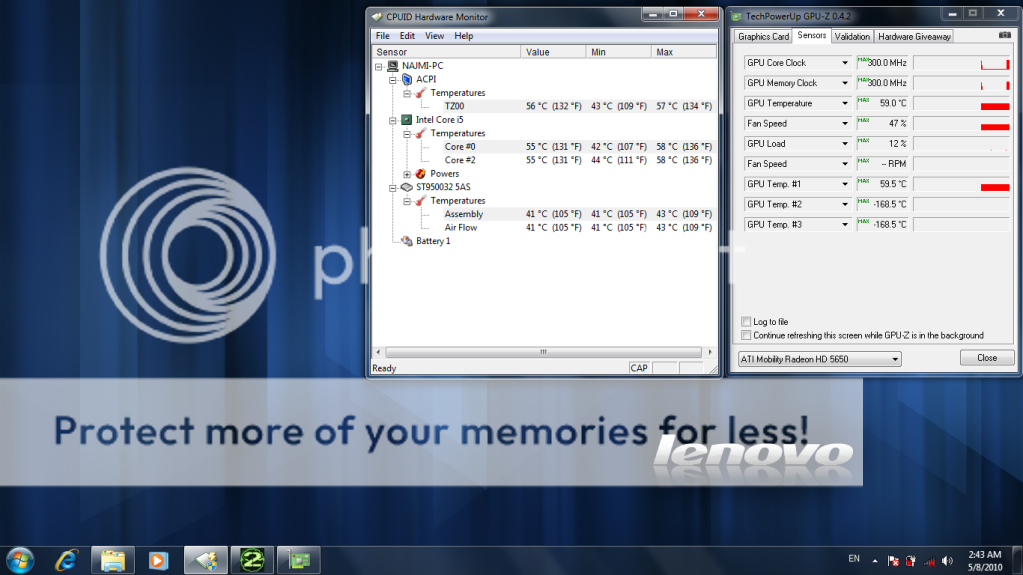
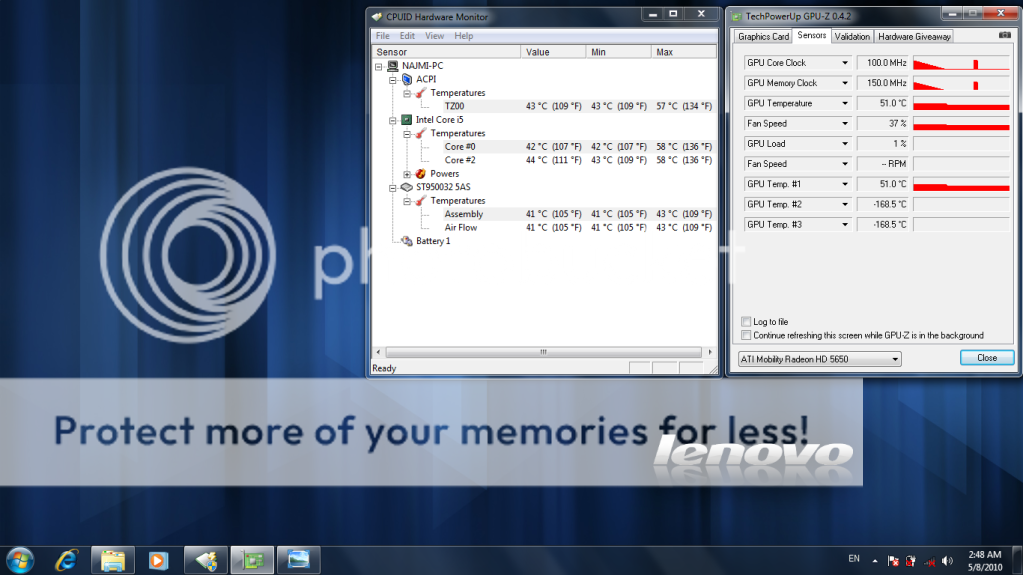
here is the test on Modern Warfare 2:

NOTE: this is based on Power Plan setting - i've choose Power Saver mode (with a lil'bit changes on it's own current setting)
this test also is on plug-in - without using battery
if i didnt make any changes on the current setting (Power Saver mode),
the temp will be a lil'bit higher (around 3c-5c)
game setting: high

during the test:
» Click to show Spoiler - click again to hide... «


after the test:
» Click to show Spoiler - click again to hide... «


..next will try to test it out on SC - FA (Supreme Commander 2 - Forged Alliance)

biggrin.gif in the future, will test it out on Supreme Commander 2, Dirt 2 ..

This post has been edited by Mie131085: May 8 2010, 03:55 AM
Mie131085
post May 8 2010, 03:11 PM

Getting Started
**
Junior Member
136 posts

Joined: Apr 2010
From: Melaka <-- -> Kuala Lumpur


QUOTE(bluesky413 @ May 8 2010, 02:43 PM)
hi . . . i having the same problem as mie 131085 it seem like my GPU in idle mode is 100/150 and 300/300 at load. and i wondering where can i download the latest GPU driver for this laptop. thx  tongue.gif

[attachmentid=1566037]
*
bcoz i notice when u choose the power plan setting,
it also will affect the graphic card performance..
..try take alook at ur power plan setting.. on advanced power setting
Mie131085
post May 9 2010, 03:09 AM

Getting Started
**
Junior Member
136 posts

Joined: Apr 2010
From: Melaka <-- -> Kuala Lumpur


QUOTE(jotaro12 @ May 8 2010, 10:03 AM)
@Mie131085

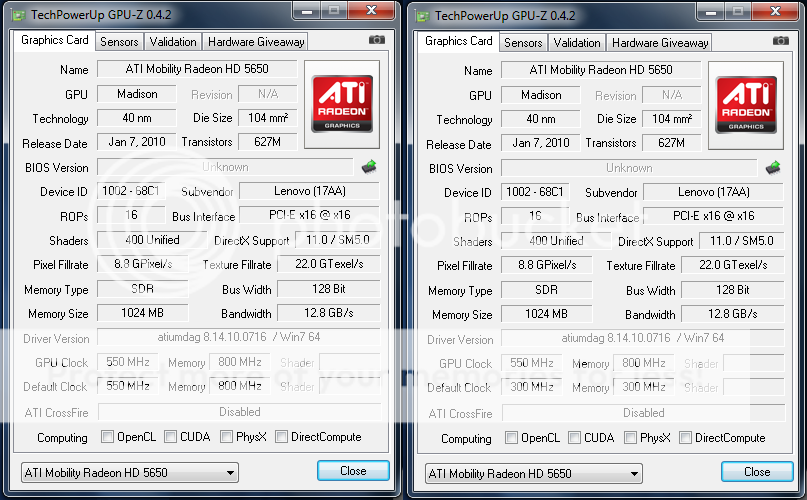
The temp on your laptop does look good but somehow I'm a bit curious why your GPU clock is lower than usual... it should be 450/800 idle and 550/800 load.

If you have a screenshot on GPU-Z showing the HD 5650 info, that will let us know more smile.gif.
*
Here is my GPU HD 5650 Info:
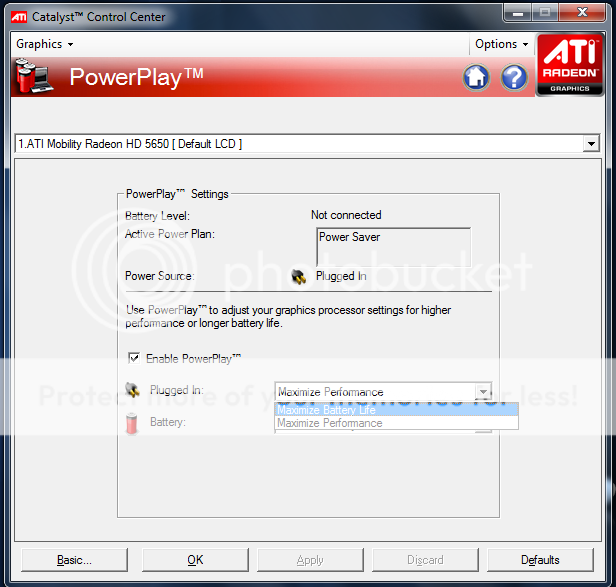
Left - Maximize Performance, Right - Maximize Battery Life
» Click to show Spoiler - click again to hide... «


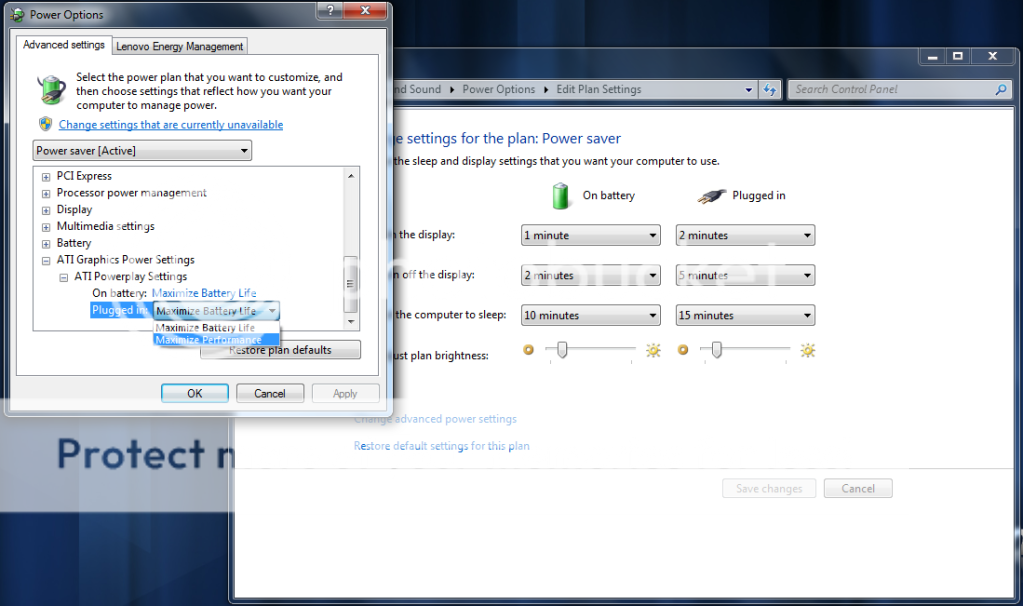
i made changes on power option (on advanced power settings):
» Click to show Spoiler - click again to hide... «


also can be changed at Catalyst control (Power Play):
» Click to show Spoiler - click again to hide... «


yep, by doing this, it does affect the game performance, tongue.gif

this setting (Maximize Battery Life) is good for for some games that utilize less than 300MHz GPU Clock
by doing this, user can have a more longer battery life nod.gif

for heavy games, better use Maximize Performance (400 - 500MHz) instead tongue.gif

Mie131085
post May 10 2010, 03:19 PM

Getting Started
**
Junior Member
136 posts

Joined: Apr 2010
From: Melaka <-- -> Kuala Lumpur


QUOTE(unknownhammie @ May 10 2010, 10:02 AM)
Hmm~~~

Anybody having issue with this machine?
Tonight gonna hardcore gaming with this machine. The screen back side a bit 'lembik' compare to current Y530. lolz
*
yes, it can support most of games today..
try to read previous post on this thread,

regarding on heat..
u need to make sure that ur laptop have been configured based on what user suggested..

based on what Jotaro12 said:
QUOTE
I believed that most of the heat problems which generated by users are found to be the software's fault, which is the default OS where bloatwares came with it in the 1st place. I've checked the task manager and found more than 80 processes running and while I was just browsing the features, the heat just generated, in a rather fast manner. With the new OS that I have now, having the same drivers and getting some software which I needed, I'm only getting normal laptop heat, 60-65 processes running(and I haven't go to msconfig to shut off the useless ones) and switching between ATI/Intel doesn't make a lot of difference. Lowest temp I got on it was 33C, normal usage using Intel GMA was 36-38C with browsing net and installing software. I hope this should clear out some of your minds and I'll continue my testing tomorrow. Thank you for reading


this can be done by checking ur startup setting (on msconfig, and disabled some other non-useful program)

and also please take alook at this (my previous post)

» Click to show Spoiler - click again to hide... «


hope it'l help smile.gif

This post has been edited by Mie131085: May 10 2010, 03:20 PM

Mie131085
post May 10 2010, 03:40 PM

Getting Started
**
Junior Member
136 posts

Joined: Apr 2010
From: Melaka <-- -> Kuala Lumpur


QUOTE(unknownhammie @ May 10 2010, 03:28 PM)
Yup its fragile alright. The best would be Y530, kinda hard...Something like Think series case. lolz
Normal, heat issue on GPU or CPU?

I tried Y550 & Y530, both also high temperature for the GPU. The Y530 temp for GPU max was 89C and 90C for Y550. Sighs.
*
tongue.gif
sorry, forgot to tell you all, that post actually for customized power plan setting

based on my previous screenshot (on that post) -
GPU clock - 300MHz (actual performance - 500MHz)
GPU clock - 300MHz (actual performance - 799MHz)

so, for better performance - during playing game, you need to do the following (based on previous post - choose Maximize Performance) :
My Previous Post

and also do as what we've suggested (remove unused bloatware/startup)

NOTE: during playing the CODMW2 (based on that setting - test for 2 hour)
i can get the GPU temp max out around 70c tongue.gif

This post has been edited by Mie131085: May 10 2010, 03:45 PM
Mie131085
post May 10 2010, 05:13 PM

Getting Started
**
Junior Member
136 posts

Joined: Apr 2010
From: Melaka <-- -> Kuala Lumpur


QUOTE(bananalow @ May 10 2010, 05:04 PM)
Err~~ i have some question... If i want to format y460 laptop~~ can i download back all the driver from website? Does lenovo provide any win7 cd key ?
*
yes you can,

the win 7 cd key is below ur laptop,
on serial number... iinm hmm.gif

..and for drivers you can go here:
Lenovo Y460 Driver

hmm.gif
NOTE: better use ur One Key Recovery Feature instead...
because One Key Recovery does comes with win 7 in it.... iinm...

This post has been edited by Mie131085: May 10 2010, 05:17 PM
Mie131085
post May 11 2010, 09:23 AM

Getting Started
**
Junior Member
136 posts

Joined: Apr 2010
From: Melaka <-- -> Kuala Lumpur


QUOTE(unknownhammie @ May 11 2010, 06:57 AM)
Not bad for this spec...Today will test new arrived Z460. Integrated graphic, sighs.
*
sorry, what is the spec for this model?
Mie131085
post May 11 2010, 09:49 AM

Getting Started
**
Junior Member
136 posts

Joined: Apr 2010
From: Melaka <-- -> Kuala Lumpur


QUOTE(unknownhammie @ May 11 2010, 09:25 AM)
see this attachment for z460... Now only having V460. Don't know the performance. Need good software to try.
*
does it have a GC inside it?

because from the spec that ur give just now doesnt come with GC...

but other site stated that Z460 comes with ATi Radeon HD 5145...

as what stated on this site: Lenovo Z460

NOTE: HD 5145 is lower than the HD 5650...

for Lenovo V460, IINM it cames with NVIDIA GeForce 310M 512MB and Intel HD intgrated GPU..

This post has been edited by Mie131085: May 11 2010, 09:53 AM
Mie131085
post May 19 2010, 07:33 PM

Getting Started
**
Junior Member
136 posts

Joined: Apr 2010
From: Melaka <-- -> Kuala Lumpur


QUOTE(unknownhammie @ May 19 2010, 03:48 PM)
Good.. new BIOS already? hmm.gif
hope they've overcome the previous one (previous BIOS update problem) ..
Mie131085
post May 19 2010, 10:11 PM

Getting Started
**
Junior Member
136 posts

Joined: Apr 2010
From: Melaka <-- -> Kuala Lumpur


QUOTE(unknownhammie @ May 19 2010, 09:29 PM)
Which BIOS problem are you referring to?  Sign of the issue?
*
try to refer back on this one:
my previous post regarding on BIOS problem

& during that time (when LENOVO know that the BIOS update have a problem)
they change the BIOS (on the download page) to the previous one (for 64bit user)...


... i hope that the new updated BIOS already solved that problem.... smile.gif

Mie131085
post May 20 2010, 12:08 AM

Getting Started
**
Junior Member
136 posts

Joined: Apr 2010
From: Melaka <-- -> Kuala Lumpur


QUOTE(-pWs- @ May 19 2010, 11:32 PM)
Thanks for informing.

UPDATED.  wub.gif  wub.gif

user posted image

-pWs-
*
Good to hear that rclxms.gif
well..looks like im also gonna to update mine to the new one biggrin.gif
Mie131085
post May 20 2010, 10:23 AM

Getting Started
**
Junior Member
136 posts

Joined: Apr 2010
From: Melaka <-- -> Kuala Lumpur


QUOTE(jotaro12 @ May 20 2010, 09:57 AM)
Thanks unknownhammie for informing us about the new BIOS ver smile.gif. Did flash mine last night too and I'm surprised to find that the ATI GC kept maintaining @ 300/300(rather than 450/800) even my powerplay setting was the usual maximum performance. Idle temp on ATI GC is 52-53C while CPU is 49-50C, no changes when using Intel GMA. I'm not sure the old BIOS have this but there's an option there for you to choose between switchable graphics or discrete graphics at all time.

Aside from that, I'm keen to see Lenovo update the ATI GC's software, if possible, please include overdrive!!  drool.gif
*
lower GC clock rate? hmm.gif
it should have affected the game performance right?

by default the clock rate it should be around 450...
wondering why they lower the GC clock rate... hmm.gif

did you try to play any game after the BIOS update?

yeah.. it would be cool if LENOVO update the ATi GC + overdrive biggrin.gif
Mie131085
post May 20 2010, 11:24 AM

Getting Started
**
Junior Member
136 posts

Joined: Apr 2010
From: Melaka <-- -> Kuala Lumpur


QUOTE(unknownhammie @ May 20 2010, 11:10 AM)
Mandatory to update BIOS for now thou. Can't force you guys but if you called and enquire, they will tell you to update your BIOS eventually.

So update now and try to play your games see whether it will face any issue or not. Else you could wait for other Forumer which already update to give feedback regarding this.
*
nod.gif yup, i will update the BIOS today...

sorry, my bad, didnt read throughly jotaro previous post,
i think what he said is on idle GC 300/300
while gaming maybe around 450-550/800... tongue.gif LOL

i think that's a good approach..
by doing so can make the GC temp lower...

will try to test it out... smile.gif

This post has been edited by Mie131085: May 20 2010, 11:52 AM
Mie131085
post May 20 2010, 12:55 PM

Getting Started
**
Junior Member
136 posts

Joined: Apr 2010
From: Melaka <-- -> Kuala Lumpur


QUOTE(jotaro12 @ May 20 2010, 12:15 PM)
I've played game for >2 hours after I flashed. 300/300 because you want to lower your GPU load hence less heat. It'll switch to 450/800 if you're accessing browser and video/movies iirc then when you stop, it just falls back to 300/300. The game part is a bit skeptical as I only did once, the game lag or rather stop during gaming in 1st few minutes, then amazingly it went really smooth after that. Max temp recorded 73C, Ave 68.5C on GPU-Z.
*
..i guess GC (during playing game - 1st few minutes) is trying to adjust the GPU core clock+ with the fan speed (to make it cooler)...
to make sure that the GC not overheated...
Mie131085
post May 21 2010, 05:02 PM

Getting Started
**
Junior Member
136 posts

Joined: Apr 2010
From: Melaka <-- -> Kuala Lumpur


QUOTE(unknownhammie @ May 21 2010, 04:52 PM)
Yup, previous manufactured model does not have this Technology. New model will have, can look at the machine if comes with this sticker.  sweat.gif
*
what i have is Lenovo Enhanced Experience Sticker (without Rapiddrive technology) blush.gif LoL
Mie131085
post May 21 2010, 05:40 PM

Getting Started
**
Junior Member
136 posts

Joined: Apr 2010
From: Melaka <-- -> Kuala Lumpur


QUOTE(unknownhammie @ May 21 2010, 05:06 PM)
Hmm, aint sure. Perhaps you could read this article as curerntly Y460 that my fren use does not come with rapiddrive technology but it has the enchanced experienced sticker as well. Maybe can add the SSD and turn it into rapiddrive in future? not so sure

http://shop.lenovo.com/SEUILibrary/control...Consumer%20news
*
on the lenovo y460 website shown us a video comparing enhance experience + rapiddrive technology with the enhance experience

This post has been edited by Mie131085: May 21 2010, 06:01 PM
Mie131085
post May 24 2010, 11:45 AM

Getting Started
**
Junior Member
136 posts

Joined: Apr 2010
From: Melaka <-- -> Kuala Lumpur


QUOTE(jotaro12 @ May 24 2010, 10:46 AM)

can u guys plz run either furmark or unigine heaven 2 bench to measure peak temps of cpu and gpu?
Not every owners like to test burn their new shiny toy but this will convince you on how HOT it'll get.  icon_idea.gif
» Click to show Spoiler - click again to hide... «


Other answers are on the review links.
*
yep, from ur test i did notice that you're tested it while charging ur own laptop battery (for 12 hour) hmm.gif
isn't that will create more heat?

...why dont we all try it on AC power (if anyone here brave enough to test it out LoL - i think i will try to test it out)

it just because i did notice when im playing games + charging battery, it generate more heat
and while playing games on AC power (without battery) less heat...
Mie131085
post Jun 10 2010, 10:56 AM

Getting Started
**
Junior Member
136 posts

Joined: Apr 2010
From: Melaka <-- -> Kuala Lumpur


Hi guys,

icon_question.gif there's a question that i need to ask u all..
i think i want to reformat back my own laptop..
install back windows 7 home premium on my laptop..

i have a windows 7 home premium DVD x64..
my question is..
Can i re-enter back the product key (that is below my own laptop)
during the installation?

does it void warranty? LoL biggrin.gif

i want to repartition back the Harddisk.. (im thinking of adding another OS on my laptop brows.gif )

This post has been edited by Mie131085: Jun 10 2010, 11:44 AM

2 Pages  1 2 >Top
 

Change to:
| Lo-Fi Version
0.0383sec    0.79    7 queries    GZIP Disabled
Time is now: 6th December 2025 - 12:02 AM