Welcome Guest ( Log In | Register )

98 Pages « < 29 30 31 32 33 > » Bottom

Outline · [ Standard ] · Linear+

Hardware Mac servicing, emergency tips, General knowledge on Mac issues

views
     
aaronwee
post Jun 30 2010, 03:04 AM

Getting Started
**
Senior Member
125 posts

Joined: May 2009
From: LYN Sony Centre


i am also using 27" imac in my office... and a DELL pc with dual monitor smile.gif ... and my macbookpro to check on LYN threads periodically...

i seldom use the imac but yet my magic mouse consumed 2 batteries for the past one month... Enegizer somemore... i was shock of how much batt it will consume in a year...

perhaps we should consider getting rechargeable batteries for the magic mouse.

wireless keyboard batteries are alright thus far.


My imac havent crash on me yet. happy.gif
but my macbook pro often does.

no idea why either. anyone have any thoughts?
Ojimaru
post Jun 30 2010, 05:16 AM

On my way
****
Senior Member
561 posts

Joined: Apr 2009


QUOTE(g r a p e k e y @ Jun 29 2010, 10:17 PM)
Hi people! thanks for looking into this matter. I'm a lil new to iMac here.
My company's iMac often encounter crash files whenever I'm using AI, PS, ID, AE, DW, FL, PR, even when I'm using the famous safari. Am not sure if this is coming from the softwares as all the softwares are original and thus, the installation was fine and everything else was crystal not until 2 months after starting from beginning of this month.

Another thing is, the magic mouse consumes battery a lot. More or less estimating 1 month  4 batteries gone. lol .. Anyone encounter situations like this too? come share your experience.

Thanks..

=)
*
First step:
Disk Utility > Select Hard Disk > Repair Disk Permissions

I have no idea what those acronyms are, so I'm guessing... Adobe CS4? Can you describe what were you doing before it crashed? What are the programs running in the background? Was Safari trying to open a Flash file? Are all your browser plugins up to date?
masahito
post Jun 30 2010, 07:37 AM

Casual
***
Junior Member
488 posts

Joined: Jul 2009
From: earth/japan/shibuya Warn: (92%)
you can format it

buy better mouse.

no one line post
dvlzplayground
post Jun 30 2010, 08:57 AM

Web developer Nadzim.com
*******
Senior Member
7,916 posts

Joined: Jul 2005
From: Kuala Lumpur


^ and what good is your post exactly?

TS, follow Ojimaru's recommendation. if it still doesnt solve your problem, boot from the OSX dvd, wait until you get to the menu bar, n go to Utilities > Disk Utility. shud look the same as before, but this time you can do a Repair Disk. try it
aaronwee
post Jun 30 2010, 09:27 AM

Getting Started
**
Senior Member
125 posts

Joined: May 2009
From: LYN Sony Centre


how about this free System Disc Utility software ~ Onyx
http://www.apple.com/downloads/macosx/syst...ities/onyx.html

will it help in any way? happy.gif
TakanoKyohei
post Jun 30 2010, 09:27 AM

101101010110100101011
*****
Senior Member
959 posts

Joined: Jun 2006
From: Uaaaaaaa Status: Machine Coding


@aaronwee, i also encountered with OS crash for my macbook pro, last time when i installed google chrome into my OS, i using macbook pro 13 inch and i check that my harddisk have some sound coming from it.

i think it was harddisk problem and i have send it for repair( change into new harddisk at VR technology) and still dont get it yet. do your harddisk have small sound coming from it? if yes maybe it was your harddisk that make your OS crash,

and also do you upgrade your ram? for TS just like Ojimaru said, try to run disk utility and do check your harddisk sound( if there a small sound on it then maybe your harddisk got problem( eventhough it hard to hear harddisk sound from i mac i presume).
BlueSilver
post Jun 30 2010, 10:11 AM

Regular
******
Senior Member
1,142 posts

Joined: Sep 2004
From: Puchong


When i purchase my imac, the guy told me that we're supposed to off the mouse when it's not in use. That way you will save a lot of batteries. About files crashing, so far the only thing that crashes on my imac is the firefox after installing fireftp and I don't know why. Does anyone have this problem?
rx330
post Jun 30 2010, 10:17 AM

10k Club
********
All Stars
11,808 posts

Joined: Jun 2006
the mouse will go to idle/sleep wen its not being used, never bother abt turning mine off

how does ur safari crash?
teddylife
post Jun 30 2010, 10:41 AM

New Member
*
Junior Member
21 posts

Joined: May 2009
The mouse is sucking up lotz of batteries, even the mouse will automatic idle. Solution is buy rechargeable batteries... my house magic mouse change battery once every two months. but my office change twice in a month too...
TSwei
post Jun 30 2010, 04:43 PM

Get your Macs done right!
*******
Senior Member
6,496 posts

Joined: Jan 2003
From: Kota Damansara


QUOTE(g r a p e k e y @ Jun 29 2010, 10:17 PM)
Hi people! thanks for looking into this matter. I'm a lil new to iMac here.
My company's iMac often encounter crash files whenever I'm using AI, PS, ID, AE, DW, FL, PR, even when I'm using the famous safari. Am not sure if this is coming from the softwares as all the softwares are original and thus, the installation was fine and everything else was crystal not until 2 months after starting from beginning of this month.

Another thing is, the magic mouse consumes battery a lot. More or less estimating 1 month  4 batteries gone. lol .. Anyone encounter situations like this too? come share your experience.

Thanks..

=)
*
If you are using CS5 and just updated to 10.6.4 read this:
http://discussions.apple.com/thread.jspa?t...tart=0&tstart=0

For Safari, try to do a reset. Check of the crash happen of specific site or specific things you are doing.

Magic Mouse do suck battery like many has indicated. If you are using it for work consider switching to rechargeable cell or just get a cabled mouse.
g r a p e k e y
post Jun 30 2010, 08:47 PM

Casual
***
Junior Member
483 posts

Joined: Apr 2009


QUOTE(dvlzplayground @ Jun 29 2010, 11:53 PM)
@heavyarm, i notice u have a few one-liner posts lately. try to avoid that sad.gif if u dun have something constructive or a question to post, then just dont post tongue.gif

TS, about the magic mouse, did u turn it off when not in use?
*
Yups, I did!.. example during lunch hour and balik time.. but still.


Added on June 30, 2010, 8:49 pm
QUOTE(aaronwee @ Jun 30 2010, 03:04 AM)
i am also using 27" imac in my office... and a DELL pc with dual monitor smile.gif ... and my macbookpro to check on LYN threads periodically...

i seldom use the imac but yet my magic mouse consumed 2 batteries for the past one month... Enegizer somemore... i was shock of how much batt it will consume in a year...

perhaps we should consider getting rechargeable batteries for the magic mouse.

wireless keyboard batteries are alright thus far.
My imac havent crash on me yet. happy.gif
but my macbook pro often does.

no idea why either. anyone have any thoughts?
*
yea, rechargeable batteries would help.. oh thanks for the simple thoughts ^-^


Added on June 30, 2010, 8:56 pm
QUOTE(Ojimaru @ Jun 30 2010, 05:16 AM)
First step:
Disk Utility > Select Hard Disk > Repair Disk Permissions

I have no idea what those acronyms are, so I'm guessing... Adobe CS4? Can you describe what were you doing before it crashed? What are the programs running in the background? Was Safari trying to open a Flash file? Are all your browser plugins up to date?
*
thanks ojimaru, I will try your first step at work tomorrow ^-^ and yesss, I'm on Adobe CS4. I open many hires pictures in Illustrator? but that doesn't justify the crash I guess? cause my colleagues opens the file too and theirs did not crash. And nopes, Safari wasn't opening the Flash file. lol.. and everything's up to date.

I just don't know why the iMac constantly crashed and when it happens, I have to pick up from where I've left unsaved sad.gif .. so sad sad.gif


Added on June 30, 2010, 9:00 pm
QUOTE(dvlzplayground @ Jun 30 2010, 08:57 AM)
^ and what good is your post exactly?

TS, follow Ojimaru's recommendation. if it still doesnt solve your problem, boot from the OSX dvd, wait until you get to the menu bar, n go to Utilities > Disk Utility. shud look the same as before, but this time you can do a Repair Disk. try it
*
Thanks for the pointer again, I will try it tomorrow at work.


Added on June 30, 2010, 9:01 pm
QUOTE(dvlzplayground @ Jun 30 2010, 08:57 AM)
^ and what good is your post exactly?

TS, follow Ojimaru's recommendation. if it still doesnt solve your problem, boot from the OSX dvd, wait until you get to the menu bar, n go to Utilities > Disk Utility. shud look the same as before, but this time you can do a Repair Disk. try it
*
Thanks for the pointer again, I will try it at work tomorrow


Added on June 30, 2010, 9:04 pm
QUOTE(TakanoKyohei @ Jun 30 2010, 09:27 AM)
@aaronwee, i also encountered with OS crash for my macbook pro, last time when i installed google chrome into my OS, i using macbook pro 13 inch and i check that my harddisk have some sound coming from it.

i think it was harddisk problem and i have send it for repair( change into new harddisk at VR technology) and still dont get it yet. do your harddisk have small sound coming from it? if yes maybe it was your harddisk that make your OS crash,

and also do you upgrade your ram? for TS just like Ojimaru said, try to run disk utility and do check your harddisk sound( if there a small sound on it then maybe your harddisk got problem( eventhough it hard to hear harddisk sound from i mac i presume).
*
thanks for your reply. will take your advise and check the hard disk tomorrow at work =) .. Hard disk got problems? the iMac is new.. but am not sure if it matters or not


Added on June 30, 2010, 9:12 pm
QUOTE(BlueSilver @ Jun 30 2010, 10:11 AM)
When i purchase my imac, the guy told me that we're supposed to off the mouse when it's not in use. That way you will save a lot of batteries. About files crashing, so far the only thing that crashes on my imac is the firefox after installing fireftp and I don't know why. Does anyone have this problem?
*
It makes me wonder if it is either the magic mouse or the batteries that never give the right information on the amount of percentage left inside the batteries.. cause mine will start with 84% or sometimes 76% etc. and the next minute, it goes back to 90%++ .. Anyone encounter such situation ? hahas.


Added on June 30, 2010, 9:29 pm
QUOTE(teddylife @ Jun 30 2010, 10:41 AM)
The mouse is sucking up lotz of batteries, even the mouse will automatic idle. Solution is buy rechargeable batteries... my house magic mouse change battery once every two months. but my office change twice in a month too...
*
That shows how much work load we have sad.gif .. At home, I'm using normal mouse for my apple macbookpro .. > < .. no money to buy apple mouse yet sad.gif

any recommended reliable rechargeable batteries other than brands like GP?


Added on June 30, 2010, 9:34 pm
QUOTE(wei @ Jun 30 2010, 04:43 PM)
If you are using CS5 and just updated to 10.6.4 read this:
http://discussions.apple.com/thread.jspa?t...tart=0&tstart=0

For Safari, try to do a reset. Check of the crash happen of specific site or specific things you are doing.

Magic Mouse do suck battery like many has indicated. If you are using it for work consider switching to rechargeable cell or just get a cabled mouse.
*
at office, the company is using CS4. So far I've no problem with CS5 but thanks for the link smile.gif

This post has been edited by g r a p e k e y: Jun 30 2010, 09:34 PM

Nullify
post Jul 3 2010, 10:52 AM

Getting Started
**
Junior Member
94 posts

Joined: Dec 2006
From: Subang Jaya, Selangor


My white 24" imac from 2006 just started having HDD problems, and is now unusable.

It is not covered under warranty anymore, and I bought it second hand.

Is there any place in lowyat I could send it in to replace the harddrive?

Thanks!
danielwan
post Jul 3 2010, 01:04 PM

Casual
***
Junior Member
365 posts

Joined: Oct 2006
From: Sri Damansara


u can PM wei. Hes good! tongue.gif I send my old macbook to him to fix last time..
Nullify
post Jul 3 2010, 01:27 PM

Getting Started
**
Junior Member
94 posts

Joined: Dec 2006
From: Subang Jaya, Selangor


is it expensive? D:


Added on July 3, 2010, 4:37 pmanyone?

This post has been edited by Nullify: Jul 3 2010, 04:37 PM
PeeEl
post Jul 4 2010, 10:39 AM

Look at all my stars!!
*******
Senior Member
3,612 posts

Joined: Jan 2009


QUOTE(Nullify @ Jul 3 2010, 01:27 PM)
is it expensive?  D:


Added on July 3, 2010, 4:37 pmanyone?
*
You have been directed to someone. You can contact and ask him. And lastly, expensive is relative. So, by speaking to the person, you would be able to get things done better and faster. Cheers.
Mackiddo
post Jul 7 2010, 01:16 PM

† St. David †
*******
Senior Member
5,859 posts

Joined: Mar 2009
From: KL in JB/SG :


My Mac Mini (year 2008) is unable to pass the booting sequence. Once power on, it will go to the Apple Logo and the clockwork then will shut down by itself. I have tried the 'C' and 'D' commands when powering up without any success. I have the original Mac OS X install disc but looks like the Mac Mini won't recognize it although the disc is perfectly fine (tested it on my Macbook). Any suggestions ? I need to be sure if it's the HDD is faulty.

I press the 'option' while staring up and it shows only the main harddisk as boot volume although i inserted the install disc

I was wondering if the ram could be the problem ?
TSwei
post Jul 7 2010, 03:52 PM

Get your Macs done right!
*******
Senior Member
6,496 posts

Joined: Jan 2003
From: Kota Damansara


QUOTE(Mackiddo @ Jul 7 2010, 01:16 PM)
My Mac Mini (year 2008) is unable to pass the booting sequence. Once power on, it will go to the Apple Logo and the clockwork then will shut down by itself. I have tried the 'C' and 'D' commands when powering up without any success. I have the original Mac OS X install disc but looks like the Mac Mini won't recognize it although the disc is perfectly fine (tested it on my Macbook). Any suggestions ? I need to be sure if it's the HDD is faulty.

I press the 'option' while staring up and it shows only the main harddisk as boot volume although i inserted the install disc

I was wondering if the ram could be the problem ?
*
Did you just install the RAM?
Mackiddo
post Jul 7 2010, 04:57 PM

† St. David †
*******
Senior Member
5,859 posts

Joined: Mar 2009
From: KL in JB/SG :


i managed to do a restore using Time Machine after booting from usb. Looks like system corrupted. I'm still clueless on why the 'C', 'D' and 'Shift' option when power up does not detect the installation disc in the 1st place


Added on July 7, 2010, 5:32 pm
QUOTE(Mackiddo @ Jul 7 2010, 04:57 PM)
i managed to do a restore using Time Machine after booting from usb. Looks like system corrupted. I'm still clueless on why the 'C', 'D' and 'Shift' option when power up does not detect the installation disc in the 1st place
*
found out my Superdrive is dead sad.gif . anyone know where i could get it replace and cost ?

This post has been edited by Mackiddo: Jul 7 2010, 05:32 PM
rx330
post Jul 7 2010, 06:00 PM

10k Club
********
All Stars
11,808 posts

Joined: Jun 2006
pm wei, he shud be able to help u with that, or wait for him to reply
Masamune
post Jul 15 2010, 03:12 PM

Just A Kid
******
Senior Member
1,228 posts

Joined: Nov 2006
From: Moscow,Russia and Klang,Selangor


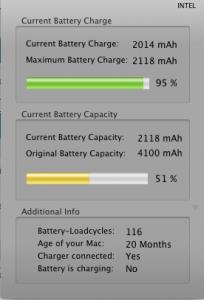
Hey my macbook alu (late 2008) battery shows service battery. I called apple support and they say confirmed that my battery is faulty based on the cycles etc.

They asked me to send to a service provider. Anyway my question is i can just send it to Machines right even though i got mine from Mac City cause Machines is listed as a service provider where else Mac City is not.

Anyway this is my battery info.


This post has been edited by Masamune: Jul 15 2010, 03:14 PM


Attached thumbnail(s)
Attached Image

98 Pages « < 29 30 31 32 33 > » Top
 

Change to:
| Lo-Fi Version
0.0279sec    0.31    6 queries    GZIP Disabled
Time is now: 2nd December 2025 - 02:00 AM