Welcome Guest ( Log In | Register )

Bump Topic Topic Closed RSS Feed
125 Pages « < 36 37 38 39 40 > » Bottom

Outline · [ Standard ] · Linear+

 Western Digital TV™ HD Media Player, Full HD 1080p Player @MSRP USD129.99

views
     
JayC75
post Jan 14 2009, 12:36 PM

Here We Go
******
Senior Member
1,404 posts

Joined: Jul 2006
From: Puchong


QUOTE(fizzy15 @ Jan 14 2009, 12:11 PM)
since the wd tv do not has hd audio decoder, i browse around and found this product Logitech Z-5500 Digital, decode everything from DD, DTS, to TXH...
biggrin.gif
im using HT so for you guy who do not has one, maybe you can take a look on the product...
*
this speaker doesnt come cheap, more than RM1k my friend.
rthj
post Jan 14 2009, 01:13 PM

Regular
******
Senior Member
1,048 posts

Joined: Aug 2008
there are TVB series available in DVD format...originals that is.

creep
post Jan 14 2009, 02:01 PM

On my way
****
Junior Member
531 posts

Joined: Jan 2003
From: Cheras


cycom Lowyat selling for RM399....saw few stocks on display....
fizzy15
post Jan 14 2009, 02:07 PM

Getting Started
**
Junior Member
159 posts

Joined: Jan 2006
From: bb bangi


QUOTE(hdwarexpert @ Jan 14 2009, 12:19 PM)
Do you mean HT = Home Theatre?
*
yup, home theater


Added on January 14, 2009, 2:12 pm
QUOTE(ar188 @ Jan 14 2009, 12:23 PM)
This speaker can do hd audio like truehd?
*
in the spec it can decode DD, DTS and THX.. connect the optical out of the WD TV to optical in of the speaker and it will decode it for you.. not a cheap device but if you compare with other normal HT, the capability is better in term of audio decoding.. my HT can only decode DD through fiber optic and it cost me 1.5k..


Added on January 14, 2009, 2:14 pm
QUOTE(JayC75 @ Jan 14 2009, 12:36 PM)
this speaker doesnt come cheap, more than RM1k my friend.
*
lowyat sell rm1599.. sweat.gif is there any other pc product that has this feature but better in price.. drool.gif

This post has been edited by fizzy15: Jan 14 2009, 02:15 PM
JayC75
post Jan 14 2009, 02:31 PM

Here We Go
******
Senior Member
1,404 posts

Joined: Jul 2006
From: Puchong


Edifier S530D come with optical & coaxial input, but cant decode DD and DTS...

Altec Lansing also got those THX speaker, but again more than RM1k....
creep
post Jan 14 2009, 02:32 PM

On my way
****
Junior Member
531 posts

Joined: Jan 2003
From: Cheras


QUOTE(kepco @ Jan 13 2009, 11:14 PM)
how to purchase from there ?
SUSMatrix
post Jan 14 2009, 04:45 PM

King of Char Siew!
********
Senior Member
15,022 posts

Joined: Jan 2003
From: Damansara Jaya/Bandar Utama


QUOTE(rthj @ Jan 13 2009, 08:10 PM)
seen those TVB drama on original DVD....they dont look that good either..
*
Err..TVB dramas in original DVD in MPEG-2 are not RMVB and i don't think they are Widescreen either. You should download some HD RMVB and see for yourself..in widescreen LCD TV. You won't see anything like it on ASTRO.


Added on January 14, 2009, 4:46 pm
QUOTE(JayC75 @ Jan 14 2009, 02:31 PM)
Edifier S530D come with optical & coaxial input, but cant decode DD and DTS...

Altec Lansing also got those THX speaker, but again more than RM1k....
*
Just buy a HTIB if budget constraint. Loads of goodies going around RM 1K price.

This post has been edited by Matrix: Jan 14 2009, 04:46 PM
rthj
post Jan 14 2009, 04:51 PM

Regular
******
Senior Member
1,048 posts

Joined: Aug 2008

no access to astro. and i can only play rmvb on the pc....no intention to get a 3rd media player just for rmvb.

Synco
post Jan 14 2009, 05:16 PM

CCB
****
Senior Member
667 posts

Joined: Jan 2007


QUOTE(rthj @ Jan 14 2009, 04:51 PM)
no access to astro. and i can only play rmvb on the pc....no intention to get a 3rd media player just for rmvb.
*
at least this player reads chinese , my popcorn onli display funny char . boot up also faster
but funny thing happen when the movie name in english , arrange sequence is fine but change back the name to chinese , all ber selerak

rthj
post Jan 14 2009, 05:25 PM

Regular
******
Senior Member
1,048 posts

Joined: Aug 2008
dont have experience with WDTV......i am currently using a TVIX and an Abigs. chinese characters display flawlessly.
ar188
post Jan 14 2009, 07:50 PM

Look at all my stars!!
*******
Senior Member
9,206 posts

Joined: Jun 2006
QUOTE(rthj @ Jan 14 2009, 04:51 PM)
no access to astro. and i can only play rmvb on the pc....no intention to get a 3rd media player just for rmvb.
*
no wonder you mention the RMVB looks bad... playback on PC.. (that was my opinion too until I got a RMVB player)

This post has been edited by ar188: Jan 14 2009, 07:58 PM
andyz
post Jan 14 2009, 08:13 PM

On my way
****
Senior Member
503 posts

Joined: Jan 2003
From: P.J.
First off before I start I am sorry I cannot compare picture quality of the wd with other machines. I didn’t realize the wd did not have component connections when I went to set it up at a friends place. But I did test on normal video out.

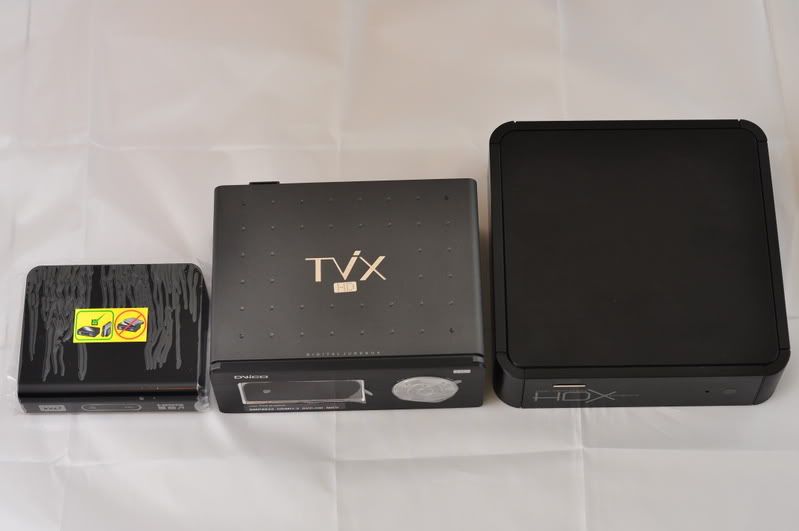
Ok now lets begin the first thing that strike me about this wd machine is how god damn small it is. So small that is so cute.
Updated the machine with the latest firmware using the usb key. Fast detect of the usb key and installation was straight forward lasting less than 5 minutes.

Went through the menu systems.. quick access using the tiny remote.

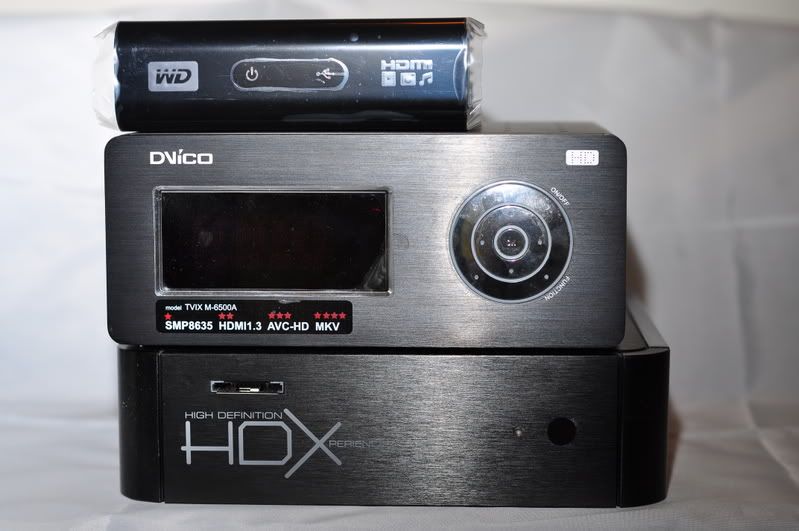
Ok I brought along my trusty dvico 6500a as the hard drive machine.. Plug it in to the usb port of the wd machine.. WD took like 10minutes to detect it , could it be because of the one terabyte worth of media files in my dvico?? Will test it on a passport drive when I get it later for him.

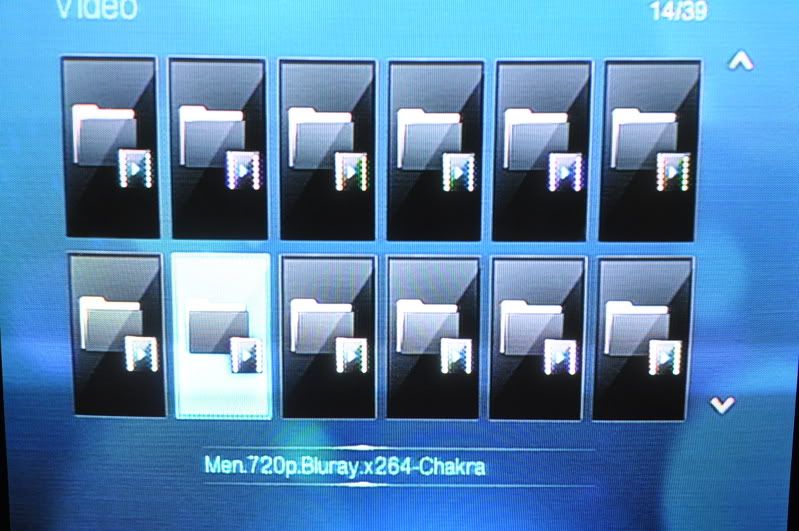
After detection went through the menu system again to look for files to play. OK this is what I don’t like of the wd machine.. the files selection is totally fugly . irritating by itself. If your movies folder have more than 300 files , god speed with you to find the files u want to watch.. don’t know what wd was thinking when designing this. U have a maximum of 12 huge icons per page(I guess u can put pictures for each files, but I don’t know how, and if u have 1000 files it will be crazy just to put a photo for each files) scrolling each icon will show u the name of the file.. u want more just keep on scrolling up or down .. and a new page will appear.. trust me its very irritating..but lukily its fast not like the hdx1000 which has a delay (but hdx1000 files system show names which is nice)

I don’t know whether its me (didn’t read manual) or just wd plain stupidity. The greatest peeve I have on this machine is the search function. Its non existence, WTF man … I click the search button on the remote to find my favourite scenes (like battlestar galactic season 3 episode exodus part 2, the scene where galactica jump into the skies above) and the bloody thing doesn’t do anything. Just a bloody stop sign appears. Don’t tell me I need to fast forward 16x to find a scene thats 1 hour ahead. Could it be I need to use a wd external drive??

Picture quality test from normal video out. I will try to do PQ on hdmi next time, but for now this little wd machine has quite outstanding PQ. I couldn’t test "v for vendetta" as the wd machine cannot play any 1080p vc1 files. But the rest of the 1080p play with without a hitch so far. Again because of the stupid wd search function not working I cannot test more into the film or critical intense scenes for stuttering. Only the start of each movie. Only one tp files had problem playing.

(will try to update with more info the next time)

So to sum it up WD hd media player is highly recommended machine for the price range. Of course u get what u paid for, like missing convenience and missing extra functions like the big boys. But i am sure most people can live without those. Now for the biggy, actually i did mention that if i had the choice between the hdx1000 or this wd machine i will definitely choose the latter. But now I can honestly say that I prefer the WD HD media player more than the HDX1000/popcorn (until hdx1000 fix their dts downmix which they have been promising for what seem years) because it just works…


Like
Small casing
Cheap cheap cheap
PQ up to par with the big boys (normal video out review)

Dislike
File menu listing
No dts downmix
No search function
No bookmark

Update 1:

ok file menu listing got better thanks to input from members at lyn (lance, jayz75)...
according to them there a few steps to improve search and listing functions
u can actually go into the settings menu and change big folder listing to filename listing.. way cool!!!
for fast forward, when fast forwarding, press NEXT, it will jump by 10min interval.(exact quote)
excellent tips..

Update 2:

the wd cannot play flac??
Queen live in Montreal 1080p using flac for sound ..
AUDiO..........: English 2.0, FLAC from 24 bits 48khz PCM
English 5.1, 1536 kbit/s DTS core from 24 bits 96khz DTS HD
English 2.0, 128 kbit/s AC3 commentary with Brian May and Roger Taylor
works for video but no sound comes out . (dvico played this file without problem)..
MKV chapter selection for video playback for MKV with chapter support was on this file(hit the chapter icon.. and the list of song will come out to choose from) .... rclxms.gif and that feature the dvico 6500a doesn't have ...
Detection of external hard drive 1tb as mention before has greatly decrease ... less than 5 minutes... its fast that its not distraction or a factor in the enjoyment of the wd player...

Update 3

Tested with hdmi already and i can say the colors and contrast is pretty good on par with the dvico 6500a, most of the 1080p (except vc-1 which was unplayable) played beautifully without any problems.
WD HD media player is not able to play flac even with optical out.
After much testing and setting up of the machine i am quite impress with its ease of use and quickness, its so much better than the hdx1000 players i experience before.
But i did notice that the Western digital external hardrive passport series, when you off the machine, the hard drive does not turn itself off. I am sure WD it will be fix in the next firmware upgrade.

Update 4

It seems u do not need the optical to pass through dts or dd. The HDMI cable is also able to do it if you have the right avr.

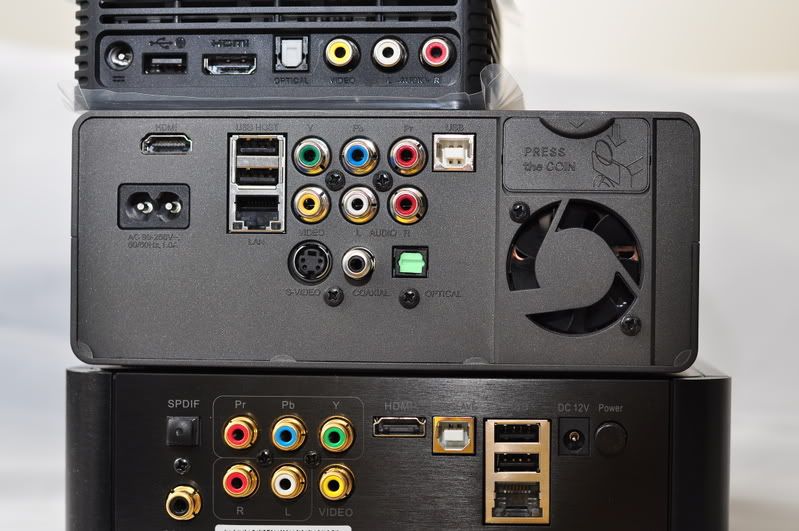
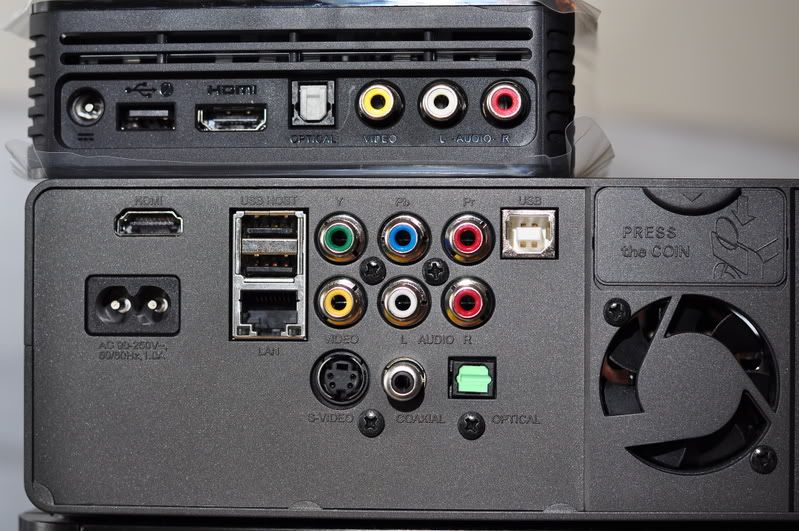
click for pictures:
» Click to show Spoiler - click again to hide... «

kepco
post Jan 14 2009, 08:31 PM

Getting Started
**
Junior Member
108 posts

Joined: Apr 2007


QUOTE(creep @ Jan 14 2009, 02:32 PM)
how to purchase from there ?
*
you have to go there yourself to get one....mind you, although they do retailing, but main business is still distribution, so don't expect they serve us like a king.
vex
post Jan 14 2009, 11:28 PM

Regular
******
Senior Member
1,984 posts

Joined: Jan 2003
From: Hell @ Penang


ya, abit kns there is not jump to / search function in wdtv, i need use 16x fwd to the scene i wan~
but rm 360... i can't ask too much, isn't it.

QUOTE(andyz @ Jan 14 2009, 08:13 PM)
First off before I start I am sorry I cannot compare picture quality of the wd with other machines. I didn’t realize the wd did not have component connections when I went to set it up at a friends place. But I did test on normal video out.

Ok now lets begin the first thing that strike me about this wd machine is how god damn small it is. So small that is so cute.
Updated the machine with the latest firmware using the usb key. Fast detect of the usb key and installation was straight forward lasting less than 5 minutes.

Went through the menu systems.. quick access using the tiny remote.

Ok I brought along my trusty dvico 6500a as the hard drive machine.. Plug it in to the usb port of the wd machine.. WD took like 10minutes to detect it , could it be because of the one terabyte worth of media files in my dvico?? Will test it on a passport drive when I get it later for him.

After detection went through the menu system again to look for files to play. OK this is what I don’t like of the wd machine.. the files selection is totally fugly . irritating by itself. If your movies folder have more than 300 files , god speed with you to find the files u want to watch.. don’t know what wd was thinking when designing this. U have a maximum of 12 huge icons per page(I guess u can put pictures for each files, but I don’t know how, and if u have 1000 files it will be crazy just to put a photo for each files) scrolling each icon will show u the name of the file.. u want more just keep on scrolling up or down .. and a new page will appear.. trust me its very irritating..but lukily its fast not like the hdx1000 which has a delay (but hdx1000 files system show names which is nice)

I don’t know whether its me (didn’t read manual) or just wd plain stupidity. The greatest peeve I have on this machine is the search function. Its non existence, WTF man … I click the search button on the remote to find my favourite scenes (like battlestar galactic season 3 episode exodus part 2, the scene where galactica jump into the skies above) and the bloody thing doesn’t do anything. Just a bloody stop sign appears. Don’t tell me I need to fast forward 16x to find a scene thats 1 hour ahead. Could it be I need to use a wd external drive??

Picture quality test  from normal video out.  I will try to do PQ on hdmi next time, but for now this little wd machine has quite outstanding PQ.  I couldn’t test "v for vendetta" as the wd machine cannot play any 1080p vc1 files. But the rest of the 1080p play with without a hitch so far. Again because of the stupid wd search function not working I cannot test more into the film or critical intense scenes for stuttering. Only the start of each movie.  Only one tp files had problem playing.

(will try to update with more info the next time)

So to sum it up WD hdtv is highly recommended machine for the price range. Of course u get what u paid for, like missing convenience and missing extra functions like the big boys.  But i am sure most people can live without those.

Like
Small casing
Cheap cheap cheap
PQ up to par with the big boys (normal video out review)

Dislike
File menu listing
No dts downmix
No search function
No bookmark

click for pictures:
» Click to show Spoiler - click again to hide... «
This post has been edited by vex: Jan 14 2009, 11:29 PM
ericpires
post Jan 14 2009, 11:59 PM

Arsenal FC
*******
Senior Member
2,657 posts

Joined: Feb 2008
From: Highbury House, 75 Drayton Park, London


rm360? where u buy ?
rx330
post Jan 15 2009, 12:00 AM

10k Club
********
All Stars
11,811 posts

Joined: Jun 2006
andyz, u on ur own

* fast fast cabut
hhtoh88
post Jan 15 2009, 12:06 AM

New Member
*
Junior Member
35 posts

Joined: Aug 2005


QUOTE(ar188 @ Jan 13 2009, 11:08 PM)
you need a video transcoder (not cheap) to convert digital (DVI/HDMI) to component..
this kind of break out cable HDMI to Component+audio.. doubt it will work (usually it works  if your Video card's HDMI supports this kind custom connection) but since its so cheap worth a try kua?
*
Thanks. That makes sense. Maybe i will just use composite for that tv.

Today, i hooked up a 1TB seagate HDD to the WDTV thru a docking station. I encountered some issues of blank screen. The audio would come on (hooked up to amp thru toslink) but no picture at all on the TV (thru HDMI). And the WDTV appears to hang and does not respond to the remote. If I switch off and turn it on again, and try playing back the same file, it would work (sometimes). I tried out many files, and it appears to randomly played some and not others. I have not had any issue with the previous WD 500GB HDD before. So my guess the issue is with the seagate HDD itself. I looked at the jumper settings and it had a jumper pin in it. The note says that with the jumper pin, the drive speed is 1.5GB/s and without it, it is 3GB/s. Does anyone use seagate HDD and is able to advice if i should remove the pin and it will help solve the issue. Thanks.
xrossf1re
post Jan 15 2009, 12:07 AM

Getting Started
**
Junior Member
247 posts

Joined: Aug 2008


QUOTE(rx330 @ Jan 15 2009, 12:00 AM)
andyz, u on ur own

* fast fast cabut
*
don't come in here and give smartass comment because we do not feed fags here.

fagg0t spammer.
hhtoh88
post Jan 15 2009, 08:27 AM

New Member
*
Junior Member
35 posts

Joined: Aug 2005


QUOTE(hhtoh88 @ Jan 15 2009, 12:06 AM)
Thanks. That makes sense. Maybe i will just use composite for that tv.

Today, i hooked up a 1TB seagate HDD to the WDTV thru a docking station. I encountered some issues of blank screen. The audio would come on (hooked up to amp thru toslink) but no picture at all on the TV (thru HDMI). And the WDTV appears to hang and does not respond to the remote. If I switch off and turn it on again, and try playing back the same file, it would work (sometimes). I tried out many files, and it appears to randomly played some and not others. I have not had any issue with the previous WD 500GB HDD before. So my guess the issue is with the seagate HDD itself. I looked at the jumper settings and it had a jumper pin in it. The note says that with the jumper pin, the drive speed is 1.5GB/s and without it, it is 3GB/s. Does anyone use seagate HDD and is able to advice if i should remove the pin and it will help solve the issue. Thanks.
*
I removed the jumper block but i still have the issue. Really need help here. Thanks
JayC75
post Jan 15 2009, 09:05 AM

Here We Go
******
Senior Member
1,404 posts

Joined: Jul 2006
From: Puchong


[quote=andyz,Jan 14 2009, 08:13 PM]
First off before I start I am sorry I cannot compare picture quality of the wd with other machines. I didn’t realize the wd did not have component connections when I went to set it up at a friends place. But I did test on normal video out.

Ok now lets begin the first thing that strike me about this wd machine is how god damn small it is. So small that is so cute.
Updated the machine with the latest firmware using the usb key. Fast detect of the usb key and installation was straight forward lasting less than 5 minutes.

Went through the menu systems.. quick access using the tiny remote.

Ok I brought along my trusty dvico 6500a as the hard drive machine.. Plug it in to the usb port of the wd machine.. WD took like 10minutes to detect it , could it be because of the one terabyte worth of media files in my dvico?? Will test it on a passport drive when I get it later for him.

After detection went through the menu system again to look for files to play. OK this is what I don’t like of the wd machine.. the files selection is totally fugly . irritating by itself. If your movies folder have more than 300 files , god speed with you to find the files u want to watch.. don’t know what wd was thinking when designing this. U have a maximum of 12 huge icons per page(I guess u can put pictures for each files, but I don’t know how, and if u have 1000 files it will be crazy just to put a photo for each files) scrolling each icon will show u the name of the file.. u want more just keep on scrolling up or down .. and a new page will appear.. trust me its very irritating..but lukily its fast not like the hdx1000 which has a delay (but hdx1000 files system show names which is nice)

I don’t know whether its me (didn’t read manual) or just wd plain stupidity. The greatest peeve I have on this machine is the search function. Its non existence, WTF man … I click the search button on the remote to find my favourite scenes (like battlestar galactic season 3 episode exodus part 2, the scene where galactica jump into the skies above) and the bloody thing doesn’t do anything. Just a bloody stop sign appears. Don’t tell me I need to fast forward 16x to find a scene thats 1 hour ahead. Could it be I need to use a wd external drive??

Picture quality test from normal video out. I will try to do PQ on hdmi next time, but for now this little wd machine has quite outstanding PQ. I couldn’t test "v for vendetta" as the wd machine cannot play any 1080p vc1 files. But the rest of the 1080p play with without a hitch so far. Again because of the stupid wd search function not working I cannot test more into the film or critical intense scenes for stuttering. Only the start of each movie. Only one tp files had problem playing.

(will try to update with more info the next time)

So to sum it up WD hdtv is highly recommended machine for the price range. Of course u get what u paid for, like missing convenience and missing extra functions like the big boys. But i am sure most people can live without those.

Like
Small casing
Cheap cheap cheap
PQ up to par with the big boys (normal video out review)

Dislike
File menu listing
No dts downmix
No search function
No bookmark


U can go into the setting page to change it to listing menu to list the fiename instead of big folder, so u can browse ur file faster.
Yup, 1TB take at least 5min to get detected, but i not sure whether is everythime need to take so long or not....
for fast forward, when fast forwarding, press NEXT, it will jump by 10min interval.


125 Pages « < 36 37 38 39 40 > » Top
Topic ClosedOptions
 

Change to:
| Lo-Fi Version
0.0311sec    0.22    6 queries    GZIP Disabled
Time is now: 20th December 2025 - 10:47 PM