

May i know how to set the proxy inside the dd-wrt? i need to reserve this proxy for youtube.
THE DD-WRT V2 ( V24 SP2 Firmware Released ), Support For All DD-WRT Compatible Router
THE DD-WRT V2 ( V24 SP2 Firmware Released ), Support For All DD-WRT Compatible Router
|
|
 Nov 5 2008, 05:34 PM Nov 5 2008, 05:34 PM
|
 
Junior Member
481 posts Joined: Jan 2007 
|
May i know how to set the proxy inside the dd-wrt? i need to reserve this proxy for youtube.
|
|
|
|
|
|
Nov 6 2008, 07:32 PM
|

Junior Member
94 posts Joined: Dec 2006  
|
QUOTE(jianwei87 @ Nov 5 2008, 05:34 PM) May i know how to set the proxy inside the dd-wrt? i need to reserve this proxy for youtube. Could u elaborate more on the proxies that u want to apply? type of proxies? U want u'r connection to use proxies or what? check on the NAT / QoS page.. |
|
|
Nov 9 2008, 09:37 PM
|
|
Junior Member
481 posts Joined: Jan 2007
|
QUOTE(NtahX @ Nov 6 2008, 07:32 PM) Could u elaborate more on the proxies that u want to apply? type of proxies? Nope, i just want the only website i have set using proxy only.U want u'r connection to use proxies or what? check on the NAT / QoS page.. and may i know how to flash the buffalo whr-hp-g54 to dd-wrt in Vista. I have open the TFTP. But when i try to insert this command on run tftp -i 192.168.11.1 PUT ddwrt.bin. It has done nothing. Nothing come out on the screen |
|
|
Nov 10 2008, 10:23 AM
|
|
Junior Member
94 posts Joined: Dec 2006
|
for the proxies i think u need to setup u'r browser settings to use proxies using http/socket (80/8080/3128/etc)
but if u good enough with *nix u can try to play around within the shell console it self check u'r /etc/hosts if i'm not mistaken |
|
|
Nov 10 2008, 11:05 AM
|

Senior Member
4,038 posts Joined: Aug 2005 From: Earth
|
QUOTE(jianwei87 @ Nov 9 2008, 09:37 PM) Nope, i just want the only website i have set using proxy only. You should execute the the tftp -t 192.168.11.1 in the same directory of ur firmware and when the router is power up asap hit this command and may i know how to flash the buffalo whr-hp-g54 to dd-wrt in Vista. I have open the TFTP. But when i try to insert this command on run tftp -i 192.168.11.1 PUT ddwrt.bin. It has done nothing. Nothing come out on the screen  |
|
|
Nov 11 2008, 05:44 AM
|

Senior Member
962 posts Joined: Jan 2006 From: شه عالم 
|
i'm trying to jump into x86 version of dd-wrt. initial goal is to set-up dual-band wifi system which utilizes 5Ghz (11a band) for wireless backbone and normal 2.4Ghz (11b/g band) to serve wireless client.
Here are some of the screen shots  Attached thumbnail(s) 

|
|
|
|
|
|
Nov 11 2008, 08:12 AM
|

Senior Member
952 posts Joined: Jun 2005 From: Cyberjaya
|
QUOTE(azmihamzah @ Nov 11 2008, 05:44 AM) i'm trying to jump into x86 version of dd-wrt. initial goal is to set-up dual-band wifi system which utilizes 5Ghz (11a band) for wireless backbone and normal 2.4Ghz (11b/g band) to serve wireless client. What router is that?Here are some of the screen shots |
|
|
Nov 11 2008, 12:22 PM
|

Senior Member
1,178 posts Joined: Oct 2005 From: Sunway / Ipoh
|
Recently I've been experiencing high packet loss and very high ping times to my router as well as the AP that my router is connecting to.This only happens when i'm uploading and downloading at the same time.. eg. 30KB/s up 40KB/s down.. This also happens when my download is at around 70KB/s and upload 0KB/s.Practically i cant go above 70KB/s.I was running on ddwrt v24 sp2 and now sp2 mini.Still no improvement.WHR-HP-54G.
I thought it was due to noise but then I doublechecked and it showed there -95, -94, -93, and sometimes -85. Even at -95, when downloading,my ping to ddwrt could spike to 700ms.. My ping time to ddwrt would also fluctuate to 100ms-400ms when im at that speeds. I've attached some ping screenshots. 
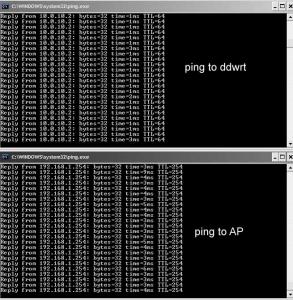
Any advice? Thanks |
|
|
Nov 11 2008, 12:45 PM
|
|
Senior Member
4,038 posts Joined: Aug 2005 From: Earth
|
How much is your transmit power for wireless?
|
|
|
Nov 11 2008, 12:49 PM
|
|
Senior Member
1,178 posts Joined: Oct 2005 From: Sunway / Ipoh
|
currently set at 9mw..
it was all along at 6.. then i noticed this problem..so i increased the power to 9.. but then again, if im directly connected to the AP, theres no high ping and packet lost.. (notebook ---> AP) This post has been edited by youliang: Nov 11 2008, 01:13 PM |
|
|
Nov 11 2008, 02:13 PM
|
|
Senior Member
962 posts Joined: Jan 2006 From: شه عالم
|
QUOTE(mcmicheal @ Nov 11 2008, 08:12 AM) What router is that? routerboard-based dd-wrt router with 256MB RAM and capable of doing 600mW transmit power  QUOTE(youliang @ Nov 11 2008, 12:49 PM) currently set at 9mw.. errr... normal transmit power is at 70mW bro... 7-9mW is too low.it was all along at 6.. then i noticed this problem..so i increased the power to 9.. but then again, if im directly connected to the AP, theres no high ping and packet lost.. (notebook ---> AP) |
|
|
Nov 11 2008, 02:53 PM
|
|
Senior Member
1,178 posts Joined: Oct 2005 From: Sunway / Ipoh
|
QUOTE(azmihamzah @ Nov 11 2008, 02:13 PM) routerboard-based dd-wrt router with 256MB RAM and capable of doing 600mW transmit power im using buffalo whr-hp-54g.. errr... normal transmit power is at 70mW bro... 7-9mW is too low. so 9mw should be around >76mW already with booster on.. according to this http://www.dd-wrt.com/phpBB2/viewtopic.php?t=22201 |
|
|
Nov 11 2008, 03:18 PM
|
|
Senior Member
4,038 posts Joined: Aug 2005 From: Earth
|
Just put 70mW
|
|
|
|
|
|
Nov 11 2008, 03:23 PM
|
|
Senior Member
1,178 posts Joined: Oct 2005 From: Sunway / Ipoh
|
QUOTE(MX510 @ Nov 11 2008, 03:18 PM) Just put 70mW okayy..i'll try and see whether theres any difference Added on November 11, 2008, 3:33 pmhmm..changed already but it is still the same.. getting 1000ms+ ping to ddwrt too.. This post has been edited by youliang: Nov 11 2008, 03:33 PM |
|
|
Nov 11 2008, 03:55 PM
|

Junior Member
469 posts Joined: Oct 2004
|
I have 4 Linksys WRT 54GL at home
2 GL1.1 with DDWRT v23 2 GL 1.1 with Coova AP Problem is, I can't authenticate my hotspot user over external radius using CoovaAP. So maybe I'll try V24 a try using the CHillispot Hotspot option |
|
|
Nov 11 2008, 04:05 PM
|
|
Senior Member
4,038 posts Joined: Aug 2005 From: Earth
|
QUOTE(youliang @ Nov 11 2008, 03:23 PM) okayy..i'll try and see whether theres any difference One more tips power it down let it rest for 1 hour and try again Added on November 11, 2008, 3:33 pmhmm..changed already but it is still the same.. getting 1000ms+ ping to ddwrt too.. hope you are using the latest firmware v24sp1 final |
|
|
Nov 11 2008, 10:58 PM
|
|
Senior Member
1,178 posts Joined: Oct 2005 From: Sunway / Ipoh
|
currently the problem has been solved..
looks like the buffalo needed a rest..(powered down for 2hours) haha.. hope the problem doesnt arise again  |
|
|
Nov 12 2008, 12:42 PM
|
|
Junior Member
469 posts Joined: Oct 2004
|
anyone tried the repeater function of v24sp2 ?
which one better ? wds vs repeater ? WDS ======== halved the bandwidth each hop mac address authentication Repeater ======== repeat the host by SSID, if somebody simply use the same ssid, thier signal also get aplified halved the bandwidth much easier to deploy, just repeat any open signal |
|
|
Nov 12 2008, 10:03 PM
|
|
Senior Member
4,038 posts Joined: Aug 2005 From: Earth
|
QUOTE(bazet @ Nov 12 2008, 12:42 PM) anyone tried the repeater function of v24sp2 ? Good question Bazet which one better ? wds vs repeater ? WDS ======== halved the bandwidth each hop mac address authentication Repeater ======== repeat the host by SSID, if somebody simply use the same ssid, thier signal also get aplified halved the bandwidth much easier to deploy, just repeat any open signal I personally prefer WDS mode :-) |
|
|
Nov 12 2008, 10:07 PM
|
|
Junior Member
469 posts Joined: Oct 2004
|
QUOTE(MX510 @ Nov 12 2008, 10:03 PM) Good question Bazet but repeater mode is so damn easy to setup....it is just no protection of ssid..if my competitor know i'm using repeater mode, hes just use the same ssid..and his signal also get amplified.I personally prefer WDS mode :-) i am connected to net uisng repeater mode at the moment....... |
| Change to: |  0.0285sec 0.0285sec
 0.74 0.74
 6 queries 6 queries
 GZIP Disabled GZIP Disabled
Time is now: 5th December 2025 - 09:44 PM |
 Quote
Quote