

less stuff and more stuff?

THE DD-WRT V2 ( V24 SP2 Firmware Released ), Support For All DD-WRT Compatible Router
|
|
 Jul 10 2008, 02:24 PM Jul 10 2008, 02:24 PM
Return to original view | Post
#1
|
 
Senior Member
1,178 posts Joined: Oct 2005 From: Sunway / Ipoh  
|
^
less stuff and more stuff? |
|
|
|
|
|
Oct 7 2008, 10:27 PM
Return to original view | Post
#2
|
|
Senior Member
1,178 posts Joined: Oct 2005 From: Sunway / Ipoh
|
just do a google search on it and u can find the torrent already
 |
|
|
Oct 16 2008, 04:30 PM
Return to original view | Post
#3
|
|
Senior Member
1,178 posts Joined: Oct 2005 From: Sunway / Ipoh
|
QUOTE(ldragon @ Oct 16 2008, 12:54 PM) DD-WRT v24 SP1 is very stable. waaaa...u have so many wireless clients.. [attachmentid=631914]       This post has been edited by youliang: Oct 16 2008, 04:31 PM |
|
|
Oct 23 2008, 10:31 PM
Return to original view | Post
#4
|
|
Senior Member
1,178 posts Joined: Oct 2005 From: Sunway / Ipoh
|
QUOTE(NtahX @ Oct 23 2008, 07:23 PM) Hurmm... Uptime issue la...after 5 days or so operation time it become unstable (web interface cannot be accessed & bandwidth transfer rate become slower n slower)... I'm not doing BT or heavy download - need to reboot it.. after that everything works fine... mines stil working perfectly..more than 5 days already.. (repeater mode)Even though..we can set the auto reboot (cronjob) Firmware: DD-WRT v24-sp1 (07/26/08) std-special Time: 19:22:44 up 5 days, 12:32, load average: 0.16, 0.19, 0.09 |
|
|
Oct 27 2008, 11:53 AM
Return to original view | Post
#5
|
|
Senior Member
1,178 posts Joined: Oct 2005 From: Sunway / Ipoh
|
QUOTE(pisces1529 @ Oct 27 2008, 11:50 AM) Hi, aww..why did you get that one..costs much more than the ordinary whr-hp-54g which you can flash by yourself.. I have bought a Buffalo WHR-HP-G54 with pre-installed DD-WRT V24 SP1 from lowyat few days ago. If I want to upgrade to new or older version firmware, can I upgrade through DD-WRT web page (administration > firmware upgrade) ? please advice, TIA !  btw, referring to your question, yes you can do so by doing that.  This post has been edited by youliang: Oct 27 2008, 11:55 AM |
|
|
Oct 31 2008, 08:24 PM
Return to original view | Post
#6
|
|
Senior Member
1,178 posts Joined: Oct 2005 From: Sunway / Ipoh
|
QUOTE(Togepy @ Oct 31 2008, 07:56 PM) hmm just click start, run..im not dling at high speed, as i limit my bt to 20kb and 100 connection only.... and i dun think msn have network problem coz have been facing tis problem for quite some time.. dun think msn hav problem for so long ma... and for the ping loss, tis 1 im not sure lo, ehehe, anyway to check?? type something like ping www.lowyat.net -t and check from there.. This post has been edited by youliang: Oct 31 2008, 08:25 PM |
|
|
|
|
|
Nov 1 2008, 11:46 AM
Return to original view | Post
#7
|
|
Senior Member
1,178 posts Joined: Oct 2005 From: Sunway / Ipoh
|
QUOTE(mcmicheal @ Nov 1 2008, 11:20 AM) @Togepy well under access restrictions you can set the ip range of the clients and block internet access .If u're using dd-wrt firmware at the moment. There's no need to revert back. U can juz firmware upgrade at the Administration page Guys... currently im using DIR-300 with dd-wrt, izzit possible for me to create another public wifi which can only get connected to the router as Local Area Network where it is not possible to use the Internet? |
|
|
Nov 1 2008, 12:15 PM
Return to original view | Post
#8
|
|
Senior Member
1,178 posts Joined: Oct 2005 From: Sunway / Ipoh
|
QUOTE(mcmicheal @ Nov 1 2008, 12:06 PM) What is the "Network Configuration [ ] Unbridge [ ] Bridge" does? hmm not sure bout that At the Wireless Section  |
|
|
Nov 11 2008, 12:22 PM
Return to original view | Post
#9
|
|
Senior Member
1,178 posts Joined: Oct 2005 From: Sunway / Ipoh
|
Recently I've been experiencing high packet loss and very high ping times to my router as well as the AP that my router is connecting to.This only happens when i'm uploading and downloading at the same time.. eg. 30KB/s up 40KB/s down.. This also happens when my download is at around 70KB/s and upload 0KB/s.Practically i cant go above 70KB/s.I was running on ddwrt v24 sp2 and now sp2 mini.Still no improvement.WHR-HP-54G.
I thought it was due to noise but then I doublechecked and it showed there -95, -94, -93, and sometimes -85. Even at -95, when downloading,my ping to ddwrt could spike to 700ms.. My ping time to ddwrt would also fluctuate to 100ms-400ms when im at that speeds. I've attached some ping screenshots. 
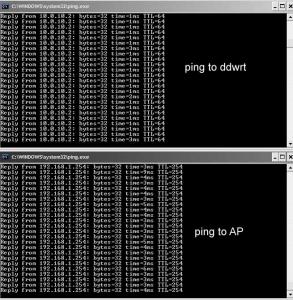
Any advice? Thanks |
|
|
Nov 11 2008, 12:49 PM
Return to original view | Post
#10
|
|
Senior Member
1,178 posts Joined: Oct 2005 From: Sunway / Ipoh
|
currently set at 9mw..
it was all along at 6.. then i noticed this problem..so i increased the power to 9.. but then again, if im directly connected to the AP, theres no high ping and packet lost.. (notebook ---> AP) This post has been edited by youliang: Nov 11 2008, 01:13 PM |
|
|
Nov 11 2008, 02:53 PM
Return to original view | Post
#11
|
|
Senior Member
1,178 posts Joined: Oct 2005 From: Sunway / Ipoh
|
QUOTE(azmihamzah @ Nov 11 2008, 02:13 PM) routerboard-based dd-wrt router with 256MB RAM and capable of doing 600mW transmit power im using buffalo whr-hp-54g.. errr... normal transmit power is at 70mW bro... 7-9mW is too low. so 9mw should be around >76mW already with booster on.. according to this http://www.dd-wrt.com/phpBB2/viewtopic.php?t=22201 |
|
|
Nov 11 2008, 03:23 PM
Return to original view | Post
#12
|
|
Senior Member
1,178 posts Joined: Oct 2005 From: Sunway / Ipoh
|
QUOTE(MX510 @ Nov 11 2008, 03:18 PM) Just put 70mW okayy..i'll try and see whether theres any difference Added on November 11, 2008, 3:33 pmhmm..changed already but it is still the same.. getting 1000ms+ ping to ddwrt too.. This post has been edited by youliang: Nov 11 2008, 03:33 PM |
|
|
Nov 11 2008, 10:58 PM
Return to original view | Post
#13
|
|
Senior Member
1,178 posts Joined: Oct 2005 From: Sunway / Ipoh
|
currently the problem has been solved..
looks like the buffalo needed a rest..(powered down for 2hours) haha.. hope the problem doesnt arise again |
|
|
Nov 12 2008, 10:14 PM
Return to original view | Post
#14
|
|
Senior Member
1,178 posts Joined: Oct 2005 From: Sunway / Ipoh
|
QUOTE(bazet @ Nov 12 2008, 10:07 PM) but repeater mode is so damn easy to setup....it is just no protection of ssid..if my competitor know i'm using repeater mode, hes just use the same ssid..and his signal also get amplified. under repeater mode you can use password also..WEP, WPA, WPA2 anything..i am connected to net uisng repeater mode at the moment....... so your competitor wont be able to use .. |
|
|
Jul 24 2009, 11:01 PM
Return to original view | Post
#15
|
|
Senior Member
1,178 posts Joined: Oct 2005 From: Sunway / Ipoh
|
|
| Change to: |  0.0304sec 0.0304sec
 0.38 0.38
 7 queries 7 queries
 GZIP Disabled GZIP Disabled
Time is now: 10th December 2025 - 12:29 AM |
 Quote
Quote