Welcome Guest ( Log In | Register )

Outline · [ Standard ] · Linear+

 iPhone Wireless Problem- Not available!!, Solutions?

views
     
TSspeare
post Jun 15 2008, 10:11 PM, updated 17y ago

New Member
*
Junior Member
30 posts

Joined: Mar 2008


hey, anyone of the iphone users got problem with the wireless anot? i can't seem to connect to the wireless. everywhere. why ha? anyone know a solution to this? btw i reset my settings already. sigh. please help. =|


-----

Take note:

Apple has posted a support document to help those having Wi-Fi issues with their iPhone or iPod touch.

You can read Apple's fix suggestions below and note that if all tips fail they suggest taking your iPhone for repair.

http://support.apple.com/kb/TS1559


This post has been edited by davidgary73: Jul 23 2009, 06:02 PM
nokia2003
post Jun 15 2008, 10:19 PM

Look at all my stars!!
*******
Senior Member
5,786 posts

Joined: Nov 2007
From: VIC - The Place To Be


is your wireless security set to WEP or WAP?


Added on June 15, 2008, 10:20 pmsorry, didnt read properly.


try "forget this network"

This post has been edited by nokia2003: Jun 15 2008, 10:20 PM
TSspeare
post Jun 15 2008, 10:24 PM

New Member
*
Junior Member
30 posts

Joined: Mar 2008


forget this network? hmmm..i tried also.. can't solve it either... hmmm how ha?? reset settings again?

sigh...

nokia2003
post Jun 15 2008, 10:28 PM

Look at all my stars!!
*******
Senior Member
5,786 posts

Joined: Nov 2007
From: VIC - The Place To Be


sent you a pm
ff8ong
post Oct 23 2008, 09:39 AM

Look at all my stars!!
*******
Senior Member
2,550 posts

Joined: Dec 2006
Are you able to detect?
gengstapo
post Oct 23 2008, 12:14 PM

Retired enthusiast
********
All Stars
10,688 posts

Joined: Jan 2005
QUOTE(speare @ Jun 15 2008, 10:11 PM)
hey, anyone of the iphone users got problem with the wireless anot? i can't seem to connect to the wireless. everywhere. why ha? anyone know a solution to this? btw i reset my settings already. sigh. please help. =|
*
did u manage to solve?
if yes, maybe can share?

my friend phone also encounter this similar probs..

This post has been edited by gengstapo: Oct 23 2008, 12:14 PM
Fighteden
post Oct 23 2008, 12:25 PM

Stark Industries
*****
Senior Member
976 posts

Joined: May 2008
From: My Chair


I think this might be the router's problem ..

I have a LinkSys AP router, i can find it but i could never access internet no matter what i set .. WEP or WAP or no password ..

But i can use my WiFi in Big Apple or Starbucks .. weird eh?
gengstapo
post Oct 23 2008, 12:32 PM

Retired enthusiast
********
All Stars
10,688 posts

Joined: Jan 2005
QUOTE(Fighteden @ Oct 23 2008, 12:25 PM)
I think this might be the router's problem ..

I have a LinkSys AP router, i can find it but i could never access internet no matter what i set .. WEP or WAP or no password ..

But i can use my WiFi in Big Apple or Starbucks .. weird eh?
*
but the funny, i test it side by side with mine & mine got no prob..
ive done full restore(my friend unit) also still get the same result..

feel like the receiver very very weak..

This post has been edited by gengstapo: Oct 23 2008, 12:33 PM
kennyshan
post Oct 25 2008, 12:46 AM

love.is.gone
******
Senior Member
1,473 posts

Joined: Jul 2008
From: Subang


i have experienced a funny thing which i can detect and connect to wifi in oldtown restaurant with my iphone but my fren's pda showing the access point is secured @@
little ice
post Oct 25 2008, 01:14 AM

PROFESSIONAL TROLL
*******
Senior Member
3,242 posts

Joined: Apr 2008
From: From: From: From: From: From: From: From: From:
i've once compared N95 8GB with iphone 2G.

it seems that the N95 8GB have stronger signal than the iphone 2G, at least N95 can detect with 1 bar but iphone 2G was having a hard time detecting the same access point at same distance.

not sure about iphone 3G.
nokia2003
post Oct 25 2008, 01:18 AM

Look at all my stars!!
*******
Senior Member
5,786 posts

Joined: Nov 2007
From: VIC - The Place To Be


QUOTE(little ice @ Oct 25 2008, 01:14 AM)
i've once compared N95 8GB with iphone 2G.

it seems that the N95 8GB have stronger signal than the iphone 2G, at least N95 can detect with 1 bar but iphone 2G was having a hard time detecting the same access point at same distance.

not sure about iphone 3G.
*
this is from my personal experience (and it is not supported by anything) but i feel that by A/U/J-ing an iphone 2G, the wifi signal seems to be relatively weaker compared an officially unlocked 3G unit (assuming what they claim is true that both are still outsourcing from the same manufacturer).


i have observed this by comparing previous wifi out-of-coverage areas (with my 2G) around my house.
gengstapo
post Oct 25 2008, 07:01 AM

Retired enthusiast
********
All Stars
10,688 posts

Joined: Jan 2005
QUOTE(nokia2003 @ Oct 25 2008, 01:18 AM)
this is from my personal experience (and it is not supported by anything) but i feel that by A/U/J-ing an iphone 2G, the wifi signal seems to be relatively weaker compared an officially unlocked 3G unit (assuming what they claim is true that both are still outsourcing from the same manufacturer).
i have observed this by comparing previous wifi out-of-coverage areas (with my 2G) around my house.
*
heh, u should compared same model boss
2g & 3g totally different built one, new model should been enhanced compared to old model, IMHO icon_rolleyes.gif smile.gif
nokia2003
post Oct 25 2008, 09:44 AM

Look at all my stars!!
*******
Senior Member
5,786 posts

Joined: Nov 2007
From: VIC - The Place To Be


QUOTE(gengstapo @ Oct 25 2008, 07:01 AM)
heh, u should compared same model boss
2g & 3g totally different built one, new model should been enhanced compared to old model, IMHO  icon_rolleyes.gif   smile.gif
*
ayai, how la to find an officially unlocked 2G version in malaysia? the closest thing which i can do is to find, for example is a uk unit with an o2 sim card roaming.


Added on October 25, 2008, 9:46 ambesides, i have read one article before (authenticity is not confirmed) that both 2G and 3G uses the same wifi device. hence only i came up with that theory.

This post has been edited by nokia2003: Oct 25 2008, 09:46 AM
harmeet15
post Oct 25 2008, 11:30 AM

Winners don't make excuses
*******
Senior Member
2,729 posts

Joined: Oct 2005
From: Gotham City


i sm times face tis prob...rare la actually
2 solve it, try using static ip...
get da details frm a pc in da network and use those info 2 use with i3g...
under static...

tauevo
post Dec 1 2008, 08:02 PM

Getting Started
**
Junior Member
230 posts

Joined: Dec 2006
bro. i having a problem with my newly bought(just few days only)iphone 3g 16gb. The wifi just coudlnt find any network in my house(I have 2 wifi networks). However, my laptops, pcs, n95 can connect to my network without hassle. i just face this problem today. before that i use the wifi with my iphone without any problem. Can anyone help me?

My iphone bought from singtel and it is officially unlocked. The firmware was updated to the latest 2.2 version on the day i got my the phone. It works with the wifi until this evening. I am very worried rite now.

This post has been edited by tauevo: Dec 1 2008, 08:04 PM
nokia2003
post Dec 1 2008, 08:10 PM

Look at all my stars!!
*******
Senior Member
5,786 posts

Joined: Nov 2007
From: VIC - The Place To Be


QUOTE(tauevo @ Dec 1 2008, 08:02 PM)
bro. i having a problem with my newly bought(just few days only)iphone 3g 16gb. The wifi just coudlnt find any network in my house(I have 2 wifi networks). However, my laptops, pcs, n95 can connect to my network without hassle. i just face this problem today. before that i use the wifi with my iphone without any problem. Can anyone help me?

My iphone bought from singtel and it is officially unlocked. The firmware was updated to the latest 2.2 version on the day i got my the phone. It works with the wifi until this evening. I am very worried rite now.
*
thank you for not opening a brand new thread to keep this forum less messy.

may i recommend that you these two methods first:

1. load your desired wifi network -> Forget this network

2. Settings -> General ->Reset -> Reset Network Settings
tauevo
post Dec 1 2008, 08:13 PM

Getting Started
**
Junior Member
230 posts

Joined: Dec 2006
the 2. method i did tried but not help.

the 1st one i dun get it as the iphone couldnt find any network at my home. I am very 200% sure that my home network is not defect as i am using it rite now.

wat i see the wifi in the iphone is on but search nothing.
nokia2003
post Dec 1 2008, 08:17 PM

Look at all my stars!!
*******
Senior Member
5,786 posts

Joined: Nov 2007
From: VIC - The Place To Be


QUOTE(tauevo @ Dec 1 2008, 08:13 PM)
the 2. method i did tried but not help.

the 1st one i dun get it as the iphone couldnt find any network at my home. I am very 200% sure that my home network is not defect as i am using it rite now.

wat i see the wifi in the iphone is on but search nothing.
*
then i cannot offer anymore solutions (apart from the dreaded restoration, which i will hold first). however if it is any consolation, when i patronise starbucks, i do have troubles "latching" on to its network sometimes.
tauevo
post Dec 1 2008, 08:20 PM

Getting Started
**
Junior Member
230 posts

Joined: Dec 2006
thanks bro, if i get weak signal or got dead spot still ok. but i pinned point to my wifi just 50cm from the iphone then it couldnt get any network, i am worried lo. Oh god!
Samanoske Akechi
post Dec 2 2008, 12:44 AM

Itanium Solutions Inc.
****
Senior Member
625 posts

Joined: Aug 2006
From: Subang Jaya


Guys, don't be misled by the size of the iPhone's antennas. I'm certain that the iPhone's 802.11 wireless radio strengths, both 2G and 3G, are very much equivalent to that of an ordinary notebook's Intel Wireless adapter. And by saying that, I mean it in a literal sense when I say if your laptop detects it, your phone should be no different. wink.gif

In cases where you see any abnormalities in the iPhone's connectivity strengths, irregular connection drops even during use and even the inability to connect to a/an secured/unsecured WiFi-AP at any given time, your first shot would be to perform the "Reset All Network Settings" option as recommended by many others here. However if the problem persists, I have seen many such cases where it's usually linked to a corrupted or less-than-functional baseband. Re-Neutering it usually does the trick.

That's all I have for now. Hope it's helpful.
tauevo
post Dec 2 2008, 07:51 AM

Getting Started
**
Junior Member
230 posts

Joined: Dec 2006
So what is the solution if the method doesnt help?
twinkles
post Dec 2 2008, 10:18 AM

GOD behind You !
****
Senior Member
656 posts

Joined: Aug 2008


QUOTE(Samanoske Akechi @ Dec 2 2008, 12:44 AM)
Guys, don't be misled by the size of the iPhone's antennas. I'm certain that the iPhone's 802.11 wireless radio strengths, both 2G and 3G, are very much equivalent to that of an ordinary notebook's Intel Wireless adapter. And by saying that, I mean it in a literal sense when I say if your laptop detects it, your phone should be no different. wink.gif

In cases where you see any abnormalities in the iPhone's connectivity strengths, irregular connection drops even during use and even the inability to connect to a/an secured/unsecured WiFi-AP at any given time, your first shot would be to perform the "Reset All Network Settings" option as recommended by many others here. However if the problem persists, I have seen many such cases where it's usually linked to a corrupted or less-than-functional baseband. Re-Neutering it usually does the trick.

That's all I have for now. Hope it's helpful.
*
thanks for your helps smile.gif
tauevo
post Dec 2 2008, 10:26 AM

Getting Started
**
Junior Member
230 posts

Joined: Dec 2006
"Re-Neutering it usually does the trick." can u explain in more detail? thanks.

Samanoske Akechi
post Dec 2 2008, 02:12 PM

Itanium Solutions Inc.
****
Senior Member
625 posts

Joined: Aug 2006
From: Subang Jaya


QUOTE(tauevo @ Dec 2 2008, 10:26 AM)
"Re-Neutering it usually does the trick." can u explain in more detail? thanks.
*
My apologize for not going into detail on this, mate. By "Re-Neutering" it, I'm referring to the use of BootNeuter, a second time. Basically you will need to install the 'BootNeuter.tar' payload into a custom IPSW using PwnageTool or WinPwn (whichever works for you), OR if you still have WiFi access on your phone you can look it up and install it from Cydia under 'Utilities'. Note that this method is targeted at 2.x users, as the current versions of BootNeuter only contain the 04.05.04_G files intended for 2.x phones.

NOTE : Only attempt this on 2G phones, as this will not function correctly on 3G phones until a soft-unlock is released.

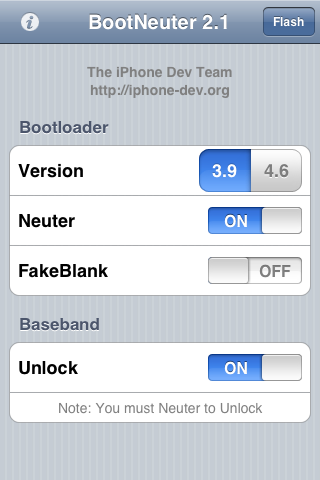
Once you've done that, once you see 'BootNeuter' on your Springboard and are able to start it up, it will first try to determine your current bootloader and baseband status and settings. Once done, there are 4 options you can tinker with. The current settings should look like this.

user posted image

**If you have fakeblank turned ON, I would strongly suggest opting for a non-fakeblank bootloader. I've ran into many unpleasant encounters with problematic fakeblanks. Just one man's opinion wink.gif


Now, change your settings to the following, then tap on 'Flash'.

user posted image

IMPORTANT : Once BootNeuter starts flashing, NEVER, understand any circumstances allow anything to interrupt the process, be it sleep mode, a low battery gauge or your potential impatience. wink.gif Ensure that AUTO-LOCK is set to 'Never', and that your battery gauge is at least half-full. From my previous experiences, the baseband flashing process in particular has been known to take more than 1/2 an hour in bad cases, so just be patient and keep your distance, it will finish eventually. Most importantly, DO NOT reboot the phone until the last step below has been completed.

After it is done, revert the settings back to the first image above once again, and 'Flash'. What does this do? Basically this is one of the few techniques I've tried and tested which have succeeded at achieving a completely clean, fresh baseband. And this is important because the baseband is usually, and as a matter of fact ALWAYS behind cellular and WiFi connectivity issues. Once you're done with the final step, reboot the phone and you SHOULD have resolved any underlying WiFi issues.

Thanks.


NOTE : The instructions above are compiled from my personal experiences with baseband troubleshooting on both 1.1.x and 2.x which have attained successful complete recoveries of WiFi connectivity issues. However, I shall not be held liable for any potential corruption (not permanent 'damage') and/or ineffective outcomes of this procedure. I will, however, be glad to entertain any questions and requests for assistance on the matter.


UPDATE : Download the BootNeuter 2.1 payload HERE.


This post has been edited by Samanoske Akechi: Dec 2 2008, 04:03 PM
tauevo
post Dec 2 2008, 02:25 PM

Getting Started
**
Junior Member
230 posts

Joined: Dec 2006
by ur statements, i need to jb my iphone 3g rite?
rawn
post Dec 2 2008, 02:35 PM

Getting Started
**
Junior Member
148 posts

Joined: Aug 2008


dude am having the same occasional problem connecting to wifi as well. should i put it erm, the iphone is able to detect and join the network but however safari is not able to open any webpage.

am using singtel unlocked unit, 3g.
chinamobile
post Dec 2 2008, 02:43 PM

Getting Started
**
Junior Member
146 posts

Joined: Jun 2008
From: KL lowyat plaza


my cus had same problem. even standing beside the router sometime cannot link.

so he went to singtel and got it change. 1 to 1 brand new set

This post has been edited by chinamobile: Dec 2 2008, 02:46 PM
tauevo
post Dec 2 2008, 02:54 PM

Getting Started
**
Junior Member
230 posts

Joined: Dec 2006
hi chinamobile.

may i noe the procedure for 1 to 1 exchange?


Added on December 2, 2008, 3:02 pm
QUOTE(rawn @ Dec 2 2008, 02:35 PM)
dude am having the same occasional problem connecting to wifi as well. should i put it erm, the iphone is able to detect and join the network but however safari is not able to open any webpage.

am using singtel unlocked unit, 3g.
*
urs is able to detect is not an issue la bro. perphaps u didnt get the rite password from the wifi router. i ever put wrong password although the network is connected but is not connected to the internet. hope this helps u. else if u can try other apps such as youtube via ur wifi (PLS note tat NOT the simcard 3g or using edge or gprs ar) can or not?

This post has been edited by tauevo: Dec 2 2008, 03:02 PM
Samanoske Akechi
post Dec 2 2008, 03:06 PM

Itanium Solutions Inc.
****
Senior Member
625 posts

Joined: Aug 2006
From: Subang Jaya


QUOTE(tauevo @ Dec 2 2008, 02:25 PM)
by ur statements, i need to jb my iphone 3g rite?
*
Unfortunately, yes. However I would consider this one of the many benefits of jailbreaking. Warranties can only do so much. In time, manual fixes like this will come in handy. But of course, since you're still on warranty, exchanging it for a new unit is of course THE most logical course of action right now. wink.gif

QUOTE(rawn @ Dec 2 2008, 02:35 PM)
dude am having the same occasional problem connecting to wifi as well. should i put it erm, the iphone is able to detect and join the network but however safari is not able to open any webpage.

am using singtel unlocked unit, 3g.
*
This particular method isn't currently supported on the iPhone 3G because a baseband unlock has not been achieved in order to facilitate the flashing of the baseband. From your description of the problem, it could well be related to the baseband.

Though this may sound obvious, I assume that the WiFi-AP which you're currently connected to has been checked for a functional internet connection?
tauevo
post Dec 2 2008, 03:17 PM

Getting Started
**
Junior Member
230 posts

Joined: Dec 2006
QUOTE(Samanoske Akechi @ Dec 2 2008, 03:06 PM)
Unfortunately, yes. However I would consider this one of the many benefits of jailbreaking. Warranties can only do so much. In time, manual fixes like this will come in handy. But of course, since you're still on warranty, exchanging it for a new unit is of course THE most logical course of action right now. wink.gif
This particular method isn't currently supported on the iPhone 3G because a baseband unlock has not been achieved in order to facilitate the flashing of the baseband. From your description of the problem, it could well be related to the baseband.

Though this may sound obvious, I assume that the WiFi-AP which you're currently connected to has been checked for a functional internet connection?
*
Thank you so much for ur assitance. So i need to claim the warranty then. Any people here ever make such warranty claim? Pls guide me ya. thank you!
frozzbyte
post Dec 2 2008, 03:48 PM

Feeling butthurt lately? Like I care
*******
Senior Member
3,657 posts

Joined: May 2005
@Samanoske Akechi
It's a good thing that u put up a guide on using BootNeuter so people will not brick their baseband BUT u must put a disclaimer that BootNeuter only works with 1st generation iPhone. If people that don't know about this and run BootNeuter, they might face more problem . Even right now BootNeuter is not working properly on fw2.2. Be careful when writing something that might ruin the device.

This post has been edited by frozzbyte: Dec 2 2008, 03:49 PM
Samanoske Akechi
post Dec 2 2008, 04:01 PM

Itanium Solutions Inc.
****
Senior Member
625 posts

Joined: Aug 2006
From: Subang Jaya


QUOTE(frozzbyte @ Dec 2 2008, 03:48 PM)
@Samanoske Akechi
It's a good thing that u put up a guide on using BootNeuter so people will not brick their baseband BUT u must put a disclaimer that BootNeuter only works with 1st generation iPhone. If people that don't know about this and run BootNeuter, they might face more problem . Even right now BootNeuter is not working properly on fw2.2. Be careful when writing something that might ruin the device.
*
Thanks for pointing that out, mate. Noted and disclaimer added. However, BootNeuter is working flawlessly on 2.2 (2G). There's no reason to worry. The fundamental utilities working behind the scenes of BootNeuter have been the same since 1.0.2.
chinamobile
post Dec 2 2008, 04:08 PM

Getting Started
**
Junior Member
146 posts

Joined: Jun 2008
From: KL lowyat plaza


QUOTE(tauevo @ Dec 2 2008, 02:54 PM)
hi chinamobile.

may i noe the procedure for 1 to 1 exchange?


Added on December 2, 2008, 3:02 pm
urs is able to detect is not an issue la bro. perphaps u didnt get the rite password from the wifi router. i ever put wrong password although the network is connected but is not connected to the internet. hope this helps u. else if u can try other apps such as youtube via ur wifi (PLS note tat NOT the simcard 3g or using edge or gprs ar) can or not?
*
You will need to produce the Singtel Receipt. Photocopy also can smile.gif

goto

hello! ComCentre
31 Exeter Road
Singapore 239732
Mon - Sat : 10am to 9pm
Sun/PH : 11am - 8 pm
Nearest MRT Station: Somerset MRT

Main line: +65 6838 3388


best you call them
wzseow
post Dec 2 2008, 04:25 PM

Getting Started
**
Junior Member
191 posts

Joined: Nov 2006
bro tumpang your thread =)


how come my wi-fi off by itself? as in... if i lock my phone, the wifi will be disconnected. when i unlock, it will connect by itself again.


how can i make sure it's connected all the while?
frozzbyte
post Dec 2 2008, 04:27 PM

Feeling butthurt lately? Like I care
*******
Senior Member
3,657 posts

Joined: May 2005
QUOTE(Samanoske Akechi @ Dec 2 2008, 04:01 PM)
Thanks for pointing that out, mate. Noted and disclaimer added. However, BootNeuter is working flawlessly on 2.2 (2G). There's no reason to worry. The fundamental utilities working behind the scenes of BootNeuter have been the same since 1.0.2.
*
Mmm ... they might have updated BootNeuter to work on fw2.2. Last time when using it, it will hang there and need a reboot.

What do u mean by the bold sentence? The fundamentals of unlocking have been the same since 1.0.2, refering to fw1.0.2?


Added on December 2, 2008, 4:34 pm
QUOTE(wzseow @ Dec 2 2008, 04:25 PM)
bro tumpang your thread =)
how come my wi-fi off by itself? as in... if i lock my phone, the wifi will be disconnected. when i unlock, it will connect by itself again.
how can i make sure it's connected all the while?
*
It's meant to be like that as a measure to save battery. If u want to keep the connection even when the phone in sleeping mode, install insomnia in cydia (need to JB).

This post has been edited by frozzbyte: Dec 2 2008, 04:34 PM
wzseow
post Dec 2 2008, 04:40 PM

Getting Started
**
Junior Member
191 posts

Joined: Nov 2006
QUOTE(frozzbyte @ Dec 2 2008, 04:27 PM)
Mmm ... they might have updated BootNeuter to work on fw2.2. Last time when using it, it will hang there and need a reboot.

What do u mean by the bold sentence? The fundamentals of unlocking have been the same since 1.0.2, refering to fw1.0.2?


Added on December 2, 2008, 4:34 pm

It's meant to be like that as a measure to save battery. If u want to keep the connection even when the phone in sleeping mode, install insomnia in cydia (need to JB).
*
okay got it thanks biggrin.gif
tauevo
post Dec 2 2008, 07:11 PM

Getting Started
**
Junior Member
230 posts

Joined: Dec 2006
QUOTE(chinamobile @ Dec 2 2008, 04:08 PM)
You will need to produce the Singtel Receipt. Photocopy also can smile.gif

goto

hello! ComCentre
31 Exeter Road
Singapore 239732
Mon - Sat : 10am to 9pm
Sun/PH : 11am - 8 pm
Nearest MRT Station: Somerset MRT

Main line: +65 6838 3388
best you call them
*
Thanks bro. One more question ya. How long does it takes to get the phone?
Samanoske Akechi
post Dec 2 2008, 07:20 PM

Itanium Solutions Inc.
****
Senior Member
625 posts

Joined: Aug 2006
From: Subang Jaya


QUOTE(frozzbyte @ Dec 2 2008, 04:27 PM)
Mmm ... they might have updated BootNeuter to work on fw2.2. Last time when using it, it will hang there and need a reboot.

What do u mean by the bold sentence? The fundamentals of unlocking have been the same since 1.0.2, refering to fw1.0.2?
*
Yes, indeed. Every BootNeuter version update is only intended to add the additional, updated firmware basebands. Perhaps some bugfixes left and right, but fundamentally it is a mere GUI of ienew, ieraser, bbupdater in terms of the baseband flashing functions.
geo-milano
post Dec 3 2008, 08:47 AM

Getting Started
**
Junior Member
237 posts

Joined: Jul 2008
before that, make sure the wireless device is DHCP or not. If not u need mannually key in ur IP.
JasLyn
post Dec 3 2008, 04:30 PM

Kernel Panic
*****
Senior Member
724 posts

Joined: Jul 2007
From: Land Below The Wind...
my office wifi lagi lah bodoh.... its a hidden network... so i choose others and key in the name and password manually via wpa security.. it says unable to connect... so i change to wpa enterprise rightaway and re-key in the username and since the password is there earlier, i just join and wolla, its connected and surf i go.... but remember my step, i have to connect via wpa and got kicked and then change to wpa enterprise....

And if i straightly choose wpa enterprise security from the begining and key in the username & password, it show connected but NO INTERNET LINE!!... i have to redo everything (reset network settings inc.) and do the step top above first to get internet connection...

This problem was since the very 2.0 firmware... while im on 1.1.x, langsung takde chance to connect to a hidden network (that time only have wep and wpa only....)

But i dont bother the steps i did as long as i can connect kekekeke... outside on open wifi, no problem.... so, what's the culprit?

P/S: im still on 1st gen kekekeke (Buat malu orang lama only kekekeke)
tauevo
post Dec 3 2008, 08:17 PM

Getting Started
**
Junior Member
230 posts

Joined: Dec 2006
Iphone couldnt detect hidden network but u can connect it if u noe the SSID(network name) that broadcast by the hidden network. Key in the SSID and the watsoever password tat is provided from the network then voila, surf ur net without hassle.
JasLyn
post Dec 4 2008, 07:58 AM

Kernel Panic
*****
Senior Member
724 posts

Joined: Jul 2007
From: Land Below The Wind...
That is the first thing i would do.... problem only at my office....
davvycroix
post Dec 4 2008, 11:36 PM

Getting Started
**
Junior Member
178 posts

Joined: Jan 2008
From: the most historical place in malaysia


im using iphone 3g... when i connect to the net, my edge is used after i've restarted my network settings...

isnt it supposingly WIFI comes 1st then our data transfer?
i mean WIFI then 3G or edge


Added on December 4, 2008, 11:44 pmit says im not connected to the internet but my laptop is online :S
yesterday i tried.. it was fine.. but today suddenly cannot... :S

This post has been edited by davvycroix: Dec 4 2008, 11:44 PM
lucas_lik
post Dec 13 2008, 02:29 PM

Getting Started
**
Junior Member
136 posts

Joined: Sep 2008
From: Land of Oil in Borneo


I'm using Iphone 2G. winpwn to 2.02 then quickpwn to 2.2. I download the bootneuter in cydia using edge cz my wifi cannot be used. But when I launch the bootneuter,it just jam at there and can't continue. Please help.


Added on December 14, 2008, 4:29 pmI try the the bootneuter already. After downgrade to version 2.1 it works. But after flash it. The wifi is still the same. Still cannot detect any wifi signal. I'm using quickpwn for window. If using iliberty,will it work. I try to jailbreak using Iliberty cz it has the function to fix no wifi,bluetooth and so on. But When I put my phone in sleep mode,it just hang at there. Please help.

This post has been edited by lucas_lik: Dec 14 2008, 04:29 PM
oxx_xx
post Jan 28 2009, 09:26 PM

Getting Started
**
Junior Member
99 posts

Joined: Dec 2006
my wifi oso bcome grey d..
not hardware prob i think, bluetooth still ok..
how ???
tauevo
post Jan 28 2009, 10:14 PM

Getting Started
**
Junior Member
230 posts

Joined: Dec 2006
reset network setting should bring back ur wifi.
oxx_xx
post Jan 28 2009, 11:14 PM

Getting Started
**
Junior Member
99 posts

Joined: Dec 2006
reset twice d... still canot...
cpyew
post Jan 28 2009, 11:35 PM

Getting Started
**
Junior Member
58 posts

Joined: Jun 2008


wau seem alot of ppl facing the same problem as i do. i think i should try to send bck to Singtel to fix or replace. coz i reali cant stand with tis wifi issue. some said is related to software fw2.2 but any1 try to down grade and find out can work or not ???
tauevo
post Jan 29 2009, 09:49 AM

Getting Started
**
Junior Member
230 posts

Joined: Dec 2006
did restore also? Pls check at about there to c whether ur wifi address is blanked?
oxx_xx
post Jan 29 2009, 08:39 PM

Getting Started
**
Junior Member
99 posts

Joined: Dec 2006
now can on...
gt add..
00:1E:52:26:7B:E4
but even put infront of my router still cant detect.. ><

This post has been edited by oxx_xx: Jan 29 2009, 08:42 PM
tauevo
post Jan 29 2009, 11:27 PM

Getting Started
**
Junior Member
230 posts

Joined: Dec 2006
U mean wifi not greyed n can be turn on but detect nothing? Maybe is hardware failure. My previous iphone was having tat problem as well then claimed a new one at comcentre.

This post has been edited by tauevo: Jan 29 2009, 11:29 PM
oxx_xx
post Jan 30 2009, 07:03 PM

Getting Started
**
Junior Member
99 posts

Joined: Dec 2006
how to claim ? at ?
tauevo
post Jan 30 2009, 07:24 PM

Getting Started
**
Junior Member
230 posts

Joined: Dec 2006
bring along the receipt from singtel to comcentre. Look for chabo to serve u. Guy more ngiao ci.
oxx_xx
post Jan 30 2009, 08:05 PM

Getting Started
**
Junior Member
99 posts

Joined: Dec 2006
i m uk set la... ><
but sometimes can detect wor...
any solution.. hehe
turbo4life
post Feb 1 2009, 11:44 PM

New Member
*
Newbie
3 posts

Joined: Dec 2008


strangely when when i got my iphone 3g it was having problems connecting to wi-fi (FW 2.1) but after upgrading to FW 2.2 it works brilliantly! no issues at all. home, starbux, fren's house, u name it - can connect no problem. after jailbreak it's still good too.
Zombiemonkey
post Mar 6 2009, 01:00 PM

Getting Started
**
Junior Member
141 posts

Joined: Feb 2009


dude,
i can access to public wifi but can't access at my office's wifi. i'm able detect but couldn't acess. so...conclusion?
claim new set??

thanks in advance for replyin
tauevo
post Mar 6 2009, 11:09 PM

Getting Started
**
Junior Member
230 posts

Joined: Dec 2006
hey brother. u can access public de then is not an issue la. Ur office network should be secured with password. tap in the correct password. I have no issue with public and private network.
kaichia
post Mar 7 2009, 02:06 PM

Getting Started
**
Junior Member
77 posts

Joined: Jun 2006
My iphone 2G wifi sometimes can detect wifi and connect but the connection doesn't last long. After a few minutes it disconnect and couldn't reconnect because unable to detect the router. Need to off wifi for few hours and it can detect and reconnect again. mad.gif
It always happen, any idea why? hmm.gif
Hearts
post Mar 22 2009, 02:41 AM

Getting Started
**
Junior Member
122 posts

Joined: Apr 2007


Hey Guys, i just got my iPhone 2 days ago and i can't connect to my wireless at home.
i can see the network, but i cant connect to it.
any solutions? icon_question.gif
enemysaxon
post Mar 22 2009, 09:31 PM

Getting Started
**
Junior Member
180 posts

Joined: Nov 2007


QUOTE(oxx_xx @ Jan 28 2009, 09:26 PM)
my wifi oso bcome grey d..
not hardware prob i think, bluetooth still ok..
how ???
*
welcome to my world...huhuh
yewjin
post Mar 24 2009, 11:14 PM

Casual
***
Junior Member
356 posts

Joined: Oct 2007


QUOTE(Fighteden @ Oct 23 2008, 12:25 PM)
I think this might be the router's problem ..

I have a LinkSys AP router, i can find it but i could never access internet no matter what i set .. WEP or WAP or no password ..

But i can use my WiFi in Big Apple or Starbucks .. weird eh?
*
I tried turning on my wifi yesterday at starbucks and my iphone just hang. cry.gif

However wirelesskl didn't seem to have any problem. Anyone facing this issue?
cpyew
post Mar 24 2009, 11:55 PM

Getting Started
**
Junior Member
58 posts

Joined: Jun 2008


i just wonder all those wifi problem is related to software ??? last time when i upgrade to 2.2 i got problem with my wifi, and send bck to singtel and replace a new one but the software version is 2.0 i do not dare to upgrade to 2.1 or 2.2, pls advice is it safe to upgrade and is there any proper way to upgrade the software
dzerg
post Mar 25 2009, 08:54 AM

Getting Started
**
Junior Member
168 posts

Joined: Apr 2006
From: more tranquil and peaceful home...


i dont know bout u guys..
mine already updated to 2.2.1,JB..wireless works like charm..
and connected even faster than before..i've already connect my iphone to several wifi spots..
office,starbucks,my home,my fren's home,my cousin's home..
all works.. blush.gif
yewjin
post Mar 25 2009, 12:32 PM

Casual
***
Junior Member
356 posts

Joined: Oct 2007


QUOTE(dzerg @ Mar 25 2009, 08:54 AM)
i dont know bout u guys..
mine already updated to 2.2.1,JB..wireless works like charm..
and connected even faster than before..i've already connect my iphone to several wifi spots..
office,starbucks,my home,my fren's home,my cousin's home..
all works.. blush.gif
*
strange mine just hangs the phone. Nothing works at all unless I off the wifi and then it is back to normal. vmad.gif

Was thinking of restoring it back to original and send it back to Maxis. I will restore it back to factory setting and see if it works. If it still hangs I am going to send it to Maxis. Wonder if they will do a one to one exchange.


Added on March 25, 2009, 4:40 pm
QUOTE(yewjin @ Mar 25 2009, 12:32 PM)
strange mine just hangs the phone. Nothing works at all unless I off the wifi and then it is back to normal.  vmad.gif

Was thinking of restoring it back to original and send it back to Maxis. I will restore it back to factory setting and see if it works. If it still hangs I am going to send it to Maxis. Wonder if they will do a one to one exchange.
*
Just restored my phone settings to its original setting. Wifi works ok. No hang. Will jail break it and see if wifi works or hangs again.

This post has been edited by yewjin: Mar 25 2009, 04:40 PM
SothysSaleShop
post May 31 2009, 01:00 PM

Getting Started
**
Junior Member
92 posts

Joined: Mar 2009
From: Malaysia
Hello all,

My wifi problem started few days ago and till today its still the same, I have problem connecting to ANY wifi networks, home or outside, secured or unsecured, it just shows 'N/A' status at Bosspref. I never experience this problem before since Jan 09 when I got this phone.

My wife and myself each got an iphone 3G and her iphone got no problem detecting and connecting to wifi networks, while mine can't even detect, let alone connect. My laptop is able to connect to the wifi network and I can conclude that the problem comes from my own iphone.

I have done reset network settings, turn phone off and on and it does not help. I dare not restore my phone now as my phone is yellowsn0w unlock and worry after restore my wifi problem still persist I will have no chance to use my phone again.

I have done many hours of online research for answers but can never get any sure solution to resolve my wifi problem?

Do you think its the most feared wifi hardware failure?

Appreciate some help here.

Thanks
teikwing
post May 31 2009, 01:59 PM

Dah Macan?
*******
Senior Member
3,239 posts

Joined: Oct 2006
From: Sydney, NSW


QUOTE(SothysSaleShop @ May 31 2009, 01:00 PM)
Hello all,

My wifi problem started few days ago and till today its still the same, I have problem connecting to ANY wifi networks, home or outside, secured or unsecured, it just shows 'N/A' status at Bosspref. I never experience this problem before since Jan 09 when I got this phone.

My wife and myself each got an iphone 3G and her iphone got no problem detecting and connecting to wifi networks, while mine can't even detect, let alone connect. My laptop is able to connect to the wifi network and I can conclude that the problem comes from my own iphone.

I have done reset network settings, turn phone off and on and it does not help. I dare not restore my phone now as my phone is yellowsn0w unlock and worry after restore my wifi problem still persist I will have no chance to use my phone again.

I have done many hours of online research for answers but can never get any sure solution to resolve my wifi problem?

Do you think its the most feared wifi hardware failure?

Appreciate some help here.

Thanks
*
tried restoring it? you can restore to 2.2 then still be able to use yellowsn0w for unlocking.
SothysSaleShop
post May 31 2009, 02:34 PM

Getting Started
**
Junior Member
92 posts

Joined: Mar 2009
From: Malaysia
I worry after restoring it, if my wifi problem still persist, then i am unable to download yellowsn0w, then my phone will be even useless, losing wifi ability now is better than losing the use of phone in my opinion.

Having researched on the net, many people are having serious wifi problems and I don't think there is a sure way to solve it unless returning it for a 1 to 1 exchange, for me, this is not an option my phone came from aussie.

I am basically out of options now,
CPICH
post May 31 2009, 06:04 PM

New Member
*
Junior Member
14 posts

Joined: May 2009
QUOTE(SothysSaleShop @ May 31 2009, 02:34 PM)
I worry after restoring it, if my wifi problem still persist, then i am unable to download yellowsn0w, then my phone will be even useless, losing wifi ability now is better than losing the use of phone in my opinion.

Having researched on the net, many people are having serious wifi problems and I don't think there is a sure way to solve it unless returning it for a 1 to 1 exchange, for me, this is not an option my phone came from aussie.

I am basically out of options now,
*
Hey, get a hold of yourself and listen to Teikwing. By the way, your advertizing is lame.
hajicrespo
post Jun 7 2009, 10:44 AM

New Member
*
Junior Member
9 posts

Joined: Jan 2009


Hi Guys... I want to share my problem with u guys...

iPhone Generation : Iphone 3g, 16G , about 10 months in age
Unlocked? (or Part Number): Singtel Set, MB496ZA ( I bought the phone from someone, in lowyat.net)
Current Firmware : 2.2.1
iTunes Version : 8.1.1
PC/MAC : PC
Jailbreaking software : Not Jailbroken yet

Problem Encountered :

My problem started two days ago, whereby my iphone refused to connect to the net. When i switched on my wifi, the signal appears, then when I want to surf, it says, it is not connected to the net. I tried with edge, and it has no problem as compared to my wifi. I am currently using wifi in my college, and it doesnt need any WEP settings, or specific password or whatsoever. Previously, I was happily using the college wifi without any problem..

Steps Taken So Far :

I had tried soft reset it, hard reset it and reset all network settings prior to this. Initially, the phone still can detect wifi signal, but it still failed upon surfing the net. After one network setting reset, the wifi it suddenly switch back to my edge when surfing. Then I reset all network settings again, and suddenly to my worst fear, the wifi has became GREYED OUT.. I resort to restore my phone back to previous backup, no improvement.. And last but not least, I tried restoring back to factory settings, but the wifi still become greyed out...

Through my reading in this forum and other sites, the only possible solution is the one to one exchange. My iphone expires on 22 August 09 (about 2 months from now) from the apple site. The age of the phone is about 10 months now..But i dun have any official receipt because when I bought it 4 months back, the seller didnt provide any receipt.

Screenshot of Problem(if applicable) : Will post screenies later...

This post has been edited by hajicrespo: Jun 7 2009, 04:06 PM
Powerpuffs
post Jun 7 2009, 01:35 PM

New Member
*
Junior Member
25 posts

Joined: Jun 2008
From: kayelle-peejay


QUOTE(hajicrespo @ Jun 7 2009, 10:44 AM)
Hi Guys... I want to share my problem with u guys...

iPhone Generation : Iphone 3g, 16G , about 10 months in age
Unlocked? (or Part Number): Singtel Set, MB496ZA ( I bought the phone from someone, in lowyat.net)
Current Firmware : 2.2.1
iTunes Version : 8.1.1
PC/MAC : PC
Jailbreaking software : Not Jailbroken yet

Problem Encountered :

My problem started two days ago, whereby my iphone refused to connect to the net. When i switched on my wifi, the signal appears, then when I want to surf, it says, it is not connected to the net. I tried with edge, and it has no problem as compared to my wifi. I am currently using wifi in my college, and it doesnt need any WEP settings, or specific password or whatsoever. Previously, I was happily using the college wifi without any problem..

Steps Taken So Far :

I had tried soft reset it,  hard reset it and reset all network settings prior to this. Initially, the phone still can detect wifi signal, but it still failed upon surfing the net. After one network setting reset, the wifi it suddenly switch back to my edge when surfing. Then I reset all network settings again, and suddenly to my worst fear, the wifi has became GREYED OUT.. I resort to restore my phone back to previous backup, no improvement.. And last but not least, I tried restoring back to factory settings, but the wifi still become greyed out...

Through my reading in this forum and other sites, the only possible solution is the one to one exchange. My iphone expires on 22 August 09 (about 2 months from now) from the apple site. The age of the phone is about 10 months now..But i dun have any official receipt because when I bought it 4 months back, the seller didnt provide any receipt.

Now, in the state of despair, I am asking for opinions. Can I do one to one exchange WITHOUT the official receipt? Have anyone ever done it? Ive tried contacting my seller, but still no reply. How is the procedure exactly? I have browsed the forum, but i didnt get the ways to do one to one exchange without the receipt right. Right now, I am waiting for my seller reply, but if no response, I am willing to travel to singapore to do it myself or to give some incentives for whoever (that is trustworthy) to do this one to one exchange..
Screenshot of Problem(if applicable) : Will post screenies later...
*
assuming it's a Singtel unit you own there (based on the blded part), there are chances that Singtel will honour a warranty exchange without the official receipt as few members did and claimed that they are able to obtain warranty without receipt. do approach your seller for clarification anyway.

hajicrespo
post Jun 7 2009, 04:09 PM

New Member
*
Junior Member
9 posts

Joined: Jan 2009


QUOTE(Powerpuffs @ Jun 7 2009, 01:35 PM)
assuming it's a Singtel unit you own there (based on the blded part), there are chances that Singtel will honour a warranty exchange without the official receipt as few members did and claimed that they are able to obtain warranty without receipt. do approach your seller for clarification anyway.
*
Thanks for the info.. My seller responded, and thinks he will settle the phone for me.. i just have to keep my finger crossed..


davidmak
post Jun 8 2009, 01:12 PM

~ di di Android di di ~
*******
Senior Member
3,749 posts

Joined: Dec 2005
From: Sydney, AU


The only time when I had problem with WIFI was the SSID issue. This when you first connect to an access point let say 'ABC'. Then you decided to protect this access point by giving it a WPA2 key or you change the attributes of this access point. Bang! iPhone can't detect any 'ABC' access point or it won't connect to it.

The steps I did was to restore access point back to normal then iPhone can connect. Then on the iPhone, I press 'Forget Network' so it would disengage. Do the necessary settings on access point and let iPhone rediscover the access point.

Sometimes I have to change the SSID name to something else so it can connect. Then press Forget Network and then change the SSID back to something I want before letting iPhone rediscover. Very sticky problem.
teikwing
post Jun 8 2009, 01:15 PM

Dah Macan?
*******
Senior Member
3,239 posts

Joined: Oct 2006
From: Sydney, NSW


QUOTE(davidmak @ Jun 8 2009, 01:12 PM)
The only time when I had problem with WIFI was the SSID issue. This when you first connect to an access point let say 'ABC'. Then you decided to protect this access point by giving it a WPA2 key or you change the attributes of this access point. Bang! iPhone can't detect any 'ABC' access point or it won't connect to it.

The steps I did was to restore access point back to normal then iPhone can connect. Then on the iPhone, I press 'Forget Network' so it would disengage. Do the necessary settings on access point and let iPhone rediscover the access point.

Sometimes I have to change the SSID name to something else so it can connect. Then press Forget Network and then change the SSID back to something I want before letting iPhone rediscover. Very sticky problem.
*
the same problem occurs to me as well. whenever i change the passkey of a particular wireless access point, the iPhone just won't connect to it even if i typed in the correct new key. so my solution to this is to "reset all network settings". (sometimes even "forget network" won't work).
davidmak
post Jun 8 2009, 01:52 PM

~ di di Android di di ~
*******
Senior Member
3,749 posts

Joined: Dec 2005
From: Sydney, AU


QUOTE(teikwing @ Jun 8 2009, 01:15 PM)
the same problem occurs to me as well. whenever i change the passkey of a particular wireless access point, the iPhone just won't connect to it even if i typed in the correct new key. so my solution to this is to "reset all network settings". (sometimes even "forget network" won't work).
*
For me, reset all network settings didn't work. It is hooked onto the old SSID. I thought reset all networking settings should allow it to forget everything. Too bad, iPhone don't display a list of SSID or profile it has last connected to. That way we can better manage the connections. Also, with this limitation I wonder how many redundant or unused SSID got stucked/cached on iPhone's OS.
hajicrespo
post Jun 19 2009, 07:59 PM

New Member
*
Junior Member
9 posts

Joined: Jan 2009


QUOTE(hajicrespo @ Jun 7 2009, 10:44 AM)
Hi Guys... I want to share my problem with u guys...

iPhone Generation : Iphone 3g, 16G , about 10 months in age
Unlocked? (or Part Number): Singtel Set, MB496ZA ( I bought the phone from someone, in lowyat.net)
Current Firmware : 2.2.1
iTunes Version : 8.1.1
PC/MAC : PC
Jailbreaking software : Not Jailbroken yet

Problem Encountered :

My problem started two days ago, whereby my iphone refused to connect to the net. When i switched on my wifi, the signal appears, then when I want to surf, it says, it is not connected to the net. I tried with edge, and it has no problem as compared to my wifi. I am currently using wifi in my college, and it doesnt need any WEP settings, or specific password or whatsoever. Previously, I was happily using the college wifi without any problem..

Steps Taken So Far :

I had tried soft reset it,  hard reset it and reset all network settings prior to this. Initially, the phone still can detect wifi signal, but it still failed upon surfing the net. After one network setting reset, the wifi it suddenly switch back to my edge when surfing. Then I reset all network settings again, and suddenly to my worst fear, the wifi has became GREYED OUT.. I resort to restore my phone back to previous backup, no improvement.. And last but not least, I tried restoring back to factory settings, but the wifi still become greyed out...

Through my reading in this forum and other sites, the only possible solution is the one to one exchange. My iphone expires on 22 August 09 (about 2 months from now) from the apple site. The age of the phone is about 10 months now..But i dun have any official receipt because when I bought it 4 months back, the seller didnt provide any receipt.

Screenshot of Problem(if applicable) : Will post screenies later...
*
After i update my phone to 3.0, the iphone magically can use the wifi again... I was about to inquire about warranty exchange that time... It is weird though, but deep inside I felt relieved that my wifi is back... Anyone has any thoughts on this?
SothysSaleShop
post Jun 19 2009, 10:23 PM

Getting Started
**
Junior Member
92 posts

Joined: Mar 2009
From: Malaysia
Good to hear wifi works again for you after upgrading to FW 3.0, I shall wait for quickpwn and cydia (ultrasn0w) to upgrade mine to 3.0, hope it works for my wifi. sweat.gif

QUOTE(hajicrespo @ Jun 19 2009, 07:59 PM)
After i update my phone to 3.0, the iphone magically can use the wifi again... I was about to inquire about warranty exchange that time... It is weird though, but deep inside I felt relieved that my wifi is back... Anyone has any thoughts on this?
*
roxxor
post Jun 21 2009, 11:21 PM

Getting Started
**
Junior Member
129 posts

Joined: Feb 2008


i have problem with my wifi.. im able to use it to connect to internet at my home.. but when i go out.. at some restaurants with wifi.. i can see ppl browsing internet using the wifi there but i cant use my iphone 3g to surf.. my phone is connected to the wifi.. but the router and DNS under DHCP are without any numbers..
SothysSaleShop
post Jun 23 2009, 12:33 PM

Getting Started
**
Junior Member
92 posts

Joined: Mar 2009
From: Malaysia
I cant even use mine anywhere now, totally unable to detect any wifi network, consider yourself lucky..i am waiting for the ultrasn0w to update to 3.0 and see if this will solve my problem..sigh..
shiniraz
post Jun 23 2009, 01:57 PM

Getting Started
**
Junior Member
221 posts

Joined: Dec 2006
Dear all, need some advice here.

Phone Generation : Iphone 3g, 8GB , about 4 months in age
Unlocked? (or Part Number): Singapore/singtel official unlock, MB489ZA
Current Firmware : 3.0
iTunes Version : 8.2.1
PC/MAC : PC
Jailbreaking software : redsn0w 0.71

Problem Encountered : Can't connect to my office WIFI (using WEP key)
1. Prob persists since it was on 2.2.1 FW. After upgrade, still have problem to connect to my office network. Error "Failed to Joined".

Steps Taken So Far :
1. Respring
2. Reset network connection
3. Reset all connection
4. Restore
5. Insert IP / Gateway etc manually.
6. Upgrade from 2.2.1 to 3.0

Extra info:
1. I can connect to my home's wifi (using WPA key) with no problem. Also can connect to several others free wifi.
2. Another iPhone (with OS 3.0), have no problem to connect to the office's wifi.


So what's wrong here? what should i do? Is there any solution/patch or Do i need to reclaim the warranty? (since early next month will be going to Spore~)

This post has been edited by shiniraz: Jun 23 2009, 02:07 PM
FaKeAnGeL
post Jun 25 2009, 05:39 PM

Getting Started
**
Junior Member
178 posts

Joined: May 2008
iPhone Generation : Iphone 2g 16GB
Unlocked? (or Part Number): MB384LL Locked Set
Current Firmware : 3.0
iTunes Version : 8.1.2
PC/MAC : PC win xp
Jailbreaking software : firmware 3.0 jailbreaken

Problem Encountered :

My problem is Wifi Greyed.....It Write no wifi....bluetooth it write unavalible

This post has been edited by FaKeAnGeL: Jun 25 2009, 08:31 PM
TeraPox
post Jun 27 2009, 04:56 AM

Enthusiast
*****
Senior Member
961 posts

Joined: Apr 2005


I've just upgraded to 3.0 recently..

but after i do so, i found out that my WIFI/bluetooth option both greyed out...
cry.gif

what happened? tried to restore a few times, but it's still the same


please help me~~~
Protoss-Zealot
post Jun 27 2009, 06:56 AM

iPhone Board Repair Specialist
****
Senior Member
577 posts

Joined: Jan 2003
From: South City Plaza


have u try downgrade?
SothysSaleShop
post Jun 27 2009, 10:48 AM

Getting Started
**
Junior Member
92 posts

Joined: Mar 2009
From: Malaysia
This wifi and bluetooth greyed out is not a new problem exclusively to 3.0, in fact this was reported many months earlier by many other users reported on the internet, do a search and you will see, even some people posted video on youtube to show. This thread also started because people experience wifi and bluetooth problem.

As for my case, my wifi option is there (not greyed out) but the phone can never detect available or connect to any wifi network.

I believe something in the iphone hardware is contributing to this wifi problem, because if its software problem, a restore should do the trick, but even some people have tried restore several times and gets no where. To me this is a defect apple has yet to address. They should recall all phones that experience this defect as their customers are paying top dollars for it and wifi is a basic feature that should work flawlessly.
FaKeAnGeL
post Jun 27 2009, 04:17 PM

Getting Started
**
Junior Member
178 posts

Joined: May 2008
got ppl fix it by downgrade the firmware??
SothysSaleShop
post Jun 27 2009, 05:01 PM

Getting Started
**
Junior Member
92 posts

Joined: Mar 2009
From: Malaysia
I dont think there is a clear cut solution, I've read people upgrade to 3.0 and wifi problem solved, now we get people without wifi problem upgraded to 3.0 and started to have problem. Upgrade and downgrade also does not 100% resolve the problem, which I see its very critical for Apple to do something about it, sooner the better.
zaff1984
post Jun 29 2009, 02:53 PM

Getting Started
**
Junior Member
187 posts

Joined: Jul 2006


mine updated to 3.0 week ago but not working anymore after few days. it not detect any wireless. already network reset but still don't solve problem.


Added on July 1, 2009, 2:32 pmplease... no body have this answer to solve 3.0 wifi problem?

This post has been edited by zaff1984: Jul 1 2009, 02:32 PM
SUSnatzakaria
post Jul 1 2009, 09:06 PM

Regular
******
Senior Member
1,022 posts

Joined: Jan 2003
Celcom has barred one of my lines as they say that my current internet bill is RM2500 - not on data plan for this iphone.
So I screwed them up saying that they should have not allowed it to exceed as the limit is RM250 MAX.

In ay case how in the world do I get the iphone to connect to my wireless router???
It sees the router it even connects to it - but I see the IP is not the one that is generated by DHCP it is some wiered 168.xxx.xxx.xxx with 255.255.0.0 which i believe is the Celcom IP address thus the RM2500.

Pls advise as setting the APN to some other junk does not seem to work either.
durfzstonez
post Jul 1 2009, 09:16 PM

Casual
***
Junior Member
340 posts

Joined: Jul 2007


What the??? Rm 2500, damnnnn.. Maxis really sucks people money. Poor you. I hope maxis can give you discount.
SUSnatzakaria
post Jul 1 2009, 09:22 PM

Regular
******
Senior Member
1,022 posts

Joined: Jan 2003
It's Celcom - in any case the cap is RM250 and I have checked so they screwed up.

In any case how to get this wifi connection going? and disable the APN?
calvin_gsc
post Jul 1 2009, 09:26 PM

10k Club
********
All Stars
10,261 posts

Joined: Jan 2003


QUOTE(natzakaria @ Jul 1 2009, 09:22 PM)
It's Celcom - in any case the cap is RM250 and I have checked so they screwed up.

In any case how to get this wifi connection going? and disable the APN?
*
There shouldn't be any settings that you need to fiddle around to get wifi working. Just turn on, and connect to an access point.

Try this, tap on the arrow next to your access point name, scroll to bottom and tap "renew lease". See if it fixes the problem.

If that doesn't work, try "Forget this network" and reconnect.

The last option is to restore the phone. Which i think will most likely fix any problem.
SUSnatzakaria
post Jul 1 2009, 09:29 PM

Regular
******
Senior Member
1,022 posts

Joined: Jan 2003
I have tried practically everything even the ones you suggested including the reset network setting except for the restore as new phone.
Is there an app that will allow me to save my contacts to sim as I am sure if I restore as new phone itunes will also wipe out the contacts

Suggestions welcome
calvin_gsc
post Jul 1 2009, 09:47 PM

10k Club
********
All Stars
10,261 posts

Joined: Jan 2003


QUOTE(natzakaria @ Jul 1 2009, 09:29 PM)
I have tried practically everything even the ones you suggested including the reset network setting except for the restore as new phone.
Is there an app that will allow me to save my contacts to sim as I am sure if I restore as new phone itunes will also wipe out the contacts

Suggestions welcome
*
My favourite way to perserve my contacts is to sync with Windows Address Book in iTunes. This way, it preserves the name fields (First Name/Last name/etc).

You can try looking at this or this (#4) for contacts backup via SSH.
zaff1984
post Jul 1 2009, 11:45 PM

Getting Started
**
Junior Member
187 posts

Joined: Jul 2006


my wifi cannot detect any access point at all after i upgrade to 3.0. already restored and reset network but will not working.

until now i dont have any solution.
SUSnatzakaria
post Jul 1 2009, 11:53 PM

Regular
******
Senior Member
1,022 posts

Joined: Jan 2003
Cheers - shall give it a shot

oohhhh i guess I am not alone on this. I have tried everything even put in static IP - it sees the router then tried to surf - gone again. does not lock
FaKeAnGeL
post Jul 2 2009, 12:58 AM

Getting Started
**
Junior Member
178 posts

Joined: May 2008
help me pls how to fix no wifi problem and bluetooth unavalible...
aifoninfo
post Jul 2 2009, 01:19 AM

New Member
*
Junior Member
10 posts

Joined: Jul 2009


I got similar wifi problem when I downgrade to 1.1.4 from 3.0. I noticed some wifi lag considerably while on 3.0, and decided to go to 1.1.4. It simply won't work.

Right now I am with 2.2.1.

I hope Apple is not disabling the wifi purposely for downgraders.


I did notice before, the iPhone got overheat while on 3.0. Found many discussion about some freezer trick. I hope this is not the case normally happened in notebooks/laptops when wifi mini pci-e dead after repeatedly overheat.

Updated:
I got on 3.0 back, and the wifi works.

This post has been edited by aifoninfo: Jul 2 2009, 07:50 AM
zaff1984
post Jul 2 2009, 04:39 PM

Getting Started
**
Junior Member
187 posts

Joined: Jul 2006


aifoninfo help i need my wifi back....


Added on July 2, 2009, 4:46 pmiPhone can downgrade solve the problem? or totally cannot downgrade? from 3.0 to 2.2.1 ?

This post has been edited by zaff1984: Jul 2 2009, 04:46 PM
FaKeAnGeL
post Jul 2 2009, 05:08 PM

Getting Started
**
Junior Member
178 posts

Joined: May 2008
i dono how to downgrade to 2.2.1 can teach me bro...
SUSnatzakaria
post Jul 2 2009, 11:05 PM

Regular
******
Senior Member
1,022 posts

Joined: Jan 2003
Solved it finally.

need to set as static and add the dns as 202.188.0.133
aifoninfo
post Jul 2 2009, 11:51 PM

New Member
*
Junior Member
10 posts

Joined: Jul 2009


QUOTE(FaKeAnGeL @ Jul 2 2009, 05:08 PM)
i dono how to downgrade to 2.2.1 can teach me bro...
*
Press CTRL+ALT+Del

End these process:
* AppleMobileDeviceHelper
* AppleMobileDeviceService
* iTunes
* iPodService

Uninstall all Apple component software
* Apple Mobile Device Support
* Apple software update
* iTunes
* Bonjour
* Quicktime

Delete or rename My Documents\My Music\iTunes

* for fw 1.1.4 you will need iTunes 7.6
* for fw 2.2.1 you will need iTunes less than 8.2
* for fw 3.0 you will need iTunes 8.2

get it from www.oldversion.com

Use En__ZiPhone_patched_by_kIREmK_04.05.04_G.zip
Select
* Downgrade Baseband
* Debug boot
* iErase

Enter DFU mode, please be patient at this stage. Please refer to youtube DFU tutorial

Restore your firmware with proper version of iTunes

Jailbreak with proper tools

for fw 1.1.4 use iLibertySetup_1.3.0.113.exe
for fw 2.2.1 use QuickPwn-225-2.zip
for fw 3.0 use redsn0w-win_0.7.1.zip, if 0.7.2 is used; never use ICY or your Cydia will go berserk

This post has been edited by aifoninfo: Jul 2 2009, 11:52 PM
FaKeAnGeL
post Jul 3 2009, 02:20 PM

Getting Started
**
Junior Member
178 posts

Joined: May 2008
this step can fix no wifi problem??
zaff1984
post Jul 3 2009, 09:52 PM

Getting Started
**
Junior Member
187 posts

Joined: Jul 2006


apple...apple pls release update fast....


Added on July 4, 2009, 8:18 amI already post this problem at Apple Discussion Forum yesterday night... but still waiting for real solution.... see if they can help....

here my thread at Apple Discussion
http://discussions.apple.com/thread.jspa?m...9759966#9759966

This post has been edited by zaff1984: Jul 4 2009, 08:18 AM
davidgary73
post Jul 11 2009, 08:16 PM

Music Producer
Group Icon
VIP
4,903 posts

Joined: Jul 2008
Apple has posted a support document to help those having Wi-Fi issues with their iPhone or iPod touch.

You can read Apple's fix suggestions below and note that if all tips fail they suggest taking your iPhone for repair.

http://support.apple.com/kb/TS1559

Cheers
zaff1984
post Jul 12 2009, 11:29 PM

Getting Started
**
Junior Member
187 posts

Joined: Jul 2006


I went to maxis centre just now... they cant fix the WiFi problem (fresh restore also not fix the problem). So they will repair my iPhone. but its take 15 days to repair.

I ask them about 1 to 1 Exchange. they said 1 to 1 exchange takes 15 days.
tinkerbel
post Jul 12 2009, 11:38 PM

Fanaddict!
Group Icon
VIP
13,495 posts

Joined: Dec 2006
From: KL, Malaysia


@zaff1984,
If fixing the phone and getting a 1:1 exchange is going to take 15 days I'll go with getting the 1:1 exchange biggrin.gif
zaff1984
post Jul 12 2009, 11:58 PM

Getting Started
**
Junior Member
187 posts

Joined: Jul 2006


I will send my iphone for repair. I dont know they will give a new one or just repair the phone. hope they replace the new one...

tinkerbel so no 1 to 1 exchange for iphone by maxis?


jesslicious
post Jul 23 2009, 10:46 AM

New Member
*
Newbie
3 posts

Joined: Jul 2009


Hi..Anyone had any advice? any opinion to help me?

Mine iphone 3g wifi does not works at all. icon_question.gif
kc3832
post Jul 23 2009, 01:35 PM

Getting Started
**
Junior Member
100 posts

Joined: Aug 2005
From: Ampang, Selangor


Hihihi! Time to get iPhone 3GS..... Anyway, the posting in apple suggested by davidgary help me.... you might wanna try it.....

This post has been edited by kc3832: Jul 23 2009, 01:35 PM
dimebag81787
post Aug 7 2009, 04:21 AM

New Member
*
Junior Member
12 posts

Joined: Mar 2009
From: Kota Damansara


Hi LYN,

I bought an iPhone 3G 16GB model outside Malaysia and during the first few hours it worked great. However after sometime my wifi signal disappeared and my iPhone 3G wouldn't even look for networks anymore. The bluetooth also seems to be malfunctioning, pairing with devices but continually dropping the connection when trying to transfer any type of file. I've tried all the fixes possible, including those given by Apple! cry.gif

I don't have warranty for this phone, do you guys have any advice on how to fix the problem?
The phone is virtually perfect and I've kept good care of it with a SPECK Candyshell case and invisibleSHIELD protector, I just want to use my wifi the way the iphone was intended to provide!

Any help is greatly appreciated guys,

Sincerely,
Dimebag81787
SUSMatrix
post Aug 7 2009, 08:49 AM

King of Char Siew!
********
Senior Member
15,022 posts

Joined: Jan 2003
From: Damansara Jaya/Bandar Utama


QUOTE(dimebag81787 @ Aug 7 2009, 04:21 AM)
Hi LYN,

I bought an iPhone 3G 16GB model outside Malaysia and during the first few hours it worked great. However after sometime my wifi signal disappeared and my iPhone 3G wouldn't even look for networks anymore. The bluetooth also seems to be malfunctioning, pairing with devices but continually dropping the connection when trying to transfer any type of file. I've tried all the fixes possible, including those given by Apple!  cry.gif 

I don't have warranty for this phone, do you guys have any advice on how to fix the problem?
The phone is virtually perfect and I've kept good care of it with a SPECK Candyshell case and invisibleSHIELD protector, I just want to use my wifi the way the iphone was intended to provide!

Any help is greatly appreciated guys,

Sincerely,
Dimebag81787
*
I think this happens to some jailbreaked iphones. Try to reset to factory default using iTunes and jailbreak/unlock again. PM me to discuss further if needed.
SUSitanium
post Aug 7 2009, 08:59 AM

I brake very late.
*****
Senior Member
762 posts

Joined: Jan 2003
From: Kota Kinabalu, Country of North Borneo.


I have seen 3-4 units failing both wifi and bluetooth functions after ahem ahem and they were sent back to apple for DOA.
geo-milano
post Aug 7 2009, 09:03 AM

Getting Started
**
Junior Member
237 posts

Joined: Jul 2008
Now u have to backup ur data in ur iPhone. Then restore it again, without jailbreak. Try and see whether can get the network? Btw , which country of ur iPhone from? Lock or unlock set?
soonwai
post Aug 7 2009, 09:07 AM


********
All Stars
11,456 posts

Joined: Oct 2007
From: KL


Have you tried to do a Restore in iTunes? If it's hardware problem then tough luck, I guess.
dimebag81787
post Aug 7 2009, 09:30 AM

New Member
*
Junior Member
12 posts

Joined: Mar 2009
From: Kota Damansara


QUOTE(soonwai @ Aug 7 2009, 09:07 AM)
Have you tried to do a Restore in iTunes? If it's hardware problem then tough luck, I guess.
*
Yeah guys, my iPhone was Jailbroken when the problem started but I must have restored five times already and tried every variation to get it to work. I've also reset the factory network settings and used itunes to restore to the original Apple settings but still no fix. I bought my phone unlocked from Saudi Arabia through the phone service provider Mobily there. They sell the phones unlocked. Could it be a hardware issue? If so, any place dependable to fix the problem since I don't have warranty?

This is a shot in the dark but, any chance Maxis can repair my phone? unsure.gif

Thanks guys for your advice and help, would really like to figure out if this is a hardware or software problem!

Sincerely,
Dimebag81787


Added on August 7, 2009, 9:33 am
QUOTE(itanium @ Aug 7 2009, 08:59 AM)
I have seen 3-4 units failing both wifi and bluetooth functions after ahem ahem and they were sent back to apple for DOA.
*
itanium, I'm guessing those units came with warranties right? Anyway I can purchase a warranty for my iPhone like you can for Macbooks?

Thanks for your comment anyway, comforts me to know it's not just my model with the sickness~

Dimebag81787

This post has been edited by dimebag81787: Aug 7 2009, 09:33 AM
soonwai
post Aug 7 2009, 09:54 AM


********
All Stars
11,456 posts

Joined: Oct 2007
From: KL


If it's a software prob, a single restore should solve it. Just make sure to "Setup as New Phone" after the restore.

Can you still make calls with it? It might just be a loose antenna cable, there are 2 inside the iPhone, one for the cell radio and another for wifi/bluetooth.

Your phone should still be under warranty. You can check on Apple's website. Problem is you have to send it back to wherever it came from which may or may not be where you bought it from.

crxr & wei on this forum does repairs, contact then and let them have a look.
dimebag81787
post Aug 7 2009, 11:17 AM

New Member
*
Junior Member
12 posts

Joined: Mar 2009
From: Kota Damansara


QUOTE(soonwai @ Aug 7 2009, 09:54 AM)
If it's a software prob, a single restore should solve it. Just make sure to "Setup as New Phone" after the restore.

Can you still make calls with it? It might just be a loose antenna cable, there are 2 inside the iPhone, one for the cell radio and another for wifi/bluetooth.

Your phone should still be under warranty. You can check on Apple's website. Problem is you have to send it back to wherever it came from which may or may not be where you bought it from.

crxr & wei on this forum does repairs, contact then and let them have a look.
*
Thanks for the user suggestions. Everything about the phone works perfectly except the wifi and bluetooth. I suspect you could be right about the antenna, however I've spoken with with a couple of repairers in Malaysia and they both suggest replacing the motherboard. Is this a valid solution? I don't have warranty so there's no worrying about losing it once the iPhone is opened up. Other than the wifi and the bluetooth, the phone is perfect, even the casing is like new! *sigh* Do you think its a motherboard problem or are some repairers looking for some extra cash from me? wink.gif

Wifi is the most important feature of this phone, I'll keep asking around and if I find a valid and cost effective solution, I'll let you guys know so everyone who has the same problem as me will know how to fix it. For now I suspect its a hardware issue such as a bent antenna or burnt chip.

Thanks fellas, really effective brainstorming with you guys! Any other suggestions or experiences would surely help!

Dimebag81787


Added on August 7, 2009, 8:58 pm
QUOTE(kennyshan @ Oct 25 2008, 12:46 AM)
i have experienced a funny thing which i can detect and connect to wifi in oldtown restaurant with my iphone but my fren's pda showing the access point is secured @@
*
Did you manage to get your wifi working? From what I know about the Oldtown in my area, they limit the number of people who can connect to the wifi to 4 people at a time. That could be the reason if you're wifi works everywhere except that time in Oldtown! Just a thought!

Sincerely,
Dimebag81787


Added on August 7, 2009, 9:07 pmDoes anyone have any proof or experience in downgrading and solving the problem? I know one poster in this thread appeared to have downgraded then upgraded up to 3.0 again and it worked! Anyone else follow this method successfully?

This post has been edited by dimebag81787: Aug 7 2009, 09:07 PM
xxx306
post Aug 8 2009, 01:38 AM

Kylo Ren worshipper
****
Senior Member
635 posts

Joined: Dec 2006
From: KL/Miri


hello
something is wrong with my sis's 3Gs. her iphone wifi is connected but when browsing in safari, the browser said it is not connected to the internet.

my iphone's wifi is good. there's no problem at all.

is it hardware problem?
nokia2003
post Aug 8 2009, 01:45 AM

Look at all my stars!!
*******
Senior Member
5,786 posts

Joined: Nov 2007
From: VIC - The Place To Be


QUOTE(xxx306 @ Aug 8 2009, 01:38 AM)
hello
something is wrong with my sis's 3Gs. her iphone wifi is connected but when browsing in safari, the browser said it is not connected to the internet.

my iphone's wifi is good. there's no problem at all.

is it hardware problem?
*
is it jailbroken? have you tried opting for "reset network settings"?
xxx306
post Aug 8 2009, 01:59 AM

Kylo Ren worshipper
****
Senior Member
635 posts

Joined: Dec 2006
From: KL/Miri


QUOTE(nokia2003 @ Aug 8 2009, 01:45 AM)
is it jailbroken? have you tried opting for "reset network settings"?
*
nope. not jailbroken. but i did jailbreak it then i noticed the wifi doesnt work. then i restore it back.
i asked my sis whether got wifi problem before i jailbreak it and she said yes.

yup, i did everything but still can't. icon_question.gif

my sis's 3gs wifi problem is exactly like this
QUOTE
Ever since I’ve started using the iphone 3gs, I have noticed that Wifi has been a pain. The phone keeps connecting to wifi then cuts off and goes to 3g. Once I restart the phone, the wifi connection comes back but then disconnects from wifi and I get this pop up asking me to enter my wifi password. I’m not sure if this a 3gs issue or 3.0. Anyone else experiencing this let me know if you know of a fix to this. Thanks

taken from: http://www.theiphoneblog.com/2009/07/08/ip...-wifi-problems/
This post has been edited by xxx306: Aug 8 2009, 02:35 AM
dimebag81787
post Aug 8 2009, 04:08 AM

New Member
*
Junior Member
12 posts

Joined: Mar 2009
From: Kota Damansara


QUOTE(xxx306 @ Aug 8 2009, 01:59 AM)
nope. not jailbroken. but i did jailbreak it then i noticed the wifi doesnt work. then i restore it back.
i asked my sis whether got wifi problem before i jailbreak it and she said yes.

yup, i did everything but still can't.  icon_question.gif

my sis's 3gs wifi problem is exactly like this
*
Try to turn off your 3G in the settings for 15 seconds, this should reset the wifi again. See if that works, its a suggestion from the Apple Wifi support suggestions. Since it stopped working before the jailbreak, I don't think jailbreaking is the cause then. Did the iPhone get unusually hot before the wifi went off? I lost my wifi too after so many restores and jailbreaks. Could be a burnt chip in the motherboard from overheating as my iPhone was a little hot before I lost it.

Does this sound plausible?
xxx306
post Aug 8 2009, 07:43 AM

Kylo Ren worshipper
****
Senior Member
635 posts

Joined: Dec 2006
From: KL/Miri


QUOTE(dimebag81787 @ Aug 8 2009, 04:08 AM)
Try to turn off your 3G in the settings for 15 seconds, this should reset the wifi again. See if that works, its a suggestion from the Apple Wifi support suggestions. Since it stopped working before the jailbreak, I don't think jailbreaking is the cause then. Did the iPhone get unusually hot before the wifi went off? I lost my wifi too after so many restores and jailbreaks. Could be a burnt chip in the motherboard from overheating as my iPhone was a little hot before I lost it.

Does this sound plausible?
*
even i did turn off the 3G, it will still connected to GPRS (i think, she's using maxis - there's a round thingy beside 'my maxis')
nope, no hotness or whatsoever on device.

-----

well basically the wifi doesnt work at all. even i turned on airplane mode and connect with wifi, it shows it connected to wifi but then when browsing in safari it said no internet connection.

can i exchange it with maxis? just got it last Sunday. sad.gif

This post has been edited by xxx306: Aug 8 2009, 07:48 AM
dimebag81787
post Aug 9 2009, 01:22 AM

New Member
*
Junior Member
12 posts

Joined: Mar 2009
From: Kota Damansara


QUOTE(xxx306 @ Aug 8 2009, 07:43 AM)
even i did turn off the 3G, it will still connected to GPRS (i think, she's using maxis - there's a round thingy beside 'my maxis')
nope, no hotness or whatsoever on device.

-----

well basically the wifi doesnt work at all. even i turned on airplane mode and connect with wifi, it shows it connected to wifi but then when browsing in safari it said no internet connection.

can i exchange it with maxis? just got it last Sunday. sad.gif
*
Yeah I have the same problem. I get the little blue dot as well, if not the 3G symbol. Other than that I can't connect to wifi at all. I'll try ask Maxis as well, since my phone wasn't bought from there I hope they can repair it for me.

I suggest taking it to maxis and asking them to clear your 3G settings and see if the wifi kicks back on. If not, you have the same problem as me and I have no idea how to fix it!

Hope yours and my problem works out~
jphlau
post Aug 10 2009, 12:09 PM

Regular
******
Senior Member
1,202 posts

Joined: Jun 2009
QUOTE(dimebag81787 @ Aug 9 2009, 01:22 AM)
Yeah I have the same problem. I get the little blue dot as well, if not the 3G symbol. Other than that I can't connect to wifi at all. I'll try ask Maxis as well, since my phone wasn't bought from there I hope they can repair it for me.

I suggest taking it to maxis and asking them to clear your 3G settings and see if the wifi kicks back on. If not, you have the same problem as me and I have no idea how to fix it!

Hope yours and my problem works out~
*
Check your wireless router and make sure that dcip client has your iphone inside. Another suggestion is to change the channel of your wireless router.
Cheesenium
post Aug 16 2009, 11:09 PM

Vigilo Confido
*******
Senior Member
4,852 posts

Joined: Aug 2006
How do i fix the broken wifi? Without going to the Genius as they wont fix it in Australia.

I have upgrade to version 3.0.1,still no wifi.

I have the wifi address,but i still cant connect to any wifi network.Tried whatever Apple put on their site and nothing works.

Is there any solution to that?

This post has been edited by Cheesenium: Aug 16 2009, 11:23 PM
-Katrina-
post Aug 19 2009, 12:12 AM

New Member
*
Junior Member
19 posts

Joined: Feb 2009
i got prob which i connected to wifi but no internet access when i browsing
Cheesenium
post Aug 19 2009, 09:48 PM

Vigilo Confido
*******
Senior Member
4,852 posts

Joined: Aug 2006
Still no solutions.

Damn,im stuck with a wifi-less i-Phone.
nokia2003
post Aug 19 2009, 09:53 PM

Look at all my stars!!
*******
Senior Member
5,786 posts

Joined: Nov 2007
From: VIC - The Place To Be


QUOTE(Cheesenium @ Aug 16 2009, 11:09 PM)
How do i fix the broken wifi? Without going to the Genius as they wont fix it in Australia.

I have upgrade to version 3.0.1,still no wifi.

I have the wifi address,but i still cant connect to any wifi network.Tried whatever Apple put on their site and nothing works.

Is there any solution to that?
*
yours is an australian set? still under warranty?
crxr
post Aug 19 2009, 11:52 PM

Getting Started
**
Junior Member
144 posts

Joined: Jan 2003
Replace new wifi chip then.
robinlaw88
post Aug 26 2009, 02:34 AM

New Member
*
Junior Member
6 posts

Joined: Aug 2009
From: Kuching, Sarawak


Dear All,

I'm a proud owner of an Apple IPhone 3G for 2 weeks, when all of a sudden my wifi is not working anymore. When I switch off and on my Iphone again, to my suprise when I go to settings->General at the wifi settings it stated that No Wifi.

I went online and search every resource I can find. A lot of Apple Iphone owners is also facing the same problem. They all offered solutions like, delete all network settings, delete all data on the phone, restore and even re jailbreaking but to no avail. Some even came up with the crazy idea of putting the phone into the freezer!! Cause said something about a telco comp staff from abroad told one guy that the 3.0 firmware fried the wifi chip or something. rclxub.gif

I'm posting this hoping the guys here in malaysia has had any luck in solving this problem and can offer me a solution.

I would like to apologize to the admin if someone else has already posted this topic but this is my first time here and I am hoping that this topic may help other Iphone users from malaysia too.

So guys and gals if you have ever encountered this problem before and has solved it, whether firmware or hardware.

Please let me know. Thanks.


Regards,


Robin
Siilver
post Aug 26 2009, 02:54 AM

Getting Started
**
Junior Member
154 posts

Joined: Nov 2008
From: Quelque part seulement nous savons
First, sync your iPhone or iPod touch to iTunes to backup your user information, Contacts, Calendar, and other data. Then try the following steps in order.

One
On the device, tap Settings > General > Reset > Reset Network Settings. Check to see if the device now displays the Wi-Fi address or Bluetooth address (tap Settings > General > About and scroll down to Wi-Fi Address or Bluetooth). If there is a Wi-Fi address and a Bluetooh address, then you're done with these steps and you can resync your settings and your media using iTunes.

If there's still no Wi-Fi address or Bluetooth address, then continue to step two.

Two
On the device, tap Settings > General > Reset > Erase All Content and Settings. Check to see if the device now displays the Wi-Fi address and Bluetooth address (tap Settings > General > About and scroll down to Wi-Fi Address or Bluetooth). If there is a Wi-Fi address and Bluetooth address, then you're done with these steps and can resync your settings and your media using iTunes.

If there's still no Wi-Fi dddress or Bluetooth address, then continue to step three.

Three
Restore the iPhone or iPod touch software (this erases all data on the device) using iTunes (see article 305744 for additional assistance).
After the restore is complete, sync your previous settings (mail settings, text messages, notes, call history, contact favorites, and so on).
Now see if your device shows a Wi-Fi address and Bluetooth address (tap Settings > General > About and scroll down to Wi-Fi Address or Bluetooth).

If there is a Wi-Fi address and Bluetooth address, then you're done with these steps. If there is no Wi-Fi address or Bluetooth address, then continue to step four.

Four
If there is no Wi-Fi address or Bluetooth address listed after doing the above steps, bring your set back to any Maxis centre and claim warranty.

Apple is aware of this issue and thus, you can actually claim warranty if this fails.

Now all you need is luck. smile.gif
robinlaw88
post Aug 26 2009, 03:44 AM

New Member
*
Junior Member
6 posts

Joined: Aug 2009
From: Kuching, Sarawak


I tried all the steps that I could find in the internet, still cannot. Replace wifi chip? where to replace? My phone I bought from someone here in Lowyat forum.

I also dunno where the set came from. From singapore ka or from where. Any way to check this on my iphone ah?
Siilver
post Aug 26 2009, 05:09 AM

Getting Started
**
Junior Member
154 posts

Joined: Nov 2008
From: Quelque part seulement nous savons
QUOTE(robinlaw88 @ Aug 26 2009, 03:44 AM)
I tried all the steps that I could find in the internet, still cannot. Replace wifi chip? where to replace? My phone I bought from someone here in Lowyat forum.

I also dunno where the set came from. From singapore ka or from where. Any way to check this on my iphone ah?
*
http://forum.lowyat.net/index.php?act=Atta...=post&id=919091

Refer to part numbers.

But you bought it from here, I think its better for you to PM the forummer to claim warranty.
kebeckham7
post Aug 26 2009, 08:47 AM

Regular
******
Senior Member
1,047 posts

Joined: Jun 2006
From: TerenGGanu Manchester


QUOTE(robinlaw88 @ Aug 26 2009, 03:44 AM)
I tried all the steps that I could find in the internet, still cannot. Replace wifi chip? where to replace? My phone I bought from someone here in Lowyat forum.

I also dunno where the set came from. From singapore ka or from where. Any way to check this on my iphone ah?
*
a lot of iphone users that have the same problem here send back their iphone to the apple....but if the phone that bought is from outside malaysia then i think that u need to find someone that can change the wifi chip..u can ask crxr ( http://forum.lowyat.net/index.php?showtopic=920182&hl= ) (can repair iphone 2g ,3g or 3gs)...have been dealing with him for quite sometime now. Try to pm him

This post has been edited by kebeckham7: Aug 26 2009, 09:27 AM
Siilver
post Aug 26 2009, 08:58 AM

Getting Started
**
Junior Member
154 posts

Joined: Nov 2008
From: Quelque part seulement nous savons
And incase you need to service it yourself, this guy too gets pretty good reviews about his service.

http://forum.lowyat.net/topic/1028510
Digitral
post Aug 26 2009, 12:44 PM

Full Capdase Product
*******
Senior Member
7,578 posts

Joined: Jan 2003
From: Taman Segar Perdana, Cheras


Maybe change Wifi Channel in your Router setting?
kebeckham7
post Aug 26 2009, 01:19 PM

Regular
******
Senior Member
1,047 posts

Joined: Jun 2006
From: TerenGGanu Manchester


users that have problem with their wifi connectivity need to test within a few difference wifi connection...try it at starbuck @ ur home wifi@office wifi or hotel wifi. give it a try...if still not working try to reset all setting...or restore ur phone back or upgrade or downgrade ur firmware which do u think ur wifi working for the last time. If not this case has turn into hardware failure...advise given by other forumers that users need to send the iphone to the provider such as MAXIS and SINGTEL....if not users can have other option that is repair with lyn forumer that provided services for repairing iphone.
gyver
post Aug 26 2009, 04:06 PM

Regular
******
Senior Member
1,067 posts

Joined: Mar 2005
For people who can connect at other sites but not at home. Please try some basic troubleshooting. Disable WEP or WPA and change the channel to it's default channel of 6. Do not use high number channels like 10 and above since most of asian or UK clients cannot connect to this US standard channel.

Also please check if you can connect with your other gadgets like laptop or other phones. If all cannot then it's the router, if some clients can connect, maybe that problematic client doesn't support certain parameters of the wifi ap.

If your wifi ap has certain new technology like speed boost and compression, please do disable those settings.

This post has been edited by gyver: Aug 26 2009, 04:08 PM
robinlaw88
post Aug 27 2009, 01:57 PM

New Member
*
Junior Member
6 posts

Joined: Aug 2009
From: Kuching, Sarawak


Hopefully some people in malaysia can find a way to fix this wifi problem soon. As in hardware repairing.


kebeckham7
post Aug 27 2009, 03:09 PM

Regular
******
Senior Member
1,047 posts

Joined: Jun 2006
From: TerenGGanu Manchester


my friend iphone got stuck with this problem yesterday....iphone can detect wifi but cannot join the network....not only at public wifi but also at my home and his home.....have been doing all the thing that i have list down before....even i have restore his phone to fw3.0 but still with detect but not connected wifi network. now i have assume the problem are hardware.
G_KeN
post Sep 6 2009, 11:30 AM

~~Cheers love <3~~
******
Senior Member
1,453 posts

Joined: Dec 2007
Hmm, my iphone cant detect my router or other wireles router when wifi is enabled.. sad.gif pls help..
oh yeah, my phone do have the wifi address (under setting -- general -- about)..

This post has been edited by G_KeN: Sep 6 2009, 11:47 AM
zaff1984
post Sep 6 2009, 01:27 PM

Getting Started
**
Junior Member
187 posts

Joined: Jul 2006


QUOTE(robinlaw88 @ Aug 26 2009, 02:34 AM)
Dear All,

I'm a proud owner of an Apple IPhone 3G for 2 weeks, when all of a sudden my wifi is not working anymore. When I switch off and on my Iphone again, to my suprise when I go to settings->General at the wifi settings it stated that No Wifi.

I went online and search every resource I can find. A lot of Apple Iphone owners is also facing the same problem. They all offered solutions like, delete all network settings, delete all data on the phone, restore and even re jailbreaking but to no avail. Some even came up with the crazy idea of putting the phone into the freezer!! Cause said something about a telco comp staff from abroad told one guy that the 3.0 firmware fried the wifi chip or something.  rclxub.gif

I'm posting this hoping the guys here in malaysia has had any luck in solving this problem and can offer me a solution.

I would like to apologize to the admin if someone else has already posted this topic but this is my first time here and I am hoping that this topic may help other Iphone users from malaysia too.

So guys and gals if you have ever encountered this problem before and has solved it, whether firmware or hardware.

Please let me know. Thanks.
Regards,
Robin
*
QUOTE(robinlaw88 @ Aug 26 2009, 03:44 AM)
I tried all the steps that I could find in the internet, still cannot. Replace wifi chip? where to replace? My phone I bought from someone here in Lowyat forum.

I also dunno where the set came from. From singapore ka or from where. Any way to check this on my iphone ah?
*
My problem quite similar like every1 here, absolutely no WiFi. Mine is Maxis set, I bought from Lowyat.net forumer and still under warranty untill next year...

I want to send the iPhone to Maxis, but the original owner is the only one entitle to collect repaired iPhone at Maxis center [I can send the iPhone for repair but cant collect the iPhone after it being repaired] even though she already sell to me.

NOW, she in HK and seem dont want to help me to claim the warranty from maxis.... she doesnt reply my call and email. If I know this will happen I will not buy the secondhand iPhone even it Maxis set.

The only solution is to send iPhone to the 3rd party to change the WiFi chip and it will cost me RM400 and takes 10 days. I bought the iPhone RM2350 and have to repair RM400, = Total RM2750. DAMN.

or have to wait firmware 3.1OS and still not sure it will fix the fried WiFi chip. Is it true the chip is FRIED? or just the ppl assumption...
PeeEl
post Sep 6 2009, 07:08 PM

Look at all my stars!!
*******
Senior Member
3,612 posts

Joined: Jan 2009


QUOTE(zaff1984 @ Sep 6 2009, 01:27 PM)
My problem quite similar like every1 here, absolutely no WiFi. Mine is Maxis set, I bought from Lowyat.net forumer and still under warranty untill next year...

I want to send the iPhone to Maxis, but the original owner is the only one entitle to collect repaired iPhone at Maxis center [I can send the iPhone for repair but cant collect the iPhone after it being repaired] even though she already sell to me. 

NOW, she in HK and seem dont want to help me to claim the warranty from maxis.... she doesnt reply my call and email. If I know this will happen I will not buy the secondhand iPhone even it Maxis set.

The only solution is to send iPhone to the 3rd party to change the WiFi chip and it will cost me RM400 and takes 10 days. I bought the iPhone RM2350 and have to repair RM400, = Total RM2750. DAMN.

or have to wait firmware 3.1OS and still not sure it will fix the fried WiFi chip. Is it true the chip is FRIED? or just the ppl assumption...
*
Going by what you have stated, your WiFi chip is a gonna. The cost of the replacement WiFi chip is not your only concern. If you get a third party to work on your iPhone, you can probably kiss the warranty good-bye forever.

I suggest you take it to Maxis(different outlets until one accommodates, hopefully), tell sob stories and beg if need be to claim under the entitled warranty. It is worth the effort, trust me.
Lowyat Jason
post Sep 6 2009, 07:31 PM

New Member
*
Junior Member
22 posts

Joined: Jul 2009
QUOTE(zaff1984 @ Sep 6 2009, 01:27 PM)
My problem quite similar like every1 here, absolutely no WiFi. Mine is Maxis set, I bought from Lowyat.net forumer and still under warranty untill next year...

I want to send the iPhone to Maxis, but the original owner is the only one entitle to collect repaired iPhone at Maxis center [I can send the iPhone for repair but cant collect the iPhone after it being repaired] even though she already sell to me. 

NOW, she in HK and seem dont want to help me to claim the warranty from maxis.... she doesnt reply my call and email. If I know this will happen I will not buy the secondhand iPhone even it Maxis set.

The only solution is to send iPhone to the 3rd party to change the WiFi chip and it will cost me RM400 and takes 10 days. I bought the iPhone RM2350 and have to repair RM400, = Total RM2750. DAMN.

or have to wait firmware 3.1OS and still not sure it will fix the fried WiFi chip. Is it true the chip is FRIED? or just the ppl assumption...
*
that aint 100% true. i have sold maxis iphone to a few people in this forum. and there were two customers sent their iphones for warranty at maxis centre, and two of them got the exchange.
no owner information required, they just sent in the phone with warranty card, and maxis issued them an invoice and they just collected their phone with that invoice.
may i know which branch u went to?
PeeEl
post Sep 6 2009, 07:39 PM

Look at all my stars!!
*******
Senior Member
3,612 posts

Joined: Jan 2009


QUOTE(Lowyat Jason @ Sep 6 2009, 07:31 PM)
that aint 100% true. i have sold maxis iphone to a few people in this forum. and there were two customers sent their iphones for warranty at maxis centre, and two of them got the exchange.
no owner information required, they just sent in the phone with warranty card, and maxis issued them an invoice and they just collected their phone with that invoice.
may i know which branch u went to?
*
Thank you. You have answered the enigmatic question raised by me sometime back when this pertinenet issue was raised. But no one, until now, has any first hand experience.
zaff1984
post Sep 6 2009, 09:28 PM

Getting Started
**
Junior Member
187 posts

Joined: Jul 2006


Hi Jason, thanks for the info... btw I already tried Maxis Centre Sunway Pyramid and BBT (Bukit Tinggi Klang)...

and I also called maxis hotline for their advise and they said the same no way for me to get the replacement without owner...

Please 3x tell me where did your customer exchange or repair their iPhone. I really3x need your advise. The owner don't want to help me.


Added on September 6, 2009, 9:31 pmPeeEl, that y i still patiently waiting for the solution and waiting for the owner reply my call.... I know the warranty will void if I sent to the 3rd party for repair...

This post has been edited by zaff1984: Sep 6 2009, 09:31 PM
nokia2003
post Sep 6 2009, 09:35 PM

Look at all my stars!!
*******
Senior Member
5,786 posts

Joined: Nov 2007
From: VIC - The Place To Be


QUOTE(zaff1984 @ Sep 6 2009, 09:28 PM)
Hi Jason, thanks for the info... btw I already tried Maxis Centre Sunway Pyramid and BBT (Bukit Tinggi Klang)...

and I also called maxis hotline for their advise and they said the same no way for me to get the replacement without owner...

Please 3x tell me where did your customer exchange or repair their iPhone. I really3x need your advise. The owner don't want to help me.


Added on September 6, 2009, 9:31 pmPeeEl, that y i still patiently waiting for the solution and waiting for the owner reply my call.... I know the warranty will void if I sent to the 3rd party for repair...
*
i recalled, tinkelbel telling me that, for warranty purposes, you just need the card that comes with the iPhone.
PeeEl
post Sep 6 2009, 11:15 PM

Look at all my stars!!
*******
Senior Member
3,612 posts

Joined: Jan 2009


QUOTE(nokia2003 @ Sep 6 2009, 09:35 PM)
i recalled, tinkelbel telling me that, for warranty purposes, you just need the card that comes with the iPhone.
*
Before Lowyat Jason came out with his revelation, experiences shared by some forummers here much earlier were that the original owner must present the iPhone for warranty claims. Hence, the reason I posted what I posted above.

Looks like the mystery continues.........
nokia2003
post Sep 6 2009, 11:25 PM

Look at all my stars!!
*******
Senior Member
5,786 posts

Joined: Nov 2007
From: VIC - The Place To Be


QUOTE(PeeEl @ Sep 6 2009, 11:15 PM)
Before Lowyat Jason came out with his revelation, experiences shared by some forummers here much earlier were that the original owner must present the iPhone for warranty claims. Hence, the reason I posted what I posted above.

Looks like the mystery continues.........
*
i really have no idea, with regards to maxis operational methods (as i have never purchased from maxis before)

that service card just looks extra work if you ask me (coupled with the snail mail of the OS 3.0 CD)

though, i can only speculate, the reason that maxis would wanna impose such a pain in the neck procedure is, to avoid customers from forfeiting (or how the cantonese peeps would say it, "FFK") their contracts and subsequently selling off their iPhones for a quick fortune.

surely, if you haven't been paying your maxis bills, you cannot expect maxis to honour the warranty; only the rightful owner of the iPhone will be responsible sorting them out.


» Click to show Spoiler - click again to hide... «


Added on September 6, 2009, 11:29 pmlet's just wait for tinkelbel to be "operational" again after she sorts out her new MBP

This post has been edited by nokia2003: Sep 6 2009, 11:36 PM
zaff1984
post Sep 6 2009, 11:29 PM

Getting Started
**
Junior Member
187 posts

Joined: Jul 2006


According to procedure, PeeEl is right. Original owner is the only one who can claim the warranty...

Even though I have the service warranty card, its not valid because the iPhone is not registered under my name....

If Jason say it true 2 his customer (not the original owner) can claim the warranty without the present of original owner... I will give a try to go to that particular Maxis Centre.
neekun
post Sep 6 2009, 11:33 PM

I'm a Mac
*******
Senior Member
2,570 posts

Joined: Jun 2006


QUOTE(PeeEl @ Sep 6 2009, 11:15 PM)
Before Lowyat Jason came out with his revelation, experiences shared by some forummers here much earlier were that the original owner must present the iPhone for warranty claims. Hence, the reason I posted what I posted above.

Looks like the mystery continues.........
*
Just to share my experience at Singtel while I helped a friend of mine claim warranty for his faulty 3G set. Just walk in to Singtel Comcentre and given the iPhone serial number, Singtel staff cross checked online (seems like an Apple intranet site) for warranty validity.

Once confirmed, they direct me to service counter where a replacement set is issued immediately on the spot. The phone was bought from someone and the he/she is not required to be there for any warranty claim. In this case Singtel did not check the receipt as well.

Maxis really making things complicated. All they need is just the serial number and can determine the phone is under warranty or not. Why la need the registered owner?? doh.gif

This post has been edited by neekun: Sep 6 2009, 11:35 PM
Lowyat Jason
post Sep 7 2009, 12:42 AM

New Member
*
Junior Member
22 posts

Joined: Jul 2009
What i said is true. one of the 2 customers that i mentioned is actually a LYN member himself. try PM "eyez98" . he successfully claimed back the iphone himself. but it took 2 weeks time, which was longer than my other customer who only waited for a few days. hehe.
zaff1984
post Sep 7 2009, 01:18 AM

Getting Started
**
Junior Member
187 posts

Joined: Jul 2006


I dont mind if it takes times... as long as i can collect the iphone back...
PeeEl
post Sep 7 2009, 02:35 PM

Look at all my stars!!
*******
Senior Member
3,612 posts

Joined: Jan 2009


QUOTE(zaff1984 @ Sep 7 2009, 01:18 AM)
I dont mind if it takes times... as long as i can  collect the iphone back...
*
Just to fuel the subject matter a little more.....

What if I were to tell the Maxis staff that the unit was bought for me as a birthday present? Can I not make the warranty claim since my cousin or whoever whose name the iPhone was bought under, is indisposed? Of course, do your homework first by collaborating with the seller. And tell Maxis to call the owner to verify on their own, if they need to. You as their customer should not succumb to their whims and fancies...meaning stand your ground.

But alas, in this case, make sure you know who is the original owner.
zaff1984
post Sep 7 2009, 05:43 PM

Getting Started
**
Junior Member
187 posts

Joined: Jul 2006


I know the owner full name, her contact number and her IC, but I still cant communicate with her... since she never reply me...
PeeEl
post Sep 7 2009, 06:33 PM

Look at all my stars!!
*******
Senior Member
3,612 posts

Joined: Jan 2009


QUOTE(zaff1984 @ Sep 7 2009, 05:43 PM)
I know the owner full name, her contact number and her IC, but I still cant communicate with her... since she never reply me...
*
All said and done, it is still worth the effort in going to the Maxis outlet(s) and state your case.

Mention, if rejected, that other non-original owners have claimed before or give what I said a go. Who knows? It might just work. Or for all we know, Maxis is now allowing, like other telcos including strict Singaporean's, without the nothing but hassle causing ruling, for warranty claims.
zaff1984
post Sep 10 2009, 10:47 PM

Getting Started
**
Junior Member
187 posts

Joined: Jul 2006


Hi Im not send my problem iPhone to maxis yet... maybe after raya... but I want to try 3.1OS first to checkout its fix bugs or not... currently updating my itunes.

but my prediction it will not fix the wifi problem.....

LowyatJason, I already contacted eyez98, In his case you took the iPhone and sent it to Maxis.. and eyez98 juz follow-up and collect the iPhone by himself without your present.

In my case, the owner doesnt want to cooperate to send to maxis or collect it after repaired.

maybe tinkerbel or other admin can give their opinion....


Added on September 11, 2009, 12:52 pmINSTALLED 3.1OS.... WiFi problem still occur...

This post has been edited by zaff1984: Sep 11 2009, 12:52 PM
photokakibaru
post Sep 19 2009, 03:10 PM

New Member
*
Junior Member
13 posts

Joined: Jul 2008
Had bought a iPhone from NZ/Vodaphone which is unlocked/open. Did not Jailbreak/Pawnbreak it.

After upgrading the firmware... the darn wifi function has failed to connect to ANY wifi available...

At first I thought it was just my home wifi network, but bringing it out to other <open> wifi areas, realised it doesn't connect as well.

Anyone knows why or what has happened??

Is it a software or hardware problem... please advise/help... I am at wits end...


ps: Contacted Apple but they can only say.... SORRY, Maxis holds the franchise here... contact MAXIS. Asked MAXIS... they say they will only attend to only MAXIS issued iPhones... iPhones from other places, can go sulk elsewhere!!! wtf!!!
zaff1984
post Sep 20 2009, 09:48 AM

Getting Started
**
Junior Member
187 posts

Joined: Jul 2006


photokakibaru, yup, they correct! Maxis will not entertain non-maxis set. Apple cannot do anything...they should have international warranty for iPhone.

Even my iPhone Maxis set (that I bought from LYN Forum-er) get discriminated.

YUP, I get the same problem as you... wifi dis-function after upgraded to 3.0OS firmware... some said the firmware cause heat and fried the WiFI chip.

Option you have to send the iPhone back to NZ Vodaphone or get repair by 3rd party that cost RM400 and will void your NZ Vodaphone warranty.
rama2hijau
post Oct 15 2009, 01:56 AM

New Member
*
Newbie
2 posts

Joined: Oct 2009


i searched the wifi network and found one free public wifi.
it connected for few seconds and suddenly it disconnected from the network.
one i tried to search for the available network again, my iphone failed to detect one although my laptop could.
please help me.
tq.
PeeEl
post Oct 15 2009, 06:51 AM

Look at all my stars!!
*******
Senior Member
3,612 posts

Joined: Jan 2009


QUOTE(rama2hijau @ Oct 15 2009, 01:56 AM)
i searched the wifi network and found one free public wifi.
it connected for few seconds and suddenly it disconnected from the network.
one i tried to search for the available network again, my iphone failed to detect one although my laptop could.
please help me.
tq.
*
Sad to say but it is normal. In any event, mobile phones' reception of wifi signal is not as strong as a notebook's. You just have to try a few times and sometimes you do get the signal back after a few tries.
rama2hijau
post Oct 15 2009, 10:41 PM

New Member
*
Newbie
2 posts

Joined: Oct 2009


QUOTE(PeeEl @ Oct 15 2009, 06:51 AM)
Sad to say but it is normal. In any event, mobile phones' reception of wifi signal is not as strong as a notebook's. You just have to try a few times and sometimes you do get the signal back after a few tries.
*
tried for sooo many times..but still not working..sent my iphone back to CK..he is a very helpful seller in lowyat..
sidi
post Oct 27 2009, 10:37 AM

New Member
*
Junior Member
20 posts

Joined: Sep 2005


QUOTE(rama2hijau @ Oct 15 2009, 10:41 PM)
tried for sooo many times..but still not working..sent my iphone back to CK..he is a very helpful seller in lowyat..
*
mcm mane ko punyer iphone, can get wifi or still same like before
saksoba
post Oct 27 2009, 10:54 AM

Casual
***
Junior Member
478 posts

Joined: Nov 2006


i just notice this thread. i hv a problem with wifi connection. it cant detect at all. before that, when i connected to wifi, suddenly turn off n askin to insert password again.

later, cant detect. i place my iphone side by side with router also cant detect. after google around, do what ppl do, restore, upgrade, bla3. also cant detect.

from google also, found out that, hi probability my wifi chip was burn d or wire connection inside the iphone cut off.
ryan_giggs
post Nov 5 2009, 05:25 PM

Getting Started
**
Junior Member
94 posts

Joined: Sep 2009
Guys, need some help. not sure izzit this the right place to get advise.

recently, my iphone go crazy because it cannot detect my wifi in my house and alway stay at gprs signal. It happen after i upgrade to 3.1 software.

even when i went to old town, also cannot detect the wifi while my laptop can detect the wifi......


anyone got good advice for me? sad.gif
sidi
post Nov 6 2009, 08:44 AM

New Member
*
Junior Member
20 posts

Joined: Sep 2005


ermm, cant upgrade the firmware if cant connect to wifi, it true. im using jailbrake iphone 3g. now im stuck at OS3.1
saksoba
post Nov 6 2009, 09:04 AM

Casual
***
Junior Member
478 posts

Joined: Nov 2006


QUOTE(ryan_giggs @ Nov 5 2009, 05:25 PM)
Guys, need some help. not sure izzit this the right place to get advise.

recently, my iphone go crazy because it cannot detect my wifi in my house and alway stay at gprs signal. It happen after i upgrade to 3.1 software.

even when i went to old town, also cannot detect the wifi while my laptop can detect the wifi......
anyone got good advice for me? sad.gif
*
try to restore to older fw. see 3.0.

or, use any wifi tracker app such as Wifitrak.


QUOTE(sidi @ Nov 6 2009, 08:44 AM)
ermm, cant upgrade the firmware if cant connect to wifi, it true. im using jailbrake iphone 3g.  now im stuck at OS3.1
*
use ur 3G dude if u want to connect to net. just for temporary solution. smile.gif
fakerdemit
post Nov 16 2009, 08:50 PM

Getting Started
**
Junior Member
227 posts

Joined: Nov 2008
i upgrade my iphone 3g to 3.1.2
suddenly it doesn't find wifi anymore,
the wifi on off settings is greyed out.

i tried restored it and soft reset. but it still the same
can anyone help me ?

please help me.
g3n0c1d3
post Nov 16 2009, 09:13 PM

hai hai... kazuma dayo....
*******
Senior Member
6,497 posts

Joined: Sep 2008


maybe a software fault...
just restore and install 3.1.2 again.... its a pain in behind process i know... but it should help..

fakerdemit
post Nov 17 2009, 12:04 AM

Getting Started
**
Junior Member
227 posts

Joined: Nov 2008
same oh
restore many time and install 3.1.2
still the wifi is greyed out.
PeeEl
post Nov 17 2009, 02:00 PM

Look at all my stars!!
*******
Senior Member
3,612 posts

Joined: Jan 2009


QUOTE(fakerdemit @ Nov 17 2009, 12:04 AM)
same oh
restore many time and install 3.1.2
still the wifi is greyed out.
*
When your WiFi is greyed out, it cannot be resolved by restoring. This problem is actually quite rampant with the iPhone. If your set in still under warranty, submit in for a claim.
saksoba
post Nov 17 2009, 02:02 PM

Casual
***
Junior Member
478 posts

Joined: Nov 2006


wireless problem become normal d. apple shud do something about this. at apple forum , there lots of complain about wifi issues.

just matter of time that ur iphone cant detect wifi. beware. laugh.gif

This post has been edited by saksoba: Nov 17 2009, 02:02 PM
fakerdemit
post Nov 17 2009, 07:33 PM

Getting Started
**
Junior Member
227 posts

Joined: Nov 2008
oh no, i bought my iphone from singapore
not from maxis
still has the warranty, but don't know when can go there.

then what could i do?
PeeEl
post Nov 17 2009, 11:44 PM

Look at all my stars!!
*******
Senior Member
3,612 posts

Joined: Jan 2009


QUOTE(fakerdemit @ Nov 17 2009, 07:33 PM)
oh no, i bought my iphone from singapore
not from maxis
still has the warranty, but don't know when can go there.

then what could i do?
*
If I remember correctly, there is a couple of resellers in GS who will send in your iPhone for warranty to SingTel for a fee.
saksoba
post Nov 18 2009, 09:03 AM

Casual
***
Junior Member
478 posts

Joined: Nov 2006


QUOTE(fakerdemit @ Nov 17 2009, 07:33 PM)
oh no, i bought my iphone from singapore
not from maxis
still has the warranty, but don't know when can go there.

then what could i do?
*
try consult xfree. Maybe, he can help you. smile.gif

This post has been edited by saksoba: Nov 18 2009, 09:04 AM
hobby69
post Nov 26 2009, 12:50 AM

New Member
*
Junior Member
37 posts

Joined: Oct 2008
most of the wifi problem caused by the firmware upgrade? now im abit scared bcoz going to get my new 3gs singtel set from xfree. afraid if i upgrade the firmware it might disable the wifi sad.gif
PeeEl
post Nov 26 2009, 12:09 PM

Look at all my stars!!
*******
Senior Member
3,612 posts

Joined: Jan 2009


QUOTE(hobby69 @ Nov 26 2009, 12:50 AM)
most of the wifi problem caused by the firmware upgrade? now im abit scared bcoz going to get my new 3gs singtel set from xfree. afraid if i upgrade the firmware it might disable the wifi  sad.gif
*
Problems with electronic gadgets come randomly. It is not due to your upgrading or modding your iPhone that cause problem with the WiFi. So, don't worry unduly. Anyway, the sooner you do it the better as the unit will be under warranty and since you buy from xfree, he can send it to SingTel for claims.
maiself
post Dec 24 2009, 01:54 AM

Pro Surfer
******
Senior Member
1,346 posts

Joined: Jan 2003
From: Putrajaya & Siberjaya


after upgrade my i2g to 3.0 - i also getting this problem.. but after reset the network settings twice, it seems the wifi problem gone. (not sure for how long hehe)
vincent09
post Dec 31 2009, 11:09 AM

*~ When I was young ~*
******
Senior Member
1,710 posts

Joined: Apr 2006
From: Klang, Selangor D.E.


Hmm if getting problem about wifi, is it maxis center will fix it? Or still the same no solution there....
Does anyone still facing wifi connection problem ?
I just think is it the modem not compatible with iphone ?

After few try, I feel is my modem problem, if I use other phone become wifi modem, the iphone can connect the wifi through that phone.....
Anyone here that can use wifi online with iphone by using own modem ? Just want to know which modem is compatible for iphone wifi.

This post has been edited by vincent09: Dec 31 2009, 03:10 PM
saksoba
post Dec 31 2009, 10:54 PM

Casual
***
Junior Member
478 posts

Joined: Nov 2006


which modem u refer to?

try restore, reset network setting 1st.. then go to maxis.. they will replace ur unit.. take times.. 1month if u lucky..
tabs
post Jan 1 2010, 01:17 AM

Gadget Siao @@
*******
Senior Member
2,587 posts

Joined: Oct 2008
From: Malysia


haha.. 1 month maybe.. probably it will take a few month.. if ur set is 16gb
vincent09
post Jan 1 2010, 02:52 AM

*~ When I was young ~*
******
Senior Member
1,710 posts

Joined: Apr 2006
From: Klang, Selangor D.E.


I found the solution by own testing rclxm9.gif
The problem that I meet early is turn on wifi and can't search any wifi connection event my own modem, after I try few round and the last thing I do is change the SSID name without any "space" between 2 words, then the Iphone just search my modem &..... Online rclxm9.gif.
jaapar
post Jan 5 2010, 08:31 PM

Getting Started
**
Junior Member
71 posts

Joined: Jun 2008
Hi, I recently upgraded my US set 3G iPhone to firmware 3.1.2, after the upgrade, the iPhone failed to detect any wifi network at all, i've tried at different places and time but to no avail. Resetting the network settings did not help either sad.gif. Any recommendation guys?
Cheesenium
post Jan 7 2010, 11:37 AM

Vigilo Confido
*******
Senior Member
4,852 posts

Joined: Aug 2006
I used to have the wifi problem.I manage to fix it after sending my i-phone to a shop in low yat to fix it.

The wifi chip was burnt.
saksoba
post Jan 7 2010, 11:54 AM

Casual
***
Junior Member
478 posts

Joined: Nov 2006


QUOTE(Cheesenium @ Jan 7 2010, 11:37 AM)
I used to have the wifi problem.I manage to fix it after sending my i-phone to a shop in low yat to fix it.

The wifi chip was burnt.
*
How much does it cost u?

I get my new set, after 2 days, it cant detect the wifi. Consider wifi chip burn ka bro? shakehead.gif
Cheesenium
post Jan 7 2010, 12:47 PM

Vigilo Confido
*******
Senior Member
4,852 posts

Joined: Aug 2006
QUOTE(saksoba @ Jan 7 2010, 11:54 AM)
How much does it cost u?

I get my new set, after 2 days, it cant detect the wifi. Consider wifi chip burn ka bro?  shakehead.gif
*
RM450. Quite expensive,IMO.

It could be any reason,not just wifi chip burnt.
saksoba
post Jan 8 2010, 09:12 AM

Casual
***
Junior Member
478 posts

Joined: Nov 2006


Attached Image

Who knows the next release of blacksnow/blackra1n can fix wifi problem..
cloud9_lee
post Jan 12 2010, 08:37 AM

Casual
***
Junior Member
369 posts

Joined: Sep 2005
From: KL


Restore iphone OS. smile.gif
psychopersonified
post Jan 12 2010, 09:25 PM

New Member
*
Junior Member
18 posts

Joined: Jun 2008


I'm having the same problem after upgrading to 3.1.2. Cannot connect over WIFI


http://forum.lowyat.net/topic/1037479/+920
Cheesenium
post Jan 13 2010, 02:39 AM

Vigilo Confido
*******
Senior Member
4,852 posts

Joined: Aug 2006
QUOTE(saksoba @ Jan 8 2010, 09:12 AM)
Attached Image

Who knows the next release of blacksnow/blackra1n can fix wifi problem..
*
Quite hard to say,as in my case,the whole wifi chip was burnt.
saksoba
post Jan 13 2010, 06:25 PM

Casual
***
Junior Member
478 posts

Joined: Nov 2006


how does it happen eh? excessive usage?

SothysSaleShop
post Jan 18 2010, 11:51 AM

Getting Started
**
Junior Member
92 posts

Joined: Mar 2009
From: Malaysia
Hi,

Can you share the name of the shop in lowyat that is able to fix the burnt wifi chip?

Thanks

QUOTE(Cheesenium @ Jan 7 2010, 11:37 AM)
I used to have the wifi problem.I manage to fix it after sending my i-phone to a shop in low yat to fix it.

The wifi chip was burnt.
*
benjm25
post Jan 20 2010, 08:37 AM

New Member
*
Junior Member
12 posts

Joined: Aug 2007


QUOTE(Cheesenium @ Jan 7 2010, 11:37 AM)
I used to have the wifi problem.I manage to fix it after sending my i-phone to a shop in low yat to fix it.

The wifi chip was burnt.
*
it take u how many days to fix it? my wifi chip oso burnt..... at low yat whr?
birdkingz
post Jan 22 2010, 11:52 AM

Getting Started
**
Junior Member
179 posts

Joined: Aug 2008
Hey guys, I have a question would like to ask:
If I'm connecting the WiFi, but I didn't do any web surfing, is it will drain my battery more faster?
syNzoR
post Jan 22 2010, 12:01 PM

Casual
***
Junior Member
369 posts

Joined: Apr 2005


QUOTE(benjm25 @ Jan 20 2010, 08:37 AM)
it take u how many days to fix it? my wifi chip oso burnt..... at low yat whr?
*
sorry edited.....

This post has been edited by syNzoR: Jan 22 2010, 02:44 PM
PeeEl
post Jan 22 2010, 01:35 PM

Look at all my stars!!
*******
Senior Member
3,612 posts

Joined: Jan 2009


QUOTE(birdkingz @ Jan 22 2010, 11:52 AM)
Hey guys, I have a question would like to ask:
If I'm connecting the WiFi, but I didn't do any web surfing, is it will drain my battery more faster?
*
Allow me to answer by asking a question.....if you switch on your TV but are not watching it, will be consume energy? May be pedantic but should give you a clue.
syNzoR
post Jan 22 2010, 02:46 PM

Casual
***
Junior Member
369 posts

Joined: Apr 2005


QUOTE(PeeEl @ Jan 22 2010, 01:35 PM)
Allow me to answer by asking a question.....if you switch on your TV but are not watching it, will be consume energy? May be pedantic but should give you a clue.
*
rclxms.gif rclxms.gif

anyway if u switch on wifi but not using intenet, the battery will drain abit fast only for me..
benjm25
post Jan 26 2010, 12:54 AM

New Member
*
Junior Member
12 posts

Joined: Aug 2007


does any1 know in kl got any where can fixing wifi chip??
tabs
post Jan 26 2010, 01:30 AM

Gadget Siao @@
*******
Senior Member
2,587 posts

Joined: Oct 2008
From: Malysia


in lawyat plaza lo.. if not u try to find the seller here like crxr he fix iphone u can ask regrading it.. over here seller probably more cheaper then lawyat plaza
nasik
post Jan 26 2010, 05:11 PM

⎛⎝⎛ooo..
****
Senior Member
569 posts

Joined: May 2005
From: Bikini Bottom


for those whose can't see any wifi addresses after upgrading/jailbreaking 3.1.2, try this method:

1) turn off your phone

2) open itunes on pc

3) while itunes open, connect iphone to your computer

your iphone should bot after that. after booting, the wifi probelm should be no more.. well, at least it worked for me.
skadimo
post Feb 2 2010, 11:51 AM

Getting Started
**
Junior Member
67 posts

Joined: May 2009
From: Shah Alam, Petaling Jaya


Seriously and honestly speaking, there's one instruction i googled which is putting the iphone in the freezer for about 5 mins, and guess what, my iphone DID DETECT wifi signal!!! rclxms.gif and i CAN connect to the wifi! thumbup.gif i'll update in 1 hour time whether its still connecting.. sweat.gif


p/s: i assume it is the hardware problem then.. It will cost me freakin rm400++ to change it! damn doh.gif

This post has been edited by skadimo: Feb 2 2010, 12:10 PM
leyley
post Feb 2 2010, 12:10 PM

Look at all my stars!!
*******
Senior Member
2,096 posts

Joined: May 2008
QUOTE(skadimo @ Feb 2 2010, 11:51 AM)
Seriously and honestly speaking, there's one instruction i googled which is putting the iphone in the freezer for about 5 mins, and guess what, my iphone DID DETECT wifi signal!!!    rclxms.gif  and i CAN connect to the wifi!  thumbup.gif      i'll update in 1 hour time whether its still connecting..    sweat.gif

p/s: i assume it is the hardware problem then.. It will cost me frekin rm400++ to change it! damn  doh.gif
*
But everytime want use wifi also need to put in fridge then how drool.gif
skadimo
post Feb 2 2010, 12:11 PM

Getting Started
**
Junior Member
67 posts

Joined: May 2009
From: Shah Alam, Petaling Jaya


that's why i stated in the last sentence, need to change it..
PeeEl
post Feb 2 2010, 01:27 PM

Look at all my stars!!
*******
Senior Member
3,612 posts

Joined: Jan 2009


QUOTE(skadimo @ Feb 2 2010, 11:51 AM)
Seriously and honestly speaking, there's one instruction i googled which is putting the iphone in the freezer for about 5 mins, and guess what, my iphone DID DETECT wifi signal!!!    rclxms.gif  and i CAN connect to the wifi!  thumbup.gif      i'll update in 1 hour time whether its still connecting..    sweat.gif
p/s: i assume it is the hardware problem then.. It will cost me freakin rm400++ to change it! damn  doh.gif
*
This is for phones with WiFi not detecting and not for greyed out WiFi, right? Because, generally speaking, greyed out WiFi means the chip is burnt and I have had a 1-for-1 replacement earlier for my i3G SingTel set due to that. And if the chip is burnt, then I don't think any freezing would help unless you now tell us otherwise.
skadimo
post Feb 2 2010, 01:30 PM

Getting Started
**
Junior Member
67 posts

Joined: May 2009
From: Shah Alam, Petaling Jaya


QUOTE(PeeEl @ Feb 2 2010, 01:27 PM)
This is for phones with WiFi not detecting and not for greyed out WiFi, right? Because, generally speaking, greyed out WiFi means the chip is burnt and I have had a 1-for-1 replacement earlier for my i3G SingTel set due to that. And if the chip is burnt, then I don't think any freezing would help unless you now tell us otherwise.
*
yup, this method is for the phone that can switch on the wifi but cant detect any network..
PeeEl
post Feb 2 2010, 01:51 PM

Look at all my stars!!
*******
Senior Member
3,612 posts

Joined: Jan 2009


QUOTE(skadimo @ Feb 2 2010, 01:30 PM)
yup, this method is for the phone that can switch on the wifi but cant detect any network..
*
That being the case, why do you need to change the WiFi Chip(I am assuming it is that)? It is network problem isn't it, as stated by you?

As mentioned by me, only if the chip is burnt you need to change if your phone's warranty period is over otherwise you can claim for a new one.


skadimo
post Feb 2 2010, 02:05 PM

Getting Started
**
Junior Member
67 posts

Joined: May 2009
From: Shah Alam, Petaling Jaya


Maybe its either the chip or the over heating receiver.. need to consult the expert on this matter this coming weekend..
ken_jr
post Feb 4 2010, 12:17 PM

On my way
****
Senior Member
519 posts

Joined: Sep 2008
From: Somewhere between Earth & Hell


QUOTE(skadimo @ Feb 2 2010, 11:51 AM)
Seriously and honestly speaking, there's one instruction i googled which is putting the iphone in the freezer for about 5 mins, and guess what, my iphone DID DETECT wifi signal!!!    rclxms.gif  and i CAN connect to the wifi!  thumbup.gif      i'll update in 1 hour time whether its still connecting..    sweat.gif
p/s: i assume it is the hardware problem then.. It will cost me freakin rm400++ to change it! damn  doh.gif
*
thumbup.gif thumbup.gif thumbup.gif 'cool' solution..
BTW, are u using 3G 8GB ?
I just encountered wifi problems with 8GB model only.. got few units also like dat.. lucky all can send for replacement
developer
post Feb 4 2010, 09:27 PM

Getting Started
**
Junior Member
285 posts

Joined: Jan 2006


well i have the same problem but after i installed pushfix from cydia, it was fine again!
egomiomx
post Mar 5 2010, 03:35 PM

New Member
*
Newbie
1 posts

Joined: Mar 2010


iPhone Generation : 2g
Unlocked? (or Part Number): YES. MA712LL
Current Firmware : 3.0.1
Current network: Maxis
iTunes Version : 9
PC/MAC : pc
Jailbreaking software : cyndia
Problem Encountered : wifi cannot detected any signal
Steps Taken So Far : reset
Screenshot of Problem(if applicable) : sorry
Other Information/Remarks : this 2nd set i just buy it . is there any easier way to make this thing can be use.
yuvanesh
post Mar 5 2010, 03:55 PM

<<ASSASSINO>>
******
Senior Member
1,231 posts

Joined: Aug 2009
From: Nilai---KL


QUOTE(egomiomx @ Mar 5 2010, 03:35 PM)
iPhone Generation : 2g
Unlocked? (or Part Number): YES. MA712LL
Current Firmware : 3.0.1
Current network: Maxis
iTunes Version : 9
PC/MAC : pc
Jailbreaking software : cyndia
Problem Encountered : wifi cannot detected any signal
Steps Taken So Far : reset
Screenshot of Problem(if applicable) : sorry
Other Information/Remarks : this 2nd set i just buy it . is there any easier way to make this thing can be use.
*
bro you dont need a new thread for this...use the existing thread..anyway..try rejailbreaking and see whether the problem solve or not...
denzel88
post Mar 5 2010, 04:32 PM

Let's Bring it On!
******
Senior Member
1,432 posts

Joined: Jul 2007
From: Kuala Lumpur

try using the latest firmware for ur phone
red-queen
post Mar 9 2010, 12:21 PM

Regular
******
Senior Member
1,310 posts

Joined: Jan 2003


for the past few days my SBSettings is showing my wifi ip as 192.168.20.1 even though my wifi has been disabled.

funny thing is that, i can still connect to my home wireless network and browse the internet etc, which has an ip address scheme of 192.168.1.x but SBSettings doesn't show it. it still shows 192.168.20.1

when i launch iFile it will load the webserver with ip address of 192.168.20.1 which is wrong :\

is there anyway to reset the ip address without having to reboot the phone or reset network settings?
msuah
post Mar 11 2010, 10:56 AM

New Member
*
Newbie
1 posts

Joined: Jun 2008
I have a question..What if the iphone does'nt have a wifi setting or closed enought no WIFI...How would that help me? are there any wifi chip sold or repair in sabah?

This post has been edited by msuah: Mar 18 2010, 07:47 AM
Snuffykl
post Mar 12 2010, 08:23 AM

**emolified**
*****
Senior Member
835 posts

Joined: Oct 2006
From: Malacca


QUOTE(red-queen @ Mar 9 2010, 12:21 PM)
for the past few days my SBSettings is showing my wifi ip as 192.168.20.1 even though my wifi has been disabled.

funny thing is that, i can still connect to my home wireless network and browse the internet etc, which has an ip address scheme of 192.168.1.x but SBSettings doesn't show it. it still shows 192.168.20.1

when i launch iFile it will load the webserver with ip address of 192.168.20.1 which is wrong :\

is there anyway to reset the ip address without having to reboot the phone or reset network settings?
*
did u install mywi??cuz usually mywi gives that IP to iPhones...well if u did jus off mywi and everything will be back to normal...for sbsetting if u did install mywi and on it without turning on ur wifi in sbsetting will be a little buggy..actually in ur sbsetting is off but in ur setting>wifi is on actually..so jus switch it off in ur settings..that will solve ur problem =)...

This post has been edited by Snuffykl: Mar 12 2010, 08:31 AM
red-queen
post Mar 15 2010, 10:46 AM

Regular
******
Senior Member
1,310 posts

Joined: Jan 2003


QUOTE(Snuffykl @ Mar 12 2010, 08:23 AM)
did u install mywi??cuz usually mywi gives that IP to iPhones...well if u did jus off mywi and everything will be back to normal...for sbsetting if u did install mywi and on it without turning on ur wifi in sbsetting will be a little buggy..actually in ur sbsetting is off but in ur setting>wifi is on actually..so jus switch it off in ur settings..that will solve ur problem =)...
*
no Mywi installed. i tried turning on/off in settings.

the 192.168.20.1 ip still remains. i don't know where the hell did that IP came from. but my wifi is working like normal. at work, at home no problem. it's getting the right IP from dhcp. just that SBsettings is showing the wrong ip for whatever reasons.

i guess i'll just reboot my phone and see.
lchee
post Apr 21 2010, 09:29 AM

On my way
****
Junior Member
511 posts

Joined: Jan 2003
I just updated Iphone 3G to 3.1.2. After updating it, i found that the camera app is missing and the wifi is greyed out. I searched online and managed to get back camera by going to restrictions. However, the wifi being greyed out is still a problem. I read multiple forums, tried the soft restart, the reset network, reset all data and connection info, connect to itunes method. None of them worked. I am sure this is not a jailbreak issue as it happened before I jailbroken the Iphone 3G. There is suggestion that the wifi chip could be burnt and thus the wifi option is greyed out (also under settings there is no wifi address).

Like to ask the guru here if this is really a case of hardware failure? Appreciate help from those who hopefully has this issue resolved.
yuvanesh
post Apr 21 2010, 11:12 AM

<<ASSASSINO>>
******
Senior Member
1,231 posts

Joined: Aug 2009
From: Nilai---KL


QUOTE(lchee @ Apr 21 2010, 09:29 AM)
I just updated Iphone 3G to 3.1.2.  After updating it, i found that the camera app is missing and the wifi is greyed out.  I searched online and managed to get back camera by going to restrictions.  However, the wifi being greyed out is still a problem.  I read multiple forums, tried the soft restart, the reset network, reset all data and connection info, connect to itunes method.  None of them worked.  I am sure this is not a jailbreak issue as it happened before I jailbroken the Iphone 3G.  There is suggestion that the wifi chip could be burnt and thus the wifi option is greyed out (also under settings there is no wifi address).

Like to ask the guru here if this is really a case of hardware failure?  Appreciate help from those who hopefully has this issue resolved.
*
normaly this often occurs after jailbreaking...try restoring to 3.1.2 again and check whether the wifi working or not...if yes the it just jailbreak software problem..if no then it is hardware problem...
PeeEl
post Apr 21 2010, 03:55 PM

Look at all my stars!!
*******
Senior Member
3,612 posts

Joined: Jan 2009


QUOTE(yuvanesh @ Apr 21 2010, 11:12 AM)
normaly this often occurs after jailbreaking...try restoring to 3.1.2 again and check whether the wifi working or not...if yes the it just jailbreak software problem..if no then it is hardware problem...
*
@lchee
My other iPhone, the 3G variant had the same problem. Since it was a SingTel set, sent it there and had a replacement on the spot. Apparently, it is a hardware issue.
lilster
post May 2 2010, 08:06 PM

On my way
****
Senior Member
636 posts

Joined: Mar 2009
hi can someone help pls.

my iphone wireless got no problem detecting wifi connection. just that after it is connected and dl-ing for a while, it says no internet connection and i had to return to home screen then only the wifi reconnect. but during this, my wifi on the laptop is connected at all times.

any idea why?


Added on May 3, 2010, 11:59 amany solutions to my problem plss

This post has been edited by lilster: May 3 2010, 11:59 AM
janson_kaniaz
post May 3 2010, 03:07 PM

...
*******
Senior Member
6,955 posts

Joined: Apr 2008


guys this is a new problem for me, just happened not long ago.
not sure why i cant use my wifi even though the signal is there
apparently when i switch on my safari and load, the wifi signal will turn into edge and i'm charged for data usage.
i could still use the wifi few weeks back...

can this b solved or i need to go to maxis?
csi406
post May 5 2010, 10:40 PM

Getting Started
**
Junior Member
51 posts

Joined: Aug 2008


Guys this problem can be caused by BlackRa1n unlock method. pls refer to this site http://www.podzombie.com/2010/03/introduci...-1/#comment-271. this method works for me.
saksoba
post May 5 2010, 10:48 PM

Casual
***
Junior Member
478 posts

Joined: Nov 2006


QUOTE(csi406 @ May 5 2010, 10:40 PM)
Guys this problem can be caused by BlackRa1n unlock method. pls refer to this site http://www.podzombie.com/2010/03/introduci...-1/#comment-271. this method works for me.
*
so, if maxis iphone set which did not use blackrain to unlock, this method still work?

ur iphone is maxis set bro?
csi406
post May 5 2010, 11:46 PM

Getting Started
**
Junior Member
51 posts

Joined: Aug 2008


mine is us set software unlocked. as for maxis (official unlocked) maybe due to hardware issues. i think you better send it to maxis centre for repair.
Zombiemonkey
post Sep 21 2010, 03:01 PM

Getting Started
**
Junior Member
141 posts

Joined: Feb 2009


hello........
i just wanna ask u guys, ive got wifi problems.

my iphone 3G 3.1.3 non jailbreak (Restored from backup after update from 3.1.2) is able to list network when wifi is turn on.
but i cannot connect to any of the network.
is this my 3G software problem or hardware?

any fix?
Waachaaa
post Sep 27 2010, 03:18 PM

Casual
***
Junior Member
495 posts

Joined: Jan 2003
When i connect my wi-fi and browse the internet, does Maxis still charge my 3G data usage?

Else how do i save my data consumption by switching to wi-fi only?
triple02
post Sep 27 2010, 03:25 PM

endorphin addict
*******
Senior Member
2,715 posts

Joined: Oct 2004
From: The backyards of boleh land


QUOTE(ljmljm @ Sep 27 2010, 03:17 PM)
@triple02 thanks,i read all iphone2g/3g/3gs/4 purchase guide..what should i really check when i got my iphone??
*
Check for dead pixel if can.
Check for yellow banding if can
Try to make a call on the spot and see if the other person can listen to you if can
Try the sounds to make sure the speaker works if can


QUOTE(Waachaaa @ Sep 27 2010, 03:18 PM)
When i connect my wi-fi and browse the internet, does Maxis still charge my 3G data usage?

Else how do i save my data consumption by switching to wi-fi only?
*
When i connect my wi-fi and browse the internet, does Maxis still charge my 3G data usage?

NO


Else how do i save my data consumption by switching to wi-fi only?

Data consumption? are you on Prepaid?
davidgary73
post Sep 27 2010, 03:26 PM

Music Producer
Group Icon
VIP
4,903 posts

Joined: Jul 2008
QUOTE(ljmljm @ Sep 27 2010, 03:17 PM)
@triple02 thanks,i read all iphone2g/3g/3gs/4 purchase guide..what should i really check when i got my iphone??
*
There's a guide in the thread you read and you did you not read this? >>> Important check points for iPhone 4 Buyers

After you have gotten your iPhone, please read this as well: https://forum.lowyat.net/topic/868281

QUOTE(Waachaaa @ Sep 27 2010, 03:18 PM)
When i connect my wi-fi and browse the internet, does Maxis still charge my 3G data usage?

Else how do i save my data consumption by switching to wi-fi only?
*
Wifi is wifi. 3G is 3G.

If you're using Wifi, just turn of the 3G connection in the iPhone and you will not be charged+save your data consumption.

This post has been edited by davidgary73: Sep 27 2010, 03:32 PM
CloudKee
post Sep 27 2010, 05:23 PM

Getting Started
**
Junior Member
204 posts

Joined: Jul 2009


Wan to ask,
If my iPhone 4 known a WIFI network, it will automatically connected?
and will not show Connected to the Wifi Network?
yupio
post Sep 27 2010, 05:25 PM

Pro
******
Senior Member
1,766 posts

Joined: May 2005
From: rite here in this forum!


QUOTE(CloudKee @ Sep 27 2010, 05:23 PM)
Wan to ask,
If my iPhone 4 known a WIFI network, it will automatically connected?
and will not show Connected to the Wifi Network?
*
It will ask u whether u wanna connect to it or not.

If, u just turn on your wifi n it detects your previously connected wifi AP, it will straight connect itself to the AP (access point)

This post has been edited by yupio: Sep 27 2010, 05:26 PM
CloudKee
post Sep 27 2010, 05:34 PM

Getting Started
**
Junior Member
204 posts

Joined: Jul 2009


QUOTE(yupio @ Sep 27 2010, 05:25 PM)
It will ask u whether u wanna connect to it or not.

If, u just turn on your wifi n it detects your previously connected wifi AP, it will straight connect itself to the AP (access point)
*
Bro, I turn it on, and the top left corner shown the WIFI signal.
but when I checked it WIFI status, it shown not connected.

But, I try at McD, it will shown the WIFI connected to which WIFI network.
Why only my house WIFI network shown not connected?! notworthy.gif
yupio
post Sep 27 2010, 05:39 PM

Pro
******
Senior Member
1,766 posts

Joined: May 2005
From: rite here in this forum!


QUOTE(CloudKee @ Sep 27 2010, 05:34 PM)
Bro, I turn it on, and the top left corner shown the WIFI signal.
but when I checked it WIFI status, it shown not connected.

But, I try at McD, it will shown the WIFI connected to which WIFI network.
Why only my house WIFI network shown not connected?! notworthy.gif
*
Hrm...did u wait a bit after u turn on wifi to let it authenticate n establish connection?

If after a while still not connected, you should go to settings > wifi : Remove your home wifi ssid.

Then switch off wifi n turn back on to let it detect. Thereafter re-keyin the access password n let it connect again.

See if this works.
davidmak
post Sep 27 2010, 05:44 PM

~ di di Android di di ~
*******
Senior Member
3,749 posts

Joined: Dec 2005
From: Sydney, AU


Sometimes I noticed that the iPhone 4 would not detect all the SSID nearby (especially the known ones). It will not list down all. But later it will display the WiFi symbol on top to indicate that it has successfully connected. Weird.
CloudKee
post Sep 27 2010, 05:46 PM

Getting Started
**
Junior Member
204 posts

Joined: Jul 2009


QUOTE(yupio @ Sep 27 2010, 05:39 PM)
Hrm...did u wait a bit after u turn on wifi to let it authenticate n establish connection?

If after a while still not connected, you should go to settings > wifi : Remove your home wifi ssid.

Then switch off wifi n turn back on to let it detect. Thereafter re-keyin the access password n let it connect again.

See if this works.
*
Bro, I go to setting > WIFI > "Not Connected"

Choose a Network... < also don`t have my house WIFI Network, only got my neighbour,

Where to remove my Home WIFI SSID?


Added on September 27, 2010, 5:48 pm
QUOTE(davidmak @ Sep 27 2010, 05:44 PM)
Sometimes I noticed that the iPhone 4 would not detect all the SSID nearby (especially the known ones). It will not list down all. But later it will display the WiFi symbol on top to indicate that it has successfully connected. Weird.
*
Yes bro, I got this problem, even it automatic connected, the WIFI setting shown NOT CONNECTED..........
But I can suf net without any problem.... there`s a symbol of WIFI too..

This post has been edited by CloudKee: Sep 27 2010, 05:48 PM
yupio
post Sep 27 2010, 06:10 PM

Pro
******
Senior Member
1,766 posts

Joined: May 2005
From: rite here in this forum!


QUOTE(CloudKee @ Sep 27 2010, 05:46 PM)
Bro, I go to setting > WIFI > "Not Connected"

Choose a Network... < also don`t have my house WIFI Network, only got my neighbour,

Where to remove my Home WIFI SSID?


Added on September 27, 2010, 5:48 pm
Yes bro, I got this problem, even it automatic connected, the WIFI setting shown NOT CONNECTED..........
But I can suf net without any problem.... there`s a symbol of WIFI too..
*
is your home wifi SSID set to hidden?

are u using wireless N ?

are u using Belkin AP?
clayclws
post Sep 27 2010, 06:26 PM

Look at all my stars!!
*******
Senior Member
2,659 posts

Joined: Sep 2006
From: Miri, PJ & KL


QUOTE(Waachaaa @ Sep 27 2010, 03:18 PM)
When i connect my wi-fi and browse the internet, does Maxis still charge my 3G data usage?

Else how do i save my data consumption by switching to wi-fi only?
*
Make sure you check 3G and Cellular Data off.


QUOTE(triple02 @ Sep 27 2010, 03:25 PM)
Check for dead pixel if can.
Check for yellow banding if can
Try to make a call on the spot and see if the other person can listen to you if can
Try the sounds to make sure the speaker works if can
When i connect my wi-fi and browse the internet, does Maxis still charge my 3G data usage?

NO
Else how do i save my data consumption by switching to wi-fi only?

Data consumption? are you on Prepaid?
*
QUOTE(davidgary73 @ Sep 27 2010, 03:26 PM)
There's a guide in the thread you read and you did you not read this? >>> Important check points for iPhone 4 Buyers

After you have gotten your iPhone, please read this as well: https://forum.lowyat.net/topic/868281
Wifi is wifi. 3G is 3G.

If you're using Wifi, just turn of the 3G connection in the iPhone and you will not be charged+save your data consumption.
*
Guys, remember when Maxis (and subsequently, also DiGi) did not allow us to change the APN info? I remember when I was on Maxis 2 years ago and I did not have the option to disable the APN, unless I installed that operator update. I have tested with just WiFi, and then WiFi with 3G APN setting turned on. Apparently, my credit (I was on hotlink) reduced dramatically when I was on Wifi with 3G APN turned on. This happened to me and my friends.

Of course, things have changed since then...Maxis bringing in iPhone officially, etc. so I do not know if it is still the same case.
Waachaaa
post Sep 27 2010, 07:22 PM

Casual
***
Junior Member
495 posts

Joined: Jan 2003
[quote=clayclws,Sep 27 2010, 06:26 PM]
Make sure you check 3G and Cellular Data off.

How do i check both "3G and Cellular Data" is off?
From Settings>Carrier>??? (Mine is Automatic)

Q1. Is there any other alternative to key in passcode (others than numeric).
Example, Draw a Zorro (Z) to unlock the phone.
CloudKee
post Sep 27 2010, 08:16 PM

Getting Started
**
Junior Member
204 posts

Joined: Jul 2009


QUOTE(yupio @ Sep 27 2010, 06:10 PM)
is your home wifi SSID set to hidden?

are u using wireless N ?

are u using Belkin AP?
*
Bro, yes, I am using N wireless.....
and Yes again, I am using Belkin router notworthy.gif
So it`s there any problem?
clayclws
post Sep 29 2010, 08:28 AM

Look at all my stars!!
*******
Senior Member
2,659 posts

Joined: Sep 2006
From: Miri, PJ & KL


QUOTE(Waachaaa @ Sep 27 2010, 07:22 PM)
How do i check both "3G and Cellular Data" is off?
From Settings>Carrier>??? (Mine is Automatic)

Q1. Is there any other alternative to key in passcode (others than numeric).
Example, Draw a Zorro (Z) to unlock the phone.
*
Settings > General > Network

Make sure you have iOS 4.0 or higher to turn off cellular data.

As for your other question, nope. You should change to Android if you want that option.
yupio
post Sep 29 2010, 11:15 AM

Pro
******
Senior Member
1,766 posts

Joined: May 2005
From: rite here in this forum!


QUOTE(CloudKee @ Sep 27 2010, 05:46 PM)

Added on September 27, 2010, 5:48 pm
Yes bro, I got this problem, even it automatic connected, the WIFI setting shown NOT CONNECTED..........
But I can suf net without any problem.... there`s a symbol of WIFI too..
*
You can still surf probably because its surfing using 3G and not WiFi.

QUOTE(CloudKee @ Sep 27 2010, 08:16 PM)
Bro, yes, I am using N wireless.....
and Yes again, I am using Belkin router notworthy.gif
So it`s there any problem?
*
Ah...this is gonna be tough now.....me personally I am using Belkin too and am experiencing such issue ocassionally....therefore I can roughly guess you're using one too from your explanation of the problems.

You can try disabling the N and left with B and G and see if it helps (as a first step).

Can your notebook or other devices see your WIFI ID (SSID) and connect to it?

For the rest of the measures, I will need to look through my belkin's settings b4 I can guide u.

So far, I've played with the settings and now manage to get my ip4 connected to it......but my notebook (also wireless N capable) seems to have issues with the belkin....it sorta disconnect itself randomly n reconnecting again....n again n again....end up i have to use cable (gave up trying to solve for my notebook).

You can PM me once u try the step above n let me know the result. I'll check out my router settings tonite n come back to u. thumbup.gif
KeMeZ
post Oct 1 2010, 02:34 AM

Getting Started
**
Junior Member
63 posts

Joined: Jan 2003


Dear Sifus,

My 2nd unit of Iphone 3G is not able to detect wireless network. As I am reading here i noticed alot ppl also actually kena...

- How would i know if software or hardware?
- Any advice if any forumer can help me fix on this issue?
- Any good location or shop to intro to check on this?
- tried reseting couple times edi.. does not seem to work..
- any additional recommendations?

Tks
clayclws
post Oct 1 2010, 07:43 AM

Look at all my stars!!
*******
Senior Member
2,659 posts

Joined: Sep 2006
From: Miri, PJ & KL


QUOTE(KeMeZ @ Oct 1 2010, 02:34 AM)
Dear Sifus,

My 2nd unit of Iphone 3G is not able to detect wireless network. As I am reading here i noticed alot ppl also actually kena...

- How would i know if software or hardware?
- Any advice if any forumer can help me fix on this issue?
- Any good location or shop to intro to check on this?
- tried reseting couple times edi.. does not seem to work..
- any additional recommendations?

Tks
*
1. You wouldn't know unless you try all the method stated on Apple's page - Google it. If the recommended methods cannot restore your Wifi - it is hardware problem. If it can rectify your problem - it is software problem.

2. Google the fix. Look for Apple's recommendations.

3. Check Garage Sales - there are a couple shops. I only know of one in Berjaya Times Square and one in Taman Cannaught Giant.

4. Try the recommendations by Apple.

5. Same as number 2 & 4, try Apple's recommendation. If they cannot fix your phone, you are out of luck. Go find the store that can restore it for you. Your phone is 3G, so I assume the warranty period has passed, and you cannot send it back to Apple for a fix.
CloudKee
post Oct 1 2010, 01:14 PM

Getting Started
**
Junior Member
204 posts

Joined: Jul 2009


QUOTE(yupio @ Sep 29 2010, 11:15 AM)
You can still surf probably because its surfing using 3G and not WiFi.
Ah...this is gonna be tough now.....me personally I am using Belkin too and am experiencing such issue ocassionally....therefore I can roughly guess you're using one too from your explanation of the problems.

You can try disabling the N and left with B and G and see if it helps (as a first step).

Can your notebook or other devices see your WIFI ID (SSID) and connect to it?

For the rest of the measures, I will need to look through my belkin's settings b4 I can guide u.

So far, I've played with the settings and now manage to get my ip4 connected to it......but my notebook (also wireless N capable) seems to have issues with the belkin....it sorta disconnect itself randomly n reconnecting again....n again n again....end up i have to use cable (gave up trying to solve for my notebook).

You can PM me once u try the step above n let me know the result. I'll check out my router settings tonite n come back to u.  thumbup.gif
*
Yes bro, my other devices can see the SSID, eg. laptop, other handphone,
all can, just the iPhone canot.... rclxub.gif
barry80
post Oct 1 2010, 01:29 PM

Casual
***
Junior Member
490 posts

Joined: Feb 2006
From: Somewhere I belong

This is weird, even with only one bar...the wifi signal strength is better than desktop.
eymee90
post Nov 26 2010, 11:20 AM

New Member
*
Junior Member
10 posts

Joined: Jul 2010
From: Kuantan


Hello all..I'm owning an iphone 3g..I accidently upgraded the iOS4.1..It's baseband changed to 05.14.02..I'm being informed that this baseband has not yet released it's unlock..The ques is, my wifi does not detect any wireless network even i turn the wifi on..I oredi downgrading to 3.1.3,but the problem doesn't solve..Izzit bcoz of the baseband,my wifi can't detect network? Hope sum1 can help me..btw greyed out WiFi means cant slide on the wifi rite? Mine can on but no network..

This post has been edited by eymee90: Nov 26 2010, 11:34 AM
SUSkhalpowers
post Nov 26 2010, 04:11 PM

Regular
******
Senior Member
1,966 posts

Joined: Dec 2009
Ya my i3gs also got replace by maxis b4 bcoz of wifi faulty...now i prefer my xt as a primary phone...huhu..connection faster n stable compare to iphone..

This post has been edited by khalpowers: Nov 26 2010, 04:12 PM
fx2800
post Nov 26 2010, 10:11 PM

Getting Started
**
Junior Member
106 posts

Joined: Jan 2007


my friend fixed this issue by changing the wifi router's channel
Dozz
post Dec 5 2010, 05:53 PM

Look at all my stars!!
*******
Senior Member
2,149 posts

Joined: Aug 2005
From: Malaysia


Am having weak or no wifi signal issue with my iphone 4. i have to go very close to the router in order to get full bar otherwise my phone wont be able to detect the connection. any idea?
Polytechnic
post Dec 6 2010, 01:32 AM

Getting Started
**
Junior Member
143 posts

Joined: Jan 2009


How to know whether you are surfing at 3G speed / GPRS / WIFI ?

I am surfing and the speed is terrible slow with the package included


Change to:
| Lo-Fi Version
0.1121sec    0.27    6 queries    GZIP Disabled
Time is now: 4th December 2025 - 11:01 PM