Welcome Guest ( Log In | Register )

Bump Topic Topic Closed RSS Feed
495 Pages « < 458 459 460 461 462 > » Bottom

Outline · [ Standard ] · Linear+

Unifi Official TM UniFi High Speed Broadband Thread V42, READ 1ST PAGE FOR RELEVANT WIFI INFO!

views
     
kwss
post Feb 13 2025, 12:06 AM

Regular
******
Senior Member
1,207 posts

Joined: Aug 2018
QUOTE(go626201 @ Feb 12 2025, 11:51 PM)
Iperf3 with UDP -b 480M
This is get from the VPS that unifi upload send to the VPS.

VPS1
CODE
[ ID] Interval           Transfer     Bitrate         Jitter    Lost/Total Datagrams
[  5]   0.00-1.00   sec  44.5 MBytes   374 Mbits/sec  0.025 ms  5384/38095 (14%)
[  5]   1.00-2.00   sec  52.5 MBytes   441 Mbits/sec  0.018 ms  86/38662 (0.22%)
[  5]   2.00-3.00   sec  51.2 MBytes   429 Mbits/sec  0.018 ms  194/37779 (0.51%)
[  5]   3.00-4.00   sec  51.5 MBytes   432 Mbits/sec  0.035 ms  3347/41152 (8.1%)
[  5]   4.00-5.00   sec  50.1 MBytes   420 Mbits/sec  0.040 ms  5170/41942 (12%)
[  5]   5.00-6.00   sec  50.9 MBytes   427 Mbits/sec  0.028 ms  4676/42054 (11%)
[  5]   6.00-7.00   sec  51.2 MBytes   430 Mbits/sec  0.043 ms  4539/42147 (11%)
[  5]   7.00-8.00   sec  50.1 MBytes   420 Mbits/sec  0.019 ms  5120/41911 (12%)
[  5]   8.00-9.00   sec  51.0 MBytes   428 Mbits/sec  0.039 ms  4644/42077 (11%)
[  5]   9.00-10.00  sec  51.9 MBytes   435 Mbits/sec  0.018 ms  3891/42003 (9.3%)
[  5]  10.00-10.06  sec  2.00 MBytes   300 Mbits/sec  0.057 ms  1043/2513 (42%)
- - - - - - - - - - - - - - - - - - - - - - - - -
[ ID] Interval           Transfer     Bitrate         Jitter    Lost/Total Datagrams
[SUM]  0.0-10.1 sec  23 datagrams received out-of-order
[  5]   0.00-10.06  sec   507 MBytes   423 Mbits/sec  0.057 ms  38094/410335 (9.3%)  receiver


VPS2
CODE
[ ID] Interval           Transfer     Bitrate         Jitter    Lost/Total Datagrams
[  5]   0.00-1.00   sec  45.0 MBytes   378 Mbits/sec  0.020 ms  7741/40792 (19%)
[  5]   1.00-2.00   sec  56.9 MBytes   477 Mbits/sec  0.021 ms  330/42107 (0.78%)
[  5]   2.00-3.00   sec  56.8 MBytes   477 Mbits/sec  0.017 ms  290/42024 (0.69%)
[  5]   3.00-4.00   sec  54.3 MBytes   456 Mbits/sec  0.017 ms  64/39964 (0.16%)
[  5]   4.00-5.00   sec  52.7 MBytes   442 Mbits/sec  0.035 ms  247/38948 (0.63%)
[  5]   5.00-6.00   sec  53.5 MBytes   449 Mbits/sec  0.349 ms  427/39697 (1.1%)
[  5]   6.00-7.00   sec  54.2 MBytes   455 Mbits/sec  0.015 ms  805/40608 (2%)
[  5]   7.00-8.00   sec  53.6 MBytes   449 Mbits/sec  0.020 ms  1888/41229 (4.6%)
[  5]   8.00-9.00   sec  54.3 MBytes   455 Mbits/sec  0.017 ms  2235/42073 (5.3%)
[  5]   9.00-10.00  sec  53.7 MBytes   451 Mbits/sec  0.026 ms  2572/42024 (6.1%)
[  5]  10.00-10.02  sec  1.14 MBytes   483 Mbits/sec  0.017 ms  25/860 (2.9%)
- - - - - - - - - - - - - - - - - - - - - - - - -
[ ID] Interval           Transfer     Bitrate         Jitter    Lost/Total Datagrams
[SUM]  0.0-10.0 sec  195 datagrams received out-of-order
[  5]   0.00-10.02  sec   536 MBytes   449 Mbits/sec  0.017 ms  16624/410326 (4.1%)  receiver

*
Are you testing it on a quiet network? As in at least your torrent is not running.
You need to keep lowering the Mbps until you see 0 in at least half the row.

Anyway this test is end to end... Meaning from your house all the way to VPS. It will show the lowest reserved bandwidth along the path.
go626201
post Feb 13 2025, 12:22 AM

Regular
******
Senior Member
1,882 posts

Joined: Sep 2017
QUOTE(kwss @ Feb 13 2025, 12:06 AM)
Are you testing it on a quiet network? As in at least your torrent is not running.
You need to keep lowering the Mbps until you see 0 in at least half the row.

Anyway this test is end to end... Meaning from your house all the way to VPS. It will show the lowest reserved bandwidth along the path.
*
Second test with all 0% lost. (Torrent off)

VPS1
CODE
[ ID] Interval           Transfer     Bitrate         Jitter    Lost/Total Datagrams
[  5]   0.00-1.00   sec  15.3 MBytes   129 Mbits/sec  0.054 ms  0/11271 (0%)
[  5]   1.00-2.00   sec  16.6 MBytes   139 Mbits/sec  0.086 ms  0/12180 (0%)
[  5]   2.00-3.00   sec  16.6 MBytes   139 Mbits/sec  0.045 ms  0/12174 (0%)
[  5]   3.00-4.00   sec  16.6 MBytes   139 Mbits/sec  0.054 ms  0/12156 (0%)
[  5]   4.00-5.00   sec  16.6 MBytes   139 Mbits/sec  0.095 ms  0/12169 (0%)
[  5]   5.00-6.00   sec  16.6 MBytes   139 Mbits/sec  0.088 ms  0/12163 (0%)
[  5]   6.00-7.00   sec  16.6 MBytes   139 Mbits/sec  0.061 ms  0/12168 (0%)
[  5]   7.00-8.00   sec  16.6 MBytes   139 Mbits/sec  0.045 ms  0/12178 (0%)
[  5]   8.00-9.00   sec  16.6 MBytes   139 Mbits/sec  0.048 ms  0/12162 (0%)
[  5]   9.00-10.00  sec  16.6 MBytes   139 Mbits/sec  0.060 ms  0/12174 (0%)
[  5]  10.00-10.06  sec  1.01 MBytes   135 Mbits/sec  0.063 ms  0/742 (0%)
- - - - - - - - - - - - - - - - - - - - - - - - -
[ ID] Interval           Transfer     Bitrate         Jitter    Lost/Total Datagrams
[SUM]  0.0-10.1 sec  11 datagrams received out-of-order
[  5]   0.00-10.06  sec   166 MBytes   138 Mbits/sec  0.063 ms  0/121537 (0%)  receiver


VPS2
CODE
[ ID] Interval           Transfer     Bitrate         Jitter    Lost/Total Datagrams
[  5]   0.00-1.00   sec  15.5 MBytes   130 Mbits/sec  0.452 ms  0/11396 (0%)
[  5]   1.00-2.00   sec  16.0 MBytes   134 Mbits/sec  0.247 ms  0/11731 (0%)
[  5]   2.00-3.00   sec  16.0 MBytes   134 Mbits/sec  0.447 ms  0/11725 (0%)
[  5]   3.00-4.00   sec  16.0 MBytes   134 Mbits/sec  0.049 ms  0/11764 (0%)
[  5]   4.00-5.00   sec  15.9 MBytes   134 Mbits/sec  0.222 ms  0/11704 (0%)
[  5]   5.00-6.00   sec  16.0 MBytes   134 Mbits/sec  0.091 ms  0/11730 (0%)
[  5]   6.00-7.00   sec  16.0 MBytes   134 Mbits/sec  0.049 ms  0/11735 (0%)
[  5]   7.00-8.00   sec  16.0 MBytes   134 Mbits/sec  0.094 ms  0/11733 (0%)
[  5]   8.00-9.00   sec  16.0 MBytes   134 Mbits/sec  0.089 ms  0/11717 (0%)
[  5]   9.00-10.00  sec  16.0 MBytes   134 Mbits/sec  0.049 ms  0/11752 (0%)
[  5]  10.00-10.02  sec   350 KBytes   131 Mbits/sec  0.051 ms  0/251 (0%)
- - - - - - - - - - - - - - - - - - - - - - - - -
[ ID] Interval           Transfer     Bitrate         Jitter    Lost/Total Datagrams
[SUM]  0.0-10.0 sec  6 datagrams received out-of-order
[  5]   0.00-10.02  sec   160 MBytes   134 Mbits/sec  0.051 ms  0/117238 (0%)  receiver


And the strange part is i start getting disconnect from unifi multiple time started yesterday and just now once.

This post has been edited by go626201: Feb 13 2025, 12:25 AM
hsbb
post Feb 13 2025, 12:25 AM

Casual
***
Junior Member
447 posts

Joined: Aug 2009


Try to study about OSI model you'll found something about ipv4/ipv6 MTU frame size or why etc.But most important packet size must be smaller than Ethernet mtu 1500.. ignore about fiber or microwave as trunk because it end up as Ethernet also.
kwss
post Feb 13 2025, 12:26 AM

Regular
******
Senior Member
1,207 posts

Joined: Aug 2018
QUOTE(go626201 @ Feb 13 2025, 12:22 AM)
Second test with all 0% lost.

CODE
[ ID] Interval           Transfer     Bitrate         Jitter    Lost/Total Datagrams
[  5]   0.00-1.00   sec  15.3 MBytes   129 Mbits/sec  0.054 ms  0/11271 (0%)
[  5]   1.00-2.00   sec  16.6 MBytes   139 Mbits/sec  0.086 ms  0/12180 (0%)
[  5]   2.00-3.00   sec  16.6 MBytes   139 Mbits/sec  0.045 ms  0/12174 (0%)
[  5]   3.00-4.00   sec  16.6 MBytes   139 Mbits/sec  0.054 ms  0/12156 (0%)
[  5]   4.00-5.00   sec  16.6 MBytes   139 Mbits/sec  0.095 ms  0/12169 (0%)
[  5]   5.00-6.00   sec  16.6 MBytes   139 Mbits/sec  0.088 ms  0/12163 (0%)
[  5]   6.00-7.00   sec  16.6 MBytes   139 Mbits/sec  0.061 ms  0/12168 (0%)
[  5]   7.00-8.00   sec  16.6 MBytes   139 Mbits/sec  0.045 ms  0/12178 (0%)
[  5]   8.00-9.00   sec  16.6 MBytes   139 Mbits/sec  0.048 ms  0/12162 (0%)
[  5]   9.00-10.00  sec  16.6 MBytes   139 Mbits/sec  0.060 ms  0/12174 (0%)
[  5]  10.00-10.06  sec  1.01 MBytes   135 Mbits/sec  0.063 ms  0/742 (0%)
- - - - - - - - - - - - - - - - - - - - - - - - -
[ ID] Interval           Transfer     Bitrate         Jitter    Lost/Total Datagrams
[SUM]  0.0-10.1 sec  11 datagrams received out-of-order
[  5]   0.00-10.06  sec   166 MBytes   138 Mbits/sec  0.063 ms  0/121537 (0%)  receiver


CODE
[ ID] Interval           Transfer     Bitrate         Jitter    Lost/Total Datagrams
[  5]   0.00-1.00   sec  15.5 MBytes   130 Mbits/sec  0.452 ms  0/11396 (0%)
[  5]   1.00-2.00   sec  16.0 MBytes   134 Mbits/sec  0.247 ms  0/11731 (0%)
[  5]   2.00-3.00   sec  16.0 MBytes   134 Mbits/sec  0.447 ms  0/11725 (0%)
[  5]   3.00-4.00   sec  16.0 MBytes   134 Mbits/sec  0.049 ms  0/11764 (0%)
[  5]   4.00-5.00   sec  15.9 MBytes   134 Mbits/sec  0.222 ms  0/11704 (0%)
[  5]   5.00-6.00   sec  16.0 MBytes   134 Mbits/sec  0.091 ms  0/11730 (0%)
[  5]   6.00-7.00   sec  16.0 MBytes   134 Mbits/sec  0.049 ms  0/11735 (0%)
[  5]   7.00-8.00   sec  16.0 MBytes   134 Mbits/sec  0.094 ms  0/11733 (0%)
[  5]   8.00-9.00   sec  16.0 MBytes   134 Mbits/sec  0.089 ms  0/11717 (0%)
[  5]   9.00-10.00  sec  16.0 MBytes   134 Mbits/sec  0.049 ms  0/11752 (0%)
[  5]  10.00-10.02  sec   350 KBytes   131 Mbits/sec  0.051 ms  0/251 (0%)
- - - - - - - - - - - - - - - - - - - - - - - - -
[ ID] Interval           Transfer     Bitrate         Jitter    Lost/Total Datagrams
[SUM]  0.0-10.0 sec  6 datagrams received out-of-order
[  5]   0.00-10.02  sec   160 MBytes   134 Mbits/sec  0.051 ms  0/117238 (0%)  receiver

*
This is the most conservative. You can bump it up until you only get packet drop at the beginning.
It also depends on what's your VPS peering policy. AWS and Equinix has a policy they will never use more than 50% of any link. That means if you test against them, you will surely hit your ISP or any intermediary AS limit first.
Mileage vary, just like leased line. They only guarantee you for that endpoint.
hsbb
post Feb 13 2025, 12:35 AM

Casual
***
Junior Member
447 posts

Joined: Aug 2009


QUOTE(go626201 @ Feb 13 2025, 12:22 AM)
Second test with all 0% lost. (Torrent off)

VPS1
CODE
[ ID] Interval           Transfer     Bitrate         Jitter    Lost/Total Datagrams
[  5]   0.00-1.00   sec  15.3 MBytes   129 Mbits/sec  0.054 ms  0/11271 (0%)
[  5]   1.00-2.00   sec  16.6 MBytes   139 Mbits/sec  0.086 ms  0/12180 (0%)
[  5]   2.00-3.00   sec  16.6 MBytes   139 Mbits/sec  0.045 ms  0/12174 (0%)
[  5]   3.00-4.00   sec  16.6 MBytes   139 Mbits/sec  0.054 ms  0/12156 (0%)
[  5]   4.00-5.00   sec  16.6 MBytes   139 Mbits/sec  0.095 ms  0/12169 (0%)
[  5]   5.00-6.00   sec  16.6 MBytes   139 Mbits/sec  0.088 ms  0/12163 (0%)
[  5]   6.00-7.00   sec  16.6 MBytes   139 Mbits/sec  0.061 ms  0/12168 (0%)
[  5]   7.00-8.00   sec  16.6 MBytes   139 Mbits/sec  0.045 ms  0/12178 (0%)
[  5]   8.00-9.00   sec  16.6 MBytes   139 Mbits/sec  0.048 ms  0/12162 (0%)
[  5]   9.00-10.00  sec  16.6 MBytes   139 Mbits/sec  0.060 ms  0/12174 (0%)
[  5]  10.00-10.06  sec  1.01 MBytes   135 Mbits/sec  0.063 ms  0/742 (0%)
- - - - - - - - - - - - - - - - - - - - - - - - -
[ ID] Interval           Transfer     Bitrate         Jitter    Lost/Total Datagrams
[SUM]  0.0-10.1 sec  11 datagrams received out-of-order
[  5]   0.00-10.06  sec   166 MBytes   138 Mbits/sec  0.063 ms  0/121537 (0%)  receiver


VPS2
CODE
[ ID] Interval           Transfer     Bitrate         Jitter    Lost/Total Datagrams
[  5]   0.00-1.00   sec  15.5 MBytes   130 Mbits/sec  0.452 ms  0/11396 (0%)
[  5]   1.00-2.00   sec  16.0 MBytes   134 Mbits/sec  0.247 ms  0/11731 (0%)
[  5]   2.00-3.00   sec  16.0 MBytes   134 Mbits/sec  0.447 ms  0/11725 (0%)
[  5]   3.00-4.00   sec  16.0 MBytes   134 Mbits/sec  0.049 ms  0/11764 (0%)
[  5]   4.00-5.00   sec  15.9 MBytes   134 Mbits/sec  0.222 ms  0/11704 (0%)
[  5]   5.00-6.00   sec  16.0 MBytes   134 Mbits/sec  0.091 ms  0/11730 (0%)
[  5]   6.00-7.00   sec  16.0 MBytes   134 Mbits/sec  0.049 ms  0/11735 (0%)
[  5]   7.00-8.00   sec  16.0 MBytes   134 Mbits/sec  0.094 ms  0/11733 (0%)
[  5]   8.00-9.00   sec  16.0 MBytes   134 Mbits/sec  0.089 ms  0/11717 (0%)
[  5]   9.00-10.00  sec  16.0 MBytes   134 Mbits/sec  0.049 ms  0/11752 (0%)
[  5]  10.00-10.02  sec   350 KBytes   131 Mbits/sec  0.051 ms  0/251 (0%)
- - - - - - - - - - - - - - - - - - - - - - - - -
[ ID] Interval           Transfer     Bitrate         Jitter    Lost/Total Datagrams
[SUM]  0.0-10.0 sec  6 datagrams received out-of-order
[  5]   0.00-10.02  sec   160 MBytes   134 Mbits/sec  0.051 ms  0/117238 (0%)  receiver


And the strange part is i start getting disconnect from unifi multiple time started yesterday and just now once.
*
IPsec will fragmented packet data when over 1500bytes if you use VPN because it add extra data for encryption & make bigger size than original. You can see different ping result if compare by vpn or not by vpn.
go626201
post Feb 13 2025, 12:38 AM

Regular
******
Senior Member
1,882 posts

Joined: Sep 2017
QUOTE(kwss @ Feb 13 2025, 12:26 AM)
This is the most conservative. You can bump it up until you only get packet drop at the beginning.
It also depends on what's your VPS peering policy. AWS and Equinix has a policy they will never use more than 50% of any link. That means if you test against them, you will surely hit your ISP or any intermediary AS limit first.
Mileage vary, just like leased line. They only guarantee you for that endpoint.
*
My VPS1 is 10G port,and VPS2 is 1G port...
I have other VPS but didn't install iperf3,if needed will install later to test.

I dont think this bandwidth test can prove anything about my problem,but for what you said dedicate distribute bandwidth yes,i agree. It might possible.

I really think something wrong between my unifi to TM local exchange centre.
I already having disconnect from unifi twice after 12am.
kwss
post Feb 13 2025, 12:40 AM

Regular
******
Senior Member
1,207 posts

Joined: Aug 2018
go626201
Now only I see your updated post about disconnection.
You mean in your PPPoE client you see the count increase?
Not sure if your ONU has this function where it will show you all the VLAN uptime. Try to check it out and match if the ONU cut off.
Nokia ONU, for example, will drop the Ethernet if it loses O5 Operational status. Not sure if your ONU also implement this. You can check your Mikrotik log to see if the Ethernet drop.
go626201
post Feb 13 2025, 12:40 AM

Regular
******
Senior Member
1,882 posts

Joined: Sep 2017
QUOTE(hsbb @ Feb 13 2025, 12:35 AM)
IPsec will fragmented packet data when over 1500bytes if you use VPN because it add extra data for encryption & make bigger size than original. You can see different ping result if compare by vpn or not by vpn.
*
I didn't use VPN,as the problem is on pure unifi without VPN.
It might be temp fix with VPN,but i want to know what the real problem for this issue,and try to mitigate without VPN.
And if really causing by TM,i will report to them to ask them to fix it.
go626201
post Feb 13 2025, 12:42 AM

Regular
******
Senior Member
1,882 posts

Joined: Sep 2017
QUOTE(kwss @ Feb 13 2025, 12:40 AM)
go626201
Now only I see your updated post about disconnection.
You mean in your PPPoE client you see the count increase?
Not sure if your ONU has this function where it will show you all the VLAN uptime. Try to check it out and match if the ONU cut off.
Nokia ONU, for example, will drop the Ethernet if it loses O5 Operational status. Not sure if your ONU also implement this. You can check your Mikrotik log to see if the Ethernet drop.
*
PPPoE client show the number yes.
I can access GN630V web panel,but i dont think there is a stat counter for connect or disconnect.
Ethernet didn't drop,as i check the mikrotik log show twice tonight after 12am. (No ethernet drop)
user posted image

user posted image

user posted image

Got one GPON Uptime on second picture.

This post has been edited by go626201: Feb 13 2025, 12:46 AM
kwss
post Feb 13 2025, 12:46 AM

Regular
******
Senior Member
1,207 posts

Joined: Aug 2018
QUOTE(go626201 @ Feb 13 2025, 12:42 AM)
I can access GN630V web panel,but i dont think there is a stat counter for connect or disconnect.
Ethernet didn't drop,as i check the mikrotik log show twice tonight after 12am. (No ethernet drop)
user posted image
*
Well I am not sure about your ONU. If you disconnect, I say just open a report.
But you really need to be persistent to have them look into it.

What's your current fiber reading?

Also I realize whenever TM want to perform maintenance work, they will do it past midnight, which is now. If you only disconnect after midnight, you can just monitor it for a few days.
go626201
post Feb 13 2025, 12:49 AM

Regular
******
Senior Member
1,882 posts

Joined: Sep 2017
QUOTE(kwss @ Feb 13 2025, 12:46 AM)
Well I am not sure about your ONU. If you disconnect, I say just open a report.
But you really need to be persistent to have them look into it.

What's your current fiber reading?

Also I realize whenever TM want to perform maintenance work, they will do it past midnight, which is now. If you only disconnect after midnight, you can just monitor it for a few days.
*
Normally maintenance work at my area will just cut off the line for few hours. I never see TM just disconnect and reconnect in seconds for maintenance at my area.

Fiber reading showed on the picture.
kwss
post Feb 13 2025, 12:51 AM

Regular
******
Senior Member
1,207 posts

Joined: Aug 2018
go626201
Reading is within spec. If the uptime really means it stays O5, that means it is not L2 problem for your disconnect.
However, I notice you have HEC error, although the number is small. Should be zero in a perfectly fine network. Maybe you monitor this number and see how many counts it increases every 24 hours, or any time of day where it increases the fastest.

EDIT:
Did you restart you ONU after you swap your network cable? I still see all the error counts for your LAN

EDIT 2:
Check all your Mikrotik interface status / statistic for error too.

This post has been edited by kwss: Feb 13 2025, 12:56 AM
go626201
post Feb 13 2025, 12:58 AM

Regular
******
Senior Member
1,882 posts

Joined: Sep 2017
QUOTE(kwss @ Feb 13 2025, 12:51 AM)
go626201
Reading is within spec. If the uptime really means it stays O5, that means it is not L2 problem for your disconnect.
However, I notice you have HEC error, although the number is small. Should be zero in a perfectly fine network. Maybe you monitor this number and see how many counts it increases every 24 hours, or any time of day where it increases the fastest.

EDIT:
Did you restart you ONU after you swap your network cable? I still see all the error counts for your LAN

EDIT 2:
Check all your Mikrotik interface status / statistic for error too.
*
Yes,the uptime restart this evening,that i replace the cable again with another cable.
you mean which interface? pppoe vlan500 or the wan port interface?

user posted image user posted image

user posted imageuser posted image


This post has been edited by go626201: Feb 13 2025, 01:03 AM
kwss
post Feb 13 2025, 01:03 AM

Regular
******
Senior Member
1,207 posts

Joined: Aug 2018
QUOTE(go626201 @ Feb 13 2025, 12:58 AM)
Yes,the uptime restart this evening,that i replace the cable again with another cable.
you mean which interface? pppoe vlan500 or the wan port interface?
*
In the first screenshot under Ethernet. You can see there's still some serious number of error. This is your RJ45 cable error

In second screenshot, last line. That is the fiber error.

EDIT:
Maybe reboot your ONU again and see if the error come back.
Seems weird Mikrotik didn't register any error but the ONU did.

EDIT 2:
Did you try your old ONU again?

This post has been edited by kwss: Feb 13 2025, 01:07 AM
go626201
post Feb 13 2025, 01:17 AM

Regular
******
Senior Member
1,882 posts

Joined: Sep 2017
QUOTE(kwss @ Feb 13 2025, 01:03 AM)
In the first screenshot under Ethernet. You can see there's still some serious number of error. This is your RJ45 cable error

In second screenshot, last line. That is the fiber error.

EDIT:
Maybe reboot your ONU again and see if the error come back.
Seems weird Mikrotik didn't register any error but the ONU did.

EDIT 2:
Did you try your old ONU again?
*
Emm 3 different cable all showing error?
1 Non-brand(5e), 1 Ugreen(Cat 8), 1 Vention(Cat6/7/8 not sure).
I dont think cable fault,as i use for so long time with non-brand one,and never have so serious issue.

ONU already restart few time today.

This evening got swap back,but after few min i swap back to new ONU.later i will try to swap again.

Edited:
And i disconnect again just now from unifi...

This post has been edited by go626201: Feb 13 2025, 01:19 AM
kwss
post Feb 13 2025, 01:20 AM

Regular
******
Senior Member
1,207 posts

Joined: Aug 2018
QUOTE(go626201 @ Feb 13 2025, 01:17 AM)
Emm 3 different cable all showing error?
1 Non-brand(5e), 1 Ugreen(Cat 8), 1 Vention(Cat6/7/8 not sure).
I dont think cable fault,as i use for so long time with non-brand one,and never have so serious issue.

ONU already restart few time today.

This evening got swap back,but after few min i swap back to new ONU.later i will try to swap again.
*
The thing is we just discovered your ONU is registering error.
We never check this before. So now when you swap cable, you gotta look out for this number.
Also check if your old ONU is registering any error.

Can you check your Mikrotik interface connecting to the ONU, is Flow Control OFF?

EDIT:
Which cable are you using now? Maybe stick to Ugreen and see how?

This post has been edited by kwss: Feb 13 2025, 01:21 AM
go626201
post Feb 13 2025, 01:23 AM

Regular
******
Senior Member
1,882 posts

Joined: Sep 2017
QUOTE(kwss @ Feb 13 2025, 01:20 AM)
The thing is we just discovered your ONU is registering error.
We never check this before. So now when you swap cable, you gotta look out for this number.
Also check if your old ONU is registering any error.

Can you check your Mikrotik interface connecting to the ONU, is Flow Control OFF?

EDIT:
Which cable are you using now? Maybe stick to Ugreen and see how?
*
I just swap to old ONU,and yes flow control 1000% off.i check before.
Now using Ugreen again.
old ONU cant check detail,for ALCT I240G-T.
kwss
post Feb 13 2025, 01:25 AM

Regular
******
Senior Member
1,207 posts

Joined: Aug 2018
QUOTE(go626201 @ Feb 13 2025, 01:23 AM)
I just swap to old ONU,and yes flow control 1000% off.i check before.
Now using Ugreen again.
old ONU cant check detail,for ALCT I240G-T.
*
Okay... Let's just use it for 24 hours and see how it goes.
hsbb
post Feb 13 2025, 01:30 AM

Casual
***
Junior Member
447 posts

Joined: Aug 2009


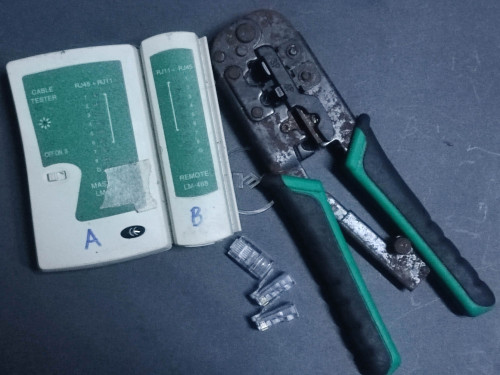
You need this to play around with LAN cable. RJ45 header pin can can easily worn out if always plug & play.

user posted image
kwss
post Feb 13 2025, 01:31 AM

Regular
******
Senior Member
1,207 posts

Joined: Aug 2018
QUOTE(hsbb @ Feb 13 2025, 01:30 AM)
You need this to play around with LAN cable. RJ45 header pin can can easily worn out if always plug & play.

user posted image
*
I think he need a professional Fluke Network Cable Tester. The one that came with calibration certificate
bruce.gif

495 Pages « < 458 459 460 461 462 > » Top
Topic ClosedOptions
 

Change to:
| Lo-Fi Version
0.0197sec    0.39    6 queries    GZIP Disabled
Time is now: 3rd December 2025 - 10:16 PM