Welcome Guest ( Log In | Register )

Bump Topic Topic Closed RSS Feed
495 Pages « < 457 458 459 460 461 > » Bottom

Outline · [ Standard ] · Linear+

Unifi Official TM UniFi High Speed Broadband Thread V42, READ 1ST PAGE FOR RELEVANT WIFI INFO!

views
     
kwss
post Feb 12 2025, 04:48 PM

Regular
******
Senior Member
1,207 posts

Joined: Aug 2018
QUOTE(mesf @ Feb 12 2025, 04:20 PM)
500mbps from SWU3.0 that they then upgraded to 800 for free, but idk if its still 800 bc i havent checked in a while. i have called TM they have confirmed i have public ip

first 2 octet is 180.73
*
You are already having public IPv4 address so it must be configuration issue for the port forwarding. I am not familiar with all the router out there but if can post some screenshot I might be able to spot the problem
hsbb
post Feb 12 2025, 05:04 PM

Casual
***
Junior Member
447 posts

Joined: Aug 2009


QUOTE(mesf @ Feb 12 2025, 04:20 PM)
500mbps from SWU3.0 that they then upgraded to 800 for free, but idk if its still 800 bc i havent checked in a while. i have called TM they have confirmed i have public ip

first 2 octet is 180.73
*
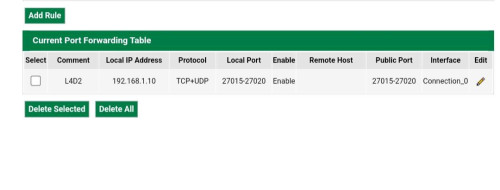
Your router model? 1st thing is make fix ip for your device which used for the games (MUST). Set this in your router.

user posted image

OR

user posted image
go626201
post Feb 12 2025, 05:06 PM

Regular
******
Senior Member
1,882 posts

Joined: Sep 2017
QUOTE(kwss @ Feb 12 2025, 04:03 PM)
You might not like to hear it but I kind of sus your Mikrotik is broken. Either physically broken or you configured it wrongly.
Look at all the packet loss you have on your Mikrotik. It is abnormally high. I launch a ping flood on mine and it is 0 packet lost.

Maybe try swapping out network cable as a start. Then configure your ONR as router and try it out.
If you have a switch or anything in between your device and Mikrotik, they are automatic a sus too.

EDIT:
I just pulled a fast ping on you. Assuming you didn't disconnect and your Mikrotik is still using the same IPv6 address, it is looking good. So the problem is internal to your house.

user posted image
*
Emm,yesterday i tried to switch to ether2(I was using for few years with 800M),and line better again.
But after that i switch back to ether1(2.5G port) with another Ugreen Cat 8 cable,and came out with the last screenshot result that posted midnight.

I am partially agree with your assumption about the RB5009 Ether1(2.5G) or Ethernet cable(which already use with 100M-800M plan for 5years).

I might get another new proper shorter Cat6A cable to replace the Ugreen Cat8 cable,as it is very tough to bend for the curve to placing.
Let me observe for another few days. Maybe the previous problem is causing be the cable aging and poor contact while replacing the new ONR.

And last,thanks for helping me to find the problem.

This post has been edited by go626201: Feb 12 2025, 05:11 PM
kwss
post Feb 12 2025, 05:32 PM

Regular
******
Senior Member
1,207 posts

Joined: Aug 2018
QUOTE(go626201 @ Feb 12 2025, 05:06 PM)
Emm,yesterday i tried to switch to ether2(I was using for few years with 800M),and line better again.
But after that i switch back to ether1(2.5G port) with another Ugreen Cat 8 cable,and came out with the last screenshot result that posted midnight.

I am partially agree with your assumption about the RB5009 Ether1(2.5G) or Ethernet cable(which already use with 100M-800M plan for 5years).

I might get another new proper shorter Cat6A cable to replace the Ugreen Cat8 cable,as it is very tough to bend for the curve to placing.
Let me observe for another few days. Maybe the previous problem is causing be the cable aging and poor contact while replacing the new ONR.

And last,thanks for helping me to find the problem.
*
I am just curious, how do you get more than 1gig when the rb5009 only have one 2.5gig port?
Are you using the SFP+ port or you MLAG 2x1gig to a switch?

Based on my ping test, everything from your ONU to Mikrotik is fine. In fact I get better result pinging from far away than you pinging your own router.
Just focus on everything that goes from Mikrotik to your internal network.
mesf
post Feb 12 2025, 06:53 PM

New Member
*
Junior Member
20 posts

Joined: Feb 2025
QUOTE(hsbb @ Feb 12 2025, 05:04 PM)

Your router model? 1st thing is make fix ip for your device which used for the games (MUST). Set this in your router.

https://pictr.com/images/2025/02/12/xG3SYq.md.jpg

OR

https://pictr.com/images/2025/02/12/xG3lKI.md.jpg
*


i have the zyxel e3200-t0. i have already set my ip to static


https://pictr.com/images/2025/02/12/xGD7AJ.md.png
https://pictr.com/images/2025/02/12/xGD51Z.md.png
https://pictr.com/images/2025/02/12/xGD00Y.png
hsbb
post Feb 12 2025, 07:32 PM

Casual
***
Junior Member
447 posts

Joined: Aug 2009


QUOTE(mesf @ Feb 12 2025, 06:53 PM)
Disable DMZ. At port fwd page select Internet for wan connection & put games server ip at configure originating ip.

Also allow incoming/outgoing connection for your games in your pc firewall setting.

This post has been edited by hsbb: Feb 12 2025, 07:35 PM
tng55
post Feb 12 2025, 09:06 PM

Regular
******
Senior Member
1,440 posts

Joined: Sep 2021


QUOTE(mesf @ Feb 12 2025, 06:53 PM)
zyxel e3200-t0 that provider TM Router wont work port forwarding

due limited control

get gaming router like asus can be port forward will always open not issue TM
you don't need ask tm
anip94
post Feb 12 2025, 09:24 PM

Getting Started
**
Junior Member
99 posts

Joined: Nov 2008
From: KL
hi guys, is the dedicated mesh network like deco is better solution than converting my current router to controller and getting another router as satellite?
go626201
post Feb 12 2025, 09:27 PM

Regular
******
Senior Member
1,882 posts

Joined: Sep 2017
QUOTE(kwss @ Feb 12 2025, 05:32 PM)
I am just curious, how do you get more than 1gig when the rb5009 only have one 2.5gig port?
Are you using the SFP+ port or you MLAG 2x1gig to a switch?

Based on my ping test, everything from your ONU to Mikrotik is fine. In fact I get better result pinging from far away than you pinging your own router.
Just focus on everything that goes from Mikrotik to your internal network.
*
I using SFP+ with 2.5G switch(SFP+ connected). Ether1(2.5G) connected to GN630V 2.5G Port.
Just now i try to tinkering again,and there are still having some small issue but not longer with uploading file with high speed.
As i mention before,i always have some similar issue with torrenting (With low speed torrenting,mean speed never hit more than 50-100mbps).

Below is my latest pingplotter result with torrenting and uploading at the same time and 517M limit.
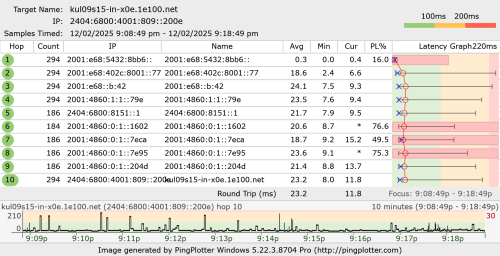
user posted image

user posted image

You can try to ping test to my ipv6 address again now. (I restart my router again just now,now didn't see 800ms spikes anymore which is a big improvement,but torrenting causing small spikes-40ms now)
I just tried with my SG VPS,and seeing similar latency spikes connected to my unifi ipv6.
user posted image

Which i still believe the problem is causing by Unifi QoS rule. (connection number limit?,my torrenting connection less than 100 connection only)
I having this torrenting issue for few years already,thats why 75% of my smokeping that having very short time of spikes that only occurs once or twice per month might due to my pc running torrenting.

Without torrenting and before FSU,99% of time is totally latency fine.

Edited:Added a mikrotik firewall connection screenshot of total connection number IPv4 and IPv6. (at least half of of connection used for smokeping)
user posted image

This post has been edited by go626201: Feb 12 2025, 09:39 PM
kwss
post Feb 12 2025, 09:39 PM

Regular
******
Senior Member
1,207 posts

Joined: Aug 2018
QUOTE(go626201 @ Feb 12 2025, 09:27 PM)
I using SFP+ with 2.5G switch(SFP+ connected). Ether1(2.5G) connected to GN630V 2.5G Port.
Just now i try to tinkering again,and there are still having some small issue but not longer with uploading file with high speed.
As i mention before,i always have some similar issue with torrenting (With low speed torrenting,mean speed never hit more than 50-100mbps).

Below is my latest pingplotter result with torrenting and uploading at the same time and 517M limit.
user posted image

user posted image

You can try to ping test to my ipv6 address again now. (I restart my router again just now,now didn't see 800ms spikes anymore which is a big improvement,but torrenting causing small spikes-40ms now)
I just tried with my SG VPS,and seeing similar latency spikes connected to my unifi ipv6.
user posted image

Which i still believe the problem is causing by Unifi QoS rule. (connection number limit?,my torrenting connection less than 100 connection only)
I having this torrenting issue for few years already,thats why 75% of my smokeping that having very short time of spikes that only occurs once or twice per month might due to my pc running torrenting.

Without torrenting and before FSU,99% of time is totally latency fine.
*
Hi, is it possible for you to connect your machine directly to Mikrotik and run the ping plotter again?
Based on your screenshot you are still losing packet to your router.
From what I tested earlier your router do not lose packet.
The underlying problem is still not fixed.
kwss
post Feb 12 2025, 10:37 PM

Regular
******
Senior Member
1,207 posts

Joined: Aug 2018
go626201
Fast ping result:
CODE

--- 2001:e68:5432:8bb6:: ping statistics ---
15374 packets transmitted, 15373 received, 0.00650449% packet loss, time 492368ms
rtt min/avg/max/mdev = 7.860/37.606/158.960/36.281 ms, pipe 10, ipg/ewma 32.028/46.030 ms

It is pretty decent.

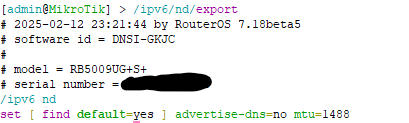
Can you get me the following output from your Mikrotik?
CODE

/ipv6/nd/export


Also from 7.18 changelog:
CODE
*) queue - prevent CAKE bandwidth config from potentially causing lost connectivity to a device;


Maybe you want to give my cake QoS another go and see if it helps?
kwss
post Feb 12 2025, 10:54 PM

Regular
******
Senior Member
1,207 posts

Joined: Aug 2018
go626201
I spin up an instance in AWS Malaysia and did ping for both of us.

MINE:
CODE

--- 2001:e68:5427:<snip> ping statistics ---
1400 packets transmitted, 1400 received, 0% packet loss, time 280828ms
rtt min/avg/max/mdev = 4.093/5.034/6.137/0.533 ms, ipg/ewma 200.734/4.910 ms


YOURS:
CODE

--- 2001:e68:5432:8bb6:: ping statistics ---
1403 packets transmitted, 1402 received, 0.0712758% packet loss, time 281287ms
rtt min/avg/max/mdev = 8.970/37.573/169.916/37.022 ms, ipg/ewma 200.632/27.331 ms


Not exactly sure if 2Gbps get such high network priority compared to 1Gbps. The jitter and latency is like a leased line.
kwss
post Feb 12 2025, 11:11 PM

Regular
******
Senior Member
1,207 posts

Joined: Aug 2018
Testing Unifi 2Gbps reserved bandwidth.
Since I found out the latency and jitter is so much more amazing compared to 1Gbps package, lets find out how much reserved bandwidth I actually have. Reserved bandwidth here means I get absolutely zero packet retransmit at a given transmission rate.

The test is using iperf3 udp packet test and see how much we can stream without a missing packet. Once we are past equilibrium, there should be zero packet drop. That is our reserved bandwidth.

Test at 600Mbps
CODE

[ ID] Interval           Transfer     Bitrate         Jitter    Lost/Total Datagrams
[  5]   0.00-1.00   sec  65.6 MBytes   549 Mbits/sec  0.030 ms  4199/53021 (7.9%)  
[  5]   1.00-2.00   sec  71.5 MBytes   600 Mbits/sec  0.020 ms  0/53275 (0%)  
[  5]   2.00-3.00   sec  71.5 MBytes   600 Mbits/sec  0.028 ms  0/53268 (0%)  
[  5]   3.00-4.00   sec  71.5 MBytes   600 Mbits/sec  0.033 ms  0/53266 (0%)  
[  5]   4.00-5.00   sec  71.5 MBytes   600 Mbits/sec  0.032 ms  0/53260 (0%)  
[  5]   5.00-6.00   sec  71.5 MBytes   600 Mbits/sec  0.025 ms  0/53279 (0%)  
[  5]   6.00-7.00   sec  71.5 MBytes   600 Mbits/sec  0.033 ms  0/53252 (0%)  
[  5]   7.00-8.00   sec  71.5 MBytes   600 Mbits/sec  0.040 ms  0/53272 (0%)  
[  5]   8.00-9.00   sec  71.5 MBytes   600 Mbits/sec  0.022 ms  0/53271 (0%)  
[  5]   9.00-10.00  sec  71.5 MBytes   600 Mbits/sec  0.033 ms  4/53268 (0.0075%)  
[  5]  10.00-10.01  sec   268 KBytes   512 Mbits/sec  0.013 ms  0/195 (0%)  
- - - - - - - - - - - - - - - - - - - - - - - - -
[ ID] Interval           Transfer     Bitrate         Jitter    Lost/Total Datagrams
[  5]   0.00-10.01  sec   710 MBytes   595 Mbits/sec  0.013 ms  4203/532627 (0.79%)  receiver
-----------------------------------------------------------


Test at 700Mbps
CODE

[ ID] Interval           Transfer     Bitrate         Jitter    Lost/Total Datagrams
[  5]   0.00-1.00   sec  74.7 MBytes   626 Mbits/sec  0.024 ms  6201/61868 (10%)  
[  5]   1.00-2.00   sec  83.5 MBytes   700 Mbits/sec  0.010 ms  9/62159 (0.014%)  
[  5]   2.00-3.00   sec  83.4 MBytes   700 Mbits/sec  0.011 ms  9/62142 (0.014%)  
[  5]   3.00-4.00   sec  83.4 MBytes   700 Mbits/sec  0.011 ms  2/62144 (0.0032%)  
[  5]   4.00-5.00   sec  83.4 MBytes   700 Mbits/sec  0.013 ms  14/62149 (0.023%)  
[  5]   5.00-6.00   sec  83.4 MBytes   700 Mbits/sec  0.009 ms  17/62149 (0.027%)  
[  5]   6.00-7.00   sec  83.4 MBytes   700 Mbits/sec  0.026 ms  10/62128 (0.016%)  
[  5]   7.00-8.00   sec  83.4 MBytes   700 Mbits/sec  0.011 ms  12/62155 (0.019%)  
[  5]   8.00-9.00   sec  83.4 MBytes   700 Mbits/sec  0.032 ms  3/62131 (0.0048%)  
[  5]   9.00-10.00  sec  83.4 MBytes   700 Mbits/sec  0.025 ms  7/62149 (0.011%)  
[  5]  10.00-10.00  sec   311 KBytes   656 Mbits/sec  0.011 ms  0/226 (0%)  
- - - - - - - - - - - - - - - - - - - - - - - - -
[ ID] Interval           Transfer     Bitrate         Jitter    Lost/Total Datagrams
[  5]   0.00-10.00  sec   826 MBytes   693 Mbits/sec  0.011 ms  6284/621400 (1%)  receiver


Since we are having some drop at 700M, let's try 650M
CODE

[ ID] Interval           Transfer     Bitrate         Jitter    Lost/Total Datagrams
[  5]   0.00-1.00   sec  70.1 MBytes   588 Mbits/sec  0.010 ms  5239/57428 (9.1%)  
[  5]   1.00-2.00   sec  77.6 MBytes   650 Mbits/sec  0.008 ms  0/57755 (0%)  
[  5]   2.00-3.00   sec  77.4 MBytes   650 Mbits/sec  0.011 ms  3/57657 (0.0052%)  
[  5]   3.00-4.00   sec  76.9 MBytes   645 Mbits/sec  0.017 ms  441/57740 (0.76%)  
[  5]   4.00-5.00   sec  77.5 MBytes   650 Mbits/sec  0.017 ms  0/57717 (0%)  
[  5]   5.00-6.00   sec  77.5 MBytes   650 Mbits/sec  0.015 ms  0/57694 (0%)  
[  5]   6.00-7.00   sec  77.5 MBytes   650 Mbits/sec  0.015 ms  0/57710 (0%)  
[  5]   7.00-8.00   sec  77.5 MBytes   650 Mbits/sec  0.025 ms  0/57698 (0%)  
[  5]   8.00-9.00   sec  77.5 MBytes   650 Mbits/sec  0.012 ms  0/57726 (0%)  
[  5]   9.00-10.00  sec  77.5 MBytes   650 Mbits/sec  0.015 ms  0/57697 (0%)  
[  5]  10.00-10.00  sec   264 KBytes   581 Mbits/sec  0.011 ms  0/192 (0%)  
- - - - - - - - - - - - - - - - - - - - - - - - -
[ ID] Interval           Transfer     Bitrate         Jitter    Lost/Total Datagrams
[  5]   0.00-10.00  sec   767 MBytes   643 Mbits/sec  0.011 ms  5683/577014 (0.98%)  receiver


Conclusion:
The price I get for my 2Gbps is equivalent to a 600-650Mbps leased line.
go626201
post Feb 12 2025, 11:25 PM

Regular
******
Senior Member
1,882 posts

Joined: Sep 2017
QUOTE(kwss @ Feb 12 2025, 10:37 PM)
go626201
Fast ping result:
CODE

--- 2001:e68:5432:8bb6:: ping statistics ---
15374 packets transmitted, 15373 received, 0.00650449% packet loss, time 492368ms
rtt min/avg/max/mdev = 7.860/37.606/158.960/36.281 ms, pipe 10, ipg/ewma 32.028/46.030 ms

It is pretty decent.

Can you get me the following output from your Mikrotik?
CODE

/ipv6/nd/export


Also from 7.18 changelog:
CODE
*) queue - prevent CAKE bandwidth config from potentially causing lost connectivity to a device;


Maybe you want to give my cake QoS another go and see if it helps?
*
QUOTE(kwss @ Feb 12 2025, 11:11 PM)
Testing Unifi 2Gbps reserved bandwidth.
Since I found out the latency and jitter is so much more amazing compared to 1Gbps package, lets find out how much reserved bandwidth I actually have. Reserved bandwidth here means I get absolutely zero packet retransmit at a given transmission rate.

The test is using iperf3 udp packet test and see how much we can stream without a missing packet. Once we are past equilibrium, there should be zero packet drop. That is our reserved bandwidth.

Test at 600Mbps
CODE

[ ID] Interval           Transfer     Bitrate         Jitter    Lost/Total Datagrams
[  5]   0.00-1.00   sec  65.6 MBytes   549 Mbits/sec  0.030 ms  4199/53021 (7.9%)  
[  5]   1.00-2.00   sec  71.5 MBytes   600 Mbits/sec  0.020 ms  0/53275 (0%)  
[  5]   2.00-3.00   sec  71.5 MBytes   600 Mbits/sec  0.028 ms  0/53268 (0%)  
[  5]   3.00-4.00   sec  71.5 MBytes   600 Mbits/sec  0.033 ms  0/53266 (0%)  
[  5]   4.00-5.00   sec  71.5 MBytes   600 Mbits/sec  0.032 ms  0/53260 (0%)  
[  5]   5.00-6.00   sec  71.5 MBytes   600 Mbits/sec  0.025 ms  0/53279 (0%)  
[  5]   6.00-7.00   sec  71.5 MBytes   600 Mbits/sec  0.033 ms  0/53252 (0%)  
[  5]   7.00-8.00   sec  71.5 MBytes   600 Mbits/sec  0.040 ms  0/53272 (0%)  
[  5]   8.00-9.00   sec  71.5 MBytes   600 Mbits/sec  0.022 ms  0/53271 (0%)  
[  5]   9.00-10.00  sec  71.5 MBytes   600 Mbits/sec  0.033 ms  4/53268 (0.0075%)  
[  5]  10.00-10.01  sec   268 KBytes   512 Mbits/sec  0.013 ms  0/195 (0%)  
- - - - - - - - - - - - - - - - - - - - - - - - -
[ ID] Interval           Transfer     Bitrate         Jitter    Lost/Total Datagrams
[  5]   0.00-10.01  sec   710 MBytes   595 Mbits/sec  0.013 ms  4203/532627 (0.79%)  receiver
-----------------------------------------------------------


Test at 700Mbps
CODE

[ ID] Interval           Transfer     Bitrate         Jitter    Lost/Total Datagrams
[  5]   0.00-1.00   sec  74.7 MBytes   626 Mbits/sec  0.024 ms  6201/61868 (10%)  
[  5]   1.00-2.00   sec  83.5 MBytes   700 Mbits/sec  0.010 ms  9/62159 (0.014%)  
[  5]   2.00-3.00   sec  83.4 MBytes   700 Mbits/sec  0.011 ms  9/62142 (0.014%)  
[  5]   3.00-4.00   sec  83.4 MBytes   700 Mbits/sec  0.011 ms  2/62144 (0.0032%)  
[  5]   4.00-5.00   sec  83.4 MBytes   700 Mbits/sec  0.013 ms  14/62149 (0.023%)  
[  5]   5.00-6.00   sec  83.4 MBytes   700 Mbits/sec  0.009 ms  17/62149 (0.027%)  
[  5]   6.00-7.00   sec  83.4 MBytes   700 Mbits/sec  0.026 ms  10/62128 (0.016%)  
[  5]   7.00-8.00   sec  83.4 MBytes   700 Mbits/sec  0.011 ms  12/62155 (0.019%)  
[  5]   8.00-9.00   sec  83.4 MBytes   700 Mbits/sec  0.032 ms  3/62131 (0.0048%)  
[  5]   9.00-10.00  sec  83.4 MBytes   700 Mbits/sec  0.025 ms  7/62149 (0.011%)  
[  5]  10.00-10.00  sec   311 KBytes   656 Mbits/sec  0.011 ms  0/226 (0%)  
- - - - - - - - - - - - - - - - - - - - - - - - -
[ ID] Interval           Transfer     Bitrate         Jitter    Lost/Total Datagrams
[  5]   0.00-10.00  sec   826 MBytes   693 Mbits/sec  0.011 ms  6284/621400 (1%)  receiver


Since we are having some drop at 700M, let's try 650M
CODE

[ ID] Interval           Transfer     Bitrate         Jitter    Lost/Total Datagrams
[  5]   0.00-1.00   sec  70.1 MBytes   588 Mbits/sec  0.010 ms  5239/57428 (9.1%)  
[  5]   1.00-2.00   sec  77.6 MBytes   650 Mbits/sec  0.008 ms  0/57755 (0%)  
[  5]   2.00-3.00   sec  77.4 MBytes   650 Mbits/sec  0.011 ms  3/57657 (0.0052%)  
[  5]   3.00-4.00   sec  76.9 MBytes   645 Mbits/sec  0.017 ms  441/57740 (0.76%)  
[  5]   4.00-5.00   sec  77.5 MBytes   650 Mbits/sec  0.017 ms  0/57717 (0%)  
[  5]   5.00-6.00   sec  77.5 MBytes   650 Mbits/sec  0.015 ms  0/57694 (0%)  
[  5]   6.00-7.00   sec  77.5 MBytes   650 Mbits/sec  0.015 ms  0/57710 (0%)  
[  5]   7.00-8.00   sec  77.5 MBytes   650 Mbits/sec  0.025 ms  0/57698 (0%)  
[  5]   8.00-9.00   sec  77.5 MBytes   650 Mbits/sec  0.012 ms  0/57726 (0%)  
[  5]   9.00-10.00  sec  77.5 MBytes   650 Mbits/sec  0.015 ms  0/57697 (0%)  
[  5]  10.00-10.00  sec   264 KBytes   581 Mbits/sec  0.011 ms  0/192 (0%)  
- - - - - - - - - - - - - - - - - - - - - - - - -
[ ID] Interval           Transfer     Bitrate         Jitter    Lost/Total Datagrams
[  5]   0.00-10.00  sec   767 MBytes   643 Mbits/sec  0.011 ms  5683/577014 (0.98%)  receiver


Conclusion:
The price I get for my 2Gbps is equivalent to a 600-650Mbps leased line.
*
user posted image
About cake i will try it later or tomorrow.
Can i know what command that you using with iperf3?
I got 10+ SG VPS can test with it and i will screenshot some that can hit more than 500mbps.
kwss
post Feb 12 2025, 11:28 PM

Regular
******
Senior Member
1,207 posts

Joined: Aug 2018
QUOTE(go626201 @ Feb 12 2025, 11:25 PM)
user posted image
About cake i will try it later or tomorrow.
Can i know what command that you using with iperf3?
I got 10+ SG VPS can test with it and i will screenshot some that can hit more than 500mbps.
*
It is:
iperf3 -c 2406:da10:8a99:4e02:cc0a:6fc7:2359:aae7 -u -b 650M

Can you verify the MTU you configured in your ND advertisement is the same as the MTU in your PPPoE client status? 1488 is a weird number for RouterOS
go626201
post Feb 12 2025, 11:31 PM

Regular
******
Senior Member
1,882 posts

Joined: Sep 2017
QUOTE(kwss @ Feb 12 2025, 11:28 PM)
It is:
iperf3 -c 2406:da10:8a99:4e02:cc0a:6fc7:2359:aae7 -u -b 650M

Can you verify the MTU you configured in your ND advertisement is the same as the MTU in your PPPoE client status? 1488 is a weird number for RouterOS
*
Yes 1488,because i cant get 1492 with unifi. and the default from unifi is 1480.
go626201
post Feb 12 2025, 11:51 PM

Regular
******
Senior Member
1,882 posts

Joined: Sep 2017
QUOTE(kwss @ Feb 12 2025, 11:28 PM)
It is:
iperf3 -c 2406:da10:8a99:4e02:cc0a:6fc7:2359:aae7 -u -b 650M

Can you verify the MTU you configured in your ND advertisement is the same as the MTU in your PPPoE client status? 1488 is a weird number for RouterOS
*
Iperf3 with UDP -b 480M
This is get from the VPS that unifi upload send to the VPS.

VPS1
CODE
[ ID] Interval           Transfer     Bitrate         Jitter    Lost/Total Datagrams
[  5]   0.00-1.00   sec  44.5 MBytes   374 Mbits/sec  0.025 ms  5384/38095 (14%)
[  5]   1.00-2.00   sec  52.5 MBytes   441 Mbits/sec  0.018 ms  86/38662 (0.22%)
[  5]   2.00-3.00   sec  51.2 MBytes   429 Mbits/sec  0.018 ms  194/37779 (0.51%)
[  5]   3.00-4.00   sec  51.5 MBytes   432 Mbits/sec  0.035 ms  3347/41152 (8.1%)
[  5]   4.00-5.00   sec  50.1 MBytes   420 Mbits/sec  0.040 ms  5170/41942 (12%)
[  5]   5.00-6.00   sec  50.9 MBytes   427 Mbits/sec  0.028 ms  4676/42054 (11%)
[  5]   6.00-7.00   sec  51.2 MBytes   430 Mbits/sec  0.043 ms  4539/42147 (11%)
[  5]   7.00-8.00   sec  50.1 MBytes   420 Mbits/sec  0.019 ms  5120/41911 (12%)
[  5]   8.00-9.00   sec  51.0 MBytes   428 Mbits/sec  0.039 ms  4644/42077 (11%)
[  5]   9.00-10.00  sec  51.9 MBytes   435 Mbits/sec  0.018 ms  3891/42003 (9.3%)
[  5]  10.00-10.06  sec  2.00 MBytes   300 Mbits/sec  0.057 ms  1043/2513 (42%)
- - - - - - - - - - - - - - - - - - - - - - - - -
[ ID] Interval           Transfer     Bitrate         Jitter    Lost/Total Datagrams
[SUM]  0.0-10.1 sec  23 datagrams received out-of-order
[  5]   0.00-10.06  sec   507 MBytes   423 Mbits/sec  0.057 ms  38094/410335 (9.3%)  receiver


VPS2
CODE
[ ID] Interval           Transfer     Bitrate         Jitter    Lost/Total Datagrams
[  5]   0.00-1.00   sec  45.0 MBytes   378 Mbits/sec  0.020 ms  7741/40792 (19%)
[  5]   1.00-2.00   sec  56.9 MBytes   477 Mbits/sec  0.021 ms  330/42107 (0.78%)
[  5]   2.00-3.00   sec  56.8 MBytes   477 Mbits/sec  0.017 ms  290/42024 (0.69%)
[  5]   3.00-4.00   sec  54.3 MBytes   456 Mbits/sec  0.017 ms  64/39964 (0.16%)
[  5]   4.00-5.00   sec  52.7 MBytes   442 Mbits/sec  0.035 ms  247/38948 (0.63%)
[  5]   5.00-6.00   sec  53.5 MBytes   449 Mbits/sec  0.349 ms  427/39697 (1.1%)
[  5]   6.00-7.00   sec  54.2 MBytes   455 Mbits/sec  0.015 ms  805/40608 (2%)
[  5]   7.00-8.00   sec  53.6 MBytes   449 Mbits/sec  0.020 ms  1888/41229 (4.6%)
[  5]   8.00-9.00   sec  54.3 MBytes   455 Mbits/sec  0.017 ms  2235/42073 (5.3%)
[  5]   9.00-10.00  sec  53.7 MBytes   451 Mbits/sec  0.026 ms  2572/42024 (6.1%)
[  5]  10.00-10.02  sec  1.14 MBytes   483 Mbits/sec  0.017 ms  25/860 (2.9%)
- - - - - - - - - - - - - - - - - - - - - - - - -
[ ID] Interval           Transfer     Bitrate         Jitter    Lost/Total Datagrams
[SUM]  0.0-10.0 sec  195 datagrams received out-of-order
[  5]   0.00-10.02  sec   536 MBytes   449 Mbits/sec  0.017 ms  16624/410326 (4.1%)  receiver


hsbb
post Feb 12 2025, 11:53 PM

Casual
***
Junior Member
447 posts

Joined: Aug 2009


QUOTE(go626201 @ Feb 12 2025, 11:31 PM)
Yes 1488,because i cant get 1492 with unifi. and the default from unifi is 1480.
*
Yes. 1480 is default MTU for PPPoE over fiber. I use it when using combo but not when using standalone ONU.

This post has been edited by hsbb: Feb 12 2025, 11:55 PM
go626201
post Feb 12 2025, 11:56 PM

Regular
******
Senior Member
1,882 posts

Joined: Sep 2017
QUOTE(hsbb @ Feb 12 2025, 11:53 PM)
Yes. 1480 is default MTU for PPPoE over fiber.
*
I though MTU1492 is the default one?
Soonwai's thread wrote something about it before.
https://forum.lowyat.net/topic/4206500

Edited:
Add another link
https://community.fortinet.com/t5/FortiGate...iFi/ta-p/196973

This post has been edited by go626201: Feb 12 2025, 11:58 PM
hsbb
post Feb 13 2025, 12:06 AM

Casual
***
Junior Member
447 posts

Joined: Aug 2009


QUOTE(go626201 @ Feb 12 2025, 11:56 PM)
I though MTU1492 is the default one?
Soonwai's thread wrote something about it before.
https://forum.lowyat.net/topic/4206500
*
But it depend because the max MTU is 1500. As for your case 1492 not working, but you can increase/decrease by 2. Btw 1480 is PPPoE default for Fiberhome SR120-A. Some router need to change also MSS if you change MTU.. MTU-(20+20)=MSS. Because MTU is related to Ethernet eth0 so I think the value depend on eth0 ic also maybe. Try to change the value when anything about technical thing, it will never fix value.

** If you ask me, i will say Ethernet MTU is 1500.

This post has been edited by hsbb: Feb 13 2025, 12:12 AM

495 Pages « < 457 458 459 460 461 > » Top
Topic ClosedOptions
 

Change to:
| Lo-Fi Version
0.0209sec    0.45    6 queries    GZIP Disabled
Time is now: 3rd December 2025 - 11:46 PM