Welcome Guest ( Log In | Register )

Bump Topic Topic Closed RSS Feed
495 Pages « < 332 333 334 335 336 > » Bottom

Outline · [ Standard ] · Linear+

Unifi Official TM UniFi High Speed Broadband Thread V42, READ 1ST PAGE FOR RELEVANT WIFI INFO!

views
     
yenchenje
post Sep 11 2024, 12:35 PM

Enthusiast
*****
Junior Member
932 posts

Joined: Dec 2019
QUOTE(blackbox14 @ Sep 11 2024, 11:18 AM)
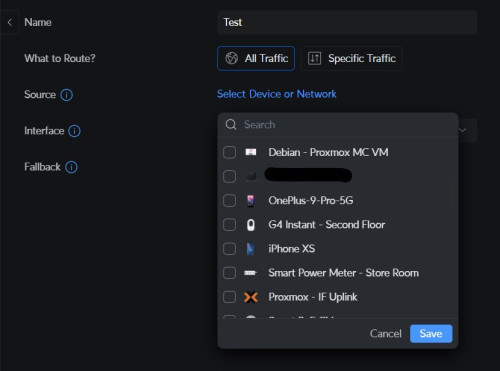
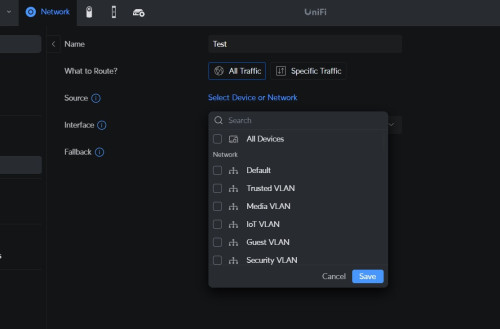
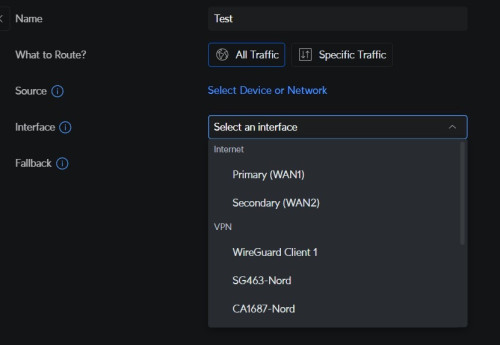
Is there some way to filter the devices using the VPN client by MAC address or something similar for your UDM SE?

Asus has the VPN Fusion feature for their TUF AX4200 that lets you decide which device goes through VPN.
*
user posted image
user posted image
user posted image

Havenโ€™t passed through an entire VLAN on VPN, only tried device per device so far
Oltromen Ripot
post Sep 11 2024, 12:37 PM

๐Ÿ‘ 999999 person Likes this member
*******
Senior Member
4,034 posts

Joined: Dec 2019
QUOTE(Moogle Stiltzkin @ Sep 11 2024, 05:19 AM)
is dot or doh better?

i did dot at router, cauz my users r not savvy enough to go browser enable doh (go figure).

You can test here if it's working or not
https://one.one.one.one/help/
*
got too involved as i am working/worked on DNS proxying the past few nights.
an endeavour which itself involved research purposes, with the achieved outcome is obviously meant to facilitate future research purposes.

so far i have DoH working in iphone, ipad, windows, and linux.
android unfortunately requires DoT, which i am avoiding because its default port tcp/853 can be detected and thus subject to blocking - and worst, hijacking.

--

i'm ignoring cost of creating and cost of deciphering DNS wire payload, which is applicable to each below.

DNS
no udp/53 protocol penalty

DNS-over-TLS
tcp/853; cost of establishing TCP session, cost of negotiating secure TLS session, cost of tearing TCP session

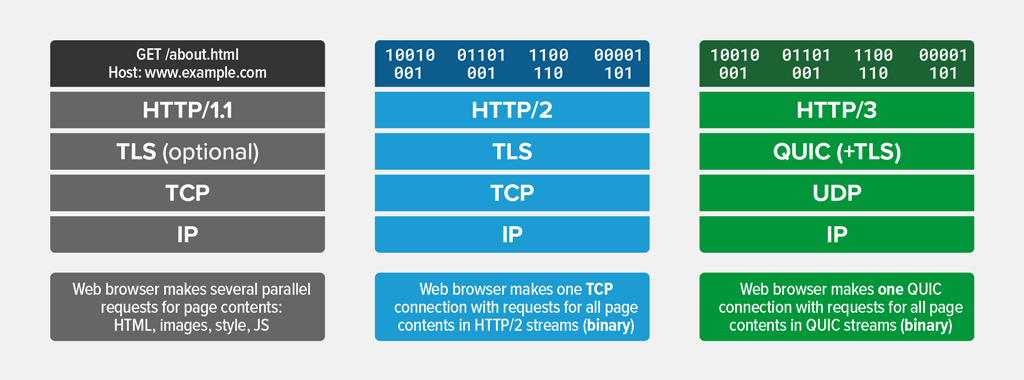
DNS-over-HTTP/1, DNS-over-HTTP/1.1, DNS-over-HTTP/2
tcp/443; cost of establishing TCP session, cost of negotiating secure TLS session, cost of parsing HTTP request and response, cost of tearing down TCP session

DNS-over-HTTP/3, which runs over QUIC
udp/443; cost of negotiating QUIC session, cost of parsing HTTP request and response

https://www.f5.com/glossary/quic-http3
user posted image

--

instead of using DoH-proxy reinvented by people out there, i decided to use nginx as my DNS-over-HTTPS forwarder. no need to reinvent the wheel.
immediately can support all HTTP/1 to HTTP/3, tcp and quic protocols.
and specifically choosing nginx; because i can hide my DNS-over-HTTPS entry point behind normal web hosting.
Unless one knows the exact https://what-is-my-exact-name/, you shouldn't be able to identify it nor use it. Hiding in plain sight.

--

(oh, yes. i'm bragging.)

This post has been edited by Oltromen Ripot: Sep 11 2024, 12:48 PM

Orpheus1120
post Sep 11 2024, 12:45 PM

Getting Started
**
Junior Member
176 posts

Joined: Dec 2008


hazairi

Thanks to you, Iโ€™ve managed to upgrade my plan to 1gbps. Technician will come tomorrow afternoon.

Btw, I read they will be giving us a D-Link DPN-FX3060V. But I would like to continue to use my edgerouter 4.

Is there anything I need to do on the DLINK router end to disable the routing and use my edgerouter instead?

This post has been edited by Orpheus1120: Sep 11 2024, 12:46 PM
BenYeeHua
post Sep 11 2024, 12:58 PM

Regular
******
Senior Member
1,873 posts

Joined: Nov 2010


QUOTE(Oltromen Ripot @ Sep 11 2024, 12:37 PM)
» Click to show Spoiler - click again to hide... «

instead of using DoH-proxy reinvented by people out there, i decided to use nginx as my DNS-over-HTTPS forwarder. no need to reinvent the wheel.
immediately can support all HTTP/1 to HTTP/3, tcp and quic protocols.
and specifically choosing nginx; because i can hide my DNS-over-HTTPS entry point behind normal web hosting.
Unless one knows the exact https://what-is-my-exact-name/, you shouldn't be able to identify it nor use it. Hiding in plain sight.

--

(oh, yes. i'm bragging.)
*
Ya, Win 11 one DoH is the best, got keepalive, so all browser's auto supported get ECH, including those Electron(chromium) apps.
https://tls-ech.dev/

Android too random, all use like UCweb or TBS(Tencent) webview, many even not following DoT config lol.
Even you set the DNS to 8888 by DHCP, it will fallback to China DNS as it like...

iOS enforce safari webview, so it just getting safer when webview updated with iOS. thumbsup.gif

---
Anyway, it is funny that you had to redirect/hijack your port 53 for Android DNS, else just don't use any China apps, lol. laugh.gif

This post has been edited by BenYeeHua: Sep 11 2024, 01:00 PM
boombaamboom
post Sep 11 2024, 01:02 PM

New Member
*
Newbie
2 posts

Joined: Jan 2019
QUOTE(hazairi @ Sep 11 2024, 12:25 PM)
I also got the free fx3060v from TM but i didn't use it. Means that model, the LAN is capable of more than 940Mbps?
*
technically yes it is, since the lan port 1 is 2.5gbe port(make sure its v3 firmware)
BUT
make sure on your side you using at least cat6 cable & your device (pc/laptop) network card is also 2.5Gbe
AND ALSO
depend on TM infra in your area is it capable or not (this part is easy, just keep on lodge report until they solve it)

This post has been edited by boombaamboom: Sep 11 2024, 01:03 PM
hazairi
post Sep 11 2024, 01:32 PM

Look at all my stars!!
*******
Senior Member
2,694 posts

Joined: Feb 2007
From: KL


QUOTE(boombaamboom @ Sep 11 2024, 01:02 PM)
technically yes it is, since the lan port 1 is 2.5gbe port(make sure its v3 firmware)
BUT
make sure on your side you using at least cat6 cable & your device (pc/laptop) network card is also 2.5Gbe
AND ALSO
depend on TM infra in your area is it capable or not (this part is easy, just keep on lodge report until they solve it)
*
OK, but technically, if the port is 1Gbps, speedtest can't reach 999Mbps right? Max would be 950Mbps
tng55
post Sep 11 2024, 01:43 PM

Regular
******
Senior Member
1,445 posts

Joined: Sep 2021


QUOTE(sgpdsmss @ Sep 11 2024, 11:27 AM)
so walk in tm for recontract?
or switch line ..wait tm to counter offer ?

thanks ..
*
walk in and ask is best tm point try if no give best offer
go ahead switch line maxis i think will chance tm to counter offer by call they will call you
tng55
post Sep 11 2024, 01:45 PM

Regular
******
Senior Member
1,445 posts

Joined: Sep 2021


QUOTE(hazairi @ Sep 11 2024, 12:25 PM)
I also got the free fx3060v from TM but i didn't use it. Means that model, the LAN is capable of more than 940Mbps?
*
he got router 2.5gbps LAN port to PC Network 2.5Gbps LAN
tng55
post Sep 11 2024, 01:48 PM

Regular
******
Senior Member
1,445 posts

Joined: Sep 2021


QUOTE(hazairi @ Sep 11 2024, 01:32 PM)
OK, but technically, if the port is 1Gbps, speedtest can't reach 999Mbps right? Max would be 950Mbps
*
yes of course you ROUTER LAN PORT IS 1GBPS TO PC LAN PORT IS 1Gbps speedtest will max 940Mbps cannot reach 999Mbps
understand

This post has been edited by tng55: Sep 11 2024, 01:50 PM
Inferno_Angel
post Sep 11 2024, 01:52 PM

Getting Started
**
Junior Member
70 posts

Joined: Aug 2010
I'm using SWU 2.0 right now and gonna expired next month...
It is possible for me to get SWU plan again?
hazairi
post Sep 11 2024, 02:05 PM

Look at all my stars!!
*******
Senior Member
2,694 posts

Joined: Feb 2007
From: KL


QUOTE(Inferno_Angel @ Sep 11 2024, 01:52 PM)
I'm using SWU 2.0 right now and gonna expired next month...
It is possible for me to get SWU plan again?
*
yup. once your contract ended, go to TMPOINT and pretend to ask 'how can I terminate my unifi'
zeronehza
post Sep 11 2024, 02:15 PM

Malaysian Real Madrid Supporter Club
******
Senior Member
1,704 posts

Joined: Jan 2003
From: Hogoh Pahang Hogoh

QUOTE(Inferno_Angel @ Sep 11 2024, 01:52 PM)
I'm using SWU 2.0 right now and gonna expired next month...
It is possible for me to get SWU plan again?
*
swu 5.0 1Gbps RM 159 + foc 6m bill
BladeRider88
post Sep 11 2024, 02:18 PM

On my way
****
Junior Member
554 posts

Joined: Nov 2006


QUOTE(Oltromen Ripot @ Sep 11 2024, 12:37 PM)
got too involved as i am working/worked on DNS proxying the past few nights.
an endeavour which itself involved research purposes, with the achieved outcome is obviously meant to facilitate future research purposes.

so far i have DoH working in iphone, ipad, windows, and linux.
android unfortunately requires DoT, which i am avoiding because its default port tcp/853 can be detected and thus subject to blocking - and worst, hijacking.

--

i'm ignoring cost of creating and cost of deciphering DNS wire payload, which is applicable to each below.

DNS
no udp/53 protocol penalty

DNS-over-TLS
tcp/853; cost of establishing TCP session, cost of negotiating secure TLS session, cost of tearing TCP session

DNS-over-HTTP/1, DNS-over-HTTP/1.1, DNS-over-HTTP/2
tcp/443; cost of establishing TCP session, cost of negotiating secure TLS session, cost of parsing HTTP request and response, cost of tearing down TCP session

DNS-over-HTTP/3, which runs over QUIC
udp/443; cost of negotiating QUIC session, cost of parsing HTTP request and response

https://www.f5.com/glossary/quic-http3

user posted image

--

instead of using DoH-proxy reinvented by people out there, i decided to use nginx as my DNS-over-HTTPS forwarder. no need to reinvent the wheel.
immediately can support all HTTP/1 to HTTP/3, tcp and quic protocols.
and specifically choosing nginx; because i can hide my DNS-over-HTTPS entry point behind normal web hosting.
Unless one knows the exact https://what-is-my-exact-name/, you shouldn't be able to identify it nor use it. Hiding in plain sight.

--

(oh, yes. i'm bragging.)
*
For Android i know that you can use AdGuard or NexDNS app to get DoH

QUOTE(zeronehza @ Sep 11 2024, 02:15 PM)
swu 5.0 1Gbps RM 159 + foc 6m bill
*
This 1Gbps package last for 24 months only or permanent?

This post has been edited by BladeRider88: Sep 11 2024, 02:20 PM
zellleonhart
post Sep 11 2024, 02:48 PM

Stars stars stars
*******
Senior Member
5,075 posts

Joined: Oct 2008


QUOTE(Oltromen Ripot @ Sep 11 2024, 12:37 PM)
instead of using DoH-proxy reinvented by people out there, i decided to use nginx as my DNS-over-HTTPS forwarder. no need to reinvent the wheel.
immediately can support all HTTP/1 to HTTP/3, tcp and quic protocols.
and specifically choosing nginx; because i can hide my DNS-over-HTTPS entry point behind normal web hosting.
Unless one knows the exact https://what-is-my-exact-name/, you shouldn't be able to identify it nor use it. Hiding in plain sight.
*
I am using nginx to forward DoH queries to my AGH so that I can use https://my-doh-address/somethingelse instead of /dns-query too. But I am still stuck with DoT on android (when it's on mobile data) if I don't use to use third party apps for DNS right?
hustlerism
post Sep 11 2024, 02:59 PM

Devil In Disguise
******
Senior Member
1,641 posts

Joined: Jun 2011
From: Sin City


Hi Sifu,

I got a TP-Link Deco X50-5G router and im getting my unifi installed soon. They will probably provide me a D-Link router.

Is there any way I can make use of my TP-LINK Deco router? Bridge mode?
Oltromen Ripot
post Sep 11 2024, 03:00 PM

๐Ÿ‘ 999999 person Likes this member
*******
Senior Member
4,034 posts

Joined: Dec 2019
QUOTE(BladeRider88 @ Sep 11 2024, 02:18 PM)
For Android i know that you can use AdGuard or NexDNS app to get DoH
This 1Gbps package last for 24 months only or permanent?
*
i don't want to use app lah.
just want built-in support.
that's why i am going the extra mile to set up my own.

if use app or vpn, battery will masuk drain faster...

QUOTE(zellleonhart @ Sep 11 2024, 02:48 PM)
I am using nginx to forward DoH queries to my AGH so that I can use https://my-doh-address/somethingelse instead of /dns-query too. But I am still stuck with DoT on android (when it's on mobile data) if I don't use to use third party apps for DNS right?
*
Official document:
only Google and Cloudflare can DoH as secure DNS in Android - for the padt 2 years still no progress!(?)
BladeRider88
post Sep 11 2024, 03:05 PM

On my way
****
Junior Member
554 posts

Joined: Nov 2006


QUOTE(Oltromen Ripot @ Sep 11 2024, 03:00 PM)
i don't want to use app lah.
just want built-in support.
that's why i am going the extra mile to set up my own.

if use app or vpn, battery will masuk drain faster...
Official document:
only Google and Cloudflare can DoH as secure DNS in Android - for the padt 2 years still no progress!(?)
*
True also but app can give you protection when you are out from your home network, your 4G/5G network also can be hijacked remember? whistling.gif

So if you using VPN to connect back to your own server, it still will drain battery too whistling.gif

This post has been edited by BladeRider88: Sep 11 2024, 03:06 PM
Oltromen Ripot
post Sep 11 2024, 03:11 PM

๐Ÿ‘ 999999 person Likes this member
*******
Senior Member
4,034 posts

Joined: Dec 2019
QUOTE(BladeRider88 @ Sep 11 2024, 03:05 PM)
True also but app can give you protection when you are out from your home network, your 4G/5G network also can be hijacked remember?  whistling.gif

So if you using VPN to connect back to your own server, it still will drain battery too  whistling.gif
*
i have not found solution to this dilemma of wanting to use own DoH in Android.
so still using official adguard-dns.com in my Android.
iOS can already use DoH system-wide; hepi.

i selfishly refuse to accept app-based or vpn-based solution whether in Android or iOS.
not that desperate yet since MCMC is paused at the moment.
BladeRider88
post Sep 11 2024, 03:21 PM

On my way
****
Junior Member
554 posts

Joined: Nov 2006


QUOTE(Oltromen Ripot @ Sep 11 2024, 03:11 PM)
i have not found solution to this dilemma of wanting to use own DoH in Android.
so still using official adguard-dns.com in my Android.
iOS can already use DoH system-wide; hepi.

i selfishly refuse to accept app-based or vpn-based solution whether in Android or iOS.
not that desperate yet since MCMC is paused at the moment.
*
Actually given the current situation, DoT is sufficient for those device that not compatible with DoH

I use AdGuard app to protect my phone from ads & implement DoH when i am outside my network.

My major concerns is more on ad-blocking as i been using ads free Android phone for many years. DoH is just additional bonus for me.

Nothing wrong to refuse as this is everyone's preference. cool2.gif

EDIT:

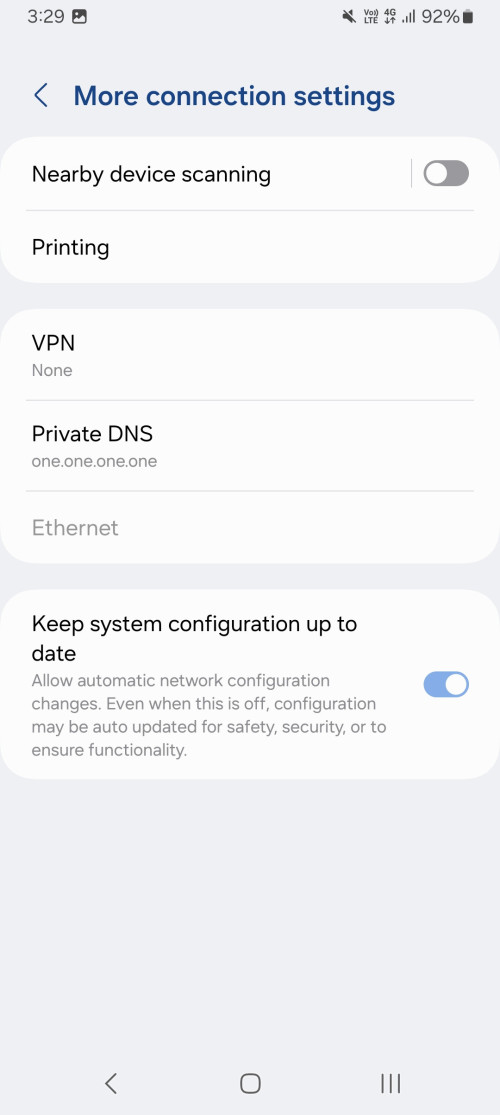
I did some research and i come across this

https://www.androidpolice.com/android-dns-o...https-mainline/

Maybe you can give it a try? Since it does not involved any apps and it is bake into the system

EDIT:

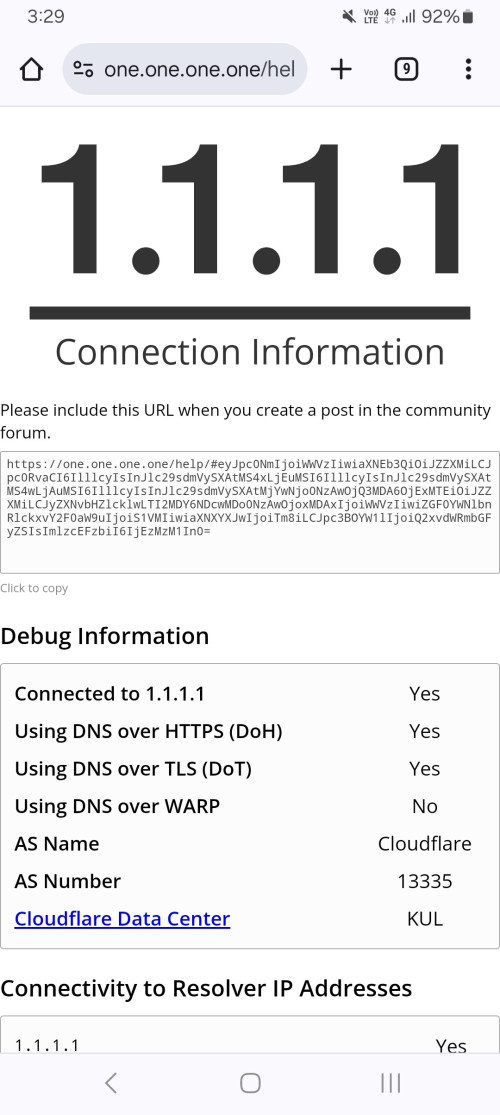
I tried on CF and it works~

user posted image
user posted image

This post has been edited by BladeRider88: Sep 11 2024, 03:33 PM
BenYeeHua
post Sep 11 2024, 03:30 PM

Regular
******
Senior Member
1,873 posts

Joined: Nov 2010


QUOTE(BladeRider88 @ Sep 11 2024, 03:21 PM)
Actually given the current situation, DoT is sufficient for those device that not compatible with DoH

I use AdGuard app to protect my phone from ads & implement DoH when i am outside my network.

My major concerns is more on ad-blocking as i been using ads free Android phone for many years. DoH is just additional bonus for me.

Nothing wrong to refuse as this is everyone's preference.ย  cool2.gif

EDIT:

I did some research and i come across this

https://www.androidpolice.com/android-dns-o...https-mainline/

Maybe you can give it a try? Since it does not involved any apps and it is bake into the system
*
And it means the same, only support CF or Google DoH lol.

QUOTE
Google DNS and Cloudflare DNS at launch, others may be added in the future.

https://security.googleblog.com/2022/07/dns...ndroid.html#fn2

lol, 2 years still only this 2 in whitelist, means DNS provider gonna pay google to get on list them.

This post has been edited by BenYeeHua: Sep 11 2024, 03:31 PM

495 Pages « < 332 333 334 335 336 > » Top
Topic ClosedOptions
 

Change to:
| Lo-Fi Version
0.0200sec    0.88    6 queries    GZIP Disabled
Time is now: 16th December 2025 - 06:38 PM