Welcome Guest ( Log In | Register )

Bump Topic Topic Closed RSS Feed
495 Pages « < 333 334 335 336 337 > » Bottom

Outline · [ Standard ] · Linear+

Unifi Official TM UniFi High Speed Broadband Thread V42, READ 1ST PAGE FOR RELEVANT WIFI INFO!

views
     
Sky.Live
post Sep 11 2024, 03:30 PM

Proctected Species
*******
Senior Member
4,390 posts

Joined: Oct 2004
From: Cheras, Malaysia


QUOTE(Orpheus1120 @ Sep 11 2024, 12:45 PM)
hazairi

Thanks to you, I’ve managed to upgrade my plan to 1gbps. Technician will come tomorrow afternoon. 

Btw, I read they will be giving us a D-Link DPN-FX3060V. But I would like to continue to use my edgerouter 4.

Is there anything I need to do on the DLINK router end to disable the routing and use my edgerouter instead?
*
How much is your monthly commitment? Bundling with other unifi
Services?
BladeRider88
post Sep 11 2024, 03:34 PM

On my way
****
Junior Member
554 posts

Joined: Nov 2006


QUOTE(BenYeeHua @ Sep 11 2024, 03:30 PM)
And it means the same, only support CF or Google DoH lol.
https://security.googleblog.com/2022/07/dns...ndroid.html#fn2

lol, 2 years still only this 2 in whitelist, means DNS provider gonna pay google to get on list them.
*
I quote from AndroidPolice

"Eventually, this upgraded system should just work without you having to even worry about which DNS server you might be using. For now, the feature is ready; it's on DNS providers to finish rolling out support for DNS over HTTPS."

As per my understanding, it is up to the DNS provider to provide DoH or DoT, nothing to do with the phone as the phone & OS is DoH/DoT ready
Oltromen Ripot
post Sep 11 2024, 03:41 PM

👍 999999 person Likes this member
*******
Senior Member
4,034 posts

Joined: Dec 2019
QUOTE(BladeRider88 @ Sep 11 2024, 03:21 PM)
EDIT:

I did some research and i come across this

https://www.androidpolice.com/android-dns-o...https-mainline/

Maybe you can give it a try? Since it does not involved any apps and it is bake into the system

EDIT:

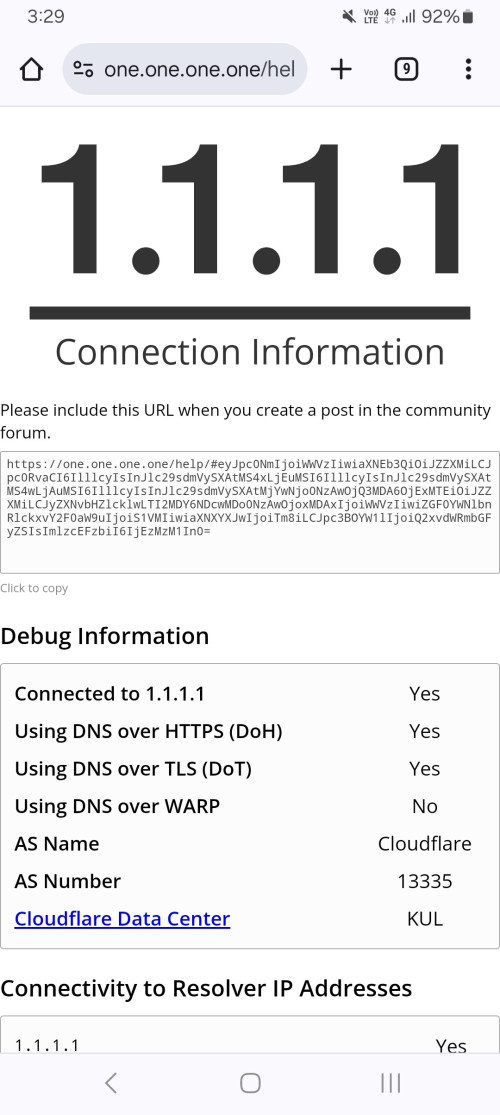
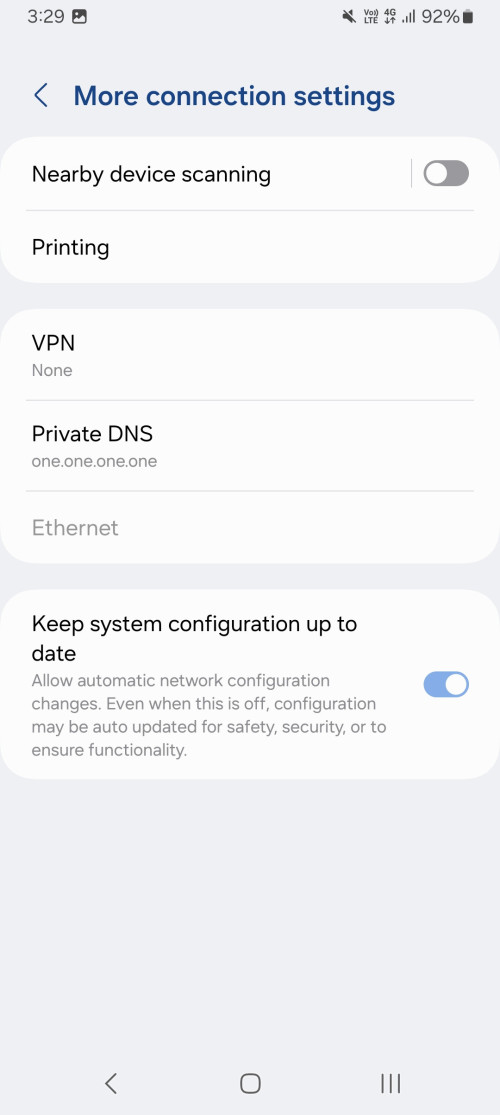
I tried on CF and it works~

user posted image
user posted image
*
1. i already read of those 2 as early as yesterday morning

2. ... and somebody pointed it out to me again yesterday afternoon

3. ... which i mentioned again in today afternoon

4. ... which you again invariably mentioned again through another article.

so lets laugh at google for such mediocre effort.

--

those cloudflare and google addresses are capable of both DoT and DoH.
so when we use them as Android's Secure DNS target; how can we be sure whether it's really using DoH? and not DoT?
i know that my own DoH didn't even log any https request.
axxer
post Sep 11 2024, 03:46 PM

Banned
******
Validating
1,822 posts

Joined: Jul 2010
From: Yesterday, 01:25 AM
QUOTE(Oltromen Ripot @ Sep 11 2024, 03:41 PM)
1. i already read of those 2 as early as yesterday morning

2. ... and somebody pointed it out to me again yesterday afternoon

3. ... which i mentioned again in today afternoon

4. ... which you again invariably mentioned again through another article.

so lets laugh at google for such mediocre effort.

--

those cloudflare and google addresses are capable of both DoT and DoH.
so when we use them as Android's Secure DNS target; how can we be sure whether it's really using DoH? and not DoT?
i know that my own DoH didn't even log any https request.
*
Only 2 dns provider will use doh when adding to the Private DNS setting on android, Google dns and cloudflare dns. Google hardcoded to only allow those 2 to use doh. If you want to force dot, use other than the 2. Quad9, opendns, adguard dns etc. Or use third party app that can be specific on using either doh or dot depends on your requirement.
BenYeeHua
post Sep 11 2024, 03:49 PM

Regular
******
Senior Member
1,873 posts

Joined: Nov 2010


QUOTE(BladeRider88 @ Sep 11 2024, 03:34 PM)
I quote from AndroidPolice

"Eventually, this upgraded system should just work without you having to even worry about which DNS server you might be using. For now, the feature is ready; it's on DNS providers to finish rolling out support for DNS over HTTPS."

As per my understanding, it is up to the DNS provider to provide DoH or DoT, nothing to do with the phone as the phone & OS is DoH/DoT ready
*
Better wait for someone setup own DNS with DoH support only, then key in his own custom domain, check did it connect via DoH first, or DoT first.

Or simple, key in any domain, wiresharp, see first connection make via DoH or DoT port.
Kind of lazy person now, so someone who wanna do a test, go ahead la. tongue.gif
BladeRider88
post Sep 11 2024, 03:50 PM

On my way
****
Junior Member
554 posts

Joined: Nov 2006


QUOTE(Oltromen Ripot @ Sep 11 2024, 03:41 PM)
1. i already read of those 2 as early as yesterday morning

2. ... and somebody pointed it out to me again yesterday afternoon

3. ... which i mentioned again in today afternoon

4. ... which you again invariably mentioned again through another article.

so lets laugh at google for such mediocre effort.

--

those cloudflare and google addresses are capable of both DoT and DoH.
so when we use them as Android's Secure DNS target; how can we be sure whether it's really using DoH? and not DoT?
i know that my own DoH didn't even log any https request.
*
Good to have good memories laugh.gif

The article is TLDR so i just point out the most important thing

"Eventually, this upgraded system should just work without you having to even worry about which DNS server you might be using. For now, the feature is ready; it's on DNS providers to finish rolling out support for DNS over HTTPS."

I am trying to clarify that your statement about Google's joke on DoH implementation. I think you got the wrong point about Google, Google already slate the dish out to the public, it is up to your favorite DNS provider to support Google's way of DoH or not. CloudFlare already done that and give us a way to check whether you are using DoH or not, but since your favorite DNS provider nor solutions did not work, don't blame Google. If you think Google's DoH implementation is a joke, then be my guest. After all 3rd party apps already fill the joke that you are laughing at after all. laugh.gif And you still making a fuss about it.

QUOTE(axxer @ Sep 11 2024, 03:46 PM)
Only 2 dns provider will use doh when adding to the Private DNS setting on android, Google dns and cloudflare dns. Google hardcoded to only allow those 2 to use doh. If you want to force dot, use other than the 2. Quad9, opendns, adguard dns etc. Or use third party app that can be specific on using either doh or dot depends on your requirement.
*
At last someone who can understand and accept the reality check


QUOTE(BenYeeHua @ Sep 11 2024, 03:50 PM)
Ya, that's my point of view, it should be whitelisted and controlled by Google, I don't think Google will be KIND enough to connect any domain with DoH first, then DoT.
*
Yup, given Google's hard stance on this matter, only way for now is use CloudFlare or Google DNS solution, or use 3rd party apps or host own DNS server that is similar to CloudFlare implementation. whistling.gif

This post has been edited by BladeRider88: Sep 11 2024, 04:01 PM

BenYeeHua
post Sep 11 2024, 03:50 PM

Regular
******
Senior Member
1,873 posts

Joined: Nov 2010


QUOTE(axxer @ Sep 11 2024, 03:46 PM)
Only 2 dns provider will use doh when adding to the Private DNS setting on android, Google dns and cloudflare dns. Google hardcoded to only allow those 2 to use doh. If you want to force dot, use other than the 2. Quad9, opendns, adguard dns etc. Or use third party app that can be specific on using either doh or dot depends on your requirement.
*
Ya, that's my point of view, it should be whitelisted and controlled by Google, I don't think Google will be KIND enough to connect any domain with DoH first, then DoT.
Hikari Natsumi
post Sep 11 2024, 03:50 PM

New Member
*
Junior Member
24 posts

Joined: Nov 2014
From: \Device\Harddisk0\Partiton1\


is the DoH address it self has E-SNI ?
BenYeeHua
post Sep 11 2024, 03:54 PM

Regular
******
Senior Member
1,873 posts

Joined: Nov 2010


QUOTE(Hikari Natsumi @ Sep 11 2024, 03:50 PM)
is the DoH address it self has E-SNI ?
*
It is pointless, when you know 90% of DNS give you same IP address, so by knowing you are connecting to that IP address, means you are using DoH lol.

Except rethink DNS, yes, it is supported by CloudFlare.
QUOTE
colo=SIN
sliver=none
http=http/3
loc=MY
tls=TLSv1.3
sni=encrypted

https://sky.rethinkdns.com/cdn-cgi/trace

The only problem left is, did the DoH client can connect DoH HTTP3 with ECH or not, lol.
----
Another solution is, you sign cert with IP address as well, so you can be.
https://[2606:4700:4700::1111]/dns-query

But the problem is, which custom DNS allow to do this la.

This post has been edited by BenYeeHua: Sep 11 2024, 03:57 PM
BladeRider88
post Sep 11 2024, 03:58 PM

On my way
****
Junior Member
554 posts

Joined: Nov 2006


QUOTE(BenYeeHua @ Sep 11 2024, 03:50 PM)
Ya, that's my point of view, it should be whitelisted and controlled by Google, I don't think Google will be KIND enough to connect any domain with DoH first, then DoT.
*
Yes, this implementation is on the OS level, just like Microsoft Windows, by default Win 10 is not supported, need to use registry to enable it, as for Win 11 it is supported out from the box. And yes Google will NOT BE KIND enough to do that. Last time for Android if you need to change the DNS server, you needed root access & app in order to change the Cellular DNS to your favorite DNS server. Now different story and it tooks how many version of Android in order to achieve such function.


Oltromen Ripot
post Sep 11 2024, 03:59 PM

👍 999999 person Likes this member
*******
Senior Member
4,034 posts

Joined: Dec 2019
QUOTE(BenYeeHua @ Sep 11 2024, 03:49 PM)
Better wait for someone setup own DNS with DoH support only, then key in his own custom domain, check did it connect via DoH first, or DoT first.

Or simple, key in any domain, wiresharp, see first connection make via DoH or DoT port.
Kind of lazy person now, so someone who wanna do a test, go ahead la. tongue.gif
*
i confirm my DNS out there is DoH-only, and only Android Secure DNS cannot use it.
other OS platforms can use my DoH.

I was initially baffled why Cloudflare, Adguard, Google, Quad9 etc etc out there can work while mine can't.
Until I stumbled on articles that mentioned Android only support DoH with those 2 providers. and made me realise of course Android appeared worked with any random 3-party DNS out there; because they have both DoH and DoT on same IP address, so it gave the appearance of working (by actually using DoT) while I was expecting otherwise.
RiriRuruRara
post Sep 11 2024, 04:11 PM

Regular
******
Senior Member
1,011 posts

Joined: Aug 2014


Hi, is the SWU promo still available???
dev/numb
post Sep 11 2024, 04:14 PM

On my way
****
Junior Member
691 posts

Joined: Nov 2021
QUOTE(Oltromen Ripot @ Sep 11 2024, 03:59 PM)
i confirm my DNS out there is DoH-only, and only Android Secure DNS cannot use it.
other OS platforms can use my DoH.

I was initially baffled why Cloudflare, Adguard, Google, Quad9 etc etc out there can work while mine can't.
Until I stumbled on articles that mentioned Android only support DoH with those 2 providers. and made me realise of course Android appeared worked with any random 3-party DNS out there; because they have both DoH and DoT on same IP address, so it gave the appearance of working (by actually using DoT) while I was expecting otherwise.
*
At this point, I think you can only depend on an app if you want device-wide DoH on Android using your preferred provider. If you insist on not using an app (understandable because many of these apps will use the VPN profile) then you can only mitigate it by relying on a browser that supports DoH to do most of your stuff while leaving the rest of the system/apps on DoT. I do this on my Android setup actually. One NextDNS profile for OS in DoT format, and a separate profile from Cromite in DoH. I do this mainly because it’s easier for me to check the logs if I need to narrow down something based on timestamps.

This post has been edited by dev/numb: Sep 11 2024, 04:17 PM
BenYeeHua
post Sep 11 2024, 04:17 PM

Regular
******
Senior Member
1,873 posts

Joined: Nov 2010


QUOTE(Oltromen Ripot @ Sep 11 2024, 03:59 PM)
i confirm my DNS out there is DoH-only, and only Android Secure DNS cannot use it.
other OS platforms can use my DoH.

I was initially baffled why Cloudflare, Adguard, Google, Quad9 etc etc out there can work while mine can't.
Until I stumbled on articles that mentioned Android only support DoH with those 2 providers. and made me realise of course Android appeared worked with any random 3-party DNS out there; because they have both DoH and DoT on same IP address, so it gave the appearance of working (by actually using DoT) while I was expecting otherwise.
*
A bit off-topic, but yes, Google nowadays is not that old "Don't be evil".

To collect test data on QUIC, they just letting regular Chrome user use QUIC to Google by default.
Then VPx video codec, next is WebP.

After success, now they are: JPEG XL? Nope, no one gonna use it, sorry, not gonna support it.
But the success of WebP is because it is supported by most browser, then open source/free to use.

For now, it is funny to see them fighting with different kind of HDR standard on old JPG or HEIF, instead just drop on JPEG XL and done.
So far only Apple one leading, lol. laugh.gif

QUOTE(RiriRuruRara @ Sep 11 2024, 04:11 PM)
Hi, is the SWU promo still available???
*
Yes, TM Point pls.
mikey8811
post Sep 11 2024, 04:24 PM

Getting Started
**
Junior Member
126 posts

Joined: Jul 2008


Hi my parents contract just ended with Maxis Fibre. What are the current offers for Unifi for senior citizens?

Thanks
Oltromen Ripot
post Sep 11 2024, 04:32 PM

👍 999999 person Likes this member
*******
Senior Member
4,034 posts

Joined: Dec 2019
**** berdebat panjang-panjang pun tak bermakna

This post has been edited by Oltromen Ripot: Sep 11 2024, 04:47 PM
dev/numb
post Sep 11 2024, 05:17 PM

On my way
****
Junior Member
691 posts

Joined: Nov 2021
QUOTE(Oltromen Ripot @ Sep 11 2024, 04:32 PM)
VPN is last choice. App-based is failure-prone. And both are battery-consuming. I am avoiding that.
*
I’ve not noticed significant degradation in battery life for my provider’s app on both Android and iPadOS, at least on the WireGuard protocol. If your provider’s app sucks, there always the option of genetaring/importing their wireguard.conf and using the standalone WireGuard app made by the protocol developer. Any good app is just creating a config and hooking it into the operating system’s tunneling APIs. If your VPN provider offers IPSec/IKEv2 you can even manually input the setting yourself without needing the provider or protocol apps since both Android and iOS support the protocol natively. Good luck if you’re rolling your own IPSec on a rented VPS though, because strongSwan documentation is useless.

Alas, it is Android and iOS dependence on these tunneling APIs that make their VPN implementation unreliable, since mobile operating systems don’t give users access to the networking hooks or firewall rules the same way Linux distros lets you control ufw or firewalld, or how MacOS has pf built into the kernel (which always makes me wonder why MacOS people buy Little Snitch instead of Murus, but I digress). I suppose you could access the firewall rules if you root Android or jailbreak iOS, but that brings along a whole new set of security risks.

This post has been edited by dev/numb: Sep 11 2024, 05:28 PM
RiriRuruRara
post Sep 11 2024, 05:22 PM

Regular
******
Senior Member
1,011 posts

Joined: Aug 2014


QUOTE(BenYeeHua @ Sep 11 2024, 04:17 PM)

Yes, TM Point pls.
*
If no contract over the phone they won't give? They only give when walk in TM Point?
Anime4000
post Sep 11 2024, 05:23 PM

Look at all my stars!!
*******
Senior Member
2,400 posts

Joined: Jul 2009
From: /dev/null


QUOTE(BenYeeHua @ Sep 11 2024, 03:54 PM)
It is pointless, when you know 90% of DNS give you same IP address, so by knowing you are connecting to that IP address, means you are using DoH lol.
*
Even hosting own DoH?

QUOTE(BenYeeHua @ Sep 11 2024, 03:54 PM)
Another solution is, you sign cert with IP address as well, so you can be.
https://[2606:4700:4700::1111]/dns-query

But the problem is, which custom DNS allow to do this la.
*
My Mikrotik DoH use IP Address instead of domain!
PRSXFENG
post Sep 11 2024, 05:49 PM

Look at all my stars!!
*******
Senior Member
2,611 posts

Joined: Nov 2020


QUOTE(hustlerism @ Sep 11 2024, 02:59 PM)
Hi Sifu,

I got a TP-Link Deco X50-5G router and im getting my unifi installed soon. They will probably provide me a D-Link router.

Is there any way I can make use of my TP-LINK Deco router? Bridge mode?
*
depends on the plan
if below 1Gbps you may be given skyworth/fiberhome/etc 2 in one

if above then D-Link

all of them should be able to be bridged but there's no proper guide written down properly
have to search the forums for it

if black D-Link, there is a chance of a bug where the speed will drop and get stuck at 300Mbps

after bridge, just setup PPPoE as usual on the Deco

also VLAN may be handled by the 2 in 1, cant remember
so you may need to set no vlan on the deco

495 Pages « < 333 334 335 336 337 > » Top
Topic ClosedOptions
 

Change to:
| Lo-Fi Version
0.0200sec    0.44    6 queries    GZIP Disabled
Time is now: 17th December 2025 - 09:37 AM