Outline ·
[ Standard ] ·
Linear+
Unifi Official TM UniFi High Speed Broadband Thread V42, READ 1ST PAGE FOR RELEVANT WIFI INFO!
|
Orpheus1120
|
 Sep 2 2024, 10:14 AM Sep 2 2024, 10:14 AM
|
Getting Started


|
Ping to Quad9 timed out 99%. Changed my dns to cloudflare for the time being.
Update: back to normal.
This post has been edited by Orpheus1120: Sep 2 2024, 10:24 AM
|
|
|
|
|
|
Orpheus1120
|
Sep 10 2024, 01:22 PM
|
Getting Started
|
QUOTE(hazairi @ Sep 9 2024, 10:13 PM) SWU plan and no need to bundle with Unifi postpaid. I took the 1Gbps offer, RM159 with free 6 months and free 6 months of Disney Hotstar I went to TM Point just now and asked about the 1Gbps deal. But she didn't know about it until I asked her to enquire with her supervisor only then was told that this deal can only be approved from the HQ? If I want this package she would need to apply on my behalf to HQ to seek approval. WTF? I told her if like that I might as well go all the way to cyberjaya since you were given the deal on the spot. This post has been edited by Orpheus1120: Sep 10 2024, 01:23 PM |
|
|
|
|
|
Orpheus1120
|
Sep 10 2024, 02:23 PM
|
Getting Started
|
QUOTE(hazairi @ Sep 10 2024, 01:59 PM) Hi guys, I just got my speed upgrade to 1Gbps, but i ran speedtest, can't reach 1Gbps  Previously when I was with 800Mbps, my speedtest can get 850Mbps, so I expect I would get 1050Mbps for this new package. Is there any limitation from my side? Maybe the LAN cable I'm using? My router supports up to 2.5Gbps Yes normally you will slightly more than subscribed. Looks like this is a more conservative tune. A variance of about ±5% is typical amongst ISPs but for Unifi this is rather uncommon. Get a technician to come configure again maybe. Wait a minute, TP-LINK AX6600.right? I assume the 2.5G port is used for WAN, and you connected wired or wireless? The 3 LAN port is only 1G ports so 930+ is normal take into consideration of internal lost. This post has been edited by Orpheus1120: Sep 10 2024, 02:29 PM |
|
|
|
|
|
Orpheus1120
|
Sep 10 2024, 03:10 PM
|
Getting Started
|
QUOTE(hazairi @ Sep 10 2024, 02:44 PM) Yup, 2.5G port for WAN. Connected using LAN cable to my PC. But I think the limitation is with my network interface card on my PC. The max can go 1Gbps. Not just your card. It's the 1G port on the router too. Your speed is limited by it. Nowadays there are plenty of cheap 2.5G switches from AliExpress. It's something you can consider if you ever consider getting wired connection to your devices, ie wifi 6E/7 APs, computers etc. But kinda moot because you only have a single 2.5G port. This post has been edited by Orpheus1120: Sep 10 2024, 03:11 PM |
|
|
|
|
|
Orpheus1120
|
Sep 11 2024, 12:45 PM
|
Getting Started
|
hazairi
Thanks to you, I’ve managed to upgrade my plan to 1gbps. Technician will come tomorrow afternoon.
Btw, I read they will be giving us a D-Link DPN-FX3060V. But I would like to continue to use my edgerouter 4.
Is there anything I need to do on the DLINK router end to disable the routing and use my edgerouter instead?
This post has been edited by Orpheus1120: Sep 11 2024, 12:46 PM
|
|
|
|
|
|
Orpheus1120
|
Sep 11 2024, 06:01 PM
|
Getting Started
|
QUOTE(Sky.Live @ Sep 11 2024, 03:30 PM) How much is your monthly commitment? Bundling with other unifi Services? RM159. Not need to bundle anything. Anyway I don't know why you guys are stressing over the dns thingy. If you are using pihole just spin up a vps and implement bind9 and tie to your pihole for system wide bypass. This post has been edited by Orpheus1120: Sep 11 2024, 06:04 PM |
|
|
|
|
|
Orpheus1120
|
Sep 15 2024, 05:57 PM
|
Getting Started
|
all bad to all sg servers. Less than 1mbps.
|
|
|
|
|
|
Orpheus1120
|
Sep 16 2024, 11:30 AM
|
Getting Started
|
to sg still bad.
|
|
|
|
|
|
Orpheus1120
|
Sep 16 2024, 01:36 PM
|
Getting Started
|
We should just report to TM. See if they can rectify this.
|
|
|
|
|
|
Orpheus1120
|
Sep 16 2024, 05:05 PM
|
Getting Started
|
QUOTE(heLL_bOy @ Sep 16 2024, 03:04 PM) Is TM issue wrongly assign the route basically is detour whole world back to TM The thing is how you gonna relay the routing issue to TM so that the relevant person get notified? I'm not saying you are wrong etc. I'm just pondering how we as users can tell the CSO that this is an issue worthy of additional attention in a way he/she understands too. |
|
|
|
|
|
Orpheus1120
|
Sep 16 2024, 09:16 PM
|
Getting Started
|
Let I asked previously, how do we get this info to the relevant people in TM? CSO are basically useless.
Netflix's unwatchable too.
This post has been edited by Orpheus1120: Sep 16 2024, 09:22 PM
|
|
|
|
|
|
Orpheus1120
|
Sep 16 2024, 09:30 PM
|
Getting Started
|
Need to highlight issue on twitter and tag mcmc and fahmi. That will get these people to act. Provide screenshots of traceroute.
|
|
|
|
|
|
Orpheus1120
|
Sep 17 2024, 01:10 AM
|
Getting Started
|
I'm in JB, ip 147.xx.xx.xx. Unifi 1gbps. These are speedtest to sg servers. To Pacific Net. https://www.speedtest.net/result/d/690718438To Starhub. https://www.speedtest.net/my-result/d/690719305All sg servers are affected, except for Singtel. https://www.speedtest.net/my-result/d/690719627Below are results before the disruption happened. https://www.speedtest.net/my-result/d/689725817https://www.speedtest.net/my-result/d/689725721https://www.speedtest.net/my-result/d/689592380As you can see, I'm badly affected by the abysmal speed. It's like I'm back to streamyx time. traceroute to OpenDNS and Shopee. » Click to show Spoiler - click again to hide... « CODE ❯ traceroute 208.67.222.222
traceroute to 208.67.222.222 (208.67.222.222), 64 hops max, 40 byte packets
1 router (192.168.41.1) 3.700 ms 0.365 ms 0.221 ms
2 147.158.255.254 (147.158.255.254) 4.588 ms 3.217 ms 2.796 ms
3 10.55.106.9 (10.55.106.9) 14.199 ms
10.55.106.11 (10.55.106.11) 27.803 ms
10.55.106.9 (10.55.106.9) 13.715 ms
4 10.55.50.48 (10.55.50.48) 15.976 ms 14.632 ms
10.55.50.52 (10.55.50.52) 17.230 ms
5 10.55.52.30 (10.55.52.30) 19.548 ms
10.55.52.26 (10.55.52.26) 16.287 ms 14.091 ms
6 * * *
7 * * *
8 36692.sgw.equinix.com (27.111.228.90) 601.051 ms * 568.764 ms
9 * * *
10 * * *
11 * * *
12 * * *
13 * * *
14 * * *
15 * * *
16 * * *
17 * * * » Click to show Spoiler - click again to hide... « CODE ❯ traceroute www.shopee.com.my
traceroute to shopee.com.my (202.181.90.194), 64 hops max, 40 byte packets
1 router (192.168.41.1) 1.899 ms 0.432 ms 0.350 ms
2 147.158.255.254 (147.158.255.254) 6.428 ms 3.427 ms 3.250 ms
3 10.55.106.11 (10.55.106.11) 8.644 ms
10.55.106.9 (10.55.106.9) 8.859 ms
10.55.106.11 (10.55.106.11) 8.072 ms
4 10.55.100.84 (10.55.100.84) 6.738 ms 6.781 ms
10.55.100.82 (10.55.100.82) 7.891 ms
5 10.55.208.91 (10.55.208.91) 8.503 ms
10.55.208.133 (10.55.208.133) 9.577 ms 8.237 ms
6 137831.sgw.equinix.com (27.111.229.144) 666.848 ms 577.923 ms 630.597 ms
7 143.92.96.50 (143.92.96.50) 77.218 ms 76.830 ms
143.92.96.46 (143.92.96.46) 80.521 ms
8 * * *
9 * * *
10 10.254.244.185 (10.254.244.185) 78.970 ms
10.254.241.163 (10.254.241.163) 79.552 ms
10.254.241.165 (10.254.241.165) 79.012 ms
11 10.254.3.245 (10.254.3.245) 78.185 ms
10.254.0.245 (10.254.0.245) 78.378 ms
10.254.3.245 (10.254.3.245) 77.242 ms
12 * * *
13 * * *
14 * * *
15 * * *
16 * * *
17 * * *
18 * * *
19 * * *
20 * * *
21 * * *
22 * * * |
|
|
|
|
|
Orpheus1120
|
Sep 17 2024, 02:57 AM
|
Getting Started
|
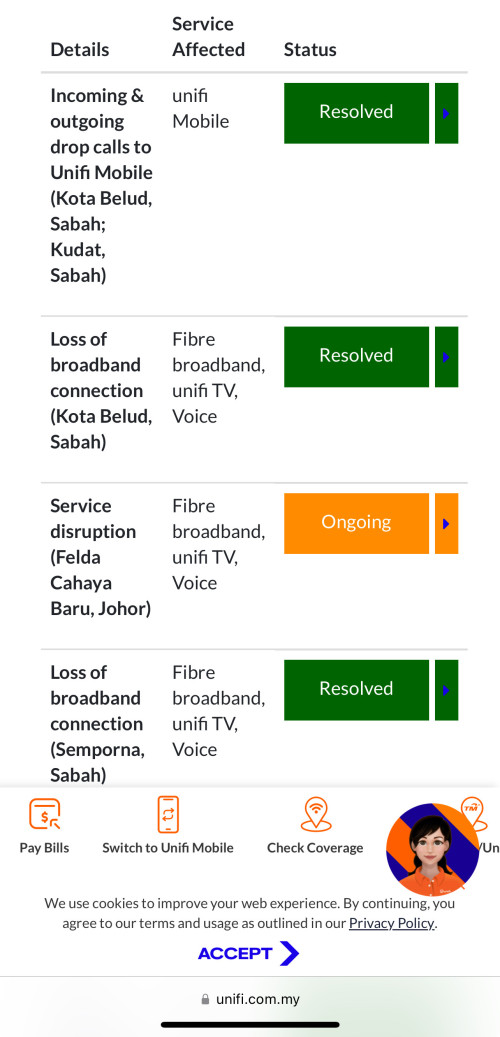
kwssI'm using Quad9 for dns, hence the difference in IP address for Shopee. It has multiple IPs. The fact that the issue is so widespread and I had also verified with friends from Cheras and Damansara that I see no reason to believe it is a local congestion. I'm not sure if these are related to the most recent outages over at https://unifi.com.my/unifi-alerts which by now had been resolved. Pacific Net: » Click to show Spoiler - click again to hide... « CODE
❯ traceroute speedtest2.pacificinternet.com
traceroute to speedtest2.pacificinternet.com (45.117.189.2), 64 hops max, 40 byte packets
1 router (192.168.41.1) 2.067 ms 0.284 ms 0.218 ms
2 147.158.255.254 (147.158.255.254) 12.278 ms 5.562 ms 12.219 ms
3 10.55.106.11 (10.55.106.11) 7.398 ms
10.55.106.9 (10.55.106.9) 7.416 ms
10.55.106.11 (10.55.106.11) 6.285 ms
4 10.55.100.84 (10.55.100.84) 7.316 ms 6.460 ms
10.55.100.82 (10.55.100.82) 7.428 ms
5 203.116.89-53.unknown.starhub.net.sg (203.116.89.53) 490.225 ms 502.552 ms *
6 203.116.3-78.unknown.starhub.net.sg (203.116.3.78) 508.739 ms 508.028 ms 571.637 ms
7 203.117.162-250.unknown.starhub.net.sg (203.117.162.250) 468.933 ms 266.835 ms 216.892 ms
8 isaiah-v2-bdx-148-233.pacificinternet.com (182.23.148.233) 77.589 ms
isaiah-v3-bdx-148-205.pacificinternet.com (182.23.148.205) 80.325 ms 77.948 ms
9 * * *
10 * * *
11 * * *
Starhub: » Click to show Spoiler - click again to hide... « CODE
❯ traceroute co2dsvr03.speedtest.starhub.com
traceroute to co2dsvr03.speedtest.starhub.com (203.116.3.14), 64 hops max, 40 byte packets
1 router (192.168.41.1) 1344.018 ms 0.433 ms 0.286 ms
2 147.158.255.254 (147.158.255.254) 4.478 ms 2.642 ms 5.684 ms
3 10.55.106.9 (10.55.106.9) 7.785 ms
10.55.106.11 (10.55.106.11) 7.715 ms
10.55.106.9 (10.55.106.9) 20.806 ms
4 10.55.100.82 (10.55.100.82) 7.944 ms 6.508 ms
10.55.100.84 (10.55.100.84) 6.841 ms
5 203.116.89-53.unknown.starhub.net.sg (203.116.89.53) 520.708 ms 505.153 ms 488.401 ms
6 203.118.6.198 (203.118.6.198) 526.106 ms 523.849 ms 585.987 ms
7 203.116.3-14.unknown.starhub.net.sg (203.116.3.14) 77.600 ms !Z 78.329 ms !Z 77.842 ms !Z
|
|
|
|
|
|
Orpheus1120
|
Sep 17 2024, 03:41 AM
|
Getting Started
|
Does local congestion extends past into the wee hours?  Or perhaps its a routing error as suggested by heLL_bOy ? |
|
|
|
|
|
Orpheus1120
|
Sep 17 2024, 07:29 AM
|
Getting Started
|
Well, I hate to say this but this looks like TM is throttling bandwidth in my case. I was up whole day and as of 4.30am, all routes are back to normal with almost perfect latency.
But things went to hell again at 7am. Judging from what I'd seen first hand this looks very much like classic throttling of the border gateways.
I hope I am wrong and that it's just a local congestion on my side, so I'll monitor again for the next couple of days.
|
|
|
|
|
|
Orpheus1120
|
Sep 17 2024, 08:04 AM
|
Getting Started
|
Can you stay up into early morning? Do speedtests on the closest border gateways periodically:- during peak hours, and off peak (around 4-5am), and check for any differences.
|
|
|
|
|
|
Orpheus1120
|
Sep 17 2024, 07:51 PM
|
Getting Started
|
Yes Johor damn lag these few days. First time in so many years had I experienced such lag and it all happened like since last Friday.
|
|
|
|
|
|
Orpheus1120
|
Sep 17 2024, 11:42 PM
|
Getting Started
|
QUOTE(Haru97 @ Sep 17 2024, 11:03 PM) Guess I have to go repeat the same thing again, anybody already lodged a report with TM? I did today. |
|
|
|
|



 Quote
Quote

 0.0313sec
 1.27
1.27
 7 queries
 GZIP Disabled