Welcome Guest ( Log In | Register )

Bump Topic Topic Closed RSS Feed
495 Pages « < 261 262 263 264 265 > » Bottom

Outline · [ Standard ] · Linear+

Unifi Official TM UniFi High Speed Broadband Thread V42, READ 1ST PAGE FOR RELEVANT WIFI INFO!

views
     
soonwai
post Sep 4 2024, 05:46 PM


********
All Stars
11,460 posts

Joined: Oct 2007
From: KL


QUOTE(heLL_bOy @ Sep 4 2024, 05:18 PM)
i had no issue accessing all listed website above using CF or Q9 DOH method.  dry.gif  dry.gif
*
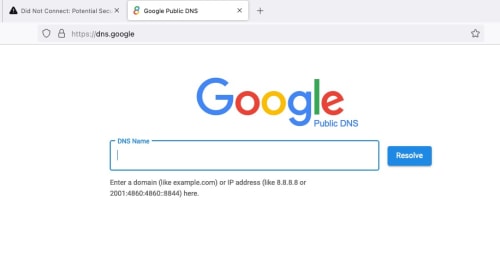
Can you access https://8.8.8.8 ? If can, then your area not affected yet.
user posted image


This post has been edited by soonwai: Sep 4 2024, 05:46 PM
hazairi
post Sep 4 2024, 05:49 PM

Look at all my stars!!
*******
Senior Member
2,694 posts

Joined: Feb 2007
From: KL


Hi guys,

I just went to TMPOINT (unifi store) for the 2nd time in Cyberjaya.

This time I saja2 saying I wanna terminate Unifi because I already got a better offer from Astro.

So, here's the best offer that they can give:

300Mbps RM99
500Mbps RM139
1Gbps RM159

All will get free 6 months usage and 6 months Disney+ Hotstar.

Since that 500Mbps to 1Gbps only diff RM20 ja, I took the 1Gbps. Plus, the current i'm using is 800Mbps.
soonwai
post Sep 4 2024, 05:50 PM


********
All Stars
11,460 posts

Joined: Oct 2007
From: KL


QUOTE(countingcrows @ Sep 4 2024, 05:18 PM)
How's the ping to hijacked 8.8.8.8?
*
Very good.
CODE
ping -c 5 8.8.8.8      
PING 8.8.8.8 (8.8.8.8): 56 data bytes
64 bytes from 8.8.8.8: icmp_seq=0 ttl=59 time=5.357 ms
64 bytes from 8.8.8.8: icmp_seq=1 ttl=59 time=4.316 ms
64 bytes from 8.8.8.8: icmp_seq=2 ttl=59 time=4.279 ms
64 bytes from 8.8.8.8: icmp_seq=3 ttl=59 time=4.330 ms
64 bytes from 8.8.8.8: icmp_seq=4 ttl=59 time=3.133 ms


Should be the same as ping to 210.187.85.34

CODE
% traceroute to 8.8.8.8 (8.8.8.8), 64 hops max, 40 byte packets
1  10.0.1.1 (10.0.1.1)  1.843 ms  0.453 ms  0.405 ms
2  175.138.112.126 (175.138.112.126)  4.057 ms  3.756 ms  3.519 ms
3  10.55.49.1 (10.55.49.1)  4.910 ms
   10.55.49.3 (10.55.49.3)  4.735 ms
   10.55.49.1 (10.55.49.1)  4.331 ms
4  10.55.52.26 (10.55.52.26)  8.159 ms
   10.55.52.30 (10.55.52.30)  6.883 ms  6.257 ms
5  10.55.52.54 (10.55.52.54)  7.101 ms
   10.55.52.90 (10.55.52.90)  5.746 ms
   10.55.52.54 (10.55.52.54)  5.510 ms
6  dns.google (8.8.8.8)  4.498 ms  3.138 ms  3.664 ms

% traceroute 210.187.85.34
traceroute to 210.187.85.34 (210.187.85.34), 64 hops max, 40 byte packets
1  10.0.1.1 (10.0.1.1)  2.888 ms  0.469 ms  0.418 ms
2  175.138.112.126 (175.138.112.126)  9.473 ms  3.764 ms  3.336 ms
3  10.55.49.3 (10.55.49.3)  4.826 ms
   10.55.49.1 (10.55.49.1)  5.893 ms
   10.55.49.3 (10.55.49.3)  4.631 ms
4  10.55.52.30 (10.55.52.30)  6.064 ms
   10.55.52.26 (10.55.52.26)  6.851 ms  6.605 ms
5  10.55.52.90 (10.55.52.90)  6.210 ms
   10.55.52.54 (10.55.52.54)  6.530 ms
   10.55.52.90 (10.55.52.90)  5.299 ms
6  dns.tm.net.my (210.187.85.34)  5.001 ms  4.143 ms  3.876 ms

% traceroute 1.1.1.1      
traceroute to 1.1.1.1 (1.1.1.1), 64 hops max, 40 byte packets
1  10.0.1.1 (10.0.1.1)  2.519 ms  0.540 ms  0.434 ms
2  175.138.112.126 (175.138.112.126)  4.121 ms  3.198 ms  3.130 ms
3  10.55.49.1 (10.55.49.1)  4.777 ms
   10.55.49.3 (10.55.49.3)  4.750 ms
   10.55.49.1 (10.55.49.1)  4.086 ms
4  10.55.52.26 (10.55.52.26)  6.788 ms
   10.55.52.30 (10.55.52.30)  6.863 ms  5.844 ms
5  10.55.52.54 (10.55.52.54)  6.664 ms
   10.55.52.90 (10.55.52.90)  7.259 ms
   10.55.52.54 (10.55.52.54)  5.813 ms
6  one.one.one.one (1.1.1.1)  4.843 ms  4.034 ms  4.103 ms


Got one more IP for TM DNS
CODE
% traceroute 210.187.85.69
traceroute to 210.187.85.69 (210.187.85.69), 64 hops max, 40 byte packets
1  10.0.1.1 (10.0.1.1)  3.419 ms  0.464 ms  0.411 ms
2  175.138.112.126 (175.138.112.126)  3.450 ms  2.958 ms  3.095 ms
3  10.55.49.1 (10.55.49.1)  4.402 ms
   10.55.49.3 (10.55.49.3)  4.002 ms
   10.55.49.1 (10.55.49.1)  3.683 ms
4  10.55.52.26 (10.55.52.26)  6.502 ms
   10.55.52.30 (10.55.52.30)  6.641 ms  76.468 ms
5  10.55.52.29 (10.55.52.29)  74.446 ms
   10.55.52.52 (10.55.52.52)  7.449 ms
   10.55.52.29 (10.55.52.29)  109.706 ms
6  dns.tm.net.my (210.187.85.69)  4.271 ms  2.555 ms  3.512 ms


This post has been edited by soonwai: Sep 4 2024, 05:56 PM
Epic_winner091
post Sep 4 2024, 05:50 PM

Casual
***
Junior Member
342 posts

Joined: Mar 2010
From: Shah Alam


QUOTE(soonwai @ Sep 4 2024, 05:46 PM)
Can you access https://8.8.8.8 ? If can, then your area not affected yet.
user posted image
*
No problems here on Maxis 5G.


Attached thumbnail(s)
Attached Image Attached Image
Hikari Natsumi
post Sep 4 2024, 05:51 PM

New Member
*
Junior Member
24 posts

Joined: Nov 2014
From: \Device\Harddisk0\Partiton1\


QUOTE(soonwai @ Sep 4 2024, 05:14 PM)
Google cannot because Google's 8.8.8.8 & 8.8.4.4 are no longer going to Google. I think going to Brickfields now.
*
so TM now Black Hole Route?
do you think TM will filter TLS1.3 and block E-SNI and only allow TLS1.2 ??
soonwai
post Sep 4 2024, 05:59 PM


********
All Stars
11,460 posts

Joined: Oct 2007
From: KL


QUOTE(Epic_winner091 @ Sep 4 2024, 05:50 PM)
No problems here on Maxis 5G.
*
Digi 4G also can. I guess Digi/Maxis still got some sane network engineers in the team.
soonwai
post Sep 4 2024, 06:10 PM


********
All Stars
11,460 posts

Joined: Oct 2007
From: KL


QUOTE(BladeRider88 @ Sep 4 2024, 05:22 PM)
My mobile operator Digi with DoH 8.8.8.8 & 9.9.9.9 can access olevod. May i know your affected area are using Mobile Operator or Fiber ISP?
*
Unifi, Digi & Hotlink all cannot access olevod.tv with ISPs DNS. I don't use DoH on my phones, just stock telco config.

On wifi (Unifi), can since using my own DNS server.

My area, all affected, Unifi, Digi and Hotlink.
soonwai
post Sep 4 2024, 06:19 PM


********
All Stars
11,460 posts

Joined: Oct 2007
From: KL


QUOTE(Hikari Natsumi @ Sep 4 2024, 05:51 PM)
so TM now Black Hole Route?
do you think TM will filter TLS1.3 and block E-SNI and only allow TLS1.2 ??
*
Probably not, I don't think their network engineers have gone for that course yet. smile.gif Static route and 1to1 NATting, no problem.

But seriously, I dunno, but I think no because that's probably too much work and sounds complicated.
annoymous1234
post Sep 4 2024, 06:29 PM

Look at all my stars!!
*******
Senior Member
7,617 posts

Joined: Mar 2009

guys, is BiliBili block too?? i still can access torrent site, but BiliBili app is not working

This post has been edited by annoymous1234: Sep 4 2024, 06:30 PM
jasontanky
post Sep 4 2024, 06:33 PM

Casual
***
Junior Member
454 posts

Joined: Nov 2015


QUOTE(Epic_winner091 @ Sep 4 2024, 05:50 PM)
No problems here on Maxis 5G.
*
Maxis, Celcom, and Digi seems to implement more sophisticated censorship prolly using DPI

Update: It might not be DPI because DoH on certain resolvers still works. But almost all public DNS resolver does not work anymore

This post has been edited by jasontanky: Sep 4 2024, 06:42 PM
Azusa_San
post Sep 4 2024, 06:40 PM

Casual
***
Junior Member
309 posts

Joined: Mar 2015
QUOTE(annoymous1234 @ Sep 4 2024, 06:29 PM)
guys, is BiliBili block too?? i still can access torrent site, but BiliBili app is not working
*
bilibili china or malaysia?


soonwai
post Sep 4 2024, 06:44 PM


********
All Stars
11,460 posts

Joined: Oct 2007
From: KL


QUOTE(annoymous1234 @ Sep 4 2024, 06:29 PM)
guys, is BiliBili block too?? i still can access torrent site, but BiliBili app is not working
*
bilibili should be OK

dig +short www.bilibili.com @8.8.8.8
a.w.bilicdn1.com.
i.w.bilicdn1.com.
164.52.39.42
164.52.39.43
164.52.39.44
103.151.151.133
103.151.151.134
164.52.28.62

Answers from Google Brickfields.

www.bilibili.cn also ok.

This post has been edited by soonwai: Sep 4 2024, 06:45 PM
annoymous1234
post Sep 4 2024, 07:02 PM

Look at all my stars!!
*******
Senior Member
7,617 posts

Joined: Mar 2009

QUOTE(Azusa_San @ Sep 4 2024, 06:40 PM)
bilibili china or malaysia?
*
QUOTE(soonwai @ Sep 4 2024, 06:44 PM)
bilibili should be OK

dig +short www.bilibili.com @8.8.8.8
a.w.bilicdn1.com.
i.w.bilicdn1.com.
164.52.39.42
164.52.39.43
164.52.39.44
103.151.151.133
103.151.151.134
164.52.28.62

Answers from Google Brickfields.

www.bilibili.cn also ok.
*
I'm using apps, it keeps saying no Internet connection https://play.google.com/store/apps/details?id=com.bstar.intl
soonwai
post Sep 4 2024, 07:13 PM


********
All Stars
11,460 posts

Joined: Oct 2007
From: KL


Turkey 2014. Sound familiar?

https://www.internetsociety.org/blog/2014/0...d-dns-security/
QUOTE
As we noted ten days ago, ISPs in Turkey started out attempting to implement the government’s ban by simply blocking those sites in DNS. When Turkish citizens tried to go to those social media...

QUOTE
Turkish citizens found they could get around this block by simply changing their devices’ DNS settings to point to open public DNS resolvers such as those operated by Google.

QUOTE
Starting this past Saturday, March 29, though, reports started coming in that the Turkish ISPs were taking this to a whole new level by hijacking routing of the Border Gateway Protocol (BGP) and pretending to be Google’s Public DNS servers (and the servers of other similar services).

QUOTE
The Turkish ISPs went a step further, though, in that they set up their own DNS servers that answered as if they were Google’s Public DNS servers.  As Andree Toonk wrote on the BGPmon blog:

QUOTE
Turk Telekom went one step further, instead of null routing this IP address they brought up servers with the IP addresses of the hijacked DNS servers and are now pretending to be these DNS servers.  These new fake servers are receiving traffic for 8.8.8.8 and other popular DNS providers and are answering DNS queries for the incoming DNS requests.


This post has been edited by soonwai: Sep 4 2024, 07:31 PM
PRSXFENG
post Sep 4 2024, 07:21 PM

Look at all my stars!!
*******
Senior Member
2,616 posts

Joined: Nov 2020


QUOTE(soonwai @ Sep 4 2024, 07:13 PM)
TM has caused BGP routing issues before in the past (2015) tongue.gif

https://news.ycombinator.com/item?id=9704952
https://www.cloudflarestatus.com/incidents/bzknm1t91kjq

karenzayn
post Sep 4 2024, 07:31 PM

Getting Started
**
Junior Member
98 posts

Joined: Sep 2019
From: Kuching
QUOTE(hazairi @ Sep 4 2024, 05:49 PM)
Hi guys,

I just went to TMPOINT (unifi store) for the 2nd time in Cyberjaya.

This time I saja2 saying I wanna terminate Unifi because I already got a better offer from Astro.

So, here's the best offer that they can give:

300Mbps RM99
500Mbps RM139
1Gbps RM159

All will get free 6 months usage and 6 months Disney+ Hotstar.

Since that 500Mbps to 1Gbps only diff RM20 ja, I took the 1Gbps. Plus, the current i'm using is 800Mbps.
*
1G for RM159??? SIGN ME UP!!!
Next year can try XD
iotbot000
post Sep 4 2024, 07:36 PM

New Member
*
Junior Member
36 posts

Joined: Apr 2019
QUOTE(karenzayn @ Sep 4 2024, 07:31 PM)
1G for RM159??? SIGN ME UP!!!
Next year can try XD
*
Beware that it is 1Gbps for 24 months only. After 24 months, it is 500Mbps, price maintained at RM159.

hazairi
post Sep 4 2024, 08:11 PM

Look at all my stars!!
*******
Senior Member
2,694 posts

Joined: Feb 2007
From: KL


QUOTE(iotbot000 @ Sep 4 2024, 07:36 PM)
Beware that it is 1Gbps for 24 months only. After 24 months,  it is 500Mbps, price maintained at RM159.
*
By the time contract finishes, already got a better package i think. Plus, when contract ends, u are free to venture other ISP that can give better offer. Surely TM will counter u with a new offer. Hehe

k-rolll P
post Sep 4 2024, 08:28 PM

New Member
*
Probation
19 posts

Joined: Apr 2019


QUOTE(blacktubi @ Sep 4 2024, 02:58 PM)
For those with resources to setup their own DNS resolver or those sysadmin here.

Can anyone verify if ISP is hijacking private DNS resolver as well?

Cause it seems fine on my end. I am trying to avoid DoH and DoT due to performance impact.
*
I can confirmed both unencrypted, DOH and DOT blocked by TM. Im from Alor Setar.
Last night my internet stop working and cause by DNS (DOH) on my Mikrotik router.

Here list of well known DNS (53/DoH/Dot) blocked by TM tested on my Mikrotik and Android phone:

Google = blocked

Cloudflare
1.1.1.1 = blocked
1.1.1.2 = blocked
1.1.1.3 = not blocked

Opendns
208.67.222.222 = blocked
208.67.222.123 (family) = not blocked
208.67.222.2 (sandbox) = not blocked

Quad9
9.9.9.9 = blocked
9.9.9.10 = not blocked
9.9.9.11 = not blocked
9.9.9.12 = not blocked

Adguard
94.140.14.14 = blocked
94.140.14.140 (unfiltered) = not blocked
94.140.14.15 (family) = not blocked
Private (Nextdns like) = not blocked

Controld freedns = not blocked

Mullvad DoH and DoT = not blocked

Nextdns = Not blocked

Cheers!!


blacktubi
post Sep 4 2024, 08:30 PM

-
Group Icon
Elite
8,427 posts

Joined: Jul 2008

k-rolll
Thanks for the detailed report!

On the bright side it's not a blanket block so you can use a less well-known DNS resolver or just host your own DNS server to forward the request to another public DNS provider.

495 Pages « < 261 262 263 264 265 > » Top
Topic ClosedOptions
 

Change to:
| Lo-Fi Version
0.0188sec    0.12    6 queries    GZIP Disabled
Time is now: 24th December 2025 - 02:21 AM