Welcome Guest ( Log In | Register )

Bump Topic Topic Closed RSS Feed
495 Pages « < 235 236 237 238 239 > » Bottom

Outline · [ Standard ] · Linear+

Unifi Official TM UniFi High Speed Broadband Thread V42, READ 1ST PAGE FOR RELEVANT WIFI INFO!

views
     
YoungMan
post Aug 26 2024, 12:10 PM

Look at all my stars!!
*******
Senior Member
6,825 posts

Joined: Oct 2008
From: Kuala Lumpur


QUOTE(p1p @ Aug 26 2024, 11:41 AM)
I have 2 months left in the contract with Unifi. The modem has a red light even after restart.

What are the on-site technician repair fees? The operator claims that it will cost RM 50 if the error is on my side but I am afraid they will ask to sign contract 2 years more just to restore service. My plan is the 200+ with TV which I never watch. Need guidance on what to expect later.
*
If ONU/cable issue they will fix it for free. Contract will refresh if need to replace router, which you can decline and buy own router.
jackchoong0110
post Aug 26 2024, 01:06 PM

New Member
*
Newbie
6 posts

Joined: Sep 2016


Today my home finally receive the free 1gbps free upgrade. The technician changed my separate modem & router into single D-link AX3000 combo box (black). I just wonder is that normal my LAN speeds only around 940mbps? Tested on ookla speedtest app.

user posted image
PRSXFENG
post Aug 26 2024, 01:10 PM

Look at all my stars!!
*******
Senior Member
2,613 posts

Joined: Nov 2020


QUOTE(Cavino @ Aug 26 2024, 11:32 AM)
DPN-FX3060V

Unfortunately when tested the ONR as router, it is 1052mbps but when do bridging, it maxed out at 923mps using Ookla Speedtest between 1pm to 3pm Saturday.
So the 940 might be true but the upload can achieve 500Mbps++.

So sacrificing abt 100Mbps to allow usage of my own Asus router with its more powerful features and reach is worth it tho. Upload speed to double up.

Anyway sunday 10pm did another test...can hit 300+download and 100+ upload only. Will try test again at midnight to see if non-peak hour can achieve back 900+.
Hopefully it is not issue that some face, dropping to 300+ at all times regardless of peak hour.

Anyway, you can do just like what I did, ask the TM Tech to setup ONR as router, then save the ONR setting up in case you ever what to use it as router mode during emergency case. Then switch it to bridge permanently as use as primary modem. Keep the old Huawei as backup modem in case ONR bridging is not stable.

As for 2.5GBe, i think I might as make mistake here, I saw 2.5Gbe written somewhere..but now comes to think about it, it might or might not be the Dlink ONR.. sweat.gif coz my black Asus router also got 2.5GBe port...I have to go back to take a look, maybe my memory got mixed up.
*
Black D-Link has 2.5Gbe port

The 300+Mbps is a known issue of this D-Link
It's mentioned in some other thread
Reboot and you'll get your speed back

If replaced with 3rd party onu, the speed is always stable
tng55
post Aug 26 2024, 01:13 PM

Regular
******
Senior Member
1,448 posts

Joined: Sep 2021


QUOTE(syahpian @ Aug 25 2024, 06:50 PM)
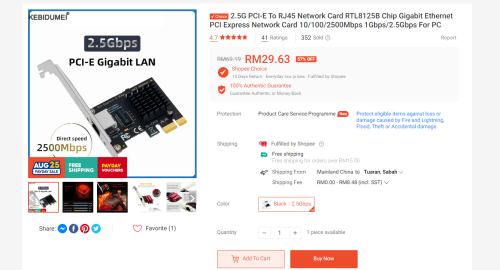
2.5Gbps pcie card so cheap on shoppe lol

user posted image
*
cheap bad quality get intel brand high quality more stable

QUOTE(Epic_winner091 @ Aug 25 2024, 07:10 PM)
Wow that's a good deal. Is it any good though?
*
yah get intel brand prefect
Cavino
post Aug 26 2024, 01:16 PM

Enthusiast
*****
Senior Member
842 posts

Joined: May 2009


QUOTE(PRSXFENG @ Aug 26 2024, 01:10 PM)
Black D-Link has 2.5Gbe port

The 300+Mbps is a known issue of this D-Link
It's mentioned in some other thread
Reboot and you'll get your speed back

If replaced with 3rd party onu, the speed is always stable
*
Like that cialiat, if consistent 300Mbp (i will check repeated for few days), coz rebooting every day is too troublesome for long term instead of the fire and forget using Huawei ONU.
I might have to switch back to Huawei ONU.

Can get 3rd party ONU? How about the config to make ONU work?

This post has been edited by Cavino: Aug 26 2024, 01:19 PM
syahpian
post Aug 26 2024, 01:22 PM

Enthusiast
*****
Junior Member
815 posts

Joined: Jul 2008
From: Kota Kinabalu <-> Kuala Lumpur


QUOTE(tng55 @ Aug 26 2024, 01:13 PM)
cheap bad quality get intel brand high quality more stable
yah get intel brand prefect
*
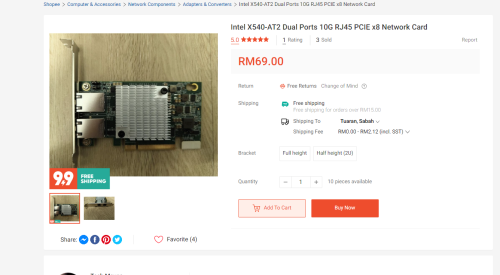
like this one? hmm.gif

it used through

user posted image

This post has been edited by syahpian: Aug 26 2024, 01:23 PM
PJng
post Aug 26 2024, 01:38 PM

10k Club
********
All Stars
12,052 posts

Joined: Oct 2017


QUOTE(jackchoong0110 @ Aug 26 2024, 01:06 PM)
Today my home finally receive the free 1gbps free upgrade. The technician changed my separate modem & router into single D-link AX3000 combo box (black). I just wonder is that normal my LAN speeds only around 940mbps? Tested on ookla speedtest app.

user posted image
*
Is normal if pc port is 1gbps, or router port also 1G, not 2.5G
PRSXFENG
post Aug 26 2024, 01:44 PM

Look at all my stars!!
*******
Senior Member
2,613 posts

Joined: Nov 2020


QUOTE(syahpian @ Aug 26 2024, 01:22 PM)
like this one?  hmm.gif

it used through

user posted image
*
its a pretty old card, from 2012
its not power efficient either

the realtek is fine... sure the realtek "crab" cards have a reputation but its cheap and good enough


PRSXFENG
post Aug 26 2024, 01:48 PM

Look at all my stars!!
*******
Senior Member
2,613 posts

Joined: Nov 2020


QUOTE(jackchoong0110 @ Aug 26 2024, 01:06 PM)
Today my home finally receive the free 1gbps free upgrade. The technician changed my separate modem & router into single D-link AX3000 combo box (black). I just wonder is that normal my LAN speeds only around 940mbps? Tested on ookla speedtest app.

user posted image
*
Completely expected for 1Gbps speed, because of Gigabit Ethernet Limitations, the max speed you will ever see is 940Mbps due to overhead

only if you have the 2Gbps plan that gives a router with 2.5Gbe port and your pc also has 2.5Gbe port, then you can get over that speed

OKLY
post Aug 26 2024, 01:50 PM

The Penguin Vader
Group Icon
Staff
12,090 posts

Joined: Dec 2004
From: Malaysia


QUOTE(Cavino @ Aug 26 2024, 11:32 AM)
DPN-FX3060V

Unfortunately when tested the ONR as router, it is 1052mbps but when do bridging, it maxed out at 923mps using Ookla Speedtest between 1pm to 3pm Saturday.
So the 940 might be true but the upload can achieve 500Mbps++.

So sacrificing abt 100Mbps to allow usage of my own Asus router with its more powerful features and reach is worth it tho. Upload speed to double up.

Anyway sunday 10pm did another test...can hit 300+download and 100+ upload only. Will try test again at midnight to see if non-peak hour can achieve back 900+.
Hopefully it is not issue that some face, dropping to 300+ at all times regardless of peak hour.

Anyway, you can do just like what I did, ask the TM Tech to setup ONR as router, then save the ONR setting up in case you ever what to use it as router mode during emergency case. Then switch it to bridge permanently as use as primary modem. Keep the old Huawei as backup modem in case ONR bridging is not stable.

As for 2.5GBe, i think I might as make mistake here, I saw 2.5Gbe written somewhere..but now comes to think about it, it might or might not be the Dlink ONR.. sweat.gif coz my black Asus router also got 2.5GBe port...I have to go back to take a look, maybe my memory got mixed up.
*
QUOTE(PRSXFENG @ Aug 26 2024, 01:10 PM)
Black D-Link has 2.5Gbe port

The 300+Mbps is a known issue of this D-Link
It's mentioned in some other thread
Reboot and you'll get your speed back

If replaced with 3rd party onu, the speed is always stable
*
I’m using Asus RT-AX86U which has a 2.5GBe port, paired with the black D-Link ONR with 2.5GBe port as well. I run the speedtest from within the router itself (to eliminate that my computer only has 1GBe port), the max speed achieved is also around 940-950mbps.

Does bridge mode actually give a lower speed? hmm.gif

This post has been edited by OKLY: Aug 26 2024, 01:50 PM

DeepMemory
post Aug 26 2024, 01:51 PM

Regular
******
Senior Member
1,805 posts

Joined: Oct 2010
Just received the speed upgrade to 1gbps from 800mbps. Possible to request for the 2.5gb port onr?
PRSXFENG
post Aug 26 2024, 01:51 PM

Look at all my stars!!
*******
Senior Member
2,613 posts

Joined: Nov 2020


QUOTE(Cavino @ Aug 26 2024, 01:16 PM)
Like that cialiat, if consistent 300Mbp (i will check repeated for few days), coz rebooting every day is too troublesome for long term instead of the fire and forget using Huawei ONU.
I might have to switch back to Huawei ONU.

Can get 3rd party ONU?  How about the config to make ONU work?
*
you probably could reuse the old huawei if you copy over the config details

otherwise Anime4000 has their solution for sale, which is a SFP ONU Stick
Cavino
post Aug 26 2024, 02:32 PM

Enthusiast
*****
Senior Member
842 posts

Joined: May 2009


QUOTE(PRSXFENG @ Aug 26 2024, 01:51 PM)
you probably could reuse the old huawei if you copy over the config details

otherwise Anime4000 has their solution for sale, which is a SFP ONU Stick
*
Wait...I tot I could plug in Old Huawei and connect to Asus Router, it should work straight away, isn't it. Since the only thing that change is the PPOE password (they reset the PPOE password that is already in my Asus router. Do I need to re-configure the old Huawei ONU?

Darn, I forgot to re-test the old Huawei ONU connection after they setup bridging for the Dlink ONU.

This post has been edited by Cavino: Aug 26 2024, 02:33 PM
countingcrows
post Aug 26 2024, 02:38 PM

Getting Started
**
Junior Member
259 posts

Joined: Feb 2023
QUOTE(Cavino @ Aug 26 2024, 02:32 PM)
Wait...I tot I could plug in Old Huawei and connect to Asus Router, it should work straight away, isn't it. Since the only thing that change is the PPOE password (they reset the PPOE password that is already in my Asus router. Do I need to re-configure the old Huawei ONU?

Darn, I forgot to re-test the old Huawei ONU connection after they setup bridging for the Dlink ONU.
*
Mine, PPPOE password remains the same, so no need to change anything.
After he left, I just reconnect the fiber/cables to my old Huawei ONU to revert to my old setup.

Not going to use the black D-Link ONR.
Cavino
post Aug 26 2024, 02:44 PM

Enthusiast
*****
Senior Member
842 posts

Joined: May 2009


QUOTE(countingcrows @ Aug 26 2024, 02:38 PM)
Mine, PPPOE password remains the same, so no need to change anything.
After he left, I just reconnect the fiber/cables to my old Huawei ONU to revert to my old setup.

Not going to use the black D-Link ONR.
*
Like that, the old ONU can work straight away...Ok. Thanks.
Will try test if it remains at 300Mbps or can goes up to 900+ at non-peak hour. If consistently 300Mbps, will abandon the ONR and use back Huawei ONU.
The.Lucas.DaY
post Aug 26 2024, 09:25 PM

On my way
****
Junior Member
671 posts

Joined: May 2019

QUOTE(Jjuggler @ Aug 26 2024, 11:11 AM)
Flash with openwrt firmware. Use it till it gave up. I saw a post in FB (TM Unifi Members), dude used back his openwrt-dir842 and gave up his Skyworth ONR. Don't sell the router. I prefer router designs to be small and sleek like the good old DIR-615 days. Nowadays router is too bulky and more into selling compared to those days where the router only fulfils its duty, and ability to flash custom firmwares liike ddwrt, and openwrt.

Edit:
Glad wired vpn routers still uses USFF chassis. Another reason to opt for them if you are networking enthusiast and plan your home networking, especially likes those who setup their own homelab.
*
I flashed it with openwrt but max speed can't go above 150mbps, mine is 300 mbps plan, dunno why. And 1 of my phone connected but no internet access, others is working.
jackchoong0110
post Aug 26 2024, 09:55 PM

New Member
*
Newbie
6 posts

Joined: Sep 2016


QUOTE(PJng @ Aug 26 2024, 01:38 PM)
Is normal if pc port is 1gbps, or router port also 1G, not 2.5G
*
QUOTE(PRSXFENG @ Aug 26 2024, 01:48 PM)
Completely expected for 1Gbps speed, because of Gigabit Ethernet Limitations, the max speed you will ever see is 940Mbps due to overhead

only if you have the 2Gbps plan that gives a router with 2.5Gbe port and your pc also has 2.5Gbe port, then you can get over that speed
*
I see, then probably is limited by my pc port, since I tried plug 2.5Gbe port on router still same.

PJng
post Aug 26 2024, 09:57 PM

10k Club
********
All Stars
12,052 posts

Joined: Oct 2017


QUOTE(jackchoong0110 @ Aug 26 2024, 09:55 PM)
I see, then probably is limited by my pc port, since I tried plug 2.5Gbe port on router still same.
*
Check your mboard spec, it gigabit? Or open network status, will show 1.0gbps
iCare
post Aug 26 2024, 10:00 PM

Getting Started
**
Junior Member
67 posts

Joined: May 2015
QUOTE(syahpian @ Aug 26 2024, 01:22 PM)
like this one?  hmm.gif

it used through

user posted image
*
I have a copy ori China X540-AT2 bought it online long ago. Until now its still working fine both ports. I think for older model intel NIC , its always either copy ori or 'refurbish' version. Mine does not look like the pic though. My heatsink is exactly like original intel version.
tng55
post Aug 26 2024, 10:32 PM

Regular
******
Senior Member
1,448 posts

Joined: Sep 2021


QUOTE(jackchoong0110 @ Aug 26 2024, 09:55 PM)
I see, then probably is limited by my pc port, since I tried plug 2.5Gbe port on router still same.
*
you need dlink onr 2.5g port and PC 2.5G get full speed

495 Pages « < 235 236 237 238 239 > » Top
Topic ClosedOptions
 

Change to:
| Lo-Fi Version
0.0216sec    0.82    6 queries    GZIP Disabled
Time is now: 18th December 2025 - 07:36 PM