Welcome Guest ( Log In | Register )

Bump Topic Topic Closed RSS Feed

Outline · [ Standard ] · Linear+

Unifi Official TM UniFi High Speed Broadband Thread V42, READ 1ST PAGE FOR RELEVANT WIFI INFO!

views
     
afif92
post Feb 26 2024, 10:10 AM

Casual
***
Junior Member
374 posts

Joined: Mar 2010
QUOTE(nnannon24 @ Feb 26 2024, 10:07 AM)
I've tried that but once I hit submit my IP address gone and AUTHENTICATION FAILURE
I ended up contact TM technician and they scold me "jgn sentuh apa ii" lol

Are you sure you have the same router as mine?
*
TM router has a bit complicated interface.. If you messed up wrong settings, GG..
afif92
post Aug 9 2024, 05:13 AM

Casual
***
Junior Member
374 posts

Joined: Mar 2010
QUOTE(A183RT0 @ Aug 8 2024, 07:33 PM)
Is something wrong with TM this week??
This problem happens on last Friday, so i contact TM from Facebook (Since 3 of the customer service number is useless and no one is picking up)
their representative gives me the EasyFix Guide and i told them already tried(turn off router, they reset the port and etc) still the same
so they make a report number and the technician came to my home on this Monday, checked the cables and make speed test with their temporary account but end up also the same.
my plan is 500Mbps and yet i keep getting below 100Mbps

so now, what i am trying to say is, WHAT THE HECK IS GOING ON??

here is today's speed test result
user posted image

i can't even watch streams using the UnifiTV app
*
look like your fiber cable or port have issue
afif92
post Aug 27 2024, 08:32 PM

Casual
***
Junior Member
374 posts

Joined: Mar 2010
Hi, Is there anyone here got slow for x.com?
afif92
post Sep 12 2024, 10:51 PM

Casual
***
Junior Member
374 posts

Joined: Mar 2010
Why people discussing outside unifi scope in this thread?
afif92
post Sep 14 2024, 11:31 AM

Casual
***
Junior Member
374 posts

Joined: Mar 2010
QUOTE(abidshown @ Sep 14 2024, 10:28 AM)
Just asking, after the DNS fiasco thing, my network became very unstable.. every day disconnecting randomly every now and then.. reset port also no use. Before this uptime can go up to a month.

Any1 having such problems? This problem is very frustrating bcoz I am using internet to do work almost all day.
*
I think maybe your fiber is in bad condition either it wanna snap or loose port.
afif92
post Sep 18 2024, 08:34 PM

Casual
***
Junior Member
374 posts

Joined: Mar 2010
QUOTE(solarmystic @ Sep 18 2024, 08:00 PM)
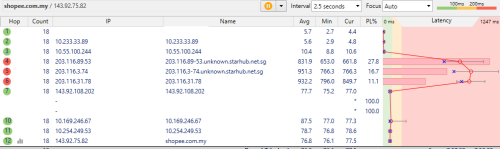
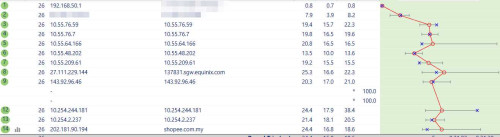
Why tf is traffic to shopee.com.my (a MY website) being routed through SG?

user posted image
*
maybe their server is hosted there.. mine is ok ok lar even far from Klang Valley area..

user posted image
afif92
post Sep 18 2024, 08:48 PM

Casual
***
Junior Member
374 posts

Joined: Mar 2010
QUOTE(pokemon @ Sep 18 2024, 08:43 PM)
Did you notice shopee.com.my has 2 ip address prefix?  143.xx  and 202.xx ??
*
yes

user posted image
afif92
post Sep 23 2024, 10:28 PM

Casual
***
Junior Member
374 posts

Joined: Mar 2010
QUOTE(jslee0610 @ Sep 23 2024, 09:35 PM)
user posted image

Yeah I was pretty surprised when I got the message for the speed bump, but there you go.
Officially still paying for 100mbps RM 89
*
I think you may got 300Mbps plan upgrade but maybe you are connected using 2.4Ghz Wifi
afif92
post Sep 25 2024, 01:59 PM

Casual
***
Junior Member
374 posts

Joined: Mar 2010
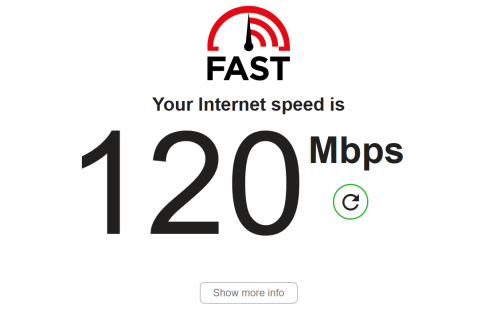
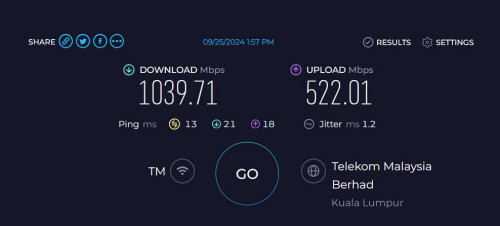
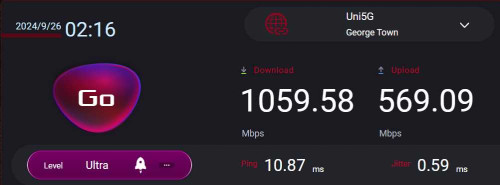
Finally after setting up ONU in bridged mode with GT-AX11000.. but only can get this result via Wi-Fi due to only have one 2.5Gbps port..

user posted image

user posted image

This post has been edited by afif92: Sep 26 2024, 02:17 AM
afif92
post Sep 25 2024, 07:45 PM

Casual
***
Junior Member
374 posts

Joined: Mar 2010
QUOTE(neekun @ Sep 25 2024, 07:22 PM)
What device you use to test on wifi?
*
Xiaomi Mi Pad 6S Pro
afif92
post Sep 25 2024, 07:47 PM

Casual
***
Junior Member
374 posts

Joined: Mar 2010
QUOTE(aa123aa @ Sep 25 2024, 02:29 PM)
which onu model u using?
*
Dlink DPN-FX3060V (COMBO BOX AX3000 2.5G)
afif92
post Sep 25 2024, 07:50 PM

Casual
***
Junior Member
374 posts

Joined: Mar 2010
QUOTE(Cavino @ Sep 25 2024, 03:53 PM)
Wah...my Asus AX11000 got problem with the black D-Link under bridge mode. Will dropped to 300Mbps, don't know when will drop, sometime next day, etc. Once dropped, it will stay at 300Mbps unless reboot. In the end, I have to switch back to old Huawei modem. That one won't drop no matter how long I leave it on.
But even using ONU bridging using the Dlink 2.5GB router, I will still only get 850++ to 930 Mbps only. Only when using Dlink in router mode under wifi can get over 1GB. But that router is way less efficient that my own Asus router...
*
I also asked technician to test gpon router mode first but internet do not up even after few minutes.. then, I asked him to change to bridge mode and use it until now.. hope mine does not drop to 300Mbps.. the black Dlink DPN-FX30060V right?
afif92
post Oct 2 2024, 06:59 AM

Casual
***
Junior Member
374 posts

Joined: Mar 2010
QUOTE(countingcrows @ Oct 1 2024, 11:59 PM)
Anyone's speedtest.net Result History missing the latest results?
*
If you are not login to speedtest.net and your IP address was changed, of course you will lose the results using previous IP if I am not mistaken.
afif92
post Oct 2 2024, 07:44 AM

Casual
***
Junior Member
374 posts

Joined: Mar 2010
I noticed my speed from 1Gbps would drop to 300Mbps after I connect VPN using Wireguard 443.. Every time I connect using this method, the speed would drop. Unless I used UDP 443, it stays full speed. This all happen with Black Dlink FX3060V in bridge mode. How can VPN in PC affect ONU to behave like this? How could this happen and how to prevent them?

This post has been edited by afif92: Oct 2 2024, 07:49 AM
afif92
post Oct 2 2024, 09:43 AM

Casual
***
Junior Member
374 posts

Joined: Mar 2010
QUOTE(PRSXFENG @ Oct 2 2024, 08:32 AM)
the speed drop to 300 is a known issue on the dlink, but i think you're the first one to relate it to a specific action causing it...
*
For my issue, i think i have find the culprit.. Recently, I changed MTU value in PPPoE from default one (1492) to (1480).. Now , after changed back to (1492) , the speed does not slow down anymore after connect to Wireguard.. Hope it has been settled and dont give me problem anymore..
afif92
post Oct 2 2024, 11:33 AM

Casual
***
Junior Member
374 posts

Joined: Mar 2010
QUOTE(jonathanwhm @ Oct 2 2024, 10:38 AM)
I had the same issue with my 2Gbps plan. After connecting to the VPN, my speed dropped to 300Mbps. Even after disconnecting from the VPN, the speed remained at 300Mbps. It only returned to full speed after I rebooted the ONU. This problem only occurs every time I connect to the VPN.
*
You could try my solution too..
afif92
post Oct 18 2024, 12:22 PM

Casual
***
Junior Member
374 posts

Joined: Mar 2010
QUOTE(kwss @ Oct 18 2024, 11:57 AM)
Firmware v2.0.3 for black D-Link ONR.
Thanks to MarcoFromTropoja

Download link:
https://www.mediafire.com/file/4s9bfvbco0hw...flowid.bin/file

SHA-256 sum:
e91b8b93b3bf93a5836631179f8404443abccb328369a34f90f8ea47c0dba81a
*
Nice.. When I free I want to try if new firmware still same like old or not.. For now, in bridged mode and current firmware ( dont know because didnt check) , the speed does not drop after change MTU to 1492 after connecting to Wireguard..
afif92
post Oct 18 2024, 03:17 PM

Casual
***
Junior Member
374 posts

Joined: Mar 2010
QUOTE(blacktubi @ Oct 18 2024, 01:05 PM)
Curious to know you changed the MTU on your router or at the modem
*
router
afif92
post Oct 18 2024, 06:26 PM

Casual
***
Junior Member
374 posts

Joined: Mar 2010
QUOTE(RViN @ Oct 18 2024, 03:43 PM)
My router default MTU is 1492 ... always had the issue.

What was the default on your end that you changed to 1492? On the Asus routers I've used the default has always been 1492.

Maybe there's something else that's specific to your setup that causes you not to have the issue.

I'll try the 2.0.3 firmware later tonight and see if that changes anything on my side.
*
Done update to 2.0.3.. I do not know if it really solve my problem but after change MTU to 1488, it does not slow to 300Mbps after connect wireguard.. Before this, I need to restart ONU to get the speed back..
afif92
post Oct 22 2024, 10:57 AM

Casual
***
Junior Member
374 posts

Joined: Mar 2010
QUOTE(stevenlys @ Oct 22 2024, 02:27 AM)
Do you still experience speed drop after the update?
*
until today not yet happen

2 Pages  1 2 >Top
Topic ClosedOptions
 

Change to:
| Lo-Fi Version
1.7940sec    0.87    7 queries    GZIP Disabled
Time is now: 11th December 2025 - 03:29 AM