

WTA so are all unifi user having problem sites like Twitter/X gets very slow usually from 8pm onwards??
Unifi Official TM UniFi High Speed Broadband Thread V42, READ 1ST PAGE FOR RELEVANT WIFI INFO!
Unifi Official TM UniFi High Speed Broadband Thread V42, READ 1ST PAGE FOR RELEVANT WIFI INFO!
|
|
 Jun 18 2024, 10:20 PM Jun 18 2024, 10:20 PM
|
 
Senior Member
1,010 posts Joined: Aug 2014  
|
WTA so are all unifi user having problem sites like Twitter/X gets very slow usually from 8pm onwards?? Singh93 liked this post
|
|
|
|
|
|
Jun 18 2024, 10:25 PM
Show posts by this member only | IPv6 | Post
#3242
|

Senior Member
3,305 posts Joined: Dec 2012
|
I noticed that my WAN IP address changes randomly every day. Could this be due to I restarting my router, causing the IP address to change? Additionally, I'm unsure which IP range would be optimal. I've seen discussions about IP ranges in the past but hadn't paid attention to them until now.
|
|
|
Jun 19 2024, 12:14 AM
Show posts by this member only | IPv6 | Post
#3243
|

Junior Member
705 posts Joined: Feb 2017 
|
QUOTE(ycs @ Jun 18 2024, 10:22 PM) mine is 19 hops on 60.50.x.x same 19hops on 60.51.x.x |
|
|
Jun 19 2024, 08:24 AM
|

Junior Member
156 posts Joined: Dec 2010
|
QUOTE(cklove96 @ Jun 19 2024, 12:14 AM) same 19hops on 60.51.x.x The lower the hop count the better. See this is what I meant by differences in local routing (gateway ip) to the same remote destination. If you get connected to a bad or underperformed local gateway your connection to the remote destination be it a website or server will be affected. For normal browsing usage its fine but for ping based apps like online gaming or video conference apps you can tell the difference. Higher hop count doesnt always mean bad connection but the ideal is to get it as low as possible. I get 16 with 124.xxx and somtimes 18 with 175.xxx Also take note of your MTU number there it should be 1492 PPPoE. You can live with 1480 but its not optimal because of packet fragmentation. Anything lower or higher on a PPPoE connection will create packet issue on your side for example on ping based apps like online gaming you'll get intermittent packet loss. Since we're on Unifi PPPoE just set your MTU to 1492. Theres overhead and fragmentation issue if you mismatch. Here's some easy to understand general info Hops https://www.lifewire.com/what-are-hops-hop-counts-2625905 MTU https://www.cloudflare.com/learning/network...er/what-is-mtu/ This post has been edited by Ashren: Jun 19 2024, 08:46 AM cHiLdHo0drEaMz liked this post
|
|
|
Jun 19 2024, 08:56 AM
|
|
Junior Member
156 posts Joined: Dec 2010
|
QUOTE(jiaen0509 @ Jun 18 2024, 10:25 PM) I noticed that my WAN IP address changes randomly every day. Could this be due to I restarting my router, causing the IP address to change? Additionally, I'm unsure which IP range would be optimal. I've seen discussions about IP ranges in the past but hadn't paid attention to them until now. Gateway ip varies for everyone. Some area are better off with 175 range, some 60, some 124, etc. As for me 124 is the most realiable. Might not be the same for everyone. My advice is if you dont get issues with your present or regular ip range then continue as it is. Tweaking and monitoring only needed if you're facing stability issues. But that 42.xxx gateway is cursed. The worst of all gateway ever existed. |
|
|
Jun 19 2024, 08:59 AM
|

Senior Member
1,341 posts Joined: Dec 2016
|
QUOTE(Ashren @ Jun 19 2024, 08:56 AM) Gateway ip varies for everyone. Some area are better off with 175 range, some 60, some 124, etc. As for me 124 is the most realiable. Might not be the same for everyone. My advice is if you dont get issues with your present or regular ip range then continue as it is. Tweaking and monitoring only needed if you're facing stability issues. But that 42.xxx gateway is cursed. The worst of all gateway ever existed. I second this. As Unifi Air user that stuck with 42.xxx.xxx.xxxx ip range, I agree with this statement.Edit: Just checked mine. I got 19 hops according to browserleaks.com/ip. This post has been edited by Jjuggler: Jun 19 2024, 09:04 AM Ashren liked this post
|
|
|
|
|
|
Jun 19 2024, 08:59 AM
|
|
Senior Member
3,305 posts Joined: Dec 2012
|
QUOTE(Ashren @ Jun 19 2024, 08:24 AM) The lower the hop count the better. See this is what I meant by differences in local routing (gateway ip) to the same remote destination. If you get connected to a bad or underperformed local gateway your connection to the remote destination be it a website or server will be affected. For normal browsing usage its fine but for ping based apps like online gaming or video conference apps you can tell the difference. Higher hop count doesnt always mean bad connection but the ideal is to get it as low as possible. I get 16 with 124.xxx and somtimes 18 with 175.xxx Also take note of your MTU number there it should be 1492 PPPoE. You can live with 1480 but its not optimal because of packet fragmentation. Anything lower or higher on a PPPoE connection will create packet issue on your side for example on ping based apps like online gaming you'll get intermittent packet loss. Since we're on Unifi PPPoE just set your MTU to 1492. Theres overhead and fragmentation issue if you mismatch. Here's some easy to understand general info Hops https://www.lifewire.com/what-are-hops-hop-counts-2625905 MTU https://www.cloudflare.com/learning/network...er/what-is-mtu/ QUOTE(Ashren @ Jun 19 2024, 08:56 AM) Gateway ip varies for everyone. Some area are better off with 175 range, some 60, some 124, etc. As for me 124 is the most realiable. Might not be the same for everyone. My advice is if you dont get issues with your present or regular ip range then continue as it is. Tweaking and monitoring only needed if you're facing stability issues. But that 42.xxx gateway is cursed. The worst of all gateway ever existed. I got 110.x, 124.x and now I got 60.x. All ip range I got 17 hops.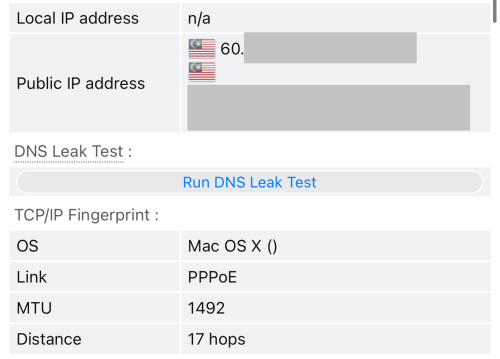 Ashren liked this post
|
|
|
Jun 19 2024, 09:39 AM
|

Senior Member
1,130 posts Joined: Jan 2003 
|
QUOTE(Ashren @ Jun 19 2024, 08:24 AM) The lower the hop count the better. See this is what I meant by differences in local routing (gateway ip) to the same remote destination. If you get connected to a bad or underperformed local gateway your connection to the remote destination be it a website or server will be affected. For normal browsing usage its fine but for ping based apps like online gaming or video conference apps you can tell the difference. Higher hop count doesnt always mean bad connection but the ideal is to get it as low as possible. I get 16 with 124.xxx and somtimes 18 with 175.xxx Mikrotik pppoe client always use the default 1480. Not a big deal as I don't notice much.Also take note of your MTU number there it should be 1492 PPPoE. You can live with 1480 but its not optimal because of packet fragmentation. Anything lower or higher on a PPPoE connection will create packet issue on your side for example on ping based apps like online gaming you'll get intermittent packet loss. Since we're on Unifi PPPoE just set your MTU to 1492. Theres overhead and fragmentation issue if you mismatch. Here's some easy to understand general info Hops https://www.lifewire.com/what-are-hops-hop-counts-2625905 MTU https://www.cloudflare.com/learning/network...er/what-is-mtu/ |
|
|
Jun 19 2024, 10:02 AM
|
|
Junior Member
156 posts Joined: Dec 2010
|
QUOTE(jiaen0509 @ Jun 19 2024, 08:59 AM) I got 110.x, 124.x and now I got 60.x. All ip range I got 17 hops. Your area gateway has a very much optimized routing. Correct MTU set also. Nice. jiaen0509 liked this post
|
|
|
Jun 19 2024, 10:06 AM
|
|
Junior Member
156 posts Joined: Dec 2010
|
QUOTE(cyberic @ Jun 19 2024, 09:39 AM) Mikrotik pppoe client always use the default 1480. Not a big deal as I don't notice much. Yeah Mikrotik default is 1480 same as Xbox consoles. It doesnt hurt having that number on a 1492 link but its under utilized. As I said it before you can live with 1480 but some apps, device, sometimes dont play nice. If it doesnt affect your setup, just continue as it is.https://forum.mikrotik.com/viewtopic.php?t=146034 This post has been edited by Ashren: Jun 19 2024, 10:14 AM |
|
|
Jun 19 2024, 11:28 AM
|
|
Senior Member
1,130 posts Joined: Jan 2003
|
QUOTE(Ashren @ Jun 19 2024, 10:06 AM) Yeah Mikrotik default is 1480 same as Xbox consoles. It doesnt hurt having that number on a 1492 link but its under utilized. As I said it before you can live with 1480 but some apps, device, sometimes dont play nice. If it doesnt affect your setup, just continue as it is. I always thought it is using 1492 that I set. https://forum.mikrotik.com/viewtopic.php?t=146034  |
|
|
Jun 19 2024, 11:47 AM
|
|
Junior Member
156 posts Joined: Dec 2010
|
QUOTE(cyberic @ Jun 19 2024, 11:28 AM) I always thought it is using 1492 that I set. Its okay you can always manually set your lan mtu for the particular device if its having packet or nat issues. Most device will auto adjust and utilize the pmtud especially windows pc. Just generally its better to have it correctly set on the router/dialer itself to avoid the hassle. Lower mtu set vs max allowed usually is fine if theres no mismatch between both end to end link or you'll get packet drop and fragmentation issues. If everything is fine meaning pmtud is doing its job for you and you're good to go. Just that you're transmitting 1480 on a 1492 link, like I said before it isnt optimal but not the end of the world either. The total throughput difference isnt noticeable its not like you drop to 500 on a 1gbps link. Its only noticeable on time/ping sensitive apps like online gaming which rely heavily on packet transmission. Just like how gamers can detect frame drops without even looking at the fps number.This post has been edited by Ashren: Jun 19 2024, 12:19 PM |
|
|
Jun 19 2024, 12:53 PM
|
|
Senior Member
1,207 posts Joined: Aug 2018
|
QUOTE(Ashren @ Jun 19 2024, 08:24 AM) The lower the hop count the better. See this is what I meant by differences in local routing (gateway ip) to the same remote destination. If you get connected to a bad or underperformed local gateway your connection to the remote destination be it a website or server will be affected. For normal browsing usage its fine but for ping based apps like online gaming or video conference apps you can tell the difference. Higher hop count doesnt always mean bad connection but the ideal is to get it as low as possible. I get 16 with 124.xxx and somtimes 18 with 175.xxx I is obvious you just google MTU when I mentioned it.Also take note of your MTU number there it should be 1492 PPPoE. You can live with 1480 but its not optimal because of packet fragmentation. Anything lower or higher on a PPPoE connection will create packet issue on your side for example on ping based apps like online gaming you'll get intermittent packet loss. Since we're on Unifi PPPoE just set your MTU to 1492. Theres overhead and fragmentation issue if you mismatch. Here's some easy to understand general info Hops https://www.lifewire.com/what-are-hops-hop-counts-2625905 MTU https://www.cloudflare.com/learning/network...er/what-is-mtu/ It is even more obvious you do not fully understand the Cloudflare article. What is most obvious is you are not a network engineer. Every single network engineer I know deal with at least one MTU problem in their life and remember their experience well because it is one hell of a mystery to begin with. But I am an inclusive person and I will not tell people to stop argument with me. Most importantly I will not brush people off because they are not a doctor or not a network engineer or what not. So let me start you up with your research, as you seems a lot smarter than tng55. Not sure who is smarter, is it you or BeeYenHua PPPoE: The standard says the minimum overhead is 8 bytes. It can be more. You never know if the BNG you are using are having an 8 bytes overhead or more. Multipath link: All telco run jumbo frame in their network. If they misconfigured one path, anything going through that path will be hit with fragmentation and reassembly. MPLS and Segment Routing: Overhead varies, depending on the number of label, and the number of tunnel-in-tunnel the telco use. 5G edge compute: They are mostly MTU 1300 right now. The Mikrotik specific problem: It can do MRU 1500 but MTU is 1480. Do a packet capture and you will understand why. The negitiation for MTU 1500 is actually successful, but then TM BNG has a problem where the LCP-Reply will be malformed. When Mikrotik detects it, it lower MTU to 1480. As far as I can tell, all the TM BNG I tried exhibit this bug. The lowering of MTU is actually a bug itself in RouterOS. So 2 bugs combined made this happen. The "most stable" MTU: It is 1280. It is the smallest dictated by IPv6 standard without fragmentation. Large enough to fit most tunnel, including 5G compute edge, PPPoE, VPN. It will even work if Path MTU Discovery is broken. Windows and their firewall: The last time I use Windows, their firewall by default block ICMP Type 3 Code 4 and ICMPv6 Type 2 Code 0. What this means is PMTUD will never work on Windows. If the BNG is configured to never disassemble packet, it will break all Windows machine with the default configuration and has a higher than link MTU set. CDN and big tech runs at MTU 1280 for maximum compatibility. Cloudflare only recently changed and they blogged it: https://blog.cloudflare.com/increasing-ipv6-mtu Using a browser test to talk about hop count? You need to do better than that. Hop count is never accurate on MPLS / SR network because everything inside the tunnel session has count=1 regardless of how many physical router they pass-through. Proof that MRU 1500 is working even when my MTU is 1480... Woots! CODE $ ss -tapi State Recv-Q Send-Q Local Address:Port Peer Address:Port Process ESTAB 0 0 192.168.88.17:37238 104.26.6.73:https users:(("firefox",pid=3486,fd=157)) bbr wscale:13,7 rto:227 rtt:26.152/5.336 ato:40 mss:1388 pmtu:1500 rcvmss:1428 advmss:1448 cwnd:23 bytes_sent:3454 bytes_acked:3455 bytes_received:7593 segs_out:24 segs_in:21 data_segs_out:13 data_segs_in:15 bbr:(bw:1.81Mbps,mrtt:15.556,pacing_gain:2.88672,cwnd_gain:2.88672) send 9.77Mbps lastsnd:22071 lastrcv:22047 lastack:22047 pacing_rate 10.8Mbps delivery_rate 1.81Mbps delivered:14 app_limited busy:182ms rcv_space:14480 rcv_ssthresh:64088 minrtt:11.561 snd_wnd:49152 rcv_wnd:59392 ESTAB 0 0 192.168.88.17:32940 151.101.65.140:https users:(("firefox",pid=3486,fd=153)) bbr wscale:9,7 rto:221 rtt:20.62/5.495 ato:40 mss:1428 pmtu:1500 rcvmss:1428 advmss:1448 cwnd:30 bytes_sent:12516 bytes_acked:12517 bytes_received:23479 segs_out:43 segs_in:50 data_segs_out:22 data_segs_in:31 bbr:(bw:3.78Mbps,mrtt:10.567,pacing_gain:2.88672,cwnd_gain:2.88672) send 16.6Mbps lastsnd:25072 lastrcv:25053 lastack:25053 pacing_rate 27.1Mbps delivery_rate 3.78Mbps delivered:23 app_limited busy:203ms rcv_space:14480 rcv_ssthresh:64088 minrtt:10.567 rcv_ooopack:1 snd_wnd:187392 rcv_wnd:64128 ESTAB 0 0 192.168.88.17:50304 104.18.18.239:https users:(("firefox",pid=3486,fd=125)) bbr wscale:13,7 rto:226 rtt:25.686/19.446 ato:40 mss:1388 pmtu:1500 rcvmss:1428 advmss:1448 cwnd:17 bytes_sent:2427 bytes_acked:2428 bytes_received:6841 segs_out:13 segs_in:15 data_segs_out:7 data_segs_in:9 bbr:(bw:1.27Mbps,mrtt:13.162,pacing_gain:2.88672,cwnd_gain:2.88672) send 7.35Mbps lastsnd:29026 lastrcv:28959 lastack:28959 pacing_rate 24.1Mbps delivery_rate 1.27Mbps delivered:8 app_limited busy:183ms rcv_space:14480 rcv_ssthresh:64088 minrtt:13.162 snd_wnd:49152 rcv_wnd:59264 ESTAB 0 0 [2001:e68:5427:3c12:be6e:fc31:120a:42af]:49876 [2001:4860:4860::8844]:https users:(("firefox",pid=3486,fd=121)) bbr wscale:8,7 rto:214 rtt:13.583/4.275 ato:40 mss:1408 pmtu:1480 rcvmss:1208 advmss:1408 cwnd:18 bytes_sent:2837 bytes_acked:2838 bytes_received:2068 segs_out:16 segs_in:12 data_segs_out:8 data_segs_in:7 bbr:(bw:3.2Mbps,mrtt:7.028,pacing_gain:2.88672,cwnd_gain:2.88672) send 14.9Mbps lastsnd:46324 lastrcv:46310 lastack:46310 pacing_rate 23.6Mbps delivery_rate 3.2Mbps delivered:9 app_limited busy:79ms rcv_space:14080 rcv_ssthresh:64128 minrtt:7.028 snd_wnd:74240 rcv_wnd:63616 This post has been edited by kwss: Jun 19 2024, 01:08 PM |
|
|
|
|
|
Jun 19 2024, 01:04 PM
Show posts by this member only | IPv6 | Post
#3254
|

Newbie
20 posts Joined: Oct 2015
|
WTF is wrong with unifi. I have 300Mbps plan and it's around 80 Mbps atm. It's been like this for at least 4-5 days now. I report this to their twitter every single day. Yesterday they reset port and it was back to normal speed. Now it's slow again.
Is there any solution to this? Are there better ISP? I don't have TIME here so that's out of the question. I'm really sick of this. I pay monthly on time just for this shit speed. |
|
|
Jun 19 2024, 01:13 PM
|
|
Senior Member
1,207 posts Joined: Aug 2018
|
QUOTE(Godhand73 @ Jun 19 2024, 01:04 PM) WTF is wrong with unifi. I have 300Mbps plan and it's around 80 Mbps atm. It's been like this for at least 4-5 days now. I report this to their twitter every single day. Yesterday they reset port and it was back to normal speed. Now it's slow again. I have a suspect for this. GPON is never designed for speed more than 1Gbps. Actually I don't think it is part of the QA process for any GPON equipment manufacturer.Is there any solution to this? Are there better ISP? I don't have TIME here so that's out of the question. I'm really sick of this. I pay monthly on time just for this shit speed. In fact you cannot find GPON ONU with faster than 1Gbps port. D-LINK actually custom made it for TM. With the free speed upgrade, they are basically pushing the equipment limit. I am sure they lab test this. But what works in the lab don't necessary works in the field. Do you know what OLT are you using? Maybe everyone can post this info and see if all the problem is with a single OLT vendor. Other than that, there is nothing a consumer can do. I don't think TM can fix the bug other than upgrade to XGSPON or better. |
|
|
Jun 19 2024, 02:04 PM
|
|
Senior Member
1,207 posts Joined: Aug 2018
|
Everything going to TATA -> Packet Host over IPv6 hits a routing loop right now.
CODE $ ping gitlab.freedesktop.org PING gitlab.freedesktop.org (2604:1380:45f2:6901::2) 56 data bytes From fdo-k3s-server-15 (2604:1380:45f2:6900::1b) icmp_seq=1 Time exceeded: Hop limit From fdo-k3s-server-15 (2604:1380:45f2:6900::1b) icmp_seq=2 Time exceeded: Hop limit From fdo-k3s-server-15 (2604:1380:45f2:6900::1b) icmp_seq=3 Time exceeded: Hop limit From fdo-k3s-server-15 (2604:1380:45f2:6900::1b) icmp_seq=4 Time exceeded: Hop limit From fdo-k3s-server-15 (2604:1380:45f2:6900::1b) icmp_seq=5 Time exceeded: Hop limit From fdo-k3s-server-15 (2604:1380:45f2:6900::1b) icmp_seq=6 Time exceeded: Hop limit From fdo-k3s-server-15 (2604:1380:45f2:6900::1b) icmp_seq=7 Time exceeded: Hop limit From fdo-k3s-server-15 (2604:1380:45f2:6900::1b) icmp_seq=8 Time exceeded: Hop limit From fdo-k3s-server-15 (2604:1380:45f2:6900::1b) icmp_seq=9 Time exceeded: Hop limit ^C --- gitlab.freedesktop.org ping statistics --- 10 packets transmitted, 0 received, +9 errors, 100% packet loss, time 9173ms CODE $ traceroute -6 gitlab.freedesktop.org traceroute to gitlab.freedesktop.org (2604:1380:45f2:6901::2), 30 hops max, 80 byte packets 1 2001:e68:5427:3c12::1 (2001:e68:5427:3c12::1) 16.513 ms 16.471 ms 16.449 ms 2 2001:e68:402c:8001::6c (2001:e68:402c:8001::6c) 26.841 ms 26.821 ms 26.802 ms 3 2001:e68::b:a00c (2001:e68::b:a00c) 65.861 ms 34.837 ms 65.824 ms 4 * * * 5 * * * 6 * if-bundle-19-2.qcore2.svw-singapore.ipv6.as6453.net (2405:2000:2a00:50::20) 11.211 ms * 7 * * * 8 if-ae-33-2.tcore1.svw-singapore.ipv6.as6453.net (2405:2000:ffaa:20::5) 22.229 ms 21.502 ms 29.714 ms 9 * if-et-23-2.hcore2.kv8-chiba.ipv6.as6453.net (2405:2000:ffa0:100::73) 120.362 ms 112.112 ms 10 if-ae-53-2.tcore2.lvw-losangeles.ipv6.as6453.net (2001:5a0:fff0:100::24) 285.960 ms 285.894 ms 285.847 ms 11 * * * 12 * * if-bundle-26-2.qcore2.aeq-ashburn.ipv6.as6453.net (2001:5a0:fff0:230::9) 278.356 ms 13 * * if-be-3-2.ecore2.aeq-ashburn.ipv6.as6453.net (2001:5a0:3c01:130::201) 277.021 ms 14 2001:5a0:600:500::32 (2001:5a0:600:500::32) 285.232 ms 277.410 ms 276.114 ms 15 0.et-0-0-1.bsr2.dc13.packet.net (2604:1380:fffe::3d) 276.095 ms 0.et-0-0-19.bsr1.dc13.packet.net (2604:1380:fffe::125) 279.939 ms 0.et-0-0-1.bsr2.dc13.packet.net (2604:1380:fffe::3d) 279.015 ms 16 * * * 17 * * * 18 fdo-k3s-server-17 (2604:1380:45f2:6900::1) 297.793 ms 297.737 ms fdo-k3s-server-15 (2604:1380:45f2:6900::1b) 268.160 ms 19 * * * 20 fdo-k3s-server-16 (2604:1380:45f2:6900::b) 461.264 ms fdo-k3s-server-17 (2604:1380:45f2:6900::1) 461.243 ms fdo-k3s-server-15 (2604:1380:45f2:6900::1b) 461.224 ms 21 * * * 22 fdo-k3s-server-15 (2604:1380:45f2:6900::1b) 461.100 ms fdo-k3s-server-17 (2604:1380:45f2:6900::1) 461.081 ms fdo-k3s-server-16 (2604:1380:45f2:6900::b) 306.254 ms 23 * * * 24 fdo-k3s-server-15 (2604:1380:45f2:6900::1b) 306.019 ms fdo-k3s-server-17 (2604:1380:45f2:6900::1) 304.386 ms fdo-k3s-server-16 (2604:1380:45f2:6900::b) 304.196 ms 25 * * * 26 fdo-k3s-server-15 (2604:1380:45f2:6900::1b) 523.276 ms fdo-k3s-server-16 (2604:1380:45f2:6900::b) 523.231 ms fdo-k3s-server-15 (2604:1380:45f2:6900::1b) 523.192 ms 27 * * * 28 fdo-k3s-server-17 (2604:1380:45f2:6900::1) 306.698 ms * 609.017 ms 29 * * * 30 fdo-k3s-server-17 (2604:1380:45f2:6900::1) 466.717 ms fdo-k3s-server-15 (2604:1380:45f2:6900::1b) 466.699 ms fdo-k3s-server-16 (2604:1380:45f2:6900::b) 466.682 ms |
|
|
Jun 19 2024, 02:13 PM
|
|
Junior Member
156 posts Joined: Dec 2010
|
QUOTE(kwss @ Jun 19 2024, 12:53 PM) I is obvious you just google MTU when I mentioned it. I sure do live rent free in your head am I. There's no way you get offended and flamed by my replies to others that doesnt even include you in a single bit. Matter of fact lets just all change our MTU to 1280 and post the stability results here since you insist so hard thats the way to go. Keep pasting numbers every now and then. Entertain me.It is even more obvious you do not fully understand the Cloudflare article. What is most obvious is you are not a network engineer. Every single network engineer I know deal with at least one MTU problem in their life and remember their experience well because it is one hell of a mystery to begin with. But I am an inclusive person and I will not tell people to stop argument with me. Most importantly I will not brush people off because they are not a doctor or not a network engineer or what not. So let me start you up with your research, as you seems a lot smarter than tng55. Not sure who is smarter, is it you or BeeYenHua PPPoE: The standard says the minimum overhead is 8 bytes. It can be more. You never know if the BNG you are using are having an 8 bytes overhead or more. Multipath link: All telco run jumbo frame in their network. If they misconfigured one path, anything going through that path will be hit with fragmentation and reassembly. MPLS and Segment Routing: Overhead varies, depending on the number of label, and the number of tunnel-in-tunnel the telco use. 5G edge compute: They are mostly MTU 1300 right now. The Mikrotik specific problem: It can do MRU 1500 but MTU is 1480. Do a packet capture and you will understand why. The negitiation for MTU 1500 is actually successful, but then TM BNG has a problem where the LCP-Reply will be malformed. When Mikrotik detects it, it lower MTU to 1480. As far as I can tell, all the TM BNG I tried exhibit this bug. The lowering of MTU is actually a bug itself in RouterOS. So 2 bugs combined made this happen. The "most stable" MTU: It is 1280. It is the smallest dictated by IPv6 standard without fragmentation. Large enough to fit most tunnel, including 5G compute edge, PPPoE, VPN. It will even work if Path MTU Discovery is broken. Windows and their firewall: The last time I use Windows, their firewall by default block ICMP Type 3 Code 4 and ICMPv6 Type 2 Code 0. What this means is PMTUD will never work on Windows. If the BNG is configured to never disassemble packet, it will break all Windows machine with the default configuration and has a higher than link MTU set. CDN and big tech runs at MTU 1280 for maximum compatibility. Cloudflare only recently changed and they blogged it: https://blog.cloudflare.com/increasing-ipv6-mtu Using a browser test to talk about hop count? You need to do better than that. Hop count is never accurate on MPLS / SR network because everything inside the tunnel session has count=1 regardless of how many physical router they pass-through. Proof that MRU 1500 is working even when my MTU is 1480... Woots! CODE $ ss -tapi State Recv-Q Send-Q Local Address:Port Peer Address:Port Process ESTAB 0 0 192.168.88.17:37238 104.26.6.73:https users:(("firefox",pid=3486,fd=157)) bbr wscale:13,7 rto:227 rtt:26.152/5.336 ato:40 mss:1388 pmtu:1500 rcvmss:1428 advmss:1448 cwnd:23 bytes_sent:3454 bytes_acked:3455 bytes_received:7593 segs_out:24 segs_in:21 data_segs_out:13 data_segs_in:15 bbr:(bw:1.81Mbps,mrtt:15.556,pacing_gain:2.88672,cwnd_gain:2.88672) send 9.77Mbps lastsnd:22071 lastrcv:22047 lastack:22047 pacing_rate 10.8Mbps delivery_rate 1.81Mbps delivered:14 app_limited busy:182ms rcv_space:14480 rcv_ssthresh:64088 minrtt:11.561 snd_wnd:49152 rcv_wnd:59392 ESTAB 0 0 192.168.88.17:32940 151.101.65.140:https users:(("firefox",pid=3486,fd=153)) bbr wscale:9,7 rto:221 rtt:20.62/5.495 ato:40 mss:1428 pmtu:1500 rcvmss:1428 advmss:1448 cwnd:30 bytes_sent:12516 bytes_acked:12517 bytes_received:23479 segs_out:43 segs_in:50 data_segs_out:22 data_segs_in:31 bbr:(bw:3.78Mbps,mrtt:10.567,pacing_gain:2.88672,cwnd_gain:2.88672) send 16.6Mbps lastsnd:25072 lastrcv:25053 lastack:25053 pacing_rate 27.1Mbps delivery_rate 3.78Mbps delivered:23 app_limited busy:203ms rcv_space:14480 rcv_ssthresh:64088 minrtt:10.567 rcv_ooopack:1 snd_wnd:187392 rcv_wnd:64128 ESTAB 0 0 192.168.88.17:50304 104.18.18.239:https users:(("firefox",pid=3486,fd=125)) bbr wscale:13,7 rto:226 rtt:25.686/19.446 ato:40 mss:1388 pmtu:1500 rcvmss:1428 advmss:1448 cwnd:17 bytes_sent:2427 bytes_acked:2428 bytes_received:6841 segs_out:13 segs_in:15 data_segs_out:7 data_segs_in:9 bbr:(bw:1.27Mbps,mrtt:13.162,pacing_gain:2.88672,cwnd_gain:2.88672) send 7.35Mbps lastsnd:29026 lastrcv:28959 lastack:28959 pacing_rate 24.1Mbps delivery_rate 1.27Mbps delivered:8 app_limited busy:183ms rcv_space:14480 rcv_ssthresh:64088 minrtt:13.162 snd_wnd:49152 rcv_wnd:59264 ESTAB 0 0 [2001:e68:5427:3c12:be6e:fc31:120a:42af]:49876 [2001:4860:4860::8844]:https users:(("firefox",pid=3486,fd=121)) bbr wscale:8,7 rto:214 rtt:13.583/4.275 ato:40 mss:1408 pmtu:1480 rcvmss:1208 advmss:1408 cwnd:18 bytes_sent:2837 bytes_acked:2838 bytes_received:2068 segs_out:16 segs_in:12 data_segs_out:8 data_segs_in:7 bbr:(bw:3.2Mbps,mrtt:7.028,pacing_gain:2.88672,cwnd_gain:2.88672) send 14.9Mbps lastsnd:46324 lastrcv:46310 lastack:46310 pacing_rate 23.6Mbps delivery_rate 3.2Mbps delivered:9 app_limited busy:79ms rcv_space:14080 rcv_ssthresh:64128 minrtt:7.028 snd_wnd:74240 rcv_wnd:63616 |
|
|
Jun 19 2024, 02:16 PM
|
|
Senior Member
1,207 posts Joined: Aug 2018
|
QUOTE(Ashren @ Jun 19 2024, 02:13 PM) I sure do live rent free in your head am I. There's no way you get offended and flamed by my replies to others that doesnt even include you in a single bit. Matter of fact lets just all change our MTU to 1280 and post the stability results here since you insist so hard thats the way to go. Keep pasting numbers every now and then. Entertain me. It is a diagnostic process and you didn't take lowering MTU into consideration because of your lack of knowledge. it harms other member who try to diagnose the same problem.You are spreading misinformation by asking people to visit a browser testing website and then justify it as a routing issue. Tech support scammer open a command prompt, type in netstat and scream hacker. I am calling you out with facts, not you as a person. This post has been edited by kwss: Jun 19 2024, 02:17 PM |
|
|
Jun 19 2024, 02:16 PM
|
|
Junior Member
156 posts Joined: Dec 2010
|
QUOTE(kwss @ Jun 19 2024, 02:16 PM) It is a diagnostic process and you didn't take lowering MTU into consideration because of your lack of knowledge. it harms other member who try to diagnose the same problem. Noted.You are spreading misinformation by asking people to visit a browser testing website and then justify it is a routing issue. Tech support scammer open a command prompt, type in netstat and scream hacker. I am calling you out with facts, not you as a person. |
|
|
Jun 19 2024, 02:21 PM
Show posts by this member only | IPv6 | Post
#3260
|
|
Senior Member
1,207 posts Joined: Aug 2018
|
QUOTE(Ashren @ Jun 19 2024, 02:16 PM) Noted. Please don't have hard feelings. We all could learn from each other with the fast changing tech world.But this forum has been pretty low quality for a long time. It started when everyone tell everyone else to hard reset their router when there is a problem. Then it become disable IPv6. Then it become TM router sucks, go buy X, Y Z brand. Then now everything get swept under "routing issues" without diagnostic. Not saying it is not the cause, but without diagnostic there is no concrete evidence it is indeed the problem for that one user. |
|
Topic ClosedOptions
|
| Change to: |  0.0197sec 0.0197sec
 0.26 0.26
 6 queries 6 queries
 GZIP Disabled GZIP Disabled
Time is now: 6th December 2025 - 11:45 PM |
 Quote
Quote