Welcome Guest ( Log In | Register )

Bump Topic Topic Closed RSS Feed
495 Pages « < 143 144 145 146 147 > » Bottom

Outline · [ Standard ] · Linear+

Unifi Official TM UniFi High Speed Broadband Thread V42, READ 1ST PAGE FOR RELEVANT WIFI INFO!

views
     
kwss
post Jun 3 2024, 02:04 PM

Regular
******
Senior Member
1,208 posts

Joined: Aug 2018
QUOTE(blacktubi @ Jun 3 2024, 02:10 AM)
MYIX is located in AIMS and AIMS is partly owned by TIME

TM and TIME don’t get along very well

But I believe the ISPs would prefer to sell more cloud connect service these days
*
You have some inside story to share? I am interested to know!
Knowing how GLC works, it is believable personal vendetta comes above product & service excellence.

QUOTE(GOPI56 @ Jun 3 2024, 10:39 AM)
ISP in Malaysia sucks especially TM. They are in comfort zone since they monopoly the internet services in Malaysia. Many other ISP have to use TM fibre infra.

TM does not put effort to improve their quality of service. Futhermore TM receives special treatment and support from government.

Hope something can be done about this in conjunction with increase of data centres that are being and going to be build in Malaysia.
*
You are right. Their PON modernization is long overdue. Their RPKI is supposed to go live last November but it didn't happen. I expected their NGN upgrade with ZTE to bring improvement but it looks like they just swap out some hardware and that's about it.
In fact my personal anecdotes says quality of service went down after ZTE upgrade.
https://www.kkd.gov.my/en/public/news/21561...ansport-network

IPv6 still doesn't comply with best practice:
https://www.ripe.net/publications/docs/ripe-690/

There is nothing next gen about TM or ZTE.

This post has been edited by kwss: Jun 3 2024, 02:10 PM
simmarjit
post Jun 3 2024, 07:37 PM

Enthusiast
*****
Junior Member
980 posts

Joined: Dec 2011


QUOTE(yenchenje @ Jun 3 2024, 12:39 PM)
Just curious but has any 1G subscribers here been offered the free upgrade to 2G yet?

SWU 3.0 1G costs 269 b/f 6% SST and normal 2G standalone costs 319 b/f 6% SST.

Feels like a bit of a rip off when I can just pay 50 more for 2x the speed laugh.gif
*
6 months free also something right.
NagaK
post Jun 3 2024, 08:24 PM

Regular
******
Senior Member
1,194 posts

Joined: Sep 2018


QUOTE(neekun @ Jun 3 2024, 11:27 AM)
Same thing happened yesterday when the technician setup in bridge mode then total lost access to the box at 192.168.0.1. And land line not working, VOIP got light but TEL 1 no light.

Revert back to router and modem combo mode then the land line is working.

During bridge setup, he did enter the VOIP user name and pass. But don't know why once changed to bridge it's not working. Now log case wth TM and wait for their back end help check.

BTW, my box is the white ONR.

Still waiting as well for request to get the black ONR.
*
On VOIP ID need enter +6 before key in full number. For example if we key in 6033335678 won't work after reset and key in +6033335678 then works. This is what happen to me also. Now landline works fine
neekun
post Jun 3 2024, 11:53 PM

I'm a Mac
*******
Senior Member
2,570 posts

Joined: Jun 2006


QUOTE(NagaK @ Jun 3 2024, 08:24 PM)
On VOIP ID need enter +6 before key in full number. For example if we key in 6033335678 won't work after reset and key in +6033335678 then works. This is what happen to me also. Now landline works fine
*
Thanks. Will check again.
kwss
post Jun 4 2024, 03:55 AM

Regular
******
Senior Member
1,208 posts

Joined: Aug 2018
QUOTE(heLL_bOy @ Jun 3 2024, 02:02 PM)
AFAIK, last few days morning the was issue on Cloudflare KUL and they rerouted to Cloudflare SG at evening they rerouted back to KUL.

Becos TM > myix also got issue also especially on peak hours always having loss packet issue, i remember this was discuss at previous years.

for AWS previously is both side traffic are private peering , just recently are removed and using Equinix SG.
*
All the facts point to TM no longer peers with Cloudflare right now.
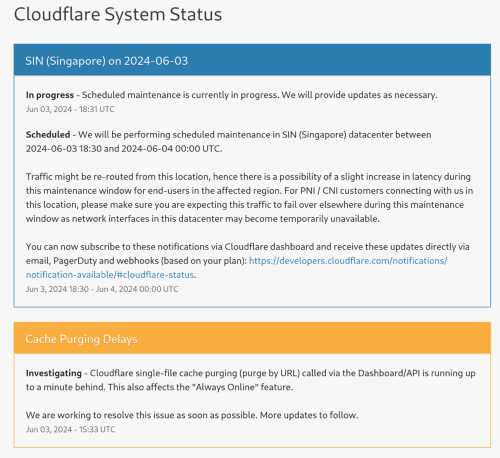
Cloudflare routinely reroute traffic to other region when they need to perform maintainance. That should not affect how TM peer as Cloudflare will just withdraw the prefix from their BGP advertisement. They have a dashboard to show this:
https://www.cloudflarestatus.com/

Example of current status:
user posted image

I believe when they rerouted their Singapore traffic to KUL, TM - MyIX link got saturated and the internet appear broken to many people.

I have a theory and it is just a theory:
With TM maxing out all their links, it is possible their edge router have problem maintaining BGP session. With enough packet lost, the BGP session might have disconnected and withdraw all the route.
With the withdrawal of routes, no traffic will flow through that link, and BGP session is up again, re-advertising all the prefix and high traffic causing packet lost again.
Rinse and repeat, and we have a common routing problem: Route Flapping

When it happen, it causes a secondary problem, which prevent the network from converging, which also means the network is broken.
Might be TM stinginess that cause this by not upgrading their link, or it might be bug in their new ZTE gear. Might be a combination of both.

TM also make use of non-ECMP in their network, clearly shown here:
CODE

➜  ~ traceroute -4 dot.sb
traceroute to dot.sb (185.222.222.222), 30 hops max, 60 byte packets
1  _gateway (192.168.88.1)  0.258 ms  0.249 ms  0.472 ms
2  115.134.191.254 (115.134.191.254)  2.600 ms  2.662 ms  11.023 ms
3  * * *
4  10.55.100.118 (10.55.100.118)  5.241 ms 10.55.100.228 (10.55.100.228)  11.800 ms 10.55.100.76 (10.55.100.76)  14.405 ms
5  10.55.100.35 (10.55.100.35)  189.889 ms 10.55.200.57 (10.55.200.57)  191.042 ms  184.618 ms
6  10.55.41.20 (10.55.41.20)  16.578 ms public-dns-a.dns.sb (185.222.222.222)  277.859 ms 10.55.41.20 (10.55.41.20)  17.947 ms


This kind of network configuration is prone to route flapping if they are not careful. Not saying this is the cause, but can definitely contribute to problem. The more unconventional method they use, the higher skill set is required out of everyone in the team to properly run the network.
https://datatracker.ietf.org/doc/html/rfc2991

TM didn't perform route aggregation in their IGP
This can be observed easily when BNG assign customer some random prefix that's not bit-aligned. The only explanation is TM didin't do their IP address planning properly (another way of saying they are lazy). So they just advertise each address individually.
If the network is small, this will work, until it didn't and things rapidly fall apart. Combined with route flapping, suddenly a broken BGP session create a network-wide problem.
Now TM is stuck in firefighting mode and maybe, just maybe, ZTE gear cannot handle TM's unconventional, broken, non-best practice configuration at all.

This post has been edited by kwss: Jun 4 2024, 07:26 AM
Laier
post Jun 4 2024, 07:46 AM

Casual
***
Junior Member
320 posts

Joined: Jun 2010


Is it just me, or is every website slow now? Even downloading from the playstore is slow, haishhhh. Celcom is just a tad bit better, but fluctuates as well. What are we even paying for if the services rendered are not 100%.
s2000c
post Jun 4 2024, 09:04 AM

Regular
******
Senior Member
1,006 posts

Joined: Jul 2007
Hi my line port will disconnect when heavy rain , 3 times a month is that normal? Each time request technician come reset port outside .
tng55
post Jun 4 2024, 11:20 AM

Regular
******
Senior Member
1,443 posts

Joined: Sep 2021


QUOTE(s2000c @ Jun 4 2024, 09:04 AM)
Hi my line port will disconnect when heavy rain , 3 times a month is that normal? Each time request technician come reset port outside .
*
not normal maybe fiber problem
mine when heavy rain my line port never disconnect just stable and speed full 500mbps no problem
YoungMan
post Jun 4 2024, 11:36 AM

Look at all my stars!!
*******
Senior Member
6,817 posts

Joined: Oct 2008
From: Kuala Lumpur


QUOTE(s2000c @ Jun 4 2024, 09:04 AM)
Hi my line port will disconnect when heavy rain , 3 times a month is that normal? Each time request technician come reset port outside .
*
Not normal. Should request them to change new port if available.
s2000c
post Jun 4 2024, 05:15 PM

Regular
******
Senior Member
1,006 posts

Joined: Jul 2007
QUOTE(YoungMan @ Jun 4 2024, 11:36 AM)
Not normal. Should request them to change new port if available.
*
Technician come check bypass the fiber optic at tiang , hope can solved
yenchenje
post Jun 4 2024, 08:19 PM

Enthusiast
*****
Junior Member
932 posts

Joined: Dec 2019
QUOTE(simmarjit @ Jun 3 2024, 07:37 PM)
6 months free also something right.
*
I guess but could be better, all the 800 is slowly getting it, so when is the 1Gbps users getting it bangwall.gif
RViN
post Jun 4 2024, 08:32 PM

There Is Only One United
*******
Senior Member
5,827 posts

Joined: Jan 2003
From: Selayang, Selangor


QUOTE(NagaK @ Jun 2 2024, 09:18 AM)
I leaves Fiberhome ONU for almost 3 hours (went for quick movie) it was fine first. After comeback the PON light start keep blinking and no internet access for Router. After switch to black box internet can be access.

I tried to access but can't Black box IP same as before right 192.168.0.1?
*
Seems like you have the same experience as me.

Only one ONU can work at a time, seems like they bind our account to the device :/
NagaK
post Jun 4 2024, 09:32 PM

Regular
******
Senior Member
1,194 posts

Joined: Sep 2018


QUOTE(RViN @ Jun 4 2024, 08:32 PM)
Seems like you have the same experience as me.

Only one ONU can work at a time, seems like they bind our account to the device :/
*
Maybe but I saw many users in forum said they can use back old modem. I think this issue only persist on Fiberhome ONU I guess
Ashren
post Jun 5 2024, 12:04 PM

Getting Started
**
Junior Member
156 posts

Joined: Dec 2010
QUOTE(NagaK @ Jun 4 2024, 09:32 PM)
Maybe but I saw many users in forum said they can use back old modem. I think this issue only persist on Fiberhome ONU I guess
*
Yeah I kinda realize it's always the Fiberhome ONU that got this binding issue. But if I'm not mistaken RViN previous ONU the ZTE also cannot connect, BUT, after they replace his ZTE with the Fiberhome. So maybe the culprit is the Fiberhome that's all I can think of, mine's Huawei.

This post has been edited by Ashren: Jun 5 2024, 12:05 PM
RViN
post Jun 5 2024, 12:08 PM

There Is Only One United
*******
Senior Member
5,827 posts

Joined: Jan 2003
From: Selayang, Selangor


QUOTE(NagaK @ Jun 4 2024, 09:32 PM)
Maybe but I saw many users in forum said they can use back old modem. I think this issue only persist on Fiberhome ONU I guess
*
QUOTE(Ashren @ Jun 5 2024, 12:04 PM)
Yeah I kinda realize it's always the Fiberhome ONU that got this binding issue. But if I'm not mistaken RViN previous ONU the ZTE also cannot connect but after they replace his ZTE with the Fiberhome. So maybe the culprit is the Fiberhome that's all I can think of, mine's Huawei.
*
Mine was originally Alcatel-Lucent ONU, it was binded technician had to call up the NOC team to check and change to FiberHome ONU, left me with the Dlink Black ONR I said I will fix myself, and that one didnt work until he had to come another day, call up the backend again and have them rebind to this ONR.

Its not only a Fiberhome issue since I couldn't use the fiberhome when I had the ALC ONU, and when using the fiberhome both ALC and Dlink didnt work. I havent tried plugging in any of the older ONUs I have now but I expect both of them wont work now that its binded to this ONR.

Not sure why some people (seems like the minority since in this thread its just you and me so far) have this issue but most dont.
Ashren
post Jun 5 2024, 12:39 PM

Getting Started
**
Junior Member
156 posts

Joined: Dec 2010
QUOTE(RViN @ Jun 5 2024, 12:08 PM)
Mine was originally Alcatel-Lucent ONU, it was binded technician had to call up the NOC team to check and change to FiberHome ONU, left me with the Dlink Black ONR I said I will fix myself, and that one didnt work until he had to come another day, call up the backend again and have them rebind to this ONR.

Its not only a Fiberhome issue since I couldn't use the fiberhome when I had the ALC ONU, and when using the fiberhome both ALC and Dlink didnt work. I havent tried plugging in any of the older ONUs I have now but I expect both of them wont work now that its binded to this ONR.

Not sure why some people (seems like the minority since in this thread its just you and me so far) have this issue but most dont.
*
If that's the case I think it's down to the area OLT. Are you guys from the same area by any chance?
NooooB
post Jun 5 2024, 01:19 PM

New Member
*
Junior Member
45 posts

Joined: Jan 2010
I'm about to port to Maxis, and Unifi called and offered me 100mbps RM79 per month with rebates for 6 months. It is an average of RM59.25 per month. A good deal?
NagaK
post Jun 5 2024, 02:31 PM

Regular
******
Senior Member
1,194 posts

Joined: Sep 2018


QUOTE(Ashren @ Jun 5 2024, 12:39 PM)
If that's the case I think it's down to the area OLT. Are you guys from the same area by any chance?
*
I'm from Klang. They originally given legendary alcatel grey modem after power issue 6 months back they changed Fiberhome.
tititilly
post Jun 5 2024, 02:42 PM

New Member
*
Junior Member
30 posts

Joined: Apr 2011
QUOTE(NooooB @ Jun 5 2024, 01:19 PM)
I'm about to port to Maxis, and Unifi called and offered me 100mbps RM79 per month with rebates for 6 months. It is an average of RM59.25 per month. A good deal?
*
I got a call from unifi, rm129 2 yrs contract first 3 months waived. anyone getting similar offer from unifi ?
NooooB
post Jun 5 2024, 03:25 PM

New Member
*
Junior Member
45 posts

Joined: Jan 2010
You can request for 6 months waived. Hopefully, they hold on to their promise. I asked them to send me an email, but they did not want to. They just asked me to complain if I did not receive the promised waiver.

QUOTE(tititilly @ Jun 5 2024, 02:42 PM)
I got a call from unifi, rm129 2 yrs contract first 3 months waived. anyone getting similar offer from unifi ?
*

495 Pages « < 143 144 145 146 147 > » Top
Topic ClosedOptions
 

Change to:
| Lo-Fi Version
0.0215sec    0.43    6 queries    GZIP Disabled
Time is now: 14th December 2025 - 10:43 AM