Welcome Guest ( Log In | Register )

Bump Topic Topic Closed RSS Feed
495 Pages « < 95 96 97 98 99 > » Bottom

Outline · [ Standard ] · Linear+

Unifi Official TM UniFi High Speed Broadband Thread V42, READ 1ST PAGE FOR RELEVANT WIFI INFO!

views
     
borgyang
post Apr 13 2024, 05:20 PM

Getting Started
**
Junior Member
64 posts

Joined: Jun 2014
House Type: Double Storey Terrace House
Unifi Modem & Wi-Fi 6 Router Location: Downstairs
Unifi Package: Unifi Home 300 Mbps
Background: I noticed that the wifi signal has dropped significantly (1-2 bar) when I’m using my phone or laptop in the bedroom at upstairs. So far no buffering issue while watching 1080p videos on phone, but sometimes it buffers when watching 4K videos on YouTube and Netflix using TV.
Remarks: We have no planning to lay Cat 6 cable to upstairs because the owner’s wife has OCD as she doesn’t want to see any cables installed on the wall.

Besides Mesh Wi-Fi, I’m not sure if there are any other setups that are suitable for us based on our requirements which is NO wired.

I don’t need very high-end specs router because my Unifi plan is only just 300 Mbps and it would be overkill for my usage. All I need is a Mesh Wi-Fi Router that provides strong wifi coverage to extend the wifi network from downstairs to upstairs so that I don’t have to experience buffering while watching 4K videos on YouTube and Netflix.

Currently, I’m looking at low to mid-range affordable budget Mesh Wi-Fi Routers from TP-Link and Asus. Is there any model to avoid at all cost due to negative user reviews? I appreciate if you could recommend me a few good models to choose from. Thanks in advance!
neekun
post Apr 13 2024, 06:05 PM

I'm a Mac
*******
Senior Member
2,570 posts

Joined: Jun 2006


QUOTE(borgyang @ Apr 13 2024, 05:20 PM)
House Type: Double Storey Terrace House
Unifi Modem & Wi-Fi 6 Router Location: Downstairs
Unifi Package: Unifi Home 300 Mbps
Background: I noticed that the wifi signal has dropped significantly (1-2 bar) when I’m using my phone or laptop in the bedroom at upstairs. So far no buffering issue while watching 1080p videos on phone, but sometimes it buffers when watching 4K videos on YouTube and Netflix using TV.
Remarks: We have no planning to lay Cat 6 cable to upstairs because the owner’s wife has OCD as she doesn’t want to see any cables installed on the wall.

Besides Mesh Wi-Fi, I’m not sure if there are any other setups that are suitable for us based on our requirements which is NO wired.

I don’t need very high-end specs router because my Unifi plan is only just 300 Mbps and it would be overkill for my usage. All I need is a Mesh Wi-Fi Router that provides strong wifi coverage to extend the wifi network from downstairs to upstairs so that I don’t have to experience buffering while watching 4K videos on YouTube and Netflix.

Currently, I’m looking at low to mid-range affordable budget Mesh Wi-Fi Routers from TP-Link and Asus. Is there any model to avoid at all cost due to negative user reviews? I appreciate if you could recommend me a few good models to choose from. Thanks in advance!
*
Perhaps you can try those power line network extension by TP Link, I used to use that last time with 800mbps Unifi speed at ground floor and about 2000mbps on upstairs with the power line.
Vickyle
post Apr 14 2024, 07:00 AM

Casual
***
Junior Member
380 posts

Joined: Aug 2010
I am using unifi 300Mbps. I restarted router few times last night and this morning. The IP address remains the same. Is this normal? I remember the address will change when I restart router the last time I did it (many years ago).
westlife
post Apr 14 2024, 08:28 AM

10k Club
********
All Stars
14,245 posts

Joined: Jan 2011
QUOTE(neekun @ Apr 13 2024, 06:05 PM)
Perhaps you can try those power line network extension by TP Link, I used to use that last time with 800mbps Unifi speed at ground floor and about 2000mbps on upstairs with the power line.
*
Dun recommend the trash anymore at this era, a good mesh wifi router can certainly do a better job as long as one can place the nodes at good positions between them

And also double storey house usually uses 3-phase electricity, power line sucks for this even.


tng55
post Apr 14 2024, 02:37 PM

Regular
******
Senior Member
1,437 posts

Joined: Sep 2021


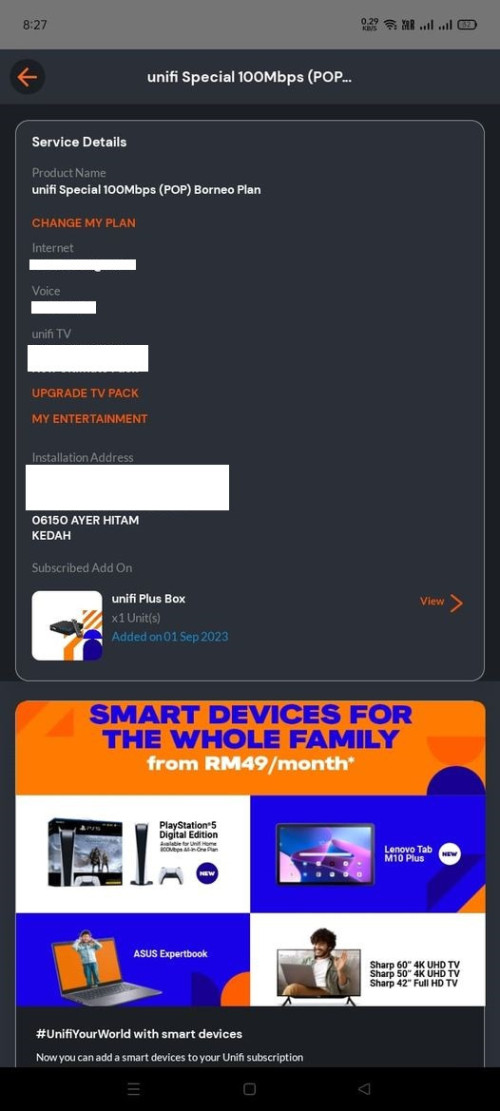
guys what mean POP UNIFI Special i saw facebook
look it
Attached Image

Yoooo
post Apr 14 2024, 06:27 PM

Getting Started
**
Junior Member
117 posts

Joined: Mar 2009


QUOTE(neekun @ Apr 13 2024, 06:05 PM)
Perhaps you can try those power line network extension by TP Link, I used to use that last time with 800mbps Unifi speed at ground floor and about 2000mbps on upstairs with the power line.
*
Yup, subjects to your house ground floor and first floor are power from same Distribution Box (DB).
If your house first floor is having another DB, the Power Line Network extension will be not working.

xCryptik
post Apr 15 2024, 05:54 AM

On my way
****
Junior Member
584 posts

Joined: May 2013
QUOTE(tng55 @ Apr 14 2024, 03:37 PM)
guys what mean POP UNIFI Special i saw facebook
look it
Attached Image
*
Fibre Optic Network HUB (Point of Presence)
kain_kapan
post Apr 15 2024, 03:46 PM

Getting Started
**
Junior Member
180 posts

Joined: Apr 2005
From: Ampang - Cheras - Kuala Lumpur


QUOTE(F_F@PANG @ Apr 10 2024, 12:05 PM)
ya, take around 7-10 days
*
For active account cannot request for refund.
Only terminated account can.
HolyCooler
post Apr 15 2024, 05:42 PM

Casual
***
Junior Member
431 posts

Joined: May 2017
Hi guys,

My problems :

1. My 2gbps line only has highest 400+mbps download speed (tested many times with cable connection with my laptop. I have 2 houses, my old house's line when testing it with my laptop with 1gbps Time fibre, can reach 800+mbps, so the testing device definitely capable of hitting higher than 400mbps).

At first the technician said it was due to the installation just done, need some time to hit the normal speed, but now around 4 months passed, still the same low download speed. For this issue i will call UNIFI to check.

2. The package didn't come with any free mesh devices, but my friend told me any package more more than 300mbps should have free mesh device. I wonder if this is true? My wife was the one who handling the whole application + installation process, i am not sure if she was conned or if this is normal.


RiriRuruRara
post Apr 15 2024, 11:35 PM

Regular
******
Senior Member
1,010 posts

Joined: Aug 2014


QUOTE(NickedAsy @ Apr 13 2024, 04:36 PM)
Yep, suddenly slowdown on int sites
*
is it still slow on your side??
NickedAsy
post Apr 15 2024, 11:41 PM

~: 6-Star Space Marshall :~
******
Senior Member
1,897 posts

Joined: Jan 2003
From: Kuala Lumpur


QUOTE(RiriRuruRara @ Apr 15 2024, 11:35 PM)
is it still slow on your side??
*
Sometimes in the night around 10pm will start the slowdown
tng55
post Apr 16 2024, 12:00 AM

Regular
******
Senior Member
1,437 posts

Joined: Sep 2021


QUOTE(xCryptik @ Apr 15 2024, 05:54 AM)
Fibre Optic Network HUB (Point of Presence)
*
what different Fibre Optic Network HUB (Point of Presence) VS Normal Fiber ONT
i don't understand how possible become cheaper RM50 rclxub.gif
aniq8676
post Apr 16 2024, 12:13 AM

Regular
******
Senior Member
1,524 posts

Joined: Dec 2020
From: Perak


QUOTE(tng55 @ Apr 14 2024, 02:37 PM)
guys what mean POP UNIFI Special i saw facebook
look it
Attached Image
*
Unifi POP is a special plan, only offered in selected areas (depend on HQ)
Not everyone is eligible to subscribe to this plan (depend on HQ)
Subscription price for 24 months only.

for example
user posted image
arvind13
post Apr 16 2024, 10:51 AM

Casual
***
Junior Member
406 posts

Joined: Dec 2007
From: Penang


hey guys... Just to check.. i was initially on 100Mbps with RM129+6%.. Recently noticed my speed was upgraded to 300Mbps with RM129+6%. i believe the price for 300Mbps should be around RM109-119 however on TMUNIFI website w/o Netflix only cn find 100mbps,500mbps,1gbps,2gbps.. Thus wondering if i cn nego with TM to lower down my monthly price RM129+6% ?

Thanks for your replies in advance. notworthy.gif
neekun
post Apr 16 2024, 11:05 AM

I'm a Mac
*******
Senior Member
2,570 posts

Joined: Jun 2006


After free upgrade to 1gbps, my plan name is Unifi Home 1Gbps - Pro Upgrade.

Using existing Huawei modem and max speed is 942mbps download. So far so good the speed and reliability..
joehann
post Apr 16 2024, 11:35 AM

Casual
***
Junior Member
430 posts

Joined: Jan 2012
QUOTE(HolyCooler @ Apr 15 2024, 05:42 PM)
Hi guys,

My problems :

1. My 2gbps line only has highest 400+mbps download speed (tested many times with cable connection with my laptop. I have 2 houses, my old house's line when testing it with my laptop with 1gbps Time fibre, can reach 800+mbps, so the testing device definitely capable of hitting higher than 400mbps).

At first the technician said it was due to the installation just done, need some time to hit the normal speed, but now around 4 months passed, still the same low download speed. For this issue i will call UNIFI to check.

2. The package didn't come with any free mesh devices, but my friend told me any package more more than 300mbps should have free mesh device. I wonder if this is true? My wife was the one who handling the whole application + installation process, i am not sure if she was conned or if this is normal.
*
Normally you will get the speed after installation done. 2gbps package should come with new router and mesh ( probably 2 mesh?) and new modem.

You should claim bill rebate from unifi if you cant manage to get the speed that you subscribe.
TongCN
post Apr 16 2024, 11:42 AM

Look ma, I have lots stars :D
*******
Senior Member
6,622 posts

Joined: Aug 2008
From: Malaysia


QUOTE(neekun @ Apr 16 2024, 11:05 AM)
After free upgrade to 1gbps, my plan name is Unifi Home 1Gbps - Pro Upgrade.

Using existing Huawei modem and max speed is 942mbps download. So far so good the speed and reliability..
*
Mine 300 >500 since Oct'23 till now after 3 complaints still no change name mad.gif
Zi-Tech
post Apr 16 2024, 02:37 PM

Eh, pangkat sudah tukar ka
*****
Senior Member
774 posts

Joined: Jun 2008
From: Shah Alam, Selangor/ Gambang, Kuantan, Pahang


QUOTE(TongCN @ Apr 16 2024, 11:42 AM)
Mine 300 >500 since Oct'23 till now after 3 complaints still no change name  mad.gif
*
no change should okay...

me still waiting when the upgrade to 1gbps

Khan92
post Apr 16 2024, 05:18 PM

To live is to die
****
Junior Member
552 posts

Joined: Aug 2017


QUOTE(TongCN @ Apr 16 2024, 11:42 AM)
Mine 300 >500 since Oct'23 till now after 3 complaints still no change name  mad.gif
*
Pretty sure TM won't change the speed name
sg8989
post Apr 16 2024, 08:01 PM

On my way
****
Junior Member
510 posts

Joined: Nov 2021
I'm with STAYWITHUNIFI4.0
From RM89 change to RM79 24months contract/foc 6 months
I just got billing written 100mbps rm99...(in my future bill)
Anyone has experience on this?
My Package started on 20/march.
So the 100mbps ori price is RM99.
Will reflect as BROADBAND WAIVER -20 become rm79?
Attached Image

This post has been edited by sg8989: Apr 16 2024, 08:08 PM

495 Pages « < 95 96 97 98 99 > » Top
Topic ClosedOptions
 

Change to:
| Lo-Fi Version
0.0220sec    0.27    6 queries    GZIP Disabled
Time is now: 3rd December 2025 - 05:08 AM