Outline ·
[ Standard ] ·
Linear+
Unifi Official TM UniFi High Speed Broadband Thread V42, READ 1ST PAGE FOR RELEVANT WIFI INFO!
|
neekun
|
 Apr 5 2024, 05:51 PM Apr 5 2024, 05:51 PM
|

|
I was told will give a Dlink modem and router combo for my upcoming 1gbps free upgrade. Can someone share how to configure the Dlink to use its modem function only where my existing Asus router will handle the pppoe and wireless network?
Thanks.
|
|
|
|
|
|
Maxieos
|
Apr 5 2024, 10:01 PM
|
|
|
Again , every 9:30-10pmpm getting worst on routing loading , can even load time out and will continue until midnight.
Anyone can help to check what happen ? broken cable ? same case as last 2 month February.
|
|
|
|
|
|
jusbella
|
Apr 5 2024, 10:09 PM
|
|
|
QUOTE(Maxieos @ Apr 5 2024, 10:01 PM) Again , every 9:30-10pmpm getting worst on routing loading , can even load time out and will continue until midnight. Anyone can help to check what happen ? broken cable ? same case as last 2 month February. No issue here. 800mbps user. |
|
|
|
|
|
Maxieos
|
Apr 5 2024, 10:22 PM
|
|
|
QUOTE(jusbella @ Apr 5 2024, 10:09 PM) No issue here. 800mbps user. No lag at all ? on online platform ? This post has been edited by Maxieos: Apr 5 2024, 10:24 PM |
|
|
|
|
|
jusbella
|
Apr 5 2024, 11:16 PM
|
|
|
QUOTE(Maxieos @ Apr 5 2024, 10:22 PM) No lag at all ? on online platform ? Yup no lag. Maybe you can try contact TM and request them help you reset your Fibre port then you try observe again. |
|
|
|
|
|
Maxieos
|
Apr 5 2024, 11:16 PM
|
|
|
Anyone know any ocr converter than can convert unifi bill to excel accurately ?
|
|
|
|
|
|
soulfly
|
Apr 5 2024, 11:35 PM
|
revving towards 10,000 rpm

|
QUOTE(PJng @ Apr 5 2024, 01:04 PM) What related to your plan speed with available subcription speed? I srill able to get 300mbps that upgrade from 100mbos very old basic 100mbps. free upgrade to 300mbps last year. but in the account still listed as 100mbps. still paying about 130-ish per month. |
|
|
|
|
|
PJng
|
Apr 5 2024, 11:42 PM
|
|
|
QUOTE(soulfly @ Apr 5 2024, 11:35 PM) very old basic 100mbps. free upgrade to 300mbps last year. but in the account still listed as 100mbps. still paying about 130-ish per month. 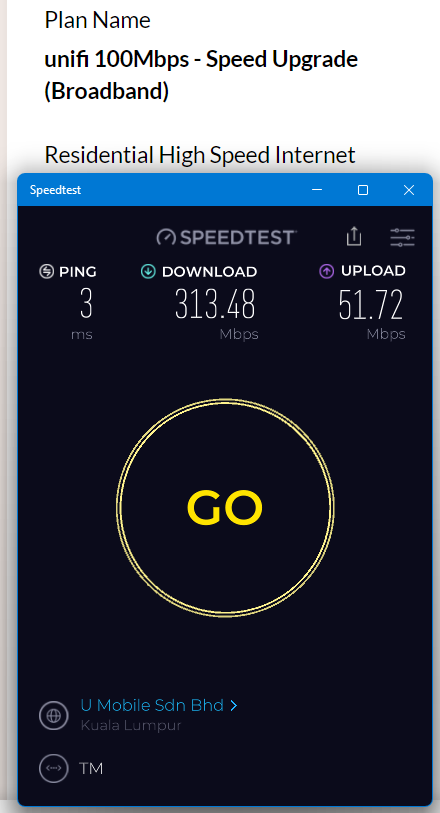 same after tax 130+ per month, no problem with speed, just some website very slow load, as above say maybe TM routing issue download file can over 30MB/s |
|
|
|
|
|
surianti
|
Apr 6 2024, 07:49 AM
|
Getting Started

|
May I know, for uploading to clouds such as IceDrive or Mega.nz, I cannot get full upload speed as the Unifi spec, Google Drive is possible but they have a certain periodic pauses 0MB/s before resuming. Is this a routing issue or is this a issue with the cloud providers?
|
|
|
|
|
|
YoungMan
|
Apr 6 2024, 11:01 AM
|
|
|
QUOTE(soulfly @ Apr 5 2024, 11:35 PM) very old basic 100mbps. free upgrade to 300mbps last year. but in the account still listed as 100mbps. still paying about 130-ish per month. You must be under the old RM129 plan for 100mbps right? Your contract must have ended long time ago. I suggest you visit Tmpoint to change to 300mbps under SWU 4.0. It cost RM119 monthly, with 6% tax it's just 120-ish per month. |
|
|
|
|
|
laihuhng
|
Apr 6 2024, 11:02 AM
|
|
|
Are we able to remote access Dlink DPN-FX3060V from outside? If yes, mind sharing how to get it done? Thanks in advance.
|
|
|
|
|
|
go626201
|
Apr 6 2024, 11:51 AM
|
|
|
QUOTE(surianti @ Apr 6 2024, 07:49 AM) May I know, for uploading to clouds such as IceDrive or Mega.nz, I cannot get full upload speed as the Unifi spec, Google Drive is possible but they have a certain periodic pauses 0MB/s before resuming. Is this a routing issue or is this a issue with the cloud providers? Normal.Because the server is hosted in Europe. For google drive,it is also normal,Google Drive and Onedrive have similar working method for uploading data. |
|
|
|
|
|
karenzayn
|
Apr 6 2024, 08:26 PM
|
Getting Started
|
QUOTE(laihuhng @ Apr 6 2024, 11:02 AM) Are we able to remote access Dlink DPN-FX3060V from outside? If yes, mind sharing how to get it done? Thanks in advance. Wireguard VPN GUI (Docker) + DDNS is your best friend (other sifus can recommend other solutions as well) make sure just the open WG port on your router. Technically you need a small, low powered server (and runs CasaOS) to become a middleman in your home network. This post has been edited by karenzayn: Apr 6 2024, 08:26 PM |
|
|
|
|
|
yenchenje
|
Apr 6 2024, 08:57 PM
|
|
|
QUOTE(laihuhng @ Apr 6 2024, 11:02 AM) Are we able to remote access Dlink DPN-FX3060V from outside? If yes, mind sharing how to get it done? Thanks in advance. Yeah, if you don't care about security, just port forward your router directly to the internet, but be prepared to people to constantly try and break in to your network. Generally good practices is to use VPN, and put it behind that to access. But unless absolutely necessary only that you expose your internal network, especially router |
|
|
|
|
|
Maxieos
|
Apr 6 2024, 10:18 PM
|
|
|
QUOTE(jusbella @ Apr 5 2024, 11:16 PM) Yup no lag. Maybe you can try contact TM and request them help you reset your Fibre port then you try observe again. Again at this time 9:30-10pm start Anyone please help to try this online platform website ? » Click to show Spoiler - click again to hide... «
PING 202.181.90.248 (202.181.90.248) 56(84) bytes of data.
64 bytes from 202.181.90.248: icmp_seq=3 ttl=54 time=1457 ms
64 bytes from 202.181.90.248: icmp_seq=4 ttl=54 time=1551 ms
64 bytes from 202.181.90.248: icmp_seq=11 ttl=54 time=1057 ms
64 bytes from 202.181.90.248: icmp_seq=12 ttl=54 time=969 ms
64 bytes from 202.181.90.248: icmp_seq=13 ttl=54 time=843 ms
134 packets transmitted, 124 received, 7% packet loss, time 133349ms
rtt min/avg/max/mdev = 16.049/547.815/1411.019/447.595 ms, pipe 2
All around 1k ms or 1 second.All loading stop. Now better 800ms This post has been edited by Maxieos: Apr 7 2024, 06:11 AM |
|
|
|
|
|
cklove96
|
Apr 6 2024, 10:20 PM
|
|
|
QUOTE(Maxieos @ Apr 6 2024, 11:18 PM) Again at this time 9:30-10pm start Anyone please help to try this online platform website ? » Click to show Spoiler - click again to hide... «
PING 202.181.90.248 (202.181.90.248) 56(84) bytes of data.
64 bytes from 202.181.90.248: icmp_seq=3 ttl=54 time=1457 ms
64 bytes from 202.181.90.248: icmp_seq=4 ttl=54 time=1551 ms
64 bytes from 202.181.90.248: icmp_seq=11 ttl=54 time=1057 ms
64 bytes from 202.181.90.248: icmp_seq=12 ttl=54 time=969 ms
64 bytes from 202.181.90.248: icmp_seq=13 ttl=54 time=843 ms
All around 1k ms or 1 second.All loading stop. Now better 800ms shopee fast and smooth no problem on my end |
|
|
|
|
|
Maxieos
|
Apr 6 2024, 10:22 PM
|
|
|
QUOTE(cklove96 @ Apr 6 2024, 10:20 PM) shopee fast and smooth no problem on my end It happen every night at 9:35-10pm start until 1am i think I just stop the result , 134 packets transmitted, 124 received, 7% packet loss, time 133349ms rtt min/avg/max/mdev = 16.049/547.815/1411.019/447.595 ms, pipe 2 This post has been edited by Maxieos: Apr 6 2024, 10:27 PM |
|
|
|
|
|
cklove96
|
Apr 6 2024, 10:23 PM
|
|
|
QUOTE(Maxieos @ Apr 6 2024, 11:22 PM) It happen every night at 9:35-10pm start until 1am i think I just stop the result , 134 packets transmitted, 124 received, 7% packet loss, time 133349ms rtt min/avg/max/mdev = 16.049/547.815/1411.019/447.595 ms, pipe 2 this is my pinging result my ip:60.x.x.x 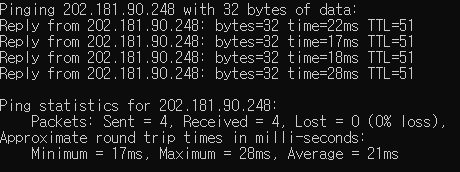 This post has been edited by cklove96: Apr 6 2024, 10:24 PM This post has been edited by cklove96: Apr 6 2024, 10:24 PM |
|
|
|
|
|
cklove96
|
Apr 6 2024, 10:24 PM
|
|
|
double post remove
This post has been edited by cklove96: Apr 6 2024, 10:24 PM
|
|
|
|
|
|
Maxieos
|
Apr 6 2024, 10:27 PM
|
|
|
QUOTE(cklove96 @ Apr 6 2024, 10:23 PM) this is my pinging result my ip:60.x.x.x Not public IP , is Private IP |
|
|
|
|



 Quote
Quote


 0.0181sec
 0.73
0.73
 6 queries
 GZIP Disabled