Welcome Guest ( Log In | Register )

Bump Topic Topic Closed RSS Feed

Outline · [ Standard ] · Linear+

Unifi Official TM UniFi High Speed Broadband Thread V42, READ 1ST PAGE FOR RELEVANT WIFI INFO!

views
     
go626201
post Apr 6 2024, 10:29 PM

Regular
******
Senior Member
1,882 posts

Joined: Sep 2017
QUOTE(Maxieos @ Apr 6 2024, 10:22 PM)
It happen every night at 9:35-10pm start until 1am i think

I just stop the result ,  134 packets transmitted, 124 received, 7% packet loss, time 133349ms
rtt min/avg/max/mdev = 16.049/547.815/1411.019/447.595 ms, pipe 2
*
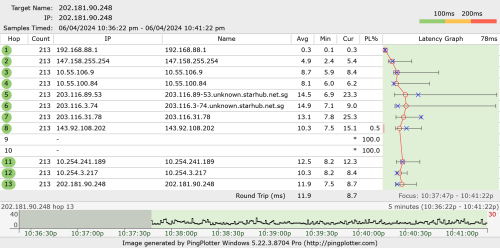
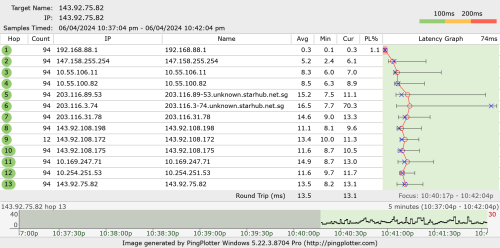
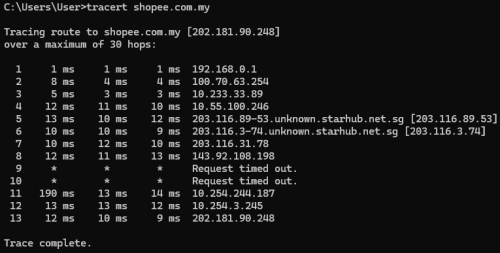
try "tracert shopee.com.my" Or use pingplotter or winmtr.

My end also working well.

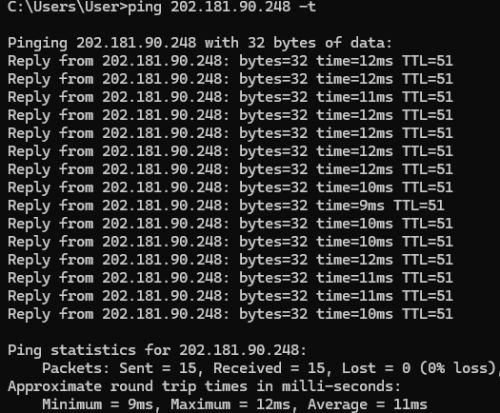
Ping statistics for 202.181.90.248:
Packets: Sent = 9, Received = 9, Lost = 0 (0% loss),
Approximate round trip times in milli-seconds:
Minimum = 10ms, Maximum = 23ms, Average = 14ms

Ping statistics for 143.92.75.82:
Packets: Sent = 6, Received = 6, Lost = 0 (0% loss),
Approximate round trip times in milli-seconds:
Minimum = 8ms, Maximum = 19ms, Average = 11ms
Maxieos
post Apr 6 2024, 10:35 PM

Look at all my stars!!
*******
Senior Member
3,757 posts

Joined: May 2008
QUOTE(go626201 @ Apr 6 2024, 10:29 PM)
try "tracert shopee.com.my" Or use pingplotter or winmtr.

My end also working well.

Ping statistics for 202.181.90.248:
    Packets: Sent = 9, Received = 9, Lost = 0 (0% loss),
Approximate round trip times in milli-seconds:
    Minimum = 10ms, Maximum = 23ms, Average = 14ms

Ping statistics for 143.92.75.82:
    Packets: Sent = 6, Received = 6, Lost = 0 (0% loss),
Approximate round trip times in milli-seconds:
    Minimum = 8ms, Maximum = 19ms, Average = 11ms
*
Done all over 1k ms.
» Click to show Spoiler - click again to hide... «


go626201
post Apr 6 2024, 10:42 PM

Regular
******
Senior Member
1,882 posts

Joined: Sep 2017
QUOTE(Maxieos @ Apr 6 2024, 10:35 PM)
Done all over 1k ms.
» Click to show Spoiler - click again to hide... «

*
Not sure why yours Starhub hops ping spikes.

user posted image

user posted image
Maxieos
post Apr 6 2024, 10:55 PM

Look at all my stars!!
*******
Senior Member
3,757 posts

Joined: May 2008
QUOTE(go626201 @ Apr 6 2024, 10:42 PM)
Not sure why yours Starhub hops ping spikes.

user posted image

user posted image
*
This IP also over 1k
» Click to show Spoiler - click again to hide... «

Anyway to find out the reason the route get worst at this time only ?

This post has been edited by Maxieos: Apr 6 2024, 11:01 PM
jusbella
post Apr 6 2024, 11:18 PM

Look at all my stars!!
*******
Senior Member
3,032 posts

Joined: Dec 2011


QUOTE(Maxieos @ Apr 6 2024, 10:55 PM)
This IP also over 1k
» Click to show Spoiler - click again to hide... «

Anyway to find out the reason the route get worst at this time only ?
*
Only way to report to TM and they'll investigate.
PJng
post Apr 7 2024, 01:28 PM

10k Club
********
All Stars
12,039 posts

Joined: Oct 2017


QUOTE(Maxieos @ Apr 6 2024, 10:55 PM)
This IP also over 1k
» Click to show Spoiler - click again to hide... «

Anyway to find out the reason the route get worst at this time only ?
*
user posted image

user posted image

just test for you, 300mbps plan so private IP
kwss
post Apr 7 2024, 02:21 PM

Regular
******
Senior Member
1,207 posts

Joined: Aug 2018
QUOTE(Maxieos @ Apr 6 2024, 10:55 PM)
This IP also over 1k
» Click to show Spoiler - click again to hide... «

Anyway to find out the reason the route get worst at this time only ?
*
Sounds like MTU or MSS Clamping issue with your router.
I suspect you only face it during certain time because StarHub has dynamic traffic engineering during those hour.
Actually almost every ISP perform traffic engineering today so you are bound to hit it all the time.
laihuhng
post Apr 8 2024, 07:30 AM

On my way
****
Junior Member
603 posts

Joined: Jun 2005


QUOTE(karenzayn @ Apr 6 2024, 08:26 PM)
Wireguard VPN GUI (Docker) + DDNS is your best friend (other sifus can recommend other solutions as well)
make sure just the open WG port on your router.

Technically you need a small, low powered server (and runs CasaOS) to become a middleman in your home network.
*
Not sure what this is. But, let me do some reading and google. Thanks.


QUOTE(yenchenje @ Apr 6 2024, 08:57 PM)
Yeah, if you don't care about security, just port forward your router directly to the internet, but be prepared to people to constantly try and break in to your network. Generally good practices is to use VPN, and put it behind that to access. But unless absolutely necessary only that you expose your internal network, especially router
*
I have and using a VPN. That said, I just have no idea how to get this done.

yenchenje
post Apr 8 2024, 08:29 AM

Enthusiast
*****
Junior Member
932 posts

Joined: Dec 2019
QUOTE(laihuhng @ Apr 8 2024, 07:30 AM)
I have and using a VPN. That said, I just have no idea how to get this done.
*
Use a VPN =/= using a VPN with your router

Basically you need to create a private VPN in your router/network, you connect to said private VPN and you go to your router through that

Im not referring to normal VPN apps like Nord/Express/PIA etc to access

By doing this, you only need to expose your VPN’s port and not your actual router, which enhances security
jiaen0509
post Apr 8 2024, 10:45 AM

Look at all my stars!!
*******
Senior Member
3,305 posts

Joined: Dec 2012
My 800mbps to 1gbps FSU experience;

Apr 5

- Appointment date received slot 9:30am-11am

Apr 6
- Morning status changed “On Site” but installer ghosted.
- Afternoon call the installer 3x no pick up
- Contact Unifi, they can’t reach the installer
- Open report
- Evening time, installer contacted me, no ONR equipment stock available. Earliest time to get the stock is Sunday morning.
- Ask me to postpone by sending him a WhatsApp message😁.
- Then I suggested Monday morning, to ensure that they have sufficient time just in case they got ONR stock afternoon time.

Apr 7
- Unifi contacted me and make a new appointment on Apr 8

Apr 8
- Different installer (not the Sat one that promised to me) early morning texted me to visit between 11-12:30.
- 10:30am call me and minta postponed because he only have my only order today. If postponed to tomorrow he can do 3 order in one way.
- Request (force) me to send him a WhatsApp message to request change the date to next day morning and “promised” me tomorrow confirmed! Will never give the fake promises.


👀any suggestions my dear sifus here? How you will react to this?

This post has been edited by jiaen0509: Apr 8 2024, 10:52 AM
countingcrows
post Apr 8 2024, 11:05 AM

Getting Started
**
Junior Member
257 posts

Joined: Feb 2023
QUOTE(jiaen0509 @ Apr 8 2024, 10:45 AM)
👀any suggestions my dear sifus here? How you will react to this?
I wouldn't rush to upgrade so close to the holidays.
Any problems with the line after the upgrade will take longer to be fixed. 15th?
neekun
post Apr 8 2024, 12:14 PM

I'm a Mac
*******
Senior Member
2,570 posts

Joined: Jun 2006


Technician is at my place with dlink ax3000 router and modem combo. I need help to configure the dlink as bridge so it can work with my Asus router. I intend to maintain pppoe at my router and wifi too on my router.
yenchenje
post Apr 8 2024, 01:37 PM

Enthusiast
*****
Junior Member
932 posts

Joined: Dec 2019
QUOTE(neekun @ Apr 8 2024, 12:14 PM)
Technician is at my place with dlink ax3000 router and modem combo. I need help to configure the dlink as bridge so it can work with my Asus router.  I intend to maintain pppoe at my router and wifi too on my router.
*
https://forum.lowyat.net/index.php?showtopi...#entry108928208

Technicians not necessarily know also how to do
Keatsan
post Apr 8 2024, 03:10 PM

If it ain't broke, don't 6ix it
******
Senior Member
1,218 posts

Joined: Jan 2010
From: Today 06.09 am
Latest SWU offer available info through walk in as of April 8th 2024

6 months free unifi fibre plan.
Mandatory take minimum 3 months Postpaid of UNI5G RM39.
Free New Router WiFi 6

Not sure if anyone else has the same info or not.


neekun
post Apr 8 2024, 03:25 PM

I'm a Mac
*******
Senior Member
2,570 posts

Joined: Jun 2006


QUOTE(yenchenje @ Apr 8 2024, 01:37 PM)
https://forum.lowyat.net/index.php?showtopi...#entry108928208

Technicians not necessarily know also how to do
*
Tried but not working, not sure missing any steps.

Anyway managed to use the existing Huawei modem and get 940mbps. Technician will get back to me again on configuring it as modem, so I can keep is as a backup device.
jiaen0509
post Apr 8 2024, 04:15 PM

Look at all my stars!!
*******
Senior Member
3,305 posts

Joined: Dec 2012
QUOTE(neekun @ Apr 8 2024, 03:25 PM)
Tried but not working, not sure missing any steps.

Anyway managed to use the existing Huawei modem and get 940mbps. Technician will get back to me again on configuring it as modem, so I can keep is as a backup device.
*
I direct change it to GPON Bridge and it works. Only things is I couldn’t access to the GUI as the Wifi was disabled in the bridge mode and my laptop dont have LAN port🤣

Now I use back my ZTE ONU je.

With Dlink ONR
Attached Image

Use back my ZTE with Asus router
Attached Image

Basically only upload increased if I using my existing Asus router. Wait in future when Router getting cheaper only buy the GPON stick hahaha
YoungMan
post Apr 8 2024, 04:20 PM

Look at all my stars!!
*******
Senior Member
6,794 posts

Joined: Oct 2008
From: Kuala Lumpur


QUOTE(Keatsan @ Apr 8 2024, 03:10 PM)
Latest SWU offer available info through walk in as of April 8th 2024

6 months free unifi fibre plan.
Mandatory take minimum 3 months Postpaid of UNI5G RM39.
Free New Router WiFi 6

Not sure if anyone else has the same info or not.
*
What abt pricing and what plan?
karenzayn
post Apr 8 2024, 04:33 PM

Getting Started
**
Junior Member
98 posts

Joined: Sep 2019
From: Kuching
RM0 Unifi: Hey there! As a token of our appreciation for your loyalty with Unifi TV, starting from 24/04/2024 we're giving you a special upgrade to the Disney+ Hotstar Premium Plan at no additional cost! More info at i.unifi.my/dy2 . T&C apply. Happy streaming!

Anyone received this msg?
soonwai
post Apr 8 2024, 05:01 PM


********
All Stars
11,456 posts

Joined: Oct 2007
From: KL


QUOTE(karenzayn @ Apr 8 2024, 04:33 PM)
RM0 Unifi: Hey there! As a token of our appreciation for your loyalty with Unifi TV, starting from 24/04/2024 we're giving you a special upgrade to the Disney+ Hotstar Premium Plan at no additional cost! More info at i.unifi.my/dy2 . T&C apply. Happy streaming!

Anyone received this msg?
*
I have but my link is i.unifi.my/dy6
soonwai
post Apr 8 2024, 05:08 PM


********
All Stars
11,456 posts

Joined: Oct 2007
From: KL


QUOTE(mikey8811 @ Apr 3 2024, 01:24 PM)
Unfortunately got a rejection again this morning both via the App and email.
*
My daughter's application last week using app, and again once more this morning, were declined so we went to UOB today. Bank officer there say don't use student or retiree as occupation. Did the application via app in front of the officer and it went through. Daughter had a part-time job so just pretend she hasn't quit yet. LOL

Almost forgot to put the UNIFI code. sweat.gif

This post has been edited by soonwai: Apr 8 2024, 05:10 PM

495 Pages « < 91 92 93 94 > » Top
Topic ClosedOptions
 

Change to:
| Lo-Fi Version
0.0205sec    0.33    6 queries    GZIP Disabled
Time is now: 3rd December 2025 - 02:11 AM