Main router at 1st floor and second router (Repeater mode) at 2nd floor. Speedtest result in second floor with package 300mbps. Is using Mesh can get better result than this?
if use tri band mesh, yes.
if dual band mesh, no. unless using ethernet backhaul.
but since u dont want to spend new device, just pull LAN cable & make 2nd router as AP.
This post has been edited by firdausbhari: Feb 17 2024, 03:51 PM
If repeater or dual band wireless mesh, maximum you can get is half of main router and that is with excellent signal strength
Best option is to wire, but tri band deco also can get 800+ wireless on node
Tri-band wireless backhaul mesh is still not bad…
QUOTE(YoungMan @ Feb 15 2024, 10:23 PM)
Yes, rm119 for 300mbps, rm139 for 500mbps. Fastest way to get is by visiting Tmpoint. Haha, wait no more. Do it while the promo is still available.
worse promotion than SWU 3.0?
QUOTE(andyz @ Feb 9 2024, 03:14 PM)
Converted Unifi 800Mbps (Turbo Upgrade 2018) To Unifi Home 1Gbps staywithUnifi 4.0 Extra
Jan 23rd Damansara Utama TMPoint to convert my present package (Unifi 800Mbps (Turbo Upgrade 2018)) to 1Gbps RM 249/mth .. sales personal switch me to 1Gbps staywithUnifi 4.0 rm235 a month.. 6 months free
Jan 31st Installation (1 Dlink DPN-FX3060Z)
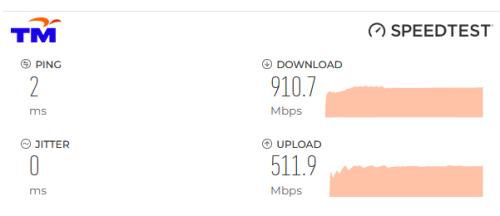
1Gbps plan but upload speed is still at 500Mbps only?
This post has been edited by westlife: Feb 18 2024, 02:29 AM
Not going to invest more $$ for Mesh, i just use existing router i have to extend the wifi signal, for working room purposes.
Off topic, the Main router has enabled ipv6, second router since turned repeater mode on, ipv6 setting disappeared. Whenever i access internet from second router, it is only ipv4 connection.
Either use ethernet cable and wire it to your 2nd mesh, or get a powerline kit, there's plenty of used one in the market.
Not going to invest more $$ for Mesh, i just use existing router i have to extend the wifi signal, for working room purposes.
Off topic, the Main router has enabled ipv6, second router since turned repeater mode on, ipv6 setting disappeared. Whenever i access internet from second router, it is only ipv4 connection.
Use as AP mode, more stable, but become 2 wifi AP la I buy cheap router use cable as AP, both also full speed 300mbps, anything just configure at main router, even ipv6, just a small problem some place of my home, phone does not auto connect stronger wifi after i leave
Use as AP mode, more stable, but become 2 wifi AP la I buy cheap router use cable as AP, both also full speed 300mbps, anything just configure at main router, even ipv6, just a small problem some place of my home, phone does not auto connect stronger wifi after i leave
That’s the prob for APs which the roaming across nodes is not so smooth.
If use mesh and connect via wired confirmed will outperformance this solution.
QUOTE(Omochao @ Feb 18 2024, 10:34 AM)
Either use ethernet cable and wire it to your 2nd mesh, or get a powerline kit, there's plenty of used one in the market.
Powerline is used to be popular for a while before mesh solution is out. Becos many ppl who do not want to hack their walls to build new wired network points at their house can use it as a solution. But over time people realise the limitations of it. Not only that it cannot work on power extension cord and it needs a dedicated power point. Even one use the pass thru version of the powerline but it is more ex and again data connection via electrical wire is not stable and the speed was cut by quite a lot, the speed one can get it way lower than the theoretical speed.
This is the reason why powerline is almost totally out of market now.
Mesh (via wired or wireless - for tri-band only) is the best solution.
This post has been edited by westlife: Feb 18 2024, 01:16 PM
That’s the prob for APs which the roaming across nodes is not so smooth.
If use mesh and connect via wired confirmed will outperformance this solution. Powerline is used to be popular for a while before mesh solution is out. Becos many ppl who do not want to hack their walls to build new wired network points at their house can use it as a solution. But over time people realise the limitations of it. Not only that it cannot work on power extension cord and it needs a dedicated power point. Even one use the pass thru version of the powerline but it is more ex and again data connection via electrical wire is not stable and the speed was cut by quite a lot, the speed one can get it way lower than the theoretical speed.
This is the reason why powerline is almost totally out of market now.
Mesh (via wired or wireless - for tri-band only) is the best solution.
like example the tplink wifi6e mesh. can either go for a 2pack (sufficient for most people) or 3pack (for bigger homes) mesh then connect them to the nodes via wifi backhaul.
or if possible you can even do wired backhaul for even better wifi. but if not, like u said, instead of powerline ethernet adapters, just the wifi backhaul to connect the mesh units will get the job done.
though you'd have to pay for them to do that for you, if you insist on reliable wired solution to different locations around the home. If not mistaken they are still using a wifi mesh, but it seems to be a wired backhaul which is more better than a wifi backhaul for performance reliability.
personally i hacked the wall and fished cat6a ethernet through the wall from 1 room to another. not everyone can or wants to do this, but if you want a neat wired setup, this is also one option. though these days most people will just be fine/happy with the mesh wifi option
This post has been edited by Moogle Stiltzkin: Feb 18 2024, 05:10 PM
like example the tplink wifi6e mesh. can either go for a 2pack (sufficient for most people) or 3pack (for bigger homes) mesh then connect them to the nodes via wifi backhaul.
or if possible you can even do wired backhaul for even better wifi. but if not, like u said, instead of powerline ethernet adapters, just the wifi backhaul to connect the mesh units will get the job done.
though you'd have to pay for them to do that for you, if you insist on reliable wired solution to different locations around the home. If not mistaken they are still using a wifi mesh, but it seems to be a wired backhaul which is more better than a wifi backhaul for performance reliability. personally i hacked the wall and fished cat6a ethernet through the wall from 1 room to another. not everyone can or wants to do this, but if you want a neat wired setup, this is also one option. though these days most people will just be fine/happy with the mesh wifi option
yes, wireless backhaul is likely will suit most ppl unless one really build all the wired network ports in the different locations that can be used with wired backhaul for their wifi mesh (e.g. new house renovation).
but make sure it is tri-band, dun waste time with dual-band.
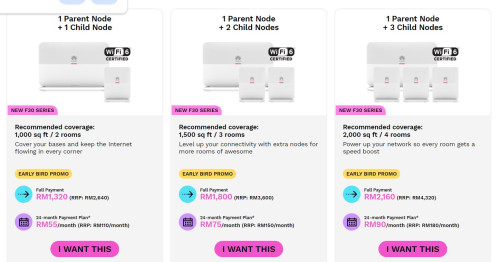
Fibre-To-The-Room (FTTR) is the perfect solution, becos one can get super super low latency as their main node everyhere in house as they wish, but seriously the solution maybe too ex for most ppl. but it is worthwhile to invest on it actually.
for rm1800 or rm2160 it is good enough to cover a 2 bedroom or 3 bedroom apartments units to ensure one has low latency internet anywhere in the house.
to be fair, a super good wifi 6 or 6E mesh system now is also not cheap to be frank.
but for those who do not want to invest this like me (becos i am renting an apartment), i can only use wireless backhaul mesh. but not too bad, i can get very good connection for unit now with 3 x linksys MR8300 mesh nodes. 1 parent node placed at living and 2 x child nodes (one at study room and one at yard) which gives me decent latency that allows me to play my mobile game anywhere in the house and has the maximum download speed of at least 300Mbps and above for my 500Mbps plan.
hacking walls are tough if one is already staying in the unit, hacking walls will cause tremendous amount of dusts which is crazy.. . but agreed that the cost of it is lower than FTTR for sure.
This post has been edited by westlife: Feb 18 2024, 06:01 PM
yes, wireless backhaul is likely will suit most ppl unless one really build all the wired network ports in the different locations that can be used with wired backhaul for their wifi mesh (e.g. new house renovation).
but make sure it is tri-band, dun waste time with dual-band.
Fibre-To-The-Room (FTTR) is the perfect solution, becos one can get super super low latency as their main node everyhere in house as they wish, but seriously the solution maybe too ex for most ppl. but it is worthwhile to invest on it actually.
for rm1800 or rm2160 it is good enough to cover a 2 bedroom or 3 bedroom apartments units to ensure one has low latency internet anywhere in the house.
to be fair, a super good wifi 6 or 6E mesh system now is also not cheap to be frank.
but for those who do not want to invest this like me (becos i am renting an apartment), i can only use wireless backhaul mesh. but not too bad, i can get very good connection for unit now with 3 x linksys MR8300 mesh nodes. 1 parent node placed at living and 2 x child nodes (one at study room and one at yard) which gives me decent latency that allows me to play my mobile game anywhere in the house and has the maximum download speed of at least 300Mbps and above for my 500Mbps plan.
hacking walls are tough if one is already staying in the unit, hacking walls will cause tremendous amount of dusts which is crazy.. . but agreed that the cost of it is lower than FTTR for sure.
FTTR without hacking wall also workable, since the invisible fiber is almost unseeable if you done in perfect way. (Maybe the cost cheaper than hacking wall,but need invest some time to do) But still need to figure out the path for sticking the invisible fiber to the side edge of wall.
This post has been edited by go626201: Feb 18 2024, 07:07 PM
FTTR without hacking wall also workable, since the invisible fiber is almost unseeable if you done in perfect way. (Maybe the cost cheaper than hacking wall,but need invest some time to do) But still need to figure out the path for sticking the invisible fiber to the side edge of wall.
I know that FTTR no need to hack wall. That’s why it is quite a worthy solution.
Hacking wall and build network ports but network ports using UTP cables should still be more be inferior to fibre cable after all.
I know that FTTR no need to hack wall. That’s why it is quite a worthy solution.
Hacking wall and build network ports but network ports using UTP cables should still be more be inferior to fibre cable after all.
i live in my own house and i also didn't want to hack walls. so I pulled the cable and shield with PVC trunking case neatly on top of my walls to each floor.
i live in my own house and i also didn't want to hack walls. so I pulled the cable and shield with PVC trunking case neatly on top of my walls to each floor.
icic. yeah... it is not an easy task to hack walls.
i find the FTTR solution is not bad, they are using transparent cable so technically should not be so obvious...
if you are serious about doing networking in your home, you may also be interested in setting up a homelab, or something more professional looking. example
so say you have the ethernet or fiber coming out through wall, you can have it exit and enter into your rack through the back of it and insert into a patch panel. this is the ideal setup for managing your networking. not everyone is into this, but something to consider if you are a networking enthusiast or trying to be one.
his channel also has some good tips about mesh wifi and other networking tips.
This post has been edited by Moogle Stiltzkin: Feb 19 2024, 11:30 AM
yes, wireless backhaul is likely will suit most ppl unless one really build all the wired network ports in the different locations that can be used with wired backhaul for their wifi mesh (e.g. new house renovation).
but make sure it is tri-band, dun waste time with dual-band.
Fibre-To-The-Room (FTTR) is the perfect solution, becos one can get super super low latency as their main node everyhere in house as they wish, but seriously the solution maybe too ex for most ppl. but it is worthwhile to invest on it actually.
for rm1800 or rm2160 it is good enough to cover a 2 bedroom or 3 bedroom apartments units to ensure one has low latency internet anywhere in the house.
to be fair, a super good wifi 6 or 6E mesh system now is also not cheap to be frank.
but for those who do not want to invest this like me (becos i am renting an apartment), i can only use wireless backhaul mesh. but not too bad, i can get very good connection for unit now with 3 x linksys MR8300 mesh nodes. 1 parent node placed at living and 2 x child nodes (one at study room and one at yard) which gives me decent latency that allows me to play my mobile game anywhere in the house and has the maximum download speed of at least 300Mbps and above for my 500Mbps plan.
hacking walls are tough if one is already staying in the unit, hacking walls will cause tremendous amount of dusts which is crazy.. . but agreed that the cost of it is lower than FTTR for sure.
ya if you're renting, just the mesh wifi is the most economical and just works. and when you move later, you can bring your mesh wifi with you. this is probably the most recommended.
FTTR is really for people who want something a bit more reliable and honestly more for the networking enthusiast. There are definitely benefits for it, it's just you got to weight the costs.
Most people rather save on money and just do wifi mesh over wifi backhaul and be done with it. less fuss and money required
wifi7 is too expensive right now. Also isn't it not yet ratified either? So wifi 6e. Then you can use the channels less people use so you won't be as impacted due to wifi congestion in your place, especially like in condo.
This post has been edited by Moogle Stiltzkin: Feb 19 2024, 11:36 AM
i live in my own house and i also didn't want to hack walls. so I pulled the cable and shield with PVC trunking case neatly on top of my walls to each floor.
Trunking also benefit if cable rosak and easy to replace
Wall hack needs to have good preparation though, some ppl doesn't even put a PVC inside the wall when talking to developer. Lazy developer then just cincai place the cable without good tunnel


 Feb 17 2024, 03:31 PM


 Quote
Quote








 but agreed that the cost of it is lower than FTTR for sure.


 0.0197sec
 1.05
1.05
 6 queries
 GZIP Disabled