

watch reddit, twitter youtube videos all keep buffering non stop

Unifi Official TM UniFi High Speed Broadband Thread V42, READ 1ST PAGE FOR RELEVANT WIFI INFO!
|
|
 Feb 16 2024, 09:44 PM Feb 16 2024, 09:44 PM
|
 
Junior Member
364 posts Joined: Jan 2018 From: Tim Apple 
|
tm routing still havent fix?
watch reddit, twitter youtube videos all keep buffering non stop |
|
|
|
|
|
Feb 16 2024, 09:44 PM
|

Senior Member
2,032 posts Joined: Jan 2003 From: PJ
|
still crap. connection to europe just died unless on VPN
 |
|
|
Feb 16 2024, 10:01 PM
Show posts by this member only | IPv6 | Post
#1263
|
|
Junior Member
818 posts Joined: Jul 2008 From: Kota Kinabalu <-> Kuala Lumpur 
|
QUOTE(yolldddd @ Feb 16 2024, 07:41 PM) Ure is public address or private bro? I guessing it's private since it's start with 60. Are u sure ure using unifi cause I can't remember unifi got 60. It's usually 175. Etc for private ip  
mine is public, using 800Mbps plan here, waiting for 1Gbps free upgrade This post has been edited by syahpian: Feb 16 2024, 10:06 PM yolldddd liked this post
|
|
|
Feb 16 2024, 10:33 PM
|
|
Senior Member
6,825 posts Joined: Oct 2008 From: Kuala Lumpur 
|
QUOTE(aneip @ Feb 16 2024, 03:50 PM) Anybody coming from Maxis to unifi? How long does it's take for Maxis to terminate your account after Unifi installation complete? Generally 1 to 2 weeks. |
|
|
Feb 16 2024, 10:50 PM
|
|
Junior Member
367 posts Joined: Oct 2006
|
1. Can I remove the new ruby plus pack?
2. Is there any cheaper plan that is 300Mbps than whatever I have now? 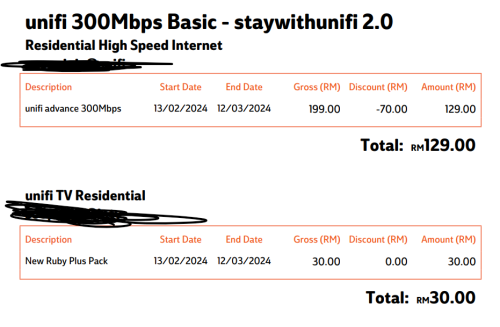 This post has been edited by priest: Feb 16 2024, 10:52 PM |
|
|
Feb 16 2024, 11:15 PM
|
|
Senior Member
1,524 posts Joined: Dec 2020 From: Perak
|
QUOTE(priest @ Feb 16 2024, 10:50 PM) 1. Can I remove the new ruby plus pack? 300 Mbps SWU 4.0 - RM 1192. Is there any cheaper plan that is 300Mbps than whatever I have now? |
|
|
|
|
|
Feb 16 2024, 11:23 PM
|

Junior Member
671 posts Joined: May 2019 
|
Main router at 1st floor and second router (Repeater mode) at 2nd floor. Speedtest result in second floor with package 300mbps.
Is using Mesh can get better result than this?   |
|
|
Feb 16 2024, 11:37 PM
Show posts by this member only | IPv6 | Post
#1268
|

All Stars
11,459 posts Joined: Oct 2007 From: KL
|
QUOTE(yolldddd @ Feb 16 2024, 06:31 PM) You're getting shopee slowdown but not in the 42. Range Yes, public IP. The ranges available to me for the past month: 1, 60, 115, 118, 124, 175 & 202. Never get 42.Ure ip is public? And what ip range is it? This post has been edited by soonwai: Feb 16 2024, 11:49 PM yolldddd liked this post
|
|
|
Feb 16 2024, 11:52 PM
|
|
Senior Member
1,449 posts Joined: Sep 2021
|
QUOTE(olivur @ Feb 16 2024, 04:48 PM) yeah doing this way I'd usually disconnect and reconnect after a minute or two i did do it still same noting change IPalternatively you could unplug the fibre optic cable from your modem for a couple secs usually if I'm not lazy enough to do that I'd power cycle both my modem and router as well hope it eventually works for you 🫠 |
|
|
Feb 16 2024, 11:53 PM
|
|
Senior Member
1,449 posts Joined: Sep 2021
|
QUOTE(laihuhng @ Feb 16 2024, 06:51 PM) 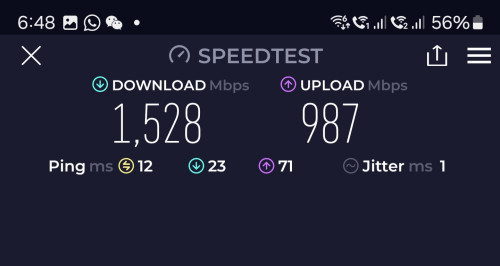 Does this mean that I have gotten my free speed upgrade from 1gbps to 2gbps? 😆 can you try LAN Cable for PC do speedtest |
|
|
Feb 17 2024, 01:00 AM
|
|
Junior Member
367 posts Joined: Oct 2006
|
QUOTE(aniq8676 @ Feb 16 2024, 11:15 PM) 300 Mbps SWU 4.0 - RM 119 just need to walk in to tm and ask for an upgrade yes?you got 500mb for 119? |
|
|
Feb 17 2024, 06:59 AM
|

Junior Member
603 posts Joined: Jun 2005
|
QUOTE(tng55 @ Feb 16 2024, 11:53 PM) confirm you are 2GBPS found upload speed 1gbps = you are download speed is 2gbps My laptop has no LAN port. Thus can't try.can you try LAN Cable for PC do speedtest Thought of not getting free upgrade anymore since the free upgrade notice has been gone from the dashboard. This post has been edited by laihuhng: Feb 17 2024, 07:01 AM |
|
|
Feb 17 2024, 10:02 AM
Show posts by this member only | IPv6 | Post
#1273
|

Junior Member
835 posts Joined: Nov 2007 From: Land of Forgotten
|
QUOTE(The.Lucas.DaY @ Feb 16 2024, 11:23 PM) Main router at 1st floor and second router (Repeater mode) at 2nd floor. Speedtest result in second floor with package 300mbps. Looks okay to me, wireless hops will only able to achieve near or to close half of what your actual speed is.Is using Mesh can get better result than this? Mesh is just a name, the end results is just to increase coverage or signal strength. Unless you get a mesh or router that has a dedicated wireless band for backhaul, then you can achieve almost or exact to actual speed. |
|
|
|
|
|
Feb 17 2024, 01:43 PM
Show posts by this member only | IPv6 | Post
#1274
|
|
Junior Member
362 posts Joined: Jan 2011
|
QUOTE(HumanExtinction @ Feb 16 2024, 09:44 PM) tm routing still havent fix? Have you enabled your IPv6 yet?watch reddit, twitter youtube videos all keep buffering non stop My area no problem with IPv6 enabled. |
|
|
Feb 17 2024, 01:44 PM
|
|
Senior Member
4,500 posts Joined: Oct 2013
|
QUOTE(priest @ Feb 17 2024, 01:00 AM) just need to walk in to tm and ask for an upgrade yes? That 1 is swu 3.0you got 500mb for 119? |
|
|
Feb 17 2024, 01:50 PM
|
|
Junior Member
364 posts Joined: Jan 2018 From: Tim Apple
|
QUOTE(michaelkkl @ Feb 17 2024, 01:43 PM) Have you enabled your IPv6 yet? I have disable it cause last time use ipv6 a lot of website not loading, havent try in awhileMy area no problem with IPv6 enabled. now ipv6 stable? |
|
|
Feb 17 2024, 01:54 PM
Show posts by this member only | IPv6 | Post
#1277
|
|
Senior Member
1,185 posts Joined: Nov 2020
|
QUOTE(The.Lucas.DaY @ Feb 16 2024, 11:23 PM) Main router at 1st floor and second router (Repeater mode) at 2nd floor. Speedtest result in second floor with package 300mbps. Get a mesh router with dedicated backhaul Is using Mesh can get better result than this? If repeater or dual band wireless mesh, maximum you can get is half of main router and that is with excellent signal strength Best option is to wire, but tri band deco also can get 800+ wireless on node |
|
|
Feb 17 2024, 01:55 PM
Show posts by this member only | IPv6 | Post
#1278
|
|
Senior Member
1,185 posts Joined: Nov 2020
|
QUOTE(laihuhng @ Feb 16 2024, 06:51 PM) Does this mean that I have gotten my free speed upgrade from 1gbps to 2gbps? 😆 Shocking can get more than 1.2 on mobile device without WiFi 7 😍😍😍 |
|
|
Feb 17 2024, 01:59 PM
Show posts by this member only | IPv6 | Post
#1279
|

All Stars
12,053 posts Joined: Oct 2017
|
QUOTE(tng55 @ Feb 16 2024, 11:53 PM) confirm you are 2GBPS found upload speed 1gbps = you are download speed is 2gbps How to use pc check? Even use stock router, LAN port is 1gbpscan you try LAN Cable for PC do speedtest |
|
|
Feb 17 2024, 02:25 PM
|
|
Junior Member
671 posts Joined: May 2019
|
Not going to invest more $$ for Mesh, i just use existing router i have to extend the wifi signal, for working room purposes.
Off topic, the Main router has enabled ipv6, second router since turned repeater mode on, ipv6 setting disappeared. Whenever i access internet from second router, it is only ipv4 connection. QUOTE(Omochao @ Feb 17 2024, 10:02 AM) Looks okay to me, wireless hops will only able to achieve near or to close half of what your actual speed is. Mesh is just a name, the end results is just to increase coverage or signal strength. Unless you get a mesh or router that has a dedicated wireless band for backhaul, then you can achieve almost or exact to actual speed. QUOTE(sadlyfalways @ Feb 17 2024, 01:54 PM) Get a mesh router with dedicated backhaul If repeater or dual band wireless mesh, maximum you can get is half of main router and that is with excellent signal strength Best option is to wire, but tri band deco also can get 800+ wireless on node |
|
Topic ClosedOptions
|
| Change to: |  0.0224sec 0.0224sec
 0.60 0.60
 6 queries 6 queries
 GZIP Disabled GZIP Disabled
Time is now: 19th December 2025 - 12:43 AM |
 Quote
Quote