Welcome Guest ( Log In | Register )

Bump Topic Topic Closed RSS Feed
495 Pages « < 56 57 58 59 60 > » Bottom

Outline · [ Standard ] · Linear+

Unifi Official TM UniFi High Speed Broadband Thread V42, READ 1ST PAGE FOR RELEVANT WIFI INFO!

views
     
HumanExtinction
post Feb 11 2024, 06:38 PM

Casual
***
Junior Member
364 posts

Joined: Jan 2018
From: Tim Apple
QUOTE(eclectice @ Feb 11 2024, 05:05 PM)
If you're experiencing difficulty logging into your Unifi member's account while using the Chrome browser, you might try using the Incognito browser mode. It appears that clearing cache and data may not be effective in the default browsing mode. Alternatively, you can use other browsers such as Firefox to log in.
*
thanks for the advice, but im using firefox sweat.gif

edit: i just tried edge also same error ranting.gif

This post has been edited by HumanExtinction: Feb 11 2024, 06:39 PM
sp6068
post Feb 11 2024, 08:30 PM

Lights Out and Away We Go!
******
Senior Member
1,699 posts

Joined: Jun 2011
From: Home of Bak Kut Teh! :)


Gong Xi Fatt Choii from TM, SLow internet for you laugh.gif
eclectice
post Feb 12 2024, 08:23 AM

Look at all my stars!!
*******
Senior Member
2,734 posts

Joined: Mar 2008
QUOTE(HumanExtinction @ Feb 11 2024, 06:38 PM)
thanks for the advice, but im using firefox  sweat.gif

edit: i just tried edge also same error  ranting.gif
*
I'm surprised my suggestions worked for me but didn't work for you. Hmm. confused.gif Have you tried the private mode in Firefox?

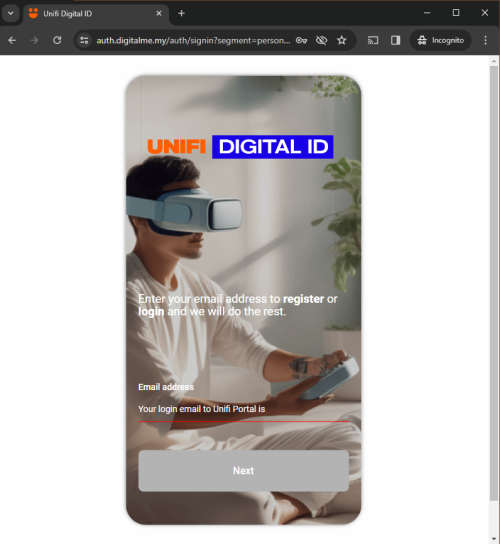
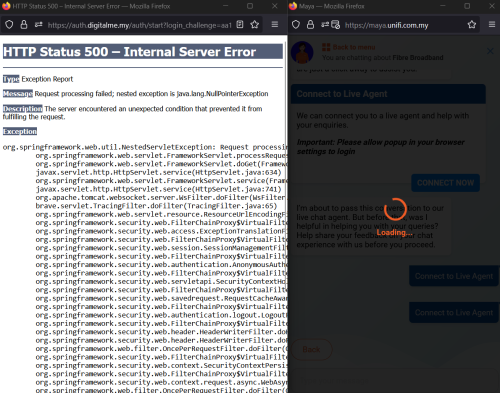
The MyUnifi link would give me an Internal Server Error 500 from the Apache Tomcat page if I didn't use either incognito mode in Chrome or inPrivate mode in Edge:
CODE

https://auth.digitalme.my/auth/start?login_challenge={MD5 hash code}
https://auth.digitalme.my/auth/signin?segment=personal&login_challenge={MD5 hash code}

user posted image

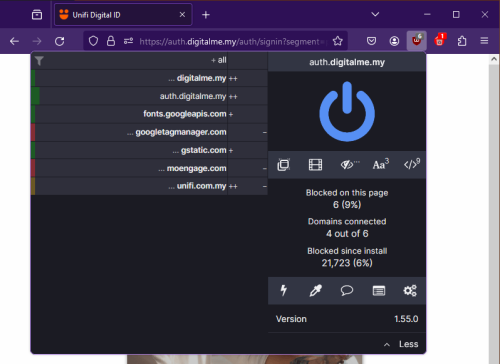
In Firefox (not private mode), I used the Mozilla uBlock Origin and Cookie AutoDelere extension to block certain cookies that prevented the MyUnifi login page from opening properly.

user posted image

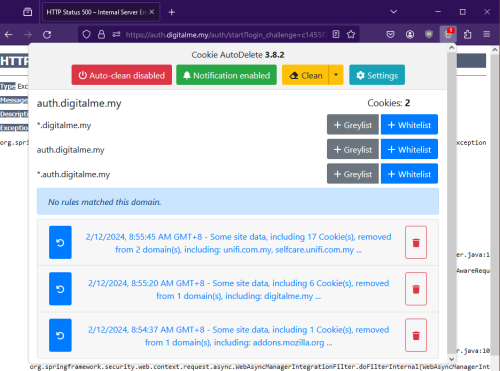
If I disabled both extensions, I would get the Internal Server Error 500 error:

user posted image

So, there are issues with persistent cookies used by the MyUnifi login page which the server uses to remember our login access.

This post has been edited by eclectice: Feb 12 2024, 09:04 AM
HumanExtinction
post Feb 12 2024, 10:38 AM

Casual
***
Junior Member
364 posts

Joined: Jan 2018
From: Tim Apple
QUOTE(eclectice @ Feb 12 2024, 08:23 AM)
I'm surprised my suggestions worked for me but didn't work for you. Hmm. confused.gif Have you tried the private mode in Firefox?

The MyUnifi link would give me an Internal Server Error 500 from the Apache Tomcat page if I didn't use either incognito mode in Chrome or inPrivate mode in Edge:
CODE

https://auth.digitalme.my/auth/start?login_challenge={MD5 hash code}
https://auth.digitalme.my/auth/signin?segment=personal&login_challenge={MD5 hash code}

user posted image

In Firefox (not private mode), I used the Mozilla uBlock Origin and Cookie AutoDelere extension to block certain cookies that prevented the MyUnifi login page from opening properly.

user posted image

If I disabled both extensions, I would get the Internal Server Error 500 error:

user posted image

So, there are issues with persistent cookies used by the MyUnifi login page which the server uses to remember our login access.
*
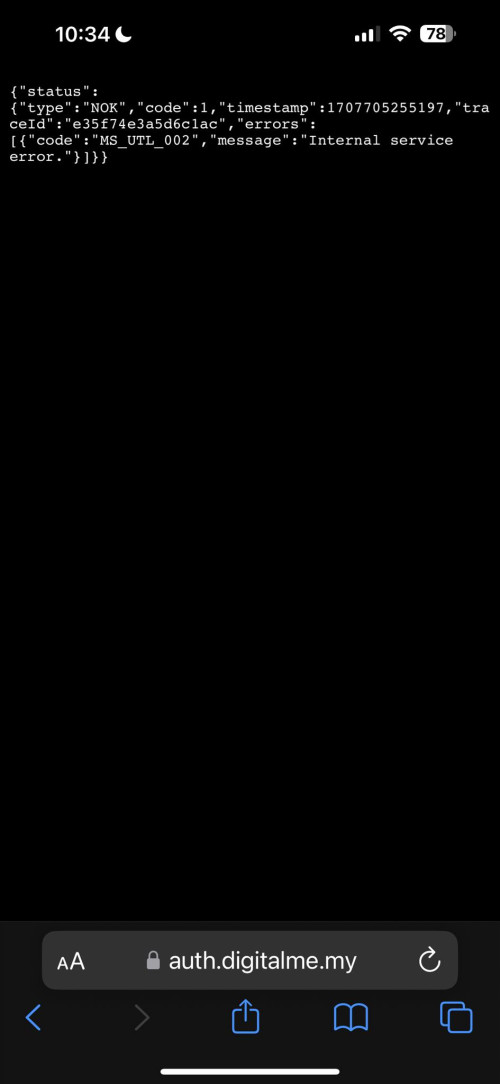
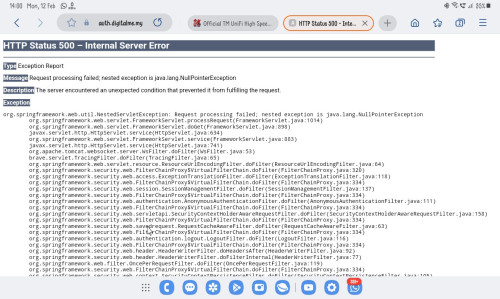
Thanks for the advice, I've tried closing ublock, using incognito on both edge and firefox still the same issue. Even using safari on iphone without any adblock also this error come out ranting.gif

cant even contact support cause need to log in ranting.gif ranting.gif

user posted image

user posted image

This post has been edited by HumanExtinction: Feb 12 2024, 10:46 AM
arslow
post Feb 12 2024, 11:53 AM

Look at all my stars!!
*******
Senior Member
3,544 posts

Joined: Sep 2008


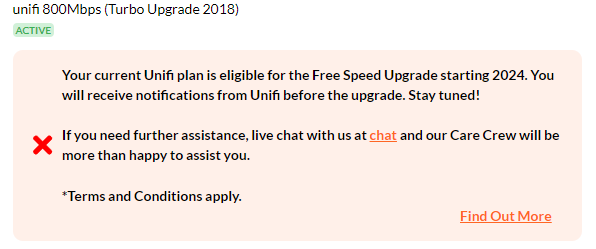
QUOTE(eclectice @ Feb 6 2024, 08:19 PM)
I realized that Unifi no longer shows the free upgrade notification as before for the current 800 Mbps plans eligible for free upgrade.

user posted image

last discussions:
https://forum.lowyat.net/index.php?showtopi...ost&p=108265766
https://forum.lowyat.net/index.php?showtopi...ost&p=108250635
*
Yes my 800mbps also not showing the upcoming upgrade notification to 1gbps anymore. Are we expected to go to tmpoint manually to switch to SWU4.0 or I wonder of we should wait further.
PJng
post Feb 12 2024, 02:01 PM

10k Club
********
All Stars
12,047 posts

Joined: Oct 2017


Just try normal log in

user posted image

But use private browser mode, can log in
Baconateer
post Feb 13 2024, 11:32 AM

Meh..... (TM)
*******
Senior Member
5,088 posts

Joined: Jun 2013
From: Blue Planet


is it just me or unifi is behaving kinda slow in ipoh area?
joehann
post Feb 13 2024, 11:43 AM

Casual
***
Junior Member
430 posts

Joined: Jan 2012
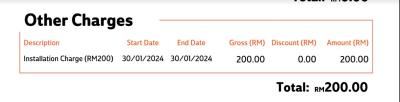
Anyone got charge with this installation charge of RM200? bloody hell betul TM. I previously got issue with netflix that suddenly got subscribed to my unifi account since October last year. I lodged report to cancel that subscription and dont know how tiba2 got open order to modify my package on 15 December 2023. that order completed end of last month and charged me with this RM200. there is nothing different on my package at all and that netflix got cancelled by my own effort by requesting it directly to netflix.

I've asked through live chat on what is this charge is all about and she just reply standard wording that she will open report and escalate this to 2nd level bla bla bla. but the thing is, she also not sure what is the detail of this charges.

since last year, I fight with them to reverse back that netflix charges since it is subscribed without my knowledge with no confirmation received through my phone number and email but now they even charged me some more out of nowhere. bangwall.gif


Attached thumbnail(s)
Attached Image
countingcrows
post Feb 13 2024, 11:44 AM

Getting Started
**
Junior Member
259 posts

Joined: Feb 2023
QUOTE(arslow @ Feb 12 2024, 11:53 AM)
Yes my 800mbps also not showing the upcoming upgrade notification to 1gbps anymore.
*
Same.

Contacted TM?


NautilusBW
post Feb 13 2024, 03:06 PM

Getting Started
**
Junior Member
69 posts

Joined: Dec 2021
Managed to login using private mode on brave browser

Crappy website
countingcrows
post Feb 13 2024, 03:14 PM

Getting Started
**
Junior Member
259 posts

Joined: Feb 2023
QUOTE(PJng @ Feb 12 2024, 02:01 PM)
Just try normal log in

user posted image

But use private browser  mode, can log in
*
Had same issue last cpl of days but after deleting the unifi and digitalme cookies in Chrome, it's working normally again.

chrome://settings/content/all?searchSubpage=unifi

chrome://settings/content/all?searchSubpage=digitalme


PJng
post Feb 13 2024, 03:26 PM

10k Club
********
All Stars
12,047 posts

Joined: Oct 2017


QUOTE(countingcrows @ Feb 13 2024, 03:14 PM)
Had same issue last cpl of days but after deleting the unifi and digitalme cookies in Chrome, it's working normally again.

chrome://settings/content/all?searchSubpage=unifi

chrome://settings/content/all?searchSubpage=digitalme
*
On phone browser no idea where to delete
Don want delete whole cookies
Alert_RaZO
post Feb 13 2024, 03:48 PM

On my way
****
Junior Member
601 posts

Joined: May 2013


I just bought tplink deco X50
I unplug the old router and plug the deco. the deco become red and no internet. Reset few times still not success.
Frustrated, I connect back the old router. Since then, no internet... Called to Unifi, restart back end, reset password, still no internet.

What went wrong?
The CS did told me if for mesh wifi I have to call to different number.
And it is unclear the cs mention new router plug in will mess the configuration?


When I connect the wifi, it says sign in to wifi network
Attached Image


This post has been edited by Alert_RaZO: Feb 13 2024, 03:53 PM
FnLockSpace
post Feb 13 2024, 04:19 PM

Getting Started
**
Junior Member
86 posts

Joined: Jan 2022
Is unifi rm89 100mbps plan still available?
eugenecctan
post Feb 13 2024, 04:44 PM

Wee Wang Wang
******
Senior Member
1,058 posts

Joined: Nov 2009


BTW, saw in Facebook Maxis home fibre can get rm119 500mb and free 6 months. Can SWU 4.0 match anything? Thanks.
YoungMan
post Feb 13 2024, 06:08 PM

Look at all my stars!!
*******
Senior Member
6,818 posts

Joined: Oct 2008
From: Kuala Lumpur


QUOTE(joehann @ Feb 13 2024, 11:43 AM)
Anyone got charge with this installation charge of RM200? bloody hell betul TM. I previously got issue with netflix that suddenly got subscribed to my unifi account since October last year. I lodged report to cancel that subscription and dont know how tiba2 got open order to modify my package on 15 December 2023. that order completed end of last month and charged me with this RM200. there is nothing different on my package at all and that netflix got cancelled by my own effort by requesting it directly to netflix.

I've asked through live chat on what is this charge is all about and she just reply standard wording that she will open report and escalate this to 2nd level bla bla bla. but the thing is, she also not sure what is the detail of this charges.

since last year, I fight with them to reverse back that netflix charges since it is subscribed without my knowledge with no confirmation received through my phone number and email but now they even charged me some more out of nowhere.  bangwall.gif
*
Should be free unless you ask for non standard installation. But how come there is rm200 installation charge long after you install Unifi? I think you better open MCMC report on this.
Oltromen Ripot
post Feb 13 2024, 06:15 PM

👍 999999 person Likes this member
*******
Senior Member
4,034 posts

Joined: Dec 2019
QUOTE(joehann @ Feb 13 2024, 11:43 AM)
Anyone got charge with this installation charge of RM200? bloody hell betul TM. I previously got issue with netflix that suddenly got subscribed to my unifi account since October last year. I lodged report to cancel that subscription and dont know how tiba2 got open order to modify my package on 15 December 2023. that order completed end of last month and charged me with this RM200. there is nothing different on my package at all and that netflix got cancelled by my own effort by requesting it directly to netflix.

I've asked through live chat on what is this charge is all about and she just reply standard wording that she will open report and escalate this to 2nd level bla bla bla. but the thing is, she also not sure what is the detail of this charges.

since last year, I fight with them to reverse back that netflix charges since it is subscribed without my knowledge with no confirmation received through my phone number and email but now they even charged me some more out of nowhere.  bangwall.gif
*
somebody complained about getting charged for Netflix access before. Apparently it was auto-subscribed accidentally through UPB. was that you or someone else.

if it wasn't you, maybe check Netflix app in UPB - if you have one.
PRSXFENG
post Feb 13 2024, 07:23 PM

Look at all my stars!!
*******
Senior Member
2,611 posts

Joined: Nov 2020


QUOTE(Alert_RaZO @ Feb 13 2024, 03:48 PM)
I just bought tplink deco X50
I unplug the old router and plug the deco. the deco become red and no internet. Reset few times still not success.
Frustrated, I connect back the old router. Since then, no internet... Called to Unifi, restart back end, reset password, still no internet.

What went wrong?
The CS did told me if for mesh wifi I have to call to different number.
And it is unclear the cs mention new router plug in will mess the configuration?
When I connect the wifi, it says sign in to wifi network
Attached Image
*
Ok so

Firstly, you have a modem, should be the one without WiFi antennas, and usually a white box, Huawei fiberhome ZTE Nokia Alcatel branded

Then you got the router, could be TP-Link D-Link fiberhome and other brands

Factory reset the deco and

Connect LAN cable from LAN1 of MODEM to a port on the deco

Setup Deco and select PPPoE mode
Ask TM for the username and password

Then, tap on VLAN SETTINGS
and select Malaysia TM Unifi

Then continue

It is not as simple as plug and play

It would be helpful if you send photos of your setup as well in case you messed up any connections

This post has been edited by PRSXFENG: Feb 13 2024, 07:23 PM

aneip
post Feb 13 2024, 08:08 PM

Look at all my stars!!
*******
Senior Member
2,466 posts

Joined: Nov 2004


QUOTE(eugenecctan @ Feb 13 2024, 04:44 PM)
BTW, saw in Facebook Maxis home fibre can get rm119 500mb and free 6 months. Can SWU 4.0 match anything? Thanks.
*
I think it's RM119 because of free 6 months. 159*18/24.
PJng
post Feb 13 2024, 08:45 PM

10k Club
********
All Stars
12,047 posts

Joined: Oct 2017


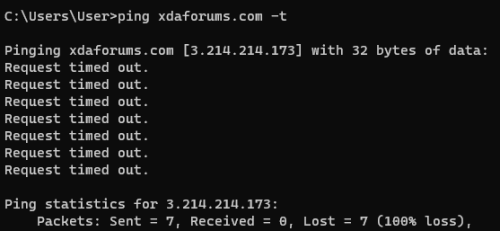
xda website so slow on this few day

user posted image

i ping correctly?

495 Pages « < 56 57 58 59 60 > » Top
Topic ClosedOptions
 

Change to:
| Lo-Fi Version
0.0203sec    0.50    6 queries    GZIP Disabled
Time is now: 15th December 2025 - 01:11 AM