Welcome Guest ( Log In | Register )

Bump Topic Topic Closed RSS Feed
456 Pages « < 435 436 437 438 439 > » Bottom

Outline · [ Standard ] · Linear+

Unifi Official TM UniFi High Speed Broadband Thread V41, READ 1ST PAGE FOR RELEVANT WIFI INFO

views
     
sitescope
post Nov 19 2023, 02:17 PM

Look at all my stars!!
*******
Senior Member
4,494 posts

Joined: Oct 2013
QUOTE(failed.hashcheck @ Nov 19 2023, 11:57 AM)
That yellow triangle, possibly you just have p2p connectivity issue?
lots of reason. maybe you are somehow in private address. or upnp not working. have you tried manually portforward?
plus you are only connected to 30 seeds while I typically get around 100.
*
yes 300mbps is on priv ip

QUOTE(BenYeeHua @ Nov 19 2023, 12:01 PM)
Look like your IPv6 not even working/promoting...
Did you try add tracker manually?
https://github.com/ngosang/trackerslist
Connect via IPv6 should helps, and global connection limit should at least 500, same to per seed.
For mine case, it is qbittorrent need higher connection limit, while utorrent no need(but the ads, lol).
And yes, DHT a bit less, hmmm.
Try tracker la, DHT is kind of no need nowadays.
*
any extra steps to configure ipv6 ?
i just enabled it in router and add cloudflare ipv6 dns n save. thats all
add trackers as per ur link but no improvement too

QUOTE(tng55 @ Nov 19 2023, 12:29 PM)
confirm you are private ip address that why yellow triangle
mine public ip address i get green
mine still use utorrent without ads because i use old version i wont update new version hahaha
already stable old version utorrent
*
yes 300mbps is on priv ip
thats why i ask if others with 300mbps pkg also got slowness in their torrent
if no, then need to know how they configure it

This post has been edited by sitescope: Nov 19 2023, 02:18 PM
failed.hashcheck
post Nov 19 2023, 02:24 PM

Neighborhood plant pathologist
*******
Senior Member
2,096 posts

Joined: Aug 2009
From: Shithole Klang
QUOTE(sitescope @ Nov 19 2023, 02:17 PM)
yes 300mbps is on priv ip
any extra steps to configure ipv6 ?
i just enabled it in router and add cloudflare ipv6 dns n save. thats all
add trackers as per ur link but no improvement too
yes 300mbps is on priv ip
thats why i ask if others with 300mbps pkg also got slowness in their torrent
if no, then need to know how they configure it
*
Welp. That sums up your issue.
Its the private ip. Since cgnat is handled at ISP level, there is nothing you could readily configure on your end to improve your speed.

The only way to go is setup/get a VPN.
fookhing
post Nov 19 2023, 02:24 PM

Getting Started
**
Junior Member
186 posts

Joined: Aug 2018
QUOTE(westlife @ Nov 18 2023, 08:03 PM)
Just sign up via WhatsApp for maxis and they will give u a transfer id to go to tm point to submit.

Last week I went to tm pelangi to request for swu 3.0. They said that I am on swu 2.0 they could not offer it.

My contract ends 14 July 2024.

Anyway I am moving house soon which the new place has no unifi coverage. they told me can suspend my unifi account for 3 months temperaily.
*
Can share how you sign up and get the Transfer ID from Maxis WhatsApp? I chose Sign Up the All New Maxis Home Fiber and get a message that a Sales Agent will call me instead.

PJng
post Nov 19 2023, 03:21 PM

10k Club
********
All Stars
12,041 posts

Joined: Oct 2017


QUOTE(sitescope @ Nov 19 2023, 02:17 PM)
yes 300mbps is on priv ip
any extra steps to configure ipv6 ?
i just enabled it in router and add cloudflare ipv6 dns n save. thats all
add trackers as per ur link but no improvement too
yes 300mbps is on priv ip
thats why i ask if others with 300mbps pkg also got slowness in their torrent
if no, then need to know how they configure it
*
My 100 to 300, speed still good
Can near 40MB/s

Btw got anyone got swu 3.0 +unifi tv price? Or still same like old plan?
phoenixxx
post Nov 19 2023, 03:54 PM

Sesquipedalian hittin' the quasihemdemisemiquaver
******
Senior Member
1,241 posts

Joined: Mar 2005
QUOTE(Omochao @ Nov 11 2023, 05:34 PM)
Hoping that you would do more testing and tinkering on it with the fiberhome, who knows someone else in the future might run into the same problem setting up with CCTVs.

I dont run a CCTV network, so i can't share what can be done or not..
*
Some further update:
TM suddenly called and said the DLink router is available. Proceeded to replace both my Fiberhome with DLink AX3000. The model is X3060Z (black colour with 5 antennas).

So far, managed to set up everything properly. The only downside is one of the ports is reserved for IPTV and despite all my tinkering it couldn't be "released" as a normal Ethernet port.

Hence, got a TP Link T3U AC1300 USB card, so far tested can get 500Mbps on the link after driver update.

Seems everything is working so far. One main router, one Bridge mode with wired LAN.

The DLink is definitely much easier to set up and works almost out of the box.

Hope it continues to be smooth and steady.

EDIT: linking another forumer's post that helped me set up the DLink. He has the same model as I do.

https://forum.lowyat.net/topic/5407927

This post has been edited by phoenixxx: Nov 19 2023, 03:56 PM
mikey8811
post Nov 19 2023, 04:07 PM

Getting Started
**
Junior Member
125 posts

Joined: Jul 2008


QUOTE(phoenixxx @ Nov 19 2023, 03:54 PM)
Some further update:
TM suddenly called and said the DLink router is available. Proceeded to replace both my Fiberhome with DLink AX3000. The model is X3060Z (black colour with 5 antennas).

So far, managed to set up everything properly. The only downside is one of the ports is reserved for IPTV and despite all my tinkering it couldn't be "released" as a normal Ethernet port.

Hence, got a TP Link T3U AC1300 USB card, so far tested can get 500Mbps on the link after driver update.

Seems everything is working so far. One main router, one Bridge mode with wired LAN.

The DLink is definitely much easier to set up and works almost out of the box.

Hope it continues to be smooth and steady.

EDIT: linking another forumer's post that helped me set up the DLink. He has the same model as I do.

https://forum.lowyat.net/topic/5407927
*
So you got the SWU 3.0 package, they set up for you with Fibrehome routers and then you requested DLink router. They then replaced your 2 Fibrehome MESH routers with the DLink ones?

phoenixxx
post Nov 19 2023, 04:10 PM

Sesquipedalian hittin' the quasihemdemisemiquaver
******
Senior Member
1,241 posts

Joined: Mar 2005
QUOTE(mikey8811 @ Nov 19 2023, 04:07 PM)
So you got the SWU 3.0 package, they set up for you with Fibrehome routers and then you requested DLink router. They then replaced your 2 Fibrehome MESH routers with the DLink ones?
*
Yes, but like some other forumers mentioned, by default you can't choose.

I think in my case, there were 2 things that worked in my favor:
1. The salesperson promised me the Dlink
2. There was an exact model (but with some red stripes) in the Unifi Centre itself, with the price tag of FREE if you sign up 100Mbps and above.

They were very reluctant to entertain me, and I pretty much gave up already. Didn't really pursue it after a few calls and follow up.

Then suddenly, they called so I just agreed to it.

I am on SWU 3.0 500Mbps.
mikey8811
post Nov 19 2023, 04:14 PM

Getting Started
**
Junior Member
125 posts

Joined: Jul 2008


QUOTE(phoenixxx @ Nov 19 2023, 04:10 PM)
Yes, but like some other forumers mentioned, by default you can't choose.

I think in my case, there were 2 things that worked in my favor:
1. The salesperson promised me the Dlink
2. There was an exact model (but with some red stripes) in the Unifi Centre itself, with the price tag of FREE if you sign up 100Mbps and above.

They were very reluctant to entertain me, and I pretty much gave up already. Didn't really pursue it after a few calls and follow up.

Then suddenly, they called so I just agreed to it.

I am on SWU 3.0 500Mbps.
*
I had also requested the DLink routers.

Do they perform better than the Fibrehome ones?
westlife
post Nov 19 2023, 04:21 PM

10k Club
********
All Stars
14,284 posts

Joined: Jan 2011
QUOTE(fookhing @ Nov 19 2023, 02:24 PM)
Can share how you sign up and get the Transfer ID from Maxis WhatsApp? I chose Sign Up the All New Maxis Home Fiber and get a message that a Sales Agent will call me instead.
*
https://api.whatsapp.com/send?phone=6012345...axisWeb%5D%20Hi
SwarmTroll
post Nov 19 2023, 04:25 PM

Regular
******
Senior Member
1,401 posts

Joined: Apr 2012
QUOTE(phoenixxx @ Nov 19 2023, 04:10 PM)
Yes, but like some other forumers mentioned, by default you can't choose.

I think in my case, there were 2 things that worked in my favor:
1. The salesperson promised me the Dlink
2. There was an exact model (but with some red stripes) in the Unifi Centre itself, with the price tag of FREE if you sign up 100Mbps and above.

They were very reluctant to entertain me, and I pretty much gave up already. Didn't really pursue it after a few calls and follow up.

Then suddenly, they called so I just agreed to it.

I am on SWU 3.0 500Mbps.
*
Daheck? They gave you the Fiberhome AX3000, then allowed you to swap to D-Link AX3000? I thought it was impossible lol. Since you have had both, how is the difference?
phoenixxx
post Nov 19 2023, 04:30 PM

Sesquipedalian hittin' the quasihemdemisemiquaver
******
Senior Member
1,241 posts

Joined: Mar 2005
QUOTE(mikey8811 @ Nov 19 2023, 04:14 PM)
I had also requested the DLink routers.

Do they perform better than the Fibrehome ones?
*
QUOTE(SwarmTroll @ Nov 19 2023, 04:25 PM)
Daheck? They gave you the Fiberhome AX3000, then allowed you to swap to D-Link AX3000? I thought it was impossible lol. Since you have had both, how is the difference?
*
TBH I did not have the Fiberhome for very long. Probably 1 week +? They were fine for what they are (not a very heavy user), my only issue was I couldn't use the spare one as a wired AP.
Dlink on the other hand took all of 5 mins to set up the AP (Bridge) mode.
Plus black devices look more sexy laugh.gif
sitescope
post Nov 19 2023, 05:41 PM

Look at all my stars!!
*******
Senior Member
4,494 posts

Joined: Oct 2013
QUOTE(PJng @ Nov 19 2023, 03:21 PM)
My 100 to 300, speed still good
Can near 40MB/s

Btw got anyone got swu 3.0 +unifi tv price? Or still same like old plan?
*
Whats ur wan ip ?
PJng
post Nov 19 2023, 05:47 PM

10k Club
********
All Stars
12,041 posts

Joined: Oct 2017


QUOTE(sitescope @ Nov 19 2023, 05:41 PM)
Whats ur wan ip ?
*
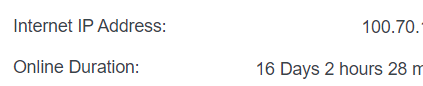
Last time still private, 100.xx
Later i try again other torrent
PJng
post Nov 19 2023, 07:24 PM

10k Club
********
All Stars
12,041 posts

Joined: Oct 2017


QUOTE(sitescope @ Nov 19 2023, 05:41 PM)
Whats ur wan ip ?
*
user posted image

user posted image

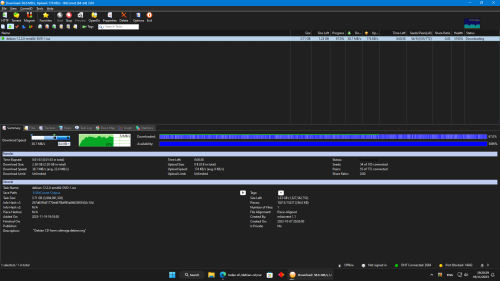
can full speed, see the graph just starting low speed

» Click to show Spoiler - click again to hide... «


there is full of seed

This post has been edited by PJng: Nov 19 2023, 07:33 PM
BenYeeHua
post Nov 19 2023, 08:43 PM

Regular
******
Senior Member
1,873 posts

Joined: Nov 2010


QUOTE(sitescope @ Nov 19 2023, 02:17 PM)
yes 300mbps is on priv ip
any extra steps to configure ipv6 ?
i just enabled it in router and add cloudflare ipv6 dns n save. thats all
add trackers as per ur link but no improvement too
yes 300mbps is on priv ip
thats why i ask if others with 300mbps pkg also got slowness in their torrent
if no, then need to know how they configure it
*
Then it is global connection limit too low, change it higher.

And you test via cable, right?
It can be your router handle half-open too slow as well, depend.

The best is enable NAT Boost of router for testing, many old router have weak CPU for QoS processing performance >500M.

QUOTE(phoenixxx @ Nov 19 2023, 03:54 PM)
Some further update:
TM suddenly called and said the DLink router is available. Proceeded to replace both my Fiberhome with DLink AX3000. The model is X3060Z (black colour with 5 antennas).

So far, managed to set up everything properly. The only downside is one of the ports is reserved for IPTV and despite all my tinkering it couldn't be "released" as a normal Ethernet port.

Hence, got a TP Link T3U AC1300 USB card, so far tested can get 500Mbps on the link after driver update.

Seems everything is working so far. One main router, one Bridge mode with wired LAN.

The DLink is definitely much easier to set up and works almost out of the box.

Hope it continues to be smooth and steady.

EDIT: linking another forumer's post that helped me set up the DLink. He has the same model as I do.

https://forum.lowyat.net/topic/5407927
*
For Realtek, better disable scanning of 2.4Ghz in driver settings, the driver don't written well, and scanning both frequency in background caused lower throughput than it should provide.
sitescope
post Nov 19 2023, 09:27 PM

Look at all my stars!!
*******
Senior Member
4,494 posts

Joined: Oct 2013
QUOTE(PJng @ Nov 19 2023, 07:24 PM)
user posted image
*
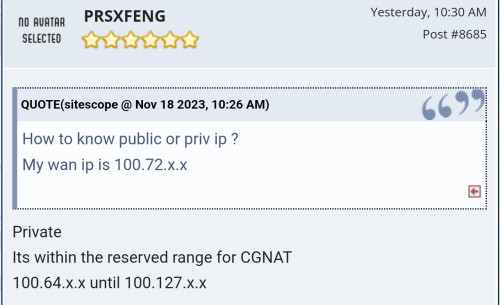
Then u with priv ip too

user posted image

Now this become more confusing
Same said priv ip cant boost torrent dload
PJng
post Nov 19 2023, 09:28 PM

10k Club
********
All Stars
12,041 posts

Joined: Oct 2017


any reason that imgur took too long to load, i hate ppl embed imgur picture on forum
have been happen many years ago, forum ppl tend to post full resolution image but load speed about 100KB/s
even phone using digi also same, less that 100KB/s load speed
sitescope
post Nov 19 2023, 09:29 PM

Look at all my stars!!
*******
Senior Member
4,494 posts

Joined: Oct 2013
QUOTE(BenYeeHua @ Nov 19 2023, 08:43 PM)
Then it is global connection limit too low, change it higher.

And you test via cable, right?
It can be your router handle half-open too slow as well, depend.

The best is enable NAT Boost of router for testing, many old router have weak CPU for QoS processing performance >500M.
*
Will check that NAS boost even my spd is below 500M
PJng
post Nov 19 2023, 09:31 PM

10k Club
********
All Stars
12,041 posts

Joined: Oct 2017


QUOTE(sitescope @ Nov 19 2023, 09:27 PM)
Then u with priv ip too

user posted image

Now this become more confusing
Same said priv ip cant boost torrent dload
*
noticing you consistence shortcut certain word, how special
hardly got speed problem for me since unifi 5mbps, then 30, 100 now 300, if seed is food mostly full speed
BenYeeHua
post Nov 19 2023, 09:32 PM

Regular
******
Senior Member
1,873 posts

Joined: Nov 2010


QUOTE(sitescope @ Nov 19 2023, 09:27 PM)
Then u with priv ip too

user posted image

Now this become more confusing
Same said priv ip cant boost torrent dload
*
Can, use IPv6, now global internet 50% IPv6 already, if including China, 70%.
Unless your router blocked IPv6 incoming data, you can get incoming traffic from IPv6, and no issues.

As IPv6 bypass NAT as well, no need worry too much overhead for NAT processing issues.


QUOTE(PJng @ Nov 19 2023, 09:28 PM)
any reason that imgur took too long to load, i hate ppl embed imgur picture on forum
have been happen many years ago, forum ppl tend to post full resolution image but load speed about 100KB/s
even phone using digi also same, less that 100KB/s load speed
*
Example, above post using EvXnK5.md.jpg, middle size jpg by default.

I think slow loading caused by slowdown of cloudflare, now cloudflare SG IPv4/IPv6 going via telstra HK then telstra SG....

You need to blame UniFi for doing that HK reroute...

456 Pages « < 435 436 437 438 439 > » Top
Topic ClosedOptions
 

Change to:
| Lo-Fi Version
0.0207sec    0.55    6 queries    GZIP Disabled
Time is now: 11th December 2025 - 02:38 PM