

Officially everyone sudah basah kena kencing by Fahmi, again

Unifi Official TM UniFi High Speed Broadband Thread V41, READ 1ST PAGE FOR RELEVANT WIFI INFO
|
|
 Sep 30 2023, 07:13 PM Sep 30 2023, 07:13 PM
Return to original view | Post
#1
|
 
Senior Member
2,090 posts Joined: Aug 2009 From: Shithole Klang 
|
Office hour today ended.
Officially everyone sudah basah kena kencing by Fahmi, again |
|
|
|
|
|
Oct 5 2023, 03:50 PM
Return to original view | Post
#2
|
|
Senior Member
2,090 posts Joined: Aug 2009 From: Shithole Klang
|
So now 500mbps going to be the lowest tier for public ip?
|
|
|
Oct 9 2023, 02:44 PM
Return to original view | Post
#3
|
|
Senior Member
2,090 posts Joined: Aug 2009 From: Shithole Klang
|
QUOTE(Oltromen Ripot @ Oct 9 2023, 01:15 PM) stop using fast.com for speed testing. If you are using Digi fast would better.fast.com is netflix. it's optimised for testing Netflix experience.  They rigged connection to speedtest.net server that lets you go as far as your LTE allows, but not the other real usage that is bound to artificial package limit. While other ISP/telco display the speed faithfully according to their plan limit. After some time they paid soyacincau to publish story about how they have the best stats in speedtest.net (apparently the sponsored article is now deleted. can't find it anymore) Since fast.com is just part of open connect server in ISP, they can't tamper it without causing collateral damage to the rest of Netflix service. Not sure if they are still doing this shit post-merger though. But I still wouldn't trust them to not fucking with speedtest.net. |
|
|
Oct 9 2023, 07:59 PM
Return to original view | Post
#4
|
|
Senior Member
2,090 posts Joined: Aug 2009 From: Shithole Klang
|
QUOTE(squall0833 @ Oct 9 2023, 07:50 PM) Still testing, I also need newer device to test if any better, all devices on hand struggling 350-400, need lend iphone 13 pro or any recent new device to confirm if it was just my on hand devices wifi bottlenecking Try local transfer as well.Fyi, all my deco m4s connected with ethernet cable as backhaul, so shouldnt be positioning problem cos i did the test right beside the deco 🤣 Maybe my deco degraded, they are few years old already The bottleneck could be at wifi, but more often than not it's due to underperforming cpu (especially when qos is enabled=hw acceleration disabled), so anything that passes through nat, ie. wan connection, experiences slowdown while anything within lan is working fine whether it through cable or wifi. |
|
|
Oct 10 2023, 02:10 AM
Return to original view | Post
#5
|
|
Senior Member
2,090 posts Joined: Aug 2009 From: Shithole Klang
|
QUOTE(The.Lucas.DaY @ Oct 10 2023, 12:09 AM) A question, Is AX53 better than AX23 ? Yes. Not much in raw chipset performance. But rather in wifi performance.AX53 base spec is pretty much same as AX23, except it uses newer Qualcomm chipset that allows it to use 160mhz channel width instead of variant of Mediatek MT7621 that is limited to 80mhz (similar to the one you find in Asus RT-AX53U). And it also reportedly runs cooler than AX23. edit: oh and you can get it for rm206 right now https://shopee.com.my/TP-LINK-ARCHER-AX53-A...30-76945741f38f This post has been edited by failed.hashcheck: Oct 10 2023, 02:46 AM |
|
|
Oct 10 2023, 02:59 AM
Return to original view | Post
#6
|
|
Senior Member
2,090 posts Joined: Aug 2009 From: Shithole Klang
|
QUOTE(BenYeeHua @ Oct 10 2023, 02:50 AM) 160MHz is much useful than 2:2 antenna, as u can see, smartphone running much slower than laptop because 2x antenna issues. well I just recommend it because it's the best value you could get at that price point right now, As we also at Malaysia, it ensure we get much higher power(1w lol) for 5Ghz as well. https://www.mcmc.gov.my/skmmgovmy/media/Gen...WirelessLAN.pdf But it depend on router wanna support it or not la, mostly just 25dbm lol.  For this AX53 router, it is Enough la. ---- For china they kind of law issues(for human body safety, they just 10% of what's global standard, so problem solved lol), so that might explain why MTK also get so limited...  I guess unless they found a workaround for it, it will greatly limiting global market for them...  (like testing at Malaysia for Huawei? they got company here as well.) while some people blindly and gladly pay rm260 for RT-AX53U made from a 2014 version MT7621AT chipset just because it has 'Asus' name  Personally tplink is no go for me since I already invested in Asus aimesh ecosystem. Even if I want to change to tplink mesh, Onemesh lacks of ethernet backhaul support is a big yikes for me. This post has been edited by failed.hashcheck: Oct 10 2023, 03:04 AM |
|
|
|
|
|
Oct 10 2023, 01:49 PM
Return to original view | Post
#7
|
|
Senior Member
2,090 posts Joined: Aug 2009 From: Shithole Klang
|
QUOTE(Khan92 @ Oct 10 2023, 03:14 AM) What would you recommend for mesh wifi 500 mbps? ]Depends on your budget. If big budget go Asus. RT-AX86U is is well rounded with substantial asking price but leaves almost nothing to be desired. If low budget go tplink. Right now AX53 has the best value and you really can't go wrong with this one. The thing about Asus value proposition is you go big or go home. For main router, either get Broadcom models like AX86U or AX88U or its derivatives , or don't do it at all and get tplink instead. For aimesh endpoint its okay to get low end models. Khan92 liked this post
|
|
|
Oct 10 2023, 02:00 PM
Return to original view | Post
#8
|
|
Senior Member
2,090 posts Joined: Aug 2009 From: Shithole Klang
|
QUOTE(crusher @ Oct 10 2023, 01:57 PM) Ax86U from China can use in Malaysia? Other than no DFS channel, missing some channels and hardcoded region with no option to change, why not?legality is different story though. if it has no sirim/mcmc sticker/cert its illegal to use here. but hey its not a crime if you don't get caught right? This post has been edited by failed.hashcheck: Oct 10 2023, 02:17 PM |
|
|
Oct 10 2023, 02:25 PM
Return to original view | Post
#9
|
|
Senior Member
2,090 posts Joined: Aug 2009 From: Shithole Klang
|
QUOTE(Oltromen Ripot @ Oct 10 2023, 02:12 PM) ktards wrote before about China's Wifi strength is hardware-limited. its true. Some channels that we can use without restriction (within base wifi spec) here, like 32-48 is rated for indoors only china.just stating this without any proof. https://en.wikipedia.org/wiki/List_of_WLAN_....11a/h/n/ac/ax) but i imagine power output is not much a real issue when you are going to do mesh anyway This post has been edited by failed.hashcheck: Oct 10 2023, 02:44 PM |
|
|
Oct 10 2023, 02:37 PM
Return to original view | Post
#10
|
|
Senior Member
2,090 posts Joined: Aug 2009 From: Shithole Klang
|
QUOTE(westlife @ Oct 10 2023, 02:25 PM) what are the price ranges for the two routers recommended? Asus AX86u would be 1.3k-1.4k(pro version). Not sure whats the difference other than higher clock in pro.tplink AX53 rm250. But lowest is rm206 in sales today. |
|
|
Oct 11 2023, 05:28 PM
Return to original view | Post
#11
|
|
Senior Member
2,090 posts Joined: Aug 2009 From: Shithole Klang
|
QUOTE(soonwai @ Oct 11 2023, 05:21 PM) yea. When network people talk about the old cat5e can't support, they are talking about datacenter or enterprise networking context.In this environment cables are almost always run in big bundles across big buildings. There is heavy crosstalk among these individual cables that are beyond what cat5e shielding could protect. It doesn't really matter in the home setting when you just run a single cable where crosstalk issue is not a concern. |
|
|
Oct 11 2023, 05:45 PM
Return to original view | Post
#12
|
|
Senior Member
2,090 posts Joined: Aug 2009 From: Shithole Klang
|
QUOTE(go626201 @ Oct 11 2023, 05:32 PM) Crap quality cable might not be able to run for that high speed,only standard or high quality cable should be use for that high speed. yea I assume the cable built within specified spec.but for real tho. cat* is just name and published spec, at the end it depends on honesty and reputation of manufacturer. During pkp I did emergency purchase of this really cheap no name 'cat5e' cable from shopee. Run 20m inside my house passing through all kind of noise like mains cable, AVR and fan. It refuses to auto negotiate to 1gbps speed. Capped 100mbps. After some time I replace with proper AMP brand cable, only then can get 1gbps. This post has been edited by failed.hashcheck: Oct 11 2023, 05:49 PM |
|
|
Oct 12 2023, 04:50 PM
Return to original view | Post
#13
|
|
Senior Member
2,090 posts Joined: Aug 2009 From: Shithole Klang
|
QUOTE(soonwai @ Oct 12 2023, 04:43 PM) How come reddit.com/r/Malaysia no talk about SWU3? All T20 there, no need discount izit? Or too kiasu to share? they are too busy being politically correct and pleasing western people.This is why LYN is dabest. |
|
|
|
|
|
Oct 13 2023, 10:40 PM
Return to original view | Post
#14
|
|
Senior Member
2,090 posts Joined: Aug 2009 From: Shithole Klang
|
QUOTE(darthvaderoo @ Oct 13 2023, 10:32 PM) Fiberhome SR1041Y Should be fine.This is router TM give when you upgrade from 100 to 300mb mesh promo last year. I have lots to complain about this specific router, but performance is not one of them. |
|
|
Nov 19 2023, 01:17 AM
Return to original view | Post
#15
|
|
Senior Member
2,090 posts Joined: Aug 2009 From: Shithole Klang
|
QUOTE(sitescope @ Nov 19 2023, 12:42 AM) Can give 1 sample hot seed torrent ? Debian x64 ltsMine always stuck at 12MB/s max Suppose can go up to avg 35MB/s Device is using cat5e lan n 5ghz wifi 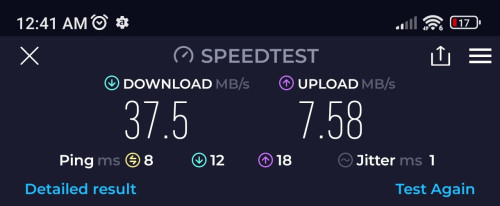 always have at least 150 seeds and lots of them are on gigabit seedbox. but its a 4.gb dvd image too small for meaningful test beyond 500mbps. By the time you contacted enough peer to reach 30MB/s its already 75% sitescope liked this post
|
|
|
Nov 19 2023, 11:57 AM
Return to original view | Post
#16
|
|
Senior Member
2,090 posts Joined: Aug 2009 From: Shithole Klang
|
QUOTE(sitescope @ Nov 19 2023, 08:55 AM) look like no improvement. upload has been set max to 50kB/ss only. That yellow triangle, possibly you just have p2p connectivity issue? this is avg spd when my old pkg was 100mbps before free upg to 300mbps 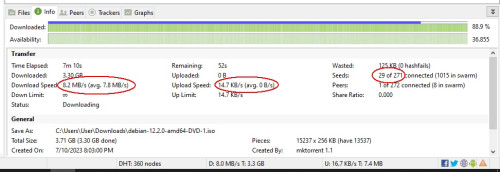 lots of reason. maybe you are somehow in private address. or upnp not working. have you tried manually portforward? plus you are only connected to 30 seeds while I typically get around 100. |
|
|
Nov 19 2023, 02:24 PM
Return to original view | Post
#17
|
|
Senior Member
2,090 posts Joined: Aug 2009 From: Shithole Klang
|
QUOTE(sitescope @ Nov 19 2023, 02:17 PM) yes 300mbps is on priv ip Welp. That sums up your issue.any extra steps to configure ipv6 ? i just enabled it in router and add cloudflare ipv6 dns n save. thats all add trackers as per ur link but no improvement too yes 300mbps is on priv ip thats why i ask if others with 300mbps pkg also got slowness in their torrent if no, then need to know how they configure it Its the private ip. Since cgnat is handled at ISP level, there is nothing you could readily configure on your end to improve your speed. The only way to go is setup/get a VPN. |
|
|
Nov 21 2023, 01:52 AM
Return to original view | Post
#18
|
|
Senior Member
2,090 posts Joined: Aug 2009 From: Shithole Klang
|
If port in to take 500mbps unifi do I get public IP by default or need to request and provide justification?
This post has been edited by failed.hashcheck: Nov 21 2023, 01:54 AM |
|
|
Nov 21 2023, 06:21 PM
Return to original view | Post
#19
|
|
Senior Member
2,090 posts Joined: Aug 2009 From: Shithole Klang
|
QUOTE(MyProLife @ Nov 21 2023, 06:15 PM) M6 = mesh WiFi 6 yea. 119 for 500m legitimately exist.Portal or app sometimes got bugs la. Actually originally swu3.0 119 is 300m upgraded to 500m. So 500m forever already I just returned from tmpoint at xx just now, they said this one is reserved as counter offer for people attempting to port out. |
|
|
Nov 26 2023, 08:43 AM
Return to original view | Post
#20
|
|
Senior Member
2,090 posts Joined: Aug 2009 From: Shithole Klang
|
QUOTE(sivapc @ Nov 26 2023, 02:18 AM) Hello guys, whats this even meanDoes anyone know if Unifi use NAT for fixed public IP? |
|
Topic ClosedOptions
|
| Change to: |  0.2462sec 0.2462sec
 0.35 0.35
 7 queries 7 queries
 GZIP Disabled GZIP Disabled
Time is now: 3rd December 2025 - 10:51 AM |
 Quote
Quote