Welcome Guest ( Log In | Register )

Bump Topic Topic Closed RSS Feed
125 Pages « < 35 36 37 38 39 > » Bottom

Outline · [ Standard ] · Linear+

 Radeon HD 3870 and HD 3850 On The Horizon, The Dark Side is POWERFUL . come join

views
     
gengstapo
post Nov 29 2007, 12:23 AM

Retired enthusiast
********
All Stars
10,688 posts

Joined: Jan 2005
QUOTE(cstkl1 @ Nov 27 2007, 07:01 PM)
errr catalyst supports all os

they are the same..
its not like nvidia cards...
which nowadays u have to install different drivers for different GPU cores and different OS's
*
nope, for vista there is another version of catalyst even its for vista x86 smile.gif

i know coz i use em'

This post has been edited by gengstapo: Nov 29 2007, 12:26 AM
0168257061
post Nov 29 2007, 12:32 AM

EimiFukada
********
All Stars
14,242 posts

Joined: Jul 2007
From: JAVABUS


QUOTE(tech_frix @ Nov 28 2007, 07:14 PM)
but d down side is d power consuming...
afraid gonna eat a lot of juice to powah up!!!
*
hmm..maybe..need to wait for result
mypetridish
post Nov 29 2007, 02:47 AM

Regular
******
Senior Member
1,313 posts

Joined: Jan 2006
QUOTE(empire23 @ Nov 28 2007, 01:28 AM)
Next Geforce high end part will not be G92 right now. It will use the G80 IIRC due to the need for high clockspeeds and the supply and clocking issues with the G92.
*
cant be true, why would they use a more expensive process - 90nm - to create a card which undoubtedly require a larger amount of transistor? not to mention heat due to the larger die and its presumably lower clocking capability. im not familiar with the G92 clocking issues, but it sure is clocking higher than the g80. i find ure logic terbalik

QUOTE(ikanayam @ Nov 28 2007, 02:55 AM)
It will be a non-cutdown G92 for the faster card coming soon. G80 has been EOL'd, they're just selling whatever old stocks they have.
*
what is a full version of G92? increased number of SP and higher memory bandwidth?

anyone who buys a g80 GTS and gtx now and the past 2 weeks deserves to be laughed at.
empire23
post Nov 29 2007, 05:25 AM

Team Island Hopper
Group Icon
Staff
9,417 posts

Joined: Jan 2003
From: Bladin Point, Northern Territory
QUOTE(mypetridish @ Nov 29 2007, 02:47 AM)
cant be true, why would they use a more expensive process - 90nm - to create a card which undoubtedly require a larger amount of transistor? not to mention heat due to the larger die and its presumably lower clocking capability. im not familiar with the G92 clocking issues, but it sure is clocking higher than the g80. i find ure logic terbalik
*
Hear it's internally called the G80 plus.

The idea isn't the larger amount of transistors or whatnot.

Highend parts have only 2 things in mind, yield, and clockspeed, and if the old process is unable to deliver on both, graphic card makers usually aim for a combinational process.

the G92 made in 90nm is a possibility, smaller processes don't really mean you'll get better clocks or usable chips per wafer. That's why the latest high enders of next gen cards usually use last gen processes because they're proven and easily optimized for.
mypetridish
post Nov 29 2007, 06:36 AM

Regular
******
Senior Member
1,313 posts

Joined: Jan 2006
QUOTE(empire23 @ Nov 28 2007, 04:25 PM)
Hear it's internally called the G80 plus.

The idea isn't the larger amount of transistors or whatnot.

Highend parts have only 2 things in mind, yield, and clockspeed, and if the old process is unable to deliver on both, graphic card makers usually aim for a combinational process.

the G92 made in 90nm is a possibility, smaller processes don't really mean you'll get better clocks or usable chips per wafer. That's why the latest high enders of next gen cards usually use last gen processes because they're proven and easily optimized for.
*
i dont recall any high end latest gen graphics card using the previous gen chip nor processes. GeForce 7800 GTX used 110nm and the GeForce 7900 GTX used 90nm. just look through the R520 and R600 series and ull see the same pattern. also, isnt the Ultra also using a 90nm process which is the pinnacle of nvidia's offering at that time?

if they could have made G80 go beyond 612 mhz without producing too much heat, they would. and maybe they are working on it hence the G80 plus. but currently G92 is churning less heat with its 65nm process, packing more transistors, and boasting better clocking performance with GTS coming out at 650mhz on a reference chip.

now that they are capable of producing G92 using 65nm process, it's just insane to go back to back to using 90nm. if ure talking about optimizing G80+ on 65nm then that sounds plausible. but staying at 90nm? rclxub.gif
8tvt
post Nov 29 2007, 09:45 AM

Peace Lover
*******
Senior Member
8,753 posts

Joined: Jan 2003
Just to clear a doubt if any..

1 - if anyone intend to buy 3850/3870 and facing installation prob using winxp...
* manual installation of display driver should do the trick, then can install catalyst control center

2 - problem starting 3dmark and hang at splash screen
* 3dmark need hotfix for new gpu go download them and install..
empire23
post Nov 29 2007, 10:34 AM

Team Island Hopper
Group Icon
Staff
9,417 posts

Joined: Jan 2003
From: Bladin Point, Northern Territory
QUOTE(mypetridish @ Nov 29 2007, 06:36 AM)
i dont recall any high end latest gen graphics card using the previous gen chip nor processes. GeForce 7800 GTX used 110nm and the GeForce 7900 GTX used 90nm. just look through the R520 and R600 series and ull see the same pattern. also, isnt the Ultra also using a 90nm process which is the pinnacle of nvidia's offering at that time?

if they could have made G80 go beyond 612 mhz without producing too much heat, they would. and maybe they are working on it hence the G80 plus. but currently G92 is churning less heat with its 65nm process, packing more transistors, and boasting better clocking performance with GTS coming out at 650mhz on a reference chip.

now that they are capable of producing G92 using 65nm process, it's just insane to go back to back to using 90nm. if ure talking about optimizing G80+ on 65nm then that sounds plausible. but staying at 90nm?  rclxub.gif
*
The R520 used a larger process of 90nm while the RV570 and the resulting performance parts used the 80nm optical shrink.

The R600 used the 80nm TSMCHS while the RV630 used the 65nm and the RV670 the 55nm optical shrink while the 80nm is still being churned out.

The 7800 used the 110nm which was used on the midend of the 6 series.

The same 90nm on the 7900 series was brought forward to the 8800 series.


High end parts usually take a half step when it comes to processes. They prefer old methods because they're perfected and the yields are better, to Nvidia, heat isn't a major primary concern above money, they have a business to run, they need the yields to make sure they keep the green coming in. Just because you can build an engine with space age materials, and you get better performance, doesn't mean you should, especially when money is the core of your business. If 65nm were as great as you'd make it seem, why the shortage? An interim solution would be to use to all production capability available, optimize the existing process and keep pushing cards.

They will move, there's no doubt about that, but in my view, not now.
X.E.D
post Nov 29 2007, 05:42 PM

curmudgeonosorus emeritus
******
Senior Member
1,955 posts

Joined: Jan 2006
From: Llanfair­pwllgwyngyll­gogery­ch


QUOTE(empire23 @ Nov 29 2007, 10:34 AM)
The R520 used a larger process of 90nm while the RV570 and the resulting performance parts used the 80nm optical shrink.

The R600 used the 80nm TSMCHS while the RV630 used the 65nm and the RV670 the 55nm optical shrink while the 80nm is still being churned out.

The 7800 used the 110nm which was used on the midend of the 6 series.

The same 90nm on the 7900 series was brought forward to the 8800 series.
High end parts usually take a half step when it comes to processes. They prefer old methods because they're perfected and the yields are better, to Nvidia, heat isn't a major primary concern above money, they have a business to run, they need the yields to make sure they keep the green coming in. Just because you can build an engine with space age materials, and you get better performance, doesn't mean you should, especially when money is the core of your business. If 65nm were as great as you'd make it seem, why the shortage? An interim solution would be to use to all production capability available, optimize the existing process and keep pushing cards.

They will move, there's no doubt about that, but in my view, not now.
*
80nm was a terrible half-node- leakhell.

55 does also shrink analogue and I/O (claimed by TSMC laugh.gif )

nVidia's (and ATI's 3870) shortage problems were non-chip related.


IMHO AMD seems to get plagued by taking a "wrong" decision everytime it comes to processes. With 65nm they'd potentially have less problems getting the 670 to scale upwards in clocks, some of the 55nm chips are voltmodded to reach this clock (stock volt RV670s are kept away, hint hint hint) and rather inconsistent yields at higher clocks (8XX Mhz, although 820 shouldn't have been a problem)

But heck, in terms of volume, HD 3850 looks like the spamfest card to go for in the next year, when added with extra costdowns and longer life it'll definitely go down in pricing, reaching the midrange spot just when the next generation of incompetent midranges arrive. biggrin.gif AMD's trying to squeeze out whatever it can from the graphics division- which also explains why "R680" was NOT a 480+SP chip with moar TMU/ROPs at 65/55. Looking at how G80 could even thrive in such big diesizes it can definitely be done, especially when 65 is relatively mature nowadays.

You gotta see where they are- CPU division won't be really starting to profitable until they've transitioned into 45nm (which might bring another set of problems overall) and/or until they've gotten K10.5 out, which by then will have to face Bloomfield/Lynnfield if we trust AMD on delays.

On a sidenote though, 790FX/X/G seems to be an awesome platform to get a non-total hardcore machine on, especially the last one. (Hybrid crossfire = WIN)
sniper69
post Nov 29 2007, 09:41 PM

.: One Shot One Kill :. .+|Level 9 Type Shit|+.
*******
Senior Member
7,173 posts

Joined: Jan 2003
From: PCH


hello, it's not about HD38xx or later version but it's about HD2900XT, i just got my HIS ATi Radeon HD2900XT 1GB gDDR4, tried install Catalyst 7.11, i got this error... doh.gif

1st
user posted image

after click, this is the 2nd
user posted image

...and this is the 3rd, stated about the error
user posted image

at first, i thought it was because of corrupted downloaded data, so i re-download (4 times actually) from various servers/mirror... but still the same

anyone have any idea, what's going on? unsure.gif

another thing is... i got this kind of artifacts only in BF2
user posted image
anyone can help? icon_question.gif
frags
post Nov 29 2007, 09:48 PM

The Wizard
Group Icon
VIP
1,640 posts

Joined: Oct 2006


QUOTE(sniper69 @ Nov 29 2007, 09:41 PM)
hello, it's not about HD38xx or later version but it's about HD2900XT, i just got my HIS ATi Radeon HD2900XT 1GB gDDR4, tried install Catalyst 7.11, i got this error... doh.gif


at first, i thought it was because of corrupted downloaded data, so i re-download (4 times actually) from various servers/mirror... but still the same

anyone have any idea, what's going on? unsure.gif

another thing is... i got this kind of artifacts only in BF2

anyone can help? icon_question.gif
*
yeah a bunch of us got this problem...Im afraid there is no solution to it...you can install the driver and ATI CC manually...
sniper69
post Nov 29 2007, 10:04 PM

.: One Shot One Kill :. .+|Level 9 Type Shit|+.
*******
Senior Member
7,173 posts

Joined: Jan 2003
From: PCH


QUOTE(frags @ Nov 29 2007, 09:48 PM)
yeah a bunch of us got this problem...Im afraid there is no solution to it...you can install the driver and ATI CC manually...
*
manually? i thought all i done just now was manually?... ok, that's for 1st Q, i don't mind, since i'm on Catalyst 7.10, but how about the second, any idea? unsure.gif
peacezxp
post Nov 29 2007, 10:04 PM

Getting Started
**
Junior Member
113 posts

Joined: Dec 2006
From: KL


QUOTE(frags @ Nov 29 2007, 09:48 PM)
yeah a bunch of us got this problem...Im afraid there is no solution to it...you can install the driver and ATI CC manually...
*
Really? I never had any problem using the same gc. could it be incompatibilty of the gc wif other pc parts?
zeustronic
post Nov 29 2007, 10:08 PM

Retire OC Into Audiophiles
*******
Senior Member
2,605 posts

Joined: Jan 2006
From: A Place Between Heaven & Hell


QUOTE(8tvt @ Nov 29 2007, 10:45 AM)
Just to clear a doubt if any..

1 - if anyone intend to buy 3850/3870 and facing installation prob using winxp...
* manual installation of display driver should do the trick, then can install catalyst control center

2 - problem starting 3dmark and hang at splash screen
* 3dmark need hotfix for new gpu go download them and install..
*
bout 3dmark issue juz go to C:\WINDOWS\system32\Futuremark\MSC & rename "Direcpll.dll" file to any name e.g.
"xxx.dll".

I ask my buddies & they don have any issue installing latest ATi catalyst 7.11 drivers. why not u tried install framework 2.0 or 3.0 1st, then install catalyst.

This post has been edited by zeustronic: Nov 29 2007, 10:09 PM
frags
post Nov 29 2007, 10:11 PM

The Wizard
Group Icon
VIP
1,640 posts

Joined: Oct 2006


QUOTE(peacezxp @ Nov 29 2007, 10:04 PM)
Really? I never had any problem using the same gc. could it be incompatibilty of the gc wif other pc parts?
*
well...its hard to say....i cant point to hardware incompatibility simply because the installer fails...its an installer issue...the card runs fine...and its not just the HD3800 series...

Quite a few people report 7.11 giving this error...but 7.10 works fine...again points to a software issue...reminder not everyone gets this...just some people...

Installing 7.11 manually:
http://forums.amd.com/game/messageview.cfm...1&enterthread=y

On the BF2 issue i cant help you much...not familiar with that game...make sure you got all the latest patch for it...

This post has been edited by frags: Nov 29 2007, 10:20 PM
Mr_47
post Nov 29 2007, 10:19 PM

***NOT MODERATOR *** Post : +10,000,000,00 Warn: 100%
*******
Senior Member
4,341 posts

Joined: Jan 2003
From: Bora-bora u jelly? Special: Age of multi-monitor


cant bleve my eyes 4 card sli .....gosh'
choyster
post Nov 29 2007, 11:52 PM

Regular
******
Senior Member
1,802 posts

Joined: May 2006


just wanna ask if 3850 vs 8800gts(old) which 1 is better?
arjuna_mfna
post Nov 30 2007, 12:15 AM

**Towards Justice World**
******
Senior Member
1,496 posts

Joined: Jan 2006
From: Baling, Kedah


QUOTE(Mr_47 @ Nov 29 2007, 10:19 PM)
cant bleve my eyes 4 card sli .....gosh'
*
since when got 4 card sli, the latest is 3way sli... that was 4 crossfire x
sniper69
post Nov 30 2007, 09:08 AM

.: One Shot One Kill :. .+|Level 9 Type Shit|+.
*******
Senior Member
7,173 posts

Joined: Jan 2003
From: PCH


QUOTE(sniper69 @ Nov 29 2007, 09:41 PM)
hello, it's not about HD38xx or later version but it's about HD2900XT, i just got my HIS ATi Radeon HD2900XT 1GB gDDR4, tried install Catalyst 7.11, i got this error... doh.gif

1st
» Click to show Spoiler - click again to hide... «


after click, this is the 2nd
» Click to show Spoiler - click again to hide... «


...and this is the 3rd, stated about the error
» Click to show Spoiler - click again to hide... «


at first, i thought it was because of corrupted downloaded data, so i re-download (4 times actually) from various servers/mirror... but still the same

anyone have any idea, what's going on? unsure.gif

another thing is... i got this kind of artifacts only in BF2
» Click to show Spoiler - click again to hide... «

anyone can help? icon_question.gif
*
1st of all, this is my PC specs

Silverstone ST56ZF + Gigabyte Odin 550W
AMD Athlon FX-60 @2.8GHz Toledo 1.4 vCORE
2x 1GB Aeneon PC3200 @DDR533 2.8 vDIMM
1GB gDDR4 HIS ATi Radeon HD2900XT (Catalyst ???)
user posted image
Creative Audigy 2 ZS Platinum
250GB Western Digital SATA (Primary)

installed essential .Net Framework (Framework 1.0, 1.1, 2.0, 2.0 SP 1/2, 3.0 and 3.5), long story short... i've installed all needed Framework laugh.gif

regarding this issue, it took me whole night to find out what's going on doh.gif laugh.gif, and found a few thing which i don't know could help or not... doh.gif tongue.gif, anyway... about the 1st Q (failed to install latest Catalyst 7.11), i think i figured that out...

but the most important thing is, my 2nd Q... about graphic problem in Battlefield 2 (BF2) game, everything's fine until i found the whole image came up with all those black spots doh.gif, here's what i did last night...

ATi Catalyst AI - Disabled

Catalyst Control Center (CCC) :
2x Anti-Aliasing (AA) (2x Box), 4x AA (4x Box) and 8x (8x Box) + 16x Anisotropic Filtering (AF)

2x AA (4x Narrow Tent (NT)), 4x AA (8x NT), 8x AA (12x NT) + 16x AF

2x AA (6x Wide Tent (WT)), 4x AA (8x NT), 8x AA (16x NT) + 16x AF

with in-game Video sets to - 1280 x 1024 @100Hz, All High Quality with 100% View Distance, in-game AA options "Off"

found out, all showed this black spot thingy (as screenshot i shown earlier)... the black disappear only when i enable ATi Catalyst AI in CCC, but that made all AA and AF settings screwed up thus making the graphic not so "cun"...

so, anyone using HD2900XT or any same problem like this? unsure.gif

8tvt
post Nov 30 2007, 09:25 AM

Peace Lover
*******
Senior Member
8,753 posts

Joined: Jan 2003
QUOTE(sniper69 @ Nov 29 2007, 09:41 PM)
hello, it's not about HD38xx or later version but it's about HD2900XT, i just got my HIS ATi Radeon HD2900XT 1GB gDDR4, tried install Catalyst 7.11, i got this error... doh.gif

1st
user posted image

after click, this is the 2nd
user posted image

...and this is the 3rd, stated about the error
user posted image
didn't know other highend ATI card also got prob...
same like me.. i tried with 7.10 n 7.11..
end up install manually..

QUOTE(frags @ Nov 29 2007, 09:48 PM)
yeah a bunch of us got this problem...Im afraid there is no solution to it...you can install the driver and ATI CC manually...
*
ya correcto..

QUOTE(zeustronic @ Nov 29 2007, 10:08 PM)
bout 3dmark issue juz go to C:\WINDOWS\system32\Futuremark\MSC & rename "Direcpll.dll" file to any name e.g.
"xxx.dll".

I ask my buddies & they don have any issue installing latest ATi catalyst 7.11 drivers. why not u tried install framework 2.0 or 3.0 1st, then install catalyst.
*
it's not the other required software.. the installer itself got problem.. same error like sniper69
i tried 2 diff windows...

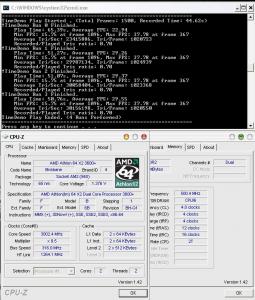
by the way this is crysis cpu benchy.. tried on winxp.. not fully tweak though... just taken to share..

ENERMAX Liberty ELT400AWT (400watt)
AMD Athlon X2 3600+ @ 3.Ghz
2xKVR DDR2 800 1024MB @ 1000mhz (4-4-4-12-16-2T)
Sapphire ATi Radeon HD3870 512Mb (Catalyst 7.11)
WinXP SP2
Reso : 1280x1024 High No AA


seriously for those got same spec like me.. it's playable.. i'm not oc the gpu just yet.. icon_idea.gif
if only the cpu can hit 3.5ghz.. aah.. i need phenom..

This post has been edited by 8tvt: Nov 30 2007, 09:55 AM


Attached thumbnail(s)
Attached Image
arjuna_mfna
post Nov 30 2007, 10:22 AM

**Towards Justice World**
******
Senior Member
1,496 posts

Joined: Jan 2006
From: Baling, Kedah


anybody already crossfire hd3870? got any prob with driver... coz got few issues with my previous hd2600xt crossfire setup, the monitor flicker few time after passing windows logo, the driver conflict with codec, i need to reinstall the driver few time to resolve it

125 Pages « < 35 36 37 38 39 > » Top
Topic ClosedOptions
 

Change to:
| Lo-Fi Version
0.0285sec    0.56    6 queries    GZIP Disabled
Time is now: 13th December 2025 - 01:53 AM