QUOTE(yenchenje @ Mar 20 2023, 11:15 AM)
I personally think D-Link's Web UI has always been kinda shit. I'm currently am using a DIR-882 as my repeater AP, and from a quick look at the web UI I can't find any mentioning of port forwarding/web UI taking up port 443 by default.. but then again it's an older model.. Do you have a screenshot of the web UI?
Alamak.. managed to finally figure it out.

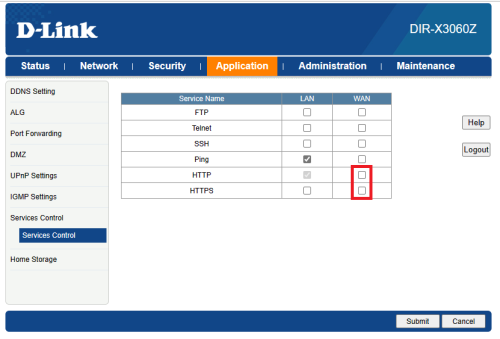
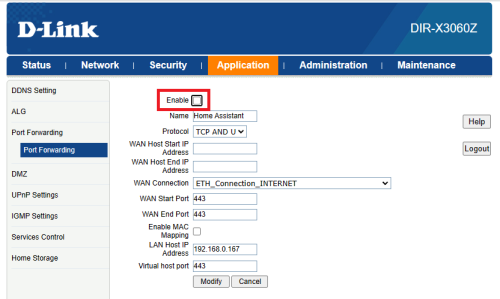
There's this Service Control under Application. When HTTPS is set at WAN, your port forward will automatically disabled.
So, after deselect HTTPS for WAN, you need to enable back your port forward.. haihh enable checkbox also not too prominent (or maybe my eyes getting older already)
QUOTE(haturaya @ Mar 20 2023, 04:49 PM)
Try Cloudflare Tunnel.

Im actually already using this as backup. Cuma performance a bit sluggish especially viewing your ipcam


 Mar 20 2023, 04:54 PM


 Quote
Quote





 0.0303sec
 0.71
0.71
 6 queries
 GZIP Disabled