
Welcome Guest ( Log In | Register )

Bump Topic Topic Closed RSS Feed

Outline · [ Standard ] · Linear+

Unifi Official TM UniFi High Speed Broadband Thread V40, READ 1ST PAGE FOR RELEVANT WIFI INFO

views
     
zubir2k
post Mar 19 2023, 10:22 PM

Getting Started
**
Junior Member
70 posts

Joined: Feb 2007
From: Kajang, Selangor


Hi, just curious. Those with Synology NAS or host own web applications, do you manage to do port forwarding on the Unifi router?

I cant seems to make it work with the D'link DIR-X3060Z using DuckDNS as DDNS. Port forward 443 but if i open within the network, it brings me to the router page. If open from external network (e.g. mobile data), i got connection refused.

Much appreciated. Thanks
zubir2k
post Mar 19 2023, 10:40 PM

Getting Started
**
Junior Member
70 posts

Joined: Feb 2007
From: Kajang, Selangor


QUOTE(yenchenje @ Mar 19 2023, 10:36 PM)
More like Xpenology, running it under Proxmox's hypervisor, there's other software like TrueNAS that can do what I need but this is more what I'm familiar with from all the time I've invested into learning how to run synology software on non synology hardware  nod.gif
Are you on 300mbps or under package? Cuz if you are, you can't port forward
*
Im on 800mbps.. eh 300 cannot? i tot last time was 100 and below you cannot port fwd
zubir2k
post Mar 20 2023, 07:10 AM

Getting Started
**
Junior Member
70 posts

Joined: Feb 2007
From: Kajang, Selangor


QUOTE(kk131 @ Mar 20 2023, 06:29 AM)
Are you behing Unifi CGNAT? Why do you need to port forward, are you running some services that you want to access from the Internet?
*
No I'm surely not and I was able doing so with the old router DIR 842. Still trying to figure out how to turn off default routing 443 to router page. In the router page there's a service control page with 80 and 443 on LAN and WAN.. turning these off/on doesn't seems to solve it though.

Any other ideas? For time being I have to rely on Cloudflare tunnel..
zubir2k
post Mar 21 2023, 10:35 PM

Getting Started
**
Junior Member
70 posts

Joined: Feb 2007
From: Kajang, Selangor


QUOTE(yenchenje @ Mar 20 2023, 11:15 AM)
I personally think D-Link's Web UI has always been kinda shit. I'm currently am using a DIR-882 as my repeater AP, and from a quick look at the web UI I can't find any mentioning of port forwarding/web UI taking up port 443 by default.. but then again it's an older model.. Do you have a screenshot of the web UI?
*
Alamak.. managed to finally figure it out. bangwall.gif There's this Service Control under Application. When HTTPS is set at WAN, your port forward will automatically disabled.
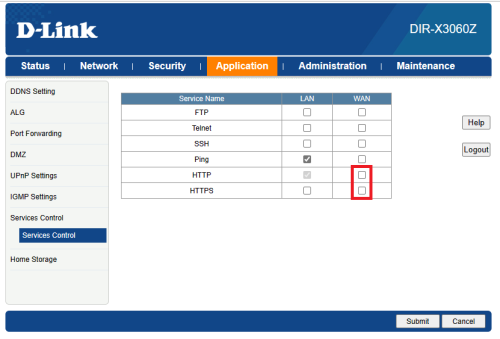
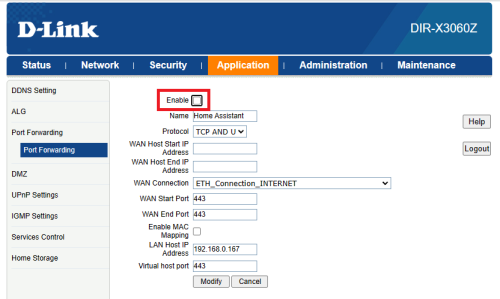
So, after deselect HTTPS for WAN, you need to enable back your port forward.. haihh enable checkbox also not too prominent (or maybe my eyes getting older already)

user posted image
user posted image

QUOTE(haturaya @ Mar 20 2023, 04:49 PM)
Try Cloudflare Tunnel.  thumbsup.gif
*
Im actually already using this as backup. Cuma performance a bit sluggish especially viewing your ipcam


zubir2k
post Mar 22 2023, 07:03 AM

Getting Started
**
Junior Member
70 posts

Joined: Feb 2007
From: Kajang, Selangor


QUOTE(yenchenje @ Mar 22 2023, 12:43 AM)
This is actually so clunky lol, why would they enable that by default.. but good for you for figuring it out! Also consider change the modem when you have the budget so you can stop using that god awful TM provided modem..  sweat.gif
*
No worries. Im setting this up for my parents house where devices are not that many. Still consider an upgrade over AC1200 previously (DIR842). Back at home im already on TP-Link AX90.

But talking about TP-Link, sadly this model is not 'yet' listed to get EasyMesh support update whereas AX55 is planned to be getting it.

https://www.tp-link.com/my/easymesh/product-list/

I saw they've just added AX80 in the planned list. I hope they will extend to AX90 too.

So what is EasyMesh?

EasyMesh is a standard certification launched by the WiFi Alliance, which brings a standards-based approach to multiple AP networks. It is a basic standard that defines the protocol for the interconnectivity between different APs

Senang cerita, you can use other brand to become your mesh network.

https://www.tp-link.com/en/blog/288/


Topic ClosedOptions
 

Change to:
| Lo-Fi Version
0.0286sec    1.06    7 queries    GZIP Disabled
Time is now: 21st December 2025 - 06:23 AM