

QUOTE(jhleo1 @ Mar 22 2023, 08:27 AM)
Malaysia always behind everything if really compare to other countries. Don't always compare else life turn not eay.. 

just yet another post he spread the 'positive-ness' as usual 
Unifi Official TM UniFi High Speed Broadband Thread V40, READ 1ST PAGE FOR RELEVANT WIFI INFO
|
|
 Mar 22 2023, 09:24 AM Mar 22 2023, 09:24 AM
|
 
Senior Member
1,197 posts Joined: Dec 2010 
|
QUOTE(jhleo1 @ Mar 22 2023, 08:27 AM) Malaysia always behind everything if really compare to other countries. Don't always compare else life turn not eay.. just yet another post he spread the 'positive-ness' as usual |
|
|
|
|
|
Mar 22 2023, 12:30 PM
|

Senior Member
9,707 posts Joined: Feb 2005 From: Why U wana know? Status: Meditating™
|
No one has Unity Broadband package?
|
|
|
Mar 22 2023, 12:41 PM
Show posts by this member only | IPv6 | Post
#4783
|

Junior Member
728 posts Joined: Feb 2013 From: Malaysia 
|
QUOTE(chicaman @ Mar 22 2023, 12:30 PM) No one has Unity Broadband package? Don't know how to request it.. u know how? |
|
|
Mar 22 2023, 01:42 PM
|

Junior Member
248 posts Joined: Feb 2006 From: KL
|
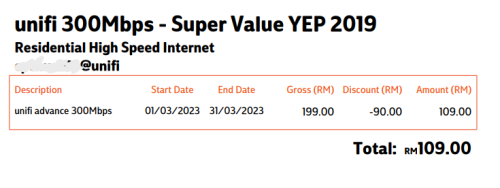 just wondering are there any better plans? cuz not watching hypp tv oso, and i confirmed with cs that this discount rm90 still valid as long as i staying in the same plan. |
|
|
Mar 22 2023, 02:06 PM
Show posts by this member only | IPv6 | Post
#4785
|
|
Junior Member
932 posts Joined: Dec 2019
|
QUOTE(zubir2k @ Mar 22 2023, 07:03 AM) No worries. Im setting this up for my parents house where devices are not that many. Still consider an upgrade over AC1200 previously (DIR842). Back at home im already on TP-Link AX90. Ooh okay sounds good. But talking about TP-Link, sadly this model is not 'yet' listed to get EasyMesh support update whereas AX55 is planned to be getting it. https://www.tp-link.com/my/easymesh/product-list/ I saw they've just added AX80 in the planned list. I hope they will extend to AX90 too. So what is EasyMesh? EasyMesh is a standard certification launched by the WiFi Alliance, which brings a standards-based approach to multiple AP networks. It is a basic standard that defines the protocol for the interconnectivity between different APs Senang cerita, you can use other brand to become your mesh network. https://www.tp-link.com/en/blog/288/ For mesh I don't really know too much about it since I'm just using different APs to handle the SSIDs  |
|
|
Mar 22 2023, 02:06 PM
Show posts by this member only | IPv6 | Post
#4786
|
|
Junior Member
932 posts Joined: Dec 2019
|
QUOTE(issac99289928 @ Mar 22 2023, 08:16 AM) Do you know the sky is blue?! |
|
|
|
|
|
Mar 22 2023, 02:16 PM
|

Senior Member
1,735 posts Joined: May 2011
|
QUOTE(kuntakinte @ Mar 21 2023, 11:39 AM) unifi changed mine to dlink ax3000 wifi6 router after change of package and I must say, it is miles better than previous tplink wifi 5....signal is so strong now that i dont have to use mesh anymore. for me, it's more than adequate and I'd recommend it...only negative is the crappy user interface agreed with this. was just wondering if this can be mesh with other D link?the reach is better than ASUS AX55 |
|
|
Mar 22 2023, 03:28 PM
|

Junior Member
612 posts Joined: Apr 2005 From: http://127.0.0.1:80/announce 
|
QUOTE(yenchenje @ Mar 22 2023, 02:06 PM) Do you know the sky is blue?! u make me laugh hard human hahahaha |
|
|
Mar 22 2023, 03:54 PM
|

All Stars
14,308 posts Joined: Jan 2011
|
QUOTE(hottemper @ Mar 22 2023, 01:42 PM) just wondering are there any better plans? cuz not watching hypp tv oso, and i confirmed with cs that this discount rm90 still valid as long as i staying in the same plan. |
|
|
Mar 22 2023, 06:03 PM
Show posts by this member only | IPv6 | Post
#4790
|
|
Junior Member
248 posts Joined: Feb 2006 From: KL
|
QUOTE(westlife @ Mar 22 2023, 03:54 PM) What are talking about? This package has no unifi tv. It's bundled with hypp tv in another page, rm30 ruby pack. If i gonna cancel unifi TV, i kena downgrade to 100mbps for rm129 |
|
|
Mar 22 2023, 06:21 PM
Show posts by this member only | IPv6 | Post
#4791
|

Senior Member
1,725 posts Joined: Jan 2003
|
QUOTE(Alpha_Tay @ Mar 22 2023, 06:21 PM) TP-Link Archer AX20 BCM6755 Chipset hardware revision V1 , V1.20 , V2 , V2.6 doesnt support and planned firmware update support for EasyMesh This post has been edited by Alpha_Tay: Apr 16 2023, 11:56 PMwhile TP-Link Archer AX10 BCM6750 BCM43217 Chipset with only 2 hardware revision V1 and V1.20 have planned firmware update support for EasyMesh in the future? TP-Link RE605X with the same BCM6755 Chipset hardware revision V1 , V2 , V3 have planned firmware update support for EasyMesh in the future? TP-Link Archer AX20 v3 BCM6755 Chipset Release at 2022 has just released EasyMesh firmware at TP-Link international website. Archer AX20(EU)_V3_1.1.4 Build 20230219 Published Date: 2023-03-17 Language: Multi-language File Size: 30.05 MB New Features/Enhancement: 1. Added EasyMesh feature; 2. Added Google Assistant feature; 3. Added Access Time Control and Bandwidth Control feature on Guest Network; 4. Added Advanced Wireless Settings on Tether App; 5. Added Speed Limit feature; 6. Added new time zones into the system time feature; 7. Increase the maximum number of entries for port forwarding to 64; 8. Optimize the client list UI; 9. Optimize the HomeShield feature. Bug Fixed: 1. Fixed some security issues. https://www.tp-link.com/en/support/download...20/v3/#Firmware https://www.tp-link.com/en/easymesh/product-list/ https://www.tp-link.com/my/easymesh/product-list/ http://en.techinfodepot.shoutwiki.com/wiki...2.11ax_Hardware - UPDATE: ASUS doesnt support EasyMesh at the moment, as point out by blacktubi and Oltromen Ripot ASUS never implemented EasyMesh They rolled out their own proprietary AiMesh that doesn't depends on router chipset and Wi-Fi association licensing. » Click to show Spoiler - click again to hide... « UPDATE : Archer AX20 V2 was now listed as PLANNED at TP-Link EasyMesh US Site but not yet at Malaysia Site. https://www.tp-link.com/us/easymesh/product-list/ https://www.tp-link.com/my/easymesh/product-list/ - The BCM6752 and BCM6755 platforms come with Broadcom’s SmartMesh multi access point management technology which is also offered on Broadcom’s Wi-Fi 6 enabled Cable, DSL and PON broadband gateway platforms. SmartMesh technology offers seamless onboarding and configuration of repeaters, in addition to intelligent channel management and dynamic client steering. Broadband gateway platforms with SmartMesh can be combined with smart repeaters to form an intelligent Wi-Fi 6 mesh network, enabling high speed broadband coverage to be deployed seamlessly throughout a home. The software suite also offers an application programming interface to enable third party cloud based managed Wi-Fi solutions. SmartMesh provides operators the assurance of multi-vendor interoperability driven by full compliance to the Wi-Fi Alliance EasyMesh industry standard. Broadcom Press Release at 2018 https://www.broadcom.com/company/news/product-releases/41096 |
|
|
Mar 22 2023, 06:56 PM
Show posts by this member only | IPv6 | Post
#4792
|

All Stars
12,413 posts Joined: Jan 2008 From: KL - Cardiff - Subang - Sydney 
|
Sorry if this is a stupid question... I'm planning to sign up for Unifi 300mbps plan (RM159) for my new house, Time not available yet unfortunately
is it worth to add RM40 to get the Unifi TV ultimate pack? Disney+, BBC and beIn Sports is fully available? Do i need to pay seperate subscription for those? Also is there any difference between the Disney+ you get from Unifi, vs if I were to subscribe Disney+ myself? Any difference in features? This post has been edited by ZeneticX: Mar 22 2023, 07:05 PM |
|
|
Mar 23 2023, 04:52 PM
|

Junior Member
139 posts Joined: Aug 2007
|
Any attractive Unifi package for now? Planning to upgrade from 100
|
|
|
|
|
|
Mar 23 2023, 09:34 PM
|

Senior Member
4,082 posts Joined: Apr 2006
|
Hi All, i just turned on my white box hypp tv today after more than a year and it seems to stay at the same page after i click unifi tv.
I changed the router last year to two stronger ones with better coverage for the whole house. Could this be the issue? This post has been edited by silverwave: Mar 23 2023, 09:35 PM |
|
|
Mar 23 2023, 09:38 PM
Show posts by this member only | IPv6 | Post
#4795
|

Senior Member
4,034 posts Joined: Dec 2019
|
QUOTE(silverwave @ Mar 23 2023, 09:34 PM) Hi All, i just turned on my white box hypp tv today after more than a year and it seems to stay at the same page after i click unifi tv. the old hypptv decoder need access through specific vlan for it to connect to upstream server.I changed the router last year to two stronger ones with better coverage for the whole house. Could this be the issue? |
|
|
Mar 23 2023, 09:44 PM
|
|
Senior Member
4,082 posts Joined: Apr 2006
|
QUOTE(Oltromen Ripot @ Mar 23 2023, 09:38 PM) the old hypptv decoder need access through specific vlan for it to connect to upstream server. what settings do i need to change in hypp tv? |
|
|
Mar 23 2023, 09:58 PM
Show posts by this member only | IPv6 | Post
#4797
|
|
Junior Member
288 posts Joined: Sep 2020
|
QUOTE(silverwave @ Mar 23 2023, 09:44 PM) what settings do i need to change in hypp tv? no setting is need to change in hypp tv, only need connect to lan port 3 or 4 on router , but for some router the VLAN 600 port is at lan port 1 |
|
|
Mar 23 2023, 10:30 PM
|
|
Senior Member
4,082 posts Joined: Apr 2006
|
QUOTE(kcl2006ch @ Mar 23 2023, 09:58 PM) no setting is need to change in hypp tv, only need connect to lan port 3 or 4 on router , but for some router the VLAN 600 port is at lan port 1 Plugged it to port one and at least it can enter the unifi tv. Doesn't seem to work with wifi only when i unplug the LAN cable (white hypp box)However, i when i click on any channels, it's just black screen with the icon in the attachment. Not too sure what it means or if i need to do something in the new router (Toto Link) Attached thumbnail(s) 
|
|
|
Mar 23 2023, 10:35 PM
Show posts by this member only | IPv6 | Post
#4799
|
|
Senior Member
4,034 posts Joined: Dec 2019
|
QUOTE(silverwave @ Mar 23 2023, 10:30 PM) Plugged it to port one and at least it can enter the unifi tv. Doesn't seem to work with wifi only when i unplug the LAN cable (white hypp box) explain again.However, i when i click on any channels, it's just black screen with the icon in the attachment. Not too sure what it means or if i need to do something in the new router (Toto Link) the old hypptv box need to connect to its broadcast server. that broadcast server is only available through that specific vlan. i can't remember which vlan (above forummer said vlan600). that broadcast server is not reachable by the old hypptv box via general internet (vlan500), which i surmise is what you meant by attempting to connect via wifi. as to which port this vlan600(?) is available to connect through, and whether it is even configured at all for you, i cannot say simply because i do not know. |
|
|
Mar 23 2023, 10:58 PM
|
|
Senior Member
4,082 posts Joined: Apr 2006
|
QUOTE(Oltromen Ripot @ Mar 23 2023, 10:35 PM) explain again. Probably broadcast server cannot be reached because of the new router. Last time with the default router, it used to work fine.the old hypptv box need to connect to its broadcast server. that broadcast server is only available through that specific vlan. i can't remember which vlan (above forummer said vlan600). that broadcast server is not reachable by the old hypptv box via general internet (vlan500), which i surmise is what you meant by attempting to connect via wifi. as to which port this vlan600(?) is available to connect through, and whether it is even configured at all for you, i cannot say simply because i do not know. Earlier i swapped the LAN cable to port 1 and then i could at least enter Hypp tv. It was at port 3 in the new router and it would only show hypptv main screen and just load but nothing changes. Regarding the wifi, i was just testing it today since i saw a WLAN icon. It somehow can't enter although it's connected. By LAN, it can enter but shows black screen and the icon above when i click on any channels. Seems like i need to make some changes in the TotoLink router or hypptv won't work with 3rd party routers? |
|
Topic ClosedOptions
|
| Change to: |  0.0233sec 0.0233sec
 1.16 1.16
 6 queries 6 queries
 GZIP Disabled GZIP Disabled
Time is now: 18th December 2025 - 11:42 AM |
 Quote
Quote