Welcome Guest ( Log In | Register )

Bump Topic Topic Closed RSS Feed
453 Pages « < 203 204 205 206 207 > » Bottom

Outline · [ Standard ] · Linear+

Unifi Official TM UniFi High Speed Broadband Thread V40, READ 1ST PAGE FOR RELEVANT WIFI INFO

views
     
soba_82
post Jan 28 2023, 06:03 AM

Getting Started
**
Junior Member
180 posts

Joined: Nov 2012
From: Land Below The Wind


QUOTE(tng55 @ Jan 15 2023, 01:27 PM)
free router D-Link DIR-X1860Z is crappy you get trouble and to much problem

buy you own asus or tplink router i using ASUS RT-AC68U no more problem
*
my problem solved now as i moved all my Tuya devices to Guest Network with compatibility mode on/2.4GHz..BTW,Tplink AX20 ok ? sori still noobies on Unifi.

This post has been edited by soba_82: Jan 28 2023, 06:04 AM
rai_fuzz
post Jan 28 2023, 11:46 AM

Enthusiast
*****
Senior Member
978 posts

Joined: Jun 2008


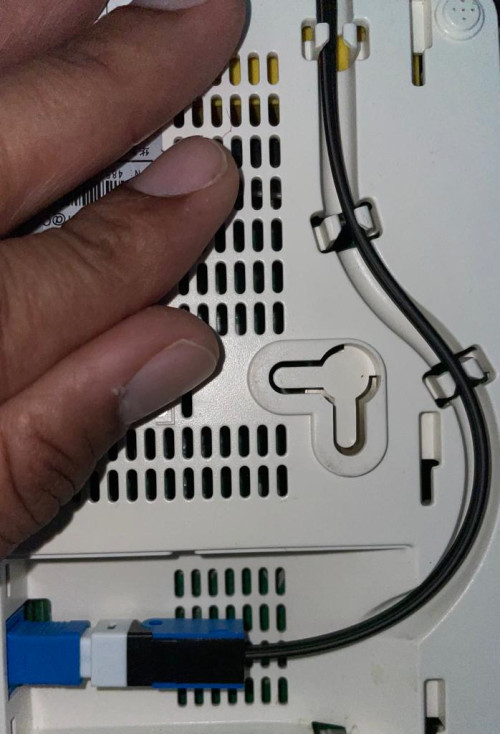
I want to check here on few things about unifi.

1. When outdoors cable (from DB to house) is severed, do I have to bear any cost for the cable replacement?
2. Is it necessary to do splicing at the modem or straight connection using fast connector will do?

Thanks!

user posted image
soba_82
post Jan 28 2023, 01:05 PM

Getting Started
**
Junior Member
180 posts

Joined: Nov 2012
From: Land Below The Wind


Noobies here want to ask bout private n public IP.Mine is 180.xx.xx.xx.How to know the different on private n public IP?
tng55
post Jan 28 2023, 01:30 PM

Regular
******
Senior Member
1,457 posts

Joined: Sep 2021


QUOTE(soba_82 @ Jan 28 2023, 06:03 AM)
my problem solved now as i moved all my Tuya devices to Guest Network with compatibility mode on/2.4GHz..BTW,Tplink AX20 ok ? sori still noobies on Unifi.
*
get this TP-Link AX73 very good

QUOTE(soba_82 @ Jan 28 2023, 01:05 PM)
Noobies here want to ask bout private n public IP.Mine is 180.xx.xx.xx.How to know the different on private n public IP?
*
maybe you is private ip address

check wan ip search google seee what you ip and router wan ip
if same both matched mean public ip
if not same both mean private ip

mine public ip
soba_82
post Jan 28 2023, 02:03 PM

Getting Started
**
Junior Member
180 posts

Joined: Nov 2012
From: Land Below The Wind


QUOTE(tng55 @ Jan 28 2023, 01:30 PM)
get this TP-Link AX73 very good
maybe you is private ip address

check wan ip search google seee what you ip and router wan ip
if same both matched mean public ip
if not same both mean private ip

mine public ip
*
ok got it.tanx boss !

Kelvynlim
post Jan 28 2023, 05:45 PM

Getting Started
**
Junior Member
166 posts

Joined: Sep 2009
Hi Sifu,

I recently got the new ASU’s router and key in exactly the same ppoe p/w but couldn’t set up the Wi-Fi. Didn’t know what has gone wrong, hope the sifus can shed some lights.

The model is TUF AX3000

westlife
post Jan 28 2023, 06:42 PM

10k Club
********
All Stars
14,315 posts

Joined: Jan 2011
QUOTE(blacktubi @ Jan 21 2023, 08:03 PM)
Cause the mesh you are using is not fast enough. You need to really overspec your mesh WiFi to get optimal speed.

Take a dual-band WiFi 6 AX1800 mesh system as example, the maximum capacity is 1200Mbps on 5GHz.

Maximum attainable speed on mesh node is half of the capacity due to WiFi retransmission = 600Mbps

Factor in around 50% signal loss over 2 walls = 300Mbps

Factor in another 20% lost due to various inefficiencies = 240Mbps

You can apply this formula to get a rough estimation of the speed you can get on the mesh node of your mesh WiFi system.

When you want to buy a dual-band mesh WiFi system, just multiply the 5GHz backhaul speed by 20% to get a rough estimation of the maximum speed you can get on the mesh node.
*
Just buy a tri-band mesh instead to get full speed.
Xefron
post Jan 28 2023, 07:12 PM

Look at all my stars!!
*******
Senior Member
2,507 posts

Joined: Jan 2003


QUOTE(asellus @ Jan 20 2023, 05:43 PM)
TM has been testing 1Gb links for quite some time already. It is better that they don't introduce this to the masses considering their congested international link.
*
if they introduced a 1 Gbps plan, my takes it will not achieve full 1Gbps or 90% of the advertised speed. Maybe along 85%-88%.
MyProLife
post Jan 28 2023, 07:24 PM

I bully wumao & MPKL
*******
Senior Member
2,075 posts

Joined: Sep 2021
From: nowhere

QUOTE(Xefron @ Jan 28 2023, 07:12 PM)
if they introduced a 1 Gbps plan, my takes it will not achieve full 1Gbps or 90% of the advertised speed. Maybe along 85%-88%.
*
with existing consumer devices in most customers, indeed this will be very hard to achieve

1Gbps ethernet, due to protocol overhead, will able to achieve only around 940 mbps

with Wifi 6 AX1800 in most modern mobile devices, will able to achieve around 800-900 mbps in ideal condition due to larger overhead, with longer distance or obstacles such as thick walls, speed will be reduced further.
kk131
post Jan 29 2023, 09:23 AM

On my way
****
Junior Member
566 posts

Joined: Jun 2005
From: Somewhere over the rainbow


QUOTE(Kelvynlim @ Jan 28 2023, 05:45 PM)
Hi Sifu,

I recently got the new ASU’s router and key in exactly the same ppoe p/w but couldn’t set up the Wi-Fi. Didn’t know what has gone wrong, hope the sifus can shed some lights.

The model is TUF AX3000
*
Can you give more detaiils, did you use the router 'quick internet setup' and choose Unifi as the ISP?

What do you mean by couldn't set up the WiFi, that you couldn't connect to Unifi?
Kelvynlim
post Jan 29 2023, 07:22 PM

Getting Started
**
Junior Member
166 posts

Joined: Sep 2009
QUOTE(kk131 @ Jan 29 2023, 09:23 AM)
Can you give more detaiils, did you use the router 'quick internet setup' and choose Unifi as the ISP?

What do you mean by couldn't set up the WiFi, that you couldn't connect to Unifi?
*
It’s ok, I did it after several try.

Thanks
hakmuiguai P
post Jan 29 2023, 09:44 PM

New Member
*
Probation
13 posts

Joined: Jan 2023
Hi im trying to setup my old tplink archer c5 as a repeater to the new fiberhome SR1041F by unifi, it can detect the root router but theres no option to connect to it.

The option to connect is however available to my neighbors router, anyone know how to solve this? could it be I need to change the setting in the new router?

https://pictr.com/images/2023/01/29/ESynRv.png
blaqkthespian
post Jan 30 2023, 06:13 PM

New Member
*
Newbie
20 posts

Joined: May 2015
I just want to share my experience applying to unifi. I live in a small town in pahang. Went to tmpoint last december. Apply for 300mbps package
I told them that there's no pole to my house and the nearest DP is at the main road.
Later that week contractor and survey team came but they went to the wrong house. They did not contact me, I live in a landed house but my house is hard to find on top of a hill somemore. After that radio silence for a month from TM.

But last week they came to my house to survey the area. After a few days TM contact me and said the nearest DP to my house is 420m, above the 350m maximum threshold. So they need to tarik 1 DP to my house and tanam 6 pole. TM will provide 4 pole for free and all the fibre cable and contractor fee is covered by them. I just need to bear the cost for just 2 pole.
I said yes and they start working within 2 days.

Yes the price for unifi package is expensive compare to others but unifi is the only internet provider wiling to bear the cost to put DP at my house just for me only.

This post has been edited by blaqkthespian: Jan 30 2023, 06:14 PM
akhito
post Jan 30 2023, 06:19 PM

Enthusiast
*****
Junior Member
752 posts

Joined: Jul 2016


QUOTE(blaqkthespian @ Jan 30 2023, 06:13 PM)
I just want to share my experience applying to unifi. I live in a small town in pahang. Went to tmpoint last december. Apply for 300mbps package
I told them that there's no pole to my house and the nearest DP is at the main road.
Later that week contractor and survey team came but they went to the wrong house. They did not contact me, I live in a landed house but my house is hard to find on top of a hill somemore. After that radio silence for a month from TM.

But last week they came to my house to survey the area. After a few days TM contact me and said the nearest DP to my house is 420m, above the 350m maximum threshold. So they need to tarik 1 DP to my house and tanam 6 pole. TM will provide 4 pole for free and all the fibre cable and contractor fee is covered by them. I just need to bear the cost for just 2 pole.
I said yes and they start working within 2 days.

Yes the price for unifi package is expensive compare to others but unifi is the only internet provider wiling to bear the cost to put DP at my house just for me only.
*
Would you mind to share how much is the cost to plant one pole
Afaik if the pole planted, after ur contract expired can maybe change provider since other like maxis, celcom also ride under maxis hsbb infra
can ask ur neighbour nearby d one got use maxis or celcom
but if u are grateful for unifi to bear some of the cost for planting the pole and their service is good for u then just keep it

papyrous
post Jan 30 2023, 06:21 PM

Getting Started
**
Junior Member
214 posts

Joined: May 2017
QUOTE(hakmuiguai @ Jan 29 2023, 09:44 PM)
Hi im trying to setup my old tplink archer c5 as a repeater to the new fiberhome SR1041F by unifi, it can detect the root router but theres no option to connect to it.
The option to connect is however available to my neighbors router, anyone know how to solve this? could it be I need to change the setting in the new router?
<a href='https://pictr.com/images/2023/01/29/ESynRv.png' target='_blank'>https://pictr.com/images/2023/01/29/ESynRv.png </a>
*
https://forum.lowyat.net/topic/4497511 refer to TPLink thread and look up WDS feature.
issac99289928
post Jan 30 2023, 07:22 PM

Getting Started
**
Junior Member
291 posts

Joined: Sep 2016
From: muar, johor


The new MSAP is expected to be implemented in March 2023. Overall, we expect some cuts in the MSAP of fixed services, considering the government's aspiration to reduce the prices of telco services.

https://www.nst.com.my/business/2023/01/870...-services-price
QuantumEdge
post Jan 30 2023, 07:25 PM

Regular
******
Senior Member
1,602 posts

Joined: Jan 2016


QUOTE(rai_fuzz @ Jan 28 2023, 11:46 AM)
I want to check here on few things about unifi.

1. When outdoors cable (from DB to house) is severed, do I have to bear any cost for the cable replacement?
2. Is it necessary to do splicing at the modem or straight connection using fast connector will do?

Thanks!

user posted image
*
1. Beared by Unifi

2. Nowadays new installation they'll use fast connector, splicing only needed when they need to fuse 2 cables together for extension or repair
blaqkthespian
post Jan 30 2023, 08:47 PM

New Member
*
Newbie
20 posts

Joined: May 2015
QUOTE(akhito @ Jan 30 2023, 06:19 PM)
Would you mind to share how much is the cost to plant one pole
Afaik if the pole planted, after ur contract expired can maybe change provider since other like maxis, celcom also ride under maxis hsbb infra
can ask ur neighbour nearby d one got use maxis or celcom
but if u are grateful for unifi to bear some of the cost for planting the pole and their service is good for u then just keep it
*
In my case the contractor charge RM400 for 1 pole. It is understandable because they need to carry the pole from the foot of the hill to the top of the hill where house is located by hand. Can't use big lorry because to steep. For business premise TM will charge up to RM800 per pole.

I will stay with unifi because there's squirel & sometimes monkey in my area, easier if something happen to the fibre cable.

Thats why they put the DP at my front gate and use anti rodent fibre cable. Less risk of squirel damaging the cable.

This post has been edited by blaqkthespian: Jan 30 2023, 09:56 PM
hakmuiguai P
post Jan 30 2023, 09:22 PM

New Member
*
Probation
13 posts

Joined: Jan 2023
QUOTE(papyrous @ Jan 30 2023, 06:21 PM)
https://forum.lowyat.net/topic/4497511 refer to TPLink thread and look up WDS feature.
*
Yep using the wds feature no option to connect to the main network (can detect)
YoungMan
post Jan 30 2023, 09:25 PM

Look at all my stars!!
*******
Senior Member
6,837 posts

Joined: Oct 2008
From: Kuala Lumpur


QUOTE(blaqkthespian @ Jan 30 2023, 06:13 PM)
I just want to share my experience applying to unifi. I live in a small town in pahang. Went to tmpoint last december. Apply for 300mbps package
I told them that there's no pole to my house and the nearest DP is at the main road.
Later that week contractor and survey team came but they went to the wrong house. They did not contact me, I live in a landed house but my house is hard to find on top of a hill somemore. After that radio silence for a month from TM.

But last week they came to my house to survey the area. After a few days TM contact me and said the nearest DP to my house is 420m, above the 350m maximum threshold. So they need to tarik 1 DP to my house and tanam 6 pole. TM will provide 4 pole for free and all the fibre cable and contractor fee is covered by them. I just need to bear the cost for just 2 pole.
I said yes and they start working within 2 days.

Yes the price for unifi package is expensive compare to others but unifi is the only internet provider wiling to bear the cost to put DP at my house just for me only.
*
That's because they are in control of the national HSBB infra. Other ISP like Maxis Celcom etc rides on TM infra, they cannot modify and add pole.

453 Pages « < 203 204 205 206 207 > » Top
Topic ClosedOptions
 

Change to:
| Lo-Fi Version
0.0237sec    0.45    6 queries    GZIP Disabled
Time is now: 23rd December 2025 - 11:20 AM