
Welcome Guest ( Log In | Register )

95 Pages « < 4 5 6 7 8 > » Bottom

Outline · [ Standard ] · Linear+

 Windows 11, To be announce on 24 June 2021

views
     
SUSlife5tyle
post Jul 13 2021, 07:24 PM

Getting Started
**
Junior Member
277 posts

Joined: Oct 2016
QUOTE(Andrewtst @ Jul 10 2021, 10:23 PM)
Should be similar with Windows 10.

Here is the usage of without opening anything but only Snipping Tools with 130+ Background Processes.

Edit: The RAM usage will increasing based on your actual physical RAM.
For example, around 4 ~ 5 GB RAM usage for 16 GB System and around 7 ~ 8 GB RAM usage for 32 GB RAM system.

user posted image
*
I believe there is a lot of processes running in background on your Windows. With AV and VMware and some other processes running in background and foreground, my RAM usage within 4GB only. Your 7~8 GB is not normal. By the way, I running 32 GB RAM system with VMware running in background.
Andrewtst
post Jul 13 2021, 09:54 PM

Forgiveness is Happiness
*********
All Stars
29,764 posts

Joined: Jan 2009
From: Johor, Malaysia.


QUOTE(life5tyle @ Jul 13 2021, 07:24 PM)
I believe there is a lot of processes running in background on your Windows. With AV and VMware and some other processes running in background and foreground, my RAM usage within 4GB only. Your 7~8 GB is not normal. By the way, I running 32 GB RAM system with VMware running in background.
*
It is normal, my company had 700+ PC and it is very normal as we test few and yes many background process is running.

RAM so many, why bother off the background process. I never care and let it all run in background. Haha!

Will only care if the system is slow down, but so far it was very ok.

This post has been edited by Andrewtst: Jul 13 2021, 10:26 PM
Savor_Savvy
post Jul 14 2021, 09:55 AM

Look at all my stars!!
*******
Senior Member
2,776 posts

Joined: Jul 2006


It's clean and minimalistic. I like it.
salimbest83
post Jul 14 2021, 10:38 PM

♥PMS on certain day♥
*******
Senior Member
8,639 posts

Joined: Feb 2006
From: Jelutong Penang


QUOTE(frantic912 @ Jul 8 2021, 09:23 PM)
any commend for windows 11 if daily use....
*
daily use it since day one
ChaosXP
post Jul 14 2021, 10:46 PM

Casual
***
Junior Member
421 posts

Joined: Jan 2005
Is the in built android emulator fully functional yet ?
Andrewtst
post Jul 15 2021, 04:40 AM

Forgiveness is Happiness
*********
All Stars
29,764 posts

Joined: Jan 2009
From: Johor, Malaysia.


QUOTE(ChaosXP @ Jul 14 2021, 10:46 PM)
Is the in built android emulator fully functional yet ?
*
Nope, it is still not there in beta 2.
1024kbps
post Jul 16 2021, 12:35 AM

李素裳
*******
Senior Member
6,012 posts

Joined: Feb 2007


Damn, it's working with VMware 7.1 too,
will keep upgrading to RTM version and see how it goes.
Attached Image
sol_badguy
post Jul 16 2021, 05:18 AM

Getting Started
**
Junior Member
192 posts

Joined: Feb 2005
I have just installed the preview version of Windows 11

So far, I am impressed with the voice typing. In fact, I am writing this utilizing voice typing. I haven't properly trying out the new features of windows 11, and I have just installed the operating system only a couple of hours ago.

I tried to search fogies uh to enable my Android application to be loaded on my windows, but I have not found any such option ,anyone can help with this?
PJng
post Jul 16 2021, 10:29 AM

10k Club
********
All Stars
12,039 posts

Joined: Oct 2017


QUOTE(sol_badguy @ Jul 16 2021, 05:18 AM)
I have just installed the preview version of Windows 11

So far, I am impressed with the voice typing. In fact, I am writing this utilizing voice typing. I haven't properly trying out the new features of windows 11, and I have just installed the operating system only a couple of hours ago.

I tried to search fogies uh to enable my Android application to be loaded on my windows, but I have not found any such option ,anyone can help with this?
*
Did you read above? Android apps still not working
Andrewtst
post Jul 16 2021, 07:43 PM

Forgiveness is Happiness
*********
All Stars
29,764 posts

Joined: Jan 2009
From: Johor, Malaysia.


QUOTE(1024kbps @ Jul 16 2021, 12:35 AM)
Damn, it's working with VMware 7.1 too,
will keep upgrading to RTM version and see how it goes.
Attached Image
*
VMware of course working, it is working even the leak version.
Andrewtst
post Jul 16 2021, 09:05 PM

Forgiveness is Happiness
*********
All Stars
29,764 posts

Joined: Jan 2009
From: Johor, Malaysia.


Windows 11 - Beta 3 (version 22000.71) just release.

More semi transparent effect, fixing the Most used Apps wording cut off issue, seems round corner more smooth now.
Rei7
post Jul 17 2021, 12:41 AM

Game, anime and headphones ❤️
******
Senior Member
1,669 posts

Joined: Apr 2011


user posted image

Looks good really. Basically just Windows 10, with smoother animation, rounded corners, new icons and a new soundpack. Will test most of it out tomorrow on the latest build.
petrofsky77
post Jul 17 2021, 09:32 AM

Temet nosce
******
Senior Member
1,691 posts

Joined: Jan 2006
From: Neither here nor there


QUOTE(Andrewtst @ Jul 16 2021, 09:05 PM)
Windows 11 - Beta 3 (version 22000.71) just release.

More semi transparent effect, fixing the Most used Apps wording cut off issue, seems round corner more smooth now.
*
Where can I get a compiled ISO version of this? Would love to try it out too.
Andrewtst
post Jul 17 2021, 01:22 PM

Forgiveness is Happiness
*********
All Stars
29,764 posts

Joined: Jan 2009
From: Johor, Malaysia.


QUOTE(petrofsky77 @ Jul 17 2021, 09:32 AM)
Where can I get a compiled ISO version of this? Would love to try it out too.
*
I join Windows Insider Program Dev Channel.

For ISO, you need to Google yourself. Latest build now is 22000.71

If you want see the real power of Windows 11, make it dual boot or boot from another drive.

Testing on VMware is for fun but you won't get the suppose feel of Windows 11.

Only use VMware or any Virtual Machine for solving issue, debugging, development and education.

This post has been edited by Andrewtst: Jul 17 2021, 07:30 PM
1024kbps
post Jul 17 2021, 05:50 PM

李素裳
*******
Senior Member
6,012 posts

Joined: Feb 2007


QUOTE(petrofsky77 @ Jul 17 2021, 09:32 AM)
Where can I get a compiled ISO version of this? Would love to try it out too.
*
or you can get the windows 10 iso legally, install, then join dev channel.
this way you can try it on vmware and virtualbox, slower but safer.
PJng
post Jul 17 2021, 06:24 PM

10k Club
********
All Stars
12,039 posts

Joined: Oct 2017


QUOTE(Andrewtst @ Jul 11 2021, 04:42 PM)
As I explain already, that is due to my system had 32 GB RAM. The RAM usage is similar as Windows 10. The RAM management pattern also same as Windows 10.

When without opening anything, the RAM utilize should be around as following if your system is

  • 32 GB, RAM usage will be around 8 GB
  • 16 GB, RAM usage will be around 5 GB
  • 8 GB, RAM usage will be around 3 GB
  • 4 GB, RAM usage will be around 2 GB

*
This was correct, i just test on my pc
When 2×4GB, nothing open use about 2.2GB
When 1×4GB, nothing open use about 1.8GB
Nothing i change on my pc
Rei7
post Jul 17 2021, 06:59 PM

Game, anime and headphones ❤️
******
Senior Member
1,669 posts

Joined: Apr 2011


So all the essential apps I usually use are working fine on Windows 11.. even the latest games I've played works without issues either. So far pretty smooth little to no problems at all.

I had one issue where I first installed it tho at the start. Windows 11 works fine, but after Windows Update on the settings with all the latest update.. it restarted a few times, and just stop updating and just give me a black screen laugh.gif Good thing pressing the reset button actually didn't mess things up, and updated just fine after.
Two other issues that I noticed that really bothers me is that when I click the clock on the bottom right corner of the taskbar...sometimes the calendar/notification will crash, so does the taskbar icons and etc and restart.. this happened frequently for me probably 10 times now or more, but is a minor issue for me.. The other issue that bothers me is that I can't rename my desktop for some reason.. Clicking rename doesn't allow me to rename it at all lol..

Now to use it for a few weeks and see if all is good. After that will try it once or twice a month going back and forth with Windows 10 which is still my main system. Just in case Microsoft mess things up...and then most likely migrate to 11 when it's official out to the public permanently.

This post has been edited by Rei7: Jul 17 2021, 07:05 PM
Andrewtst
post Jul 17 2021, 07:32 PM

Forgiveness is Happiness
*********
All Stars
29,764 posts

Joined: Jan 2009
From: Johor, Malaysia.


QUOTE(PJng @ Jul 17 2021, 06:24 PM)
This was correct, i just test on my pc
When 2×4GB, nothing open use about 2.2GB
When 1×4GB, nothing open use about 1.8GB
Nothing i change on my pc
*
Great to know you test it out. smile.gif

QUOTE(Rei7 @ Jul 17 2021, 06:59 PM)
So all the essential apps I usually use are working fine on Windows 11.. even the latest games I've played works without issues either. So far pretty smooth little to no problems at all.

I had one issue where I first installed it tho at the start. Windows 11 works fine, but after Windows Update on the settings with all the latest update.. it restarted a few times, and just stop updating and just give me a black screen laugh.gif Good thing pressing the reset button actually didn't mess things up, and updated just fine after.

Two other issues that I noticed that really bothers me is that when I click the clock on the bottom right corner of the taskbar...sometimes the calendar/notification will crash, so does the taskbar icons and etc and restart.. this happened frequently for me probably 10 times now or more, but is a minor issue for me.. The other issue that bothers me is that I can't rename my desktop for some reason.. Clicking rename doesn't allow me to rename it at all lol..

Now to use it for a few weeks and see if all is good. After that will try it once or twice a month going back and forth with Windows 10 which is still my main system. Just in case Microsoft mess things up...and then most likely migrate to 11 when it's official out to the public permanently.
*
The notification crash is new bugs in latest beta 3, build 22000.71 and I already feedback to Microsoft.

No such issue on Beta 2 and 1.
PJng
post Jul 17 2021, 08:13 PM

10k Club
********
All Stars
12,039 posts

Joined: Oct 2017


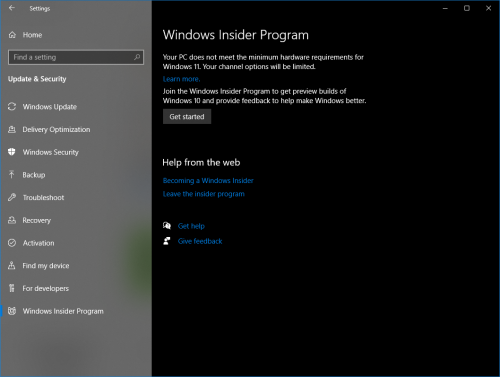
just know windows 10 setting will inform meet requirement or not for windows 11

user posted image
Andrewtst
post Jul 17 2021, 08:59 PM

Forgiveness is Happiness
*********
All Stars
29,764 posts

Joined: Jan 2009
From: Johor, Malaysia.


QUOTE(PJng @ Jul 17 2021, 08:13 PM)
just know windows 10 setting will inform meet requirement or not for windows 11

user posted image
*
Yup, Microsoft won't push out Windows 11 beta if your PC not meet the requirement even you join the Dev channel.

95 Pages « < 4 5 6 7 8 > » Top
 

Change to:
| Lo-Fi Version
0.0257sec    0.64    6 queries    GZIP Disabled
Time is now: 1st December 2025 - 04:27 PM

