Welcome Guest ( Log In | Register )

Bump Topic Topic Closed RSS Feed
159 Pages « < 27 28 29 30 31 > » Bottom

Outline · [ Standard ] · Linear+

Hardware Hackintosh Thread, The Official OSX86 Thread

views
     
jake23
post Jul 5 2008, 06:11 PM

Getting Started
**
Junior Member
128 posts

Joined: Nov 2005
QUOTE(jiant @ Jul 4 2008, 11:25 PM)
any body try install Zephyroth 10.5.2 AMD EFI Rev.1 on AMD PC?is it the Onboard LAN (ethernet)working?
also
what the different with Zephyroth 10.5.2 AMD EFI Rev.2?
and what dic u use?DVD-R,DVD+R or DVD-RAM?
*
Zeph 10.5.2 rev1 is a nice version and it is a basic installer for amd pc.Just tell us what motherboard u are using.If the onboard Lan network not supported,then just buy one pci network card.They are selling cheap now.Ur dvd burner should support the blank dvd-R and dvd+R.

jiant
post Jul 5 2008, 07:11 PM

Regular
******
Senior Member
1,785 posts

Joined: Jan 2003
my motherboard is dfi nf4 ultra ins it onboard Lan network supported?my onboard sound connector is faulty...

for the dvd...i m asking for which type of dvd is supported for osx86 installation disc.
k3v1n
post Jul 6 2008, 12:18 PM

Camouflage Artist
******
Senior Member
1,232 posts

Joined: Dec 2005
From: Kuala Lumpur


Can i know who successfully installed OSX on your Dell Vostro 1400?? need your help!! thanks
eddie89
post Jul 6 2008, 02:18 PM

Getting Started
**
Junior Member
153 posts

Joined: Apr 2007


I install kalyway 10.5.2 on my pc, everthing seems fine but the System Profiler audio (Built In) listed No Built in Audio. But in itunes still can play songs, so pls help me...
jake23
post Jul 6 2008, 05:17 PM

Getting Started
**
Junior Member
128 posts

Joined: Nov 2005
QUOTE(jiant @ Jul 5 2008, 07:11 PM)
my motherboard is dfi nf4 ultra ins it onboard Lan network supported?my onboard sound connector is faulty...

for the dvd...i m asking for which type of dvd is supported for osx86 installation disc.
*
I recommend u use leo4allv3.It is far better than zeph 10.5.2rev1 .

U want to burn dl iso file,right ?Most of the dvd burner supported dvd-r and dvd+r nowadays.Pls check ur dvd burner manufacturer web site through internet.
vailance
post Jul 6 2008, 07:03 PM

wat??
*****
Senior Member
841 posts

Joined: Feb 2005
From: Melaka>KL


QUOTE(k3v1n @ Jul 6 2008, 12:18 PM)
Can i know who successfully installed OSX on your Dell Vostro 1400?? need your help!! thanks
*
list out all ur spec .. u may find ur answer at insanelymac.com .. dun be lazy.. google it
jiant
post Jul 6 2008, 11:27 PM

Regular
******
Senior Member
1,785 posts

Joined: Jan 2003
QUOTE(jake23 @ Jul 6 2008, 05:17 PM)
I recommend u use leo4allv3.It is far better than zeph 10.5.2rev1 .

U want to burn dl iso file,right ?Most of the dvd burner supported dvd-r and dvd+r nowadays.Pls check ur dvd burner manufacturer web site through internet.
*
my burner is support dvd-ram but i m worry that osx no support....especially for this install disc.
SUSMatrix
post Jul 7 2008, 08:52 AM

King of Char Siew!
********
Senior Member
15,022 posts

Joined: Jan 2003
From: Damansara Jaya/Bandar Utama


QUOTE(jiant @ Jul 6 2008, 11:27 PM)
my burner is support dvd-ram but i m worry that osx no support....especially for this install disc.
*
What is there to worry? Most DVD burner support both DVD + or - R. Just burn one and try lah, only RM1/disc...doh.gif

Wanna install hackintosh, RM1 pun kedekut meh... doh.gif doh.gif


Added on July 7, 2008, 8:55 am
QUOTE(vailance @ Jul 6 2008, 07:03 PM)
list out all ur spec .. u may find ur answer at insanelymac.com .. dun be lazy.. google it
*
I second that...too many lazy and stingy noobs lately...never read or try, then start asking basic questions when there's so much info out there.


Added on July 7, 2008, 8:57 am
QUOTE(eddie89 @ Jul 6 2008, 02:18 PM)
I install kalyway 10.5.2 on my pc, everthing seems fine but the System Profiler audio (Built In) listed No Built in Audio. But in itunes still can play songs, so pls help me...
*
As long as you can play the sound, then you don't have a problem. On my sytem it doesn't list either but it plays everything fine.

This post has been edited by Matrix: Jul 7 2008, 08:57 AM
RiCHBoyZ
post Jul 7 2008, 02:47 PM

Regular
******
Senior Member
1,560 posts

Joined: Jan 2003
From: Cheras


QUOTE(vailance @ Jul 5 2008, 02:11 AM)
after u upgrade to 10.5.4 make sure u dun reboot and replace back ur old kernal and fix permission. if u using vanila kernal shouldnt be a prob u straight restart. guess u gotta reinstall again ..i hav no other idea. for u lan google "attansic lan insanelymac" seeu got any result if not maybe u can check those lan cards compatible with leopard at wiki.osx86project.org
*
G smile.gif smile.gif D News:

I managed to installed Attansic L1 for Mac OS X in my hackintosh. After trying to transfered files from windows networking i can say it working 99%. 1GB file took about 10-13 second! I also able to shared internet, files & folder with my main windows xp pc. I am very happy with it.


B cry.gif D News:

I unable yet to shared mac files & folder from my main windows xp pc. Last night i fixed some and only able to shared printer. Others folders, files and drives still unable to connect/shared. I will try again tonight. I hope it work.

I wanted to detect my second display (TV Out put) but it seem not respond. I gather info from insanelymac but missed out the steps. I hope cifu here can teach me step by step to actived my second display. Thanks

p/s: i found out the quality of sound from mac is way better from Win Xp.... thumbup.gif


My humble spec:

Intel C2D 6320 1.86GHz
Asus P5K Mobo
2GB PNY PC800 Ram
n8600GT 256mb
1.03TB Hdd space in total (3Xhdds)
Asus DVDRW (Sata)
USB Mouse & Wireless USB Keyboard


Q: Lowyat Plaza got Mac mouse and keyboard that can use for my PC? rolleyes.gif
SUSMatrix
post Jul 7 2008, 05:07 PM

King of Char Siew!
********
Senior Member
15,022 posts

Joined: Jan 2003
From: Damansara Jaya/Bandar Utama


QUOTE(RiCHBoyZ @ Jul 7 2008, 02:47 PM)
G smile.gif  smile.gif D News:

I managed to installed Attansic L1 for Mac OS X in my hackintosh. After trying to transfered files from windows networking i can say it working 99%. 1GB file took about 10-13 second! I also able to shared internet, files & folder with my main windows xp pc. I am very happy with it.
B cry.gif D News:

I unable yet to shared mac files & folder from my main windows xp pc. Last night i fixed some and only able to shared printer. Others folders, files and drives still unable to connect/shared. I will try again tonight. I hope it work.

I wanted to detect my second display (TV Out put) but it seem not respond. I gather info from insanelymac but missed out the steps. I hope cifu here can teach me step by step to actived my second display. Thanks

p/s: i found out the quality of sound from mac is way better from Win Xp....  thumbup.gif
My humble spec:

Intel C2D 6320 1.86GHz
Asus P5K Mobo
2GB PNY PC800 Ram
n8600GT 256mb
1.03TB Hdd space in total (3Xhdds)
Asus DVDRW (Sata)
USB Mouse & Wireless USB Keyboard
Q: Lowyat Plaza got Mac mouse and keyboard that can use for my PC?  rolleyes.gif
*
Maybe you need Macdrive 7. This app will allows you to read/write Mac drives. I use it to read/write the Macdrive on my multiboot/multipartition PC, as Windows can't detect Mac drives by default.

Sound quality better than XP? Not for me...coz there's no driver for my X-FI and have to downgrade to onboard sound...LOL. At least it works.

RiCHBoyZ
post Jul 7 2008, 06:20 PM

Regular
******
Senior Member
1,560 posts

Joined: Jan 2003
From: Cheras


QUOTE(Matrix @ Jul 7 2008, 05:07 PM)
Maybe you need Macdrive 7. This app will allows you to read/write Mac drives. I use it to read/write the Macdrive on my multiboot/multipartition PC, as Windows can't detect Mac drives by default.

Sound quality better than XP? Not for me...coz there's no driver for my X-FI and have to downgrade to onboard sound...LOL. At least it works.
*
I do mean network sharing like shared drives between both pc (mac & xp) but not to read/write mac drive (where the OSX was installed) I had two NTFS hdds (750GB & 200GB), 1 Fat32 Partition on 80GB (3rd partition in hdd that shared between dual boot with xp)
i wish to access those drives from my main windows xp pc so i can do video editing, foto editing and so on. I want to make use of MAC OSX as my working PC but leave the winxp alone for gaming! thumbup.gif While my main winxp pc for 24/7 download and online/multiplayer gaming.


My sound is integrated one, Realtek HD Audio 883, i can hear the different specially playing same mp3 file. I lovin it!
jiant
post Jul 7 2008, 08:07 PM

Regular
******
Senior Member
1,785 posts

Joined: Jan 2003
QUOTE(Matrix @ Jul 7 2008, 08:52 AM)
What is there to worry? Most DVD burner support both DVD + or - R. Just burn one and try lah, only RM1/disc...doh.gif

Wanna install hackintosh, RM1 pun kedekut meh... doh.gif  doh.gif


Added on July 7, 2008, 8:55 am
I second that...too many lazy and stingy noobs lately...never read or try, then start asking basic questions when there's so much info out there.


Added on July 7, 2008, 8:57 am

As long as you can play the sound, then you don't have a problem. On my sytem it doesn't list either but it plays everything fine.
*
u miss understand what i asking...i got dvd-ram on my hand ....can it be successfully burn as my osx installation disc??
TSprasys
post Jul 7 2008, 08:11 PM

Heros Never Die
Group Icon
VIP
12,925 posts

Joined: Mar 2005
From: Kuala Lumpur
Dont use cheap discs to burn OSX installation discs. It is very picky. i wouldn't recommend you to do so. anyway I am enjoying Boot Camp with Parallels. It just works , what more can I get !
allvin
post Jul 7 2008, 11:29 PM

......
*******
Senior Member
4,506 posts

Joined: Aug 2005

QUOTE(RiCHBoyZ @ Jul 7 2008, 06:20 PM)
I do mean network sharing like shared drives between both pc (mac & xp) but not to read/write mac drive (where the OSX was installed) I had two NTFS hdds (750GB & 200GB), 1 Fat32 Partition on 80GB (3rd partition in hdd that shared between dual boot with xp)
i wish to access those drives from my main windows xp pc so i can do video editing, foto editing and so on. I want to make use of MAC OSX as my working PC but leave the winxp alone for gaming! thumbup.gif  While my main winxp pc for 24/7 download and online/multiplayer gaming.
My sound is integrated one, Realtek HD Audio 883, i can hear the different specially playing same mp3 file. I lovin it!
*
just to clear things up. so now you want to access your main pc thru LAN from your mac os?

From your mac, command + k (or finder > go > connect to server) then type out smb://yourmainpcipaddress and then click ok.

if you want access your mac drive from your main pc.
in your mac, go system preferences > sharing. check file sharing. then click options and check sharing via SMB. Now from your main pc, ctrl + r and type \\yourmacipaddress
SUSMatrix
post Jul 8 2008, 09:03 AM

King of Char Siew!
********
Senior Member
15,022 posts

Joined: Jan 2003
From: Damansara Jaya/Bandar Utama


QUOTE(jiant @ Jul 7 2008, 08:07 PM)
u miss understand what i asking...i got dvd-ram on my hand ....can it be successfully burn as my osx installation disc??
*
ok, i don't see a need to use DVD-RAM. Why not just burn to a normal DVD+-R. One thing....burn at the slowest speed possible. I made dodgy Kalyway disc that install forever (maybe 3 hours) because i burnt at 8x speed or more. Than i made another at slowest my drive can support (4x) and the installation is only about 1.5 hours or less...doh.gif....still doesn't works on my AMD lappy though...but at least i don't have to wait 3 hours to get an answer!

RiCHBoyZ
post Jul 8 2008, 12:29 PM

Regular
******
Senior Member
1,560 posts

Joined: Jan 2003
From: Cheras


QUOTE(allvin @ Jul 7 2008, 11:29 PM)
just to clear things up. so now you want to access your main pc thru LAN from your mac os?

From your mac, command + k (or finder > go > connect to server) then type out smb://yourmainpcipaddress and then click ok.

if you want access your mac drive from your main pc.
in your mac, go system preferences > sharing. check file sharing. then click options and check sharing via SMB. Now from your main pc, ctrl + r and type \\yourmacipaddress
*
yeah youre rite dude mac & xp sharing. i able to connected all my hdds now form all ways around mac=>xp, xp<=mac..he hehe, thnak for some tips!
my mac & xp world now 99.1% perfect. 0.09% factor, i looking for dual display mode which i yet unable to configure.

thumbup.gif thumbup.gif thumbup.gif thumbup.gif thumbup.gif thumbup.gif thumbup.gif
limenghua
post Jul 11 2008, 06:48 AM

New Member
*
Newbie
3 posts

Joined: Jul 2006


Dear Gurus, extremely need your help. I want to install iatkos v2.0i on my 2008 model dell desktop (intel). I have 2 hard drives. first one already have vista installed on it. the second hard drive i've partitioned in two. first partition with xp installed. now im planning to install iatkos v2.0i on 2hdd, 2nd partition.

My goal is to be able to multiboot for 3 OSes

I followed all instructions and boot up from iatkos dvd fine. format the target partition to extended mac journaled, select the right packages and install.

it was successfully installed. but im unable to complete the installation because it wont boot in when i select macosx (after reboot). sad.gif sad.gif sad.gif

i used easybcd to setup triple booting. i can get to the darwin loader, but when i select the macos, nothing happen. im guessing this is booting issue. perhaps i misconfigured or missed some steps.

by the way, i've already done

#fdisk_-e_/dev/rdiskX
#flag_Y
#update
#write

with the correct disk and flag #.

eager to have macosx. any help u'd be greatly appreciated. smile.gif smile.gif
vailance
post Jul 12 2008, 08:38 AM

wat??
*****
Senior Member
841 posts

Joined: Feb 2005
From: Melaka>KL


QUOTE(limenghua @ Jul 11 2008, 06:48 AM)
Dear Gurus, extremely need your help. I want to install iatkos v2.0i on my 2008 model dell desktop (intel). I have 2 hard drives. first one already have vista installed on it. the second hard drive i've partitioned in two. first partition with xp installed. now im planning to install iatkos v2.0i on 2hdd, 2nd partition.

My goal is to be able to multiboot for 3 OSes

I followed all instructions and boot up from iatkos dvd fine. format the target partition to extended mac journaled, select the right packages and install.

it was successfully installed. but im unable to complete the installation because it wont boot in when i select macosx (after reboot). sad.gif sad.gif sad.gif

i used easybcd to setup triple booting. i can get to the darwin loader, but when i select the macos, nothing happen. im guessing this is booting issue. perhaps i misconfigured or missed some steps.

by the way, i've already done

#fdisk_-e_/dev/rdiskX
#flag_Y
#update
#write

with the correct disk and flag #.

eager to have macosx. any help u'd be greatly appreciated. smile.gif smile.gif
*
wats ur processor? which kernel u installed?
limenghua
post Jul 12 2008, 10:55 AM

New Member
*
Newbie
3 posts

Joined: Jul 2006


QUOTE(vailance @ Jul 12 2008, 08:38 AM)
wats ur processor? which kernel u installed?
*
Hi Vailance, thanks for responding.

My processor, Q9450, 3gig ram, graphic card geforce 8800GT

for the 1st installation i've select

-iatkos v2.0i main system
-darwin bootloader

Stock files
-appleacpiplatform.kext
-kernel 9.2.0

additional patches
-nforce core (efi)

drivers
-vga - nvidia and openGL drivers
-system - none
-network - realtek8139

result the same.

second installation

-iatkos v2.0i main system
-darwin bootloader

Stock files
-appleacpiplatform.kext
-kernel 9.2.2

additional patches
-darwin x886 for MBR (Non-EFI)
-nforce core (non-efi)

drivers
-vga - nvidia and openGL drivers
-system - none
-network - realtek8139

result still the same.

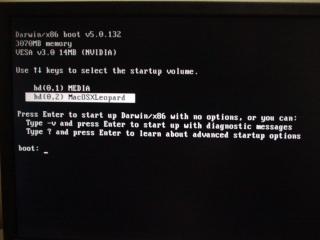
i can get to the darwin loader (as attached). but when i select Macosleopard, nothing happen. even with any boot option, -v -s -x, nothing.

Media is XP partition. i can boot no problem.


any suggestion would be greatly appreciated. Thanks

This post has been edited by limenghua: Jul 12 2008, 10:58 AM


Attached thumbnail(s)
Attached Image
heizad
post Jul 12 2008, 11:02 AM

~ Harimau Malaya ~
******
Senior Member
1,743 posts

Joined: Jul 2006
From: Shah Alam


ur prob same like mine i think...but still lazy to find what's the cause tongue.gif

159 Pages « < 27 28 29 30 31 > » Top
Topic ClosedOptions
 

Change to:
| Lo-Fi Version
0.0300sec    0.18    6 queries    GZIP Disabled
Time is now: 6th December 2025 - 11:21 AM