Welcome Guest ( Log In | Register )

Bump Topic Topic Closed RSS Feed
3 Pages  1 2 3 >Bottom

Outline · [ Standard ] · Linear+

Hardware Hackintosh Thread, The Official OSX86 Thread

views
     
SUSMatrix
post Jun 12 2008, 08:47 AM

King of Char Siew!
********
Senior Member
15,022 posts

Joined: Jan 2003
From: Damansara Jaya/Bandar Utama


I'm using this IATKOS ver 10.5.1.

I'm having this problem with the keyboard. During installation, the mouse and keyboard (mouse is PS/2, Keyboard is USB->PS/2 adapter) and both works fine.

However, after installation when it boot into the hard disk and start asking configuration question, the keyboard doesn't respond at all (although i can see it still respond to the caplocks as the light on the keyboard lits). However, MAC OS will have nothing, so i can't key anything and thus can't continue.

In the BIOS, i've already disabled USB mouse and keyboard.

Also, i've tried connecting the keyboard as USB directly. It'll show keyboard not detected and ask me to configure the keyboard (press key right to LEFT SHIFT etc), but there's no respond from the keyboard either, so i'm stuck there.

I've also tried another PS/2 keyboard, also failed.

Anyone can help?? sad.gif

SUSMatrix
post Jun 12 2008, 09:31 PM

King of Char Siew!
********
Senior Member
15,022 posts

Joined: Jan 2003
From: Damansara Jaya/Bandar Utama


Woo! Hooo!!!

Finally made the installation works!!! Really dunno what happened. I think i've must unchecked one more option, something related to speedstep? And the keyboard works!

Anyway, i ran into another problem when the configuration ask to key in the phone no, but the phone needs at least 10 digits but you can only key in max 8 digits in the fields!!

Luckily, i changed the country to Malaysia and the address screen looks a bit different with no such bug!

Everything seems pretty fast and zippy, faster than Vista! But i dunno how to use Safari yet. Downloading Firefox 3 RC3 right now...

Next step is to get the sound working. I'm using an X-FI, but obviously there's no driver for this, so i think i'll try use the onboard sound.

This is my first post with my Hackintosh. Hackintosh, here i come!!!

This post has been edited by Matrix: Jun 12 2008, 09:32 PM
SUSMatrix
post Jun 13 2008, 04:00 PM

King of Char Siew!
********
Senior Member
15,022 posts

Joined: Jan 2003
From: Damansara Jaya/Bandar Utama


QUOTE(CPURanger @ Jun 12 2008, 11:22 PM)
Mind telling your PC details (CPU, motherboard, Graphic Card, etc.) ?

I want to build a Hackintosh PC, currently looking for suitable hardware.
*
Sure, no problemo.

Gigabyte EP35-DS3
Intel C2D E4500
2 x 1GB kingston PC 667 Value RAM
Nvidia 7600GS
Creative X-FI (Not working in MAC OS nor UBUNTU either)
2 x 250GB SATA Seagate HDD ( Installed VISTA, XP and UBUNTU inside)
1 x SATA ASUS DVD-RW
1 x IDE LiteON CD-RW
1 x 40GB IDE Seagate HDD (This is the Macintosh drive).
1 x PS/2 Logitech mouse
1 x MS Office keyboard (USB, but i convert it to PS/2).

I think it's better to stick to Intel platform for Hackintosh as it is designed for Intel C2D.

Now my goal is to get following to work:
1) Sound (ACL 8888 or something like that)
2) Video working - tried to play some avi file, cannot work, maybe need some Quicktime codecs?
3) EPSON Stylus C90 printer (downloaded and installed driver but doesn't detect the USB printer....anybody can help?)

btw, i'm a bit confused with the MAC OS. How to i install a program? I tried installing Firefox 3 (dmg file), it pops up a window, after i installed, it goes to the dock, but when i reboot, it dissappear and have to install again?? Weird...

btw, the MAC menu feel when you activate an app and the top menu shows the menu for your current app makes me remember the Amiga O/S...it works almost similary...guess most of you haven't play an Amiga...should download an emulator and try it! Really advance for it's time!

SUSMatrix
post Jun 13 2008, 04:08 PM

King of Char Siew!
********
Senior Member
15,022 posts

Joined: Jan 2003
From: Damansara Jaya/Bandar Utama


QUOTE(anggajaya @ Jun 13 2008, 04:02 PM)
Guys, I have a quick question here, My specs are: Q6600, abit ip35-e, and 8800 gt

everything is working just nice except booting problems. everytime I restart the PC or turn the pc off, sometimes it jus keeps on looping without going anywhere, so I need to restart and change the bios setting ( ususally I jus disable or enable the virtualization)  then it can boot. but sometimes OK no problems at all..

d y guys know what exactly my problem is? thanks in advance.
*
Are you using Darwin or EFI bootloader? I've tried using EFI but always autoreboot. If i use Darwin, there's no problem, so during installation, i ignore EFI and select Darwin only.
SUSMatrix
post Jun 13 2008, 07:33 PM

King of Char Siew!
********
Senior Member
15,022 posts

Joined: Jan 2003
From: Damansara Jaya/Bandar Utama


Mysterious force are at work...my Epson printer just printed first time from MAC OSX!!!

And i didn't do anything...maybe i didn't notice it's working this morning?

Anyway, i've printed out a guide to get the sound working. Hopefully can get it working by tonight.

Over and out.
=========

According to the sound driver guide here, i need to access the "Terminal" utility.

Where can i find it? I only see it during the installation boot process, but can't find it in the installed MAC OSX!!

Pls help!


Added on June 13, 2008, 8:59 pmForget my last question on Terminal. Found it already. But my sound still not working no matter what i tried....maybe time to look for cheap USB soundstick...doh.gif

This post has been edited by Matrix: Jun 13 2008, 08:59 PM
SUSMatrix
post Jun 13 2008, 09:35 PM

King of Char Siew!
********
Senior Member
15,022 posts

Joined: Jan 2003
From: Damansara Jaya/Bandar Utama


Yay!!!! The sound is ok now!!!

My soundchip is RealTek ALC 885.

This is what i've done, but i dunno what exactly happened.

1) Tried to do some kext file patching to 885, didn't work at all.

2) Download and installed the ALC888 , driver installed successfully, but it is not detected.

3) Use patcher v1.16 and the downloaded kext file and patch. No go.

4) Use patcher v1.20 and the downloaded kect file and patch. Voila!! smile.gif

Anyway, here's the links:

This is where the ALC888 driver(and a few others) can be found:
http://forum.insanelymac.com/index.php?showtopic=36520

This is where all the patcher's can be found:
http://forum.insanelymac.com/index.php?sho...56&#entry231456

This is the specify patch file for ALC 885:
http://forum.insanelymac.com/index.php?act...e=post&id=17448

Hope this will help other's!

Now got another new problem. Some of the keyboard keys like END, HOME doesn't work. What gives??

This post has been edited by Matrix: Jun 14 2008, 09:06 AM
SUSMatrix
post Jun 13 2008, 10:12 PM

King of Char Siew!
********
Senior Member
15,022 posts

Joined: Jan 2003
From: Damansara Jaya/Bandar Utama


QUOTE(budakhops @ Jun 13 2008, 09:40 PM)
guys...
what software dat u guys already tried n worked in ur hackintosh??
i dunno wat software to put la.. huhu...
worried i will bored without any software...  icon_question.gif  icon_question.gif
*
Install MS Office lah!!! Ha-ha!

I think i'll use my MAC OSX to surf web and do Office App only. I suppose surfing in MAC OSX is safer kua, less virus and worms.
SUSMatrix
post Jun 14 2008, 09:05 AM

King of Char Siew!
********
Senior Member
15,022 posts

Joined: Jan 2003
From: Damansara Jaya/Bandar Utama


QUOTE(CPURanger @ Jun 13 2008, 11:09 PM)
Thanks. I am a long time Mac user, way back Motorola Macs System 7. Dunno whether to spend RM4K for iMac or build hackintosh much cheaper, it is just for home use.

For avi, you can try Perian

http://perian.org

You can also try this for wmv,

http://www.microsoft.com/mac/products/flip4mac.mspx

Matrix, I like your avatar, reminds me of my ZX Spectrum 48K, very long time ago....
*
Thanks for the org. But i don't think u can use your Hackintosh like a real Mac coz you can't do online updates as it might screw up your system.

Maybe only office work and some entertainment, music and video.

I think i might try to install PhotoShop on it and see. smile.gif

There's still problems though:
(1) Only regconized 1 SATA HDD and the SATA DVD burner...my other SATA drive is missing.
(2) Certain keys won't work.

btw, i understand there is an Apple key in MAC, what does it suppose to do? Which key on PC keyboard is usually mapped to the Apple key?

Thanks for the links, i used to have a Spectrum +, the one with the plastic keyboard, not the ori rubber keyborad like my avatar.

Speccy rules!


Added on June 14, 2008, 10:04 amJust to some comparison based on initial impression between a Hackintosh and a VISTA/XP PC
===========================================
1) Boot up time in Hackintosh seems quite slow, but it could be it's running on my old 40GB HDD.

2) Shutdown time on Hackintosh is FAST!!! I wonder why it takes so long for VISTA/XP to shutdown now!!! It's even faster than UBUNTU.

3) The way MAC OSX handles folders seems to be much neater and clearer....i hate the VISTA explorer which shows you too much info and somemore have to scroll left and right within the explorer tree...MS should really learn how to manage files properly from MacOSX in the next Windows 7!

4) In terms of prettiness, MAC OSX holds it's own, but here i give VISTA the edge. Thumbnail live windows in VISTA is very cool.

ok, still trying to come to grip with MAC OSX now, at least it's working 99% now. But now i can really hear the difference between an onboard Realtek codec compared to my X-FI....really no fight...X-FI is so much clearer!! I hope someone makes an X-FI driver for Mac soon...


This post has been edited by Matrix: Jun 14 2008, 10:04 AM

SUSMatrix
post Jun 15 2008, 02:36 PM

King of Char Siew!
********
Senior Member
15,022 posts

Joined: Jan 2003
From: Damansara Jaya/Bandar Utama


QUOTE(CPURanger @ Jun 14 2008, 10:11 PM)
Understood, hackintosh wouldn't be a perfect mac.  Maybe I buy an iMac after all, save me from the installing work and uncertain future of hackintosh. Is $$$, I have to think about it.

Apple Key, you mean command key. Rather important key, mostly use for access menu with command key, just like Windows with control key. For example, Command-C Copy for Mac, Ctrl-C - Copy in Windows.

I don't bother with Vista, no matter how pretty it is. So much problem, some downgrade to XP. Never in OS history, any OS do that.

user posted image


Added on June 14, 2008, 10:20 pmInteresting news for Hackintosh fans, I got from MacNN

EFiX dongle promises easy Mac OS installs on PC

A developer is promising an easy, hardware-assisted means of installing Mac OS X onto PCs, accounts say. The creators of the EFiX USB dongle claim that by attaching their device to a PC, users can then simply boot from a Mac OS X disc, and continue with installation as if the system were a native Apple product. Typically, the creation of "Hackintoshes" requires a number of complex steps, as Apple does not allow the Mac OS on third-party hardware.

The dongle is said to have been in development for some time, including at least six months of testing, and already in use in places such as TV stations and recording studios. A public release has been planned for June 23rd, and video of the dongle in use can be found here. No prices have been mentioned.

EFi-X website, Mac OS on PC

================

I suppose is a kind of EFI BIOS software in dongle, making Mac OS X think is the PC is a Mac.
*
Seriously though, i never have any problems with VISTA. Actually i like it better than XP in fact.

Anyway, the EFI thing is killing me...i'm trying to update to 10.5.3 and re-install using the EFI option but always reboot.....has been trying until 3am last night... doh.gif

Luckily, i've backup my working 10.5.1 with Acronis...from VISTA. With a copy of Acronis in both VISTA and XP partition, i can restore back any corrupted/screwed partition including UBUNTU and MAC OSX. My VISTA has just saved my Mac arse....ha-ha!!

Acronis rocks!!!

This post has been edited by Matrix: Jun 15 2008, 02:37 PM
SUSMatrix
post Jun 19 2008, 02:21 PM

King of Char Siew!
********
Senior Member
15,022 posts

Joined: Jan 2003
From: Damansara Jaya/Bandar Utama


QUOTE(CPURanger @ Jun 15 2008, 06:57 PM)
You are forgetting you are using a PC. If is a real Mac, partitioning and installation is much more easy.  tongue.gif
*
I'm not comparing the installation of VISTA and MAC ler.. doh.gif Of course i knew this is a Hackintosh installation!
And i dun think there is a version of Acronis for MAC...So if you installed a working Hackintosh, just image it with Acronis (from VISTA/XP) and you can save a lot of work should you screw it up. Be warned though, it doesn't compress the MAC image like an XP/VISTA image...if your partition is 40GB, you'll get a 40GB image eventhough you only used 10GB or so.

I'm just sick of hearing people complaining about VISTA when it is a pretty good O/S, IMO. And it does have Acronis. tongue.gif


Added on June 19, 2008, 2:24 pmOne question:

What is this EFI emulation suppose to do? I read it suppose to be able to make your Hackintosh like a real Mac and can do update from Apple directly? Anyone tried this?
I update my IATKOS v1.0r2 (10.5.1) with the Apple 10.5.3 update (downloaded DMG, not direct update), with tricks like the powermanagement removal file thingy, but my Hackintosh keeps rebooting after the update.

This post has been edited by Matrix: Jun 19 2008, 02:28 PM
SUSMatrix
post Jun 21 2008, 07:39 PM

King of Char Siew!
********
Senior Member
15,022 posts

Joined: Jan 2003
From: Damansara Jaya/Bandar Utama


Wheewww!!!

After battling with this hackintosh 10.5.3 update for days, i almost win the war now...smile.gif

I've been trying to update from my stable 10.5.1 (IATKOS 1.0 r2) using the downloaded official updates from Apple site.

So i jumped directly from 10.5.1 -> 10.5.3

After installing the 10.5.3 updates, i've the following problems:-
(1) System hang after install (at the grey Apple screen) - reboot a few times, then discovered the PS/2 keyboard/mouse not working, so changed all to USB keyboard and mouse - OK.
(2) No sound - this is same as 10.5.1, just install the ALC888 driver and patch it up with the HD patcher. (mine is ALC 885) - OK.
(3) No QE for GPU - just download latest Nvinstaller v.52 and run. - OK
(4) SATA drive not regconized - my DVD burner not detected no more. Previously, can detect the DVD burner and 1 SATA drive.

So i left 1 problem only...maybe fix later...really sian liao!!!!

Another weird behaviour, now cannot shutdown properly or restart. Everything seems to shutdown but it somehow can't connect to the mobo to inform to shutdown/restart. No big deal though. Just manual press reset button.

One big benefit can see...boot up time is super fast even on my slow 40GB IDE hdd... previously boot time is very slow!! It is now even faster than UBUNTU boot up time! thumbup.gif


SUSMatrix
post Jun 21 2008, 08:12 PM

King of Char Siew!
********
Senior Member
15,022 posts

Joined: Jan 2003
From: Damansara Jaya/Bandar Utama


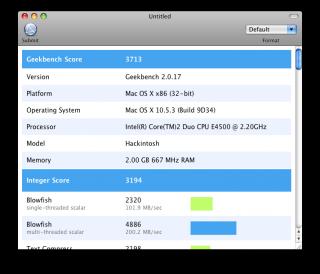
Here's some screenshot of my Hackintosh....bragging rights session...haha..

Btw, i dunno why it detect my PC as a 4ghz C2D...ha-ha...mine is a 2.2Ghz C2D, not even O/C.

Attached Image

Attached Image


Added on June 21, 2008, 8:24 pmbtw, my installation don't have the Mac intro video and the background don't have that purple colour background with lights shinning in the middle...How come?

When i start up, i'll see the boring grey Apple screen, follow by boring blue screen and then desktop appears....no flashy intro?? How to enable that?

This post has been edited by Matrix: Jun 21 2008, 10:41 PM
SUSMatrix
post Jun 22 2008, 12:52 AM

King of Char Siew!
********
Senior Member
15,022 posts

Joined: Jan 2003
From: Damansara Jaya/Bandar Utama


Last problem with SATA solved. Just packed in a kext file for the ICH9 chipset (my mobo is a P35 base mobo). All the SATA drive can now be seen. smile.gif

So, keyboard, mouse, vga, sound, SATA, IDE, Epson printer and Logitech webcam all working...
The only thing not working is Creative X-FI card, which is unlikely ever gonna work unless Creative provides driver or enough info to the open source community...oh well, it's not like I'm going to play EAX HD games on a Mac.

Now feels no more challenged liao...hee-hee.

Maybe i should try install Mac OSX on VMWare next...

SUSMatrix
post Jun 22 2008, 08:38 PM

King of Char Siew!
********
Senior Member
15,022 posts

Joined: Jan 2003
From: Damansara Jaya/Bandar Utama


QUOTE(adammale @ Jun 22 2008, 08:08 PM)
Mine stuck at

ERROR: FireWire unable to determine security-mode; defaulting at full-secure
Jettisoning kernel linker


Help me!
*
This is during the pre-installation or post-installation? Do you have a firewire port or card in ur system?

SUSMatrix
post Jun 23 2008, 09:17 AM

King of Char Siew!
********
Senior Member
15,022 posts

Joined: Jan 2003
From: Damansara Jaya/Bandar Utama


Check at ASUS website lah.

http://www.asus.com/products.aspx?l1=3&l2=...419&modelmenu=2

Your board got firewire (IEE94), which is probably different chipset than the apple's one and not supported. Can you disable your firewire in BIOS?

You are using IATKOS? If still cannot maybe you can use Leo4allv3...coz that has tons more drivers than the IATKOS version.

I say a 20GB partition should be enough if you don't intend to put a lot of things in your hackintosh partition, installation will takes about 5GB+ .
SUSMatrix
post Jun 23 2008, 08:46 PM

King of Char Siew!
********
Senior Member
15,022 posts

Joined: Jan 2003
From: Damansara Jaya/Bandar Utama


QUOTE(cscheat @ Jun 23 2008, 03:09 PM)
Anyone tried the 10.5.3 Leopard update? Mine run smooth as hell !!!
My Advice : If you encounter graphic EI/QE broken after the 10.5.3 update, try NVkush !!! that will 100% cure your problem
*
I used official Apple combo update 10.5.3, minor problem after update, PS/2 keyboard/mouse cannot work, so just use USB mouse/keyboard. As for the GPU, Nvinstaller .52 fix the QE thingy. smile.gif

How's your boot up time before and after? My boot up time is super fast compared to the IATKOS 10.5.1!! In fact, now i will only boot into MAC OSX to access internet coz it's the quickest way compared to XP, VISTA and UBUNTU!

SUSMatrix
post Jun 23 2008, 08:49 PM

King of Char Siew!
********
Senior Member
15,022 posts

Joined: Jan 2003
From: Damansara Jaya/Bandar Utama


QUOTE(adammale @ Jun 23 2008, 05:13 PM)
I've disabled it but still stuck. I've read in Insanely Mac forum that you have to wait for the Apple grey background for about half an hour and then you will get to the installation setup, is it true?

Would love to get Leo4allv3 but have already downloaded iATKOS for several days, that's why I'm trying very hard for it to work out but couldn't. Huhu...

Or should I disable everything then try to reboot?
*
Can try, disable everything that is not used...COM port, Parallel Port, whatever you can think of.

But are you getting the same error message now?

The Apple grey background only last a few minutes when i install...

If all else fails, dump AMD and migrate to Intel C2D platform....sure can. thumbup.gif


Added on June 23, 2008, 8:53 pm
QUOTE(Masamune @ Jun 23 2008, 08:49 PM)
Hey i'm using a first gen acer 5920G and i'm very interested in installing Mac OS in my laptop..
I've been holding the iatkos 1.0r2 for a very long time...just that i'm scared to do it..
Can anyone give me a guide on how to do it..
Do i have to make a recovery disk?Because i used acer erecovery management but it came out as 2 dvds..
*
Why so scare ler...just backup your stuff and try lah. On top of the recovery disk, make sure you backup your important data to the DVDs also. In case your recovery bombs, you still have your data.

I'm making a guide now, but dunno when complete. There's tons of guides on the net, just google for it. It took me 1 week plus to get everything running smoothly.

This post has been edited by Matrix: Jun 23 2008, 08:53 PM
SUSMatrix
post Jun 25 2008, 02:47 PM

King of Char Siew!
********
Senior Member
15,022 posts

Joined: Jan 2003
From: Damansara Jaya/Bandar Utama


QUOTE(andythology @ Jun 25 2008, 11:04 AM)
I have been trying to install but i always got the common issue, which is "system config file '/com.apple.Boot.plist' not found." can anyone help me on the issue?
attached is my specs.
*
I remember i have this problem before when i install dunno in Vmware or on my PC.

After a few times, it dissappear already...very strange.

Have you try with a different DVD drive? Try that and see.

Fingers doubled crossed.


Added on June 25, 2008, 2:48 pm
QUOTE(Tom Welling @ Jun 25 2008, 02:17 PM)
wow..juz notice that here gt a hackintosh thread...
guys...i need some help...newbie here..
i'm trying to install mac os x in vmware. I use iATKOS_v1.0ir2 iso. i mounted the iso wif daemon tools. i'm using vmware workstation 6.
i followed the guide in here
but when i boot it, it shows Apple logo and then pop up this message : "The CPU has been disabled by the guest operating system. You need to power off or reset the virtual machine at this point."
tried many times already stil the same problem. Googled thro many websites but stil cant find the solution icon_question.gif
anyway, I'm using Dell Inspiron 1420. My specs is:
Intel C2D T8300 2.4 GHz
3GB ram
Nvidia GeForce 8400M GS
Windows Vista Home Premium

can anyone guide me? thx..
*
Why don't you try vmware server and see? I got to the stage of the blue screen with the spinning multi colour cursor and hangs forever there in Vmware... hmm.gif


Added on June 25, 2008, 2:53 pmbtw, anyone tested Safari 3.1 vs Firefox 3 in Hackintosh?

The speed is almost the same, with Safari having a slight edge occasionally, but i still prefer Firefox 3 features smile.gif

On XP, Firefox seems to be faster...but not by much...and IE7 is hopeless slow and buggy junk....if not for Active X, i don't think many people want to use IE 7....it's just horrible.

This post has been edited by Matrix: Jun 25 2008, 02:53 PM
SUSMatrix
post Jun 29 2008, 09:58 PM

King of Char Siew!
********
Senior Member
15,022 posts

Joined: Jan 2003
From: Damansara Jaya/Bandar Utama


QUOTE(CPURanger @ Jun 29 2008, 06:04 PM)
Gigabyte EP35-DS4/EP35-DS3 is supported according websites below and also Matrix mention he/she (??) use this board (thanks for info!). Also use Intel Core 2 Duo CPU. I do not know whether 100% problem free, I am gambling it will work.

PCWiz Computer hardware guide

Xplodenet 10.5.2 HCL

You should also check out OSX86 Project .

I have not figure all the stuff yet. Just buy another hard disk for Windows, rather not partition, format and installing, and later redo all over again if things not work out. Booting up Kalyway 10.5.2 is really fast, faster than the real thing !

Now to figure how to dual boot two different OS from two hard disk and also check for hardware problem.
*
Woooi....for clarification, I am a HE. Since when i got mention i am a SHE??!!

Yes, P35 mobo like my Gigabyte EP35-DS3 are pretty much workable. Lots of success story with it.

There was problems, but basically everything fixe-able.

Hey, i even managed to set it up using the U-mobile ZTE 622 modem and access Internet via Celcom 3G broadband this morning... smile.gif

The only weird problem is the shutdown/restatart fails to shutdown the PC, everything just clean and halted and screen blanked, but mobo won't shut off. So you need to manually power off.

Dual booting is pretty easy if you use EasyBCD.

btw, does Kalyway has boot camp? I dun see boot camp in my IATKOS....just curious.

This post has been edited by Matrix: Jun 29 2008, 09:59 PM
SUSMatrix
post Jun 30 2008, 09:05 AM

King of Char Siew!
********
Senior Member
15,022 posts

Joined: Jan 2003
From: Damansara Jaya/Bandar Utama


EasyBCD must work with Vista. However, if you use XP, there is a work around by copying the C:\windows\boot folder from VISTA and put it into your XP.

I've tested it and EasyBCD regconized the VISTA boot loader files in XP, although i haven't really install MacOSX and try it out yet on my laptop.

But i've used EasyBCD on my desktop from VISTA. Works great.

I would suggest dump Acronis O/S selector. Lots of people report it doesn't works. But Acronis True Image rocks though, can even image my Mac partition and restore it. thumbup.gif

I tried install teh IATKOS on my AMD laptop...no go...hits the same error as someone here....hangs at "Jettisson linker".

Downloading Kalyway and Leo4All now...hopefully Kalyway can finish downloading today..


Added on June 30, 2008, 9:19 am
QUOTE(CPURanger @ Jun 30 2008, 07:59 AM)
I am just joking, of course you are a HE !  tongue.gif

I don't have problem starting up and shutting down using Kalyway. Same here, no Bootcamp for Kalyway.
No need Bootcamp  for hackintosh, you can always install windows and other OSes. I had download EasyBCD, have not figure out how it works. Acronis boot selector does not work, no response and hang on my PC.

I have problem with 8800gt, it does not support other resolutions. Just got the drivers and opengl, need more time to try. Also some problem with USB. Sound OK and Network OK.
*
Yeah, i heard it got some problem with the 8 series...wonder if it's work okay for 9 series...thinking to upgrade GPU later.

Have you try NVInject .52? Can give it a shot and see.

btw, I've discovered a Macintosh OSX weakness....IT DOESN'T BURN MULTISESSION DISC!!! doh.gif

I thought something as friendly as a Mac should do this, unfortunately it doesn't....but i'm not sure if Windows do this also...i always burn with Nero.

Anyway, downloaded Roxio Titanium 9... innocent.gif ....will try it out later.

This post has been edited by Matrix: Jun 30 2008, 09:23 AM

3 Pages  1 2 3 >Top
Topic ClosedOptions
 

Change to:
| Lo-Fi Version
0.0567sec    0.40    7 queries    GZIP Disabled
Time is now: 5th December 2025 - 08:19 PM