Welcome Guest ( Log In | Register )

Bump Topic Topic Closed RSS Feed
413 Pages « < 210 211 212 213 214 > » Bottom

Outline · [ Standard ] · Linear+

 Official TM UniFi High Speed Broadband Thread V39, READ 1ST PAGE FOR RELEVANT WIFI INFO

views
     
XeactorZ
post Aug 21 2021, 06:11 PM

♥ PandaDog ♥
*********
All Stars
31,609 posts

Joined: Aug 2010
QUOTE(filage @ Aug 21 2021, 11:27 AM)
Is there any reason why Unifi recently made my modem getting static first 3 portions of the IP address? Like 60.50.21.x, it started in few weeks ago, now no matter how u restart the modem u get 60.50.21.x. It used to be quite random, usually only first part is constant like 175.x.x.x where X is variable.
*
At least better than mine, I had this issue since 2 years ago
Always getting ip address start from 219, no matter how I restart still same bangwall.gif
toytoy
post Aug 22 2021, 02:41 PM

Enthusiast
*****
Senior Member
875 posts

Joined: Jan 2003


QUOTE(Ebony & Ivory @ Aug 20 2021, 09:49 PM)
I think some already post it before, it is a new "feature" called proactive notification for unifi 300/500/800 Mbps package. laugh.gif  They will monitor your line proactively to detect any fault.
*
Ooo thanks for the info. Nowadays so many scam calls that's y skeptical when TM become so proactive haha.
John42
post Aug 22 2021, 03:20 PM

Getting Started
**
Junior Member
256 posts

Joined: Aug 2019
QUOTE(toytoy @ Aug 22 2021, 02:41 PM)
Ooo thanks for the info. Nowadays so many scam calls that's y skeptical when TM become so proactive haha.
*
There's a data breach on TM side that's why we all getting scam calls. How I know because previously when we were using the same number but on different telco there's no any scam calls. But after changed to Unifi mobile we are getting scam calls and messages 🙃
failed.hashcheck
post Aug 23 2021, 12:06 AM

Neighborhood plant pathologist
*******
Senior Member
2,096 posts

Joined: Aug 2009
From: Shithole Klang
QUOTE(aniq8676 @ Aug 21 2021, 04:28 PM)
Yes, if the streamyx modem router has an Access Point mode.
*
Actually Just straightforward plain dhcp router mode also no problem. For most part there is really no downsides of double nat in home network.

Except if you want to access local machines (due to resulting different subnet) then there are some tweaking to be done.

This post has been edited by failed.hashcheck: Aug 23 2021, 12:07 AM
ideaplus
post Aug 23 2021, 02:44 PM

Enthusiast
*****
Junior Member
919 posts

Joined: Nov 2014
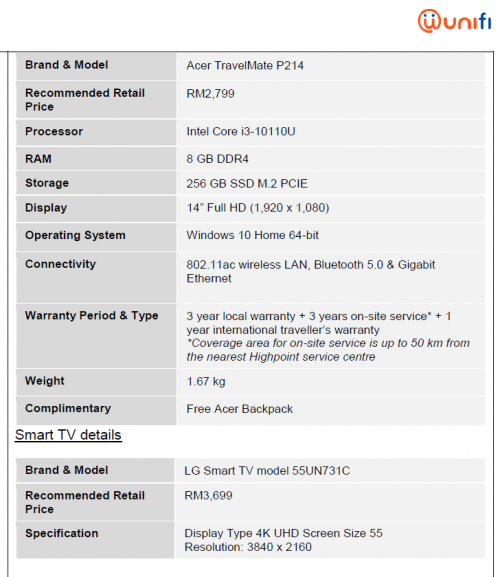
Does anyone subscribe RM99 addon Acer TravelMate P214 laptop? What spec does TM offers?
popopi
post Aug 23 2021, 02:51 PM

Regular
******
Senior Member
1,197 posts

Joined: Apr 2007


Hi Guys,

My Unifi Fibre finally want to come already... i saw my taman already got 1 person install last week. waiting my turn.

My house is double story.. i want to ask if the original Unifi router can cover double story house?

what is the model of the original router? i might want to research...
possible if not going well will change to the AX20 or Archer C6...
aniq8676
post Aug 23 2021, 02:52 PM

Regular
******
Senior Member
1,524 posts

Joined: Dec 2020
From: Perak


QUOTE(ideaplus @ Aug 23 2021, 02:44 PM)
Does anyone subscribe RM99 addon Acer TravelMate P214 laptop? What spec does TM offers?
*
user posted image
popopi
post Aug 23 2021, 03:01 PM

Regular
******
Senior Member
1,197 posts

Joined: Apr 2007


QUOTE(popopi @ Aug 23 2021, 02:51 PM)
Hi Guys,

My Unifi Fibre finally want to come already... i saw my taman already got 1 person install last week. waiting my turn.

My house is double story.. i want to ask if the original Unifi router can cover double story house?

what is the model of the original router? i might want to research...
possible if not going well will change to the AX20 or Archer C6...
*
Also i had the plan to put the router at staircase, where it have access to ground and 1st floor... is this a good location?
aniq8676
post Aug 23 2021, 03:05 PM

Regular
******
Senior Member
1,524 posts

Joined: Dec 2020
From: Perak


QUOTE(popopi @ Aug 23 2021, 02:51 PM)
Hi Guys,

My Unifi Fibre finally want to come already... i saw my taman already got 1 person install last week. waiting my turn.

My house is double story.. i want to ask if the original Unifi router can cover double story house?

what is the model of the original router? i might want to research...
possible if not going well will change to the AX20 or Archer C6...
*
1. Depend on the position of the router you place and several factors that affect WIFI coverage in your home.

2.The following are the types of routers supplied by Unifi through contractors.

NETIS DL4480V
AZtech DS244WSGV
TP-LINK Archer C1200
TP-LINK Archer C6
TP-LINK Arhcer EC221-G3V
D-LINK DIR-842
D-LINK Covr-1100
D-LINK DIR-825M
D-Link DVG-F2452
fiberhome sr120-a
ZTE Unknown model

The router that will be provided to you is random depend on the stock available at the contractor.

popopi
post Aug 23 2021, 05:08 PM

Regular
******
Senior Member
1,197 posts

Joined: Apr 2007


QUOTE(aniq8676 @ Aug 23 2021, 03:05 PM)
1. Depend on the position of the router you place and several factors that affect WIFI coverage in your home.

2.The following are the types of routers supplied by Unifi through contractors.

NETIS DL4480V
AZtech DS244WSGV
TP-LINK Archer C1200
TP-LINK Archer C6
TP-LINK Arhcer EC221-G3V
D-LINK DIR-842
D-LINK Covr-1100
D-LINK DIR-825M
D-Link DVG-F2452
fiberhome sr120-a
ZTE Unknown model

The router that will be provided to you is random depend on the stock available at the contractor.
*
Thanks for the detailed info.
Seems like there are lots of models. I will try with the original router 1st.. if bad wifi then only will change for better one.

putting at staircase of my house have wides coverage to the gound and 1st floor... least wall resistant. tongue.gif
supergen3
post Aug 23 2021, 05:12 PM

Getting Started
**
Junior Member
134 posts

Joined: May 2010


QUOTE(aniq8676 @ Aug 23 2021, 03:05 PM)
1. Depend on the position of the router you place and several factors that affect WIFI coverage in your home.

2.The following are the types of routers supplied by Unifi through contractors.

NETIS DL4480V
AZtech DS244WSGV
TP-LINK Archer C1200
TP-LINK Archer C6
TP-LINK Arhcer EC221-G3V
D-LINK DIR-842
D-LINK Covr-1100
D-LINK DIR-825M
D-Link DVG-F2452
fiberhome sr120-a
ZTE Unknown model

The router that will be provided to you is random depend on the stock available at the contractor.
*
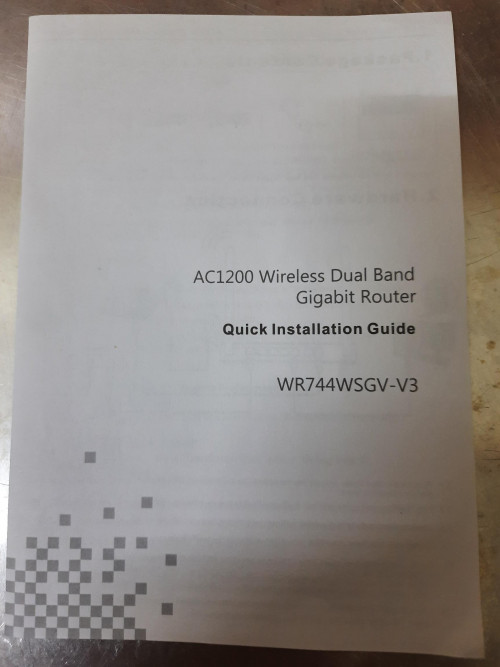
My Unifi stock router installed last week is this model from AZ-tech WR744WSGV. Got mesh network capability in the firmware settings.

user posted image
ideaplus
post Aug 23 2021, 05:30 PM

Enthusiast
*****
Junior Member
919 posts

Joined: Nov 2014
QUOTE(aniq8676 @ Aug 23 2021, 02:52 PM)
user posted image
*
Hmmm, not really worth either with its spec or compared with LG TV. Thanks smile.gif
hjack
post Aug 23 2021, 06:02 PM

Getting Started
**
Junior Member
281 posts

Joined: May 2012
QUOTE(popopi @ Aug 23 2021, 03:01 PM)
Also i had the plan to put the router at staircase, where it have access to ground and 1st floor... is this a good location?
*
Yup, best. I am putting same.
jhleo1
post Aug 23 2021, 06:05 PM

Look at all my stars!!
*******
Senior Member
4,382 posts

Joined: Jan 2003
Test it yourself on the original Unifi router first then only decide want to upgrade later.

QUOTE(popopi @ Aug 23 2021, 02:51 PM)
Hi Guys,

My Unifi Fibre finally want to come already... i saw my taman already got 1 person install last week. waiting my turn.

My house is double story.. i want to ask if the original Unifi router can cover double story house?

what is the model of the original router? i might want to research...
possible if not going well will change to the AX20 or Archer C6...
*
blacktubi
post Aug 23 2021, 08:34 PM

-
Group Icon
Elite
8,418 posts

Joined: Jul 2008

QUOTE(aniq8676 @ Aug 23 2021, 03:05 PM)
1. Depend on the position of the router you place and several factors that affect WIFI coverage in your home.

2.The following are the types of routers supplied by Unifi through contractors.

NETIS DL4480V
AZtech DS244WSGV
TP-LINK Archer C1200
TP-LINK Archer C6
TP-LINK Arhcer EC221-G3V
D-LINK DIR-842
D-LINK Covr-1100
D-LINK DIR-825M
D-Link DVG-F2452
fiberhome sr120-a
ZTE Unknown model

The router that will be provided to you is random depend on the stock available at the contractor.
*
The ZTE model is ZXHN H267A for future reference. smile.gif

QUOTE(popopi @ Aug 23 2021, 03:01 PM)
Also i had the plan to put the router at staircase, where it have access to ground and 1st floor... is this a good location?
*
On staircase is okay, under staircase is bad.

The absolute worst place would be the storeroom under staircase.
sHawTY
post Aug 23 2021, 09:35 PM

Frequent Reporter
********
All Stars
14,909 posts

Joined: Jul 2005

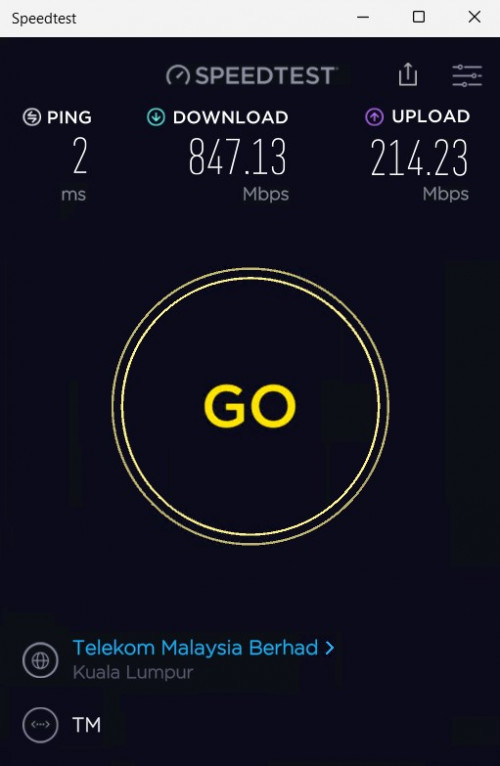
Any 800Mb/s users here can help me do a speedtest?
My Speedtest to Telekom server always gets around 805 ~ 815Mb/s

But tonight I'm only getting 400 ~ 700Mb/s

Only 1 device connected. Nothing is being downloaded nor am I streaming something right now
maxguy
post Aug 23 2021, 09:50 PM

Enthusiast
*****
Senior Member
822 posts

Joined: Jan 2003


https://www.speedtest.net/my-result/d/60f8b...98-3970bc1d4054

user posted image
sHawTY
post Aug 23 2021, 09:59 PM

Frequent Reporter
********
All Stars
14,909 posts

Joined: Jul 2005

QUOTE(maxguy @ Aug 23 2021, 09:50 PM)
That's strange
Although when I do direct download, I can get full 800Mb/s
altk1989
post Aug 23 2021, 10:08 PM

Getting Started
**
Junior Member
64 posts

Joined: Jul 2012
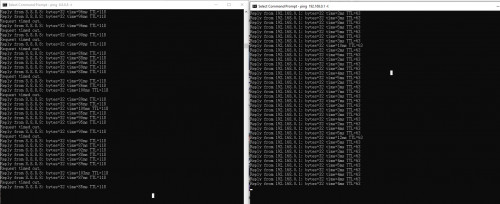
Hi all sifu, want to ask some question regarding Unifi Line Unstable

I just upgraded to Unifi 300Mbps from 100Mbps 1 month ago, and noticed the Ping unstable issue

user posted image

Left ping is google dns ping, right ping is my TP-Link Deco to Unifi Router ping......

Usually happened from 7PM-10PM, sometime can reach until midnight, afterward become stable...

Previously 100Mbps seem no problem at all...

Restart Router and BTU doesnt do anything other than ip change...

Call 100 sent technician , but how detect problem when problem only happened non-working hour?


Is it possible my Unifi line cannot support such high speed, or just my area unifi problem hmm.gif hmm.gif


mr-2
post Aug 23 2021, 11:22 PM

Enthusiast
*****
Senior Member
733 posts

Joined: Jan 2003
QUOTE(toytoy @ Aug 20 2021, 04:08 PM)
Hi all. I got a phone call from 0321062000 saying they are from TM and detected I have frequent disconnection with my Unifi and want come my house to check. Anyone for the same call?

Never knew TM can be so proactive or is this a scam?

I tried searching the forum but can’t find anything related to the phone number. Thx.
*
I got the same call today. Scare me as they mention want to come right away even I told them my house internet has no issue. I told them I am not free today. So should I allow them? They say will call me again to arrange?

413 Pages « < 210 211 212 213 214 > » Top
Topic ClosedOptions
 

Change to:
| Lo-Fi Version
0.0528sec    0.52    6 queries    GZIP Disabled
Time is now: 16th December 2025 - 03:45 AM