Outline ·
[ Standard ] ·
Linear+
Official TM UniFi High Speed Broadband Thread V39, READ 1ST PAGE FOR RELEVANT WIFI INFO
|
aniq8676
|
 Aug 19 2021, 03:08 PM Aug 19 2021, 03:08 PM
|

|
QUOTE(John42 @ Aug 19 2021, 01:13 PM) Got it bro 👌. For me unifi TV picture quality is really bad compared to Astro. Their HD doesn't even look like HD. Sorry I don't like to put As***. I am straight forward when it comes to TM 😡 because they made me pissed off with their modem router when my house was under VDSL. I am their customer for the last 8.5 years since VIP5 era. Now I am happy with fibre and using my own router. Peace of mind. BTW I have some issue with the telephone line. Whenever I call the JKJAV hotline number, Asus customer service number or Sony customer hotline number the call does not proceed the moment we choose the option. I have already lodge the report to TM earlier this month and till now they couldn't solve the issue. Technicians already came to my house 5 times(I have no choice but allow them to enter the house 🙃) and one of them even changed the modem to FibreHome from Huawei since the OLT fibre box at my building is FibreHome brand. After they changed the modem, the easyfix result for Telephone line it shows normal. Previously it was showing that there's some performance issue on my telephone line. First pic when I was using the Huawei white modem(not even 1 year yet) 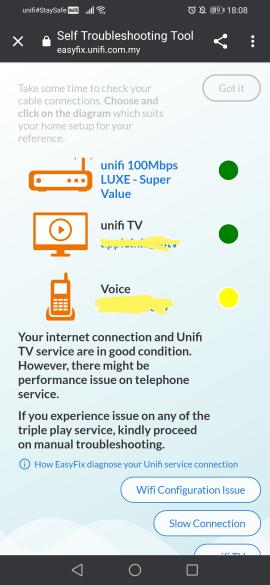 Second pic after they change to Fibrehome modem 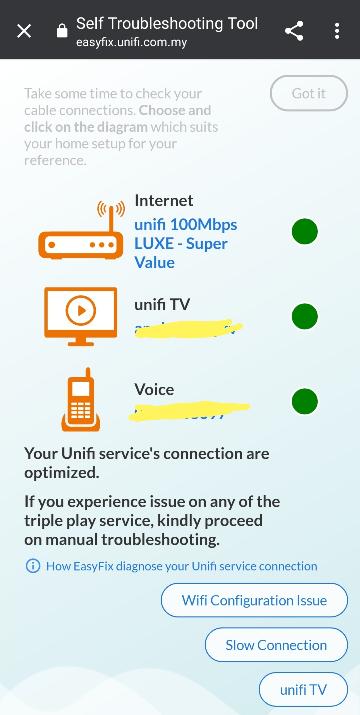 So I am wondering whether is there any issue on their server. Does anyone here have experience this kind of issue? They told me that nothing wrong with my line 🙃 and they even tried with their dect phone and analogue phone and still the same issue. Then the technician told me that he will inform to expert team but currently all of them under quarantine 😢. I hope someone here could test with their landline whether is there any issue or not. See whether the moment you choose the option it will proceed or not. Appreciate your help on this ya 😊 Asus customer service (0321070180) JKJAV vaccine hotline (1300888828) Sony customer service hotline (1300881233) 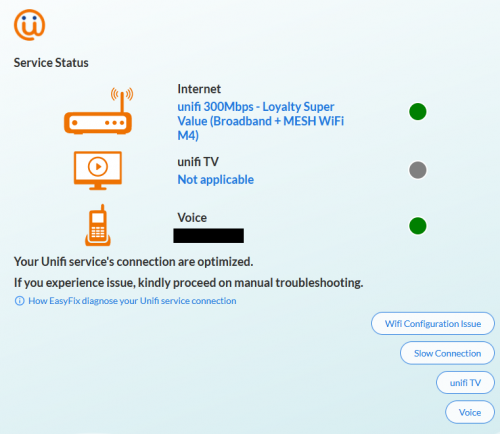 Mine, Fiberhome to Huawei |
|
|
|
|
|
John42
|
Aug 19 2021, 03:33 PM
|
Getting Started

|
QUOTE(aniq8676 @ Aug 19 2021, 03:08 PM) Mine, Fiberhome to Huawei That's nice. As what mentioned by the technician, eventhough the Huawei modem is universal type, there might be small sync issue with the OLT from different brand. He told me that there are only 3 OLT brand from unifi which is Alcatel, Huawei and Fibrehome. And since my area just upgraded to fibre a year ago, they are using the Fibrehome OLT and the Fibrehome modem is the newer model from TM. This post has been edited by John42: Aug 19 2021, 03:33 PM |
|
|
|
|
|
Savor_Savvy
|
Aug 19 2021, 06:44 PM
|
|
|
I have just installed 2 DECO M4. What I observed is that the signal is strong now (5 bars), but the speed does not change. It's still around 240-250mbps for a 300mbps line. With LAN cable, I can get 300mbps.
My old 2.4ghz & 5ghz access points are still around.
Is this normal?
This post has been edited by Savor_Savvy: Aug 19 2021, 06:47 PM
|
|
|
|
|
|
haturaya
|
Aug 19 2021, 06:45 PM
|
Look at all my stars!!

|
QUOTE(Savor_Savvy @ Aug 19 2021, 06:44 PM) I have just installed 2 DECO M4. What I observed is that the signal is strong now (5 bars), but the speed does not change. It's still around 240-250mbps for a 300mbps line. With LAN cable, I can get 300mbps. Is this normal? Normal for Deco M4. |
|
|
|
|
|
ckimsem
|
Aug 19 2021, 07:09 PM
|
|
|
QUOTE(Savor_Savvy @ Aug 19 2021, 07:44 PM) I have just installed 2 DECO M4. What I observed is that the signal is strong now (5 bars), but the speed does not change. It's still around 240-250mbps for a 300mbps line. With LAN cable, I can get 300mbps. My old 2.4ghz & 5ghz access points are still around. Is this normal? What device are you using? If the devices aren’t capable of getting 300mbps, whatever routers it connected to will be the same. |
|
|
|
|
|
Savor_Savvy
|
Aug 19 2021, 07:18 PM
|
|
|
QUOTE(ckimsem @ Aug 19 2021, 07:09 PM) What device are you using? If the devices aren’t capable of getting 300mbps, whatever routers it connected to will be the same. Eg like Iphone 11. I think should be no problem in getting 300mbps, but just that any devices connected to the DECO M4, and even to the default UNIFI Netis Router before yielded a lower speed. |
|
|
|
|
|
tvcat
|
Aug 19 2021, 08:19 PM
|
|
|
QUOTE(Savor_Savvy @ Aug 19 2021, 06:44 PM) I have just installed 2 DECO M4. What I observed is that the signal is strong now (5 bars), but the speed does not change. It's still around 240-250mbps for a 300mbps line. With LAN cable, I can get 300mbps. My old 2.4ghz & 5ghz access points are still around. Is this normal? It really doesn't matter what the speed is unless you feel that it is too slow. Even 100Mbps is more than enough for most people. |
|
|
|
|
|
Noob Boy 1996
|
Aug 19 2021, 09:54 PM
|
Getting Started
|
Been using unifi stock modem for 6 years, only now I realize the light at LAN1 keeps blinking while others like LINK AUTH VOIP TEL1 just remain static. The modem is connected to Deco M4. Why is it happening? Will it cause any problem?
|
|
|
|
|
|
audiocool
|
Aug 19 2021, 10:22 PM
|
|
|
QUOTE(John42 @ Aug 19 2021, 03:33 PM) That's nice. As what mentioned by the technician, eventhough the Huawei modem is universal type, there might be small sync issue with the OLT from different brand. He told me that there are only 3 OLT brand from unifi which is Alcatel, Huawei and Fibrehome. And since my area just upgraded to fibre a year ago, they are using the Fibrehome OLT and the Fibrehome modem is the newer model from TM. Mine one is having issue on phone since the first day install Unifi (Jun 2021), issue on my phone is the call will auto cut off. I call again, and no ringer tone at the receiver side but i can hear the tone in my phone. Feedback to tm and so far technician check Fiber cable no issue, borrow me a fix line phone, change RJ11 cable, change a new modem (still same brand Fiberhome). Problem still persist. He said he also no idea what is causing the problem. |
|
|
|
|
|
TSSilentVampire
|
Aug 20 2021, 09:40 AM
|
|
|
QUOTE(Noob Boy 1996 @ Aug 19 2021, 09:54 PM) Been using unifi stock modem for 6 years, only now I realize the light at LAN1 keeps blinking while others like LINK AUTH VOIP TEL1 just remain static. The modem is connected to Deco M4. Why is it happening? Will it cause any problem? LAN1 is blinking because it indicates activity. It is normal behavior. I wouldn't worry about it. |
|
|
|
|
|
Savor_Savvy
|
Aug 20 2021, 09:51 AM
|
|
|
Maybe M4 users can assist me on this?
Hello,
I have the Deco M4.
Main unit is on 1st floor, and connected as the router using pppoe. Excellent speed detected. 300mbps.
Second unit is on ground floor, connected to the first M4 via wifi. Bad speed. Within 150-200mbps, but mostly around 150++.
Is this normal? How can I sort this issue?
Test: Using my laptop and my handphone. Connected to the second unit. Verified via Deco App. Stated it's on 5ghz.
|
|
|
|
|
|
YoungMan
|
Aug 20 2021, 10:20 AM
|
|
|
QUOTE(Savor_Savvy @ Aug 20 2021, 10:51 AM) Maybe M4 users can assist me on this? Hello, I have the Deco M4. Main unit is on 1st floor, and connected as the router using pppoe. Excellent speed detected. 300mbps. Second unit is on ground floor, connected to the first M4 via wifi. Bad speed. Within 150-200mbps, but mostly around 150++. Is this normal? How can I sort this issue? Test: Using my laptop and my handphone. Connected to the second unit. Verified via Deco App. Stated it's on 5ghz. I am not a Deco M4 user, but I believe the Deco M4 is dual-band. Hence when using Wifi as backhaul, the performance is not so great as it is sharing the Wifi bandwidth with all other devices. A good mesh will have tri-band, whereby the extra 5ghz bandwidth can be utilise for better performance of the Wifi backhaul. If you still want the second node to have good speed, you can get a long LAN cable and wire both deco together so it uses ethernet backhaul which is more stable. |
|
|
|
|
|
steventan85
|
Aug 20 2021, 11:15 AM
|
|
|
QUOTE(Savor_Savvy @ Aug 20 2021, 09:51 AM) Maybe M4 users can assist me on this? Hello, I have the Deco M4. Main unit is on 1st floor, and connected as the router using pppoe. Excellent speed detected. 300mbps. Second unit is on ground floor, connected to the first M4 via wifi. Bad speed. Within 150-200mbps, but mostly around 150++. Is this normal? How can I sort this issue? Test: Using my laptop and my handphone. Connected to the second unit. Verified via Deco App. Stated it's on 5ghz. normal . ntg u can do , unless u willing to pull LAN cable to the deco unit . then u can get full speed |
|
|
|
|
|
jcws87
|
Aug 20 2021, 01:01 PM
|
Getting Started
|
QUOTE(Savor_Savvy @ Aug 20 2021, 09:51 AM) Maybe M4 users can assist me on this? Hello, I have the Deco M4. Main unit is on 1st floor, and connected as the router using pppoe. Excellent speed detected. 300mbps. Second unit is on ground floor, connected to the first M4 via wifi. Bad speed. Within 150-200mbps, but mostly around 150++. Is this normal? How can I sort this issue? Test: Using my laptop and my handphone. Connected to the second unit. Verified via Deco App. Stated it's on 5ghz. Maybe this can help you to understand more on mesh system. https://www.youtu.be/OW6PPTs6L6E (sorry it's in malay) This post has been edited by jcws87: Aug 20 2021, 01:02 PM |
|
|
|
|
|
Savor_Savvy
|
Aug 20 2021, 01:16 PM
|
|
|
QUOTE(YoungMan @ Aug 20 2021, 10:20 AM) I am not a Deco M4 user, but I believe the Deco M4 is dual-band. Hence when using Wifi as backhaul, the performance is not so great as it is sharing the Wifi bandwidth with all other devices. A good mesh will have tri-band, whereby the extra 5ghz bandwidth can be utilise for better performance of the Wifi backhaul. If you still want the second node to have good speed, you can get a long LAN cable and wire both deco together so it uses ethernet backhaul which is more stable. QUOTE(steventan85 @ Aug 20 2021, 11:15 AM) normal . ntg u can do , unless u willing to pull LAN cable to the deco unit . then u can get full speed QUOTE(jcws87 @ Aug 20 2021, 01:01 PM) Maybe this can help you to understand more on mesh system. https://www.youtu.be/OW6PPTs6L6E (sorry it's in malay) Thanks for all the replies. |
|
|
|
|
|
oec88
|
Aug 20 2021, 01:42 PM
|
|
|
TM just called me.
Originally:
100Mbps with HyppTV RM99+RM30 = RM129+6% service tax
Upgrade Offer:
300Mbps with removal of HyppTV RM159+6% service tax, free 2 pieces TP-Link Mesh WiFi device
|
|
|
|
|
|
The.Lucas.DaY
|
Aug 20 2021, 02:22 PM
|
|
|
QUOTE(oec88 @ Aug 20 2021, 01:42 PM) TM just called me. Originally: 100Mbps with HyppTV RM99+RM30 = RM129+6% service tax Upgrade Offer: 300Mbps with removal of HyppTV RM159+6% service tax, free 2 pieces TP-Link Mesh WiFi device Alot Unifi users including me got called offering this to them all this while,, to take it or not, depends on your personal needs This post has been edited by The.Lucas.DaY: Aug 20 2021, 02:22 PM |
|
|
|
|
|
oec88
|
Aug 20 2021, 03:54 PM
|
|
|
QUOTE(The.Lucas.DaY @ Aug 20 2021, 02:22 PM) Alot Unifi users including me got called offering this to them all this while,, to take it or not, depends on your personal needs I took it... Seems like a good deal.  Of course the pricing cannot beat TIME however my area will never have TIME. |
|
|
|
|
|
toytoy
|
Aug 20 2021, 04:08 PM
|
|
|
Hi all. I got a phone call from 0321062000 saying they are from TM and detected I have frequent disconnection with my Unifi and want come my house to check. Anyone for the same call?
Never knew TM can be so proactive or is this a scam?
I tried searching the forum but can’t find anything related to the phone number. Thx.
|
|
|
|
|
|
haturaya
|
Aug 20 2021, 04:11 PM
|
Look at all my stars!!
|
QUOTE(toytoy @ Aug 20 2021, 04:08 PM) Hi all. I got a phone call from 0321062000 saying they are from TM and detected I have frequent disconnection with my Unifi and want come my house to check. Anyone for the same call? Never knew TM can be so proactive or is this a scam? I tried searching the forum but can’t find anything related to the phone number. Thx. Check with Truecaller.  |
|
|
|
|



 Quote
Quote







 0.0269sec
 0.94
0.94
 6 queries
 GZIP Disabled