

is anyone know whether during MCO, we are not allowed to install Unifi due to need to drill wall for fiber cable ? Any SOP that i can refer to ?
Thanks.
Official TM UniFi High Speed Broadband Thread V39, READ 1ST PAGE FOR RELEVANT WIFI INFO
Official TM UniFi High Speed Broadband Thread V39, READ 1ST PAGE FOR RELEVANT WIFI INFO
|
|
 Jun 25 2021, 12:16 PM Jun 25 2021, 12:16 PM
Return to original view | Post
#1
|
 
Senior Member
587 posts Joined: Jan 2006 
|
is anyone know whether during MCO, we are not allowed to install Unifi due to need to drill wall for fiber cable ? Any SOP that i can refer to ?
Thanks. |
|
|
|
|
|
Jun 25 2021, 01:47 PM
Return to original view | IPv6 | Post
#2
|
|
Senior Member
587 posts Joined: Jan 2006
|
QUOTE(kiritoffx @ Jun 25 2021, 01:19 PM) upgrade and tm installer came on 9th June and even did some drilling  My building management use this FAQ from PKPT.gov.my 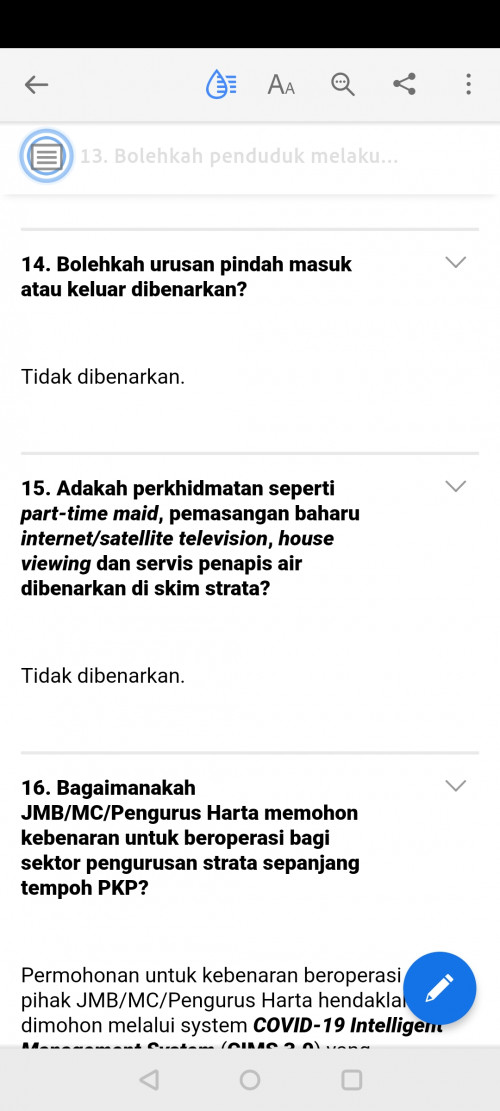 |
|
|
Jun 25 2021, 05:27 PM
Return to original view | Post
#3
|
|
Senior Member
587 posts Joined: Jan 2006
|
QUOTE(fruitie @ Jun 25 2021, 01:59 PM) If high rise, usually no choice but to follow management's rule. Mine also doesn't allow any non-resident to enter now. https://www.kpkt.gov.my/resources/index/Hom...TA_03062021.pdfOur building management follow the guideline from Kementerian Perumahan dan Kerajaan Tempatan So, no choice la. Have to wait..... |
|
|
Jul 9 2021, 10:41 PM
Return to original view | Post
#4
|
|
Senior Member
587 posts Joined: Jan 2006
|
QUOTE(syahpian @ Jul 9 2021, 05:09 PM) anyone using fiberhome router? they update the firmware to SR_V1.03 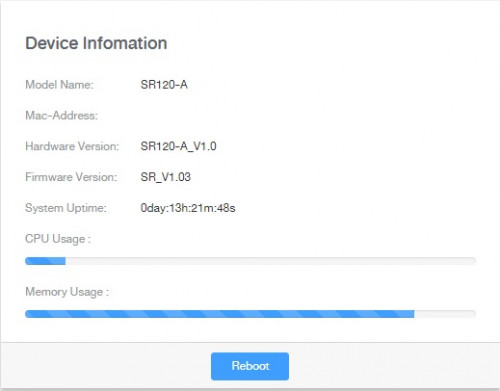 I'm just join the party. I'm getting white Fiberhome modem/btu Anyone here, know how to access the modem web interface.. Curious to know the incoming signal strength.. |
|
|
Aug 9 2021, 10:24 AM
Return to original view | Post
#5
|
|
Senior Member
587 posts Joined: Jan 2006
|
Hi good morning, My Unifi 100mbps just installed recently. One main issue i encountered so far is that my phone is not stable. When talk half way, it will disconnected. When i tried to call back, i can hear the tonne is like connected but at the other end, no ringer tone at all. What has been done so far is, change to another same modem (Fiberhome), phone cable (RJ11), TM bring their spare phone for us to try. Problem still persist even above activities have been done. Before I installed Unifi, my house actually using phone fixed line from TM, has been using for more than 20 years, no issue. Recently Tm just install fiber at my area, so decided to install Unifi. Anyone has any idea what I can do for this case ? This post has been edited by audiocool: Aug 9 2021, 10:26 AM John42 liked this post
|
|
|
Aug 19 2021, 10:22 PM
Return to original view | Post
#6
|
|
Senior Member
587 posts Joined: Jan 2006
|
QUOTE(John42 @ Aug 19 2021, 03:33 PM) That's nice. As what mentioned by the technician, eventhough the Huawei modem is universal type, there might be small sync issue with the OLT from different brand. He told me that there are only 3 OLT brand from unifi which is Alcatel, Huawei and Fibrehome. And since my area just upgraded to fibre a year ago, they are using the Fibrehome OLT and the Fibrehome modem is the newer model from TM. Mine one is having issue on phone since the first day install Unifi (Jun 2021), issue on my phone is the call will auto cut off. I call again, and no ringer tone at the receiver side but i can hear the tone in my phone.Feedback to tm and so far technician check Fiber cable no issue, borrow me a fix line phone, change RJ11 cable, change a new modem (still same brand Fiberhome). Problem still persist. He said he also no idea what is causing the problem. John42 liked this post
|
|
|
Mar 9 2022, 04:50 PM
Return to original view | Post
#7
|
|
Senior Member
587 posts Joined: Jan 2006
|
May i know how do we know that we are getting private IP or public IP from Unifi ? I'm on 300mbps
Is there a IP range specifically for Private IP ? I wonder why i always getting this IP Range 42.189.xxx.xxx no matter how many times i restart my BTU. I knew that Unifi is practicing package lower than 300mbps will get private IP. |
|
|
Mar 10 2022, 02:24 PM
Return to original view | Post
#8
|
|
Senior Member
587 posts Joined: Jan 2006
|
QUOTE(heLL_bOy @ Mar 9 2022, 05:00 PM) log in to your router to check IP address or WAN IP isit match with the current IP The WAN IP showed in my router is the same as current IP.mostly Private IP is 100.xx.xx.xx currently public IP given by TM has been reduced and no longer same like the past that you can keep change different ip range addresss. this happen since mid-January, somehow there are some area not affected by this. Thanks for the clarification. |
|
Topic ClosedOptions
|
| Change to: |  0.5495sec 0.5495sec
 0.75 0.75
 7 queries 7 queries
 GZIP Disabled GZIP Disabled
Time is now: 16th December 2025 - 12:35 PM |
 Quote
Quote