Outline ·
[ Standard ] ·
Linear+
[2020] MacBook Air with M1 Discussion Thread
|
Mavik
|
 Jan 26 2021, 10:06 PM Jan 26 2021, 10:06 PM
|
Patience is a virtue


|
QUOTE(casualscroller @ Jan 26 2021, 07:21 PM) Interesting. I ended up taking my lenovo thunderbolt 3 dock home from work. Connected it to my mba via usb-c, and displayport from dock to monitor. It now outputs the correct resolution - 2560x1440. Hmm your dell 27" native resolution is only 1920x1080? Yes, my Dell 27" is native 1920x1080 (its a 8 year old monitor). But on certain days where I don't need to run two systems, I also connect the Macbook Pro M1 to my Benq EX2780Q monitor which is a 27" 1440p QHD monitor via a direct USB-C cable. My only wish was that the monitor provides power to the MBP M1  Sadly the power delivery of the monitor is around 20-30W only, hence the other port is used for power delivery. |
|
|
|
|
|
Mavik
|
Jan 26 2021, 10:07 PM
|
Patience is a virtue
|
QUOTE(GrimmReaper @ Jan 26 2021, 09:46 PM) Anyone else have this problem with their Macbook air case? The case corners at the hinge are cracked and broken. Bought a no name brand, but now want to buy replacement, they all look the same to me. Will new ones crack too?   I had the same issue with my previous MBA laptops using those unbranded ones. I ended up getting those from the Mac City shop instead which has better quality overall (the clear ones still faced a little bit of discolouring). |
|
|
|
|
|
frostbyte13
|
Jan 28 2021, 01:31 AM
|
Getting Started

|
Have this freaking annoying problem. Just got a new ultrawide monitor with dual HDMI input which I am connecting the MBA through a dock.
Previously on my single input monitor there is no issue to just plug and play. Now, almost everytime if my mac goes to sleep or if switch off the screen, its a nightmare trying to get the monitor to load my mac.
It will always throw me no signal or no just black screen before I have to keep retrying (plug out cable) or switch monitor off-on. Anyone else faced this?
|
|
|
|
|
|
JayC75
|
Jan 28 2021, 11:04 AM
|
|
|
Every time i use my M1 MBA, the screen brightness always go back to default 50% brightness, i already turn off auto brightness and still the same. Anyone of you have similar issue?
|
|
|
|
|
|
davidletterboyz
|
Jan 28 2021, 11:24 AM
|
|
|
QUOTE(frostbyte13 @ Jan 28 2021, 01:31 AM) Have this freaking annoying problem. Just got a new ultrawide monitor with dual HDMI input which I am connecting the MBA through a dock. Previously on my single input monitor there is no issue to just plug and play. Now, almost everytime if my mac goes to sleep or if switch off the screen, its a nightmare trying to get the monitor to load my mac. It will always throw me no signal or no just black screen before I have to keep retrying (plug out cable) or switch monitor off-on. Anyone else faced this? Whoah. So buggy? Why no reviewers ever mentioned this? |
|
|
|
|
|
frostbyte13
|
Jan 28 2021, 12:41 PM
|
Getting Started
|
QUOTE(davidletterboyz @ Jan 28 2021, 11:24 AM) Whoah. So buggy? Why no reviewers ever mentioned this? So I read up yesterday that there is a potential issue with working for ultrawide monitors due to the aspect ratio. That said, I could be experiencing this issue (after troubleshooting with friend) because I have PS4 connected on the 2nd port. Apple seems to acknowledge it & there is a fix on the way just not sure when. Will update as we go. This post has been edited by frostbyte13: Jan 28 2021, 12:42 PM |
|
|
|
|
|
eikozai
|
Jan 28 2021, 06:02 PM
|
|
|
hnmph.. anyone working on heavy Excel files about 150~250MB file?
It seems M1 still incapable to cope with heavy Excel. The loading, saving, and changes updates on cells are taking long time with the color globe spinning for minutes.
I have the Excel file with about 1 million lines per sheet, 6-7 sheets with such enormous data in single file. Mildly coded, as it will hang before i even start codings.
WPS Excel and Microsoft Excel 365 will fail to operate at times. half way savings it freezed and need to be restarted, and lose all works in between.
Opening 4-5 of these enormous files seems tolling on the M1, my CPU temperature can at times, reached up to 85 degrees Celcius. CPU usage however, is relatively low like 15% only.
This post has been edited by eikozai: Jan 28 2021, 06:02 PM
|
|
|
|
|
|
waghyu
|
Jan 28 2021, 06:05 PM
|
|
|
QUOTE(eikozai @ Jan 28 2021, 06:02 PM) hnmph.. anyone working on heavy Excel files about 150~250MB file? It seems M1 still incapable to cope with heavy Excel. The loading, saving, and changes updates on cells are taking long time with the color globe spinning for minutes. I have the Excel file with about 1 million lines per sheet, 6-7 sheets with such enormous data in single file. Mildly coded, as it will hang before i even start codings. WPS Excel and Microsoft Excel 365 will fail to operate at times. half way savings it freezed and need to be restarted, and lose all works in between. Opening 4-5 of these enormous files seems tolling on the M1, my CPU temperature can at times, reached up to 85 degrees Celcius. CPU usage however, is relatively low like 15% only. 150MB excel is always heavy even for multi-core cpu, unless you have Xeon workstation, excel do run multi-threaded. How's your battery usafe span per charge for M1 mac ? |
|
|
|
|
|
eikozai
|
Jan 28 2021, 06:11 PM
|
|
|
QUOTE(waghyu @ Jan 28 2021, 06:05 PM) 150MB excel is always heavy even for multi-core cpu, unless you have Xeon workstation, excel do run multi-threaded. How's your battery usafe span per charge for M1 mac ? Hmm.. really bottlenecked. RAM and CPU really usage not high when running these files. I haven't really monitor it for recent weeks as my MBA remained charged --> MCO at home only so always plugged in. I'll monitor tomorrow and keep you updated on my battery drainage. |
|
|
|
|
|
waghyu
|
Jan 28 2021, 06:21 PM
|
|
|
QUOTE(eikozai @ Jan 28 2021, 06:11 PM) Hmm.. really bottlenecked. RAM and CPU really usage not high when running these files. I haven't really monitor it for recent weeks as my MBA remained charged --> MCO at home only so always plugged in. I'll monitor tomorrow and keep you updated on my battery drainage. Try to drain the battery under normal use. I did quite detail study on this, testing my second M1 Macbook air over this weekend too. What is the content of the excel ? You may want to turn off the auto-calculation option of your excel file. Calculate once you want to only to update cells. |
|
|
|
|
|
eikozai
|
Jan 28 2021, 07:17 PM
|
|
|
QUOTE(waghyu @ Jan 28 2021, 06:21 PM) Try to drain the battery under normal use. I did quite detail study on this, testing my second M1 Macbook air over this weekend too. What is the content of the excel ? You may want to turn off the auto-calculation option of your excel file. Calculate once you want to only to update cells. Good advice.. i think i should turn the plug off when the charge exceeded 80%, and then turned it back on when its reaching 30%. I'll do a full run-through based on 100% battery tomorrow.. Keep you updated with my drainage based on my works usages. I'll try it with auto calculate off and monitor if it will improve the overall experiences, especially the freezing part. |
|
|
|
|
|
waghyu
|
Jan 28 2021, 08:08 PM
|
|
|
QUOTE(eikozai @ Jan 28 2021, 07:17 PM) Good advice.. i think i should turn the plug off when the charge exceeded 80%, and then turned it back on when its reaching 30%. I'll do a full run-through based on 100% battery tomorrow.. Keep you updated with my drainage based on my works usages. I'll try it with auto calculate off and monitor if it will improve the overall experiences, especially the freezing part. They advertise test result using 8 click brightness. You may want to write the time vs remaining % battery say every 15-30 mins, then I'll help you plot this and fit into sort of model. This post has been edited by waghyu: Jan 28 2021, 08:08 PM |
|
|
|
|
|
frostbyte13
|
Jan 28 2021, 11:27 PM
|
Getting Started
|
QUOTE(eikozai @ Jan 28 2021, 06:02 PM) hnmph.. anyone working on heavy Excel files about 150~250MB file? It seems M1 still incapable to cope with heavy Excel. The loading, saving, and changes updates on cells are taking long time with the color globe spinning for minutes. I have the Excel file with about 1 million lines per sheet, 6-7 sheets with such enormous data in single file. Mildly coded, as it will hang before i even start codings. WPS Excel and Microsoft Excel 365 will fail to operate at times. half way savings it freezed and need to be restarted, and lose all works in between. Opening 4-5 of these enormous files seems tolling on the M1, my CPU temperature can at times, reached up to 85 degrees Celcius. CPU usage however, is relatively low like 15% only. If your excel is running a lot of complicated formulas like entire row lookups, its definitely going to feel heavy. Especially if your cells are pulling content from a source everytime it is opened. Even a windows PC struggles. anything beyond 100mb i think the person is just kidding themselves trying to keep doing work in excel. |
|
|
|
|
|
eikozai
|
Jan 29 2021, 12:20 AM
|
|
|
QUOTE(frostbyte13 @ Jan 28 2021, 11:27 PM) If your excel is running a lot of complicated formulas like entire row lookups, its definitely going to feel heavy. Especially if your cells are pulling content from a source everytime it is opened. Even a windows PC struggles. anything beyond 100mb i think the person is just kidding themselves trying to keep doing work in excel. No choice bro, the raw data is just so enormous. Right out from the oven. |
|
|
|
|
|
terryfu
|
Jan 29 2021, 03:03 PM
|
|
|
Hi all.
I saw a few videos on the new M1 chip, and i'm keen to jump on the Macbook bandwagon.
Want to ask any difference in terms of processing power between Macbook Air vs Macbook Pro (13 inch versions) other than the touch bar? If I get the macbook air, will the processing power be the same as the pro version? I cant see much difference when it comes to the specs.
|
|
|
|
|
|
eikozai
|
Jan 29 2021, 03:50 PM
|
|
|
QUOTE(terryfu @ Jan 29 2021, 03:03 PM) Hi all. I saw a few videos on the new M1 chip, and i'm keen to jump on the Macbook bandwagon. Want to ask any difference in terms of processing power between Macbook Air vs Macbook Pro (13 inch versions) other than the touch bar? If I get the macbook air, will the processing power be the same as the pro version? I cant see much difference when it comes to the specs. The difference is at the peak performance. MBA have no active fan to cool it down, hence will experience thermal throttling where your performance cannot sustain at peak performance. For short duration heavy usage MBA is okay, but if you doing heavy works for prolonged period of time, then MBA will not be suitable. MBP the other hand, will be able to sustain usage at peak performance for longer period of time due to the active cooling from the fan. Its harder for MBP to reach high temperature as the fan will constantly cool it down as the temperature rise from heavier computing usage. |
|
|
|
|
|
terryfu
|
Jan 29 2021, 03:54 PM
|
|
|
QUOTE(eikozai @ Jan 29 2021, 03:50 PM) The difference is at the peak performance. MBA have no active fan to cool it down, hence will experience thermal throttling where your performance cannot sustain at peak performance. For short duration heavy usage MBA is okay, but if you doing heavy works for prolonged period of time, then MBA will not be suitable. MBP the other hand, will be able to sustain usage at peak performance for longer period of time due to the active cooling from the fan. Its harder for MBP to reach high temperature as the fan will constantly cool it down as the temperature rise from heavier computing usage. Ah ic. I'm mainly using it for home based stuff like personal finance, trading, photobook creations, and home videos. WIll MBA suffice, or should I go for MBP? I assume speed is the same unless i have prolonged sustained heavy usage? |
|
|
|
|
|
eikozai
|
Jan 29 2021, 05:18 PM
|
|
|
QUOTE(terryfu @ Jan 29 2021, 03:54 PM) Ah ic. I'm mainly using it for home based stuff like personal finance, trading, photobook creations, and home videos. WIll MBA suffice, or should I go for MBP? I assume speed is the same unless i have prolonged sustained heavy usage? MBA is more than sufficient for this. Its already overkill. |
|
|
|
|
|
CheezyWedgez
|
Jan 29 2021, 07:43 PM
|
New Member
|
Hi guys, is the base model 8gb MBA is sufficient for basic photoshop & basic 1080p video editing (After effect/premier pro)? Any feedback would be appreciated 🙏🏻
|
|
|
|
|
|
eikozai
|
Jan 29 2021, 08:01 PM
|
|
|
QUOTE(waghyu @ Jan 28 2021, 08:08 PM) They advertise test result using 8 click brightness. You may want to write the time vs remaining % battery say every 15-30 mins, then I'll help you plot this and fit into sort of model. This is based on 8 click screen brightness. Normal routine working condition, run fully on battery. 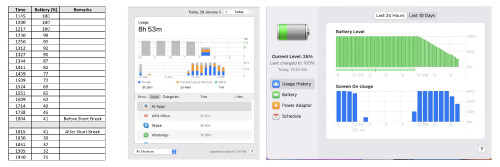 |
|
|
|
|





 Quote
Quote





 0.0285sec
 1.16
1.16
 6 queries
 GZIP Disabled