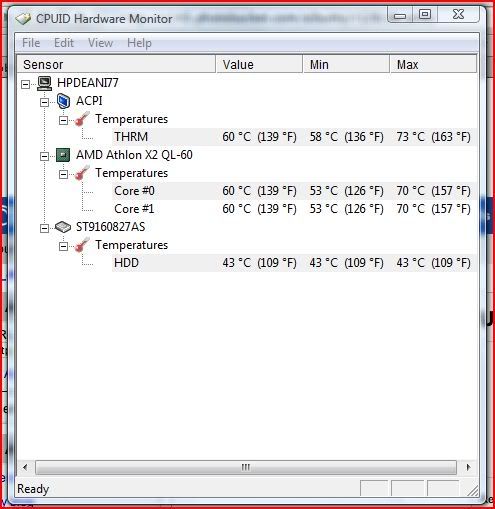
holy shit.. 60C for CPU and Chipset is way too hot..
HP Pavilion Tablet PC TX series, Discussion TX 1000, TX 2000 TX 2500
HP Pavilion Tablet PC TX series, Discussion TX 1000, TX 2000 TX 2500
|
|
 Dec 17 2008, 10:41 PM Dec 17 2008, 10:41 PM
|
 
Senior Member
2,068 posts Joined: Nov 2006  
|
holy shit.. 60C for CPU and Chipset is way too hot..
|
|
|
|
|
|
Dec 18 2008, 12:22 AM
|

Senior Member
1,748 posts Joined: Jul 2006 From: www.thegigabit.com
|
60 is cool enough. mine ex-tx1316au shoot up tp 80deg cel n shut down itself. i sold it after a month used. currently using a intel dual core (not c2d) constantly at 69-73 deg cel range running at full speed with photoshop, broswer, 2 x msn, wmp etc running 24/7. if play games will up to 80+ but dun feel as hot as my old tx. i guess nvidia is the culprit.
|
|
|
Dec 18 2008, 12:32 AM
|

Junior Member
473 posts Joined: Jun 2007
|
QUOTE(Deani_77 @ Dec 17 2008, 09:57 PM) I get this reading on HP Recommended scheme. Without laptop cooler and run only internet browser and ms excel application. Ok, I am using HP recommendation - see the difference as per attached. » Click to show Spoiler - click again to hide... « Item Balance HP Recommend ACPI 88C -> 57C = drop 31C Core0 89C -> 60C = drop 29C Core1 89C -> 60C = drop 29C HDD 52C -> 46C = drop 9C What gives? Average of 30C drop for the internal components. Nevertheless, please note that the given figures are dynamic in nature. This post has been edited by obm_nlh: Dec 18 2008, 12:49 AM |
|
|
Dec 18 2008, 02:52 AM
|

Junior Member
34 posts Joined: Dec 2008
|
QUOTE(Deani_77 @ Dec 17 2008, 09:57 PM) I get this reading on HP Recommended scheme. Without laptop cooler and run only internet browser and ms excel application. you should find an animated website and just leave your browser active and on that page. Those with flash or something.... forgot which site I went to one that has all those highly animated webpages. Just leaving it there my GPU shot up to 110C and stayed there when the page was displayed. Try different websites and see what changes to GPU temp is. If yours max out at around 80C guess your notebook life will last longer than those that goes to 110C. How long will it last?» Click to show Spoiler - click again to hide... «  All down to what are the operating temp our chips are designed to run at. From this website cpu temp Athlon x2 64 should be around 65C dunno if our notebooks are of the same x2 processors. if the CPU/GPU is designed to run at certain temp say 65C and HP let the CPU's/GPU run hotter in their design. This would shorten our notebooks life. Next time I purchase any notebook. If it's this hot i'll pass. It remains to be seen whether I will further purchase from HP. To me it's obvious HP is aware of this design fault by now. Just waiting to see how they respond to it. Added on December 18, 2008, 2:59 am QUOTE(obm_nlh @ Dec 18 2008, 12:32 AM) Ok, I am using HP recommendation - see the difference as per attached. I would think that you should be able to set performance to High and temperatures should remain close to designed operating temperatures of chips, rather than just HP Recommended setting.» Click to show Spoiler - click again to hide... « Item Balance HP Recommend ACPI 88C -> 57C = drop 31C Core0 89C -> 60C = drop 29C Core1 89C -> 60C = drop 29C HDD 52C -> 46C = drop 9C What gives? Average of 30C drop for the internal components. Nevertheless, please note that the given figures are dynamic in nature. The different settings should be only to preserve battery life while giving adequate performance. And not to keep the chips cool although it has that effect. The design of the notebook should keep temperatures in/close to spec. This post has been edited by yiks001: Dec 18 2008, 02:59 AM |
|
|
Dec 18 2008, 10:04 AM
|
|
Junior Member
473 posts Joined: Jun 2007
|
On a lighter note, has anyone used the Expansion port option?
|
|
|
Dec 18 2008, 11:48 AM
|
|
Junior Member
34 posts Joined: Dec 2008
|
QUOTE(obm_nlh @ Dec 18 2008, 10:04 AM) On a lighter note, has anyone used the Expansion port option? expansion port can be used with HP docking station only right?Nope...didn't get the docking station. |
|
|
|
|
|
Dec 18 2008, 03:23 PM
|
|
Junior Member
473 posts Joined: Jun 2007
|
QUOTE(yiks001 @ Dec 18 2008, 11:48 AM) expansion port can be used with HP docking station only right? The existing one from HP is having slotted port from the bottom. Since TX and other newer HP, are having side Expansion port, I am wondering which one of the expansion option is suitable for our TX. Nope...didn't get the docking station. Can Anyone summarise the recommended operating temperatures for AMD CPUs? I need to look into this.. need to use the table for monitoring purposes. |
|
|
Dec 19 2008, 03:07 AM
|
|
Junior Member
34 posts Joined: Dec 2008
|
Didn't believe news about nvidia chips having problems initially, tot they were contrived by competitors. until my tx1316au had problems. nvidia faulty GPUs nvidia has allocated finances to fix issue....dunno if adequate..... Still waiting from HP to fix..... wonder will they just replace with another faulty nvidia GPU or what?..... One thing for sure. Once I get back the notebook...it's gonna be so stresss tested.... |
|
|
Dec 19 2008, 09:08 AM
|
|
Junior Member
473 posts Joined: Jun 2007
|
QUOTE(yiks001 @ Dec 19 2008, 03:07 AM) Didn't believe news about nvidia chips having problems initially, tot they were contrived by competitors. until my tx1316au had problems. Wah, that's a good article to read. Thanks. nvidia faulty GPUs nvidia has allocated finances to fix issue....dunno if adequate..... Still waiting from HP to fix..... wonder will they just replace with another faulty nvidia GPU or what?..... One thing for sure. Once I get back the notebook...it's gonna be so stresss tested.... It's really scary to know that we have these not properly tested products out there. Maybe, it need as so-called "Melamine" epidemic to get the manafacturers listen to their ENG/QC Departments properly. Think about the technology not the books for once. So, you need to wait for the amatured technology only before adopting the new one eh? Phew, mine is ATI HD 3200. I don't know whether that one has any reported problem or not? This post has been edited by obm_nlh: Dec 19 2008, 09:56 AM |
|
|
Dec 19 2008, 11:45 AM
|
|
Junior Member
34 posts Joined: Dec 2008
|
QUOTE(obm_nlh @ Dec 19 2008, 09:08 AM) Wah, that's a good article to read. Thanks. But it's so interesting....maybe worth the notebook dying early too.... what with terms like 'Temperature of Glassification' ooo.... so hi tech....It's really scary to know that we have these not properly tested products out there. Maybe, it need as so-called "Melamine" epidemic to get the manafacturers listen to their ENG/QC Departments properly. Think about the technology not the books for once. So, you need to wait for the amatured technology only before adopting the new one eh? Phew, mine is ATI HD 3200. I don't know whether that one has any reported problem or not? wait for matured tech....no i doubt it........these are matured tech already....... Think this occurred coz of sloppy engineering or most likely mistake compounded by cost issues.... like 'Oh I have so many of these expensive faulty materials...what do i do?' 'Iknow.... We just sell it !!!' ' Oh...what a great idea!' But to me...(this is just conjecture...) I tend towards espionage..... nvidia and intel are at odds..... dunno since when..... Intel with their money and might... I would think they could just pay someone to err... make a mistake..... Intel does not operate that ethically too if you look at the time when AMD had the upper hand in cpu performance.... This post has been edited by yiks001: Dec 19 2008, 11:45 AM |
|
|
Dec 19 2008, 12:57 PM
|
|
Junior Member
473 posts Joined: Jun 2007
|
QUOTE(yiks001 @ Dec 19 2008, 11:45 AM) But it's so interesting....maybe worth the notebook dying early too.... what with terms like 'Temperature of Glassification' ooo.... so hi tech.... hehehehe, i like the underdog.. especially when they have the right solution..wait for matured tech....no i doubt it........these are matured tech already....... Think this occurred coz of sloppy engineering or most likely mistake compounded by cost issues.... like 'Oh I have so many of these expensive faulty materials...what do i do?' 'Iknow.... We just sell it !!!' ' Oh...what a great idea!' But to me...(this is just conjecture...) I tend towards espionage..... nvidia and intel are at odds..... dunno since when..... Intel with their money and might... I would think they could just pay someone to err... make a mistake..... Intel does not operate that ethically too if you look at the time when AMD had the upper hand in cpu performance.... |
|
|
Dec 29 2008, 06:06 PM
|
|
Junior Member
8 posts Joined: Nov 2008
|
hey guys,
i owned tx1000 series laptop and just today a problem occured after i watched a dvd movie i ejected the dvd from windows explorer by right clicking in the dvd drive and select eject after that i am trying to insert another dvd movie but it doesn't start after i checked in my computer and device manager my dvd drive is gone? does anybody ever have that same problems? |
|
|
Dec 30 2008, 07:07 PM
|

Junior Member
9 posts Joined: Dec 2008
|
seems there r a lot temperature issue on hp tx ..2032au got this kind of problem or not ah?noob here
|
|
|
|
|
|
Dec 30 2008, 09:00 PM
|
|
Junior Member
345 posts Joined: Apr 2005 From: Kajang
|
hp tx2000/tx2500 series are way much better than tx1000 series, far less issues, or if you wait for the upcoming tx2700 series with multi touch
 |
|
|
Dec 31 2008, 03:42 AM
|
|
Junior Member
34 posts Joined: Dec 2008
|
QUOTE(jsnkok @ Dec 30 2008, 09:00 PM) hp tx2000/tx2500 series are way much better than tx1000 series, far less issues, or if you wait for the upcoming tx2700 series with multi touch tx2000 uses the same chipset with tx1000. So i guess it would be the same....unless they improved on it(ie. better cooling) or they use good nvidia chips.... who knows....but in the time frame the issue with bad nvidia chips i think the tx2000 is affected too. Any tx2000 users can report max temperature chipsets can hit.?tx2500 on the other hand uses Amd chipsets( ie both CPU and North/South Bridge are AMD) so with luck these should offer less problems.... P/S Got a call from HP today. Can collect my tx1316au already.sent in on 16 Dec 08. With all the news of bad nvidia chips can't depend much on this notebook. Guess I'll relegate to downloading and browsing for the time being. This post has been edited by yiks001: Dec 31 2008, 03:43 AM |
|
|
Jan 1 2009, 03:23 AM
|

Senior Member
1,048 posts Joined: Aug 2007 
|
erm i heard my fren said lowyatt plazza selling RM 3999 for TX 1000. due to no more production in tx 1000. so they selling as limitted edition. dunno real or not.
btw, im using my tx1221au, already 1.5 year. no problem at all so far. never format before so far. juz temperature lil bit high sometimes when in gaming or high application. |
|
|
Jan 1 2009, 10:15 AM
|
|
Junior Member
473 posts Joined: Jun 2007
|
QUOTE(Travies @ Jan 1 2009, 03:23 AM) erm i heard my fren said lowyatt plazza selling RM 3999 for TX 1000. due to no more production in tx 1000. so they selling as limitted edition. dunno real or not. That's a tad expensive. TX2000 series has a better display.. Yep, be careful with the Nvidia chipset. I'm running my ATI chipset on HP recommended settings nowdays. btw, im using my tx1221au, already 1.5 year. no problem at all so far. never format before so far. juz temperature lil bit high sometimes when in gaming or high application. |
|
|
Jan 1 2009, 08:24 PM
|

Senior Member
2,084 posts Joined: Jul 2005
|
my TX back to HP for repair. First the synthetic pad is behaving weird. out of nowhere, the mouse will move to the START button and stay there. Gotta wait for a while before i can use the mouse again. then the Wifi stop working.
Send back last week. Was told HP ordered a new board and still waiting. Anyone have the same problem? |
|
|
Jan 1 2009, 08:49 PM
|
|
Junior Member
473 posts Joined: Jun 2007
|
QUOTE(demio121 @ Jan 1 2009, 08:24 PM) my TX back to HP for repair. First the synthetic pad is behaving weird. out of nowhere, the mouse will move to the START button and stay there. Gotta wait for a while before i can use the mouse again. then the Wifi stop working. Which TX series is this? TX100, TX200, TX2500, TX2600 ... or TX2? heheheheheeheSend back last week. Was told HP ordered a new board and still waiting. Anyone have the same problem? |
|
|
Jan 1 2009, 10:03 PM
|
|
Senior Member
2,084 posts Joined: Jul 2005
|
QUOTE(obm_nlh @ Jan 1 2009, 08:49 PM) Which TX series is this? TX100, TX200, TX2500, TX2600 ... or TX2? heheheheheehe ops... TX1221AU. |
| Change to: |  0.0273sec 0.0273sec
 0.67 0.67
 6 queries 6 queries
 GZIP Disabled GZIP Disabled
Time is now: 10th December 2025 - 03:56 PM |
 Quote
Quote