Welcome Guest ( Log In | Register )

Outline · [ Standard ] · Linear+

 HP Pavilion Tablet PC TX series, Discussion TX 1000, TX 2000 TX 2500

views
     
yiks001
post Dec 16 2008, 11:30 PM

New Member
*
Junior Member
34 posts

Joined: Dec 2008
QUOTE(NeO2 @ Nov 29 2008, 03:20 PM)
does any1 have problem with the wireless? Recently, my laptop suddenly cannot find the wireless adapter. It says there is no driver installed. o.o!
*
My tx1316au just died. When try to power on. LIghts light up but never reach BIOS screen. Just black screen. Looks like a common occurrence with this series of notebook. Reading on forums elsewhere , lotsa tx1000 series users are having same problem. Looks like the hot operation of this notebook shortens it's life and/or a faulty nvidia chipset. Wireless disappearing marks the beginning of your troubles....


Since this thread has quite a lot of users some time ago..... anybody else having this issue with their tx1000???

This post has been edited by yiks001: Dec 16 2008, 11:37 PM
yiks001
post Dec 17 2008, 02:03 PM

New Member
*
Junior Member
34 posts

Joined: Dec 2008
QUOTE(obm_nlh @ Dec 17 2008, 09:44 AM)
1st model, normal still have some bugs.. especially after just over one year in operation.  I've already upgrade my TX1015 to TX2550.  Worth the money.. Good to have an active screen.  But HP yet to fix the outdoor glaring problem.  Need to wait until TX2 is released in Malaysia.
*
Is HP offering an upgrade to existing tx1000 series users???
yiks001
post Dec 17 2008, 03:45 PM

New Member
*
Junior Member
34 posts

Joined: Dec 2008
QUOTE(obm_nlh @ Dec 17 2008, 02:59 PM)
Whether HP really gives upgrade path, it's still up to HP to clarify this. 

From my observations, TX1000 and TX2000 are really different babies from HP.  The latter having active touch screen.  Now, I really hate the one that's given on the earlier model (TX1000).  Upgrade path, I think just to buy a new unit.  Mind you, TX2000 series already up to TX2500/2600 variant which use different processors. 

Maybe you need to wait for the current model, TX2.  Hopefully, by next year, it will be reaching our shores .. maybe by one of the tongkang from USA.  Hehehehehehe..
*
Thanks for the info.
Unfortunately I bought extended warranty on my tx1316au. So gotta suffer with it for another 2 over years.


yiks001
post Dec 17 2008, 05:36 PM

New Member
*
Junior Member
34 posts

Joined: Dec 2008
QUOTE(arturo_bandini @ Dec 17 2008, 04:37 PM)
if you're thinking of buying this family of tablet pcs, you should seriously reconsider.

google "wireless not detected hp tx" or something like that and you will understand... for starters, visit this thread:
http://forums11.itrc.hp.com/service/forums...hreadId=1190592

apparently, the heat generated by amd cpus is too much for the motherboard - the wireless card will die first, then your motherboard. if you have this model and it has still not died yet, then perhaps you are lucky, or simply haven't used it as much as everybody else. (i often heard unexplained "beep" sounds, like hardware/memory error sound, when using mine.)
*
When I started having intermittent display problems. I ran monitoring software on the tx1316au. I see temperatures can shoot up to 70/80C for CPU. And GPU goes to 110C.. !!!!! shocker!!! Just by leaving an animated browser page open. So If your tx1000 series notebook is out of warranty.... close your browsers rather than just leave it running.

I would think the Graphics Processor (GPU) is generating the most heat and is the chip that died. What with all the intermittent screen corruptions before the final death.

Would like to see how HP handles the warranty before I purchase another product from them.


yiks001
post Dec 17 2008, 07:07 PM

New Member
*
Junior Member
34 posts

Joined: Dec 2008
QUOTE(Deani_77 @ Dec 17 2008, 06:53 PM)
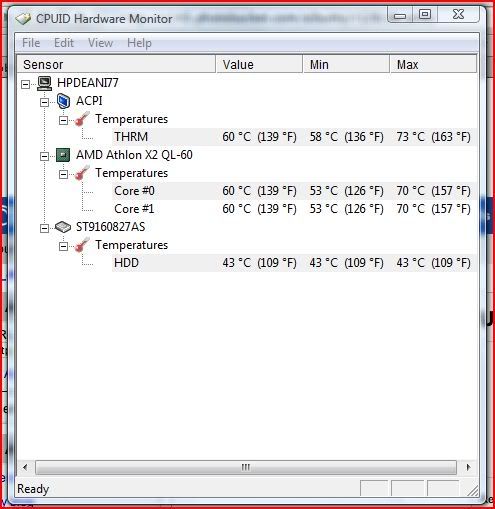
What software you use to monitor those temperature? Or it was a built-in software?
*
there's two i used while browsing forums about the problem.

One is
HWMonitor

The other one, which I found more useful.... I forgot.... coz it's in my notebook harddisk.


Rgds
yiks001
post Dec 17 2008, 07:36 PM

New Member
*
Junior Member
34 posts

Joined: Dec 2008
QUOTE(obm_nlh @ Dec 17 2008, 07:22 PM)
Thanks from me too.. Now, may need to slow down the TX.. Hopefully, no bad report for my TX2550..
*
ahh... Tx2550... that's with Ati 780G chipset.....doubt that will have problems....i think... WOuld be nice to know what temperatures you're getting too.... post if u have it thanks....

P/S the HWmonitor program you need to run as administrator else it can't get any info.


yiks001
post Dec 17 2008, 08:16 PM

New Member
*
Junior Member
34 posts

Joined: Dec 2008
QUOTE(obm_nlh @ Dec 17 2008, 07:55 PM)
Yep, it's working.. here's the info as requested - I'm running under Balance mode (in air-cond room). 

» Click to show Spoiler - click again to hide... «

*
Thanks.....Wonder if ACPI is the chipset/graphics temperature...

Guess that's why I tried the other temperature monitor software....

just found it.....as below:

Almico Speedfan

yiks001
post Dec 18 2008, 02:52 AM

New Member
*
Junior Member
34 posts

Joined: Dec 2008
QUOTE(Deani_77 @ Dec 17 2008, 09:57 PM)
I get this reading on HP Recommended scheme. Without laptop cooler and run only internet browser and ms excel application.

» Click to show Spoiler - click again to hide... «

*
you should find an animated website and just leave your browser active and on that page. Those with flash or something.... forgot which site I went to one that has all those highly animated webpages. Just leaving it there my GPU shot up to 110C and stayed there when the page was displayed. Try different websites and see what changes to GPU temp is. If yours max out at around 80C guess your notebook life will last longer than those that goes to 110C. How long will it last?

All down to what are the operating temp our chips are designed to run at.
From this website
cpu temp
Athlon x2 64 should be around 65C dunno if our notebooks are of the same x2 processors.

if the CPU/GPU is designed to run at certain temp say 65C and HP let the CPU's/GPU run hotter in their design. This would shorten our notebooks life.

Next time I purchase any notebook. If it's this hot i'll pass.

It remains to be seen whether I will further purchase from HP.
To me it's obvious HP is aware of this design fault by now. Just waiting to see how they respond to it.


Added on December 18, 2008, 2:59 am
QUOTE(obm_nlh @ Dec 18 2008, 12:32 AM)
Ok, I am using HP recommendation - see the difference as per attached. 

» Click to show Spoiler - click again to hide... «


Item  Balance    HP Recommend
ACPI  88C      -> 57C = drop 31C
Core0 89C      -> 60C = drop 29C
Core1 89C      -> 60C = drop 29C
HDD  52C      -> 46C = drop 9C

What gives? Average of 30C drop for the internal components.  Nevertheless, please note that the given figures are dynamic in nature.
*
I would think that you should be able to set performance to High and temperatures should remain close to designed operating temperatures of chips, rather than just HP Recommended setting.

The different settings should be only to preserve battery life while giving adequate performance. And not to keep the chips cool although it has that effect. The design of the notebook should keep temperatures in/close to spec.


This post has been edited by yiks001: Dec 18 2008, 02:59 AM

yiks001
post Dec 18 2008, 11:48 AM

New Member
*
Junior Member
34 posts

Joined: Dec 2008
QUOTE(obm_nlh @ Dec 18 2008, 10:04 AM)
On a lighter note, has anyone used the Expansion port option?
*
expansion port can be used with HP docking station only right?
Nope...didn't get the docking station.

yiks001
post Dec 19 2008, 03:07 AM

New Member
*
Junior Member
34 posts

Joined: Dec 2008

Didn't believe news about nvidia chips having problems initially, tot they were contrived by competitors. until my tx1316au had problems.

nvidia faulty GPUs

nvidia has allocated finances to fix issue....dunno if adequate.....

Still waiting from HP to fix..... wonder will they just replace with another faulty nvidia GPU or what?.....
One thing for sure. Once I get back the notebook...it's gonna be so stresss tested....


yiks001
post Dec 19 2008, 11:45 AM

New Member
*
Junior Member
34 posts

Joined: Dec 2008
QUOTE(obm_nlh @ Dec 19 2008, 09:08 AM)
Wah, that's a good article to read.  Thanks. 

It's really scary to know that we have these not properly tested products out there.  Maybe, it need as so-called "Melamine" epidemic to get the manafacturers listen to their ENG/QC Departments properly.  Think about the technology not the books for once. 

So, you need to wait for the amatured technology only before adopting the new one eh?

Phew, mine is ATI HD 3200.  I don't know whether that one has any reported problem or not?
*
But it's so interesting....maybe worth the notebook dying early too.... what with terms like 'Temperature of Glassification' ooo.... so hi tech....

wait for matured tech....no i doubt it........these are matured tech already.......

Think this occurred coz of sloppy engineering or most likely mistake compounded by cost issues.... like
'Oh I have so many of these expensive faulty materials...what do i do?'
'Iknow.... We just sell it !!!'
' Oh...what a great idea!'

But to me...(this is just conjecture...) I tend towards espionage..... nvidia and intel are at odds..... dunno since when..... Intel with their money and might... I would think they could just pay someone to err... make a mistake.....
Intel does not operate that ethically too if you look at the time when AMD had the upper hand in cpu performance....

This post has been edited by yiks001: Dec 19 2008, 11:45 AM
yiks001
post Dec 31 2008, 03:42 AM

New Member
*
Junior Member
34 posts

Joined: Dec 2008
QUOTE(jsnkok @ Dec 30 2008, 09:00 PM)
hp tx2000/tx2500 series are way much better than tx1000 series, far less issues, or if you wait for the upcoming tx2700 series with multi touch smile.gif
*
tx2000 uses the same chipset with tx1000. So i guess it would be the same....unless they improved on it(ie. better cooling) or they use good nvidia chips.... who knows....but in the time frame the issue with bad nvidia chips i think the tx2000 is affected too. Any tx2000 users can report max temperature chipsets can hit.?

tx2500 on the other hand uses Amd chipsets( ie both CPU and North/South Bridge are AMD) so with luck these should offer less problems....

P/S Got a call from HP today. Can collect my tx1316au already.sent in on 16 Dec 08. With all the news of bad nvidia chips can't depend much on this notebook. Guess I'll relegate to downloading and browsing for the time being.

This post has been edited by yiks001: Dec 31 2008, 03:43 AM
yiks001
post Jan 2 2009, 11:20 PM

New Member
*
Junior Member
34 posts

Joined: Dec 2008
Just FYI: AMD Turion TK55 Max Temperature is 95C

Taken from site below:
AMD Turion Temps

Anybody find info on Max temperature of 6150
?????

So we now know that if your AMD CPU hits 95C you're headed for trouble. It also means bad design of notebook if its allowed to hit that temperature. Or maybe a failed fan.

really really interested with the temps for 6150
but unofficially i read the forums indicating nvidia's own software monitoring warn level set at 130C. SO hitting 110C while just on an animated browser page is cause for concern.


This post has been edited by yiks001: Jan 2 2009, 11:32 PM
yiks001
post Jan 5 2009, 11:54 PM

New Member
*
Junior Member
34 posts

Joined: Dec 2008
QUOTE(Travies @ Jan 5 2009, 10:19 PM)
u went to bukit damansara service center? my wifi signal missing too. going to service center these few days. provide me more info pls bro... thanks
*
I think they have their procedures to go through. Just send in your unit for repair. You might try and wait for a technician to service you or just leave your notebook there.

The first time I went I just went to the fast drop off coz it was about closing already. If you maybe go there lunchtime or earlier and are prepared to wait. There might be a chance that they might be able to fix it for you there and then... I still am not certain what they did. Either flash bios or totally changed mobo. I think they changed my mobo. So it's running fine now. But like I said...they don't say much of what they did to my unit.


First time I send it in. They say have to wait for new mobo to arrive. so it took sometime. Today... was instant !!! :-)

Good Luck....

Oh... ya it's the Bukit Damansara Service Center.

P/S it's quite packed during lunchtime so go earlier


This post has been edited by yiks001: Jan 5 2009, 11:57 PM
yiks001
post Jan 6 2009, 02:12 AM

New Member
*
Junior Member
34 posts

Joined: Dec 2008
QUOTE(Travies @ Jan 6 2009, 01:04 AM)
wat time going is the best? open from 9pm till 5pm? do we have to follow any procedure? got lunch hour? if leave the laptop there will we need to leave our laptop bag there as well? go which counter, do u still remember? so now ur wireless working well rite??
*
think they open 10am to 6pm... maybe open earlier.
Procedure??? well, go there park at their free car park. on entrance click submit equipment on terminal to get a number. Choose a nice seat with table then wait. Maybe get some free coffee(i think). Think they'll be a staff roaming around checking on customers. Depending on how busy their technicians are he'll probably ask you to leaf your notebook at fast drop off counter. Or you can go to the fast drop off counter yourself if u dun want to wait. Best if you can see a technician and explain things. There's a chance he just fix it there and then ....maybe.....

Quite a comfy place to wait if you got nowhere else to be.....


yiks001
post Jan 22 2009, 12:31 AM

New Member
*
Junior Member
34 posts

Joined: Dec 2008
QUOTE(ChillyPepper @ Jan 21 2009, 08:06 PM)
Does the disappearance of the Wireless Adapter usually lead to the ultimate kaboom of the motherboard?

My friend's TX1000's wireless adapter disappeared, tried reinstalling the drivers and all but nothing seem to be working. Checked HP Centre Forum, seems that it usually leads to motherboard kabooming. Does anyone know how much they charge for the motherboard?

Any temporary solutions to the disappearing wireless adapter? CNY coming soon.
*
It is usually linked to a dying chipset.

You could try getting another wireless mini PCIE adapter. Chances are it would not help.
Best solution is to get a USB wifi modem for the moment.

When/If your mobo dies. Try and see if you are able to replace with a TX2500 mobo from HP. If that is at all possible. Coz TX2500 not using nvidia chipset so might stand a better chance of it lasting longer.

I know I would buy a TX2500 mobo if not too expensive. as long as the connectors to the LCD is the same I'd get that even if It can't fit the TX1000 case. Basically use it as a desktop then Look for another notebook to buy. haha


yiks001
post Feb 26 2009, 10:47 PM

New Member
*
Junior Member
34 posts

Joined: Dec 2008
QUOTE(obm_nlh @ Feb 17 2009, 11:07 AM)
Well, we been discussing on TX1000 series and its shortcoming for awhile.  On our part as customers, we need to inform each other on issues to be aware of.  So, keep in touch with LYN's forums.
*
Think the issue here is to discuss the way HP is treating it's customers who bought the tx1000 and tx2000 series.....As customers who got shanked by HP I'm surprised you're still talking about their new notebooks..... especially on this thread.....

Am I missing something here????/!!!!!

This post has been edited by yiks001: Feb 26 2009, 10:49 PM
yiks001
post Feb 27 2009, 12:09 AM

New Member
*
Junior Member
34 posts

Joined: Dec 2008
QUOTE(Deani_77 @ Feb 26 2009, 11:30 PM)
I think there is no problem discussing it here since the newer model spec almost the same... perhaps they also will faced the same problem as ours....
*
You miss my point. I'm saying that HP shafted their customers who bought the tx1000 series. And I believe even obm_nlh to a certain extent. But he can even go on talking about HP's new notebooks. Looks like he got no qualms buying from HP again. He's like saying to HP It's OK to sell a faulty product to customers We'll still buy from you. Huh... I dunno but from what I read thats what it looks like..... Even If obm_nlh didn't get the full brunt of the faulty tx1000s he should be more aware of HP's ethics and I dunno... I believe the right thing to do is to steer ppl away from HP. Instead he does the exact opposite.

Isn't this a bad example to set as what a customer should behave. If HP read this I bet it encourages them not to worry about quality even more.....

In fact I'd like to find out the fellas running HP right now and avoid companies that these ppl work for.


This post has been edited by yiks001: Feb 27 2009, 12:12 AM
yiks001
post Feb 27 2009, 12:40 AM

New Member
*
Junior Member
34 posts

Joined: Dec 2008
QUOTE(Kuntau @ Feb 27 2009, 12:15 AM)
Evolution dude.. evolution. 20 years ago Proton can't even make their own engine. Everything going through this process. No old, no new. No bug, no solution. This is a problem faced by all brand not just HP.

You can't pleased everyone do you?
*
Well, If someone sticks me in the back. I'll put more effort not to expose my back to the same person If I'm gonna stand a chance to evolve.

Don't you think so?
yiks001
post Feb 27 2009, 01:15 AM

New Member
*
Junior Member
34 posts

Joined: Dec 2008
QUOTE(Kuntau @ Feb 27 2009, 12:49 AM)
The thing is... that is person is your best bet to provide money for value. If other tablet maker company can beat HP sure we'll all run to them. But as for now.. no one, or you want to spend 5k+ for your tablet? Love it, or hate it.
*
Ok, this is more interesting. You mean to tell me even if HP sold you a faulty notebook. As long as they can provide a new notebook that's value for money ('spec wise') It's ok.?

So you buy a RM3000 notebook. And 1 year later it dies. And you know from various sources that it's due to faulty manufacturing. So you have to buy another Rm3000 notebook this time with better specs from same HP. So that makes it RM6000 for one usable so so notebook..... Is that value for money?? erm... that's more than 5k+ already...... true or not...??? Only value if you change your notebook every year or less.....

In hindsight. With HP's quality... It would have been better to spend 5k+ on another brand....after all you gonna spend RM6k plus if you go the HP way.


This post has been edited by yiks001: Feb 27 2009, 01:18 AM

2 Pages  1 2 >Top
 

Change to:
| Lo-Fi Version
0.0224sec    0.16    7 queries    GZIP Disabled
Time is now: 7th December 2025 - 05:03 AM