Outline ·
[ Standard ] ·
Linear+
HP Pavilion Tablet PC TX series, Discussion TX 1000, TX 2000 TX 2500
|
TSTravies
|
 Nov 26 2008, 09:58 PM Nov 26 2008, 09:58 PM
|

|
QUOTE(ESP @ Nov 26 2008, 06:22 PM) hi all, i'm newbie just bought the tx1000 series 2nd hand i'm wondering is the camera of this laptop so dark? or is it just mine? anybody could enlighten me? thx do u mean the web camera? it's 1.3megapixel.. quite dark if u are in dim environment, i think is about that lar.. |
|
|
|
|
|
ESP
|
Nov 27 2008, 01:49 PM
|
New Member

|
QUOTE(Travies @ Nov 26 2008, 08:58 PM) do u mean the web camera? it's 1.3megapixel.. quite dark if u are in dim environment, i think is about that lar.. i meant, when i am video calling using skype i see my own video is quite dark and the the other person also told the same okay, maybe i'll try again tonight in more light environment thx anyway |
|
|
|
|
|
Sphenix
|
Nov 27 2008, 04:49 PM
|
|
|
do u guys know which link to check warranty status instead of this link http://www11.itrc.hp.com/service/ewarranty/warrantyInput.do? |
|
|
|
|
|
NeO2
|
Nov 29 2008, 03:20 PM
|
|
|
does any1 have problem with the wireless? Recently, my laptop suddenly cannot find the wireless adapter. It says there is no driver installed. o.o!
|
|
|
|
|
|
yiks001
|
Dec 16 2008, 11:30 PM
|
New Member
|
QUOTE(NeO2 @ Nov 29 2008, 03:20 PM) does any1 have problem with the wireless? Recently, my laptop suddenly cannot find the wireless adapter. It says there is no driver installed. o.o! My tx1316au just died. When try to power on. LIghts light up but never reach BIOS screen. Just black screen. Looks like a common occurrence with this series of notebook. Reading on forums elsewhere , lotsa tx1000 series users are having same problem. Looks like the hot operation of this notebook shortens it's life and/or a faulty nvidia chipset. Wireless disappearing marks the beginning of your troubles.... Since this thread has quite a lot of users some time ago..... anybody else having this issue with their tx1000??? This post has been edited by yiks001: Dec 16 2008, 11:37 PM |
|
|
|
|
|
obm_nlh
|
Dec 17 2008, 09:44 AM
|
|
|
QUOTE(yiks001 @ Dec 16 2008, 11:30 PM) Since this thread has quite a lot of users some time ago..... anybody else having this issue with their tx1000??? 1st model, normal still have some bugs.. especially after just over one year in operation. I've already upgrade my TX1015 to TX2550. Worth the money.. Good to have an active screen. But HP yet to fix the outdoor glaring problem. Need to wait until TX2 is released in Malaysia. |
|
|
|
|
|
yiks001
|
Dec 17 2008, 02:03 PM
|
New Member
|
QUOTE(obm_nlh @ Dec 17 2008, 09:44 AM) 1st model, normal still have some bugs.. especially after just over one year in operation. I've already upgrade my TX1015 to TX2550. Worth the money.. Good to have an active screen. But HP yet to fix the outdoor glaring problem. Need to wait until TX2 is released in Malaysia. Is HP offering an upgrade to existing tx1000 series users??? |
|
|
|
|
|
obm_nlh
|
Dec 17 2008, 02:59 PM
|
|
|
QUOTE(yiks001 @ Dec 17 2008, 02:03 PM) Is HP offering an upgrade to existing tx1000 series users??? Whether HP really gives upgrade path, it's still up to HP to clarify this. From my observations, TX1000 and TX2000 are really different babies from HP. The latter having active touch screen. Now, I really hate the one that's given on the earlier model (TX1000). Upgrade path, I think just to buy a new unit. Mind you, TX2000 series already up to TX2500/2600 variant which use different processors. Maybe you need to wait for the current model, TX2. Hopefully, by next year, it will be reaching our shores .. maybe by one of the tongkang from USA. Hehehehehehe.. This post has been edited by obm_nlh: Dec 17 2008, 03:06 PM |
|
|
|
|
|
yiks001
|
Dec 17 2008, 03:45 PM
|
New Member
|
QUOTE(obm_nlh @ Dec 17 2008, 02:59 PM) Whether HP really gives upgrade path, it's still up to HP to clarify this. From my observations, TX1000 and TX2000 are really different babies from HP. The latter having active touch screen. Now, I really hate the one that's given on the earlier model (TX1000). Upgrade path, I think just to buy a new unit. Mind you, TX2000 series already up to TX2500/2600 variant which use different processors. Maybe you need to wait for the current model, TX2. Hopefully, by next year, it will be reaching our shores .. maybe by one of the tongkang from USA. Hehehehehehe.. Thanks for the info. Unfortunately I bought extended warranty on my tx1316au. So gotta suffer with it for another 2 over years. |
|
|
|
|
|
obm_nlh
|
Dec 17 2008, 03:56 PM
|
|
|
QUOTE(yiks001 @ Dec 17 2008, 03:45 PM) Thanks for the info. Unfortunately I bought extended warranty on my tx1316au. So gotta suffer with it for another 2 over years. Well, you can still get another one.. Like me, maybe just say to give it to the kids and get yourself a new one.. hehehehehehe.. |
|
|
|
|
|
arturo_bandini
|
Dec 17 2008, 04:37 PM
|
Getting Started
|
if you're thinking of buying this family of tablet pcs, you should seriously reconsider. google "wireless not detected hp tx" or something like that and you will understand... for starters, visit this thread: http://forums11.itrc.hp.com/service/forums...hreadId=1190592apparently, the heat generated by amd cpus is too much for the motherboard - the wireless card will die first, then your motherboard. if you have this model and it has still not died yet, then perhaps you are lucky, or simply haven't used it as much as everybody else. (i often heard unexplained "beep" sounds, like hardware/memory error sound, when using mine.) |
|
|
|
|
|
yiks001
|
Dec 17 2008, 05:36 PM
|
New Member
|
QUOTE(arturo_bandini @ Dec 17 2008, 04:37 PM) if you're thinking of buying this family of tablet pcs, you should seriously reconsider. google "wireless not detected hp tx" or something like that and you will understand... for starters, visit this thread: http://forums11.itrc.hp.com/service/forums...hreadId=1190592apparently, the heat generated by amd cpus is too much for the motherboard - the wireless card will die first, then your motherboard. if you have this model and it has still not died yet, then perhaps you are lucky, or simply haven't used it as much as everybody else. (i often heard unexplained "beep" sounds, like hardware/memory error sound, when using mine.) When I started having intermittent display problems. I ran monitoring software on the tx1316au. I see temperatures can shoot up to 70/80C for CPU. And GPU goes to 110C.. !!!!! shocker!!! Just by leaving an animated browser page open. So If your tx1000 series notebook is out of warranty.... close your browsers rather than just leave it running. I would think the Graphics Processor (GPU) is generating the most heat and is the chip that died. What with all the intermittent screen corruptions before the final death. Would like to see how HP handles the warranty before I purchase another product from them. |
|
|
|
|
|
Deani_77
|
Dec 17 2008, 06:53 PM
|
|
|
QUOTE(yiks001 @ Dec 17 2008, 05:36 PM) When I started having intermittent display problems. I ran monitoring software on the tx1316au. I see temperatures can shoot up to 70/80C for CPU. And GPU goes to 110C.. !!!!! shocker!!! Just by leaving an animated browser page open. So If your tx1000 series notebook is out of warranty.... close your browsers rather than just leave it running. I would think the Graphics Processor (GPU) is generating the most heat and is the chip that died. What with all the intermittent screen corruptions before the final death. Would like to see how HP handles the warranty before I purchase another product from them. What software you use to monitor those temperature? Or it was a built-in software? |
|
|
|
|
|
yiks001
|
Dec 17 2008, 07:07 PM
|
New Member
|
QUOTE(Deani_77 @ Dec 17 2008, 06:53 PM) What software you use to monitor those temperature? Or it was a built-in software? there's two i used while browsing forums about the problem. One is HWMonitorThe other one, which I found more useful.... I forgot.... coz it's in my notebook harddisk. Rgds |
|
|
|
|
|
obm_nlh
|
Dec 17 2008, 07:22 PM
|
|
|
QUOTE(yiks001 @ Dec 17 2008, 07:07 PM) there's two i used while browsing forums about the problem. One is HWMonitorThe other one, which I found more useful.... I forgot.... coz it's in my notebook harddisk. Rgds Thanks from me too.. Now, may need to slow down the TX.. Hopefully, no bad report for my TX2550.. |
|
|
|
|
|
yiks001
|
Dec 17 2008, 07:36 PM
|
New Member
|
QUOTE(obm_nlh @ Dec 17 2008, 07:22 PM) Thanks from me too.. Now, may need to slow down the TX.. Hopefully, no bad report for my TX2550.. ahh... Tx2550... that's with Ati 780G chipset.....doubt that will have problems....i think... WOuld be nice to know what temperatures you're getting too.... post if u have it thanks.... P/S the HWmonitor program you need to run as administrator else it can't get any info. |
|
|
|
|
|
obm_nlh
|
Dec 17 2008, 07:55 PM
|
|
|
QUOTE(yiks001 @ Dec 17 2008, 07:36 PM) ahh... Tx2550... that's with Ati 780G chipset.....doubt that will have problems....i think... WOuld be nice to know what temperatures you're getting too.... post if u have it thanks.... P/S the HWmonitor program you need to run as administrator else it can't get any info. Yep, it's working.. here's the info as requested - I'm running under Balance mode (in air-cond room). » Click to show Spoiler - click again to hide... « |
|
|
|
|
|
yiks001
|
Dec 17 2008, 08:16 PM
|
New Member
|
QUOTE(obm_nlh @ Dec 17 2008, 07:55 PM) Yep, it's working.. here's the info as requested - I'm running under Balance mode (in air-cond room). » Click to show Spoiler - click again to hide... « Thanks.....Wonder if ACPI is the chipset/graphics temperature... Guess that's why I tried the other temperature monitor software.... just found it.....as below: Almico Speedfan |
|
|
|
|
|
satuross
|
Dec 17 2008, 09:11 PM
|
|
|
For new users, i suggest NEVER... EVER touch a HP tx1000 series.
the fans are very loud even on the first day, and the heating is CRAZY. WAY CRAZY.
most people who uses it gets their laptop dying on them abit after the warranty ends. Its all the same problem with HP entertainment tablets. the heat is crazy, and its a tablet. tablet are supposed to be cool, afterall you want to place it on ur JOHNNY in the bus. or in lectures. if its hot, you might get infertile (or something).
same like u guys, 1) wireless adapter goes caput
2) screen starts to grow lines and restart
3) motherboard fails. the end. (happens 1 year + abit after laptop is bought)
i just jumped to the N10 ASUS series, its as powerful, it isnt tablet, but its cheaper, almost as powerful, lighter.
|
|
|
|
|
|
Deani_77
|
Dec 17 2008, 09:57 PM
|
|
|
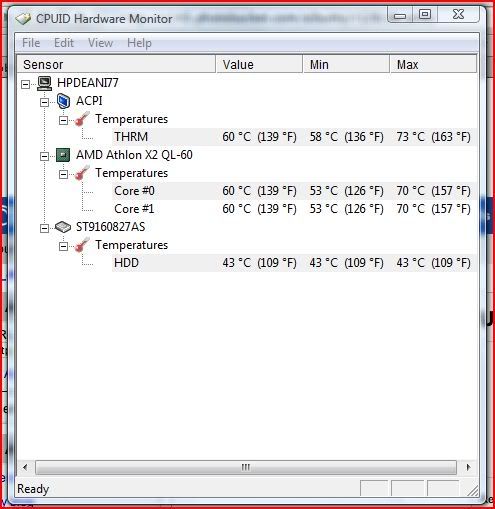
I get this reading on HP Recommended scheme. Without laptop cooler and run only internet browser and ms excel application. » Click to show Spoiler - click again to hide... « |
|
|
|
|



 Quote
Quote




 0.0233sec
 0.23
0.23
 6 queries
 GZIP Disabled