Outline ·
[ Standard ] ·
Linear+
Digi Fibre 50Mbps RM90/m. seems like on TM infra, read #1
|
YoungMan
|
 Jan 3 2022, 07:50 PM Jan 3 2022, 07:50 PM
|

|
QUOTE(xDjWanNabex @ Jan 3 2022, 06:11 PM) Did unifi try to counter anyone while trying to switch to digi? if so, how did u broach the topic? It all depends on the Tmpoint CS. When I switch to Digi the CS just process my transfer, no question asked. Perhaps you can start to bring up the topic and see how is their response. |
|
|
|
|
|
sendohz
|
Jan 4 2022, 07:58 PM
|
|
|
Ive just changed to zyxel router for DIGI fiber today And my TV unable to detect the modem. Any idea heats happening? Error Shown on tv staging automatic IP address failed. Any sifu can advice what to do? 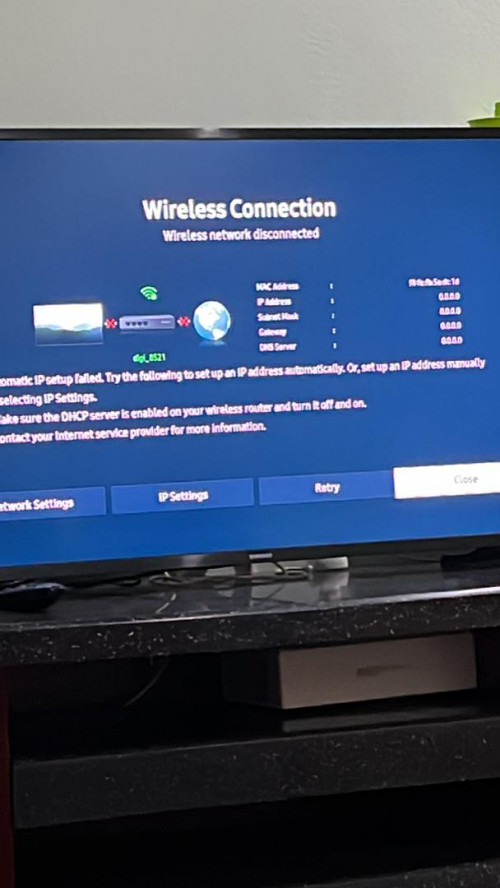 |
|
|
|
|
|
joeyrm
|
Jan 5 2022, 03:46 PM
|
Getting Started

|
QUOTE(sendohz @ Jan 4 2022, 07:58 PM) Ive just changed to zyxel router for DIGI fiber today And my TV unable to detect the modem. Any idea heats happening? Error Shown on tv staging automatic IP address failed. Any sifu can advice what to do? Is your Wifi configured with WPA2 or WPA3? Also, do check if your wifi running on single SSID for both 2.4G and 5G. So far, i haven't encountered any major issue with the router. |
|
|
|
|
|
sendohz
|
Jan 5 2022, 08:52 PM
|
|
|
QUOTE(joeyrm @ Jan 5 2022, 03:46 PM) Is your Wifi configured with WPA2 or WPA3? Also, do check if your wifi running on single SSID for both 2.4G and 5G. So far, i haven't encountered any major issue with the router. It’s running on WPA3 Wifi running for both 2.4 and 5 together. I’m unable to separate it. |
|
|
|
|
|
anonymous552235
|
Jan 6 2022, 09:22 AM
|
Getting Started
|
QUOTE(sendohz @ Jan 5 2022, 08:52 PM) It’s running on WPA3 Wifi running for both 2.4 and 5 together. I’m unable to separate it. Best to downgrade back to wpa2 ...a lot of device doesnt support wpa3 although its supposed to be backwards compatible |
|
|
|
|
|
ly27 P
|
Jan 6 2022, 10:34 AM
|
New Member
|
QUOTE(sendohz @ Jan 5 2022, 08:52 PM) It’s running on WPA3 Wifi running for both 2.4 and 5 together. I’m unable to separate it. Go to wireless > Mesh > Disable Mpro mesh I think Digi have it enable to get ready for mesh in future. |
|
|
|
|
|
andyjyneo
|
Jan 8 2022, 02:28 AM
|
|
|
QUOTE(ly27 @ Jan 6 2022, 10:34 AM) Go to wireless > Mesh > Disable Mpro mesh I think Digi have it enable to get ready for mesh in future. Hmm, my Mibox can find the network, but cannot connect at all. I've disabled MPro Mesh, but still the same. |
|
|
|
|
|
YoungMan
|
Jan 8 2022, 09:32 AM
|
|
|
QUOTE(galadriel1992 @ Jan 3 2022, 06:19 PM) Alright done changing to c1200 router. Will see whether the connection will become smoother than using zyxel. How is your connection so far? QUOTE(andyjyneo @ Jan 8 2022, 03:28 AM) Hmm, my Mibox can find the network, but cannot connect at all. I've disabled MPro Mesh, but still the same. Can you try to change Wifi security to WPA2? Also if still having problem, best to swap it with another router. |
|
|
|
|
|
andyjyneo
|
Jan 8 2022, 10:36 PM
|
|
|
QUOTE(YoungMan @ Jan 8 2022, 09:32 AM) How is your connection so far? Can you try to change Wifi security to WPA2? Also if still having problem, best to swap it with another router. Already set to WPA2-PSK, still the same. Yeah, looks like I've got to change back to my unifi Asus router. This post has been edited by andyjyneo: Jan 8 2022, 11:16 PM |
|
|
|
|
|
YoungMan
|
Jan 9 2022, 10:13 AM
|
|
|
QUOTE(andyjyneo @ Jan 8 2022, 11:36 PM) Already set to WPA2-PSK, still the same. Yeah, looks like I've got to change back to my unifi Asus router. I believe your Asus router is much better, without considerring the need of Wifi 6. |
|
|
|
|
|
andyjyneo
|
Jan 10 2022, 07:20 PM
|
|
|
QUOTE(YoungMan @ Jan 9 2022, 10:13 AM) I believe your Asus router is much better, without considerring the need of Wifi 6. Yup, bought when I was using unifi. My router is Asus AC1200. |
|
|
|
|
|
hellfried
|
Jan 13 2022, 10:35 AM
|
|
|
I swapped the Zxyel router with a TP-link AX73. But the speeds are almost identical. Around 270-280 Mbps. I am subscribed to the 300 Mbps package. I remember hitting 310 Mbps during the Unifi trial period end of last year.
|
|
|
|
|
|
PRSXFENG
|
Jan 13 2022, 02:03 PM
|
|
|
QUOTE(hellfried @ Jan 13 2022, 10:35 AM) I swapped the Zxyel router with a TP-link AX73. But the speeds are almost identical. Around 270-280 Mbps. I am subscribed to the 300 Mbps package. I remember hitting 310 Mbps during the Unifi trial period end of last year. Digi using TM infra? if so, expected TM every so slightly caps the speeds of competitors using their infra for an advantage (eg, making you think unifi is better cause they actually deliver 300Mbps) |
|
|
|
|
|
hellfried
|
Jan 14 2022, 03:00 AM
|
|
|
QUOTE(PRSXFENG @ Jan 13 2022, 02:03 PM) Digi using TM infra? if so, expected TM every so slightly caps the speeds of competitors using their infra for an advantage (eg, making you think unifi is better cause they actually deliver 300Mbps) Well, that's not right but so be it. Can complain to MCMC? |
|
|
|
|
|
C_ST
|
Jan 14 2022, 10:30 AM
|
|
|
Don't think u can complain unless ur speed is more than 10% less than the advertised speed. I forgot where is the page/link, but I did read before somewhere in Digi website during my application, something like 'make sure your speed is within 10% of the advertise speed during installation', so i suppose its applicable to all the time. So for your case, 270Mbps is still within the range... Consider to complain when it hits 269 Mbps  |
|
|
|
|
|
ly27 P
|
Jan 14 2022, 12:36 PM
|
New Member
|
QUOTE(hellfried @ Jan 13 2022, 10:35 AM) I swapped the Zxyel router with a TP-link AX73. But the speeds are almost identical. Around 270-280 Mbps. I am subscribed to the 300 Mbps package. I remember hitting 310 Mbps during the Unifi trial period end of last year. Wifi? Looks about normal to me If LAN, then something is off |
|
|
|
|
|
galadriel1992
|
Jan 14 2022, 08:05 PM
|
New Member
|
QUOTE(YoungMan @ Jan 8 2022, 09:32 AM) How is your connection so far? Can you try to change Wifi security to WPA2? Also if still having problem, best to swap it with another router. Everything is good. I can already update ios without connecting to macbook! Via OTA. Never download from torrent so no comment on that |
|
|
|
|
|
Activ3z P
|
Jan 20 2022, 12:52 PM
|
New Member
|
Hi, today I apply for Digi 100mbps (actually order 300mbps but i forgot i read fully when they ask 😂) and got under TIME infra, do anyone got any experience for this? I thought Digi only using TM infra, if I know TIME got coverage for my place already direct apply aiyo. Technician said just this 8 Jan they activated for my place area
|
|
|
|
|
|
C_ST
|
Jan 20 2022, 01:03 PM
|
|
|
Heard of that Digi run on TIme infra, but forgot hear from where.
I suppose one day not yet come install, u can cancel right? Even if not 'request to cancel' which might got penalty, u can try refuse to proceed also ma, find a logical & reasonable reason to refuse to proceed
|
|
|
|
|
|
Activ3z P
|
Jan 20 2022, 01:41 PM
|
New Member
|
QUOTE(C_ST @ Jan 20 2022, 01:03 PM) Heard of that Digi run on TIme infra, but forgot hear from where. I suppose one day not yet come install, u can cancel right? Even if not 'request to cancel' which might got penalty, u can try refuse to proceed also ma, find a logical & reasonable reason to refuse to proceed He already installed, when he come I see using TIME shirt so I ask him about it since when TIME take over. if change to TIME for this month does TIME will absorb penalty charge ? Huhu |
|
|
|
|



 Quote
Quote



 0.0440sec
 0.32
0.32
 6 queries
 GZIP Disabled