Comparison with Huawei AX3 Pro (not AX3) : https://www.acwifi.net/9937.html
How to add vlan tagging: https://youtu.be/jdg9KaC4LpY
2 meters from router:
This post has been edited by heidarren: Jul 26 2020, 02:21 PM
XiaoMi AX3600 AX1800 AX5 Vlan tagging
|
|
 Jul 13 2020, 02:53 AM, updated 5y ago Jul 13 2020, 02:53 AM, updated 5y ago
Show posts by this member only | IPv6 | Post
#1
|
 
Junior Member
248 posts Joined: Aug 2018 
|
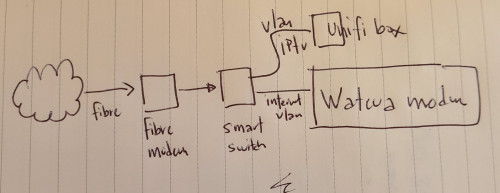
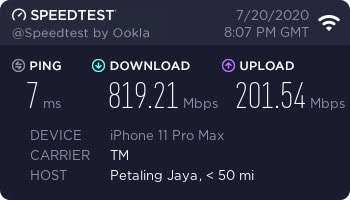
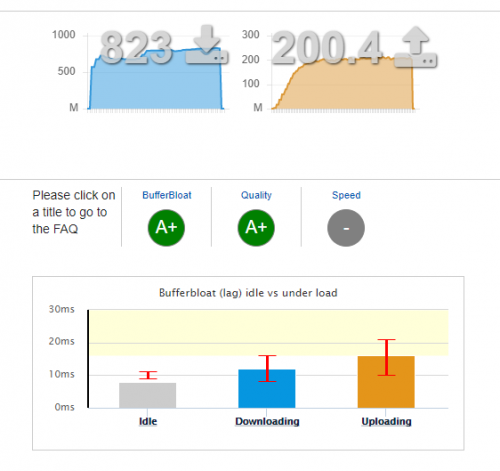
It's hard to explain with text, so I made a YouTube video, hope you guys can learn from it. These XiaoMi routers are OpenWRT based, logically once you get SSH access, you can do whatever you want, if you familiar with OpenWRT. From my personal experience, the AX3600 beats all my routers/APs in hand, including Asus GT-AC5300/AC86U, Huawei AX3/AX3 Pro, Ubiquiti nanoHD/LR, Aruba IAP-225/IAP-315, MikroTik cAP ac/hAP ac2/Audience and many many more in terms of coverage and speed. Also, instead of writing their own firmware, XiaoMi decided to use OpenWRT and put a pretty GUI on top of it, so it's basically OpenWRT router + official Qualcomm driver(NSS enabled), with a decent skin, stability isn't a problem anymore, and due to official driver, performance is great too, it can also do QoS with full speed of my 800/200 Unifi plan. Regarding mesh, I see no lagging during roaming APs, 802.11 k/v and Qualcomm Wifi-Son supported, tested with ping in iPhone, FaceTime and MobileLegend. Love it! AX1800 is about 5% lower than AX3600 in WiFi, and can only do QoS at about 500mbps, without QoS can fully run my 800/200mbps, so my personal recommendation is to get an AX3600 @RM340 from Taobao, and add AX1800 as a mesh AP if you need any extra coverage, both wireless and LAN can do, @about RM170 each from Taobao too.
Comparison with Huawei AX3 Pro (not AX3) : https://www.acwifi.net/9937.html How to add vlan tagging: https://youtu.be/jdg9KaC4LpY 2 meters from router: This post has been edited by heidarren: Jul 26 2020, 02:21 PM |
|
|
|
|
|
Jul 13 2020, 03:16 AM
Show posts by this member only | Post
#2
|

Junior Member
374 posts Joined: Mar 2010
|
the video is private. can't watch it
|
|
|
Jul 13 2020, 03:24 AM
Show posts by this member only | IPv6 | Post
#3
|
|
Junior Member
248 posts Joined: Aug 2018
|
QUOTE(afif92 @ Jul 13 2020, 03:16 AM) the video is private. can't watch it Edited Ethanyinghao and afif92 liked this post
|
|
|
Jul 13 2020, 04:38 PM
Show posts by this member only | Post
#4
|
|
Junior Member
255 posts Joined: Oct 2007
|
interesting.. is there an English GUI for bananas? kiritoffx liked this post
|
|
|
Jul 13 2020, 04:49 PM
Show posts by this member only | Post
#5
|
|
Junior Member
248 posts Joined: Aug 2018
|
QUOTE(terradrgn @ Jul 13 2020, 04:38 PM) interesting.. is there an English GUI for bananas? On webpage, use google chrome translate whole page. On app, can select English in language setting |
|
|
Jul 13 2020, 04:58 PM
Show posts by this member only | Post
#6
|
|
Junior Member
255 posts Joined: Oct 2007
|
have you tested if HyppTV works well? eg. no lag or choppiness
|
|
|
|
|
|
Jul 13 2020, 05:10 PM
Show posts by this member only | Post
#7
|

Senior Member
858 posts Joined: May 2005 From: MARS 
|
finally!..... time to buy AX3600
|
|
|
Jul 13 2020, 05:27 PM
Show posts by this member only | Post
#8
|
|
Junior Member
248 posts Joined: Aug 2018
|
QUOTE(terradrgn @ Jul 13 2020, 04:58 PM) have you tested if HyppTV works well? eg. no lag or choppiness Logically can be done, but I’m not familiar with OpenWRT, maybe someone who know it well can show us the commands to do so. |
|
|
Jul 13 2020, 06:15 PM
Show posts by this member only | IPv6 | Post
#9
|

Senior Member
1,878 posts Joined: Apr 2019
|
Prefer to wait for stabilized global firmware with pre-configured settings for popular ISP drop-down list like the one from Huawei.
Too confusing and troublesome for normal users to setup, must paste strings to access webgui very troublesome. |
|
|
Jul 14 2020, 12:54 AM
|
 
Elite
8,415 posts Joined: Jul 2008 
|
The Xiaomi AX3600 is a great router for the price. Too bad it doesn't support local environment really well here. Huawei AX3 is really not that good compared to offerings from TP-Link. iz1011 liked this post
|
|
|
Jul 14 2020, 08:29 PM
|

Senior Member
736 posts Joined: Jun 2006 From: Ipoh
|
TS, can share tabao link?
|
|
|
Jul 15 2020, 10:02 AM
|
|
Junior Member
224 posts Joined: Apr 2019
|
from reading at acwifi.net, seems that current wifi 6 routers not support mu-mimo in wifi 6 mode, so unless u plan to use it just for wifi 5, running a 4x4 in wifi 6 would be just waste of electricity
|
|
|
Jul 15 2020, 10:35 AM
|
|
Junior Member
248 posts Joined: Aug 2018
|
QUOTE(nonamer @ Jul 15 2020, 10:02 AM) from reading at acwifi.net, seems that current wifi 6 routers not support mu-mimo in wifi 6 mode, so unless u plan to use it just for wifi 5, running a 4x4 in wifi 6 would be just waste of electricity "waste of electricity"...... a bit too much to say like this bro, 4x4 not just meant for MU-MIMO, but also coverage. MU-MIMO is always tricky part to test, unless u use some device like SmallNetBuilder do to test, or else u can't really tell it's AP problem or client problem, especially when u only tested by using some models of phone. Btw, with OFDMA, MU-MIMO isn't as important as wifi 5 era anymore.This post has been edited by heidarren: Jul 15 2020, 10:45 AM |
|
|
|
|
|
Jul 15 2020, 10:40 AM
|
|
Junior Member
248 posts Joined: Aug 2018
|
QUOTE(muncheno @ Jul 14 2020, 08:29 PM) TS, can share tabao link? https://item.taobao.com/item.htm?spm=a1z09...._u=f3olopeo3b87I bought it from them, RMB539+RMB60 for shipping to Malaysia muncheno liked this post
|
|
|
Jul 15 2020, 10:43 AM
|
|
Junior Member
248 posts Joined: Aug 2018
|
QUOTE(blacktubi @ Jul 14 2020, 12:54 AM) The Xiaomi AX3600 is a great router for the price. Too bad it doesn't support local environment really well here. True, but luckily we finally managed to get it run on Vlan tagging, the good thing is we only have to do it once and do a backup file, can restore config anytime.Huawei AX3 is really not that good compared to offerings from TP-Link. chilskater liked this post
|
|
|
Jul 15 2020, 11:05 AM
|

Senior Member
2,741 posts Joined: Jan 2007
|
Saw some reported disconnect issue during gaming, do you face any?
|
|
|
Jul 15 2020, 11:23 AM
|
|
Junior Member
248 posts Joined: Aug 2018
|
QUOTE(JayceOoi @ Jul 15 2020, 11:05 AM) Saw some reported disconnect issue during gaming, do you face any? I found this router as picky as AC86U for LAN cable, if your LAN cable is bad, it will jump between 100mbps and 1Gbps, maybe this causes them disconnect. I got a slim LAN cable, cat 6 32AWG, which I used to power up my Aruba IAP-315 by using PoE+ and 1Gbps connection, never have any problem, but when I connected to this router, it just can't stay at 1Gbps, changed to another normal LAN cable cat 5e 24AWG (not slim type) and the problem's gone, now it's stable for few weeks. |
|
|
Jul 15 2020, 11:37 AM
|
|
Senior Member
2,741 posts Joined: Jan 2007
|
QUOTE(heidarren @ Jul 15 2020, 11:23 AM) I found this router as picky as AC86U for LAN cable, if your LAN cable is bad, it will jump between 100mbps and 1Gbps, maybe this causes them disconnect. Noted. So wireless also stable? It is great for the price since VLAN is supported. I got a slim LAN cable, cat 6 32AWG, which I used to power up my Aruba IAP-315 by using PoE+ and 1Gbps connection, never have any problem, but when I connected to this router, it just can't stay at 1Gbps, changed to another normal LAN cable cat 5e 24AWG (not slim type) and the problem's gone, now it's stable for few weeks.  |
|
|
Jul 15 2020, 12:07 PM
Show posts by this member only | IPv6 | Post
#19
|

Senior Member
3,305 posts Joined: Dec 2012
|
Meaning that can buy Xiaomi Router now? With the guide you share to change vlan?
|
|
|
Jul 15 2020, 12:10 PM
|
|
Junior Member
248 posts Joined: Aug 2018
|
QUOTE(JayceOoi @ Jul 15 2020, 11:37 AM) Noted. So wireless also stable? It is great for the price since VLAN is supported. Yes it's very stable, it's original Qualcomm driver based and thanks to Xiaomi didn't do many mod for it. eddieleon7pc and JayceOoi liked this post
|
|
|
Jul 15 2020, 12:18 PM
|
|
Junior Member
55 posts Joined: Jul 2007
|
QUOTE(blacktubi @ Jul 14 2020, 12:54 AM) The Xiaomi AX3600 is a great router for the price. Too bad it doesn't support local environment really well here. Waiting you to make the video tutorialHuawei AX3 is really not that good compared to offerings from TP-Link. |
|
|
Jul 15 2020, 02:42 PM
|
|
Junior Member
224 posts Joined: Apr 2019
|
QUOTE(heidarren @ Jul 15 2020, 10:35 AM) "waste of electricity"...... a bit too much to say like this bro, 4x4 not just meant for MU-MIMO, but also coverage. MU-MIMO is always tricky part to test, unless u use some device like SmallNetBuilder do to test, or else u can't really tell it's AP problem or client problem, especially when u only tested by using some models of phone. Btw, with OFDMA, MU-MIMO isn't as important as wifi 5 era anymore. i saw it has many antenna and assumed it is 4x4, but just relook and found it is actually "2x2@160mhz / 4x4@80mhz", so it actually same 2x2 as huawei and tplink (maybe it is the so called 80+80 while others are true 160mhz...need research), all priced around rm300, so the advantage of this xiaomi besides maybe performance is mesh capability and modable firmwareThis post has been edited by nonamer: Jul 15 2020, 02:48 PM |
|
|
Jul 15 2020, 04:19 PM
|
|
Junior Member
248 posts Joined: Aug 2018
|
QUOTE(nonamer @ Jul 15 2020, 02:42 PM) i saw it has many antenna and assumed it is 4x4, but just relook and found it is actually "2x2@160mhz / 4x4@80mhz", so it actually same 2x2 as huawei and tplink (maybe it is the so called 80+80 while others are true 160mhz...need research), all priced around rm300, so the advantage of this xiaomi besides maybe performance is mesh capability and modable firmware It’s Qualcomm special technology, to have 2x2 160MHz and 4x4 80MHz running simultaneously, normally if u have 2x2 160MHz client in the network will make ur 4x4 80MHz client stays in 2x2 80MHz, but Qualcomm make it possible to run both at the same time, u may do some research of it. |
|
|
Jul 15 2020, 04:39 PM
Show posts by this member only | IPv6 | Post
#24
|
|
Junior Member
485 posts Joined: May 2006
|
Been using 2 units of this router for some time now. One as a access point and the other the conventional way with a switch for VLAN tagging. Works well.
|
|
|
Jul 15 2020, 04:50 PM
|
|
Junior Member
224 posts Joined: Apr 2019
|
QUOTE(heidarren @ Jul 15 2020, 04:19 PM) It’s Qualcomm special technology, to have 2x2 160MHz and 4x4 80MHz running simultaneously, normally if u have 2x2 160MHz client in the network will make ur 4x4 80MHz client stays in 2x2 80MHz, but Qualcomm make it possible to run both at the same time, u may do some research of it. no...it is similar to the issue in redmi ac2100, capable of 160mhz in wifi 5, but comes at the expense of turning it from 4x4 to 2x2 mode, achieved by combining two 80mhz channels, u can search to find out more about this |
|
|
Jul 18 2020, 11:10 AM
Show posts by this member only | IPv6 | Post
#26
|
|
Junior Member
64 posts Joined: Mar 2005
|
It seems doesnt work for me bro. Anyone can help ?
im using AX1800 & firmware 1.0.34 config interface 'eth4' option ifname 'eth4.621' option keepup '1' config interface 'ifb' option ifname 'ifb0' config interface 'guest' option ifname ' ' option type 'bridge' option proto 'static' option ipaddr '192.168.19.1' option netmask '255.255.255.0' config interface 'wan' option proto 'pppoe' option special '0' option username 'xxx@home.maxis.com.my' option mru '1480' option password 'xxx1' option ifname 'eth4.621' 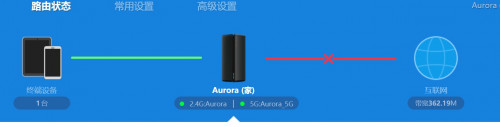 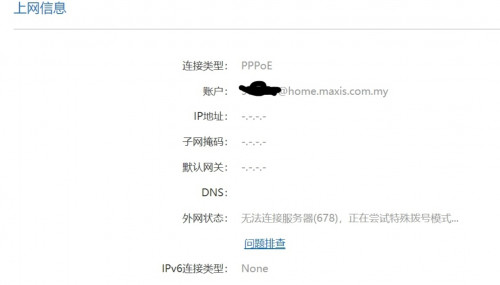 This post has been edited by allen84us: Jul 18 2020, 11:43 AM |
|
|
Jul 18 2020, 12:13 PM
Show posts by this member only | IPv6 | Post
#27
|
|
Junior Member
64 posts Joined: Mar 2005
|
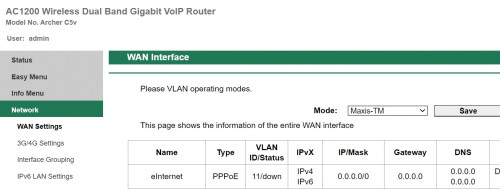 this is existing TP-link router that works. am i supposed to use vlan11? |
|
|
Jul 18 2020, 12:27 PM
|
|
Junior Member
64 posts Joined: Mar 2005
|
Update: it works like a charm by using vlan 11
|
|
|
Jul 18 2020, 01:09 PM
|
|
Junior Member
248 posts Joined: Aug 2018
|
QUOTE(allen84us @ Jul 18 2020, 12:27 PM) Update: it works like a charm by using vlan 11 Saw your post on right.com.cn, but I don't have an account to reply you there, lolMaybe Maxis changed vlan tagging from 621 to 11? Not sure about it, but glad to hear it finally work for you, just don't forget to do a backup file so that you don't need to do it again if accidentally reset. This post has been edited by heidarren: Jul 18 2020, 01:11 PM |
|
|
Jul 18 2020, 03:37 PM
|
|
Junior Member
64 posts Joined: Mar 2005
|
QUOTE(heidarren @ Jul 18 2020, 01:09 PM) Saw your post on right.com.cn, but I don't have an account to reply you there, lol Thank you for guide. Otherwise I'm still using the stupid tplink router. 😜Maybe Maxis changed vlan tagging from 621 to 11? Not sure about it, but glad to hear it finally work for you, just don't forget to do a backup file so that you don't need to do it again if accidentally reset. This post has been edited by allen84us: Jul 18 2020, 06:11 PM |
|
|
Jul 18 2020, 03:41 PM
|
|
Junior Member
306 posts Joined: Sep 2007
|
QUOTE(nonamer @ Jul 15 2020, 04:50 PM) no...it is similar to the issue in redmi ac2100, capable of 160mhz in wifi 5, but comes at the expense of turning it from 4x4 to 2x2 mode, achieved by combining two 80mhz channels, u can search to find out more about this I am really interested to get this router since there is a way to use it on UNIFI.But the issue mentioned has made me stumped. I have a Asus PCE AC68 wifi adapter which is 3x3. If pair with this router, will I still get the 3x3 link speed of 1.3Gbps? |
|
|
Jul 18 2020, 05:44 PM
|
|
Senior Member
875 posts Joined: Jan 2003
|
How long did it take to ship from China using Taobao? Saw one unit RMB539 free shipping. RM327. 😋
|
|
|
Jul 18 2020, 06:13 PM
|
|
Junior Member
64 posts Joined: Mar 2005
|
QUOTE(toytoy @ Jul 18 2020, 05:44 PM) How long did it take to ship from China using Taobao? Saw one unit RMB539 free shipping. RM327. 😋 I bought my ax1800 from taobao rmb289. Airway take 7 days |
|
|
Jul 18 2020, 06:21 PM
|
|
Junior Member
224 posts Joined: Apr 2019
|
QUOTE(NooBiE888 @ Jul 18 2020, 03:41 PM) I am really interested to get this router since there is a way to use it on UNIFI. should be no problem if u set the channel width to only 80mhz and not 160mhzBut the issue mentioned has made me stumped. I have a Asus PCE AC68 wifi adapter which is 3x3. If pair with this router, will I still get the 3x3 link speed of 1.3Gbps? |
|
|
Jul 18 2020, 06:37 PM
|
|
Senior Member
875 posts Joined: Jan 2003
|
QUOTE(allen84us @ Jul 18 2020, 06:13 PM) I bought my ax1800 from taobao rmb289. Airway take 7 days Hi. Would like find out what shipping you choose? 官方集运 or 直送?shipping by seller or by yourself ? |
|
|
Jul 18 2020, 06:42 PM
|
|
Junior Member
64 posts Joined: Mar 2005
|
QUOTE(toytoy @ Jul 18 2020, 06:37 PM) Hi. Would like find out what shipping you choose? 官方集运 or 直送?shipping by seller or by yourself ? I used 官方直运 mineja liked this post
|
|
|
Jul 18 2020, 06:47 PM
|
|
Senior Member
875 posts Joined: Jan 2003
|
QUOTE(allen84us @ Jul 18 2020, 06:42 PM) I used 官方直运 Meaning u paid for shipping correct? How much did u pay? Thx. They charging RMB64.50 for direct shipping. But I don’t understand 官方集运。Consolidated shipment. RMB21 onwards. So do we need to pay for it? This post has been edited by toytoy: Jul 18 2020, 07:07 PM |
|
|
Jul 18 2020, 07:17 PM
|
|
Junior Member
12 posts Joined: Feb 2014
|
QUOTE(toytoy @ Jul 18 2020, 06:47 PM) Meaning u paid for shipping correct? How much did u pay? Thx. They charging RMB64.50 for direct shipping. But I don’t understand 官方集运。Consolidated shipment. RMB21 onwards. So do we need to pay for it? 官方集运 means consolidated shipment. You only use this if you are buying multiple items from multiple seller and want to combine them into 1 package. If you only buy 1 item then use 官方直运, and yes you need to pay for shipping overseas.This post has been edited by mianghuei: Jul 18 2020, 07:17 PM |
|
|
Jul 18 2020, 07:23 PM
|
|
Junior Member
64 posts Joined: Mar 2005
|
QUOTE(toytoy @ Jul 18 2020, 06:47 PM) Meaning u paid for shipping correct? How much did u pay? Thx. They charging RMB64.50 for direct shipping. But I don’t understand 官方集运。Consolidated shipment. RMB21 onwards. So do we need to pay for it? 直送. So it it direct ship via airway |
|
|
Jul 18 2020, 09:03 PM
|
|
Senior Member
875 posts Joined: Jan 2003
|
QUOTE(allen84us @ Jul 18 2020, 07:23 PM) 直送. So it it direct ship via airway May I know how much u paid for shipping? Thanks. |
|
|
Jul 19 2020, 08:52 AM
|
|
Junior Member
64 posts Joined: Mar 2005
|
QUOTE(toytoy @ Jul 18 2020, 09:03 PM) May I know how much u paid for shipping? Thanks. I hope this is helpful. Ship to kl. RMB35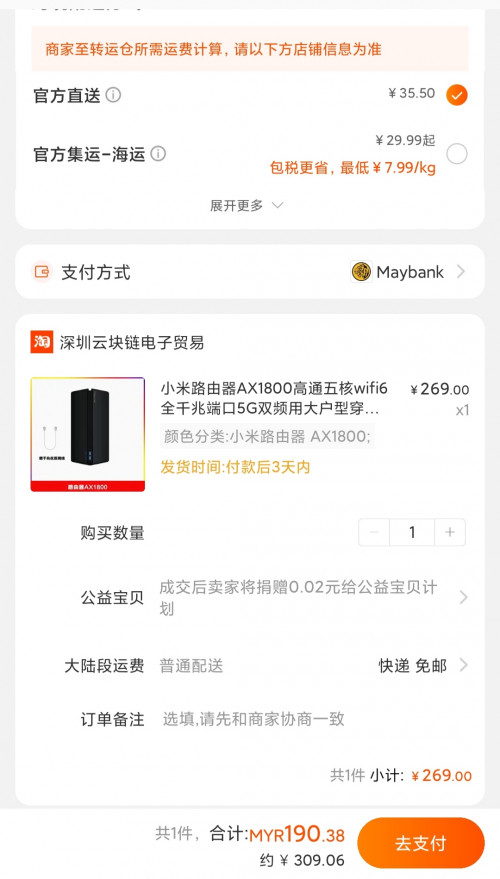 |
|
|
Jul 19 2020, 04:06 PM
|
|
Senior Member
875 posts Joined: Jan 2003
|
Thx for the info. 🙏🏻💪🏻
|
|
|
Jul 19 2020, 10:47 PM
|
|
Senior Member
875 posts Joined: Jan 2003
|
QUOTE(heidarren @ Jul 15 2020, 12:10 PM) Yes it's very stable, it's original Qualcomm driver based and thanks to Xiaomi didn't do many mod for it. Bro any option to connect vpn services like expressvpn? Thx. |
|
|
Jul 20 2020, 02:24 PM
|
|
Junior Member
64 posts Joined: Mar 2005
|
QUOTE(toytoy @ Jul 19 2020, 10:47 PM) Bro any option to connect vpn services like expressvpn? Thx. i also having problem to connect to expressvpn...anyone has luck on this? |
|
|
Jul 21 2020, 05:30 PM
|
|
Probation
4 posts Joined: Jul 2020
|
QUOTE(heidarren @ Jul 13 2020, 02:53 AM) It's hard to explain with text, so I made a YouTube video, hope you guys can learn from it. These XiaoMi routers are OpenWRT based, logically once you get SSH access, you can do whatever you want, if you familiar with OpenWRT. From my personal experience, the AX3600 beats all my routers/APs in hand, including Asus GT-AC5300/AC86U, Huawei AX3/AX3 Pro, Ubiquiti nanoHD/LR, Aruba IAP-225/IAP-315, MikroTik cAP ac/hAP ac2/Audience and many many more in terms of coverage and speed. Also, instead of writing their own firmware, XiaoMi decided to use OpenWRT and put a pretty GUI on top of it, so it's basically OpenWRT router + official Qualcomm driver(NSS enabled), with a decent skin, stability isn't a problem anymore, and due to official driver, performance is great too, it can also do QoS with full speed of my 800/200 Unifi plan. Regarding mesh, I see no lagging during roaming APs, 802.11 k/v and Qualcomm Wifi-Son supported, tested with ping in iPhone, FaceTime and MobileLegend. Love it! AX1800 is about 5% lower than AX3600 in WiFi, and can only do QoS at about 500mbps, without QoS can fully run my 800/200mbps, so my personal recommendation is to get an AX3600 @RM340 from Taobao, and add AX1800 as a mesh AP if you need any extra coverage, both wireless and LAN can do, @about RM170 each from Taobao too. Comparison with Huawei AX3 Pro (not AX3) : https://www.acwifi.net/9937.html How to add vlan tagging: https://youtu.be/jdg9KaC4LpY 2 meters from router: https://pictr.com/images/2020/07/17/7mtKDf.jpg https://pictr.com/images/2020/07/13/7mlyN9.md.png need help pls! 
i cant do as your youtube. after key in my unifi username and password it does not go to the page for wifi password https://pictr.com/images/2020/07/21/7rYXRG.png |
|
|
Jul 21 2020, 11:08 PM
Show posts by this member only | IPv6 | Post
#46
|

Senior Member
1,138 posts Joined: May 2008
|
any chance to config the vlan tag for port 2 to be maxis voip instead?
current setup: BTU > WAN Maxis TP Link (bridge mode for voip) Port 2 > AX3600 Wondering if AX3600 can be installed this way BTU > WAN AX3600 Port 2 > Maxis TP Link |
|
|
Jul 22 2020, 12:44 PM
|

Newbie
6 posts Joined: Oct 2011
|
Thank ts for the awesome guide. I manage to get it up and running without any issues . AX3600 is a beast of a router. Sadly i don't have any wifi 6 devices but I can definitely appreciate the awesome coverage and speed. Definitely better than my previous D-Link 882/Asus AC68u. Note, if you have error code 1521 and have trouble accessing the scp path, try downgrading your firmware to 1.0.17 and try again. That helped me as the router i purchased came with the latest firmware.
|
|
|
Jul 24 2020, 12:58 PM
|
|
Probation
4 posts Joined: Jul 2020
|
Any link to download firmware Redmi AX5 version 1.0.16 ???
|
|
|
Jul 24 2020, 03:01 PM
|
|
Probation
4 posts Joined: Jul 2020
|
QUOTE(mjtay100 @ Jul 24 2020, 12:58 PM) Any link to download firmware Redmi AX5 version 1.0.16 ??? you using redmi ax5 as well? can you manage do as the video? |
|
|
Jul 24 2020, 06:51 PM
|
|
Junior Member
81 posts Joined: Sep 2007
|
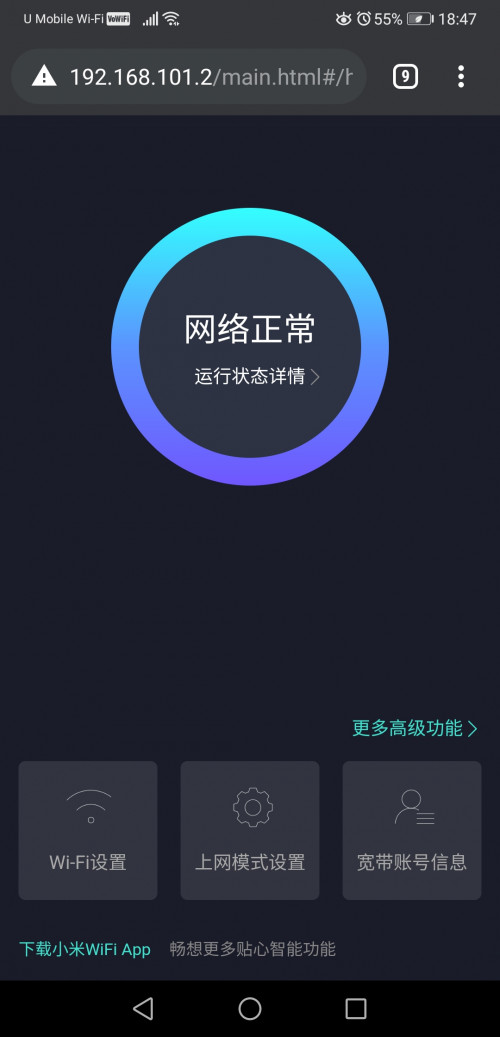 I bought redmi ax5 from taobao and shipped to here last week, costs me 189RMB. I setup it as access point instead while TM cheapskate router as PPPoE dialup. I can say the WiFi performance is way better than TM 1 with this given price. Most important is single dual band SSID.. It will switch you in between 2.4Ghz & 5Ghz channel based on your SNR and supported device. Hassle free. redjurgen liked this post
|
|
|
Jul 24 2020, 06:54 PM
|
|
Junior Member
81 posts Joined: Sep 2007
|
QUOTE(mjtay100 @ Jul 24 2020, 12:58 PM) Any link to download firmware Redmi AX5 version 1.0.16 ??? http://miwifi.com/wap_download.htmlLatest redmi ax5 version is 1.0.26 now. |
|
|
Jul 24 2020, 07:38 PM
|
|
Probation
4 posts Joined: Jul 2020
|
QUOTE(KyEap @ Jul 24 2020, 06:51 PM) I bought redmi ax5 from taobao and shipped to here last week, costs me 189RMB. I setup it as access point instead while TM cheapskate router as PPPoE dialup. I can say the WiFi performance is way better than TM 1 with this given price. Most important is single dual band SSID.. It will switch you in between 2.4Ghz & 5Ghz channel based on your SNR and supported device. Hassle free. kinda noob question  |
|
|
Jul 24 2020, 08:26 PM
|
|
Junior Member
81 posts Joined: Sep 2007
|
QUOTE(redjurgen @ Jul 24 2020, 07:38 PM) i noticed that the AX5 router ipv6 is off by default.. so do we turn it ON? You may, as now unifi started roll out ipv6 too. kinda noob question No harm to enable it. |
|
|
Jul 24 2020, 10:44 PM
|
|
Newbie
1 posts Joined: May 2011 From: Kota Kinabalu
|
Thank you heidarren.
Configure AX1800 successfully. Provider: Unifi Location: KK This post has been edited by jimk68: Jul 24 2020, 10:48 PM |
|
|
Jul 24 2020, 11:04 PM
|
|
Senior Member
1,026 posts Joined: Jan 2003 From: Kuala Lumpur, Malaysia
|
Xiaomi AX3600 is huge ! I received the unit today.
 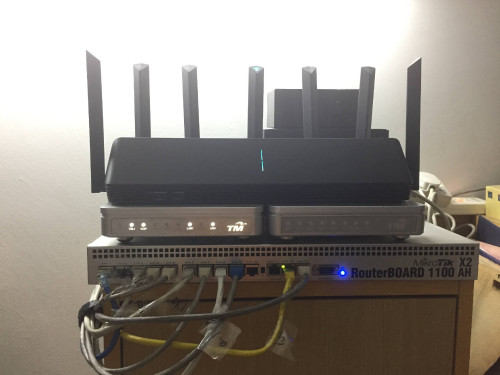 This post has been edited by ldragon: Jul 24 2020, 11:04 PM |
|
|
Jul 27 2020, 11:50 AM
|
|
Junior Member
18 posts Joined: Aug 2007
|
QUOTE(jimk68 @ Jul 24 2020, 10:44 PM) Thank you heidarren. hi sifus, sorry for asking...Configure AX1800 successfully. Provider: Unifi Location: KK does AX1800 supports vlan? i.e. i can connect it directly to the BTU. |
|
|
Jul 27 2020, 02:34 PM
|
|
Junior Member
248 posts Joined: Aug 2018
|
QUOTE(dcblog79 @ Jul 27 2020, 11:50 AM) hi sifus, sorry for asking... Yes, just follow the guide then u can directly connect to BTUdoes AX1800 supports vlan? i.e. i can connect it directly to the BTU. |
|
|
Jul 27 2020, 09:49 PM
|
|
Junior Member
64 posts Joined: Mar 2005
|
QUOTE(allen84us @ Jul 20 2020, 02:24 PM) i also having problem to connect to expressvpn...anyone has luck on this? Anyone able to get expressvpn to work on xiaomi router? |
|
|
Jul 28 2020, 01:57 PM
|

Junior Member
504 posts Joined: Oct 2012 From: It's all relative
|
really based on openwrt? I'm a noob when it comes to router, looking to buy this one as my first 'hackable' router to tinker with.
btw no english for the web interface? This post has been edited by amir.asyraf: Jul 28 2020, 01:58 PM |
|
|
Jul 28 2020, 08:04 PM
|
|
Senior Member
1,026 posts Joined: Jan 2003 From: Kuala Lumpur, Malaysia
|
QUOTE(amir.asyraf @ Jul 28 2020, 01:57 PM) really based on openwrt? I'm a noob when it comes to router, looking to buy this one as my first 'hackable' router to tinker with. use google chrome auto translate / smartphone app are in Englishbtw no english for the web interface? 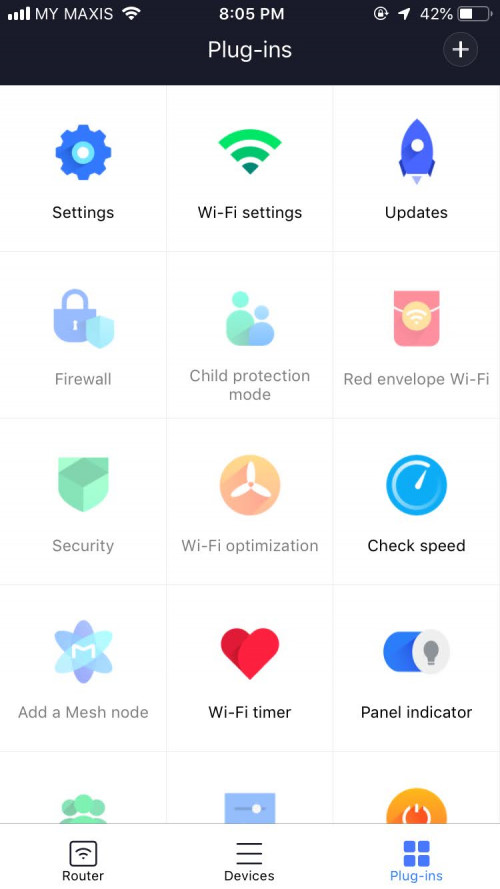 This post has been edited by ldragon: Jul 28 2020, 08:05 PM |
|
|
Aug 1 2020, 10:06 PM
|
|
Senior Member
875 posts Joined: Jan 2003
|
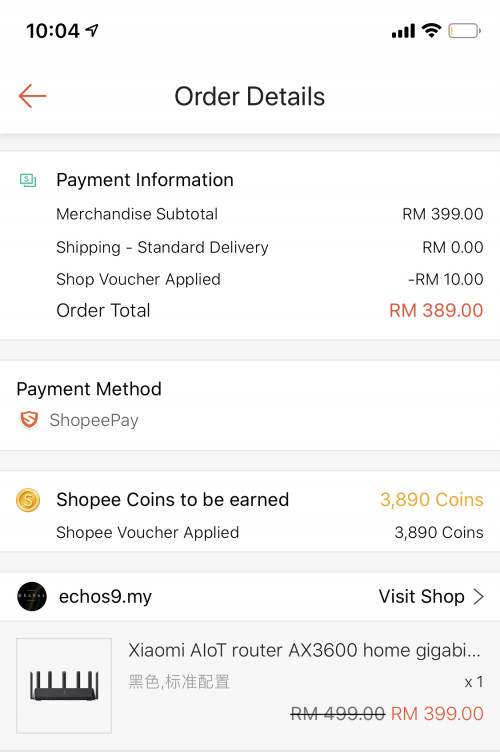 Chepest I found in shopee. Free shipping. RM10 shop discount. 10% Cashback. 1 year warranty. Total comes down to RM350. chilskater liked this post
|
|
|
Aug 2 2020, 03:31 PM
Show posts by this member only | IPv6 | Post
#62
|
|
Probation
4 posts Joined: Jul 2020
|
QUOTE(redjurgen @ Jul 24 2020, 03:01 PM) you using redmi ax5 as well? can you manage do as the video? i can do it and connect thru btu but i cannot get ip6 wan ip ...haizzzzthat means i cant access internet. Anyone cant solve it ? (ax5 firmware 1.026) |
|
|
Aug 2 2020, 03:47 PM
|

Junior Member
50 posts Joined: Mar 2008
|
thx ts for sharing. tried setting up everything even downgrading firmware, still got dns error, all follow steps, all ok. but msg say dialling to wan success. onli error from dns. then tried manually gugel dns ip or gugel for solution and diff dns ip still cannot work. sob...
ax3600 |
|
|
Aug 2 2020, 05:21 PM
Show posts by this member only | IPv6 | Post
#64
|
|
Probation
4 posts Joined: Jul 2020
|
where can i download firmware version 1.0.16 for redmi AX5.
i wanna to dwongrade redmi AX5 firmware ....(currently 1.0.26) |
|
|
Aug 3 2020, 02:42 PM
|
|
Junior Member
224 posts Joined: Apr 2019
|
i wonder does the 2.4g capability of ax5/ax1800/ax3600 (2x2 and 1ghz+ processor and FEM) enable the auto selection of 4k resolution in youtube in android boxes?
my previous router which is '2x2 1.0ghz' not able to autoload 4k, now change to '3x3 1.2ghz' only can, wondering is it because of the faster wireless chip or processor or both? because if buying these latest routers and not able to autoload 4k is losing a feature This post has been edited by nonamer: Aug 3 2020, 06:12 PM |
|
|
Aug 3 2020, 08:56 PM
|
|
Junior Member
64 posts Joined: Mar 2005
|
QUOTE(mjtay100 @ Aug 2 2020, 03:31 PM) i can do it and connect thru btu but i cannot get ip6 wan ip ...haizzzz why do you want to have ipv6?that means i cant access internet. Anyone cant solve it ? (ax5 firmware 1.026) |
|
|
Aug 4 2020, 02:10 PM
|
|
Junior Member
81 posts Joined: Sep 2007
|
QUOTE(mjtay100 @ Aug 2 2020, 05:21 PM) where can i download firmware version 1.0.16 for redmi AX5. http://cdn.cnbj1.fds.api.mi-img.com/xiaoqi...3805_1.0.16.bini wanna to dwongrade redmi AX5 firmware ....(currently 1.0.26) mjtay100 liked this post
|
|
|
Aug 4 2020, 02:22 PM
|
|
Junior Member
81 posts Joined: Sep 2007
|
QUOTE(nonamer @ Aug 3 2020, 02:42 PM) i wonder does the 2.4g capability of ax5/ax1800/ax3600 (2x2 and 1ghz+ processor and FEM) enable the auto selection of 4k resolution in youtube in android boxes? Video quality assignment is based on your wan bandwidth and wireless connection. my previous router which is '2x2 1.0ghz' not able to autoload 4k, now change to '3x3 1.2ghz' only can, wondering is it because of the faster wireless chip or processor or both? because if buying these latest routers and not able to autoload 4k is losing a feature Assuming your WAN bandwidth is not an issue.. 5GHz wireless connection in house definitely would get you to 4k selection. |
|
|
Aug 4 2020, 06:07 PM
|
|
Junior Member
224 posts Joined: Apr 2019
|
QUOTE(KyEap @ Aug 4 2020, 02:22 PM) Video quality assignment is based on your wan bandwidth and wireless connection. the android box wifi chip is rtl8189es (1x1, 2.4ghz, 802.11n), not support 5ghz, not even 802.11aAssuming your WAN bandwidth is not an issue.. 5GHz wireless connection in house definitely would get you to 4k selection. i think is because of increased throughput from faster processor and from 2x2 to 3x3 configuration according to following article, even though client antenna remain same, going from 2x2 to 3x3 can increase performance by 10-30% https://pakedge.wordpress.com/2015/11/17/2x...matterfind-out/ but the question is, is the 2.4ghz 2x2 router able to? (autoselect 4k youtube in android box) or maybe with closer distance it is possible? have not tried that bandwidth not issue as 4k only need like 30mbps my internet is 100mbps This post has been edited by nonamer: Aug 4 2020, 06:32 PM |
|
|
Aug 4 2020, 08:37 PM
|
|
Junior Member
81 posts Joined: Sep 2007
|
QUOTE(nonamer @ Aug 4 2020, 06:07 PM) the android box wifi chip is rtl8189es (1x1, 2.4ghz, 802.11n), not support 5ghz, not even 802.11a with your 802.11n wireless chipset.. 150Mbps max throughput in 40MHz(only if so lucky connected in 150Mbps max speed) .. deduct half-duplex nature(-50%), overhead, signal strength & uncertain interference especially 2.4Ghz..your topbox barely support 4k auto selection.i think is because of increased throughput from faster processor and from 2x2 to 3x3 configuration according to following article, even though client antenna remain same, going from 2x2 to 3x3 can increase performance by 10-30% https://pakedge.wordpress.com/2015/11/17/2x...matterfind-out/ but the question is, is the 2.4ghz 2x2 router able to? (autoselect 4k youtube in android box) or maybe with closer distance it is possible? have not tried that bandwidth not issue as 4k only need like 30mbps my internet is 100mbps This post has been edited by KyEap: Aug 4 2020, 08:38 PM |
|
|
Aug 7 2020, 08:06 AM
|

Junior Member
316 posts Joined: Oct 2009
|
morning all, has anyone managed to add vlan tagging for Redmi AX5? for unifi
|
|
|
Aug 10 2020, 08:20 PM
|
|
Junior Member
316 posts Joined: Oct 2009
|
=deleted=
This post has been edited by n0v1ce: Aug 10 2020, 11:11 PM |
|
|
Aug 11 2020, 03:08 PM
|
|
Senior Member
875 posts Joined: Jan 2003
|
Finally got my unit at 10.30PM yesterday 😅
Straight jumped into setting it up and managed to connect to unifi thanks to the great tutorial by heidarren. However, not all went well, the unit came with firmware 1.0.2x and the SSH hack doesn't work. After 1 hour of trial and error and doing some research online finally found out that the SSH hack only works on firmware version 1.0.17 as per heidarren's tutorial. So for the newer units have to downgrade the firmware first. After gaining SSH access can update to latest firmware withouy problem. It's a big upgrade to the TP-Link AC1900 Touch P5 Router I am currently using. WiFi Speed on iPhone X is over 300Mbps which never reach before. Was able to get full 800/200 Mpbs on Laptop and the range is much better. My router is on one end of the house whereas my home office is at the other end. Prevoiusly cannot get past 20Mbps but now can get over 100Mbps download however upload is still less than 20Mbps. Even PS4 able to get 600/200Mpbs. Never see this kind of speed before. Fired up a game of COD WWII Multiplayer and gotten full green bar for all 3 TDM. All in all it is a great router and easy to use. Don't allow me to set non-standard IP Range though. Tried to start with 221.x.x.x but not allowed hehe. What is the max theoretical speed we can get if add another unit of AX3600 as MESH? Thinking of adding another unit upstairs to get better speed in my home office.  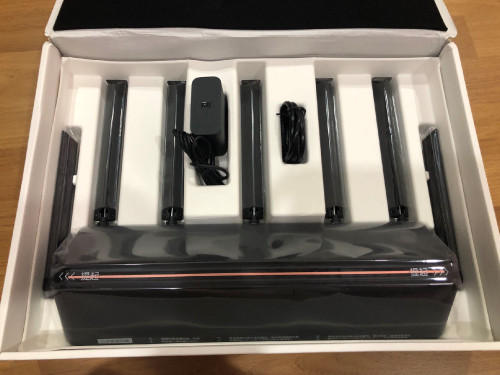 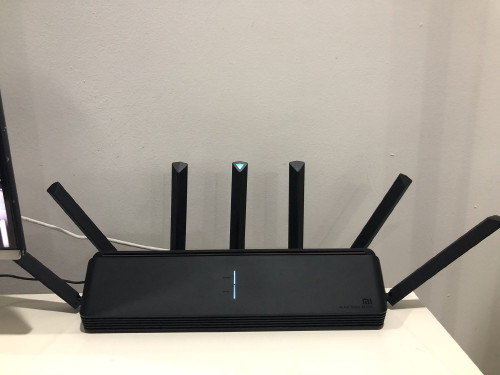 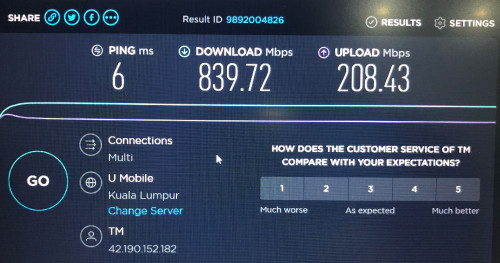 This post has been edited by toytoy: Aug 11 2020, 03:11 PM |
|
|
Aug 11 2020, 06:15 PM
|
|
Senior Member
875 posts Joined: Jan 2003
|
QUOTE(allen84us @ Jul 20 2020, 02:24 PM) i also having problem to connect to expressvpn...anyone has luck on this? Tried connecting ExpressVPN using L2TP protocol and surprisingly it worked. LA3 didn't work but NY2 worked. Maybe you can try it out. Very smart feature. Can assign specific website to use VPN or specific device to use VPN. 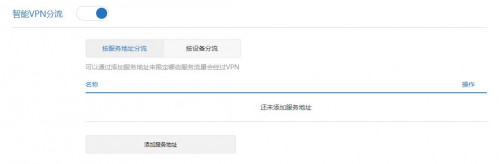 This post has been edited by toytoy: Aug 11 2020, 06:30 PM |
|
|
Aug 12 2020, 09:50 AM
|
|
Junior Member
224 posts Joined: Apr 2019
|
QUOTE(toytoy @ Aug 11 2020, 06:15 PM) Tried connecting ExpressVPN using L2TP protocol and surprisingly it worked. LA3 didn't work but NY2 worked. Maybe you can try it out. if it is able to continuously reconnect dropped connection it is improvement over original openwrt's l2tp client which couldnt so the only practical choice is to use openvpn |
|
|
Aug 12 2020, 12:10 PM
|
|
Probation
4 posts Joined: Jul 2020
|
QUOTE(KyEap @ Aug 4 2020, 02:10 PM) Thanks very much bro ....  |
|
|
Aug 12 2020, 12:35 PM
|
|
Senior Member
875 posts Joined: Jan 2003
|
Redmi AX6 just announced RMB369. Maybe can buy it for MESH setup
https://xiaomidna.com/news/redmi-router-ax6...at-369-yuan-53/ This post has been edited by toytoy: Aug 12 2020, 12:35 PM |
|
|
Aug 23 2020, 10:48 AM
|
|
Senior Member
875 posts Joined: Jan 2003
|
Hi All, I bought another unit of ax3600 to setup mesh. I am only able to get around 400Mbps max even when I put the routers next to each other. This is not normal right? When I put the unit upstairs I only get Around 200Mbps. I can get more than 300Mbos Connecting directly to the main unit. 😓
I am on latest firmware and factory reset the unit already to try again. Still same. I see YouTube ppl getting around 700Mbps. Am I missing anything? Thx 🙏🏻 |
|
|
Aug 23 2020, 10:52 AM
|
|
Junior Member
306 posts Joined: Sep 2007
|
QUOTE(toytoy @ Aug 23 2020, 10:48 AM) Hi All, I bought another unit of ax3600 to setup mesh. I am only able to get around 400Mbps max even when I put the routers next to each other. This is not normal right? When I put the unit upstairs I only get Around 200Mbps. I can get more than 300Mbos Connecting directly to the main unit. 😓 Interesting, I am on latest firmware and factory reset the unit already to try again. Still same. I see YouTube ppl getting around 700Mbps. Am I missing anything? Thx 🙏🏻 What device are you using to check the connection speed ? When you testing what's the link speed of the connected device to the router ? Did you try using lan connection to test on the child node ? |
|
|
Aug 23 2020, 12:28 PM
|
|
Senior Member
875 posts Joined: Jan 2003
|
QUOTE(NooBiE888 @ Aug 23 2020, 10:52 AM) Interesting, I used an old laptop with intel ax200 WiFi module [bought from shopee for RM35. Recommended!!] Having the laptop right beside main node I get above 800Mbps at stable 2.2 Gbps link speed. Connected to the Child node beside the main node I get less than 400Mbps. Link speed I don’t remember but should be more than 1Gbps. What device are you using to check the connection speed ? When you testing what's the link speed of the connected device to the router ? Did you try using lan connection to test on the child node ? Connected to child node upstairs using lan cable can get around 500Mbps. Swap to WiFi straight drop to 280Mbps. |
|
|
Aug 23 2020, 01:07 PM
|
|
Junior Member
306 posts Joined: Sep 2007
|
QUOTE(toytoy @ Aug 23 2020, 12:28 PM) I used an old laptop with intel ax200 WiFi module [bought from shopee for RM35. Recommended!!] Having the laptop right beside main node I get above 800Mbps at stable 2.2 Gbps link speed. Connected to the Child node beside the main node I get less than 400Mbps. Link speed I don’t remember but should be more than 1Gbps. Let me say first that I don't have a mesh network so take what I say with a grain of salt.Connected to child node upstairs using lan cable can get around 500Mbps. Swap to WiFi straight drop to 280Mbps. Potentially the location of the child node is not ideal, signal strength is not good enough. You also have to consider that wifi is best effort basis. Also, you are using WiFi backhaul . Some of the wifi band is taken up for interconnect between the router. Another thing you can try is to check the WiFi settings of the child network to make sure it's transmit power and channel width. ----------------------- If anyone is considering to let go their unit. Do PM me, I am looking for a 2nd unit to try mesh. |
|
|
Aug 23 2020, 01:42 PM
|
|
Junior Member
504 posts Joined: Oct 2012 From: It's all relative
|
QUOTE(toytoy @ Aug 23 2020, 12:28 PM) I used an old laptop with intel ax200 WiFi module [bought from shopee for RM35. Recommended!!] Having the laptop right beside main node I get above 800Mbps at stable 2.2 Gbps link speed. Connected to the Child node beside the main node I get less than 400Mbps. Link speed I don’t remember but should be more than 1Gbps. Intel AX200 for RM35? Got link?Connected to child node upstairs using lan cable can get around 500Mbps. Swap to WiFi straight drop to 280Mbps. chilskater liked this post
|
|
|
Aug 23 2020, 03:04 PM
|
|
Senior Member
875 posts Joined: Jan 2003
|
QUOTE(amir.asyraf @ Aug 23 2020, 01:42 PM) Intel AX200 for RM35? Got link? Sorry. I just checked. RM30 After deduct shopee coin and voucher. Original price RM43. https://shopee.com.my/product/269995966/784...6054?smtt=0.0.9 |
|
|
Aug 23 2020, 03:27 PM
|
|
Senior Member
875 posts Joined: Jan 2003
|
QUOTE(NooBiE888 @ Aug 23 2020, 01:07 PM) Let me say first that I don't have a mesh network so take what I say with a grain of salt. The test was carried out with child node around 1.5m beside a the main node using wireless backhaul. If wireless backhaul cuts down the bandwidth my half then 400Mbps seems to be right. WiFi setting and channel for child cannot be changed. I’ve tried few channels below 48 still same. Potentially the location of the child node is not ideal, signal strength is not good enough. You also have to consider that wifi is best effort basis. Also, you are using WiFi backhaul . Some of the wifi band is taken up for interconnect between the router. Another thing you can try is to check the WiFi settings of the child network to make sure it's transmit power and channel width. ----------------------- If anyone is considering to let go their unit. Do PM me, I am looking for a 2nd unit to try mesh. ax3600 considered have dedicated wireless backhaul? Or have is it Technically possible for other more expensive routers to achieve 800Mbps on the mesh network? I have tried AV1300 powerline adaptor and now mesh network. Still I’m only getting around 200Mpbs in my home office. Spent more than RM1k ady. Pull one Ethernet cable also not so expensive. I wan die ady. 😭😭😭 |
|
|
Aug 23 2020, 07:13 PM
|
|
Junior Member
306 posts Joined: Sep 2007
|
QUOTE(toytoy @ Aug 23 2020, 03:27 PM) The test was carried out with child node around 1.5m beside a the main node using wireless backhaul. If wireless backhaul cuts down the bandwidth my half then 400Mbps seems to be right. WiFi setting and channel for child cannot be changed. I’ve tried few channels below 48 still same. Do you have a long lan cable ?ax3600 considered have dedicated wireless backhaul? Or have is it Technically possible for other more expensive routers to achieve 800Mbps on the mesh network? I have tried AV1300 powerline adaptor and now mesh network. Still I’m only getting around 200Mpbs in my home office. Spent more than RM1k ady. Pull one Ethernet cable also not so expensive. I wan die ady. 😭😭😭 Try use wired backhaul instead. Connect a lan cable between router and child. Then test again see. AFAIK, ax3600 no mention of dedicated backhaul. If you want full speed you need to pull lan cable. For normal use, 200 to 300 Mbps is plenty already. |
|
|
Aug 23 2020, 08:01 PM
|
|
Senior Member
875 posts Joined: Jan 2003
|
QUOTE(NooBiE888 @ Aug 23 2020, 07:13 PM) Do you have a long lan cable ? Thx for the suggestion. I was trying to avoid pulling a cable. Was disappointed with powerline adaptor and was hopeful mesh could solve my problem. Try use wired backhaul instead. Connect a lan cable between router and child. Then test again see. AFAIK, ax3600 no mention of dedicated backhaul. If you want full speed you need to pull lan cable. For normal use, 200 to 300 Mbps is plenty already. Yes I agree 200-300 is more than enough but I have been paying for 800Mbps for a long time without really able to fully utilise it due to device limitations. 😭 Was hoping the latest WiFi 6 and mesh could help solve the problem. Sigh. I was connected to the router at 1.2Gbps. I believe the other half of 1.2Gbps was used for wireless backhaul. Cut that by half I should still get around 500-600Mbps. But I only get less than 400 when placing the child next yo main. In my home office behind one wall I can only get around 200Mbps. 🤯 This post has been edited by toytoy: Aug 23 2020, 08:02 PM |
|
|
Aug 23 2020, 08:38 PM
Show posts by this member only | IPv6 | Post
#87
|
|
Junior Member
306 posts Joined: Sep 2007
|
QUOTE(toytoy @ Aug 23 2020, 08:01 PM) Thx for the suggestion. I was trying to avoid pulling a cable. Was disappointed with powerline adaptor and was hopeful mesh could solve my problem. It could be an issue with the current firmware of the ax3600 as MESH capability was only added recently.Yes I agree 200-300 is more than enough but I have been paying for 800Mbps for a long time without really able to fully utilise it due to device limitations. 😭 Was hoping the latest WiFi 6 and mesh could help solve the problem. Sigh. I was connected to the router at 1.2Gbps. I believe the other half of 1.2Gbps was used for wireless backhaul. Cut that by half I should still get around 500-600Mbps. But I only get less than 400 when placing the child next yo main. In my home office behind one wall I can only get around 200Mbps. 🤯 If you really want to get up to 800mbps via wireless backhaul, you need to look into the high end AX mesh routers. When the child unit is next to the main unit, try to use a short lan cable to connect and test again. Do check that the backhaul is stated "ethernet". |
|
|
Aug 23 2020, 08:46 PM
|
|
Senior Member
875 posts Joined: Jan 2003
|
QUOTE(NooBiE888 @ Aug 23 2020, 08:38 PM) It could be an issue with the current firmware of the ax3600 as MESH capability was only added recently. Thanks for the suggestion. I will try tonight. Hopefully it’s a firmware problem. 🤞🏻If you really want to get up to 800mbps via wireless backhaul, you need to look into the high end AX mesh routers. When the child unit is next to the main unit, try to use a short lan cable to connect and test again. Do check that the backhaul is stated "ethernet". chilskater liked this post
|
|
|
Aug 23 2020, 08:54 PM
|
|
Senior Member
1,124 posts Joined: Oct 2004
|
QUOTE(toytoy @ Aug 11 2020, 04:08 PM) Finally got my unit at 10.30PM yesterday 😅 TP Link want to sell? think of replacing my oren unifi routerStraight jumped into setting it up and managed to connect to unifi thanks to the great tutorial by heidarren. However, not all went well, the unit came with firmware 1.0.2x and the SSH hack doesn't work. After 1 hour of trial and error and doing some research online finally found out that the SSH hack only works on firmware version 1.0.17 as per heidarren's tutorial. So for the newer units have to downgrade the firmware first. After gaining SSH access can update to latest firmware withouy problem. It's a big upgrade to the TP-Link AC1900 Touch P5 Router I am currently using. WiFi Speed on iPhone X is over 300Mbps which never reach before. Was able to get full 800/200 Mpbs on Laptop and the range is much better. My router is on one end of the house whereas my home office is at the other end. Prevoiusly cannot get past 20Mbps but now can get over 100Mbps download however upload is still less than 20Mbps. Even PS4 able to get 600/200Mpbs. Never see this kind of speed before. Fired up a game of COD WWII Multiplayer and gotten full green bar for all 3 TDM. All in all it is a great router and easy to use. Don't allow me to set non-standard IP Range though. Tried to start with 221.x.x.x but not allowed hehe. What is the max theoretical speed we can get if add another unit of AX3600 as MESH? Thinking of adding another unit upstairs to get better speed in my home office. |
|
|
Aug 25 2020, 10:13 AM
|
|
Junior Member
55 posts Joined: Sep 2006
|
i also just bot ax3600 + ax1800 from tb.
|
|
|
Aug 25 2020, 10:46 AM
|
|
Junior Member
224 posts Joined: Apr 2019
|
this router even though the NPU seems attractive but it still cant really replace a single board computer as main router because it doesnt have storage space to be able to run a torrent capable router that complement 100mbps line allowing downloads to run nonstop / overnight / during work hours
This post has been edited by nonamer: Aug 25 2020, 05:43 PM |
|
|
Aug 25 2020, 12:07 PM
|
|
Junior Member
248 posts Joined: Aug 2018
|
QUOTE(nonamer @ Aug 25 2020, 10:46 AM) this router even though the NPU seems attractive but it still cant really replace a single board computer as main router because it doesnt have storage space to be able to run a torrent capable router that complement 100mbps broadband allowing downloads to run nonstop / overnight / during work hours I afraid this is an NAS job to do, previous gen XiaoMi routers has a lot of fancy features including this, they were too greedy to try to bring as many features as they can in order to have more selling point, but in the end non of them useful due to instability. This time they decided to cut all fancy things out and focus on routing and wifi only, I think this is the right way because the most important thing for a wireless router is stable, focus on the main thing is always the right choice.Stable vs features, you choose. Wanna have both? Can, but clearly not @RM350, everything has a cost. This post has been edited by heidarren: Aug 25 2020, 12:10 PM hjack liked this post
|
|
|
Aug 25 2020, 02:57 PM
|

Senior Member
1,472 posts Joined: Apr 2005 From: SumwHeRe In MaLaYsIa 
|
after ssh hack, if upgrade, all vlan setting missing?
|
|
|
Aug 27 2020, 10:17 AM
|
|
Senior Member
875 posts Joined: Jan 2003
|
QUOTE(amirsubhi @ Aug 25 2020, 02:57 PM) after ssh hack, if upgrade, all vlan setting missing? Once hack all intact. Update like normal. |
|
|
Aug 27 2020, 11:32 PM
Show posts by this member only | IPv6 | Post
#95
|

Senior Member
845 posts Joined: Nov 2010 From: Puchong/Cyberjaya
|
Hi all...... redmi ax6 can ssh hack? probably no one have experience with it yet since its very new.
price is so so so tempting compared to ax3600 https://shopee.com.my/Xiaomi-Redmi-Router-A...7355.5148488852 |
|
|
Aug 28 2020, 12:22 AM
|
|
Junior Member
248 posts Joined: Aug 2018
|
QUOTE(cle900706 @ Aug 27 2020, 11:32 PM) Hi all...... redmi ax6 can ssh hack? probably no one have experience with it yet since its very new. So far no SSH hack for this model yetprice is so so so tempting compared to ax3600 https://shopee.com.my/Xiaomi-Redmi-Router-A...7355.5148488852 |
|
|
Aug 28 2020, 01:22 AM
|

Senior Member
3,008 posts Joined: Sep 2005 From: T.T.D.I, Bukit Damansara
|
QUOTE(toytoy @ Aug 23 2020, 03:27 PM) The test was carried out with child node around 1.5m beside a the main node using wireless backhaul. If wireless backhaul cuts down the bandwidth my half then 400Mbps seems to be right. WiFi setting and channel for child cannot be changed. I’ve tried few channels below 48 still same. Not sure if this helps but...ax3600 considered have dedicated wireless backhaul? Or have is it Technically possible for other more expensive routers to achieve 800Mbps on the mesh network? I have tried AV1300 powerline adaptor and now mesh network. Still I’m only getting around 200Mpbs in my home office. Spent more than RM1k ady. Pull one Ethernet cable also not so expensive. I wan die ady. 😭😭😭 I tested 2 units of Deco M9 Plus on my unifi 800Mbps connection. Master deco in AP mode connected to my main router. I put the slave deco M9 about 5m from the main, the deco app shows the slave is getting full signal from the master deco. I connected my laptop to the slave deco using ethernet and ran the speedtest and got 800++Mbps. Then I moved the slave deco 1 floor down where the signal from the master deco was 2 to 3 bars. Connected my laptop like the previous test, and got 300+ Mbps. However, the built in speedtest in the deco android app can only get 500 to 600+Mbps max after several tries. |
|
|
Sep 7 2020, 04:30 PM
|
|
Senior Member
845 posts Joined: Nov 2010 From: Puchong/Cyberjaya
|
xiaomi ax1800 or redmi ax5?
|
|
|
Sep 8 2020, 10:05 AM
|
|
Senior Member
875 posts Joined: Jan 2003
|
QUOTE(cannavaro @ Aug 28 2020, 01:22 AM) Not sure if this helps but... I think Deco M9 is in a different game given the price. It has dedicated WiFi backhaul which explains why you r able to get full speed on the slave node. The ax3600 does not have it. Thus sharing the WiFi For mesh connection cuts the speed in half. I tested 2 units of Deco M9 Plus on my unifi 800Mbps connection. Master deco in AP mode connected to my main router. I put the slave deco M9 about 5m from the main, the deco app shows the slave is getting full signal from the master deco. I connected my laptop to the slave deco using ethernet and ran the speedtest and got 800++Mbps. Then I moved the slave deco 1 floor down where the signal from the master deco was 2 to 3 bars. Connected my laptop like the previous test, and got 300+ Mbps. However, the built in speedtest in the deco android app can only get 500 to 600+Mbps max after several tries. I put the slave node right beside the main node also get 400Mbps only. 😪 Just out of curiosity why r u using the M9 as AP instead of router? |
|
|
Sep 8 2020, 12:59 PM
|
|
Senior Member
3,008 posts Joined: Sep 2005 From: T.T.D.I, Bukit Damansara
|
QUOTE(toytoy @ Sep 8 2020, 10:05 AM) I think Deco M9 is in a different game given the price. It has dedicated WiFi backhaul which explains why you r able to get full speed on the slave node. The ax3600 does not have it. Thus sharing the WiFi For mesh connection cuts the speed in half. Oh.. I put the slave node right beside the main node also get 400Mbps only. 😪 Just out of curiosity why r u using the M9 as AP instead of router?  The M9 was not for my own use, it's for a student accommodation that I am managing (which also uses Unifi 800, main router is tplink C2300, whereas mine is archer c7); if I use the M9 as the main router there I have to add yet another switch due to the low number of ethernet ports on the deco |
|
|
Sep 8 2020, 03:49 PM
|

Junior Member
879 posts Joined: Jan 2007
|
i just received this router and immediately replaced my AC86U. Performance wise very significant. However i missed a lot of deep customization offered in asuswrt.
1. Unable to set DNS server in DHCP. I have pi-hole ad blocker and used to point my LAN DNS to here. 2. Limited DDNS support. I remembered in stock openwrt they support a lot of ddns provider. No time to tinker around right now. 3. No support for guest network creation. I need to reconfigure all my iot devices (smart plugs, ip cam) 4. SSH access removed once i performed firmware upgrade. So can't tinker around for adding iptv support, adding additional ddns provider etc. slowly resolving above issue before i can permanently shut my ac86u. Back to this thread objective, the solution for getting the ssh and vlan tagging for unifi really works well! |
|
|
Sep 8 2020, 04:13 PM
|
|
Junior Member
248 posts Joined: Aug 2018
|
QUOTE(neuromancerx @ Sep 8 2020, 03:49 PM) i just received this router and immediately replaced my AC86U. Performance wise very significant. However i missed a lot of deep customization offered in asuswrt. Actually I got the method for permanent ssh access even with latest .67 firmware, will update here soon.1. Unable to set DNS server in DHCP. I have pi-hole ad blocker and used to point my LAN DNS to here. 2. Limited DDNS support. I remembered in stock openwrt they support a lot of ddns provider. No time to tinker around right now. 3. No support for guest network creation. I need to reconfigure all my iot devices (smart plugs, ip cam) 4. SSH access removed once i performed firmware upgrade. So can't tinker around for adding iptv support, adding additional ddns provider etc. slowly resolving above issue before i can permanently shut my ac86u. Back to this thread objective, the solution for getting the ssh and vlan tagging for unifi really works well! As for PiHole, yes I did edited the DNS server to my PiHole via winscp, now all my client will receive IP and gateway IP from AX3600 and DNS server from PiHole. Will update here soon also, I need to do some screenshots. |
|
|
Sep 8 2020, 04:42 PM
|
|
Junior Member
879 posts Joined: Jan 2007
|
QUOTE(heidarren @ Sep 8 2020, 04:13 PM) Actually I got the method for permanent ssh access even with latest .67 firmware, will update here soon. thanks bro!As for PiHole, yes I did edited the DNS server to my PiHole via winscp, now all my client will receive IP and gateway IP from AX3600 and DNS server from PiHole. Will update here soon also, I need to do some screenshots. anyway, the moment im replying this post, im already back on my old router. for some reason after i rebooted this ax1800 router all my internet connection lost. i recalled that i have changed the WAN DNS (to point to my pi-hole) and hoping that all my client DNS request will be forwarded to pi-hole. also i noticed when i did that, the MTU changed to 1480 by itself. so after i reverted all those settings but my internet still disconnected i gave up. will explore more at night as im currently WFH now having SSH directly to the router will ease the troubleshooting This post has been edited by neuromancerx: Sep 8 2020, 04:42 PM |
|
|
Sep 8 2020, 05:03 PM
|
|
Junior Member
248 posts Joined: Aug 2018
|
QUOTE(neuromancerx @ Sep 8 2020, 04:42 PM) thanks bro! Do not point WAN DNS to PiHole, it will ruin everything. Proper way to do it is use winscp, go to /etc/config/dhcp, add list 'dhcp_option' '6,192.168.0.6' anyway, the moment im replying this post, im already back on my old router. for some reason after i rebooted this ax1800 router all my internet connection lost. i recalled that i have changed the WAN DNS (to point to my pi-hole) and hoping that all my client DNS request will be forwarded to pi-hole. also i noticed when i did that, the MTU changed to 1480 by itself. so after i reverted all those settings but my internet still disconnected i gave up. will explore more at night as im currently WFH now having SSH directly to the router will ease the troubleshooting (my PiHole is 192.168.0.6, if u want more DNS server u may do it like '6,192.168.0.6,8.8.8.8' ), by doing this u will get IP form DHCP and DNS server will be PiHole IP This post has been edited by heidarren: Sep 8 2020, 05:04 PM |
|
|
Sep 8 2020, 05:17 PM
|
|
Junior Member
879 posts Joined: Jan 2007
|
QUOTE(heidarren @ Sep 8 2020, 05:03 PM) Do not point WAN DNS to PiHole, it will ruin everything. Proper way to do it is use winscp, go to /etc/config/dhcp, add list 'dhcp_option' '6,192.168.0.6' thats the plan, but then i lost my ssh access when upgraded the fw. anyway just playing for fun. honestly, i do not see any harm pointing the WAN DNS to pihole, since my pi-hole is using 1.1.1.1/8.8.8.8 as an upstream dns resolver. so as long as the internet is reachable, it should resolves.(my PiHole is 192.168.0.6, if u want more DNS server u may do it like '6,192.168.0.6,8.8.8.8' ), by doing this u will get IP form DHCP and DNS server will be PiHole IP my pc cant even ping 1.1.1.1, so i believed issue is not related to dns, unless there is something that im not aware with xiaomi's openwrt implementation This post has been edited by neuromancerx: Sep 8 2020, 05:18 PM |
|
|
Sep 8 2020, 11:02 PM
|
|
Senior Member
1,974 posts Joined: Dec 2011
|
Hi guys. which one is better? the new Redmi AX6 or Xiaomi AX3600? seems like those 2 are better than Huawei AX3.
|
|
|
Sep 9 2020, 02:00 AM
|
|
Junior Member
248 posts Joined: Aug 2018
|
QUOTE(ipohps3 @ Sep 8 2020, 11:02 PM) Hi guys. which one is better? the new Redmi AX6 or Xiaomi AX3600? seems like those 2 are better than Huawei AX3. AX6 doesn't have ssh access yet, not sure if they able to crack it, go for AX3600 if you need VLAN tagging |
|
|
Sep 9 2020, 12:29 PM
|

Junior Member
211 posts Joined: Jan 2003 From: Seri Kembangan
|
the current firmware should be 1.0.67 but when I've upgraded automatically it pushed a 1.0.227 firmware in, did anyone else got this as well?
|
|
|
Sep 9 2020, 07:04 PM
|
|
Senior Member
875 posts Joined: Jan 2003
|
QUOTE(neuromancerx @ Sep 8 2020, 03:49 PM) i just received this router and immediately replaced my AC86U. Performance wise very significant. However i missed a lot of deep customization offered in asuswrt. 1.Pardon my ignorance but being able to set DNS at DHCP is different from setting the DNS at PPPOE side?1. Unable to set DNS server in DHCP. I have pi-hole ad blocker and used to point my LAN DNS to here. 2. Limited DDNS support. I remembered in stock openwrt they support a lot of ddns provider. No time to tinker around right now. 3. No support for guest network creation. I need to reconfigure all my iot devices (smart plugs, ip cam) 4. SSH access removed once i performed firmware upgrade. So can't tinker around for adding iptv support, adding additional ddns provider etc. slowly resolving above issue before i can permanently shut my ac86u. Back to this thread objective, the solution for getting the ssh and vlan tagging for unifi really works well! 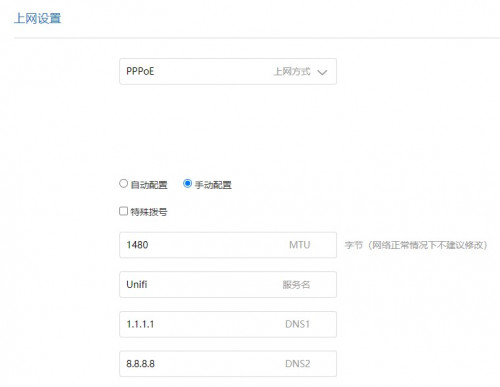 2. Yes, DDNS service is limited. I m using no-ip so it's fine for me. 3. You can actually setup Guest WiFi using the APP in mobile phone. There are quite a number of settings available on the app only which is quite weird. 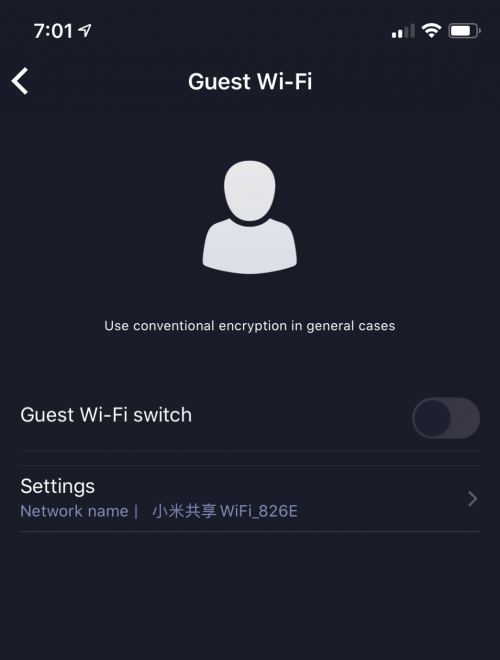 This post has been edited by toytoy: Sep 9 2020, 07:04 PM |
|
|
Sep 9 2020, 11:07 PM
|
|
Junior Member
879 posts Joined: Jan 2007
|
QUOTE(toytoy @ Sep 9 2020, 07:04 PM) 1.Pardon my ignorance but being able to set DNS at DHCP is different from setting the DNS at PPPOE side? 1. Technically will achieve the same thing, but in a weird way. 2. Yes, DDNS service is limited. I m using no-ip so it's fine for me. 3. You can actually setup Guest WiFi using the APP in mobile phone. There are quite a number of settings available on the app only which is quite weird. Client DNS resolution when: Set DNS at DHCP Client-LAN DNS server Set DNS at PPPOE side Client-Router-LAN DNS server But when i alter DNS setting under pppoe, something broken and im losing my inet access 2. My personal preference for DDNS will be dns-o-matic. It able to update to other multiple ddns service and act as a central hub - since i also have ddns service with he.net and afraid dns. just noticed that i have no-ip account as well, but IINM need to visit their website every month to keep account remain active. 3. Is that miwifi app downloaded from playstore or modded apk? i dont recall i see that option yesterday This post has been edited by neuromancerx: Sep 9 2020, 11:09 PM |
|
|
Sep 10 2020, 01:46 AM
|
|
Senior Member
875 posts Joined: Jan 2003
|
QUOTE(neuromancerx @ Sep 9 2020, 11:07 PM) 1. Technically will achieve the same thing, but in a weird way. 2. Yes, for no-ip need to visit their website every month. but they send reminder every month and the process is mostly less than 1 minute.Client DNS resolution when: Set DNS at DHCP Client-LAN DNS server Set DNS at PPPOE side Client-Router-LAN DNS server But when i alter DNS setting under pppoe, something broken and im losing my inet access 2. My personal preference for DDNS will be dns-o-matic. It able to update to other multiple ddns service and act as a central hub - since i also have ddns service with he.net and afraid dns. just noticed that i have no-ip account as well, but IINM need to visit their website every month to keep account remain active. 3. Is that miwifi app downloaded from playstore or modded apk? i dont recall i see that option yesterday 3. Yes, MiWiFi app but I am using the iOS version. It is located at the apps site under guest wifi. The strange thing is i have to change to china region in the app to get it connected to my routers. |
|
|
Sep 11 2020, 08:14 PM
|
|
Probation
8 posts Joined: Aug 2020
|
|
|
|
Sep 12 2020, 03:23 AM
|
|
Probation
8 posts Joined: Aug 2020
|
QUOTE(flubear @ Sep 9 2020, 12:29 PM) the current firmware should be 1.0.67 but when I've upgraded automatically it pushed a 1.0.227 firmware in, did anyone else got this as well? i have the same version 227 |
|
|
Sep 12 2020, 04:14 AM
Show posts by this member only | IPv6 | Post
#114
|
|
Junior Member
485 posts Joined: May 2006
|
I am unable to auto update firmware for AX3600. Anybody know where I can manually download firmware? Is there a need to backup before manual update?
|
|
|
Sep 12 2020, 05:49 AM
|
|
Junior Member
211 posts Joined: Jan 2003 From: Seri Kembangan
|
QUOTE(Janushi @ Sep 11 2020, 08:14 PM) interesting to see this =) but if they have this we just have to get the firmware that is used in Russia and we will be able to update to switch it to English if required. |
|
|
Sep 12 2020, 05:51 AM
|
|
Junior Member
211 posts Joined: Jan 2003 From: Seri Kembangan
|
QUOTE(chaos32 @ Sep 12 2020, 04:14 AM) I am unable to auto update firmware for AX3600. Anybody know where I can manually download firmware? Is there a need to backup before manual update? only 1.0.67 available for download, 1.0.227 not available on their website yet. http://cdn.cnbj1.fds.api.mi-img.com/xiaoqi...7f3e_1.0.67.bin Cheers |
|
|
Sep 12 2020, 07:06 AM
Show posts by this member only | IPv6 | Post
#117
|
|
Junior Member
485 posts Joined: May 2006
|
QUOTE(flubear @ Sep 12 2020, 05:51 AM) only 1.0.67 available for download, 1.0.227 not available on their website yet. Thanks.http://cdn.cnbj1.fds.api.mi-img.com/xiaoqi...7f3e_1.0.67.bin Cheers |
|
|
Sep 15 2020, 04:20 PM
|

Senior Member
1,058 posts Joined: Nov 2009
|
Sifu, what is the advantage of Xiaomi AX1800/Redmi AX5 compared to local TP-Link AX20? Other than price. Thanks.
|
|
|
Sep 15 2020, 08:33 PM
|
|
Junior Member
224 posts Joined: Apr 2019
|
QUOTE(eugenecctan @ Sep 15 2020, 04:20 PM) Sifu, what is the advantage of Xiaomi AX1800/Redmi AX5 compared to local TP-Link AX20? Other than price. Thanks. xiaomi's qos will actually work compare to tplink's qos which probably doesnt work and just for showbut ax20 have faster processor which can be better for gaming ax20 have alexa which turn your router into another surveillance node for cia |
|
|
Sep 15 2020, 08:39 PM
|
|
Senior Member
1,058 posts Joined: Nov 2009
|
QUOTE(nonamer @ Sep 15 2020, 08:33 PM) xiaomi's qos will actually work compare to tplink's qos which probably doesnt work and just for show How about signal strength? I am trying to convince myself to save rm50 to get something from oversea without warranty compared to local unit that more expensive but with 3 years warranty.but ax20 have faster processor which can be better for gaming ax20 have alexa which turn your router into another surveillance node for cia |
|
|
Sep 15 2020, 08:58 PM
|
|
Junior Member
224 posts Joined: Apr 2019
|
QUOTE(eugenecctan @ Sep 15 2020, 08:39 PM) How about signal strength? I am trying to convince myself to save rm50 to get something from oversea without warranty compared to local unit that more expensive but with 3 years warranty. no idea about ax20 but ax1800 signal strength is quite good as far as i can see...acwifi.net point D measurement 65 mark for 5g and 40 mark for 2.4g...5g range slightly better than mine (70 mark for 5g) which already cover whole double storey bungalow...so i know ax1800 will be enough for most normal size homehttps://www.acwifi.net/wp-content/uploads/2020/06/D.jpg |
|
|
Sep 16 2020, 10:17 AM
|
|
Senior Member
1,058 posts Joined: Nov 2009
|
OK guys, last question before I place my order.
 2 units as mesh setup with Ax5 or Ax1800, which is better? Any link where can I get the best price for either units? Thanks. |
|
|
Sep 17 2020, 04:28 PM
|
|
Junior Member
879 posts Joined: Jan 2007
|
sorry, off topic:
im thinking to sell my AX1800 router. im barely using it, just for testing and experience. i dont think im ready to use the stock firmware yet at this point, will wait until it officially supported by openwrt. other than AX1800, i'm also planning to sell these routers as well: WS880 flashed with asuswrt RM100 AC86U CN set, consider no warranty. it got issue with disappearing 2.4Ghz but managed to get the workaround by set the country to AU RM250 Too much routers to play :sigh: PM me if interested |
|
|
Sep 17 2020, 07:05 PM
|
|
Senior Member
1,058 posts Joined: Nov 2009
|
QUOTE(eugenecctan @ Sep 16 2020, 10:17 AM) OK guys, last question before I place my order. Bought from Taobao, 1 unit of ax5 and 1 unit of ax1800, then saw the YouTube review on the weak 2.4g. Weaker than Huawei AX3... Hmm, is that true? I just returned a Huawei ax3 due to very weak 2.4g. My smart devices and chromecast are using 2.4g.2 units as mesh setup with Ax5 or Ax1800, which is better? Any link where can I get the best price for either units? Thanks. |
|
|
Sep 19 2020, 01:40 AM
|
|
Junior Member
211 posts Joined: Jan 2003 From: Seri Kembangan
|
Anyone managed to get iptv vlan 600 tag working on one of the ax3600 or ax1800 network port?
|
|
|
Sep 19 2020, 01:03 PM
|
|
Probation
4 posts Joined: Sep 2020
|
Hi Darren,
Many thanks for your video but l couldn't get it work. Perhaps you or some expert can help me as I am network idiot. Story goes: I livein Melbourne at the moment using ADSL2+ connect and I just installed the NBN (National Broadband Network) yesterday. Everything seems to work until the Miwifi part where it would not connect。 People advised me that I might need to get a router with vlan supported and or try to configure this newly bought Xiaomi Ax3600, hence they directed me to your video. This is where i am stuck as I do not even know how to connect correctly right at the begining. This is what is happening: 1. Connect the HFC modem to the router WAN port and connect one of the LAN port to my desktop, is this rorrect? 2. My broadband service provider did not give me any login or password, so I cannot do the PPPoE setup like you have shown in the video. All the help and advice are very much appreciated. Many thanks. |
|
|
Sep 19 2020, 02:14 PM
|

Senior Member
1,448 posts Joined: Oct 2019
|
QUOTE(eugenecctan @ Sep 17 2020, 08:05 PM) Bought from Taobao, 1 unit of ax5 and 1 unit of ax1800, then saw the YouTube review on the weak 2.4g. Weaker than Huawei AX3... Hmm, is that true? I just returned a Huawei ax3 due to very weak 2.4g. My smart devices and chromecast are using 2.4g. china routers have txpower transmit at 100mW compare to malaysia can max at 500mW .is this the reason for weaker 2.4g signals ? |
|
|
Sep 19 2020, 02:18 PM
|
|
Senior Member
3,389 posts Joined: Sep 2019
|
Ok lo fast enough...
Attached image(s)  |
|
|
Sep 19 2020, 04:56 PM
Show posts by this member only | IPv6 | Post
#129
|
|
Senior Member
1,878 posts Joined: Apr 2019
|
QUOTE(BlueWhisky @ Sep 19 2020, 01:03 PM) Hi Darren, You need to enable bridge mode for your HFC cable modem which disables its routing function which basically turns it into just a "modem" that authenticates with your ISP and acquiring a connecting IP address. After that, proceed to connect it to the WAN port of the wireless router.Enable DHCP/Static IP for the WAN settings of your new router instead of using PPPoE.Many thanks for your video but l couldn't get it work. Perhaps you or some expert can help me as I am network idiot. Story goes: I livein Melbourne at the moment using ADSL2+ connect and I just installed the NBN (National Broadband Network) yesterday. Everything seems to work until the Miwifi part where it would not connect。 People advised me that I might need to get a router with vlan supported and or try to configure this newly bought Xiaomi Ax3600, hence they directed me to your video. This is where i am stuck as I do not even know how to connect correctly right at the begining. This is what is happening: 1. Connect the HFC modem to the router WAN port and connect one of the LAN port to my desktop, is this rorrect? 2. My broadband service provider did not give me any login or password, so I cannot do the PPPoE setup like you have shown in the video. All the help and advice are very much appreciated. Many thanks. There is no need for PPPoE authentication here as your NBN cable modem authenticates itself with the ISP network via DHCP assignment. |
|
|
Sep 19 2020, 07:08 PM
|
|
Probation
4 posts Joined: Sep 2020
|
QUOTE(Candy12 @ Sep 19 2020, 06:56 PM) You need to enable bridge mode for your HFC cable modem which disables its routing function which basically turns it into just a "modem" that authenticates with your ISP and acquiring a connecting IP address. After that, proceed to connect it to the WAN port of the wireless router.Enable DHCP/Static IP for the WAN settings of your new router instead of using PPPoE. Many thanks Candy12.There is no need for PPPoE authentication here as your NBN cable modem authenticates itself with the ISP network via DHCP assignment. Looks like it is the end of the road for me and the easiest way is to switch to an ISP that does no do vlan. |
|
|
Sep 20 2020, 07:00 PM
|
|
Senior Member
1,058 posts Joined: Nov 2009
|
QUOTE(waghyu @ Sep 19 2020, 02:18 PM) Ok lo fast enough... Thanks. As long as 2.4g stronger than Ac1200 then I am happy. Waiting for receive my router now from China. Thanks. |
|
|
Sep 20 2020, 10:45 PM
Show posts by this member only | IPv6 | Post
#132
|
|
Senior Member
1,878 posts Joined: Apr 2019
|
QUOTE(BlueWhisky @ Sep 19 2020, 07:08 PM) Many thanks Candy12. Have you confirmed that your NBN HFC isp uses VLAN?Looks like it is the end of the road for me and the easiest way is to switch to an ISP that does no do vlan. Which ISP are you using? Optus? Telstra? Usually HFC networks don't use VLAN. Have you set your router to DHCP mode under WAN settings then plug an ethernet cable from your modem to the WAN port of your router? Wait for the few mins for the connection to get detected then try opening your browser to surf the internet? |
|
|
Sep 21 2020, 10:16 PM
|
|
Probation
4 posts Joined: Sep 2020
|
QUOTE(Candy12 @ Sep 21 2020, 12:45 AM) Have you confirmed that your NBN HFC isp uses VLAN? I am using Future Broadband and this is what they told me:Which ISP are you using? Optus? Telstra? Usually HFC networks don't use VLAN. Have you set your router to DHCP mode under WAN settings then plug an ethernet cable from your modem to the WAN port of your router? Wait for the few mins for the connection to get detected then try opening your browser to surf the internet? - VLAN ID: 100 - 802.1p/VLAN Priority: 0 (Only if required by your device) Just a while ago, I repeated the steps in Darren's video and configured the router which I wasn't sure it supposed to be eth0 or eth1 but I set it this way: config interface 'eth1' option ifname 'eth1.100' option keepup '1' config interface 'wan' option ifname 'eth1.100' Amazingly it worked after I set the static IP info just given to me today. However, there are websites I am not able to access such as all the speedtest websites, another puzzle to solve. |
|
|
Sep 21 2020, 11:58 PM
Show posts by this member only | IPv6 | Post
#134
|
|
Senior Member
1,878 posts Joined: Apr 2019
|
QUOTE(BlueWhisky @ Sep 21 2020, 10:16 PM) I am using Future Broadband and this is what they told me: Try changing your public DNS with 3rd party ones such as Google's DNS/Cloudflare- VLAN ID: 100 - 802.1p/VLAN Priority: 0 (Only if required by your device) Just a while ago, I repeated the steps in Darren's video and configured the router which I wasn't sure it supposed to be eth0 or eth1 but I set it this way: config interface 'eth1' option ifname 'eth1.100' option keepup '1' config interface 'wan' option ifname 'eth1.100' Amazingly it worked after I set the static IP info just given to me today. However, there are websites I am not able to access such as all the speedtest websites, another puzzle to solve. Also you can try disabling IPv6 if it was turned on in your router. |
|
|
Sep 22 2020, 07:49 AM
|
|
Probation
4 posts Joined: Sep 2020
|
QUOTE(Candy12 @ Sep 22 2020, 01:58 AM) Try changing your public DNS with 3rd party ones such as Google's DNS/Cloudflare I did and the trace route was ok: Also you can try disabling IPv6 if it was turned on in your router. Tracing route to speedtest.net [151.101.2.219] over a maximum of 30 hops: 1 <1 ms <1 ms <1 ms XiaoQiang [192.168.31.1] 2 * * * Request timed out. 3 11 ms 9 ms 11 ms te3-3.mflindist02.aapt.net.au [203.131.61.12] 4 11 ms 10 ms 10 ms bu9.mflinbrdr11.aapt.net.au [202.10.14.33] 5 11 ms 8 ms 6 ms Bundle-Ether19.lon-edge901.melbourne.telstra.net [139.130.41.105] 6 10 ms 10 ms 12 ms bundle-ether10.exi-core10.melbourne.telstra.net [203.50.11.109] 7 10 ms 10 ms 10 ms bundle-ether1.lon-edge903.melbourne.telstra.net [203.50.11.199] 8 12 ms 11 ms 10 ms fas3044810.lnk.telstra.net [203.54.133.106] 9 10 ms 10 ms 10 ms 151.101.2.219 |
|
|
Sep 23 2020, 05:32 PM
|
|
Senior Member
845 posts Joined: Nov 2010 From: Puchong/Cyberjaya
|
im stucked here... can help?
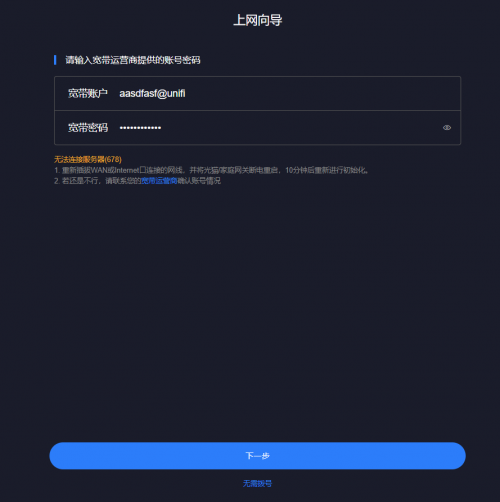 |
|
|
Sep 23 2020, 05:48 PM
Show posts by this member only | IPv6 | Post
#137
|
|
Junior Member
248 posts Joined: Aug 2018
|
QUOTE(cle900706 @ Sep 23 2020, 05:32 PM) im stucked here... can help? Use DHCP 1st, change it afterward |
|
|
Sep 23 2020, 05:58 PM
Show posts by this member only | IPv6 | Post
#138
|
|
Senior Member
845 posts Joined: Nov 2010 From: Puchong/Cyberjaya
|
QUOTE(heidarren @ Sep 23 2020, 05:48 PM) Use DHCP 1st, change it afterward ok got it.i had done all and input the details for pppoe logins. from the summary i have ip address those but dns is empty. not connecting to the internet. hmmmmmmmm ax5 1.0.16 version |
|
|
Sep 23 2020, 07:21 PM
|
|
Senior Member
845 posts Joined: Nov 2010 From: Puchong/Cyberjaya
|
ok finally everything is up!
i am using android and i dont really see guest wifi options in the app. hmmmmm |
|
|
Sep 25 2020, 07:21 PM
|
|
Senior Member
1,058 posts Joined: Nov 2009
|
Hi sifus,
For Ax1800 I am able to setup successfully. Thanks. But for Ax5. I cannot detect any as mesh. Any idea why? |
|
|
Sep 25 2020, 07:40 PM
|
|
Senior Member
1,058 posts Joined: Nov 2009
|
QUOTE(eugenecctan @ Sep 25 2020, 07:21 PM) Hi sifus, No issue already, just need to update firmware for AX5. I will test out the connection in a while. Thanks. For Ax1800 I am able to setup successfully. Thanks. But for Ax5. I cannot detect any as mesh. Any idea why? |
|
|
Sep 25 2020, 09:25 PM
Show posts by this member only | IPv6 | Post
#142
|
|
Senior Member
1,058 posts Joined: Nov 2009
|
OK, highly recommended. Everything good except the channels available. After 48 then jump to 149?
Add on, can I enable guest network? I do not able to find this option. Thanks 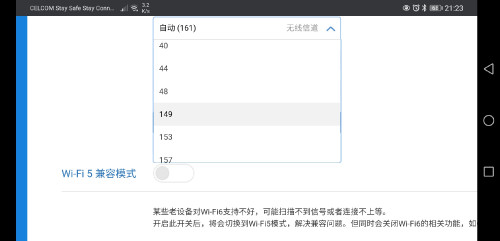 This post has been edited by eugenecctan: Sep 25 2020, 09:32 PM |
|
|
Sep 26 2020, 12:41 AM
Show posts by this member only | IPv6 | Post
#143
|
|
Junior Member
248 posts Joined: Aug 2018
|
QUOTE(eugenecctan @ Sep 25 2020, 09:25 PM) OK, highly recommended. Everything good except the channels available. After 48 then jump to 149? Actually u can use channel 52~64 by setting it to auto and manually change it via winscp Add on, can I enable guest network? I do not able to find this option. Thanks |
|
|
Sep 26 2020, 01:00 AM
|
|
Junior Member
879 posts Joined: Jan 2007
|
QUOTE(heidarren @ Sep 26 2020, 12:41 AM) Actually u can use channel 52~64 by setting it to auto and manually change it via winscp correct me if im wrong, the moment we upgrade the firmware, the ssh will be disabled and the exploit is no longer there, right? |
|
|
Sep 26 2020, 02:18 AM
Show posts by this member only | IPv6 | Post
#145
|
|
Junior Member
248 posts Joined: Aug 2018
|
QUOTE(neuromancerx @ Sep 26 2020, 01:00 AM) correct me if im wrong, the moment we upgrade the firmware, the ssh will be disabled and the exploit is no longer there, right? Ya, so make all the mods before upgrade, and it will stay remain after upgrade. Do a backup before upgrade to save your time, just in case |
|
|
Sep 26 2020, 02:23 AM
Show posts by this member only | IPv6 | Post
#146
|
|
Senior Member
1,058 posts Joined: Nov 2009
|
QUOTE(heidarren @ Sep 26 2020, 02:18 AM) Ya, so make all the mods before upgrade, and it will stay remain after upgrade. Do a backup before upgrade to save your time, just in case My Ax1800 shipped with latest firmware. No issue to follow the step. Anyhow.. My line was disconnected jst now. Not sure unifi issue or router. After restart then OK. Will monitor these few days. Thanks. |
|
|
Sep 26 2020, 02:24 AM
Show posts by this member only | IPv6 | Post
#147
|
|
Senior Member
1,058 posts Joined: Nov 2009
|
QUOTE(neuromancerx @ Sep 26 2020, 01:00 AM) correct me if im wrong, the moment we upgrade the firmware, the ssh will be disabled and the exploit is no longer there, right? Still limited. As I used to set to channels 112 for 5Ghz. |
|
|
Sep 26 2020, 02:25 AM
Show posts by this member only | IPv6 | Post
#148
|
|
Junior Member
248 posts Joined: Aug 2018
|
QUOTE(eugenecctan @ Sep 26 2020, 02:23 AM) My Ax1800 shipped with latest firmware. No issue to follow the step. Anyhow.. My line was disconnected jst now. Not sure unifi issue or router. After restart then OK. Will monitor these few days. Thanks. I always set the daily reboot for maximizing stability, so I can leave it at corners and forget about it |
|
|
Sep 27 2020, 07:47 PM
|
|
Senior Member
3,389 posts Joined: Sep 2019
|
QUOTE(eugenecctan @ Sep 20 2020, 07:00 PM) Thanks. As long as 2.4g stronger than Ac1200 then I am happy. Waiting for receive my router now from China. Thanks. No worries. Many problematic connection are due to high latency attributed to wifi-wifi signal not established properly. 5 mbps if stable and low latency are far better than 50 mbps with low latency multi floor house connection issue scenario as example. |
|
|
Sep 27 2020, 08:45 PM
|
|
Senior Member
1,058 posts Joined: Nov 2009
|
Ya. It was Unifi issue. BTW. 1 big problem. After unifi reset port. Now my xiaomi router not working anymore. Anything that I need to do after Unifi reset port? Thanks.
|
|
|
Oct 8 2020, 05:45 PM
|
|
Probation
1 posts Joined: Oct 2020
|
Does anyone know where can i download firmware version 1.0.16 for redmi AX6 (RA69).
Current version 1.0.18 (upgraded) is very unstable and I would like to downgrade Thanks |
|
|
Oct 14 2020, 04:45 PM
|
|
Senior Member
1,058 posts Joined: Nov 2009
|
Happen again. Suddenly not able to connect to unifi again. The only way is to format and resetup everything again....
|
|
|
Nov 3 2020, 10:52 AM
|

Junior Member
430 posts Joined: Jan 2003 From: BSD
|
just place my order for ax3600...
wondering anyone recently configures ax3600 with maxis? and whether will it work with the 4g backup usb ? |
|
|
Nov 3 2020, 04:26 PM
|
|
Junior Member
879 posts Joined: Jan 2007
|
i ended up using this as wireless extender mode. but a bit uncomfortable due to the miwifi app is cloud based, and the router keep sending a beacon to the internet.
This post has been edited by neuromancerx: Nov 3 2020, 04:27 PM |
|
|
Nov 4 2020, 09:53 AM
|

Senior Member
741 posts Joined: Oct 2006 From: KL/Ampang
|
QUOTE(y2kming @ Nov 3 2020, 10:52 AM) just place my order for ax3600... there is no usb port on ax3600wondering anyone recently configures ax3600 with maxis? and whether will it work with the 4g backup usb ? |
|
|
Nov 5 2020, 08:20 AM
Show posts by this member only | IPv6 | Post
#156
|
|
Junior Member
30 posts Joined: May 2009
|
QUOTE(eugenecctan @ Oct 14 2020, 04:45 PM) Happen again. Suddenly not able to connect to unifi again. The only way is to format and resetup everything again.... Hi, how is your ax1800 work with unifi? Is everything good and stable? I’m in planning to get one for replacing unifi default router.Thank for your feedback |
|
|
Nov 5 2020, 03:50 PM
|
|
Junior Member
430 posts Joined: Jan 2003 From: BSD
|
QUOTE(kenjixx @ Nov 4 2020, 09:53 AM) there is no usb port on ax3600 omg ... i didnt notice tat ..... the mi router 3 also got usb ... i thinking this one should also have... siao liao .... thanks @kenjixx |
|
|
Nov 5 2020, 03:51 PM
|
|
Junior Member
430 posts Joined: Jan 2003 From: BSD
|
all sifu, just wondering ... if i plug cable from my current tplink of maxis router to this ax3600.. and use this ax3600 for wifi only (disable tplink wifi) ... is the speed acceptable ? anyone tried ?
|
|
|
Nov 5 2020, 03:55 PM
|
|
Newbie
12 posts Joined: Feb 2009
|
QUOTE(cstan1989 @ Nov 5 2020, 08:20 AM) Hi, how is your ax1800 work with unifi? Is everything good and stable? I’m in planning to get one for replacing unifi default router. No need to change router to wifi 6 router if your internet package speed is below 500mbps. If u change to wifi 6 router your device almost is wifi 5 also not got best performent. Wifi 6 is defective so now got wifi 6e more better than wifi 6. So now not need upgrade to wifi 6 router just waiting wifi 6e.Thank for your feedback |
|
|
Nov 5 2020, 04:16 PM
|
|
Junior Member
879 posts Joined: Jan 2007
|
QUOTE(y2kming @ Nov 5 2020, 03:51 PM) all sifu, just wondering ... if i plug cable from my current tplink of maxis router to this ax3600.. and use this ax3600 for wifi only (disable tplink wifi) ... is the speed acceptable ? anyone tried ? i did this exactly, i dont think there was a significant difference for the existing wifi 5 client. speed more or less is similar with asus ac86u, which can cover my whole double storey house |
|
|
Nov 5 2020, 04:20 PM
|
|
Junior Member
430 posts Joined: Jan 2003 From: BSD
|
QUOTE(neuromancerx @ Nov 5 2020, 04:16 PM) i did this exactly, i dont think there was a significant difference for the existing wifi 5 client. speed more or less is similar with asus ac86u, which can cover my whole double storey house great !! im using Asus ac86u previously with unifi, but router koyak after 4 years plus... therefore wanna get this ax3600 to resume my wifi coverage.Good to know its same as ac86u coverage ... thank you !! |
|
|
Nov 6 2020, 02:41 AM
|
|
Senior Member
1,058 posts Joined: Nov 2009
|
QUOTE(cstan1989 @ Nov 5 2020, 08:20 AM) Hi, how is your ax1800 work with unifi? Is everything good and stable? I’m in planning to get one for replacing unifi default router. So far no issue after upgraded to latest firmware. Recommended as itis the cheapest mesh setup that you can find.Thank for your feedback |
|
|
Nov 6 2020, 09:23 PM
Show posts by this member only | IPv6 | Post
#163
|

Probation
10 posts Joined: Nov 2020
|
Xiaomi ax1800 or redmi ax6, right now I only plan to use either one as ap. At taobao they are almost same price.
|
|
|
Nov 8 2020, 09:57 AM
|
|
Elite
8,415 posts Joined: Jul 2008
|
QUOTE(Tinyredkryptonite @ Nov 6 2020, 09:23 PM) Xiaomi ax1800 or redmi ax6, right now I only plan to use either one as ap. At taobao they are almost same price. Do you mean the Redmi AX5?The Redmi AX6 is an AX3000 router. |
|
|
Nov 9 2020, 02:51 PM
Show posts by this member only | IPv6 | Post
#165
|
|
Probation
10 posts Joined: Nov 2020
|
yeah I know that
|
|
|
Nov 15 2020, 09:31 PM
|
|
Junior Member
388 posts Joined: Dec 2013
|
Anyone manage to configure vlan 600 for Hyptv?
|
|
|
Nov 17 2020, 06:10 PM
|

Senior Member
6,040 posts Joined: Jan 2003 From: Cheras, Kuala Lumpur
|
Is it worth to get the global version or should just stick with the China version?
https://shopee.com.my/%E3%80%90Global-Versi...3032.7961932260 |
|
|
Nov 22 2020, 12:37 PM
|
|
Junior Member
211 posts Joined: Jan 2003 From: Seri Kembangan
|
QUOTE(blurjoey @ Nov 17 2020, 06:10 PM) Is it worth to get the global version or should just stick with the China version? buy the china one .. eventually you could get the English rom if it irritates you too much like how Mi R3P could install TW ENG firmware. https://shopee.com.my/%E3%80%90Global-Versi...3032.7961932260 From the shopee link it seems this global verision comes in diff english packaging box only but still don't have vlan configurations built into their AX3600 router. the only benefit is the 1 year warranty which you have to pay another RM100-RM130 above for it =) the device from China can definitely connect to Time WIFI as there is no vlan required, if you require to use on Maxis & Unifi then hack the vlan setting. If you need to use HyppTV then get a switch =) This post has been edited by flubear: Nov 22 2020, 12:38 PM blurjoey liked this post
|
|
|
Nov 25 2020, 01:51 AM
Show posts by this member only | IPv6 | Post
#169
|

Junior Member
67 posts Joined: May 2009
|
QUOTE(flubear @ Nov 22 2020, 12:37 PM) buy the china one .. eventually you could get the English rom if it irritates you too much like how Mi R3P could install TW ENG firmware. so if i need to do vlan tagging to use hypptv how to get it to work ? From the shopee link it seems this global verision comes in diff english packaging box only but still don't have vlan configurations built into their AX3600 router. the only benefit is the 1 year warranty which you have to pay another RM100-RM130 above for it =) the device from China can definitely connect to Time WIFI as there is no vlan required, if you require to use on Maxis & Unifi then hack the vlan setting. If you need to use HyppTV then get a switch =) |
|
|
Nov 25 2020, 09:38 AM
|
|
Junior Member
879 posts Joined: Jan 2007
|
QUOTE(TaKeOVER @ Nov 25 2020, 01:51 AM) so if i need to do vlan tagging to use hypptv how to get it to work ? of course. theoretically, you will need below vlan setup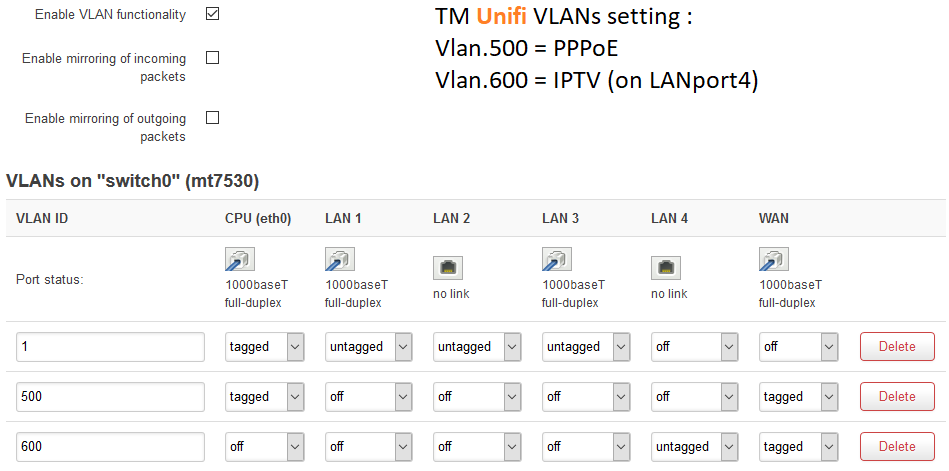 this is openwrt setup for unifi vlan, you may get the similar result as Mi AX1800 is derived from the same code. WAN port: tagged with vlan 500 (data) & 600 (iptv) LAN4 untagged for vlan600, this is where you connect the STB as mentioned in previous post, it will be much easier to get external switch that support vlan. Refer here: https://www.blacktubi.com/guide/make-any-ro...-work-on-unifi/ This post has been edited by neuromancerx: Nov 25 2020, 09:41 AM |
|
|
Nov 25 2020, 11:25 AM
|
|
Junior Member
422 posts Joined: Mar 2010
|
This router can do port forward or not ?
As i know , only wi-fi mode can do that but not with wired lan cable ... |
|
|
Nov 25 2020, 09:17 PM
Show posts by this member only | IPv6 | Post
#172
|
|
Junior Member
67 posts Joined: May 2009
|
QUOTE(neuromancerx @ Nov 25 2020, 09:38 AM) of course. theoretically, you will need below vlan setup Yeah i understand vlan tagging, what i mean is, can u edit the config file on the ax3600 to add vland600 for hypptv, just wondering if anyone has done it, considering to buy this , but i still use hypptv.this is openwrt setup for unifi vlan, you may get the similar result as Mi AX1800 is derived from the same code. WAN port: tagged with vlan 500 (data) & 600 (iptv) LAN4 untagged for vlan600, this is where you connect the STB as mentioned in previous post, it will be much easier to get external switch that support vlan. Refer here: https://www.blacktubi.com/guide/make-any-ro...-work-on-unifi/ |
|
|
Nov 25 2020, 09:23 PM
Show posts by this member only | IPv6 | Post
#173
|
|
Junior Member
67 posts Joined: May 2009
|
im just asking out of the box, to use the smart switch, have to spend another rm100, im wondering if u can edit the config file direct. from what i understand u could also just use an old router flash it with ddwrt and use that as a smart switch.
|
|
|
Nov 27 2020, 03:18 AM
|
|
Junior Member
211 posts Joined: Jan 2003 From: Seri Kembangan
|
QUOTE(TaKeOVER @ Nov 25 2020, 01:51 AM) so if i need to do vlan tagging to use hypptv how to get it to work ? I've only managed to update the vlan tagging as per what Darren mentioned, trying to update the file to use other LAN ports to vlan600 for hypptv was not successful. for a client i've used a 5 port smart switch that cost another RM80-RM100 (depending when you buy it) Cheers |
|
|
Nov 29 2020, 07:13 PM
|
|
Junior Member
47 posts Joined: Jul 2014
|
has anyone flashed CN AX3600 with Global rom? Vlan profile is available for s'pore isp, dunno msia tho'
https://youtu.be/CWQHrocbmvE This post has been edited by j03y_r055: Nov 29 2020, 07:13 PM |
|
|
Nov 30 2020, 10:12 AM
Show posts by this member only | IPv6 | Post
#176
|
|
Senior Member
845 posts Joined: Nov 2010 From: Puchong/Cyberjaya
|
hi guys, having the ax5 for couple of months now.
once in awhile it will disconnect from internet. in the router options it shows connected. need to connect n reconnect several times to get it connected again. besides that, after restart router, seems like need try couple of times to connect and reconnect in settings to get connected. any advice of fix for this? This post has been edited by cle900706: Nov 30 2020, 10:28 AM |
|
|
Nov 30 2020, 01:02 PM
Show posts by this member only | IPv6 | Post
#177
|
|
Junior Member
248 posts Joined: Aug 2018
|
QUOTE(cle900706 @ Nov 30 2020, 10:12 AM) hi guys, having the ax5 for couple of months now. Try to change the LAN cable, these Xiaomi routers seem as picky as AC86U, I had an issue like you, in the end I found that it jumped between 100mbps and 1000mbps for cable connection speed causes connection issue, solved by changing to a better cable.once in awhile it will disconnect from internet. in the router options it shows connected. need to connect n reconnect several times to get it connected again. besides that, after restart router, seems like need try couple of times to connect and reconnect in settings to get connected. any advice of fix for this? |
|
|
Nov 30 2020, 01:09 PM
Show posts by this member only | IPv6 | Post
#178
|
|
Junior Member
248 posts Joined: Aug 2018
|
Also, these Xiaomi routers come with a power adaptor which just enough for it to power up, as a power supply we do recommend to have more than 50% power reserve but Xiaomi original power adaptor only has about 20% power reserve, it might cause some instability issue depending on the stability of your house electricity supply. I upgraded AX3600's original 12v/2a to 12v/3a, and use the 12v/2a to power AX1800 which originally came with only 12v/1a. It's not necessary unless you are facing stability issue, I did it just because I have an extra 12v/3a power adaptor.
|
|
|
Nov 30 2020, 02:37 PM
Show posts by this member only | IPv6 | Post
#179
|
|
Senior Member
845 posts Joined: Nov 2010 From: Puchong/Cyberjaya
|
QUOTE(heidarren @ Nov 30 2020, 01:02 PM) Try to change the LAN cable, these Xiaomi routers seem as picky as AC86U, I had an issue like you, in the end I found that it jumped between 100mbps and 1000mbps for cable connection speed causes connection issue, solved by changing to a better cable. tried other Lan cable, but still not able to connect.everything is alright. suddenly cannot connect at all. router settings showed this, but router internet light is orange. 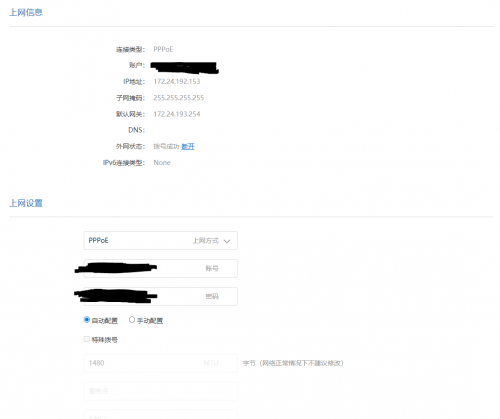 QUOTE(heidarren @ Nov 30 2020, 01:09 PM) Also, these Xiaomi routers come with a power adaptor which just enough for it to power up, as a power supply we do recommend to have more than 50% power reserve but Xiaomi original power adaptor only has about 20% power reserve, it might cause some instability issue depending on the stability of your house electricity supply. I upgraded AX3600's original 12v/2a to 12v/3a, and use the 12v/2a to power AX1800 which originally came with only 12v/1a. It's not necessary unless you are facing stability issue, I did it just because I have an extra 12v/3a power adaptor. unfortunately i dont have other power supply. |
|
|
Nov 30 2020, 03:59 PM
|
|
Junior Member
355 posts Joined: Jan 2003 From: Seremban
|
QUOTE(cle900706 @ Nov 30 2020, 02:37 PM) tried other Lan cable, but still not able to connect. Might be fault from TM Unifi site. Calle their support and ask them to reset your port from their site.everything is alright. suddenly cannot connect at all. router settings showed this, but router internet light is orange. unfortunately i dont have other power supply. Cheers! |
|
|
Nov 30 2020, 04:21 PM
|

Junior Member
238 posts Joined: Aug 2011 From: Bachok,Kelantan
|
QUOTE(cle900706 @ Nov 30 2020, 02:37 PM) tried other Lan cable, but still not able to connect. Can u manually set the DNS? The dns field seemed emptyeverything is alright. suddenly cannot connect at all. router settings showed this, but router internet light is orange. unfortunately i dont have other power supply. |
|
|
Nov 30 2020, 04:53 PM
Show posts by this member only | IPv6 | Post
#182
|
|
Senior Member
845 posts Joined: Nov 2010 From: Puchong/Cyberjaya
|
QUOTE(hengng @ Nov 30 2020, 03:59 PM) Might be fault from TM Unifi site. Calle their support and ask them to reset your port from their site. using old router no problem lolCheers! QUOTE(Gregar Forte @ Nov 30 2020, 04:21 PM) Can u manually set the DNS? The dns field seemed empty hm........ what dns setting should i put. dont really know how to read chinese haha |
|
|
Nov 30 2020, 07:35 PM
|
|
Senior Member
845 posts Joined: Nov 2010 From: Puchong/Cyberjaya
|
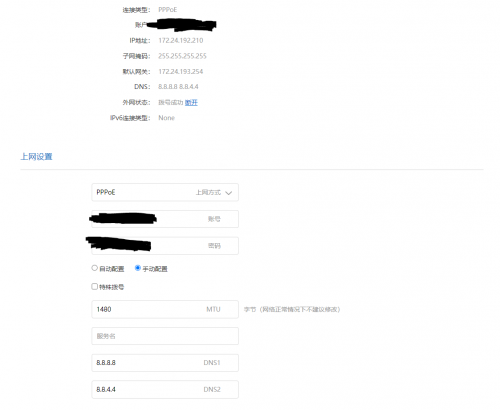 using old unifi router now no problem router down since morning and was using auto dns setting previously may i now if my settings correct? |
|
|
Nov 30 2020, 10:00 PM
|
|
Junior Member
879 posts Joined: Jan 2007
|
QUOTE(cle900706 @ Nov 30 2020, 07:35 PM) using old unifi router now no problem router down since morning and was using auto dns setting previously may i now if my settings correct? DNS will not have any impact to your connection. This post has been edited by neuromancerx: Nov 30 2020, 10:06 PM |
|
|
Nov 30 2020, 10:56 PM
|
|
Junior Member
355 posts Joined: Jan 2003 From: Seremban
|
QUOTE(cle900706 @ Nov 30 2020, 07:35 PM) using old unifi router now no problem router down since morning and was using auto dns setting previously may i now if my settings correct? The other possible problem I will think of is WAN口速率. If you select the first one from the drop box you need to get at least a cat6 LAN cable. Or you can select the last one which is 100M, and see how is it. This post has been edited by hengng: Nov 30 2020, 11:18 PM |
|
|
Dec 1 2020, 08:49 AM
Show posts by this member only | IPv6 | Post
#186
|
|
Senior Member
845 posts Joined: Nov 2010 From: Puchong/Cyberjaya
|
QUOTE(hengng @ Nov 30 2020, 10:56 PM) From your picture, you have selected manually to select DNS. So you need to click on left one 自动配置. tried what you recommended. no luckThe other possible problem I will think of is WAN口速率. If you select the first one from the drop box you need to get at least a cat6 LAN cable. Or you can select the last one which is 100M, and see how is it. from the router settings, everything is connected, but not sure why its not. if i were to reset the router, do i need to redo the vlan tagging? |
|
|
Dec 1 2020, 09:57 AM
|
|
Junior Member
355 posts Joined: Jan 2003 From: Seremban
|
QUOTE(cle900706 @ Dec 1 2020, 08:49 AM) tried what you recommended. no luck You can try to reset, but after you reset, if you can't get Tm Unifi ip address, then you have to redo everything over again to regain unifi vlan.from the router settings, everything is connected, but not sure why its not. if i were to reset the router, do i need to redo the vlan tagging? |
|
|
Dec 1 2020, 05:19 PM
|
|
Junior Member
211 posts Joined: Jan 2003 From: Seri Kembangan
|
QUOTE(neuromancerx @ Nov 30 2020, 10:00 PM) can you try changing the MTU to 1492? just sharingDNS will not have any impact to your connection. don't know why sometimes Unifi on some place can't use MTU 1492 and need to use MTU 1480. Had several clients with this issue where if using AX3600 with MTU1492, their website fails to load.... setting to MTU1480 it works ... Unifi's prob.. Time's line using MTU 1492 is ok. |
|
|
Dec 1 2020, 06:57 PM
Show posts by this member only | IPv6 | Post
#189
|
|
Junior Member
248 posts Joined: Aug 2018
|
QUOTE(flubear @ Dec 1 2020, 05:19 PM) just sharing This is due to MSS clamping, some router will change MSS according to the MTU that you set and some doesn’t, so I will always use default since I never notice any different between 1480 and 1492, no lower ping and no faster speed, an extra 12 of MTU doesn’t make things day and night, so just leave it at 1480 and you are good to go.don't know why sometimes Unifi on some place can't use MTU 1492 and need to use MTU 1480. Had several clients with this issue where if using AX3600 with MTU1492, their website fails to load.... setting to MTU1480 it works ... Unifi's prob.. Time's line using MTU 1492 is ok. This post has been edited by heidarren: Dec 1 2020, 07:00 PM |
|
|
Dec 1 2020, 06:59 PM
Show posts by this member only | IPv6 | Post
#190
|
|
Junior Member
248 posts Joined: Aug 2018
|
QUOTE(heidarren @ Dec 1 2020, 06:57 PM) This is due to MSS clamping, some router will change MSS according to the MTU that you set and some doesn’t, so I will always use default since I never notice any different between 1480 and 1492, no lower ping and no faster speed, an extra 12 of MTU doesn’t make things day and night, so just leave it at 1480 and you are good to go. |
|
|
Dec 3 2020, 01:37 PM
|

Junior Member
650 posts Joined: Mar 2009
|
AX3600 still worth getting ?
|
|
|
Dec 5 2020, 06:01 PM
Show posts by this member only | IPv6 | Post
#192
|

Junior Member
529 posts Joined: Aug 2006 From: Oil Town (Miri)
|
QUOTE(cle900706 @ Nov 30 2020, 07:35 PM) using old unifi router now no problem router down since morning and was using auto dns setting previously may i now if my settings correct? You are getting private IP, 172 This post has been edited by poh880: Dec 5 2020, 06:04 PM |
|
|
Dec 5 2020, 06:46 PM
Show posts by this member only | IPv6 | Post
#193
|
|
Junior Member
248 posts Joined: Aug 2018
|
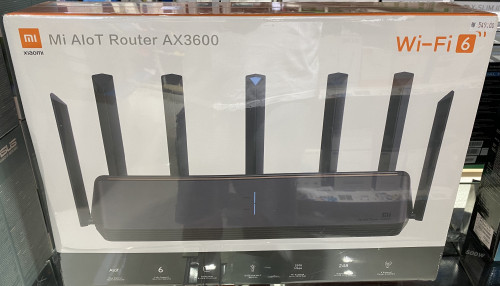 Saw this in Low Yat Plaza, RM549....... It might come with international firmware, from what I found in openwrt forums regarding int firmware is it has language option, with lower txpower, and no VLAN tagging option. Check via SSH command, China AX3600 has 31dBm/29dBm/27dBm for txpower high/mid/low, int firmware might have much lower txpower in order to match worldwide regulations. |
|
|
Dec 6 2020, 08:49 PM
|
|
Senior Member
1,472 posts Joined: Apr 2005 From: SumwHeRe In MaLaYsIa
|
QUOTE(heidarren @ Dec 5 2020, 06:46 PM) Saw this in Low Yat Plaza, RM549....... It might come with international firmware, from what I found in openwrt forums regarding int firmware is it has language option, with lower txpower, and no VLAN tagging option. Check via SSH command, China AX3600 has 31dBm/29dBm/27dBm for txpower high/mid/low, int firmware might have much lower txpower in order to match worldwide regulations. This post has been edited by amirsubhi: Dec 6 2020, 08:50 PM flubear liked this post
|
|
|
Dec 7 2020, 10:30 AM
|
|
Junior Member
211 posts Joined: Jan 2003 From: Seri Kembangan
|
QUOTE(heidarren @ Dec 5 2020, 06:46 PM) Saw this in Low Yat Plaza, RM549....... It might come with international firmware, from what I found in openwrt forums regarding int firmware is it has language option, with lower txpower, and no VLAN tagging option. Check via SSH command, China AX3600 has 31dBm/29dBm/27dBm for txpower high/mid/low, int firmware might have much lower txpower in order to match worldwide regulations. |
|
|
Dec 7 2020, 10:31 AM
|
|
Junior Member
211 posts Joined: Jan 2003 From: Seri Kembangan
|
QUOTE(Juan86 @ Dec 3 2020, 01:37 PM) AX3600 still worth getting ? why not ? unless you are gunning for the cheaper Redmi AX6 |
|
|
Dec 8 2020, 10:36 AM
Show posts by this member only | IPv6 | Post
#197
|
|
Senior Member
845 posts Joined: Nov 2010 From: Puchong/Cyberjaya
|
QUOTE(poh880 @ Dec 5 2020, 06:01 PM) Seem like you forgot to enter your VLAN or @unifi ah........ how should i enter the vlan?You are getting private IP, 172 |
|
|
Dec 8 2020, 02:48 PM
|
|
Junior Member
211 posts Joined: Jan 2003 From: Seri Kembangan
|
QUOTE(cle900706 @ Dec 8 2020, 10:36 AM) ah........ how should i enter the vlan? refer back to the first post by Darren. |
|
|
Dec 8 2020, 11:46 PM
|
|
Senior Member
736 posts Joined: Jun 2006 From: Ipoh
|
I just ordered from shopee for Rm376 (after discount Rm15).
I was expecting China version, however surprised that I got an international version, the packaging and including user menu is in English. The router itself come be firmware version 3.0.16 and I have updated 3.0.22. For those who interested, link below for your reference https://shopee.com.my/product/307075468/695...52-1607442039.9 |
|
|
Dec 10 2020, 11:57 AM
|

Senior Member
655 posts Joined: Jun 2010 From: Kota Bharu
|
Currently im using AX3600 and connected to a 16 hub switch.. once a week like that i always got DNS not found problem on my lan pc
If the pc connected with wifi no problem at all.. how to solve this problem ya? Already format the pc twice.. still sometimes will received DNS error |
|
|
Dec 13 2020, 03:12 PM
|
|
Senior Member
845 posts Joined: Nov 2010 From: Puchong/Cyberjaya
|
QUOTE(flubear @ Dec 8 2020, 02:48 PM) refer back to the first post by Darren. i redid the whole thing. checked winscp also .500 no changes.but still showing the same ip etc.... still not able to connect. any help? |
|
|
Dec 13 2020, 05:29 PM
|
|
Senior Member
1,472 posts Joined: Apr 2005 From: SumwHeRe In MaLaYsIa
|
QUOTE(cle900706 @ Dec 13 2020, 03:12 PM) i redid the whole thing. checked winscp also .500 no changes. mind sharing your /etc/config/network here? blank out the username and paswordbut still showing the same ip etc.... still not able to connect. any help? |
|
|
Dec 15 2020, 02:49 PM
|
|
Junior Member
211 posts Joined: Jan 2003 From: Seri Kembangan
|
QUOTE(cle900706 @ Dec 13 2020, 03:12 PM) i redid the whole thing. checked winscp also .500 no changes. PM u easierbut still showing the same ip etc.... still not able to connect. any help? |
|
|
Dec 18 2020, 02:12 PM
|
|
Probation
2 posts Joined: Dec 2020
|
Hi..can anyone help me..i bought this ax3600 to make it as my router. Im using huawei b525 as a modem but when i connect this ax3600 to my modem,the speed bar indicator become unstable and the speed itself very slow comparing to my modem..I already set it to dhcp but still same.. anyone can fix this please help me😔🙏 Otherwise i think i just sell this router..anyone interested?
|
|
|
Dec 18 2020, 08:56 PM
|
|
Junior Member
211 posts Joined: Jan 2003 From: Seri Kembangan
|
QUOTE(Maelz @ Dec 18 2020, 02:12 PM) Hi..can anyone help me..i bought this ax3600 to make it as my router. Im using huawei b525 as a modem but when i connect this ax3600 to my modem,the speed bar indicator become unstable and the speed itself very slow comparing to my modem..I already set it to dhcp but still same.. anyone can fix this please help me😔🙏 Otherwise i think i just sell this router..anyone interested? what do you mean by speed bar indicator ? how much are you dumping? |
|
|
Dec 18 2020, 09:10 PM
|
|
Probation
2 posts Joined: Dec 2020
|
QUOTE(flubear @ Dec 18 2020, 08:56 PM) what do you mean by speed bar indicator ? My mistake..*not speed bar but signal barhow much are you dumping? |
|
|
Dec 20 2020, 03:06 PM
|
|
Junior Member
879 posts Joined: Jan 2007
|
-sold-
This post has been edited by neuromancerx: Dec 22 2020, 12:32 AM |
|
|
Dec 20 2020, 05:16 PM
|
|
Senior Member
875 posts Joined: Jan 2003
|
QUOTE(neuromancerx @ Dec 20 2020, 03:06 PM) im selling my AX1800 for rm160 firm. used it for testing and extender, and end up having asus aimesh at home. PM me if interested or if you want to create mesh network with mi router ecosystem. Hi, are u using Asus ZenWifi CT8? Can share your test results? This model comes with dedicated 5Ghz backhaul for Mesh. Are you getting full speed on the child node? I can only get half the speed using AX3600 as it is shared backhaul. |
|
|
Dec 20 2020, 08:34 PM
|
|
Junior Member
879 posts Joined: Jan 2007
|
QUOTE(toytoy @ Dec 20 2020, 05:16 PM) Hi, are u using Asus ZenWifi CT8? Can share your test results? This model comes with dedicated 5Ghz backhaul for Mesh. Are you getting full speed on the child node? I can only get half the speed using AX3600 as it is shared backhaul. I'm using AX56U as mesh router and AC86U as mesh node. Mesh backhaul is using 5Ghz band. I haven't performed deep measurement test yet, but from a client connected to mesh node i can achieve 100mbps (on unifi 100Mbps). So, yes it served my environment well. toytoy liked this post
|
|
|
Dec 27 2020, 01:06 PM
|

Junior Member
149 posts Joined: Sep 2009
|
does it support IPv6 ?
|
|
|
Dec 31 2020, 03:48 PM
|
|
Probation
32 posts Joined: Jun 2019
|
Anyone tried this AX1800 or AX3600 work for Celcom Fiber? I can see Celcom Fiber also need vlan tagging (I saw 623 in my router setting). Just want to confirmed Xiaomi AX3600 will work for Celcom fiber before place order.
|
|
|
Dec 31 2020, 03:57 PM
|
|
Probation
32 posts Joined: Jun 2019
|
Xiaomi AX6000 seem going to sell on 08 Jan...anyone plan to buy it?
Attached thumbnail(s) 
|
|
|
Dec 31 2020, 06:02 PM
Show posts by this member only | IPv6 | Post
#213
|
|
Junior Member
248 posts Joined: Aug 2018
|
QUOTE(daigoking @ Dec 31 2020, 03:57 PM) Xiaomi AX6000 seem going to sell on 08 Jan...anyone plan to buy it? 1. CPU downgraded, I think this processor can only do 500mbps QoS, AX3600 can even handle 1000mbps QoS.2. The extra speed required client to support, unless u have the latest Snapdragon 888 phone, or else it’s nothing to u. 3. SSH cracking is unknown, hopefully XiaoMi doesn’t lock SSH access like AX6. Conclusion, unless u have 2.5G LAN or have latest Snapdragon 888 phone, or else AX3600 is better for u |
|
|
Dec 31 2020, 06:03 PM
Show posts by this member only | IPv6 | Post
#214
|
|
Junior Member
248 posts Joined: Aug 2018
|
QUOTE(daigoking @ Dec 31 2020, 03:48 PM) Anyone tried this AX1800 or AX3600 work for Celcom Fiber? I can see Celcom Fiber also need vlan tagging (I saw 623 in my router setting). Just want to confirmed Xiaomi AX3600 will work for Celcom fiber before place order. It should be work if u have the correct VLAN tagging |
|
|
Dec 31 2020, 09:53 PM
|
|
Senior Member
1,472 posts Joined: Apr 2005 From: SumwHeRe In MaLaYsIa
|
Do u guys know, international firmware got additional setting for VLAN, which u can set and dial (Without need to go to SSH/Telnet) First update your firmware to 3.0.22 https://bit.ly/MiAX3600INT and then factory reset and after reboot enter 192.168.31.1 Then you notice as below, click at additional setting, put your vlan 
This post has been edited by amirsubhi: Dec 31 2020, 09:56 PM myownentity, neuromancerx, and 1 other liked this post
|
|
|
Dec 31 2020, 10:12 PM
|
|
Senior Member
1,472 posts Joined: Apr 2005 From: SumwHeRe In MaLaYsIa
|
QUOTE(lordchaos91 @ Dec 27 2020, 01:06 PM) does it support IPv6 ? yerp |
|
|
Dec 31 2020, 10:17 PM
Show posts by this member only | IPv6 | Post
#217
|
|
Senior Member
1,643 posts Joined: Apr 2013
|
QUOTE(daigoking @ Dec 31 2020, 03:57 PM) Xiaomi AX6000 seem going to sell on 08 Jan...anyone plan to buy it? sadlly i bought ax3600 for 499 during 11.11if i know ax6000 coming with same price surely i will go with ax6000 i will just stay with ax3600, since i use it at my parent house only with 30mbps plan, more than enough edi ax3600 signal very good, dulu 1 bar at corner room now can get full bar. only cons is client device will disconnect when switching between 2.4ghz and 5ghz wifi, so i disabled 5ghz wifi. This post has been edited by CyrusWong: Dec 31 2020, 10:18 PM |
|
|
Jan 1 2021, 09:30 AM
|
|
Probation
32 posts Joined: Jun 2019
|
QUOTE(CyrusWong @ Dec 31 2020, 10:17 PM) sadlly i bought ax3600 for 499 during 11.11 Disable 5GHz? Y do that? By right 5GHz is the beauty of Wifi 6. If only need stick with 2.4GHz then a bit waste for this AX3600 loh.if i know ax6000 coming with same price surely i will go with ax6000 i will just stay with ax3600, since i use it at my parent house only with 30mbps plan, more than enough edi ax3600 signal very good, dulu 1 bar at corner room now can get full bar. only cons is client device will disconnect when switching between 2.4ghz and 5ghz wifi, so i disabled 5ghz wifi. Sure have other method can control disconnect when switching. Y client device auto switch? U use 1 ssid or 2 ssid (2.4 & 5). |
|
|
Jan 1 2021, 09:31 AM
|
|
Probation
32 posts Joined: Jun 2019
|
QUOTE(amirsubhi @ Dec 31 2020, 09:53 PM) Do u guys know, international firmware got additional setting for VLAN, which u can set and dial (Without need to go to SSH/Telnet) U tested for this method? Why the link u provide no prompt out anything?First update your firmware to 3.0.22 https://bit.ly/MiAX3600INT and then factory reset and after reboot enter 192.168.31.1 Then you notice as below, click at additional setting, put your vlan
|
|
|
Jan 1 2021, 09:33 AM
|
|
Probation
32 posts Joined: Jun 2019
|
QUOTE(heidarren @ Dec 31 2020, 06:03 PM) It should be work if u have the correct VLAN tagging Thanks...Last night I just placed order in taobao for AX3600. RMB479 + RMB58 (air freight shipping fee). Still cheaper than buy in Malaysia. I read your method (first post) to add VLAN. Do you mind share with me the correct firmware that I need to downgrade to? Where can I download that older firmware? |
|
|
Jan 1 2021, 11:25 AM
|
|
Senior Member
1,472 posts Joined: Apr 2005 From: SumwHeRe In MaLaYsIa
|
QUOTE(daigoking @ Jan 1 2021, 09:31 AM) U tested for this method? Why the link u provide no prompt out anything? Yerp, and working,
the link must be dead then(it was direct link from Mi CDN), you can use @chong83 link instead https://mega.nz/file/mEJ1Capa#jxenPjajUIYKe...wM8t3JhsOhJH5RQ This post has been edited by amirsubhi: Jan 1 2021, 11:56 AM |
|
|
Jan 1 2021, 11:54 AM
Show posts by this member only | IPv6 | Post
#222
|
|
Senior Member
1,643 posts Joined: Apr 2013
|
QUOTE(daigoking @ Jan 1 2021, 09:30 AM) Disable 5GHz? Y do that? By right 5GHz is the beauty of Wifi 6. If only need stick with 2.4GHz then a bit waste for this AX3600 loh. 2 ssid (2.4 & 5)Sure have other method can control disconnect when switching. Y client device auto switch? U use 1 ssid or 2 ssid (2.4 & 5). |
|
|
Jan 1 2021, 12:02 PM
|
|
Junior Member
879 posts Joined: Jan 2007
|
QUOTE(daigoking @ Jan 1 2021, 09:30 AM) Disable 5GHz? Y do that? By right 5GHz is the beauty of Wifi 6. If only need stick with 2.4GHz then a bit waste for this AX3600 loh. because 2.4 provide much wider coverage than 5ghz. when he going further from the AP the client will switch to 2.4. personally i use 2 different ssid, due to IOT devices only running in 2.4ghzSure have other method can control disconnect when switching. Y client device auto switch? U use 1 ssid or 2 ssid (2.4 & 5). |
|
|
Jan 1 2021, 07:24 PM
|

Junior Member
421 posts Joined: Apr 2011 From: Kuala Lumpur Malaysia 
|
Yes latest 3.0.22 is able to configure the vlan but I realized the miwifi firmware is lacking in many features
This post has been edited by ajaxcbcb: Jan 1 2021, 07:25 PM |
|
|
Jan 2 2021, 11:46 PM
|
|
Junior Member
421 posts Joined: Apr 2011 From: Kuala Lumpur Malaysia
|
QUOTE(ldragon @ Jul 28 2020, 08:04 PM) use google chrome auto translate / smartphone app are in English my app mcm half of the available features. currently using ax3000 |
|
|
Jan 3 2021, 09:12 PM
Show posts by this member only | IPv6 | Post
#226
|
|
Senior Member
1,878 posts Joined: Apr 2019
|
Xiaomi Demos Wi-Fi 6E AX6000 Router Pitting The Xiaomi Mi 11 versus The Apple iphone 12 Pro Max
Xiaomi Mi 11 Using Newer SnapDragon X60 Modem while iPhone 12 Pro Max using older X55 modem inside their respective SoC. |
|
|
Jan 6 2021, 08:23 PM
|
|
Junior Member
211 posts Joined: Jan 2003 From: Seri Kembangan
|
QUOTE(amirsubhi @ Jan 1 2021, 11:25 AM) Yerp, and working, is the vlan only 1 unit for the internet or does it allow to vlan tag for iptv as well ?
the link must be dead then(it was direct link from Mi CDN), you can use @chong83 link instead https://mega.nz/file/mEJ1Capa#jxenPjajUIYKe...wM8t3JhsOhJH5RQ |
|
|
Jan 6 2021, 08:52 PM
|
|
Senior Member
1,472 posts Joined: Apr 2005 From: SumwHeRe In MaLaYsIa
|
QUOTE(flubear @ Jan 6 2021, 08:23 PM) is the vlan only 1 unit for the internet or does it allow to vlan tag for iptv as well ? only one vlan for internet thoughfor IPTV, must use SSH and configure, bridge vlan600 to lan port, i haven't try it though This post has been edited by amirsubhi: Jan 6 2021, 08:52 PM |
|
|
Jan 6 2021, 08:55 PM
|
|
Junior Member
211 posts Joined: Jan 2003 From: Seri Kembangan
|
QUOTE(amirsubhi @ Jan 6 2021, 08:52 PM) only one vlan for internet though thanks for confirming .. seems troublesome for IPTV, must use SSH and configure, bridge vlan600 to lan port, i haven't try it though  |
|
|
Jan 6 2021, 10:37 PM
|
|
Junior Member
248 posts Joined: Aug 2018
|
Since it’s actually openwrt based, you may look for solution in openwrt forums, see what commands can set VLAN for iptv for LAN port 2/3
|
|
|
Jan 7 2021, 03:12 PM
|
|
Probation
32 posts Joined: Jun 2019
|
Guys, want to ask the method for enable SSH will work with latest AX3600 firmware or not?
As I just newly purchase AX3600 from taobao (haven't arrive), wonder that can I use same method to enable SSH or I need downgrade to certain firmware level first then only start follow the video guide to enable SSH & add VLAN ID. |
|
|
Jan 7 2021, 06:36 PM
|
|
Probation
32 posts Joined: Jun 2019
|
QUOTE(toytoy @ Aug 11 2020, 03:08 PM) Finally got my unit at 10.30PM yesterday 😅 May I know where do you download the 1.0.17 firmware?Straight jumped into setting it up and managed to connect to unifi thanks to the great tutorial by heidarren. However, not all went well, the unit came with firmware 1.0.2x and the SSH hack doesn't work. After 1 hour of trial and error and doing some research online finally found out that the SSH hack only works on firmware version 1.0.17 as per heidarren's tutorial. So for the newer units have to downgrade the firmware first. After gaining SSH access can update to latest firmware withouy problem. It's a big upgrade to the TP-Link AC1900 Touch P5 Router I am currently using. WiFi Speed on iPhone X is over 300Mbps which never reach before. Was able to get full 800/200 Mpbs on Laptop and the range is much better. My router is on one end of the house whereas my home office is at the other end. Prevoiusly cannot get past 20Mbps but now can get over 100Mbps download however upload is still less than 20Mbps. Even PS4 able to get 600/200Mpbs. Never see this kind of speed before. Fired up a game of COD WWII Multiplayer and gotten full green bar for all 3 TDM. All in all it is a great router and easy to use. Don't allow me to set non-standard IP Range though. Tried to start with 221.x.x.x but not allowed hehe. What is the max theoretical speed we can get if add another unit of AX3600 as MESH? Thinking of adding another unit upstairs to get better speed in my home office. |
|
|
Jan 7 2021, 08:51 PM
|

Senior Member
817 posts Joined: Feb 2010
|
QUOTE(daigoking @ Jan 7 2021, 06:36 PM) May I know where do you download the 1.0.17 firmware? https://forum.openwrt.org/t/xiaomi-ax3600-ssh-guide/65438 toytoy liked this post
|
|
|
Jan 8 2021, 06:43 PM
|
|
Probation
32 posts Joined: Jun 2019
|
Thanks all. Setup done for my AX3600 without issue (by follow Darren YT guide). Tested and confirmed wifi coverage better than original TP link AX10. Now my double storey house basically can have full 5G coverage. Worst signal area will be at both upper floor toilet (-80dBm), even that still consider acceptable for me la. Hopefully this AX3600 can use for long run without issue. flubear liked this post
|
|
|
Jan 9 2021, 01:31 PM
|
|
Senior Member
875 posts Joined: Jan 2003
|
QUOTE(daigoking @ Jan 8 2021, 06:43 PM) Thanks all. Setup done for my AX3600 without issue (by follow Darren YT guide). Tested and confirmed wifi coverage better than original TP link AX10. Now my double storey house basically can have full 5G coverage. Worst signal area will be at both upper floor toilet (-80dBm), even that still consider acceptable for me la. Hopefully this AX3600 can use for long run without issue. Get another ax3600 or cheaper ax6 and setup mesh. coverage will be very good. |
|
|
Jan 12 2021, 09:54 PM
Show posts by this member only | IPv6 | Post
#236
|
|
Probation
2 posts Joined: Jan 2021
|
QUOTE(heidarren @ Jul 13 2020, 03:53 AM) It's hard to explain with text, so I made a YouTube video, hope you guys can learn from it. These XiaoMi routers are OpenWRT based, logically once you get SSH access, you can do whatever you want, if you familiar with OpenWRT. From my personal experience, the AX3600 beats all my routers/APs in hand, including Asus GT-AC5300/AC86U, Huawei AX3/AX3 Pro, Ubiquiti nanoHD/LR, Aruba IAP-225/IAP-315, MikroTik cAP ac/hAP ac2/Audience and many many more in terms of coverage and speed. Also, instead of writing their own firmware, XiaoMi decided to use OpenWRT and put a pretty GUI on top of it, so it's basically OpenWRT router + official Qualcomm driver(NSS enabled), with a decent skin, stability isn't a problem anymore, and due to official driver, performance is great too, it can also do QoS with full speed of my 800/200 Unifi plan. Regarding mesh, I see no lagging during roaming APs, 802.11 k/v and Qualcomm Wifi-Son supported, tested with ping in iPhone, FaceTime and MobileLegend. Love it! AX1800 is about 5% lower than AX3600 in WiFi, and can only do QoS at about 500mbps, without QoS can fully run my 800/200mbps, so my personal recommendation is to get an AX3600 @RM340 from Taobao, and add AX1800 as a mesh AP if you need any extra coverage, both wireless and LAN can do, @about RM170 each from Taobao too. Comparison with Huawei AX3 Pro (not AX3) : https://www.acwifi.net/9937.html How to add vlan tagging: https://youtu.be/jdg9KaC4LpY 2 meters from router: https://pictr.com/images/2020/07/26/7NmRS9.jpg https://pictr.com/images/2020/07/13/7mlyN9.md.png |
|
|
Jan 12 2021, 10:04 PM
Show posts by this member only | IPv6 | Post
#237
|
|
Probation
2 posts Joined: Jan 2021
|
I can't login the winspr, username root password admin
|
|
|
Jan 13 2021, 11:24 AM
|
|
Junior Member
211 posts Joined: Jan 2003 From: Seri Kembangan
|
u missed a step, try again
|
|
|
Jan 13 2021, 11:34 AM
|
|
Senior Member
858 posts Joined: May 2005 From: MARS
|
Anyone using latest xiaomi AX6000
Vs Ax3600....? |
|
|
Jan 14 2021, 08:33 PM
Show posts by this member only | IPv6 | Post
#240
|
|
Junior Member
288 posts Joined: Dec 2008
|
good idea to get 2 ax5 to form mesh? its only rm300 drolllllz
|
|
|
Jan 15 2021, 03:01 PM
|
|
Junior Member
211 posts Joined: Jan 2003 From: Seri Kembangan
|
QUOTE(wiisg @ Jan 14 2021, 08:33 PM) good idea to get 2 ax5 to form mesh? its only rm300 drolllllz AX6 chip better |
|
|
Jan 15 2021, 08:13 PM
Show posts by this member only | IPv6 | Post
#242
|

Senior Member
3,200 posts Joined: Jan 2003 From: IPOH 
|
Any guide for ax6 maxis fibre setup.. current on maxis 100mbps ... that title was for ax3600 ax1800 and ax5...anyone manage to hack the ax 6 since the price is really temping .. rmb 269
This post has been edited by kenny79: Jan 16 2021, 12:37 PM |
|
|
Jan 16 2021, 07:26 AM
Show posts by this member only | IPv6 | Post
#243
|

Junior Member
153 posts Joined: May 2005
|
Anybody manage to get the Unifi tvbox vlan working with the ax3600?
Am considering to buy this. |
|
|
Jan 16 2021, 12:57 PM
Show posts by this member only | IPv6 | Post
#244
|
|
Senior Member
3,200 posts Joined: Jan 2003 From: IPOH
|
Was found this tutorial for ax6 anyone can practical to have the ssh
https://openwrt.org/inbox/toh/xiaomi/xiaomi_redmi_ax6_ax3000 |
|
|
Jan 17 2021, 05:26 PM
Show posts by this member only | IPv6 | Post
#245
|
|
Senior Member
3,200 posts Joined: Jan 2003 From: IPOH
|
QUOTE(toytoy @ Aug 11 2020, 03:08 PM) Finally got my unit at 10.30PM yesterday 😅 Using cable or wireless.Straight jumped into setting it up and managed to connect to unifi thanks to the great tutorial by heidarren. However, not all went well, the unit came with firmware 1.0.2x and the SSH hack doesn't work. After 1 hour of trial and error and doing some research online finally found out that the SSH hack only works on firmware version 1.0.17 as per heidarren's tutorial. So for the newer units have to downgrade the firmware first. After gaining SSH access can update to latest firmware withouy problem. It's a big upgrade to the TP-Link AC1900 Touch P5 Router I am currently using. WiFi Speed on iPhone X is over 300Mbps which never reach before. Was able to get full 800/200 Mpbs on Laptop and the range is much better. My router is on one end of the house whereas my home office is at the other end. Prevoiusly cannot get past 20Mbps but now can get over 100Mbps download however upload is still less than 20Mbps. Even PS4 able to get 600/200Mpbs. Never see this kind of speed before. Fired up a game of COD WWII Multiplayer and gotten full green bar for all 3 TDM. All in all it is a great router and easy to use. Don't allow me to set non-standard IP Range though. Tried to start with 221.x.x.x but not allowed hehe. What is the max theoretical speed we can get if add another unit of AX3600 as MESH? Thinking of adding another unit upstairs to get better speed in my home office. |
|
|
Jan 17 2021, 05:40 PM
|

Junior Member
179 posts Joined: Jul 2005
|
I am very curious of this wifi router after reading all the posts. Will consider this model in my future purchase.
|
|
|
Jan 17 2021, 06:48 PM
Show posts by this member only | IPv6 | Post
#247
|
|
Senior Member
3,200 posts Joined: Jan 2003 From: IPOH
|
QUOTE(amirsubhi @ Dec 31 2020, 09:53 PM) Do u guys know, international firmware got additional setting for VLAN, which u can set and dial (Without need to go to SSH/Telnet) Which model is it ... ax1800 or ax3600?ax5?First update your firmware to 3.0.22 https://bit.ly/MiAX3600INT and then factory reset and after reboot enter 192.168.31.1 Then you notice as below, click at additional setting, put your vlan
|
|
|
Jan 17 2021, 09:41 PM
|
|
Senior Member
1,472 posts Joined: Apr 2005 From: SumwHeRe In MaLaYsIa
|
QUOTE(kenny79 @ Jan 17 2021, 06:48 PM) Which model is it ... ax1800 or ax3600?ax5? ax3600 |
|
|
Jan 17 2021, 09:48 PM
|
|
Senior Member
875 posts Joined: Jan 2003
|
QUOTE(kenny79 @ Jan 17 2021, 05:26 PM) Using cable or wireless. This one using WiFi. LAN no problem. WiFi only always cannot get full speed. Bought a cheap wifi 6 ax200 WiFi card for my old laptop and can get full speed. https://shopee.com.my/product/269995966/784...67-1610891197.9 |
|
|
Jan 17 2021, 09:50 PM
Show posts by this member only | IPv6 | Post
#250
|
|
Senior Member
3,200 posts Joined: Jan 2003 From: IPOH
|
QUOTE(toytoy @ Jan 17 2021, 09:48 PM) This one using WiFi. LAN no problem. WiFi only always cannot get full speed. Bought a cheap wifi 6 ax200 WiFi card for my old laptop and can get full speed. Ax3600 with the ax200 to get full speed ?https://shopee.com.my/product/269995966/784...67-1610891197.9 |
|
|
Jan 17 2021, 09:56 PM
Show posts by this member only | IPv6 | Post
#251
|
|
Senior Member
3,200 posts Joined: Jan 2003 From: IPOH
|
QUOTE(amirsubhi @ Jan 17 2021, 09:41 PM) ax3600 So at that vlan tagging you fil up with 500? For using unifi Dan get it done? |
|
|
Jan 17 2021, 09:58 PM
|
|
Senior Member
1,472 posts Joined: Apr 2005 From: SumwHeRe In MaLaYsIa
|
QUOTE(kenny79 @ Jan 17 2021, 09:56 PM) So at that vlan tagging you fil up with 500? For using unifi Dan get it done? yerp, put vlan 500, fill in pppoe detail, done. except for IPTV vlan 600 of which u need to manually bridge it via ssh (of which I havent try it)This post has been edited by amirsubhi: Jan 17 2021, 09:59 PM |
|
|
Jan 17 2021, 10:21 PM
Show posts by this member only | IPv6 | Post
#253
|
|
Senior Member
3,200 posts Joined: Jan 2003 From: IPOH
|
QUOTE(amirsubhi @ Jan 17 2021, 09:58 PM) yerp, put vlan 500, fill in pppoe detail, done. except for IPTV vlan 600 of which u need to manually bridge it via ssh (of which I havent try it) The device you bought was China firmware on default and flash to to international firmware .... I’m quick noob since ready have touch tech stuff for a long time |
|
|
Jan 17 2021, 11:26 PM
|
|
Senior Member
1,472 posts Joined: Apr 2005 From: SumwHeRe In MaLaYsIa
|
QUOTE(kenny79 @ Jan 17 2021, 10:21 PM) The device you bought was China firmware on default and flash to to international firmware .... I’m quick noob since ready have touch tech stuff for a long time yes u can flash china firmware with int firmware without any problem |
|
|
Jan 18 2021, 12:30 AM
Show posts by this member only | IPv6 | Post
#255
|
|
Senior Member
3,200 posts Joined: Jan 2003 From: IPOH
|
QUOTE(amirsubhi @ Jan 17 2021, 11:26 PM) yes u can flash china firmware with int firmware without any problem Ok thank you for clarify .... I think I would go for ax 3600 |
|
|
Jan 18 2021, 04:28 PM
|
|
Senior Member
875 posts Joined: Jan 2003
|
QUOTE(kenny79 @ Jan 17 2021, 09:50 PM) Ax3600 with the ax200 to get full speed ? Yes correct. |
|
|
Jan 18 2021, 06:14 PM
|
|
Junior Member
650 posts Joined: Mar 2009
|
ax3600 mesh ax5
this setup can run good speed wifi ? |
|
|
Jan 18 2021, 06:46 PM
|
|
Senior Member
875 posts Joined: Jan 2003
|
QUOTE(Juan86 @ Jan 18 2021, 06:14 PM) ax3600 mesh ax5 What is your broadband speed?this setup can run good speed wifi ? |
|
|
Jan 18 2021, 06:50 PM
|
|
Junior Member
650 posts Joined: Mar 2009
|
QUOTE(toytoy @ Jan 18 2021, 06:46 PM) What is your broadband speed? 500Mbps, currently only getting 100Mbps using homeplug upstairs This post has been edited by Juan86: Jan 18 2021, 06:51 PM |
|
|
Jan 18 2021, 08:07 PM
|
|
Senior Member
875 posts Joined: Jan 2003
|
QUOTE(Juan86 @ Jan 18 2021, 06:50 PM) 500Mbps, currently only getting 100Mbps using homeplug upstairs I understand your plight. I have been using HomePlug since the first generation AV200 then upgrade to AV600 until now using AV1300 also get less than 200Mbps. AX5 - 5Ghz can go up to 1200 Mbps, mesh will cut that in half coz don't have dedicated backhaul. Left 600Mbps then WiFi strength will further cut it down. Better get another AX3600 or AX6. To put that into perspective, I currently have 2 x AX3600 with theoretical 5Ghz speed of 2402 Mbps. Main router ground floor and child router upstairs. Straight line distance around 6-7meters. Upstairs laptop distance to child router around 6-7meters. I get this speed on a good day with Unifi 800Mbps. 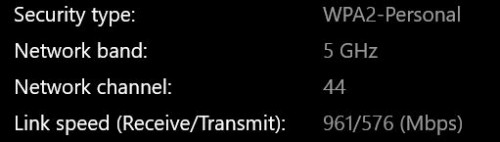 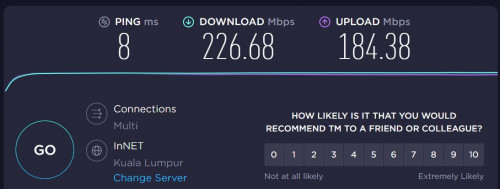 I was quite disappointed with the result. I was hoping I can get around 600Mpbs download upstairs as that's where i spend most of my time in home office. If really want best speed need to get MESH router with dedicated Haul but that also I don't think can get 800Mbps. Sometimes think back, spent so much money after all these years. might as well just pull one Ethernet Cable lagi cheap.  This post has been edited by toytoy: Jan 18 2021, 08:07 PM |
|
|
Jan 18 2021, 09:00 PM
Show posts by this member only | IPv6 | Post
#261
|
|
Senior Member
3,200 posts Joined: Jan 2003 From: IPOH
|
QUOTE(toytoy @ Jan 18 2021, 08:07 PM) I understand your plight. I have been using HomePlug since the first generation AV200 then upgrade to AV600 until now using AV1300 also get less than 200Mbps. Try to pull Ethernet cable to connect both of the ax3600... will it be better ?AX5 - 5Ghz can go up to 1200 Mbps, mesh will cut that in half coz don't have dedicated backhaul. Left 600Mbps then WiFi strength will further cut it down. Better get another AX3600 or AX6. To put that into perspective, I currently have 2 x AX3600 with theoretical 5Ghz speed of 2402 Mbps. Main router ground floor and child router upstairs. Straight line distance around 6-7meters. Upstairs laptop distance to child router around 6-7meters. I get this speed on a good day with Unifi 800Mbps. I was quite disappointed with the result. I was hoping I can get around 600Mpbs download upstairs as that's where i spend most of my time in home office. If really want best speed need to get MESH router with dedicated Haul but that also I don't think can get 800Mbps. Sometimes think back, spent so much money after all these years. might as well just pull one Ethernet Cable lagi cheap. |
|
|
Jan 18 2021, 09:07 PM
|

Junior Member
57 posts Joined: Feb 2006
|
|
|
|
Jan 18 2021, 09:11 PM
Show posts by this member only | IPv6 | Post
#263
|
|
Senior Member
3,200 posts Joined: Jan 2003 From: IPOH
|
QUOTE(jericho @ Jan 18 2021, 09:07 PM) U need Qualcomm 888 chipset to maximum the speed... previous thread got mention a3600 and ax6000 u may read back |
|
|
Jan 18 2021, 10:32 PM
|
|
Senior Member
875 posts Joined: Jan 2003
|
QUOTE(kenny79 @ Jan 18 2021, 09:00 PM) Try to pull Ethernet cable to connect both of the ax3600... will it be better ? Yes definitely better. But the reason I wanted to use MESH was I didn't want to pull a cable.But the MESH works best if you can pull a cable in between. You can get the best speed and best coverage. |
|
|
Jan 18 2021, 11:19 PM
Show posts by this member only | IPv6 | Post
#265
|
|
Senior Member
3,200 posts Joined: Jan 2003 From: IPOH
|
QUOTE(toytoy @ Jan 18 2021, 10:32 PM) Yes definitely better. But the reason I wanted to use MESH was I didn't want to pull a cable. Since the xiaomi doesn’t provide extra range of WiFi 5 backhole so it will take some bandwidth of the both router .. it’s the main reason the slow speedBut the MESH works best if you can pull a cable in between. You can get the best speed and best coverage. |
|
|
Jan 18 2021, 11:21 PM
|
|
Senior Member
875 posts Joined: Jan 2003
|
QUOTE(kenny79 @ Jan 18 2021, 11:19 PM) Since the xiaomi doesn’t provide extra range of WiFi 5 backhole so it will take some bandwidth of the both router .. it’s the main reason the slow speed Yes that's right. I didn't know until i bought 2 of them |
|
|
Jan 19 2021, 12:56 AM
Show posts by this member only | IPv6 | Post
#267
|
|
Senior Member
3,200 posts Joined: Jan 2003 From: IPOH
|
QUOTE(toytoy @ Jan 18 2021, 11:21 PM) Yes that's right. I didn't know until i bought 2 of them Reseller back for one unit lol |
|
|
Jan 23 2021, 04:20 PM
|

Senior Member
5,989 posts Joined: Nov 2005
|
QUOTE(heidarren @ Dec 5 2020, 06:46 PM) Check via SSH command, China AX3600 has 31dBm/29dBm/27dBm for txpower high/mid/low, int firmware might have much lower txpower in order to match worldwide regulations. Say, any idea what is txpower for Xiaomi AX1800? |
|
|
Jan 23 2021, 04:34 PM
|
|
Senior Member
5,989 posts Joined: Nov 2005
|
Another question, how to connect my AX1800 to the Mi Wi-Fi app on my phone?
After launching the app, I come to this screen and tap "+Add Mi Router" 
Then the app shows searching... 
Then it jumps to this screen... 
Basically I'm stuck here. The app can't seem to find any devices to connect to. |
|
|
Jan 23 2021, 06:26 PM
Show posts by this member only | IPv6 | Post
#270
|
|
Junior Member
248 posts Joined: Aug 2018
|
QUOTE(jchong @ Jan 23 2021, 04:34 PM) Another question, how to connect my AX1800 to the Mi Wi-Fi app on my phone? Change app region to mainland ChinaAfter launching the app, I come to this screen and tap "+Add Mi Router"
Then the app shows searching...
Then it jumps to this screen...
Basically I'm stuck here. The app can't seem to find any devices to connect to. |
|
|
Jan 23 2021, 08:27 PM
|
|
Senior Member
5,989 posts Joined: Nov 2005
|
QUOTE(heidarren @ Jan 23 2021, 06:26 PM) Change app region to mainland China Thanks. It worked. |
|
|
Jan 24 2021, 12:58 AM
Show posts by this member only | IPv6 | Post
#272
|
|
Senior Member
3,200 posts Joined: Jan 2003 From: IPOH
|
QUOTE(heidarren @ Jan 23 2021, 06:26 PM) Change app region to mainland China Hello bro any idea the redmi ax6 manage to tag vlan using the same way? |
|
|
Jan 24 2021, 02:40 PM
|
|
Senior Member
858 posts Joined: May 2005 From: MARS
|
Sorry, im noob in this game.
May i know is the global version can use on unifi? Thx |
|
|
Jan 24 2021, 05:53 PM
Show posts by this member only | IPv6 | Post
#274
|
|
Senior Member
3,200 posts Joined: Jan 2003 From: IPOH
|
QUOTE(evanttc @ Jan 24 2021, 02:40 PM) Sorry, im noob in this game. As mention by a member here the global firmware have the vlan tagging setting so doesn’t to make hard work to make it support unifiMay i know is the global version can use on unifi? Thx evanttc liked this post
|
|
|
Jan 25 2021, 03:46 PM
|
|
Senior Member
5,989 posts Joined: Nov 2005
|
Got another question on the AX1800, in the app I'm using English language. But then I saw one new option (under Wifi settings) which is written in Chinese:

Any idea what this is about? Should I leave it on or off? |
|
|
Jan 25 2021, 10:49 PM
|
|
Senior Member
1,882 posts Joined: Sep 2017
|
QUOTE(jchong @ Jan 25 2021, 03:46 PM) Got another question on the AX1800, in the app I'm using English language. But then I saw one new option (under Wifi settings) which is written in Chinese: This is enabled for automatic pair New Mi-Home hardware that haven't connect to the network.
Any idea what this is about? Should I leave it on or off? |
|
|
Jan 25 2021, 11:09 PM
|
|
Senior Member
5,989 posts Joined: Nov 2005
|
QUOTE(go626201 @ Jan 25 2021, 10:49 PM) This is enabled for automatic pair New Mi-Home hardware that haven't connect to the network. Thanks |
|
|
Jan 30 2021, 07:03 PM
|
|
Probation
1 posts Joined: Jan 2021
|
Hello,
I am new to forums hoping someone can help answer some questions i have please. I am looking to purchase 3-4 Xiaomi AX1800 routers to run as mesh but needed to confirm few things. 1. I have my own router/firewall so can i run this in AP mode only? 2. Can i create two SIID's one for guest access with VLAN Tagging so i can control what they can access using my firewall? 3. Does it work as Mesh wired or wireless? Thanks |
|
|
Jan 30 2021, 09:33 PM
|
|
Senior Member
1,882 posts Joined: Sep 2017
|
QUOTE(chrisnasah @ Jan 30 2021, 07:03 PM) Hello, 1.AP mode can be enabled. But now need some trick to make to run as Mesh AP mode.(Official AP Mesh mode for older series should be getting AP Mesh Mode in months-since Xiaomi AX6000 has the mode already)I am new to forums hoping someone can help answer some questions i have please. I am looking to purchase 3-4 Xiaomi AX1800 routers to run as mesh but needed to confirm few things. 1. I have my own router/firewall so can i run this in AP mode only? 2. Can i create two SIID's one for guest access with VLAN Tagging so i can control what they can access using my firewall? 3. Does it work as Mesh wired or wireless? Thanks 2.Guest Wifi seems like not working on AP mode. (Maybe router mode-NAT better for your usage) 3.Both can works. Better with wired. Wireless should not good enough since it does not have enough bandwidth for bridging. (but if you do not need very high speed then it should be acceptable) And for the 1st question ,u cant change the ip of the router manually. It can only use the DHCP distributed IP only. This post has been edited by go626201: Jan 30 2021, 09:34 PM |
|
|
Feb 15 2021, 01:18 AM
Show posts by this member only | IPv6 | Post
#280
|

Junior Member
481 posts Joined: Jan 2007
|
Possible using mikrotik as router and ax3600 as AP with Mesh?
|
|
|
Feb 15 2021, 02:19 AM
Show posts by this member only | IPv6 | Post
#281
|
|
Junior Member
248 posts Joined: Aug 2018
|
QUOTE(jianwei87 @ Feb 15 2021, 01:18 AM) Possible using mikrotik as router and ax3600 as AP with Mesh? Xiaomi just released AX3600 firmware with AP mesh mode supported, just go to official website download the latest firmware and update manually. |
|
|
Feb 15 2021, 08:36 AM
|
|
Senior Member
3,200 posts Joined: Jan 2003 From: IPOH
|
Was found xiaomi store have sale the ax3600 with international firmware in my place Ipoh prade rm439
|
|
|
Feb 15 2021, 12:54 PM
|
|
Senior Member
1,882 posts Joined: Sep 2017
|
QUOTE(jianwei87 @ Feb 15 2021, 01:18 AM) Possible using mikrotik as router and ax3600 as AP with Mesh? Yes.Just setup ax3600 or ax6000 as AP mode and setting as Mesh Node. (Seems like the latest ax3600 firmware version got some bug ,maybe need to wait for weeks for Xiaomi team to release new version to fix) |
|
|
Feb 15 2021, 03:52 PM
|
|
Senior Member
817 posts Joined: Feb 2010
|
I plan to buy ax3600.
1. Is it secured (like if there backdoor thingy)? 2. Any parental control? |
|
|
Feb 15 2021, 05:24 PM
|
|
Senior Member
1,882 posts Joined: Sep 2017
|
QUOTE(fx20 @ Feb 15 2021, 03:52 PM) I plan to buy ax3600. 1.If you want highly secure router just choose asus,They will fix most security flaw and also providing regularly firmware update.(For consumer grade router,u cant find any similar support like Asus)1. Is it secured (like if there backdoor thingy)? 2. Any parental control? 2.same answer for question 2. |
|
|
Feb 16 2021, 11:24 PM
|
|
Senior Member
817 posts Joined: Feb 2010
|
QUOTE(go626201 @ Feb 15 2021, 05:24 PM) 1.If you want highly secure router just choose asus,They will fix most security flaw and also providing regularly firmware update.(For consumer grade router,u cant find any similar support like Asus) I am using ac68 now, i know the firmware well.2.same answer for question 2. What attract me of ax3600 is the aiot channel. |
|
|
Feb 17 2021, 02:01 AM
|
|
Senior Member
1,882 posts Joined: Sep 2017
|
QUOTE(fx20 @ Feb 16 2021, 11:24 PM) I am using ac68 now, i know the firmware well. That channel is specific for aiot,and only better use if you have alot of xiaomi aiot device with wifi connectivity for use. If only 3-5 device dont need to get ax3600 for the aiot antenna.What attract me of ax3600 is the aiot channel. So far i didn't saw anyone had anyway to use the antenna for other usage. From my 3weeks of ax3600 experience, Better performance result should be coming soon as they keep improving the firmware. Maybe u can buy ax6000,seems like the wifi range is better and more stable for now. (Use it as a AP should be the best solution-good wifi range,fastest wifi speed with xiaomi mi 11 for now) And unofficial information- Xiaomi may release a new more stronger router coming soon in months similar to "octopus router". (someone said had built-in fan in the new router for cooling.) |
|
|
Feb 17 2021, 11:31 AM
|
|
Junior Member
224 posts Joined: Apr 2019
|
ax6000 with 1ghz processor is not really attractive for home user is more meant for business enterprise networking to connect to 2.5gbe backbone
|
|
|
Feb 17 2021, 12:43 PM
|
|
Senior Member
1,882 posts Joined: Sep 2017
|
QUOTE(nonamer @ Feb 17 2021, 11:31 AM) ax6000 with 1ghz processor is not really attractive for home user is more meant for business enterprise networking to connect to 2.5gbe backbone Reviews said that it is enough for most user. And It use 14nm processor,so the performance is still winning 90% of consumer router. (But of course mi wifi rom still need improvement for more stable and higher performance power) The only shortcoming is switch bandwidth only max at 1gbps but for most users 1gbps is enough. |
|
|
Feb 17 2021, 01:25 PM
|
|
Junior Member
224 posts Joined: Apr 2019
|
QUOTE(go626201 @ Feb 17 2021, 12:43 PM) Reviews said that it is enough for most user. And It use 14nm processor,so the performance is still winning 90% of consumer router. enough for most ordinary user but for the same money home user will choose xdr6030 with 1.8ghz and 4x4 2.4g all rounded router(But of course mi wifi rom still need improvement for more stable and higher performance power) The only shortcoming is switch bandwidth only max at 1gbps but for most users 1gbps is enough. |
|
|
Feb 17 2021, 02:51 PM
|
|
Junior Member
211 posts Joined: Jan 2003 From: Seri Kembangan
|
QUOTE(chrisnasah @ Jan 30 2021, 07:03 PM) Hello, u need a master Mesh Router which is either Mi AX6000/Mi AX3600 or use one of the MI AX1800 I am new to forums hoping someone can help answer some questions i have please. I am looking to purchase 3-4 Xiaomi AX1800 routers to run as mesh but needed to confirm few things. 1. I have my own router/firewall so can i run this in AP mode only? 2. Can i create two SIID's one for guest access with VLAN Tagging so i can control what they can access using my firewall? 3. Does it work as Mesh wired or wireless? Thanks 2. there is a guest WIFI service for it. if you vlan them up via your own switch that possible but troublesome Why not have a master AX3600 as main cos the chip is better? |
|
|
Feb 17 2021, 08:51 PM
Show posts by this member only | IPv6 | Post
#292
|
|
Newbie
10 posts Joined: Dec 2006
|
Hi all, I just collected AX6000 x 3 units here and installed it.
It is confirm not able to setup Unifi. Hopefully have some master to share the setup procedure for it. Temporary I will setup 2 units as Mesh.. The last unit will try to find out the setup detials, or wait for master sharing the right way to setup with Unifi.. >< This post has been edited by akfoo: Feb 17 2021, 08:54 PM |
|
|
Feb 17 2021, 10:16 PM
|
|
Junior Member
374 posts Joined: Mar 2010
|
QUOTE(akfoo @ Feb 17 2021, 08:51 PM) Hi all, I just collected AX6000 x 3 units here and installed it. The easiest way to setup VLAN without using router is by using TP-Link TL-SG105E Easy Smart Switch. It is confirm not able to setup Unifi. Hopefully have some master to share the setup procedure for it. Temporary I will setup 2 units as Mesh.. The last unit will try to find out the setup detials, or wait for master sharing the right way to setup with Unifi.. >< Tutorial was done by Blacktubi. (HERE) akfoo liked this post
|
|
|
Feb 17 2021, 10:42 PM
|
|
Senior Member
1,882 posts Joined: Sep 2017
|
QUOTE(akfoo @ Feb 17 2021, 08:51 PM) Hi all, I just collected AX6000 x 3 units here and installed it. Use a Vlan Switch confirm 100% can works with unifi.It is confirm not able to setup Unifi. Hopefully have some master to share the setup procedure for it. Temporary I will setup 2 units as Mesh.. The last unit will try to find out the setup detials, or wait for master sharing the right way to setup with Unifi.. >< But I will suggest u to get a better router(soft router or Any Advanced level router) as Main router and setup all AX6000 as Mesh AP. Should be getting better performance. AX6000 CPU so-so only,since u getting 3 units for your usage means that your may need higher router performance to maximize your internet experience and stability. akfoo liked this post
|
|
|
Feb 17 2021, 11:00 PM
|
|
Senior Member
875 posts Joined: Jan 2003
|
QUOTE(heidarren @ Feb 15 2021, 02:19 AM) Xiaomi just released AX3600 firmware with AP mesh mode supported, just go to official website download the latest firmware and update manually. Are you referring to the Official 1.1.12 firmware? Have you upgraded? Any improvements? I am on 1.0.79 and thinking if I should upgrade...  |
|
|
Feb 21 2021, 01:11 AM
|
|
Junior Member
211 posts Joined: Jan 2003 From: Seri Kembangan
|
QUOTE(akfoo @ Feb 17 2021, 08:51 PM) Hi all, I just collected AX6000 x 3 units here and installed it. most of us know there is no global rom yet and no hack SSH mode yet in the AX6000 firmware so u gotta wait a while or get a smart switch =)It is confirm not able to setup Unifi. Hopefully have some master to share the setup procedure for it. Temporary I will setup 2 units as Mesh.. The last unit will try to find out the setup detials, or wait for master sharing the right way to setup with Unifi.. >< it's only Unifi / Maxis that have this issue. Why did you end up getting AX6000 instead of AX3600 akfoo liked this post
|
|
|
Feb 21 2021, 11:34 AM
|

Junior Member
108 posts Joined: Jun 2005
|
Anyone has any idea if we can use the unifi original router as main router and then use the AX6000 as AP??
SIFU help greatly needed |
|
|
Feb 21 2021, 11:58 AM
|
|
Senior Member
1,882 posts Joined: Sep 2017
|
QUOTE(skyklg @ Feb 21 2021, 11:34 AM) Anyone has any idea if we can use the unifi original router as main router and then use the AX6000 as AP?? Yes this is the simplest way to use xiaomi router in malaysia with AP mode.SIFU help greatly needed Xiaomi Router had built-in AP mode to choose. Just unbox and plug the ethernet cable and 1st time enter router web directly just choose ap mode and set wifi password and all done. This post has been edited by go626201: Feb 21 2021, 11:59 AM |
|
|
Feb 21 2021, 09:53 PM
|

Senior Member
1,298 posts Joined: Aug 2006
|
so, is it ax3600 is better than those tplink deco m5? I aim for strong signal, currently eye on ax3600, thinking to use it as ap
|
|
|
Feb 21 2021, 10:46 PM
Show posts by this member only | IPv6 | Post
#300
|
|
Newbie
10 posts Joined: Dec 2006
|
QUOTE(flubear @ Feb 21 2021, 01:11 AM) most of us know there is no global rom yet and no hack SSH mode yet in the AX6000 firmware so u gotta wait a while or get a smart switch =) Noted. Hopefully it will release soon.it's only Unifi / Maxis that have this issue. Why did you end up getting AX6000 instead of AX3600 I bought AX6000 coz it s new, and I tot it is WIFI 6E. I only knew it is only "Extended" when read further after purchased.. >< |
|
|
Feb 21 2021, 10:47 PM
Show posts by this member only | IPv6 | Post
#301
|
|
Newbie
10 posts Joined: Dec 2006
|
QUOTE(go626201 @ Feb 17 2021, 10:42 PM) Use a Vlan Switch confirm 100% can works with unifi. Thank you for the information. I will consider it~But I will suggest u to get a better router(soft router or Any Advanced level router) as Main router and setup all AX6000 as Mesh AP. Should be getting better performance. AX6000 CPU so-so only,since u getting 3 units for your usage means that your may need higher router performance to maximize your internet experience and stability. |
|
|
Feb 22 2021, 01:32 PM
|
|
Junior Member
211 posts Joined: Jan 2003 From: Seri Kembangan
|
QUOTE(skyklg @ Feb 21 2021, 11:34 AM) Anyone has any idea if we can use the unifi original router as main router and then use the AX6000 as AP?? why do you need the AX6000? using snapdragon 888 ? WIFI6E phone? SIFU help greatly needed Might as well get AX3600 which is cheaper and u can directly update it to global rom to use for unifi.. Using another router = waste energy and another hop required. |
|
|
Feb 22 2021, 06:43 PM
|
|
Senior Member
1,882 posts Joined: Sep 2017
|
QUOTE(flubear @ Feb 22 2021, 01:32 PM) why do you need the AX6000? using snapdragon 888 ? WIFI6E phone? AX6000 better wifi performance and coverage for AP usage,if use as router better with ax3600 for better CPU/NPU.Might as well get AX3600 which is cheaper and u can directly update it to global rom to use for unifi.. Using another router = waste energy and another hop required. Just a few watts only not a big issue in malaysia but getting big improvement for wifi, Worth It. And singapore users said that global rom wifi coverage smaller. This post has been edited by go626201: Feb 22 2021, 06:44 PM |
|
|
Feb 22 2021, 08:23 PM
Show posts by this member only | IPv6 | Post
#304
|
|
Junior Member
248 posts Joined: Aug 2018
|
QUOTE(go626201 @ Feb 22 2021, 06:43 PM) AX6000 better wifi performance and coverage for AP usage,if use as router better with ax3600 for better CPU/NPU. Unless u have 4x4 160MHz client (which I can’t seems to find any Wi-Fi adaptors or smartphone/laptop supported in the market), or else u can’t tell any diff between this 2 models for Wi-Fi, but AX6000 has some obvious downside 1. CPU is much weaker, 2. beside of the 2.5G LAN port, the rest of those 3 LAN ports shared 1gbps to CPU which will seriously limit ur speed, unless u only need 1 LAN port only.Just a few watts only not a big issue in malaysia but getting big improvement for wifi, Worth It. And singapore users said that global rom wifi coverage smaller. For me, AX6000 looks good on paper, but AX3600 is much practical in real life. flubear liked this post
|
|
|
Feb 22 2021, 08:39 PM
|
|
Senior Member
1,882 posts Joined: Sep 2017
|
QUOTE(heidarren @ Feb 22 2021, 08:23 PM) Unless u have 4x4 160MHz client (which I can’t seems to find any Wi-Fi adaptors or smartphone/laptop supported in the market), or else u can’t tell any diff between this 2 models for Wi-Fi, but AX6000 has some obvious downside 1. CPU is much weaker, 2. beside of the 2.5G LAN port, the rest of those 3 LAN ports shared 1gbps to CPU which will seriously limit ur speed, unless u only need 1 LAN port only. Ya but if money not a problem and only want to use it as a AP, then AX6000 is better choice then AX3600.For me, AX6000 looks good on paper, but AX3600 is much practical in real life. AX3600 wifi range got little downside compare to AX6000.(Reviewer said) For the shared 1.25Gbps LAN bandwidth, seriously 90% of normal user didn't have local network high speed usage. This post has been edited by go626201: Feb 22 2021, 08:40 PM |
|
|
Feb 22 2021, 09:38 PM
|
|
Junior Member
224 posts Joined: Apr 2019
|
processor speed other than determine the response speed is the most important thing to determine how the 3d game graphics will look
that is why archer c1200 despite the strong signal is still not good enough for 3d gaming tp deco with 700mhz processor (even quad core is useless because code runs on single thread) is also a kind of joke with slow processor but strong wireless chipset still many jokers paying hundreds for it ax6000 is at least better than deco but compare with the choices available for that price in china only clueless people will go for it for home usage |
|
|
Feb 23 2021, 04:45 AM
Show posts by this member only | IPv6 | Post
#307
|

Senior Member
1,725 posts Joined: Jan 2003
|
QUOTE(nonamer @ Feb 22 2021, 09:38 PM) processor speed other than determine the response speed is the most important thing to determine how the 3d game graphics will look router cpu and even npu speed is for high speed connection processing, multiple user usage and high usage single or multiple user, and QoS and router VPN processing, etc. gaming use very little bandwidth, gaming is more latency than bandwidth based, unless updating games. higher speed router cpu/npu doesn't really improve gaming latency unless that router has heavy usage, or change isp provider that provide better 1st hop and destination latency.that is why archer c1200 despite the strong signal is still not good enough for 3d gaming tp deco with 700mhz processor (even quad core is useless because code runs on single thread) is also a kind of joke with slow processor but strong wireless chipset still many jokers paying hundreds for it ax6000 is at least better than deco but compare with the choices available for that price in china only clueless people will go for it for home usage some router provide cpu usage, user can check it out during their multiple application usage. multiple cpu core fast or slow would higher latency alittle bit around 1ms or few ms, same for desktop cpu, but higher speed single core cpu has limitation due to temperature, etc, multiple core is the way of the future. modern cpu would downclock cpu speed during low usage, that would also higher latency alittle bit. This post has been edited by Alpha_Tay: Feb 23 2021, 04:47 AM |
|
|
Feb 23 2021, 10:11 PM
|
|
Senior Member
705 posts Joined: Sep 2010
|
QUOTE(amirsubhi @ Dec 31 2020, 09:53 PM) Do u guys know, international firmware got additional setting for VLAN, which u can set and dial (Without need to go to SSH/Telnet) international firmware? means just flash this international firmware then can already? any difference between chinese firmware and international firmware?First update your firmware to 3.0.22 https://bit.ly/MiAX3600INT and then factory reset and after reboot enter 192.168.31.1 Then you notice as below, click at additional setting, put your vlan
|
|
|
Feb 23 2021, 10:55 PM
|
|
Senior Member
1,882 posts Joined: Sep 2017
|
QUOTE(zero721 @ Feb 23 2021, 10:11 PM) international firmware? means just flash this international firmware then can already? any difference between chinese firmware and international firmware? singapore users from HardwareZone SG said international firmware's wifi coverage will be smaller compare to Chinese firmware.But international firmware had include the vlan function. so no need vlan switch for unifi or maxis. |
|
|
Feb 24 2021, 12:04 AM
|
|
Senior Member
705 posts Joined: Sep 2010
|
QUOTE(go626201 @ Feb 23 2021, 10:55 PM) singapore users from HardwareZone SG said international firmware's wifi coverage will be smaller compare to Chinese firmware. i see. hard to choose between twoBut international firmware had include the vlan function. so no need vlan switch for unifi or maxis. |
|
|
Feb 24 2021, 01:35 AM
|
|
Junior Member
421 posts Joined: Apr 2011 From: Kuala Lumpur Malaysia
|
QUOTE(zero721 @ Feb 24 2021, 12:04 AM) i see. hard to choose between two I managed to do ssh persistent currently using ax3200 with unifi. Did a manual vlan config |
|
|
Feb 24 2021, 10:37 AM
|
|
Junior Member
224 posts Joined: Apr 2019
|
QUOTE(Alpha_Tay @ Feb 23 2021, 04:45 AM) router cpu and even npu speed is for high speed connection processing, multiple user usage and high usage single or multiple user, and QoS and router VPN processing, etc. gaming use very little bandwidth, gaming is more latency than bandwidth based, unless updating games. higher speed router cpu/npu doesn't really improve gaming latency unless that router has heavy usage, or change isp provider that provide better 1st hop and destination latency. just to clarifysome router provide cpu usage, user can check it out during their multiple application usage. multiple cpu core fast or slow would higher latency alittle bit around 1ms or few ms, same for desktop cpu, but higher speed single core cpu has limitation due to temperature, etc, multiple core is the way of the future. modern cpu would downclock cpu speed during low usage, that would also higher latency alittle bit. last time i use a 1.6ghz x86 softrouter with C1200 as AP, now i use a 1.2ghz single board computer softrouter, the visual quality in CSGO remain the same in both, so the visual quality depend on the AP speed than router speed i have since changed to tenda-realtek ac1200 (1ghz) and now settle with tp1900 (1.2ghz) and each time the visual quality is noticeably improved in CSGO my setup is one tenda ac23 as general purpose AP covering whole house placed at middle staircase, together with another adhoc (turn on when needed) AP dedicated for gaming placed at upper floor |
|
|
Feb 24 2021, 03:52 PM
|
|
Senior Member
1,725 posts Joined: Jan 2003
|
QUOTE(nonamer @ Feb 24 2021, 10:37 AM) just to clarify if the CPU has same speed, a RISC CPU can process more network throughput than ARM than X86, RISC>ARM>X86.last time i use a 1.6ghz x86 softrouter with C1200 as AP, now i use a 1.2ghz single board computer softrouter, the visual quality in CSGO remain the same in both, so the visual quality depend on the AP speed than router speed i have since changed to tenda-realtek ac1200 (1ghz) and now settle with tp1900 (1.2ghz) and each time the visual quality is noticeably improved in CSGO my setup is one tenda ac23 as general purpose AP covering whole house placed at middle staircase, together with another adhoc (turn on when needed) AP dedicated for gaming placed at upper floor what do you mean by visual quality? also, each router has different or same Generation of CPU, Nanometre, Router Firmware, Setting, MIMO Antenna, etc, that could make your gaming feel alittle bit different. |
|
|
Feb 24 2021, 09:29 PM
|
|
Senior Member
705 posts Joined: Sep 2010
|
QUOTE(ajaxcbcb @ Feb 24 2021, 01:35 AM) I managed to do ssh persistent currently using ax3200 with unifi. Did a manual vlan config mind to teach how to do so? |
|
|
Feb 25 2021, 05:16 PM
|

Newbie
8 posts Joined: Feb 2013
|
Using Ax3600 now as AP.
Anyone know for ipv6, we should use Native or NAT6? Both can't enable ipv6 for me. Directly connected to Archer c5v will give me ipv6 |
|
|
Feb 26 2021, 07:00 PM
Show posts by this member only | IPv6 | Post
#316
|
|
Junior Member
421 posts Joined: Apr 2011 From: Kuala Lumpur Malaysia
|
QUOTE(zero721 @ Feb 24 2021, 09:29 PM) mind to teach how to do so? first u need to revert the firmware to 1.0.17. turn on the ssh access2. change the region to CN 3. after that you can do a nvram commit to ensure that the change Is committed on the firmware. 4. need to write a long guide. i will revert to you when i have time. |
|
|
Feb 26 2021, 07:02 PM
|
|
Senior Member
875 posts Joined: Jan 2003
|
QUOTE(ajaxcbcb @ Feb 26 2021, 07:00 PM) first u need to revert the firmware to 1.0.17. turn on the ssh access See the YouTube video posted by TS on first page?2. change the region to CN 3. after that you can do a nvram commit to ensure that the change Is committed on the firmware. 4. need to write a long guide. i will revert to you when i have time. |
|
|
Feb 26 2021, 07:06 PM
|
|
Junior Member
248 posts Joined: Aug 2018
|
QUOTE(Mushi.Nv @ Feb 25 2021, 05:16 PM) Using Ax3600 now as AP. It seems can be done by using WinSCP, in network there change IPv6 to “relay”, but I’m not really sure exactly steps for it, u may dig in openwrt forum to see how ppl use IPv6 relay.Anyone know for ipv6, we should use Native or NAT6? Both can't enable ipv6 for me. Directly connected to Archer c5v will give me ipv6 |
|
|
Feb 26 2021, 07:32 PM
Show posts by this member only | IPv6 | Post
#319
|
|
Junior Member
421 posts Joined: Apr 2011 From: Kuala Lumpur Malaysia
|
QUOTE(toytoy @ Feb 26 2021, 07:02 PM) See the YouTube video posted by TS on first page? yes that is the first step. but the following step can be quite tedious as u need to change the region |
|
|
Feb 26 2021, 09:38 PM
Show posts by this member only | IPv6 | Post
#320
|
|
Senior Member
845 posts Joined: Nov 2010 From: Puchong/Cyberjaya
|
hi sifus, was using old router and retired the first page process again and still the DNS not appear.
but it shows that the connection is there. may i know if u add a vlan switch, will solve this problem? 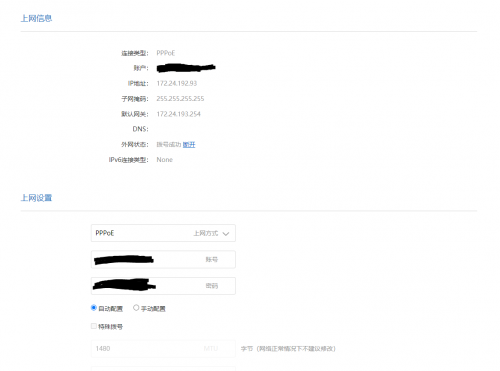 |
|
|
Feb 27 2021, 09:49 AM
Show posts by this member only | IPv6 | Post
#321
|
|
Junior Member
421 posts Joined: Apr 2011 From: Kuala Lumpur Malaysia
|
QUOTE(cle900706 @ Feb 26 2021, 09:38 PM) hi sifus, was using old router and retired the first page process again and still the DNS not appear. if u are not prepared to be a wiz. i recommend u to upgrade ur firmware to the global firmware. global firmware allows u to add the vlan switch when u pick by countrybut it shows that the connection is there. may i know if u add a vlan switch, will solve this problem? |
|
|
Feb 27 2021, 09:52 AM
Show posts by this member only | IPv6 | Post
#322
|
|
Senior Member
845 posts Joined: Nov 2010 From: Puchong/Cyberjaya
|
QUOTE(ajaxcbcb @ Feb 27 2021, 09:49 AM) if u are not prepared to be a wiz. i recommend u to upgrade ur firmware to the global firmware. global firmware allows u to add the vlan switch when u pick by country er.... any link on how to do it and download link? currently its on china firmware, can revert back to china firmware if anything happens?im using ax5 btw This post has been edited by cle900706: Feb 27 2021, 09:54 AM |
|
|
Feb 27 2021, 10:01 AM
Show posts by this member only | IPv6 | Post
#323
|
|
Junior Member
421 posts Joined: Apr 2011 From: Kuala Lumpur Malaysia
|
QUOTE(cle900706 @ Feb 27 2021, 09:52 AM) er.... any link on how to do it and download link? currently its on china firmware, can revert back to china firmware if anything happens? im using ax5 btw |
|
|
Feb 27 2021, 11:09 AM
Show posts by this member only | IPv6 | Post
#324
|
|
Senior Member
845 posts Joined: Nov 2010 From: Puchong/Cyberjaya
|
QUOTE(ajaxcbcb @ Feb 27 2021, 10:01 AM) |
|
|
Feb 27 2021, 11:15 AM
Show posts by this member only | IPv6 | Post
#325
|
|
Junior Member
421 posts Joined: Apr 2011 From: Kuala Lumpur Malaysia
|
QUOTE(cle900706 @ Feb 27 2021, 11:09 AM) not for ax5 haha sorry sorry my bad. so far I have roughly browsed. i don't think there is a global firmware for ax5. i think the cloest would be following this guideand need to find the firmware version which has the backdoor for ssh |
|
|
Feb 27 2021, 01:23 PM
|
|
Junior Member
879 posts Joined: Jan 2007
|
QUOTE(Mushi.Nv @ Feb 25 2021, 05:16 PM) Using Ax3600 now as AP. Anyone know for ipv6, we should use Native or NAT6? Both can't enable ipv6 for me. Directly connected to Archer c5v will give me ipv6 QUOTE(heidarren @ Feb 26 2021, 07:06 PM) It seems can be done by using WinSCP, in network there change IPv6 to “relay”, but I’m not really sure exactly steps for it, u may dig in openwrt forum to see how ppl use IPv6 relay. This is the ipv6 setting with original openwrt firmware, older version but the concept should be the samehttps://advanxer.com/blog/2015/11/setting-u...r-for-tm-unifi/ |
|
|
Feb 27 2021, 02:37 PM
Show posts by this member only | IPv6 | Post
#327
|
|
Senior Member
845 posts Joined: Nov 2010 From: Puchong/Cyberjaya
|
QUOTE(ajaxcbcb @ Feb 27 2021, 11:15 AM) sorry sorry my bad. so far I have roughly browsed. i don't think there is a global firmware for ax5. i think the cloest would be following this guide yes. this is the TS method.and need to find the firmware version which has the backdoor for ssh used this method from the start and it was ok. after 2-3months one day disconnected and the DNS never appeared. reset the router and redo ssh still no luck. so i can say that using a vlan switch is the only options i think? |
|
|
Feb 27 2021, 04:01 PM
|
|
Newbie
8 posts Joined: Feb 2013
|
QUOTE(neuromancerx @ Feb 27 2021, 01:23 PM) This is the ipv6 setting with original openwrt firmware, older version but the concept should be the same thanks guys.https://advanxer.com/blog/2015/11/setting-u...r-for-tm-unifi/ But, I don't understand anything about the WinSCP and OpenWRT thing. haha |
|
|
Feb 27 2021, 09:18 PM
Show posts by this member only | IPv6 | Post
#329
|
|
Junior Member
421 posts Joined: Apr 2011 From: Kuala Lumpur Malaysia
|
QUOTE(cle900706 @ Feb 27 2021, 02:37 PM) yes. this is the TS method. It means that the memory doesn't persist after the firmware update. U need to do with this tutorialused this method from the start and it was ok. after 2-3months one day disconnected and the DNS never appeared. reset the router and redo ssh still no luck. so i can say that using a vlan switch is the only options i think? https://irq5.io/2020/08/10/custom-firmware-...ireless-router/ |
|
|
Feb 28 2021, 07:21 PM
|
|
Senior Member
705 posts Joined: Sep 2010
|
QUOTE(ajaxcbcb @ Feb 26 2021, 07:00 PM) first u need to revert the firmware to 1.0.17. turn on the ssh access sure! wait for you2. change the region to CN 3. after that you can do a nvram commit to ensure that the change Is committed on the firmware. 4. need to write a long guide. i will revert to you when i have time. |
|
|
Mar 1 2021, 08:03 PM
|

Junior Member
346 posts Joined: Jan 2021
|
thanks for sharing
|
|
|
Mar 1 2021, 08:43 PM
|
|
Junior Member
346 posts Joined: Jan 2021
|
wait....custom will hold the item or not?
|
|
|
Mar 2 2021, 03:44 PM
Show posts by this member only | IPv6 | Post
#333
|
|
Junior Member
84 posts Joined: Nov 2019
|
Ax6000 worth to buy?
|
|
|
Mar 2 2021, 04:36 PM
|
|
Junior Member
346 posts Joined: Jan 2021
|
opt for redmi ax6 now. ~RM200 ship from china.
|
|
|
Mar 3 2021, 04:19 PM
|

Senior Member
758 posts Joined: Aug 2008
|
very nice ...i had to use a separate switch to to separate the vlan
ever since the xiaomi pro router 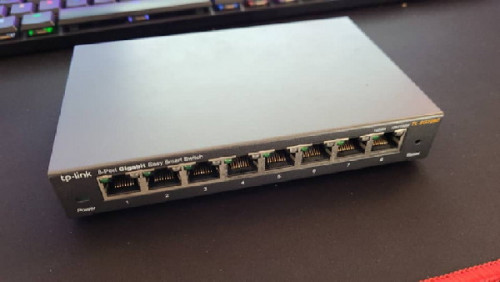 » Click to show Spoiler - click again to hide... « but now use time already .... use ax6000 ax3600 and ax1800 mesh [ This post has been edited by mousqy: Mar 3 2021, 04:48 PM |
|
|
Mar 24 2021, 09:31 AM
Show posts by this member only | IPv6 | Post
#336
|
|
Senior Member
3,200 posts Joined: Jan 2003 From: IPOH
|
QUOTE(6942nole @ Mar 2 2021, 04:36 PM) opt for redmi ax6 now. ~RM200 ship from china. Can use ssh now? |
|
|
Mar 24 2021, 12:31 PM
|
|
Junior Member
346 posts Joined: Jan 2021
|
QUOTE(kenny79 @ Mar 24 2021, 09:31 AM) Can use ssh now? not sure.bought asus rt-ac3100 (4 ports of rt-ac88u) at RM220 from china. i need the usb3.0 port for P2P. |
|
|
Apr 1 2021, 11:25 AM
|
|
Junior Member
211 posts Joined: Jan 2003 From: Seri Kembangan
|
QUOTE(6942nole @ Mar 24 2021, 12:31 PM) not sure. haha AX9000 out now with USB3 port bought asus rt-ac3100 (4 ports of rt-ac88u) at RM220 from china. i need the usb3.0 port for P2P. |
|
|
Apr 1 2021, 02:44 PM
|
|
Junior Member
879 posts Joined: Jan 2007
|
QUOTE(flubear @ Apr 1 2021, 11:25 AM) haha AX9000 out now with USB3 port just released, and probably will sold at 650-700. |
|
|
Apr 1 2021, 06:58 PM
|
|
Junior Member
346 posts Joined: Jan 2021
|
QUOTE(flubear @ Apr 1 2021, 11:25 AM) haha AX9000 out now with USB3 port bro, 3x more expensive leh. |
|
|
Apr 14 2021, 12:39 PM
|

Junior Member
964 posts Joined: Jun 2008
|
Bought AX3600.
Noticed that with a single device connected to 2.4G wifi, the speed is awesome. Ping from PC to router 192.168.31.1 less than 1ms. After I connect all my IoT and IP Cam (~10 devices) which supports only 2.4G wifi, ping from PC become ~600ms and frequently disconnected. However, if I connect my PC to 5G wifi, it's smooth again. But I can't connect to 5G wifi with my phone as it doesn't cover every corner in my house (such as toilet) :| Is this the slow 2.4G wifi a common issue for AX3600? Even with my very old TL-WR740N, it can easily handle more than 10 devices without hiccup... |
|
|
Apr 14 2021, 07:36 PM
|
|
Elite
8,415 posts Joined: Jul 2008
|
QUOTE(xeon1989 @ Apr 14 2021, 12:39 PM) Bought AX3600. Disable WiFi 6 and force 20Mhz mode for the 2.4Ghz band on the Xiaomi AX3600 and hope for the best. You can play around with channels but I doubt that will help a lot.Noticed that with a single device connected to 2.4G wifi, the speed is awesome. Ping from PC to router 192.168.31.1 less than 1ms. After I connect all my IoT and IP Cam (~10 devices) which supports only 2.4G wifi, ping from PC become ~600ms and frequently disconnected. However, if I connect my PC to 5G wifi, it's smooth again. But I can't connect to 5G wifi with my phone as it doesn't cover every corner in my house (such as toilet) :| Is this the slow 2.4G wifi a common issue for AX3600? Even with my very old TL-WR740N, it can easily handle more than 10 devices without hiccup... The Qualcomm based 2.4Ghz radio on the Xiaomi AX3600 isn't that great. There's actually better WiFi router at this price point unless you absolutely need Mi Home integration. |
|
|
Apr 14 2021, 10:16 PM
|
|
Junior Member
879 posts Joined: Jan 2007
|
QUOTE(xeon1989 @ Apr 14 2021, 12:39 PM) Bought AX3600. Older device that run on lower data rate can contribute to this, as all the clients will be forced to use the lowest data rate. Normally, cheap IOT device is the culprit.Noticed that with a single device connected to 2.4G wifi, the speed is awesome. Ping from PC to router 192.168.31.1 less than 1ms. After I connect all my IoT and IP Cam (~10 devices) which supports only 2.4G wifi, ping from PC become ~600ms and frequently disconnected. However, if I connect my PC to 5G wifi, it's smooth again. But I can't connect to 5G wifi with my phone as it doesn't cover every corner in my house (such as toilet) :| Is this the slow 2.4G wifi a common issue for AX3600? Even with my very old TL-WR740N, it can easily handle more than 10 devices without hiccup... I solved my 5ghz coverage issue by putting a wifi mesh. |
|
|
Apr 15 2021, 04:55 PM
|
|
Junior Member
964 posts Joined: Jun 2008
|
QUOTE(blacktubi @ Apr 14 2021, 07:36 PM) Disable WiFi 6 and force 20Mhz mode for the 2.4Ghz band on the Xiaomi AX3600 and hope for the best. You can play around with channels but I doubt that will help a lot. Both has been done, but still the same issue. The Qualcomm based 2.4Ghz radio on the Xiaomi AX3600 isn't that great. There's actually better WiFi router at this price point unless you absolutely need Mi Home integration. I suspect it might be caused by interference as it was placed very near to NVR and there are another router on another side of the wall in neighbour's house. I tried to relocate router and NVR away from the wall, it runs smoothly. Now monitoring. QUOTE(neuromancerx @ Apr 14 2021, 10:16 PM) Older device that run on lower data rate can contribute to this, as all the clients will be forced to use the lowest data rate. Normally, cheap IOT device is the culprit. Thanks! This might one of the possible cause. Since I already own AX3600, i might get another AX1800 as wifi mesh too. I solved my 5ghz coverage issue by putting a wifi mesh. |
|
|
Apr 20 2021, 04:36 PM
|

Junior Member
77 posts Joined: May 2012 From: Konoha
|
Does this applies to the ax9000 also
|
|
|
Apr 21 2021, 10:07 PM
|
|
Junior Member
211 posts Joined: Jan 2003 From: Seri Kembangan
|
QUOTE(neuromancerx @ Apr 14 2021, 10:16 PM) Older device that run on lower data rate can contribute to this, as all the clients will be forced to use the lowest data rate. Normally, cheap IOT device is the culprit. Edited : they still have the scanning available on the settings which is using the 2.4Ghz Wifi.I solved my 5ghz coverage issue by putting a wifi mesh. This post has been edited by flubear: Apr 24 2021, 04:32 AM |
|
|
Apr 29 2021, 01:57 PM
Show posts by this member only | IPv6 | Post
#347
|
|
Junior Member
66 posts Joined: Aug 2009
|
Planning to get AX3600. been using unifi given router and modem like 5 - 6 years ago. so i believe its time to upgrade sikit.
Heard u guys heboh about AX3600 like very keng chow, so need to get it. One question... do i need to upgrade my modem? old unifi modem from white become yellow now. |
|
|
Apr 29 2021, 11:41 PM
|
|
Senior Member
875 posts Joined: Jan 2003
|
QUOTE(m3ow @ Apr 29 2021, 01:57 PM) Planning to get AX3600. been using unifi given router and modem like 5 - 6 years ago. so i believe its time to upgrade sikit. Modem is Unifi property. If got problem can ask them to change. The last time I changed due to old one cannot support higher bandwidth.Heard u guys heboh about AX3600 like very keng chow, so need to get it. One question... do i need to upgrade my modem? old unifi modem from white become yellow now. If your modem no problem then no need to change. |
|
|
Apr 30 2021, 11:58 AM
Show posts by this member only | IPv6 | Post
#349
|
|
Junior Member
66 posts Joined: Aug 2009
|
QUOTE(toytoy @ Apr 29 2021, 11:41 PM) Modem is Unifi property. If got problem can ask them to change. The last time I changed due to old one cannot support higher bandwidth. Understand that. Check on bandwith and dont see any problem.If your modem no problem then no need to change. Thanks! |
|
|
May 3 2021, 12:46 PM
|
|
Junior Member
211 posts Joined: Jan 2003 From: Seri Kembangan
|
QUOTE(m3ow @ Apr 30 2021, 11:58 AM) Understand that. Check on bandwith and dont see any problem. i bet your modem is old as a 100 year old tree Thanks! anyway since you are and will still subscribe to Unifi at home, you could always ask call Unifi say line slow, ask technician come and request for change of modem after yearsssss of using it. They would change to the new Huawei white modem which is being used by Unifi & Time as well FOR FREE. AX3600 is still best bang for your buck =) |
|
|
May 3 2021, 12:47 PM
|
|
Junior Member
211 posts Joined: Jan 2003 From: Seri Kembangan
|
QUOTE(LanzaDelRelampago @ Apr 20 2021, 04:36 PM) Does this applies to the ax9000 also hmm i got a unit of AX9000, with several MI IOT items, how do you define it being slow ?Could do some test for ya |
|
|
May 6 2021, 12:45 AM
|
|
Junior Member
77 posts Joined: May 2012 From: Konoha
|
QUOTE(flubear @ May 3 2021, 12:47 PM) hmm i got a unit of AX9000, with several MI IOT items, how do you define it being slow ? How good it is if compared to ax6000 or ax3600.. is it any better. Also does it support dual wan or dual wan aggregation. Do you use it as ap or how do you set up the vlan. These answer would greatly help me before purchasing the ax9000.. only strong point for me was the shape, love the shape. Thanks in advance 😁Could do some test for ya |
|
|
May 6 2021, 02:16 PM
Show posts by this member only | IPv6 | Post
#353
|
|
Junior Member
248 posts Joined: Aug 2018
|
QUOTE(LanzaDelRelampago @ May 6 2021, 12:45 AM) How good it is if compared to ax6000 or ax3600.. is it any better. Also does it support dual wan or dual wan aggregation. Do you use it as ap or how do you set up the vlan. These answer would greatly help me before purchasing the ax9000.. only strong point for me was the shape, love the shape. Thanks in advance 😁 AX3600 has (compare to AX6000):Better CPU Better 2.4GHz (dedicated chipset) SSH access (so VLAN tagging is possible) AX6000 has (compare to AX3600): Better 5GHz performance (5% faster, more OFDMA client supported) Better 5GHz radio coverage (in radar pattern, AX3600 is strong at front and rear, but weak at sides, AX6000 fixed it) 2.5GHz WAN/LAN port AX9000 has (compare to AX6000): Best CPU among these 3 routers Best 5GHz chipset for 5G1 (even more OFDMA client supported) Better 2.4GHz (dedicated chipset) Slightly smaller 5GHz coverage than AX6000 due to Tri-Band, about the same with AX3600 2.5GHz WAN/LAN port AX3600 is a better router and AX6000 is a better AP, AX9000 seems strong but it doesn't give you better coverage Dual-wan is not supported but possible if you has good knowledge OpenWRT, same as IPTV VLAN tagging 6942nole liked this post
|
|
|
May 7 2021, 11:06 AM
|
|
Junior Member
211 posts Joined: Jan 2003 From: Seri Kembangan
|
@LanzaDelRelampago good summary above already.
If you use Unifi / Maxis then AX3600 gives you less headache with VLAN capability setting available either via mod or english global firm. If you are on Time or have a lot of users, the triband helps |
|
|
May 8 2021, 11:55 AM
|
|
Senior Member
1,058 posts Joined: Nov 2009
|
Sifus, question. My ax1800 once a while need to reset and setup everything again. Anyone facing the same? I am thinking to get a global unit ax3600. Will it solve the issue? Can my existing ax1800 and ax5 China units connect to global unit ax3600 as mesh? Thanks
|
|
|
May 8 2021, 01:30 PM
|
|
Senior Member
1,058 posts Joined: Nov 2009
|
QUOTE(heidarren @ Jul 15 2020, 10:43 AM) True, but luckily we finally managed to get it run on Vlan tagging, the good thing is we only have to do it once and do a backup file, can restore config anytime. May I know how to backup and restore? Thanks |
|
|
May 11 2021, 08:59 PM
|
|
Junior Member
77 posts Joined: May 2012 From: Konoha
|
QUOTE(flubear @ May 7 2021, 11:06 AM) @LanzaDelRelampago good summary above already. Ive set my mind on the ax3600 but ive saw in shopee some seller said still need switch for the global version, the global version have inbuild vlan tagging or still need to ssh into to get the vlan working ya?If you use Unifi / Maxis then AX3600 gives you less headache with VLAN capability setting available either via mod or english global firm. If you are on Time or have a lot of users, the triband helps |
|
|
May 11 2021, 09:14 PM
|
|
Junior Member
77 posts Joined: May 2012 From: Konoha
|
QUOTE(LanzaDelRelampago @ May 11 2021, 08:59 PM) Ive set my mind on the ax3600 but ive saw in shopee some seller said still need switch for the global version, the global version have inbuild vlan tagging or still need to ssh into to get the vlan working ya? disregard this question.For Unifi user, kindly update your firmware to 3.0.22 and set VLAN 500 for internet, thereafter reset the router and you are good to go! can get the firmware in the video description below https://www.youtube.com/watch?v=CWQHrocbmvE&t=94s |
|
|
May 12 2021, 01:02 PM
|
|
Junior Member
211 posts Joined: Jan 2003 From: Seri Kembangan
|
or u can hack the china version
|
|
|
May 28 2021, 09:08 PM
Show posts by this member only | IPv6 | Post
#360
|
|
Newbie
4 posts Joined: Jun 2015
|
Hi all Sifu,
I need your help and advice here. I have installed AX3600. So far all mobile devices, desktop and laptops for work can access internet through Wifi But the gaming laptops ASUS TUF A15 and Dell Gaming G3 15 cannot access internet through Wifi neither 2.4GHz nor 5GHz. Both of them can access internet through router Lan ports. Are there any settings that i need set on router in order make it work. Both are using 802.11ac Wifi. Please help. |
|
|
May 30 2021, 04:22 PM
|
|
Junior Member
211 posts Joined: Jan 2003 From: Seri Kembangan
|
QUOTE(tants @ May 28 2021, 09:08 PM) Hi all Sifu, which OS they are running on ?? if you do not update, then most likely the WIFI 6 setting will not work for older machines .. u can set the WIFI 5 downward compatibility setting and try or update your client(laptops) with the Windows 10.I need your help and advice here. I have installed AX3600. So far all mobile devices, desktop and laptops for work can access internet through Wifi But the gaming laptops ASUS TUF A15 and Dell Gaming G3 15 cannot access internet through Wifi neither 2.4GHz nor 5GHz. Both of them can access internet through router Lan ports. Are there any settings that i need set on router in order make it work. Both are using 802.11ac Wifi. Please help. This post has been edited by flubear: May 30 2021, 04:23 PM |
|
|
May 31 2021, 12:44 PM
|
|
Newbie
4 posts Joined: Jun 2015
|
QUOTE(flubear @ May 30 2021, 04:22 PM) which OS they are running on ?? if you do not update, then most likely the WIFI 6 setting will not work for older machines .. u can set the WIFI 5 downward compatibility setting and try or update your client(laptops) with the Windows 10. all are running with windows 10, latest updates.But found the solution, did the factory reset on the router and reconfigured the router. Now it works now. Thanks a lot bro for the advice. |
|
|
May 31 2021, 04:28 PM
|

Junior Member
383 posts Joined: Jan 2009 From: OH YEAH
|
AX3600 still need to do sketchy stuff to setup vlan id ka?
|
|
|
Jun 4 2021, 06:21 PM
|
|
Junior Member
211 posts Joined: Jan 2003 From: Seri Kembangan
|
QUOTE(harriss @ May 31 2021, 04:28 PM) AX3600 still need to do sketchy stuff to setup vlan id ka? depends urs is China firmware or Global firmware (this one no need) |
|
|
Jun 4 2021, 06:37 PM
|
|
Junior Member
383 posts Joined: Jan 2009 From: OH YEAH
|
QUOTE(flubear @ Jun 4 2021, 06:21 PM) depends urs is China firmware or Global firmware (this one no need) already setup mine with int firmware .does 24db vs 30db max power really got much different ke? |
|
|
Jun 15 2021, 06:46 PM
|
|
Junior Member
29 posts Joined: Jan 2003
|
QUOTE(kenny79 @ Jan 16 2021, 12:57 PM) Was found this tutorial for ax6 anyone can practical to have the ssh Managed to get ssh access to AX6 via this guide and script provided.https://openwrt.org/inbox/toh/xiaomi/xiaomi_redmi_ax6_ax3000 https://qust.me/post/hong-mi-ax6-jie-suo-ss...ash-jiao-cheng/ |
|
|
Jun 16 2021, 01:56 PM
|
|
Junior Member
211 posts Joined: Jan 2003 From: Seri Kembangan
|
QUOTE(harriss @ Jun 4 2021, 06:37 PM) already setup mine with int firmware . not really much, the lower the wider the spectrum of your wifi only.does 24db vs 30db max power really got much different ke? |
|
|
Jun 16 2021, 05:24 PM
|
|
Junior Member
383 posts Joined: Jan 2009 From: OH YEAH
|
QUOTE(flubear @ Jun 16 2021, 01:56 PM) not really much, the lower the wider the spectrum of your wifi only. i did try myself got noticeable different , 24db 5ghz behind 3 wall i couldnt get good speed. 30dbm still can get 200mbps |
|
|
Jul 4 2021, 09:02 PM
Show posts by this member only | IPv6 | Post
#369
|

Junior Member
390 posts Joined: Oct 2007
|
hi i was looking a stronger router replace my current cylinder unifi router. izzit if my unifi they already help me to change to huawei modem i can use this ax3600 without a VLAN Switch?
|
|
|
Jul 4 2021, 09:12 PM
|
|
Senior Member
1,882 posts Joined: Sep 2017
|
QUOTE(cfyong2020 @ Jul 4 2021, 09:02 PM) hi i was looking a stronger router replace my current cylinder unifi router. izzit if my unifi they already help me to change to huawei modem i can use this ax3600 without a VLAN Switch? If u buy global version of AX3600 then no need vlan switch. (CN version cant ,must use vlan switch) |
|
|
Jul 6 2021, 09:32 PM
|
|
Senior Member
1,058 posts Joined: Nov 2009
|
Sifus, 2 questions, is Ax3600's AIOT works only for XIAOMI smart devices? How about Google home or TianMaoJingLing? Can a global unit Ax3600 work with China unit Ax1800 and Ax5 as mesh? Thanks.
|
|
|
Jul 6 2021, 09:54 PM
|
|
Senior Member
1,882 posts Joined: Sep 2017
|
QUOTE(eugenecctan @ Jul 6 2021, 09:32 PM) Sifus, 2 questions, is Ax3600's AIOT works only for XIAOMI smart devices? How about Google home or TianMaoJingLing? Can a global unit Ax3600 work with China unit Ax1800 and Ax5 as mesh? Thanks. 1st question yes,only support mi aiot device. (that aiot antenna only mainly use for auto searching new mi device only,actually not useful.) Second not sure. This post has been edited by go626201: Jul 6 2021, 09:55 PM |
|
|
Jul 6 2021, 10:17 PM
|
|
Senior Member
1,058 posts Joined: Nov 2009
|
QUOTE(go626201 @ Jul 6 2021, 09:54 PM) 1st question yes,only support mi aiot device. (that aiot antenna only mainly use for auto searching new mi device only,actually not useful.) Thanks for your quick answer. Hmm, maybe I will just get an Ax6. Second not sure. Ax3600 around 280, Ax6 around 180. |
|
|
Jul 8 2021, 12:42 AM
|
|
Junior Member
110 posts Joined: Apr 2010
|
Hi sensei, ayam planning to upgrade router. I want to feel the WiFi 6 hype. Been looking at Xiomi 3600 and Xiomi 6000. ayam believe Ax6000 dont have global version yet. May I know, how do i know the Ax3600 global or china version?
Global version need to do the VLan setting or no need? Ayam dont want waste money buy switch rm80+ (as selling by most seller unifi switch / maxis switch). I got a seller said he selling global version, but still need the switch to connect to internet. Ayam use unipi internet |
|
|
Jul 13 2021, 12:37 AM
|

Senior Member
1,799 posts Joined: Mar 2012
|
QUOTE(zup @ Jul 8 2021, 12:42 AM) Global version need to do the VLan setting or no need? Ayam dont want waste money buy switch rm80+ (as selling by most seller unifi switch / maxis switch). I got a seller said he selling global version, but still need the switch to connect to internet. Ayam use unipi internet Did u get any feedback on this? Ayam would like to know this too. |
|
|
Jul 13 2021, 10:18 AM
|
|
Senior Member
1,472 posts Joined: Apr 2005 From: SumwHeRe In MaLaYsIa
|
QUOTE(zup @ Jul 8 2021, 12:42 AM) Hi sensei, ayam planning to upgrade router. I want to feel the WiFi 6 hype. Been looking at Xiomi 3600 and Xiomi 6000. ayam believe Ax6000 dont have global version yet. May I know, how do i know the Ax3600 global or china version? global version can use/set vlan for internet in the router, no need switch, check with seller what is the firmware versionGlobal version need to do the VLan setting or no need? Ayam dont want waste money buy switch rm80+ (as selling by most seller unifi switch / maxis switch). I got a seller said he selling global version, but still need the switch to connect to internet. Ayam use unipi internet mfa682 liked this post
|
|
|
Jul 13 2021, 03:47 PM
Show posts by this member only | IPv6 | Post
#377
|
|
Senior Member
1,799 posts Joined: Mar 2012
|
QUOTE(amirsubhi @ Jul 13 2021, 10:18 AM) global version can use/set vlan for internet in the router, no need switch, check with seller what is the firmware version After digging some info, if I understand correctly, since there's only one port for VLAN tagging, particularly "Internet VLAN ID", if I set to 621 for maxis fibre, I will get Internet connection only for my router? Voip and iptv won't work? |
|
|
Jul 13 2021, 08:32 PM
|
|
Senior Member
1,472 posts Joined: Apr 2005 From: SumwHeRe In MaLaYsIa
|
QUOTE(mfa682 @ Jul 13 2021, 03:47 PM) After digging some info, if I understand correctly, since there's only one port for VLAN tagging, particularly "Internet VLAN ID", if I set to 621 for maxis fibre, I will get Internet connection only for my router? Voip and iptv won't work? yerp pretty much, other than internet u need to enable SSH and configure it manually and assign it to the portThis post has been edited by amirsubhi: Jul 13 2021, 09:33 PM |
|
|
Jul 19 2021, 03:36 PM
Show posts by this member only | IPv6 | Post
#379
|

Junior Member
497 posts Joined: Jan 2008 From: Seventh Heaven
|
Wanted to get an ax1800 as a mesh for my ax3600. But got 2 types, one is the conventional looking ones and one is the tower. Which 1 to get eh
|
|
|
Aug 6 2021, 12:35 PM
Show posts by this member only | IPv6 | Post
#380
|
|
Junior Member
11 posts Joined: Jan 2007
|
One question to ask, do the Mi Malaysia local warranty set still need the VLAN switch for Unifi TV?
My house old folks not tech savvy, remember how to use the remote also happy already. That's alot ppl reason stuck with Unifi anyway I plan to do mesh using 2 ax3600 This post has been edited by mooving: Aug 6 2021, 12:44 PM |
|
|
Aug 8 2021, 07:10 PM
|
|
Junior Member
307 posts Joined: Apr 2005
|
Hihi should have come here earlier I bought in taobao tenda ax12 , at first satisfied now something burned , wifi connection keep dropping , but lan is smooth , dismantle unit and heatsink super hot , so blow fan on it slight improvement but not the same as before liao , even did hard reset and reflash to older firmware same , ping from phone to router also become unstable timeout every 5 mins or so , switch back to my old ac23 router ok smooth .
Wan ask sifus since taobao ax3600 and 6000 pricing not too far apart should I just go for the 6000? |
|
|
Aug 11 2021, 10:07 PM
|

Junior Member
142 posts Joined: Jun 2008 From: E·Poh~
|
Hey Dai gor ,
Just got myself GLOBAL version of ax3600 . Do I able to downgrade to China version ? Because I got one xiaomi router pro R3P which signal more strong in 2.4ghz cover overall haha |
|
|
Aug 12 2021, 04:13 PM
|
|
Junior Member
211 posts Joined: Jan 2003 From: Seri Kembangan
|
QUOTE(bolokent @ Aug 11 2021, 10:07 PM) Hey Dai gor , no need downgrade .. just change the firmware accordingly and flash it .. Just got myself GLOBAL version of ax3600 . Do I able to downgrade to China version ? Because I got one xiaomi router pro R3P which signal more strong in 2.4ghz cover overall haha |
|
|
Aug 14 2021, 09:44 AM
|
|
Junior Member
497 posts Joined: Jan 2008 From: Seventh Heaven
|
QUOTE(bolokent @ Aug 11 2021, 10:07 PM) Hey Dai gor , China ver got better signal strength? I'm using global nowJust got myself GLOBAL version of ax3600 . Do I able to downgrade to China version ? Because I got one xiaomi router pro R3P which signal more strong in 2.4ghz cover overall haha |
|
|
Aug 24 2021, 07:28 PM
Show posts by this member only | IPv6 | Post
#385
|
|
Senior Member
1,058 posts Joined: Nov 2009
|
Anyone try out redmi AX3000?
|
|
|
Aug 26 2021, 12:14 PM
|
|
Junior Member
95 posts Joined: Jan 2005 From: Somewhere around Subang Jaya
|
Hi All Sifus....
I am able to connect my AX3600 on Unifi running the International Version. My problem is the existing LAN cable is not working with the AX3600 LAN switch but working on my old D-Link router. Any idea how to trouble shoot this? |
|
|
Sep 10 2021, 04:05 PM
|
|
Junior Member
110 posts Joined: Apr 2010
|
Hi sifus, i am getting good look on AX6000 used. very tempting. is this VLAN tagging can be work on AX6000 too? Any difference between AX3200 and AX6000. or just a waste of money to get AX6000 ?
|
|
|
Sep 20 2021, 11:11 AM
|
|
Junior Member
211 posts Joined: Jan 2003 From: Seri Kembangan
|
QUOTE(zup @ Sep 10 2021, 04:05 PM) Hi sifus, i am getting good look on AX6000 used. very tempting. is this VLAN tagging can be work on AX6000 too? Any difference between AX3200 and AX6000. or just a waste of money to get AX6000 ? AX6000 dun have vlan mod, buy a smart switch if you wanna use it on unifi / maxis |
|
|
Sep 23 2021, 06:38 PM
|
|
Junior Member
330 posts Joined: Jan 2019
|
any where to find ax3600 ?
prices seem like increase from 200++ to 300++ now |
|
|
Sep 25 2021, 11:04 AM
|

Senior Member
866 posts Joined: Aug 2008
|
Hi. A newbie on network and a father to a daughter who watches hypptv here.
I would like to ask if any sifus here could kindly share some knowledge on the xiaomi ax3600 and ax6000. 1. Can it be used with Unifi? 2. If yes, whatabout HyppTV? 3. Is it difficult to setup? Thanks in advance!!! |
|
|
Sep 25 2021, 12:52 PM
Show posts by this member only | IPv6 | Post
#391
|

Senior Member
2,075 posts Joined: Sep 2021 From: nowhere
|
QUOTE(Ryou @ Sep 25 2021, 11:04 AM) Hi. A newbie on network and a father to a daughter who watches hypptv here. Avoid xiaomi because no support IPTV vlan yet. Only Internet VLAN for ax3600 globalI would like to ask if any sifus here could kindly share some knowledge on the xiaomi ax3600 and ax6000. 1. Can it be used with Unifi? 2. If yes, whatabout HyppTV? 3. Is it difficult to setup? Thanks in advance!!! |
|
|
Sep 25 2021, 08:13 PM
Show posts by this member only | IPv6 | Post
#392
|
|
Senior Member
866 posts Joined: Aug 2008
|
QUOTE(MyProLife @ Sep 25 2021, 12:52 PM) Avoid xiaomi because no support IPTV vlan yet. Only Internet VLAN for ax3600 global Thank you for informing!! I guess I will have to go check out other brands. |
|
|
Sep 30 2021, 12:27 PM
|
|
Junior Member
330 posts Joined: Jan 2019
|
QUOTE(MyProLife @ Sep 25 2021, 12:52 PM) Avoid xiaomi because no support IPTV vlan yet. Only Internet VLAN for ax3600 global how abt phone line ? i just need internet, mi home staff and internet thanks |
|
|
Oct 2 2021, 12:23 PM
|
|
Junior Member
57 posts Joined: Feb 2006
|
the included power adapter cable for ax3600 is too short, anyone found a longer cable replacement?
|
|
|
Oct 2 2021, 02:43 PM
|
|
Junior Member
110 posts Joined: Apr 2010
|
QUOTE(flubear @ Sep 20 2021, 11:11 AM) AX6000 dun have vlan mod, buy a smart switch if you wanna use it on unifi / maxis Thz for the reply, i already bought AX6000 day after i post the comment. too temping and i got the budget. cant wait. just bought 2nd hand for Rm400.Review :- Coverage : 11/10 Excellent (just want to to expend the wifi strength until pagar rumah. but it seems like house across can received signal Software : 5/10. still need improvement. Latest software update, there is no Guest setting Wifi speed : 6/10. Currently using 2.4 and 5GHz under one SSID name. auto switch. When it switch from 5GHz to 2.4Ghz at certain distance, cant even do a speedtest. but able to play YouTube and Facebook videos This post has been edited by zup: Oct 19 2021, 11:49 AM |
|
|
Oct 2 2021, 02:45 PM
|
|
Junior Member
110 posts Joined: Apr 2010
|
QUOTE(jericho @ Oct 2 2021, 12:23 PM) the included power adapter cable for ax3600 is too short, anyone found a longer cable replacement? buy online, or IT shops |
|
|
Oct 2 2021, 03:57 PM
|
|
Senior Member
1,882 posts Joined: Sep 2017
|
QUOTE(zup @ Oct 2 2021, 02:43 PM) Thz for the reply, i already bought AX6000 day after i post the comment. too temping and i got the budget. cant wait. just bought 2nd hand for Rm400. Don’t combine with one SSID name, just separate 2.4Ghz and 5Ghz.Review :- Coverage : 11/10 Excellent (just want to to expend the wifi strength until pagar rumah. but it seems like house across can received signal Software : 5/10. still need improvement. Latest software update, there is no Guess setting Wifi speed : 6/10. Currently using 2.4 and 5GHz under one SSID name. auto switch. When it switch from 5GHz to 2.4Ghz at certain distance, cant even do a speedtest. but able to play YouTube and Facebook videos This post has been edited by go626201: Oct 2 2021, 08:07 PM |
|
|
Oct 4 2021, 11:19 AM
|
|
Junior Member
89 posts Joined: Mar 2012
|
QUOTE(cle900706 @ Feb 26 2021, 09:38 PM) hi sifus, was using old router and retired the first page process again and still the DNS not appear. Hi, are you able to solve your problem?but it shows that the connection is there. may i know if u add a vlan switch, will solve this problem? Mind share here? |
|
|
Oct 6 2021, 06:14 PM
|
|
Senior Member
845 posts Joined: Nov 2010 From: Puchong/Cyberjaya
|
QUOTE(ttleng @ Oct 4 2021, 11:19 AM) Hi, are you able to solve your problem? router died. end up buying new router hahahaMind share here? |
|
|
Oct 12 2021, 04:04 PM
Show posts by this member only | IPv6 | Post
#400
|
|
Newbie
1 posts Joined: Apr 2014
|
QUOTE(heidarren @ Jul 13 2020, 02:53 AM) It's hard to explain with text, so I made a YouTube video, hope you guys can learn from it. These XiaoMi routers are OpenWRT based, logically once you get SSH access, you can do whatever you want, if you familiar with OpenWRT. From my personal experience, the AX3600 beats all my routers/APs in hand, including Asus GT-AC5300/AC86U, Huawei AX3/AX3 Pro, Ubiquiti nanoHD/LR, Aruba IAP-225/IAP-315, MikroTik cAP ac/hAP ac2/Audience and many many more in terms of coverage and speed. Also, instead of writing their own firmware, XiaoMi decided to use OpenWRT and put a pretty GUI on top of it, so it's basically OpenWRT router + official Qualcomm driver(NSS enabled), with a decent skin, stability isn't a problem anymore, and due to official driver, performance is great too, it can also do QoS with full speed of my 800/200 Unifi plan. Regarding mesh, I see no lagging during roaming APs, 802.11 k/v and Qualcomm Wifi-Son supported, tested with ping in iPhone, FaceTime and MobileLegend. Love it! AX1800 is about 5% lower than AX3600 in WiFi, and can only do QoS at about 500mbps, without QoS can fully run my 800/200mbps, so my personal recommendation is to get an AX3600 @RM340 from Taobao, and add AX1800 as a mesh AP if you need any extra coverage, both wireless and LAN can do, @about RM170 each from Taobao too. I bought a xiaomi ax3600, but cannot use it to connect unifi, keep saying cannot connect server (678), do you or anyone knows how to solve this? Tried everything but still in vain, now i need to use: unifi modem > unifi given router to connect > mi ax3600 for wifi only.Comparison with Huawei AX3 Pro (not AX3) : https://www.acwifi.net/9937.html How to add vlan tagging: https://youtu.be/jdg9KaC4LpY 2 meters from router: |
|
|
Oct 13 2021, 06:45 PM
|
|
Senior Member
858 posts Joined: May 2005 From: MARS
|
hi guy, im currently using ax3600 (china but unifi mod)
i wanna add on a mesh, AX1800 vs ax3000 which one better? shopee price almost same. |
|
|
Oct 20 2021, 03:51 PM
|
|
Junior Member
211 posts Joined: Jan 2003 From: Seri Kembangan
|
QUOTE(Raphael88 @ Oct 12 2021, 04:04 PM) I bought a xiaomi ax3600, but cannot use it to connect unifi, keep saying cannot connect server (678), do you or anyone knows how to solve this? Tried everything but still in vain, now i need to use: unifi modem > unifi given router to connect > mi ax3600 for wifi only. china or malaysia edition?if china one did you setup the vlan ? |
|
|
Oct 20 2021, 03:52 PM
|
|
Junior Member
211 posts Joined: Jan 2003 From: Seri Kembangan
|
QUOTE(evanttc @ Oct 13 2021, 06:45 PM) hi guy, im currently using ax3600 (china but unifi mod) AX3600 betteri wanna add on a mesh, AX1800 vs ax3000 which one better? shopee price almost same. |
|
|
Oct 21 2021, 10:22 PM
|
|
Senior Member
858 posts Joined: May 2005 From: MARS
|
QUOTE(flubear @ Oct 20 2021, 03:51 PM) china or malaysia edition? yes CHINA version, my unifi running .if china one did you setup the vlan ? |
|
|
Oct 21 2021, 10:23 PM
|
|
Senior Member
858 posts Joined: May 2005 From: MARS
|
QUOTE(flubear @ Oct 20 2021, 03:52 PM) AX3600 better adding a mesh also need AX3600?...... add on mesh only..... |
|
|
Oct 22 2021, 04:28 PM
|
|
Junior Member
217 posts Joined: Aug 2007 From: Melaka, Malaysia
|
quick question, ax3600 as main router -> ax1800 as mesh
- both sharing one SSID name for same ghz? is that configuration better then getting a 2 pack ax3000 or how about pairing ax3600 main router -> ax3000 as mesh? can anyone help in this... This post has been edited by hammerjit: Oct 22 2021, 04:55 PM |
|
|
Oct 25 2021, 07:33 PM
|
|
Junior Member
211 posts Joined: Jan 2003 From: Seri Kembangan
|
QUOTE(evanttc @ Oct 21 2021, 10:23 PM) adding a mesh also need AX3600?...... add on mesh only..... mesh AX3600 or 6000 better lo .. why would u wanna go down to ax1800 when the chip is not better |
|
|
Nov 18 2021, 03:39 PM
|
|
Senior Member
5,989 posts Joined: Nov 2005
|
I've been using the Xiaomi AX1800 router with Unifi for the past 10 months. But yesterday it would not connect - the Internet light is orange. I rebooted the router also the same.
I put back in my old D-Link 850L router and it managed to connect to Unifi. Any idea what could be wrong? Or maybe did Unifi change something and I need to update the settings inside the AX1800 to connect? |
|
|
Nov 18 2021, 05:57 PM
|
|
Senior Member
875 posts Joined: Jan 2003
|
QUOTE(jchong @ Nov 18 2021, 03:39 PM) I've been using the Xiaomi AX1800 router with Unifi for the past 10 months. But yesterday it would not connect - the Internet light is orange. I rebooted the router also the same. The last time it happened to my AX3600 I also got panicked and spent 2 hours troubleshooting but end up checking lowyat forum and there was an outage from Unifi...I put back in my old D-Link 850L router and it managed to connect to Unifi. Any idea what could be wrong? Or maybe did Unifi change something and I need to update the settings inside the AX1800 to connect? Did u plug it back since? are the configs still intact? maybe restore factory setting? backup ur config though. |
|
|
Nov 18 2021, 06:18 PM
|
|
Senior Member
5,989 posts Joined: Nov 2005
|
QUOTE(toytoy @ Nov 18 2021, 05:57 PM) The last time it happened to my AX3600 I also got panicked and spent 2 hours troubleshooting but end up checking lowyat forum and there was an outage from Unifi... I did plug in the AX1800 again today morning and still cannot connect. The configs are intact. When I swap back to the old D-Link no problem.Did u plug it back since? are the configs still intact? maybe restore factory setting? backup ur config though. Yeah, maybe I'll do a factory reset and see how it goes. |
|
|
Nov 19 2021, 04:47 PM
|
|
Senior Member
5,989 posts Joined: Nov 2005
|
Say, is there a way to set VLAN inside the AX1800?
|
|
|
Dec 9 2021, 01:31 AM
|
|
Senior Member
1,058 posts Joined: Nov 2009
|
Hi Guys, is there a way to unlock 5Ghz channels? Currently only 4 available. Thanks
|
|
|
Dec 13 2021, 10:54 AM
|
|
Junior Member
211 posts Joined: Jan 2003 From: Seri Kembangan
|
QUOTE(eugenecctan @ Dec 9 2021, 01:31 AM) Hi Guys, is there a way to unlock 5Ghz channels? Currently only 4 available. Thanks more than 4 there, unless u change the selling to only broadcast 80mhz or 40 / 20 |
|
|
Dec 13 2021, 07:44 PM
Show posts by this member only | IPv6 | Post
#414
|
|
Junior Member
47 posts Joined: Jul 2014
|
hi, anyone using global ax1800 (ra67)? is the stock firmware support vlan tagging for maxis/unifi? what about unifi tv? tqvm
|
|
|
Dec 15 2021, 01:36 AM
|
|
Senior Member
1,058 posts Joined: Nov 2009
|
QUOTE(flubear @ Dec 13 2021, 10:54 AM) more than 4 there, unless u change the selling to only broadcast 80mhz or 40 / 20 My unit allow to choose only 4 channels for 5Ghz. Not sure why. |
|
|
Feb 20 2022, 10:15 AM
|

Senior Member
1,838 posts Joined: Dec 2007
|
Is it better to buy AX3600 global version or Chinese version? I am using celcom Fibre
|
|
|
Feb 20 2022, 12:09 PM
|
|
Junior Member
529 posts Joined: Aug 2006 From: Oil Town (Miri)
|
QUOTE(MPIK @ Feb 20 2022, 10:15 AM) Is it better to buy AX3600 global version or Chinese version? I am using celcom Fibre China version have stronger signal on 5GHz as compare to Global version. Tested and proven. This post has been edited by poh880: Feb 20 2022, 12:09 PM |
|
|
Feb 25 2022, 11:29 AM
Show posts by this member only | IPv6 | Post
#418
|

Junior Member
155 posts Joined: Dec 2015
|
Hi guys, i just brought a xiaomi 4A gigabit and notice that it wont support Unifi at all. so i wanted to ask, is xiaomi 4A gigabit using the same vlan tagging here? can i apply my 4A gigabit using the same method to enable vlan tagging? thanks sifu~
|
|
|
Apr 7 2022, 06:39 PM
Show posts by this member only | IPv6 | Post
#419
|
|
Senior Member
875 posts Joined: Jan 2003
|
Hi All, I am using the China Version AX3600 with firmware 1.0.79. Found new firmware from their website 1.1.19.
Do I need to upgrade to this firmware? any improvement? Will I lose the Unifi VLAN setting? I did the SSH trick long time ago. thx. |
|
|
Apr 8 2022, 11:18 AM
|
|
Junior Member
21 posts Joined: Apr 2007
|
anyone use ax3600 china version for TIME broadband? does it need to tag vlan?
|
|
|
Apr 8 2022, 06:23 PM
|
|
Senior Member
736 posts Joined: Jun 2006 From: Ipoh
|
QUOTE(cairokl @ Apr 8 2022, 11:18 AM) anyone use ax3600 china version for TIME broadband? does it need to tag vlan? Time does NOT need VLAN.No problem with Time broadband. |
|
|
Apr 8 2022, 09:31 PM
|
|
Junior Member
21 posts Joined: Apr 2007
|
QUOTE(muncheno @ Apr 8 2022, 06:23 PM) Time does NOT need VLAN. thanks for your info.No problem with Time broadband. |
|
|
May 19 2022, 05:35 PM
Show posts by this member only | IPv6 | Post
#423
|
|
Junior Member
13 posts Joined: Dec 2005
|
QUOTE(toytoy @ Apr 7 2022, 06:39 PM) Hi All, I am using the China Version AX3600 with firmware 1.0.79. Found new firmware from their website 1.1.19. Hello! Just saw your post, i'm on the latest .19 version with no issues.Do I need to upgrade to this firmware? any improvement? Will I lose the Unifi VLAN setting? I did the SSH trick long time ago. thx. toytoy liked this post
|
|
|
May 19 2022, 06:03 PM
|

All Stars
14,909 posts Joined: Jul 2005
|
AX9000 Global version is available in AliExpress now for RM1,036.46 https://www.aliexpress.com/item/1005003725266073.html poh880 liked this post
|
|
|
Jun 30 2022, 01:36 PM
Show posts by this member only | IPv6 | Post
#425
|
|
Junior Member
211 posts Joined: Jan 2003 From: Seri Kembangan
|
QUOTE(sHawTY @ May 19 2022, 06:03 PM) AX9000 Global version is available in AliExpress now for RM1,036.46 hmm u could probably get them at about 800++ nowadays https://www.aliexpress.com/item/1005003725266073.html |
|
|
Jun 30 2022, 01:51 PM
|
|
All Stars
14,909 posts Joined: Jul 2005
|
QUOTE(flubear @ Jun 30 2022, 01:36 PM) hmm u could probably get them at about 800++ nowadays Link? |
|
|
Aug 26 2022, 10:34 AM
Show posts by this member only | IPv6 | Post
#427
|
|
Junior Member
211 posts Joined: Jan 2003 From: Seri Kembangan
|
QUOTE(sHawTY @ Jun 30 2022, 01:51 PM) Link? PM |
|
|
Aug 26 2022, 10:40 AM
|
|
All Stars
14,909 posts Joined: Jul 2005
|
QUOTE(flubear @ Aug 26 2022, 10:34 AM) PM The link you shared in PM is China units using China firmwareI was talking about Global units using Global firmware |
|
|
Aug 26 2022, 10:43 AM
|
|
Junior Member
211 posts Joined: Jan 2003 From: Seri Kembangan
|
can't flash the EN firmware in ?
|
|
|
Aug 26 2022, 10:47 AM
|
|
All Stars
14,909 posts Joined: Jul 2005
|
QUOTE(flubear @ Aug 26 2022, 10:43 AM) can't flash the EN firmware in ? Couldn't find anyone who managed to flash Global firmware to China unit AX9000 successfullyAll of them reported the flashing failed Older models like AX3600 yes can hack to install Global firmware, but not AX9000 |
|
|
Aug 30 2022, 11:41 AM
|
|
Probation
2 posts Joined: Aug 2022
|
Hi Bro / Sis,
Anyone knows how to do Vlan Tag for Redmi AX6S ? I've tried the youtube video Vlan Tagging but not successful. |
|
|
Aug 30 2022, 07:50 PM
|
|
Senior Member
2,075 posts Joined: Sep 2021 From: nowhere
|
QUOTE(Only_Lonely @ Aug 30 2022, 11:41 AM) Hi Bro / Sis, if not possible cross flash to global ax3200 firmware, no wayAnyone knows how to do Vlan Tag for Redmi AX6S ? I've tried the youtube video Vlan Tagging but not successful. |
|
|
Aug 31 2022, 09:42 AM
|
|
Probation
2 posts Joined: Aug 2022
|
QUOTE(MyProLife @ Aug 30 2022, 07:50 PM) if not possible cross flash to global ax3200 firmware, no way Hi MyProLife, Thank You for your response. May I know where can I download AX3200 firmware. I've tried at Miwifi.com, it doesn't seem to have AX3200 firmware. |
|
|
Jun 11 2023, 03:32 PM
|

Senior Member
2,298 posts Joined: Jan 2003 From: Miri, Sarawak
|
I have the Xiaomi AX6000. Can I set it to use Unifi without the additional switch. Please help!
|
|
|
Jun 11 2023, 04:01 PM
|
|
Senior Member
1,882 posts Joined: Sep 2017
|
QUOTE(lightning69 @ Jun 11 2023, 03:32 PM) I have the Xiaomi AX6000. Can I set it to use Unifi without the additional switch. Please help! For that u might need to unlock ssh to add vlan setting by ssh ,it might work. But using the additional switch is much more easily. |
|
|
Jun 12 2023, 10:54 PM
|
|
Senior Member
2,298 posts Joined: Jan 2003 From: Miri, Sarawak
|
QUOTE(go626201 @ Jun 11 2023, 04:01 PM) For that u might need to unlock ssh to add vlan setting by ssh ,it might work. I can try with ssh. But when you unlock ssh, what does it mean?But using the additional switch is much more easily. |
|
|
Dec 18 2023, 04:32 PM
|

Junior Member
30 posts Joined: Oct 2004 From: Puchong
|
I see there is an option for vLan tagging on the Xiaomi AX3000, but I am not sure how I will be able to configure the AX 3000 to be able to be my main router while making the Maxis router able to still receive calls on the dect phone. I am not sure this is possible.
If anyone has any guide for this configuration, it would be of great help. |
| Change to: |  0.2827sec 0.2827sec
 0.36 0.36
 6 queries 6 queries
 GZIP Disabled GZIP Disabled
Time is now: 13th December 2025 - 11:52 PM |
 Quote
Quote