Welcome Guest ( Log In | Register )

Outline · [ Standard ] · Linear+

 XiaoMi AX3600 AX1800 AX5 Vlan tagging

views
     
daigoking P
post Dec 31 2020, 03:48 PM

New Member
*
Probation
32 posts

Joined: Jun 2019
Anyone tried this AX1800 or AX3600 work for Celcom Fiber? I can see Celcom Fiber also need vlan tagging (I saw 623 in my router setting). Just want to confirmed Xiaomi AX3600 will work for Celcom fiber before place order.
daigoking P
post Dec 31 2020, 03:57 PM

New Member
*
Probation
32 posts

Joined: Jun 2019
Xiaomi AX6000 seem going to sell on 08 Jan...anyone plan to buy it?


Attached thumbnail(s)
Attached Image
daigoking P
post Jan 1 2021, 09:30 AM

New Member
*
Probation
32 posts

Joined: Jun 2019
QUOTE(CyrusWong @ Dec 31 2020, 10:17 PM)
sadlly i bought ax3600 for 499 during 11.11

if i know ax6000 coming with same price surely i will go with ax6000

i will just stay with ax3600, since i use it at my parent house only with 30mbps plan, more than enough edi

ax3600 signal very good, dulu 1 bar at corner room now can get full bar. only cons is client device will disconnect when switching between 2.4ghz and 5ghz wifi, so i disabled 5ghz wifi.
*
Disable 5GHz? Y do that? By right 5GHz is the beauty of Wifi 6. If only need stick with 2.4GHz then a bit waste for this AX3600 loh.

Sure have other method can control disconnect when switching. Y client device auto switch? U use 1 ssid or 2 ssid (2.4 & 5).
daigoking P
post Jan 1 2021, 09:31 AM

New Member
*
Probation
32 posts

Joined: Jun 2019
QUOTE(amirsubhi @ Dec 31 2020, 09:53 PM)
Do u guys know, international firmware got additional setting for VLAN, which u can set and dial (Without need to go to SSH/Telnet)

First update your firmware to 3.0.22 https://bit.ly/MiAX3600INT

and then factory reset and after reboot enter 192.168.31.1

Then you notice as below, click at additional setting, put your vlan

[attachmentid=10744283]
*
U tested for this method? Why the link u provide no prompt out anything?
daigoking P
post Jan 1 2021, 09:33 AM

New Member
*
Probation
32 posts

Joined: Jun 2019
QUOTE(heidarren @ Dec 31 2020, 06:03 PM)
It should be work if u have the correct VLAN tagging
*
Thanks...

Last night I just placed order in taobao for AX3600. RMB479 + RMB58 (air freight shipping fee). Still cheaper than buy in Malaysia.

I read your method (first post) to add VLAN. Do you mind share with me the correct firmware that I need to downgrade to? Where can I download that older firmware?
daigoking P
post Jan 7 2021, 03:12 PM

New Member
*
Probation
32 posts

Joined: Jun 2019
Guys, want to ask the method for enable SSH will work with latest AX3600 firmware or not?

As I just newly purchase AX3600 from taobao (haven't arrive), wonder that can I use same method to enable SSH or I need downgrade to certain firmware level first then only start follow the video guide to enable SSH & add VLAN ID.
daigoking P
post Jan 7 2021, 06:36 PM

New Member
*
Probation
32 posts

Joined: Jun 2019
QUOTE(toytoy @ Aug 11 2020, 03:08 PM)
Finally got my unit at 10.30PM yesterday 😅
Straight jumped into setting it up and managed to connect to unifi thanks to the great tutorial by heidarren.

However, not all went well, the unit came with firmware 1.0.2x and the SSH hack doesn't work. After 1 hour of trial and error and doing some research online finally found out that the SSH hack only works on firmware version 1.0.17 as per heidarren's tutorial. So for the newer units have to downgrade the firmware first. After gaining SSH access can update to latest firmware withouy problem.

It's a big upgrade to the TP-Link AC1900 Touch P5 Router I am currently using. WiFi Speed on iPhone X is over 300Mbps which never reach before.

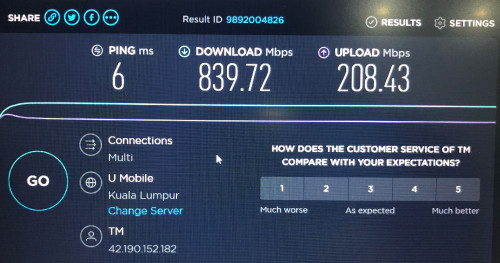
Was able to get full 800/200 Mpbs on Laptop and the range is much better. My router is on one end of the house whereas my home office is at the other end. Prevoiusly cannot get past 20Mbps but now can get over 100Mbps download however upload is still less than 20Mbps. Even PS4 able to get 600/200Mpbs. Never see this kind of speed before. Fired up a game of COD WWII Multiplayer and gotten full green bar for all 3 TDM.

All in all it is a great router and easy to use. Don't allow me to set non-standard IP Range though. Tried to start with 221.x.x.x but not allowed hehe.

What is the max theoretical speed we can get if add another unit of AX3600 as MESH? Thinking of adding another unit upstairs to get better speed in my home office.
user posted image
user posted image
user posted image
user posted image
*
May I know where do you download the 1.0.17 firmware?
daigoking P
post Jan 8 2021, 06:43 PM

New Member
*
Probation
32 posts

Joined: Jun 2019
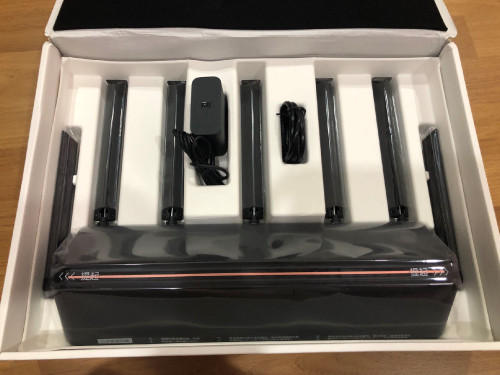
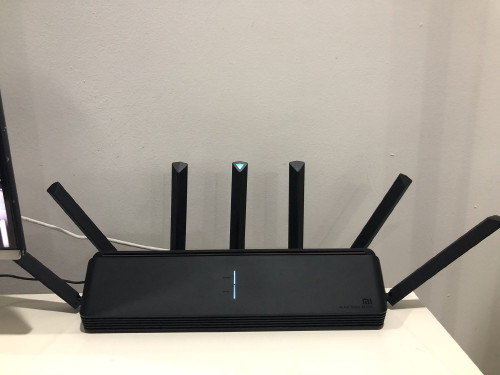
Thanks all. Setup done for my AX3600 without issue (by follow Darren YT guide). Tested and confirmed wifi coverage better than original TP link AX10. Now my double storey house basically can have full 5G coverage. Worst signal area will be at both upper floor toilet (-80dBm), even that still consider acceptable for me la. Hopefully this AX3600 can use for long run without issue.


Change to:
| Lo-Fi Version
0.0263sec    0.45    7 queries    GZIP Disabled
Time is now: 22nd December 2025 - 12:11 AM