

Comparison with Huawei AX3 Pro (not AX3) : https://www.acwifi.net/9937.html
How to add vlan tagging: https://youtu.be/jdg9KaC4LpY
2 meters from router:
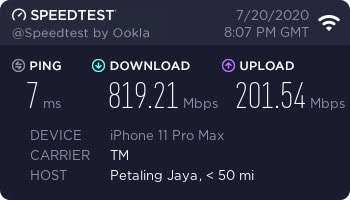
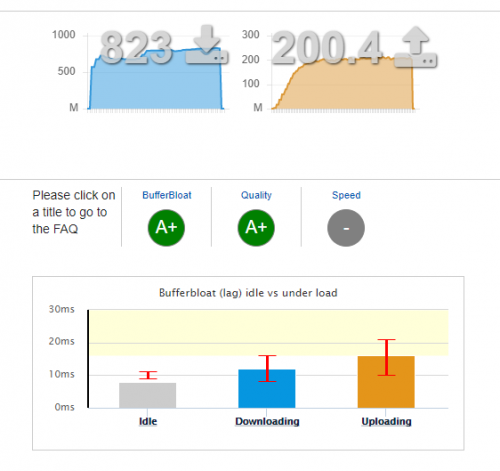
This post has been edited by heidarren: Jul 26 2020, 02:21 PM
XiaoMi AX3600 AX1800 AX5 Vlan tagging
|
|
 Jul 13 2020, 02:53 AM, updated 5y ago Jul 13 2020, 02:53 AM, updated 5y ago
Return to original view | IPv6 | Post
#1
|
 
Junior Member
248 posts Joined: Aug 2018 
|
It's hard to explain with text, so I made a YouTube video, hope you guys can learn from it. These XiaoMi routers are OpenWRT based, logically once you get SSH access, you can do whatever you want, if you familiar with OpenWRT. From my personal experience, the AX3600 beats all my routers/APs in hand, including Asus GT-AC5300/AC86U, Huawei AX3/AX3 Pro, Ubiquiti nanoHD/LR, Aruba IAP-225/IAP-315, MikroTik cAP ac/hAP ac2/Audience and many many more in terms of coverage and speed. Also, instead of writing their own firmware, XiaoMi decided to use OpenWRT and put a pretty GUI on top of it, so it's basically OpenWRT router + official Qualcomm driver(NSS enabled), with a decent skin, stability isn't a problem anymore, and due to official driver, performance is great too, it can also do QoS with full speed of my 800/200 Unifi plan. Regarding mesh, I see no lagging during roaming APs, 802.11 k/v and Qualcomm Wifi-Son supported, tested with ping in iPhone, FaceTime and MobileLegend. Love it! AX1800 is about 5% lower than AX3600 in WiFi, and can only do QoS at about 500mbps, without QoS can fully run my 800/200mbps, so my personal recommendation is to get an AX3600 @RM340 from Taobao, and add AX1800 as a mesh AP if you need any extra coverage, both wireless and LAN can do, @about RM170 each from Taobao too.
Comparison with Huawei AX3 Pro (not AX3) : https://www.acwifi.net/9937.html How to add vlan tagging: https://youtu.be/jdg9KaC4LpY 2 meters from router: This post has been edited by heidarren: Jul 26 2020, 02:21 PM |
|
|
|
|
|
Jul 13 2020, 03:24 AM
Return to original view | IPv6 | Post
#2
|
|
Junior Member
248 posts Joined: Aug 2018
|
QUOTE(afif92 @ Jul 13 2020, 03:16 AM) the video is private. can't watch it Edited Ethanyinghao and afif92 liked this post
|
|
|
Jul 13 2020, 04:49 PM
Return to original view | Post
#3
|
|
Junior Member
248 posts Joined: Aug 2018
|
QUOTE(terradrgn @ Jul 13 2020, 04:38 PM) interesting.. is there an English GUI for bananas? On webpage, use google chrome translate whole page. On app, can select English in language setting |
|
|
Jul 13 2020, 05:27 PM
Return to original view | Post
#4
|
|
Junior Member
248 posts Joined: Aug 2018
|
QUOTE(terradrgn @ Jul 13 2020, 04:58 PM) have you tested if HyppTV works well? eg. no lag or choppiness Logically can be done, but I’m not familiar with OpenWRT, maybe someone who know it well can show us the commands to do so. |
|
|
Jul 15 2020, 10:35 AM
Return to original view | Post
#5
|
|
Junior Member
248 posts Joined: Aug 2018
|
QUOTE(nonamer @ Jul 15 2020, 10:02 AM) from reading at acwifi.net, seems that current wifi 6 routers not support mu-mimo in wifi 6 mode, so unless u plan to use it just for wifi 5, running a 4x4 in wifi 6 would be just waste of electricity "waste of electricity"...... a bit too much to say like this bro, 4x4 not just meant for MU-MIMO, but also coverage. MU-MIMO is always tricky part to test, unless u use some device like SmallNetBuilder do to test, or else u can't really tell it's AP problem or client problem, especially when u only tested by using some models of phone. Btw, with OFDMA, MU-MIMO isn't as important as wifi 5 era anymore.This post has been edited by heidarren: Jul 15 2020, 10:45 AM |
|
|
Jul 15 2020, 10:40 AM
Return to original view | Post
#6
|
|
Junior Member
248 posts Joined: Aug 2018
|
QUOTE(muncheno @ Jul 14 2020, 08:29 PM) TS, can share tabao link? https://item.taobao.com/item.htm?spm=a1z09...._u=f3olopeo3b87I bought it from them, RMB539+RMB60 for shipping to Malaysia muncheno liked this post
|
|
|
|
|
|
Jul 15 2020, 10:43 AM
Return to original view | Post
#7
|
|
Junior Member
248 posts Joined: Aug 2018
|
QUOTE(blacktubi @ Jul 14 2020, 12:54 AM) The Xiaomi AX3600 is a great router for the price. Too bad it doesn't support local environment really well here. True, but luckily we finally managed to get it run on Vlan tagging, the good thing is we only have to do it once and do a backup file, can restore config anytime.Huawei AX3 is really not that good compared to offerings from TP-Link. chilskater liked this post
|
|
|
Jul 15 2020, 11:23 AM
Return to original view | Post
#8
|
|
Junior Member
248 posts Joined: Aug 2018
|
QUOTE(JayceOoi @ Jul 15 2020, 11:05 AM) Saw some reported disconnect issue during gaming, do you face any? I found this router as picky as AC86U for LAN cable, if your LAN cable is bad, it will jump between 100mbps and 1Gbps, maybe this causes them disconnect. I got a slim LAN cable, cat 6 32AWG, which I used to power up my Aruba IAP-315 by using PoE+ and 1Gbps connection, never have any problem, but when I connected to this router, it just can't stay at 1Gbps, changed to another normal LAN cable cat 5e 24AWG (not slim type) and the problem's gone, now it's stable for few weeks. |
|
|
Jul 15 2020, 12:10 PM
Return to original view | Post
#9
|
|
Junior Member
248 posts Joined: Aug 2018
|
QUOTE(JayceOoi @ Jul 15 2020, 11:37 AM) Noted. So wireless also stable? It is great for the price since VLAN is supported. Yes it's very stable, it's original Qualcomm driver based and thanks to Xiaomi didn't do many mod for it. eddieleon7pc and JayceOoi liked this post
|
|
|
Jul 15 2020, 04:19 PM
Return to original view | Post
#10
|
|
Junior Member
248 posts Joined: Aug 2018
|
QUOTE(nonamer @ Jul 15 2020, 02:42 PM) i saw it has many antenna and assumed it is 4x4, but just relook and found it is actually "2x2@160mhz / 4x4@80mhz", so it actually same 2x2 as huawei and tplink (maybe it is the so called 80+80 while others are true 160mhz...need research), all priced around rm300, so the advantage of this xiaomi besides maybe performance is mesh capability and modable firmware It’s Qualcomm special technology, to have 2x2 160MHz and 4x4 80MHz running simultaneously, normally if u have 2x2 160MHz client in the network will make ur 4x4 80MHz client stays in 2x2 80MHz, but Qualcomm make it possible to run both at the same time, u may do some research of it. |
|
|
Jul 18 2020, 01:09 PM
Return to original view | Post
#11
|
|
Junior Member
248 posts Joined: Aug 2018
|
QUOTE(allen84us @ Jul 18 2020, 12:27 PM) Update: it works like a charm by using vlan 11 Saw your post on right.com.cn, but I don't have an account to reply you there, lolMaybe Maxis changed vlan tagging from 621 to 11? Not sure about it, but glad to hear it finally work for you, just don't forget to do a backup file so that you don't need to do it again if accidentally reset. This post has been edited by heidarren: Jul 18 2020, 01:11 PM |
|
|
Jul 27 2020, 02:34 PM
Return to original view | Post
#12
|
|
Junior Member
248 posts Joined: Aug 2018
|
QUOTE(dcblog79 @ Jul 27 2020, 11:50 AM) hi sifus, sorry for asking... Yes, just follow the guide then u can directly connect to BTUdoes AX1800 supports vlan? i.e. i can connect it directly to the BTU. |
|
|
Aug 25 2020, 12:07 PM
Return to original view | Post
#13
|
|
Junior Member
248 posts Joined: Aug 2018
|
QUOTE(nonamer @ Aug 25 2020, 10:46 AM) this router even though the NPU seems attractive but it still cant really replace a single board computer as main router because it doesnt have storage space to be able to run a torrent capable router that complement 100mbps broadband allowing downloads to run nonstop / overnight / during work hours I afraid this is an NAS job to do, previous gen XiaoMi routers has a lot of fancy features including this, they were too greedy to try to bring as many features as they can in order to have more selling point, but in the end non of them useful due to instability. This time they decided to cut all fancy things out and focus on routing and wifi only, I think this is the right way because the most important thing for a wireless router is stable, focus on the main thing is always the right choice.Stable vs features, you choose. Wanna have both? Can, but clearly not @RM350, everything has a cost. This post has been edited by heidarren: Aug 25 2020, 12:10 PM hjack liked this post
|
|
|
|
|
|
Aug 28 2020, 12:22 AM
Return to original view | Post
#14
|
|
Junior Member
248 posts Joined: Aug 2018
|
QUOTE(cle900706 @ Aug 27 2020, 11:32 PM) Hi all...... redmi ax6 can ssh hack? probably no one have experience with it yet since its very new. So far no SSH hack for this model yetprice is so so so tempting compared to ax3600 https://shopee.com.my/Xiaomi-Redmi-Router-A...7355.5148488852 |
|
|
Sep 8 2020, 04:13 PM
Return to original view | Post
#15
|
|
Junior Member
248 posts Joined: Aug 2018
|
QUOTE(neuromancerx @ Sep 8 2020, 03:49 PM) i just received this router and immediately replaced my AC86U. Performance wise very significant. However i missed a lot of deep customization offered in asuswrt. Actually I got the method for permanent ssh access even with latest .67 firmware, will update here soon.1. Unable to set DNS server in DHCP. I have pi-hole ad blocker and used to point my LAN DNS to here. 2. Limited DDNS support. I remembered in stock openwrt they support a lot of ddns provider. No time to tinker around right now. 3. No support for guest network creation. I need to reconfigure all my iot devices (smart plugs, ip cam) 4. SSH access removed once i performed firmware upgrade. So can't tinker around for adding iptv support, adding additional ddns provider etc. slowly resolving above issue before i can permanently shut my ac86u. Back to this thread objective, the solution for getting the ssh and vlan tagging for unifi really works well! As for PiHole, yes I did edited the DNS server to my PiHole via winscp, now all my client will receive IP and gateway IP from AX3600 and DNS server from PiHole. Will update here soon also, I need to do some screenshots. |
|
|
Sep 8 2020, 05:03 PM
Return to original view | Post
#16
|
|
Junior Member
248 posts Joined: Aug 2018
|
QUOTE(neuromancerx @ Sep 8 2020, 04:42 PM) thanks bro! Do not point WAN DNS to PiHole, it will ruin everything. Proper way to do it is use winscp, go to /etc/config/dhcp, add list 'dhcp_option' '6,192.168.0.6' anyway, the moment im replying this post, im already back on my old router. for some reason after i rebooted this ax1800 router all my internet connection lost. i recalled that i have changed the WAN DNS (to point to my pi-hole) and hoping that all my client DNS request will be forwarded to pi-hole. also i noticed when i did that, the MTU changed to 1480 by itself. so after i reverted all those settings but my internet still disconnected i gave up. will explore more at night as im currently WFH now  having SSH directly to the router will ease the troubleshooting (my PiHole is 192.168.0.6, if u want more DNS server u may do it like '6,192.168.0.6,8.8.8.8' ), by doing this u will get IP form DHCP and DNS server will be PiHole IP This post has been edited by heidarren: Sep 8 2020, 05:04 PM |
|
|
Sep 9 2020, 02:00 AM
Return to original view | Post
#17
|
|
Junior Member
248 posts Joined: Aug 2018
|
QUOTE(ipohps3 @ Sep 8 2020, 11:02 PM) Hi guys. which one is better? the new Redmi AX6 or Xiaomi AX3600? seems like those 2 are better than Huawei AX3. AX6 doesn't have ssh access yet, not sure if they able to crack it, go for AX3600 if you need VLAN tagging |
|
|
Sep 23 2020, 05:48 PM
Return to original view | IPv6 | Post
#18
|
|
Junior Member
248 posts Joined: Aug 2018
|
QUOTE(cle900706 @ Sep 23 2020, 05:32 PM) im stucked here... can help? Use DHCP 1st, change it afterward |
|
|
Sep 26 2020, 12:41 AM
Return to original view | IPv6 | Post
#19
|
|
Junior Member
248 posts Joined: Aug 2018
|
QUOTE(eugenecctan @ Sep 25 2020, 09:25 PM) OK, highly recommended. Everything good except the channels available. After 48 then jump to 149? Actually u can use channel 52~64 by setting it to auto and manually change it via winscp Add on, can I enable guest network? I do not able to find this option. Thanks 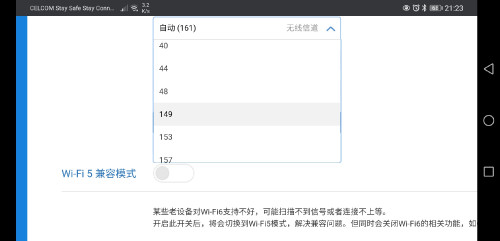 |
|
|
Sep 26 2020, 02:18 AM
Return to original view | IPv6 | Post
#20
|
|
Junior Member
248 posts Joined: Aug 2018
|
QUOTE(neuromancerx @ Sep 26 2020, 01:00 AM) correct me if im wrong, the moment we upgrade the firmware, the ssh will be disabled and the exploit is no longer there, right? Ya, so make all the mods before upgrade, and it will stay remain after upgrade. Do a backup before upgrade to save your time, just in case |
| Change to: |  0.0373sec 0.0373sec
 0.58 0.58
 7 queries 7 queries
 GZIP Disabled GZIP Disabled
Time is now: 15th December 2025 - 12:40 PM |
 Quote
Quote