Welcome Guest ( Log In | Register )

Outline · [ Standard ] · Linear+

 XiaoMi AX3600 AX1800 AX5 Vlan tagging

views
     
neuromancerx
post Sep 8 2020, 03:49 PM

Enthusiast
*****
Junior Member
879 posts

Joined: Jan 2007
i just received this router and immediately replaced my AC86U. Performance wise very significant. However i missed a lot of deep customization offered in asuswrt.

1. Unable to set DNS server in DHCP. I have pi-hole ad blocker and used to point my LAN DNS to here.
2. Limited DDNS support. I remembered in stock openwrt they support a lot of ddns provider. No time to tinker around right now.
3. No support for guest network creation. I need to reconfigure all my iot devices (smart plugs, ip cam)
4. SSH access removed once i performed firmware upgrade. So can't tinker around for adding iptv support, adding additional ddns provider etc.

slowly resolving above issue before i can permanently shut my ac86u.

Back to this thread objective, the solution for getting the ssh and vlan tagging for unifi really works well!
neuromancerx
post Sep 8 2020, 04:42 PM

Enthusiast
*****
Junior Member
879 posts

Joined: Jan 2007
QUOTE(heidarren @ Sep 8 2020, 04:13 PM)
Actually I got the method for permanent ssh access even with latest .67 firmware, will update here soon.

As for PiHole, yes I did edited the DNS server to my PiHole via winscp, now all my client will receive IP and gateway IP from AX3600 and DNS server from PiHole. Will update here soon also, I need to do some screenshots.
*
thanks bro!

anyway, the moment im replying this post, im already back on my old router. for some reason after i rebooted this ax1800 router all my internet connection lost. i recalled that i have changed the WAN DNS (to point to my pi-hole) and hoping that all my client DNS request will be forwarded to pi-hole. also i noticed when i did that, the MTU changed to 1480 by itself. so after i reverted all those settings but my internet still disconnected i gave up. will explore more at night as im currently WFH now biggrin.gif

having SSH directly to the router will ease the troubleshooting

This post has been edited by neuromancerx: Sep 8 2020, 04:42 PM
neuromancerx
post Sep 8 2020, 05:17 PM

Enthusiast
*****
Junior Member
879 posts

Joined: Jan 2007
QUOTE(heidarren @ Sep 8 2020, 05:03 PM)
Do not point WAN DNS to PiHole, it will ruin everything. Proper way to do it is use winscp, go to /etc/config/dhcp, add       list 'dhcp_option' '6,192.168.0.6' 
(my PiHole is 192.168.0.6, if u want more DNS server u may do it like '6,192.168.0.6,8.8.8.8' ), by doing this u will get IP form DHCP and DNS server will be PiHole IP
*
thats the plan, but then i lost my ssh access when upgraded the fw. anyway just playing for fun. honestly, i do not see any harm pointing the WAN DNS to pihole, since my pi-hole is using 1.1.1.1/8.8.8.8 as an upstream dns resolver. so as long as the internet is reachable, it should resolves.

my pc cant even ping 1.1.1.1, so i believed issue is not related to dns, unless there is something that im not aware with xiaomi's openwrt implementation

This post has been edited by neuromancerx: Sep 8 2020, 05:18 PM
neuromancerx
post Sep 9 2020, 11:07 PM

Enthusiast
*****
Junior Member
879 posts

Joined: Jan 2007
QUOTE(toytoy @ Sep 9 2020, 07:04 PM)
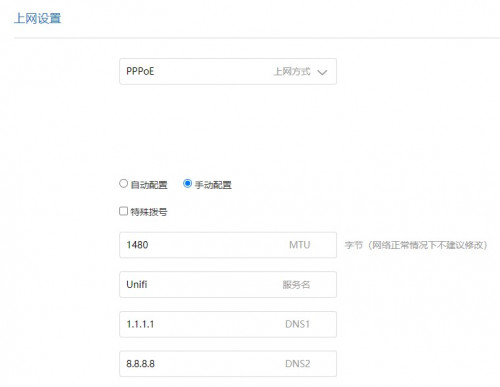
1.Pardon my ignorance but being able to set DNS at DHCP is different from setting the DNS at PPPOE side?

user posted image

2. Yes, DDNS service is limited. I m using no-ip so it's fine for me.

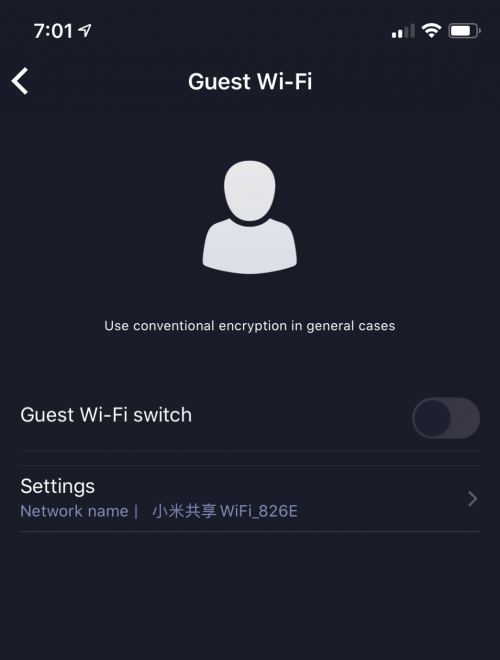
3. You can actually setup Guest WiFi using the APP in mobile phone. There are quite a number of settings available on the app only which is quite weird.

user posted image
*
1. Technically will achieve the same thing, but in a weird way.

Client DNS resolution when:

Set DNS at DHCP
Client-LAN DNS server

Set DNS at PPPOE side
Client-Router-LAN DNS server

But when i alter DNS setting under pppoe, something broken and im losing my inet access

2. My personal preference for DDNS will be dns-o-matic. It able to update to other multiple ddns service and act as a central hub - since i also have ddns service with he.net and afraid dns. just noticed that i have no-ip account as well, but IINM need to visit their website every month to keep account remain active.
3. Is that miwifi app downloaded from playstore or modded apk? i dont recall i see that option yesterday

This post has been edited by neuromancerx: Sep 9 2020, 11:09 PM
neuromancerx
post Sep 17 2020, 04:28 PM

Enthusiast
*****
Junior Member
879 posts

Joined: Jan 2007
sorry, off topic:

im thinking to sell my AX1800 router. im barely using it, just for testing and experience. i dont think im ready to use the stock firmware yet at this point, will wait until it officially supported by openwrt.

other than AX1800, i'm also planning to sell these routers as well:
WS880 flashed with asuswrt RM100
AC86U CN set, consider no warranty. it got issue with disappearing 2.4Ghz but managed to get the workaround by set the country to AU RM250

Too much routers to play :sigh:
PM me if interested
neuromancerx
post Sep 26 2020, 01:00 AM

Enthusiast
*****
Junior Member
879 posts

Joined: Jan 2007
QUOTE(heidarren @ Sep 26 2020, 12:41 AM)
Actually u can use channel 52~64 by setting it to auto and manually change it via winscp
*
correct me if im wrong, the moment we upgrade the firmware, the ssh will be disabled and the exploit is no longer there, right?
neuromancerx
post Nov 3 2020, 04:26 PM

Enthusiast
*****
Junior Member
879 posts

Joined: Jan 2007
i ended up using this as wireless extender mode. but a bit uncomfortable due to the miwifi app is cloud based, and the router keep sending a beacon to the internet.

This post has been edited by neuromancerx: Nov 3 2020, 04:27 PM
neuromancerx
post Nov 5 2020, 04:16 PM

Enthusiast
*****
Junior Member
879 posts

Joined: Jan 2007
QUOTE(y2kming @ Nov 5 2020, 03:51 PM)
all sifu, just wondering ... if i plug cable from my current tplink of maxis router to this ax3600.. and use this ax3600 for wifi only (disable tplink wifi) ... is the speed acceptable ? anyone tried ?
*
i did this exactly, i dont think there was a significant difference for the existing wifi 5 client. speed more or less is similar with asus ac86u, which can cover my whole double storey house
neuromancerx
post Nov 25 2020, 09:38 AM

Enthusiast
*****
Junior Member
879 posts

Joined: Jan 2007
QUOTE(TaKeOVER @ Nov 25 2020, 01:51 AM)
so if i need to do vlan tagging to use hypptv how to get it to work ?
*
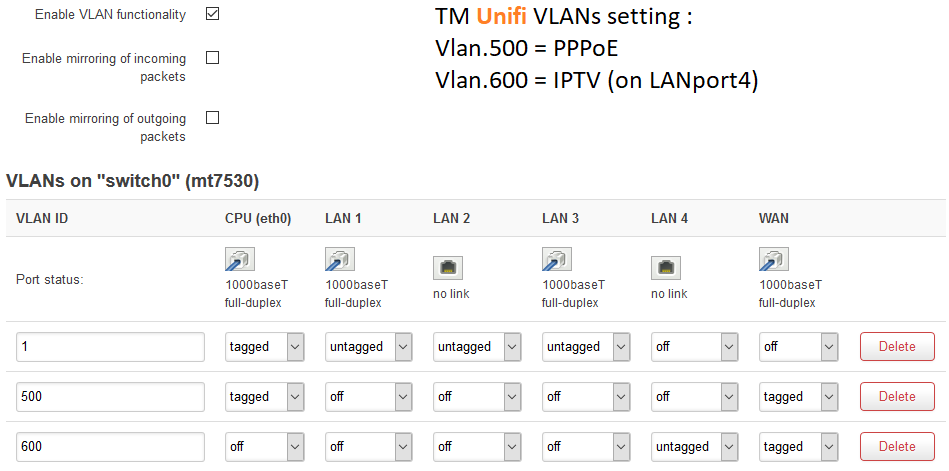
of course. theoretically, you will need below vlan setup

user posted image

this is openwrt setup for unifi vlan, you may get the similar result as Mi AX1800 is derived from the same code.

WAN port: tagged with vlan 500 (data) & 600 (iptv)
LAN4 untagged for vlan600, this is where you connect the STB

as mentioned in previous post, it will be much easier to get external switch that support vlan. Refer here: https://www.blacktubi.com/guide/make-any-ro...-work-on-unifi/

This post has been edited by neuromancerx: Nov 25 2020, 09:41 AM
neuromancerx
post Nov 30 2020, 10:00 PM

Enthusiast
*****
Junior Member
879 posts

Joined: Jan 2007
QUOTE(cle900706 @ Nov 30 2020, 07:35 PM)
user posted image

using old unifi router now no problem
router down since morning and was using auto dns setting previously
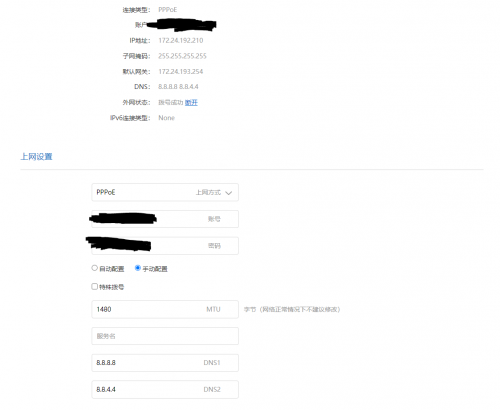
may i now if my settings correct?
*
can you try changing the MTU to 1492?

DNS will not have any impact to your connection.

This post has been edited by neuromancerx: Nov 30 2020, 10:06 PM
neuromancerx
post Dec 20 2020, 03:06 PM

Enthusiast
*****
Junior Member
879 posts

Joined: Jan 2007
-sold-

This post has been edited by neuromancerx: Dec 22 2020, 12:32 AM
neuromancerx
post Dec 20 2020, 08:34 PM

Enthusiast
*****
Junior Member
879 posts

Joined: Jan 2007
QUOTE(toytoy @ Dec 20 2020, 05:16 PM)
Hi, are u using Asus ZenWifi CT8? Can share your test results? This model comes with dedicated 5Ghz backhaul for Mesh. Are you getting full speed on the child node? I can only get half the speed using AX3600 as it is shared backhaul.
*
I'm using AX56U as mesh router and AC86U as mesh node. Mesh backhaul is using 5Ghz band. I haven't performed deep measurement test yet, but from a client connected to mesh node i can achieve 100mbps (on unifi 100Mbps). So, yes it served my environment well.
neuromancerx
post Jan 1 2021, 12:02 PM

Enthusiast
*****
Junior Member
879 posts

Joined: Jan 2007
QUOTE(daigoking @ Jan 1 2021, 09:30 AM)
Disable 5GHz? Y do that? By right 5GHz is the beauty of Wifi 6. If only need stick with 2.4GHz then a bit waste for this AX3600 loh.

Sure have other method can control disconnect when switching. Y client device auto switch? U use 1 ssid or 2 ssid (2.4 & 5).
*
because 2.4 provide much wider coverage than 5ghz. when he going further from the AP the client will switch to 2.4. personally i use 2 different ssid, due to IOT devices only running in 2.4ghz
neuromancerx
post Feb 27 2021, 01:23 PM

Enthusiast
*****
Junior Member
879 posts

Joined: Jan 2007
QUOTE(Mushi.Nv @ Feb 25 2021, 05:16 PM)
Using Ax3600 now as AP.
Anyone know for ipv6, we should use Native or NAT6? Both can't enable ipv6 for me.
Directly connected to Archer c5v will give me ipv6
*
QUOTE(heidarren @ Feb 26 2021, 07:06 PM)
It seems can be done by using WinSCP, in network there change IPv6 to “relay”, but I’m not really sure exactly steps for it, u may dig in openwrt forum to see how ppl use IPv6 relay.
*
This is the ipv6 setting with original openwrt firmware, older version but the concept should be the same

https://advanxer.com/blog/2015/11/setting-u...r-for-tm-unifi/
neuromancerx
post Apr 1 2021, 02:44 PM

Enthusiast
*****
Junior Member
879 posts

Joined: Jan 2007
QUOTE(flubear @ Apr 1 2021, 11:25 AM)
haha AX9000 out now with USB3 port tongue.gif
*
just released, and probably will sold at 650-700.
neuromancerx
post Apr 14 2021, 10:16 PM

Enthusiast
*****
Junior Member
879 posts

Joined: Jan 2007
QUOTE(xeon1989 @ Apr 14 2021, 12:39 PM)
Bought AX3600.
Noticed that with a single device connected to 2.4G wifi, the speed is awesome.
Ping from PC to router 192.168.31.1 less than 1ms.

After I connect all my IoT and IP Cam (~10 devices) which supports only 2.4G wifi, ping from PC become ~600ms and frequently disconnected.

However, if I connect my PC to 5G wifi, it's smooth again.
But I can't connect to 5G wifi with my phone as it doesn't cover every corner in my house (such as toilet) :|

Is this the slow 2.4G wifi a common issue for AX3600?
Even with my very old TL-WR740N, it can easily handle more than 10 devices without hiccup...
*
Older device that run on lower data rate can contribute to this, as all the clients will be forced to use the lowest data rate. Normally, cheap IOT device is the culprit.

I solved my 5ghz coverage issue by putting a wifi mesh.


Change to:
| Lo-Fi Version
0.0614sec    1.74    7 queries    GZIP Disabled
Time is now: 19th December 2025 - 06:13 AM