Welcome Guest ( Log In | Register )

Outline · [ Standard ] · Linear+

 XiaoMi AX3600 AX1800 AX5 Vlan tagging

views
     
kenny79
post Jan 15 2021, 08:13 PM

Look at all my stars!!
*******
Senior Member
3,200 posts

Joined: Jan 2003
From: IPOH


Any guide for ax6 maxis fibre setup.. current on maxis 100mbps ... that title was for ax3600 ax1800 and ax5...anyone manage to hack the ax 6 since the price is really temping .. rmb 269

This post has been edited by kenny79: Jan 16 2021, 12:37 PM
kenny79
post Jan 16 2021, 12:57 PM

Look at all my stars!!
*******
Senior Member
3,200 posts

Joined: Jan 2003
From: IPOH


Was found this tutorial for ax6 anyone can practical to have the ssh
https://openwrt.org/inbox/toh/xiaomi/xiaomi_redmi_ax6_ax3000
kenny79
post Jan 17 2021, 05:26 PM

Look at all my stars!!
*******
Senior Member
3,200 posts

Joined: Jan 2003
From: IPOH


QUOTE(toytoy @ Aug 11 2020, 03:08 PM)
Finally got my unit at 10.30PM yesterday 😅
Straight jumped into setting it up and managed to connect to unifi thanks to the great tutorial by heidarren.

However, not all went well, the unit came with firmware 1.0.2x and the SSH hack doesn't work. After 1 hour of trial and error and doing some research online finally found out that the SSH hack only works on firmware version 1.0.17 as per heidarren's tutorial. So for the newer units have to downgrade the firmware first. After gaining SSH access can update to latest firmware withouy problem.

It's a big upgrade to the TP-Link AC1900 Touch P5 Router I am currently using. WiFi Speed on iPhone X is over 300Mbps which never reach before.

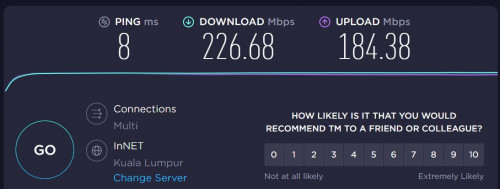
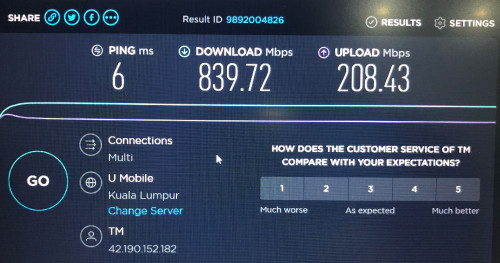
Was able to get full 800/200 Mpbs on Laptop and the range is much better. My router is on one end of the house whereas my home office is at the other end. Prevoiusly cannot get past 20Mbps but now can get over 100Mbps download however upload is still less than 20Mbps. Even PS4 able to get 600/200Mpbs. Never see this kind of speed before. Fired up a game of COD WWII Multiplayer and gotten full green bar for all 3 TDM.

All in all it is a great router and easy to use. Don't allow me to set non-standard IP Range though. Tried to start with 221.x.x.x but not allowed hehe.

What is the max theoretical speed we can get if add another unit of AX3600 as MESH? Thinking of adding another unit upstairs to get better speed in my home office.
user posted image
user posted image
user posted image
user posted image
*
Using cable or wireless.
kenny79
post Jan 17 2021, 06:48 PM

Look at all my stars!!
*******
Senior Member
3,200 posts

Joined: Jan 2003
From: IPOH


QUOTE(amirsubhi @ Dec 31 2020, 09:53 PM)
Do u guys know, international firmware got additional setting for VLAN, which u can set and dial (Without need to go to SSH/Telnet)

First update your firmware to 3.0.22 https://bit.ly/MiAX3600INT

and then factory reset and after reboot enter 192.168.31.1

Then you notice as below, click at additional setting, put your vlan

[attachmentid=10744283]
*
Which model is it ... ax1800 or ax3600?ax5?
kenny79
post Jan 17 2021, 09:50 PM

Look at all my stars!!
*******
Senior Member
3,200 posts

Joined: Jan 2003
From: IPOH


QUOTE(toytoy @ Jan 17 2021, 09:48 PM)
This one using WiFi. LAN no problem. WiFi only always cannot get full speed. Bought a cheap wifi 6 ax200 WiFi card for my old laptop and can get full speed.

https://shopee.com.my/product/269995966/784...67-1610891197.9
*
Ax3600 with the ax200 to get full speed ?
kenny79
post Jan 17 2021, 09:56 PM

Look at all my stars!!
*******
Senior Member
3,200 posts

Joined: Jan 2003
From: IPOH


QUOTE(amirsubhi @ Jan 17 2021, 09:41 PM)
ax3600
*
So at that vlan tagging you fil up with 500? For using unifi Dan get it done?
kenny79
post Jan 17 2021, 10:21 PM

Look at all my stars!!
*******
Senior Member
3,200 posts

Joined: Jan 2003
From: IPOH


QUOTE(amirsubhi @ Jan 17 2021, 09:58 PM)
yerp, put vlan 500, fill in pppoe detail, done.  except for IPTV vlan 600 of which u need to manually bridge it via ssh (of which I havent try it)
*
The device you bought was China firmware on default and flash to to international firmware .... I’m quick noob since ready have touch tech stuff for a long time
kenny79
post Jan 18 2021, 12:30 AM

Look at all my stars!!
*******
Senior Member
3,200 posts

Joined: Jan 2003
From: IPOH


QUOTE(amirsubhi @ Jan 17 2021, 11:26 PM)
yes u can flash china firmware with int firmware without any problem
*
Ok thank you for clarify .... I think I would go for ax 3600
kenny79
post Jan 18 2021, 09:00 PM

Look at all my stars!!
*******
Senior Member
3,200 posts

Joined: Jan 2003
From: IPOH


QUOTE(toytoy @ Jan 18 2021, 08:07 PM)
I understand your plight. I have been using HomePlug since the first generation AV200 then upgrade to AV600 until now using AV1300 also get less than 200Mbps.

AX5 - 5Ghz can go up to 1200 Mbps, mesh will cut that in half coz don't have dedicated backhaul. Left 600Mbps then WiFi strength will further cut it down.
Better get another AX3600 or AX6.

To put that into perspective, I currently have  2 x AX3600 with theoretical 5Ghz speed of 2402 Mbps.
Main router ground floor and child router upstairs. Straight line distance around 6-7meters.
Upstairs laptop distance to child router around 6-7meters.

I get this speed on a good day with Unifi 800Mbps.
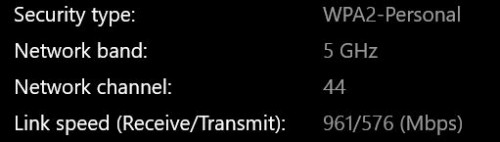
user posted image
user posted image

I was quite disappointed with the result. I was hoping I can get around 600Mpbs download upstairs as that's where i spend most of my time in home office.
If really want best speed need to get MESH router with dedicated Haul but that also I don't think can get 800Mbps.

Sometimes think back, spent so much money after all these years. might as well just pull one Ethernet Cable lagi cheap.  ranting.gif  sweat.gif
*
Try to pull Ethernet cable to connect both of the ax3600... will it be better ?

kenny79
post Jan 18 2021, 09:11 PM

Look at all my stars!!
*******
Senior Member
3,200 posts

Joined: Jan 2003
From: IPOH


QUOTE(jericho @ Jan 18 2021, 09:07 PM)
U need Qualcomm 888 chipset to maximum the speed... previous thread got mention a3600 and ax6000 u may read back
kenny79
post Jan 18 2021, 11:19 PM

Look at all my stars!!
*******
Senior Member
3,200 posts

Joined: Jan 2003
From: IPOH


QUOTE(toytoy @ Jan 18 2021, 10:32 PM)
Yes definitely better. But the reason I wanted to use MESH was I didn't want to pull a cable.
But the MESH works best if you can pull a cable in between. You can get the best speed and best coverage.
*
Since the xiaomi doesn’t provide extra range of WiFi 5 backhole so it will take some bandwidth of the both router .. it’s the main reason the slow speed
kenny79
post Jan 19 2021, 12:56 AM

Look at all my stars!!
*******
Senior Member
3,200 posts

Joined: Jan 2003
From: IPOH


QUOTE(toytoy @ Jan 18 2021, 11:21 PM)
Yes that's right. I didn't know until i bought 2 of them  sweat.gif
*
Reseller back for one unit lol
kenny79
post Jan 24 2021, 12:58 AM

Look at all my stars!!
*******
Senior Member
3,200 posts

Joined: Jan 2003
From: IPOH


QUOTE(heidarren @ Jan 23 2021, 06:26 PM)
Change app region to mainland China
*
Hello bro any idea the redmi ax6 manage to tag vlan using the same way?
kenny79
post Jan 24 2021, 05:53 PM

Look at all my stars!!
*******
Senior Member
3,200 posts

Joined: Jan 2003
From: IPOH


QUOTE(evanttc @ Jan 24 2021, 02:40 PM)
Sorry, im noob in this game.
May i know is the global version can use on unifi?
Thx
*
As mention by a member here the global firmware have the vlan tagging setting so doesn’t to make hard work to make it support unifi
kenny79
post Feb 15 2021, 08:36 AM

Look at all my stars!!
*******
Senior Member
3,200 posts

Joined: Jan 2003
From: IPOH


Was found xiaomi store have sale the ax3600 with international firmware in my place Ipoh prade rm439
kenny79
post Mar 24 2021, 09:31 AM

Look at all my stars!!
*******
Senior Member
3,200 posts

Joined: Jan 2003
From: IPOH


QUOTE(6942nole @ Mar 2 2021, 04:36 PM)
opt for redmi ax6 now. ~RM200 ship from china.
*
Can use ssh now?


Change to:
| Lo-Fi Version
0.0426sec    1.03    7 queries    GZIP Disabled
Time is now: 17th December 2025 - 03:34 AM