

Yes latest 3.0.22 is able to configure the vlan but I realized the miwifi firmware is lacking in many features
This post has been edited by ajaxcbcb: Jan 1 2021, 07:25 PM
XiaoMi AX3600 AX1800 AX5 Vlan tagging
XiaoMi AX3600 AX1800 AX5 Vlan tagging
|
|
 Jan 1 2021, 07:24 PM Jan 1 2021, 07:24 PM
Return to original view | Post
#1
|
 
Junior Member
421 posts Joined: Apr 2011 From: Kuala Lumpur Malaysia   
|
Yes latest 3.0.22 is able to configure the vlan but I realized the miwifi firmware is lacking in many features
This post has been edited by ajaxcbcb: Jan 1 2021, 07:25 PM |
|
|
|
|
|
Jan 2 2021, 11:46 PM
Return to original view | Post
#2
|
|
Junior Member
421 posts Joined: Apr 2011 From: Kuala Lumpur Malaysia
|
QUOTE(ldragon @ Jul 28 2020, 08:04 PM) use google chrome auto translate / smartphone app are in English my app mcm half of the available features. currently using ax3000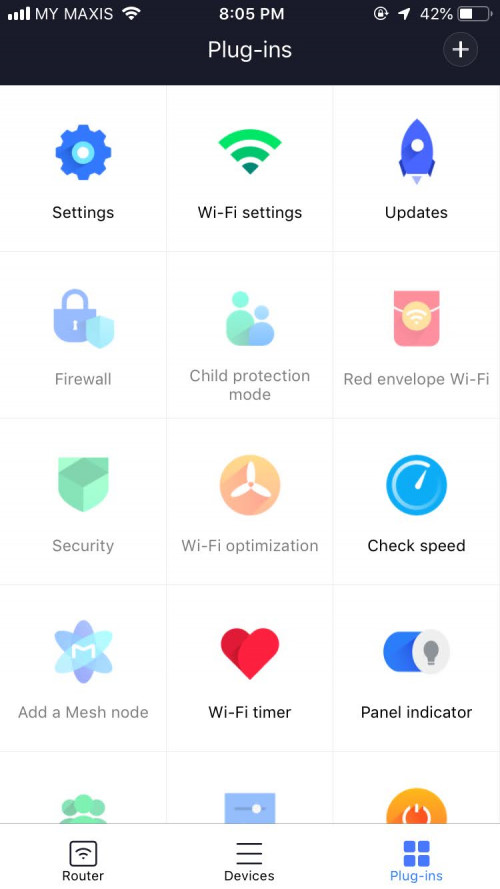  |
|
|
Feb 24 2021, 01:35 AM
Return to original view | Post
#3
|
|
Junior Member
421 posts Joined: Apr 2011 From: Kuala Lumpur Malaysia
|
QUOTE(zero721 @ Feb 24 2021, 12:04 AM) i see. hard to choose between two I managed to do ssh persistent currently using ax3200 with unifi. Did a manual vlan config |
|
|
Feb 26 2021, 07:00 PM
Return to original view | IPv6 | Post
#4
|
|
Junior Member
421 posts Joined: Apr 2011 From: Kuala Lumpur Malaysia
|
QUOTE(zero721 @ Feb 24 2021, 09:29 PM) mind to teach how to do so? first u need to revert the firmware to 1.0.17. turn on the ssh access2. change the region to CN 3. after that you can do a nvram commit to ensure that the change Is committed on the firmware. 4. need to write a long guide. i will revert to you when i have time. |
|
|
Feb 26 2021, 07:32 PM
Return to original view | IPv6 | Post
#5
|
|
Junior Member
421 posts Joined: Apr 2011 From: Kuala Lumpur Malaysia
|
QUOTE(toytoy @ Feb 26 2021, 07:02 PM) See the YouTube video posted by TS on first page? yes that is the first step. but the following step can be quite tedious as u need to change the region |
|
|
Feb 27 2021, 09:49 AM
Return to original view | IPv6 | Post
#6
|
|
Junior Member
421 posts Joined: Apr 2011 From: Kuala Lumpur Malaysia
|
QUOTE(cle900706 @ Feb 26 2021, 09:38 PM) hi sifus, was using old router and retired the first page process again and still the DNS not appear. if u are not prepared to be a wiz. i recommend u to upgrade ur firmware to the global firmware. global firmware allows u to add the vlan switch when u pick by countrybut it shows that the connection is there. may i know if u add a vlan switch, will solve this problem? 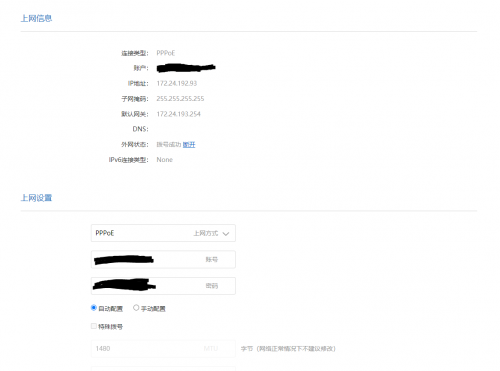 |
|
|
|
|
|
Feb 27 2021, 10:01 AM
Return to original view | IPv6 | Post
#7
|
|
Junior Member
421 posts Joined: Apr 2011 From: Kuala Lumpur Malaysia
|
QUOTE(cle900706 @ Feb 27 2021, 09:52 AM) er.... any link on how to do it and download link? currently its on china firmware, can revert back to china firmware if anything happens? im using ax5 btw |
|
|
Feb 27 2021, 11:15 AM
Return to original view | IPv6 | Post
#8
|
|
Junior Member
421 posts Joined: Apr 2011 From: Kuala Lumpur Malaysia
|
QUOTE(cle900706 @ Feb 27 2021, 11:09 AM) not for ax5 haha sorry sorry my bad. so far I have roughly browsed. i don't think there is a global firmware for ax5. i think the cloest would be following this guideand need to find the firmware version which has the backdoor for ssh |
|
|
Feb 27 2021, 09:18 PM
Return to original view | IPv6 | Post
#9
|
|
Junior Member
421 posts Joined: Apr 2011 From: Kuala Lumpur Malaysia
|
QUOTE(cle900706 @ Feb 27 2021, 02:37 PM) yes. this is the TS method. It means that the memory doesn't persist after the firmware update. U need to do with this tutorialused this method from the start and it was ok. after 2-3months one day disconnected and the DNS never appeared. reset the router and redo ssh still no luck. so i can say that using a vlan switch is the only options i think? https://irq5.io/2020/08/10/custom-firmware-...ireless-router/ |
| Change to: |  0.0315sec 0.0315sec
 0.90 0.90
 7 queries 7 queries
 GZIP Disabled GZIP Disabled
Time is now: 19th December 2025 - 05:00 AM |
 Quote
Quote