Welcome Guest ( Log In | Register )

132 Pages « < 75 76 77 78 79 > » Bottom

Outline · [ Standard ] · Linear+

 TNB Allo Nationwide Open Fibre Expansion, CBJ,Malacca,Perak,Penang,Johor & Kedah

views
     
aniq8676
post Jul 11 2021, 03:46 PM

Regular
******
Senior Member
1,524 posts

Joined: Dec 2020
From: Perak


QUOTE(wc_how @ Jul 11 2021, 03:29 PM)
No choice already signed.
Not which which ISP will be running with allo backbone other than Astro Broadband, which i suspect they are using CBB too.
*
Celcom Fibre, Digi Fibre
wc_how
post Jul 11 2021, 04:16 PM

Regular
******
Senior Member
1,187 posts

Joined: Oct 2009
QUOTE(Candy12 @ Jul 11 2021, 03:35 PM)
Maybe Maxis, Celcom or DiGi Home Fibre Broadband?
*
QUOTE(aniq8676 @ Jul 11 2021, 03:46 PM)
Celcom Fibre, Digi Fibre
*
I don't see any ads or flyers in my area other than CBB & ABB.
Anyway if CBB insist not to give me public IP, no choice i will keep using it with zerotier for the next 2 years.
joshhd
post Jul 12 2021, 02:09 AM

Look at all my stars!!
*******
Senior Member
7,799 posts

Joined: Dec 2014
From: Malaysia


QUOTE(wc_how @ Jul 11 2021, 03:29 PM)
No choice already signed.
Not which which ISP will be running with allo backbone other than Astro Broadband, which i suspect they are using CBB too.
*

If your area has Allo coverage, and you sign up Astro & Broadband, then it'll be Maxis Fibre but riding under Allo Infra. the Internet will be under Allo as well.

During installation day, Allo installer will in charge of laying fibre cable and setting up the fibre modem (ONU), while Astro installer will be in charge of configuring the WiFi router, as well as installing Astro satellite dish and Astro box.

The WiFi router will be the same as is currently used by Maxis, and the Internet account username will be xxxxxx@home.maxis.com.my
Same like what is being used by the usual Maxis Fibre customers riding under TM Infra.

If you wish to change to Public IP, you'll have to do it manually by contacting the customer service. Once it is successfully changed to Public IP, your username will be xxxxxx@public.maxis.com.my


EDIT: Sorry for the wrong info. The info above is applicable for Astro & Broadband sign ups, for infra area under TM HSBB, Maxis NGBB and CTS only.

This post has been edited by joshhd: Jul 27 2021, 11:12 PM
kskoay
post Jul 12 2021, 08:33 AM

On my way
****
Junior Member
659 posts

Joined: Nov 2007
QUOTE(asellus @ Jul 11 2021, 09:54 AM)
Playstation and Xbox (not sure about Switch) HATES private IP. Just ask Uncle Google or Auntie Bing about "Playstation NAT type 3" for starters.
*
Is there any solution or work around for gamer for private ip? Thank you


QUOTE(aniq8676 @ Jul 11 2021, 10:50 AM)
Public IP is more open than Private IP
Public IP can be used to access CCTV, NAS, FTP servers, game servers and others from anywhere globally.
*
That means I will encounter issue if I hosted nas in my house with private ip (accessing from public internet)? Thanks

aniq8676
post Jul 12 2021, 08:47 AM

Regular
******
Senior Member
1,524 posts

Joined: Dec 2020
From: Perak


QUOTE(joshhd @ Jul 12 2021, 02:09 AM)
If your area has Allo coverage, and you sign up Astro & Broadband, then it'll be Maxis Fibre but riding under Allo Infra.

During installation day, Allo installer will in charge of laying fibre cable and setting up the fibre modem (ONU), while Astro installer will be in charge of configuring the WiFi router, as well as installing Astro satellite dish and Astro box.

The WiFi router will be the same as is currently used by Maxis, and the Internet account username will be xxxxxx@home.maxis.com.my
Same like what is being used by the usual Maxis Fibre customers riding under TM Infra.

If you wish to change to Public IP, you'll have to do it manually by contacting the customer service. Once it is successfully changed to Public IP, your username will be xxxxxx@public.maxis.com.my
*
Incorrect, If your area has Infra Allo, and you sign up for Astro+Broadband, you will get Allo/City Broadband ISP instead of a Maxis Fiber ISP.
(Unless you register Astro+Broadband for areas that use Infra TM or Maxis, then the ISP that will be use is Maxis Fiber)

Post #1348
Post #1363
Cincai.La
post Jul 12 2021, 04:01 PM

Getting Started
**
Junior Member
183 posts

Joined: Jun 2020
From: IPOH


QUOTE(kskoay @ Jul 12 2021, 08:33 AM)
Is there any solution or work around for gamer for private ip? Thank you
*
I have try GTA online and it's under NAT type 2 which is acceptable for me.
jimmylim85
post Jul 14 2021, 02:38 PM

iPhone world....
*******
Senior Member
7,826 posts

Joined: Jan 2003
From: Ipoh


Did Allo team ever wonder why they still provide AC1200 wifi routers to 500mbps and 1Gbps user? When it's wireless output doesn't exceed 400mbps. Whenever you question them, they replied..."have you ever tried LAN direct connection?". It's already 2021... how often you see users use LAN direct connection. All are using WiFi instead. Isn't better they just provide us AX1500 or AX1800 wifi router at the very least.
aniq8676
post Jul 14 2021, 02:58 PM

Regular
******
Senior Member
1,524 posts

Joined: Dec 2020
From: Perak


QUOTE(jimmylim85 @ Jul 14 2021, 02:38 PM)
Did Allo team ever wonder why they still provide AC1200 wifi routers to 500mbps and 1Gbps user? When it's wireless output doesn't exceed 400mbps. Whenever you question them, they replied..."have you ever tried LAN direct connection?". It's already 2021... how often you see users use LAN direct connection. All are using WiFi instead. Isn't better they just provide us AX1500 or AX1800 wifi router at the very least.
*
Any ISP, if you want to get at least 90% speed from your subscription package, must use a LAN connection instead of WIFI.
If you want to get highspeed internet on WIFI network, please buy your own router.
jcws87
post Jul 14 2021, 04:45 PM

Getting Started
**
Junior Member
218 posts

Joined: Aug 2020


QUOTE(jimmylim85 @ Jul 14 2021, 02:38 PM)
Did Allo team ever wonder why they still provide AC1200 wifi routers to 500mbps and 1Gbps user? When it's wireless output doesn't exceed 400mbps. Whenever you question them, they replied..."have you ever tried LAN direct connection?". It's already 2021... how often you see users use LAN direct connection. All are using WiFi instead. Isn't better they just provide us AX1500 or AX1800 wifi router at the very least.
*
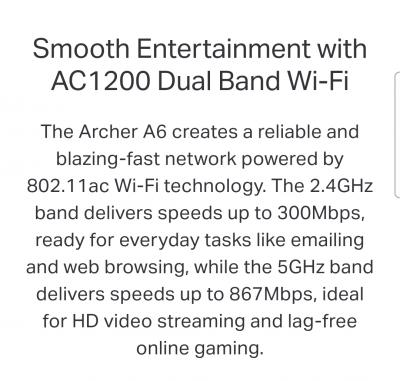
Actually, the Tp-link A6 provided by Allo CBB can perform up to 867Mbps on 5GHz (based to info from tp-link website).

Attached Image

So basically, customer on 500Mbps package have no issue. Even U××f× also giving AC1200 in this age (2021). On the LAN, that's the basic requirement set by MCMC. If ISP can provide the promise speed on LAN, that's not a problem even if your wifi output didnt reach it. I have face this problem too, where I subscribe to U××f× 100Mbps. I try 2.4GHz signal, only 50+Mbps but on 5GHz signal i can get 100Mbps.

This post has been edited by jcws87: Jul 14 2021, 04:46 PM
wc_how
post Jul 15 2021, 02:30 PM

Regular
******
Senior Member
1,187 posts

Joined: Oct 2009
QUOTE(aniq8676 @ Jul 14 2021, 02:58 PM)
Any ISP, if you want to get at least 90% speed from your subscription package, must use a LAN connection instead of WIFI.
If you want to get highspeed internet on WIFI network, please buy your own router.
*
Actually I don't really agree.
AX router is not that expensive, and probably cheaper when they purchase with bulk quantities.

They should provide better router or subsidize for 1gbps plan.

If full speed must benchmark with LAN only, then i suppose they should provide network switch instead instead of wifi router.

For plan below 500mbps, i have no comment as wifi AC1200 should be reaching 866m, and technically able to reach 600m+.
If you want better router then that is your own business.

PRSXFENG
post Jul 15 2021, 06:18 PM

Look at all my stars!!
*******
Senior Member
2,611 posts

Joined: Nov 2020


QUOTE(wc_how @ Jul 15 2021, 02:30 PM)
Actually I don't really agree.
AX router is not that expensive, and probably cheaper when they purchase with bulk quantities.

They should provide better router or subsidize for 1gbps plan.

If full speed must benchmark with LAN only, then i suppose they should provide network switch instead instead of wifi router.

For plan below 500mbps, i have no comment as wifi AC1200 should be reaching 866m, and technically able to reach 600m+.
If you want better router then that is your own business.
*
Maxis is already giving wifi 6 routers on 100mbps and up
Celcom and I think Digi too are giving TP-Link AX10 on all of their plan

Edit, maybe not digi.

This post has been edited by PRSXFENG: Jul 16 2021, 07:35 AM
jcws87
post Jul 15 2021, 08:37 PM

Getting Started
**
Junior Member
218 posts

Joined: Aug 2020


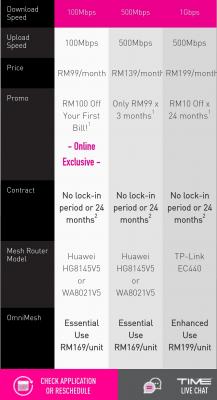
Just to share what router that TIME.com provide for it's plan :-
Attached Image
QuantumEdge
post Jul 16 2021, 07:05 PM

Regular
******
Senior Member
1,598 posts

Joined: Jan 2016


Hey guys,what's the VLAN settings for allo?
Gregar Forte
post Jul 16 2021, 08:00 PM

Getting Started
**
Junior Member
238 posts

Joined: Aug 2011
From: Bachok,Kelantan


QUOTE(QuantumEdge @ Jul 16 2021, 07:05 PM)
Hey guys,what's the VLAN settings for allo?
*
Already got allo boss? congrats
QuantumEdge
post Jul 16 2021, 11:27 PM

Regular
******
Senior Member
1,598 posts

Joined: Jan 2016


QUOTE(Gregar Forte @ Jul 16 2021, 08:00 PM)
Already got allo boss? congrats
*
Nono…friend using allo, wanna replace his stock router with something better
Gregar Forte
post Jul 16 2021, 11:33 PM

Getting Started
**
Junior Member
238 posts

Joined: Aug 2011
From: Bachok,Kelantan


QUOTE(QuantumEdge @ Jul 16 2021, 11:27 PM)
Nono…friend using allo, wanna replace his stock router with something better
*
i see. Lets wait for someone with more experience. meanwhile here in kelantan will be dreaming of using Allo for at least a couple of years
jimmylim85
post Jul 17 2021, 10:32 AM

iPhone world....
*******
Senior Member
7,826 posts

Joined: Jan 2003
From: Ipoh


QUOTE(jcws87 @ Jul 14 2021, 04:45 PM)
Actually, the Tp-link A6 provided by Allo CBB can perform up to 867Mbps on 5GHz (based to info from tp-link website).

Attached Image

So basically, customer on 500Mbps package have no issue. Even U××f× also giving AC1200 in this age (2021). On the LAN, that's the basic requirement set by MCMC. If ISP can provide the promise speed on LAN, that's not a problem even if your wifi output didnt reach it. I have face this problem too, where I subscribe to U××f× 100Mbps. I try 2.4GHz signal, only 50+Mbps but on 5GHz signal i can get 100Mbps.
*
Don't trust those speed from a AC1200 867mbps output from 5GHz. won't even get near it.

When technician came to check on my frequent sudden disconnection, suggested me to use back my TP-Link C6. When i did a speedtest on 5GHz band from my Intel AC9560 which can pull 1.7Gbps on 5GHz 160mhz i only able to get not 400mbps above. Once I swapped back to my Asus AX3000 TUF, instantly i get 540mbps and the technician is speechless about it.


jimmylim85
post Jul 17 2021, 10:36 AM

iPhone world....
*******
Senior Member
7,826 posts

Joined: Jan 2003
From: Ipoh


QUOTE(aniq8676 @ Jul 14 2021, 02:58 PM)
Any ISP, if you want to get at least 90% speed from your subscription package, must use a LAN connection instead of WIFI.
If you want to get highspeed internet on WIFI network, please buy your own router.
*
What's the point of ISP providers given those wifi routers that cant even perform. Might as well lower the price, get users to buy their own WiFi routers instead!

Besides, nobody uses LAN connection in modern days. Everyone is on their mobile devices.

My suggestion to ISP is that speed package below 300Mbps stick to AC1200 while above it such as 500mbps at least give us AX1800 which have theoretical speed of 1.2Gbps on 5GHz band.
jcws87
post Jul 17 2021, 12:45 PM

Getting Started
**
Junior Member
218 posts

Joined: Aug 2020


QUOTE(jimmylim85 @ Jul 17 2021, 10:32 AM)
Don't trust those speed from a AC1200 867mbps output from 5GHz. won't even get near it.

When technician came to check on my frequent sudden disconnection, suggested me to use back my TP-Link C6. When i did a speedtest on 5GHz band from my Intel AC9560 which can pull 1.7Gbps on 5GHz 160mhz i only able to get not 400mbps above. Once I swapped back to my Asus AX3000 TUF, instantly i get 540mbps and the technician is speechless about it.
*
Weird, i think it not the router fault. Cos from my understanding, ppl using Tp-link C6 can hit 500Mbps. I am curious on some thing.

1.Do you know the reading of your fiber line?
2.Do you mind to share the speedtest screen shot?
3.Other than testing with your Intel AC9560, have you test with hp like Samsung S20 and above or Iphone 12 and above?
Cincai.La
post Jul 17 2021, 02:22 PM

Getting Started
**
Junior Member
183 posts

Joined: Jun 2020
From: IPOH


QUOTE(QuantumEdge @ Jul 16 2021, 07:05 PM)
Hey guys,what's the VLAN settings for allo?
*
No VLAN configure on my side.

132 Pages « < 75 76 77 78 79 > » Top
 

Change to:
| Lo-Fi Version
0.0332sec    0.53    6 queries    GZIP Disabled
Time is now: 15th December 2025 - 10:51 PM