Outline ·
[ Standard ] ·
Linear+
Deluge, for Linux and Windows!
|
JamesPond
|
 Aug 28 2007, 04:15 PM Aug 28 2007, 04:15 PM
|

|
i just click the ethernet to static, bridge then NAT back. Change the manual network to static IP then changed back to DHCP. Now all returned back to NAT on the ethernet and DHCP. But no more internet connection.
|
|
|
|
|
|
philippecr
|
Aug 28 2007, 05:50 PM
|
|
|
how sad..... QUOTE TorrentFreak: More and more ISPs have started to throttle BitTorrent traffic. How do you feel about this, especially related to the upcoming BitTorrent video store?
Bram Cohen: ISPs have historically thought that all P2P traffic is illegal, which most definitely is not the case today. Identifying traffic as BitTorrent versus http is a very poor proxy for determining legal versus illegal. Even more so as content creators have begun using our self-publishing service to distribute their own work and major studios have signed up because they recognize the enormous potential of BitTorrent as a sales channel.
Legal traffic is growing within the P2P ecosystem and piracy also travels with HTTP and FTP in high volumes. ISPs have to invest in making their networks better and faster rather than stifling applications which consumers use and love. That’s just bad marketing and customer service, especially given the competition which exists in the broadband industry and consumer focus on network neutrality. For instance, in Japan and Korea, consumers currently enjoy true all-you-can eat symmetric fiber-to-the-home at 100 mbps. That’s a great environment for P2P development to make the Web a truly powerful medium for on-demand media, with broadcast economics. Of course, it also leads to the question: Why is the United States two generations behind?
TorrentFreak: What would you advise BitTorrent users to do, when they find out that their ISP is throttling BitTorrent traffic?
Bram Cohen: Switch. Competition is the best thing for the consumer. If you’ve got a couple of options, try the alternatives. If you have no alternatives or both alternatives suck, call customer service. And call them a lot. It turns out that angry customers are more expensive to ISPs than providing unadulterated access to popular applications and websites. |
|
|
|
|
|
Xybirium
|
Aug 28 2007, 08:24 PM
|
|
|
QUOTE(hz428 @ Aug 28 2007, 03:57 PM) how to help when u didnt tell us what u did? Yeah... How to help if don't give any details!!! |
|
|
|
|
|
skitZo`
|
Aug 28 2007, 10:16 PM
|
|
|
QUOTE
i just click the ethernet to static, bridge then NAT back. Change the manual network to static IP then changed back to DHCP. Now all returned back to NAT on the ethernet and DHCP. But no more internet connection
James Pond, are u using a router? if u are....use bridge mode. i found out that its better than NAT, well for my case. I dont get stable internet connection with NAT. And if youre using bridge mode and sometimes cant surf the net i suspect that yr network card is not receiving dhcp from yr router. Restart yr network card using this command on terminal sudo /etc/init.d/networking restart This post has been edited by skitZo`: Aug 28 2007, 10:17 PM |
|
|
|
|
|
aMer
|
Aug 28 2007, 11:21 PM
|
|
|
@skitZo`
what do you mean Birdge Mode?
in my router settings, there are these modes
Ethernet Over ATM (RFC 1483 Bridged) without NAT
Ethernet Over ATM (RFC 1483 Bridged) with NAT
IP over ATM (RFC 1483 Routed)
Classical IP over ATM (RFC 1577)
PPP over ATM (RFC 2364)
PPP over Ethernet (RFC 2516)
L2TP
currently im using PPoE..
|
|
|
|
|
|
SUSMinority116
|
Aug 29 2007, 01:21 AM
|
Getting Started

|
QUOTE(aMer @ Aug 28 2007, 11:21 PM) @skitZo`
what do you mean Birdge Mode? what he mean is at ur VMware settings if ur using router to connect, set ur VMware ethernet to bridge mode so it can give the virtual machine an external ip address not share with ur host machine.. if u use NAT in Vmware the virtual machine share ip address with the host computer. well there is another meaning (router mode) if ur set ur router to bridge mode, the router won't route internet WAN ip to ur computer instead u have to do it manually like ur using xp dialer.. |
|
|
|
|
|
hpares
|
Aug 29 2007, 02:20 AM
|
|
|
@@.here some question. which connection is more good? Bridge in WMserver or NAT? How to do bridge? I cant connect if i set bridged connection.
|
|
|
|
|
|
SUSMinority116
|
Aug 29 2007, 04:33 AM
|
Getting Started
|
QUOTE(hpares @ Aug 29 2007, 02:20 AM) @@.here some question. which connection is more good? Bridge in WMserver or NAT? How to do bridge? I cant connect if i set bridged connection. i recommend u using bridge connection and install SMB in ubuntu, so you could move files from ubuntu and xp easy... or u could get vmware tools to work so u could drag & drop files from ubuntu to xp folders easily but the downside is while ur copying the files vmware pause it for a while and resume the VM back.. so i prefer to use bridge mode.. i also prefer using NAT... the different is just how u assign the network.. if u choose NAT it will be shared the ip address with the host computer..if u choose bridge it will bridge to ur network adapter and give the virtual machine and external ip address. This post has been edited by Minority116: Aug 29 2007, 04:37 AM |
|
|
|
|
|
hpares
|
Aug 29 2007, 01:37 PM
|
|
|
But if i set bridged connection in wmserver, i cant connect internet in linux.
|
|
|
|
|
|
JamesPond
|
Aug 29 2007, 01:45 PM
|
|
|
same here too..if set bridge / static...cannot connect to the internet
|
|
|
|
|
|
wongck
|
Aug 29 2007, 03:02 PM
|
|
|
QUOTE(JamesPond @ Aug 29 2007, 01:45 PM) same here too..if set bridge / static...cannot connect to the internet Did you set tmnet DNS? |
|
|
|
|
|
hpares
|
Aug 30 2007, 12:29 PM
|
|
|
=.= Dun rellly know how to set, set in ubuntu or in wmserver? can teach step by step?
|
|
|
|
|
|
Suk
|
Aug 30 2007, 03:08 PM
|
|
|
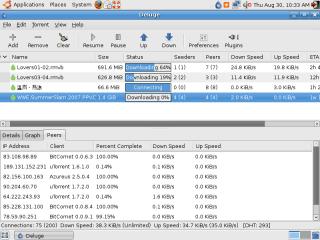
until now i got very less leecher and seeder,
example, 20(20) seeder 50(50)leecher only
so how, i saw some ppl using this has 20(221) / 50(5535)
|
|
|
|
|
|
alvinz
|
Aug 30 2007, 07:44 PM
|
|
|
@ suk
did limit u ur connections ?... get a screenshot here and we try help u out .. for me i put my conenctions at 450.
another thing is find those torrents with loads of seeders and leechers so ur download speed might go faster
|
|
|
|
|
|
Suk
|
Aug 30 2007, 10:36 PM
|
|
|
|
|
|
|
|
|
robb234
|
Aug 31 2007, 12:24 AM
|
Getting Started
|
@ Suk
CMIIW, i think ur complaining about getting very less seeder and leecher is on the torrent file itself,
some torrent file, especially new 'n popular torrent, may have lots of seeder,
while old torrent file, may have just a few seeder...
|
|
|
|
|
|
rootlinux
|
Aug 31 2007, 09:40 AM
|
|
|
Suk, I do get good speed with 200 as my Maximum Connections. You may try increasing it to 300 or 400. robb234, Agree with you. I have one downloading...only can get 5kB/s even the Max Conn increased to 350. All, We can say no to VPN services. Save money some more,  Thanks to praveenmarkandu |
|
|
|
|
|
curlyfries
|
Aug 31 2007, 01:27 PM
|
|
|
QUOTE(praveenmarkandu @ Jul 30 2007, 10:16 PM) everyone has problems with tmnet streamyx packet shaping. unless of course you use Boleh VPN. why pay for unthrottled torrent traffic? all it takes is a bit of extra time to set up. this might not be for everyone. but amazingly enough Linux solves it. Deluge Torrent (www.deluge-torrent.org) can encrypt the FULL STREAM of traffic out of a bt client. which means tmnet cant read your packet headers. take that you bastards! deluge is only available on linux. i dont know any other torrent client which does this. if any windows one does this please let me know. download any linux distro (i suggest ubuntu) and try it. i get 50kB/s Download and 25kB/s uploads. thank you and goodnight and good luck. Pardon me but is the performance as good as a VPN service? |
|
|
|
|
|
sentlon
|
Aug 31 2007, 03:25 PM
|
|
|
hi there,
i am a windows user since i was starter to use pc. now i am trying to swap it to linux.
currently i am using celcom 3G for internet acess thru my cell phone and i did try the unbuntu and i have no idea how to setup the 3G connection on it.
i need help from all linux user here, i am a noob of linux please be pantient if i ask anything sound extreme noob.
thanks.
|
|
|
|
|
|
precursor80
|
Aug 31 2007, 03:50 PM
|
Getting Started
|
Contrary to popular believe, windows clients such as utorrent, Bitcomet, Azureus and others do full stream encryption too. (In fact, utorrent, Azureus and some others I can't remember are the pioneers of protocol encryption) Capturing data using ethereal indicates that all the clients indeed support full encryption. As of now, no one really understands why Deluge and Ktorrent doesn't get throttled. » Click to show Spoiler - click again to hide... «
Capturing packets using ethereal seems to indicate that the seeds/peers that can transfer full speed (aka not throttled) are partially encrypted. If you look at it carefully, only the handshaking is encrypted and not the data transfer. Those connections that attempt to do full encryption seems to be throttled.
If anyone can understand what is going on, then probably can modify windows clients (Azureus since code is available) to work too (that is until TM wisen up). Either that or wait until Deluge windows port is done.
|
|
|
|
|



 Quote
Quote







 0.0301sec
 0.22
0.22
 6 queries
 GZIP Disabled