

Ah just to complete... the new RB5009 exact version name is: RB5009UPR+S
Home Networking Ditch ONU, use GPON SFP on Business Grade Router, 2.5G ONU for Unifi & Maxis, NO NEED VLAN
Home Networking Ditch ONU, use GPON SFP on Business Grade Router, 2.5G ONU for Unifi & Maxis, NO NEED VLAN
|
|
 Jul 9 2022, 10:21 PM Jul 9 2022, 10:21 PM
|
 
Junior Member
98 posts Joined: Nov 2021 
|
Ah just to complete... the new RB5009 exact version name is: RB5009UPR+S
|
|
|
|
|
|
Jul 10 2022, 04:07 PM
|

Senior Member
1,882 posts Joined: Sep 2017
|
QUOTE(Anime4000 @ Jul 9 2022, 04:16 PM) one little advantage using SFP ONU one less adapter, go ease on UPS, no more AC to DC conversion loss at stock ONU 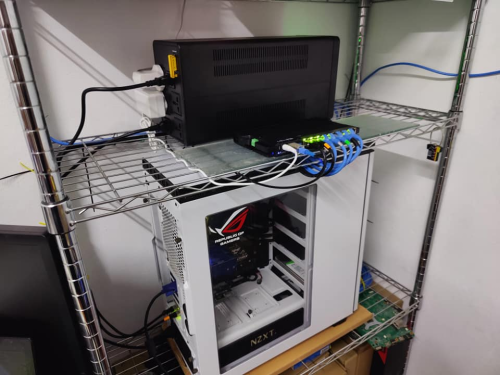 during blackout last, all neighborhood Wi-Fi died, only me remain online   UPS I bought is BVX1200LI-MS at CureComp Tech RB5009 + Deco M4 = up time on UPS ~7 hours RB5009 + Deco M4 + Ryzen 5 5600 Server ( Load average 1.06,1.15,1.21 ) = ~2.2 hours  QUOTE(rezzorix @ Jul 9 2022, 10:20 PM) Oh I have the same UPS Can i ask something about the UPS,i currently using right power F800P,and i have a blackout 3 months ago, and at that time I tried to power the TM BTU and RB5009 only,and the UPS suddenly shutdown after few minutes of usage, does it mean my UPS battery is almost died? (I bought it about 2 years ago,just have the only first blackout from 3 month ago,but i had run a battery test in 2022-actual date i forgot the date probably before blackout) And I have the same reason as you, the advantage of the SFP is 1 device less that uses a power adapter. I have the following devices secured by UPS; - RB5009 with SFP - TP-LINK TL-SG108E - NAS DS920+ - NAS DS214+ - 2x RPi0w - RPi4 - LattePanda v1 However, I auto-shutdown all after 5 min. of power outage (using nut-client & nut-server / Network UPS Tools). Mikrotik announced a new RB5009 version with PoE ON ALL PORTS. That would free up at some more power adapters as I could have the 3 RPi and 1 Lattepanda powered with PoE. |
|
|
Jul 10 2022, 05:14 PM
|
|
Junior Member
98 posts Joined: Nov 2021
|
QUOTE(go626201 @ Jul 10 2022, 04:07 PM) Can i ask something about the UPS,i currently using right power F800P,and i have a blackout 3 months ago, and at that time I tried to power the TM BTU and RB5009 only,and the UPS suddenly shutdown after few minutes of usage, does it mean my UPS battery is almost died? (I bought it about 2 years ago,just have the only first blackout from 3 month ago,but i had run a battery test in 2022-actual date i forgot the date probably before blackout) Looking at specifications then RB5009 max power consumption is like 20Watts and your TM BTU probably also another max. 20Watts.Technical Data Sheet of the F800P says: - Battery 12V 7Ah x 1 - Backup-Time 20-30 min depending on load.... So lets calculate... (and please correct me if anything is wrong): CODE Battery Capacity (in Ah) x Input voltage (V) / Total Load (in Watts) = Backup Time (in hours) 7Ah x 12V / 40 Watts = 2,4 hours So if my calculation is correct, then the UPS battery "should" last you for about 2 hours. Now if it was far less than lets say 30 minutes - yeah, something is wrong. go626201 liked this post
|
|
|
Jul 14 2022, 08:05 AM
|

Junior Member
151 posts Joined: Dec 2011 
|
QUOTE(go626201 @ Jul 10 2022, 04:07 PM) Can i ask something about the UPS,i currently using right power F800P,and i have a blackout 3 months ago, and at that time I tried to power the TM BTU and RB5009 only,and the UPS suddenly shutdown after few minutes of usage, does it mean my UPS battery is almost died? (I bought it about 2 years ago,just have the only first blackout from 3 month ago,but i had run a battery test in 2022-actual date i forgot the date probably before blackout) Each time you run the equipment using the UPS battery the capacity degrades. In any case, after ~2 years, the battery capacity will have dropped even without any blackouts.Change the battery. You should be able to get it at decent hardware shops selling electronic parts. Edit: If you are not comfortable working with A/C powered devices, it is not advisable to open up the UPS. There are large capacitors in there which can store charge for a while even after switching off the power. Of course, unplug the power socket from the wall before you do anything. This post has been edited by tcwan: Jul 14 2022, 08:10 AM go626201 liked this post
|
|
|
Jul 15 2022, 12:28 PM
|
|
Junior Member
98 posts Joined: Nov 2021
|
Status update on my ODI DFP-34X-2C2 with Firmware V1.0-220414:
Uptime: 7d19hr+ CPU: still 100% Temp: more or less stable at 64°C Internet is stable and up/download as it should be: 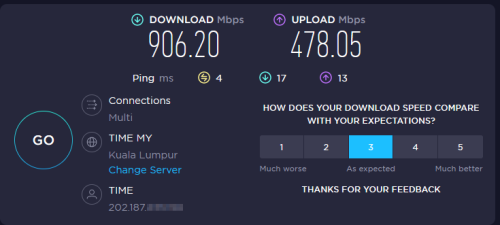 |
|
|
Jul 15 2022, 10:36 PM
Show posts by this member only | IPv6 | Post
#486
|

Senior Member
2,399 posts Joined: Jul 2009 From: /dev/null
|
QUOTE(rezzorix @ Jul 15 2022, 12:28 PM) Status update on my ODI DFP-34X-2C2 with Firmware V1.0-220414: you have 1Gbps subscription, not try to use 2.5Gb SFP router to get more speed??Uptime: 7d19hr+ CPU: still 100% Temp: more or less stable at 64°C Internet is stable and up/download as it should be: |
|
|
|
|
|
Jul 18 2022, 10:01 AM
|
|
Junior Member
98 posts Joined: Nov 2021
|
QUOTE(Anime4000 @ Jul 15 2022, 10:36 PM) you have 1Gbps subscription, not try to use 2.5Gb SFP router to get more speed?? Hmmm... how?  |
|
|
Jul 18 2022, 04:44 PM
Show posts by this member only | IPv6 | Post
#488
|
|
Senior Member
2,399 posts Joined: Jul 2009 From: /dev/null
|
QUOTE(rezzorix @ Jul 18 2022, 10:01 AM) Hmmm... how? see here:https://forum.lowyat.net/index.php?showtopi...#entry104286872 |
|
|
Jul 18 2022, 07:58 PM
|
|
Junior Member
98 posts Joined: Nov 2021
|
QUOTE(Anime4000 @ Jul 18 2022, 04:44 PM) Hmm not sure what you mean... my ODI Stick is plugged directly into my RB5009: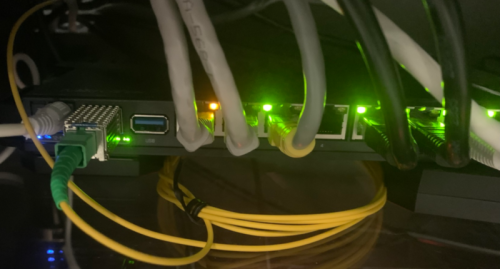 (messy cable-management... I know... will be fixed soon when I have time to print a proper stand for the router) So the router could do 2.5Gbs at the SFP <=> Router connection; But the Ethernet is 1GB only... the Speedtest will show 1Gbs only... no? So Download is at ~920..930 depending on server; how to tweak especially the upload further? Any suggestions? |
|
|
Jul 18 2022, 09:09 PM
Show posts by this member only | IPv6 | Post
#490
|
|
Senior Member
2,399 posts Joined: Jul 2009 From: /dev/null
|
QUOTE(rezzorix @ Jul 18 2022, 07:58 PM) Hmm not sure what you mean... my ODI Stick is plugged directly into my RB5009: Your setup is exactly like mine, and RB5009 cannot support 2.5/5Gb, only 1/10Gb which is very sad...(messy cable-management... I know... will be fixed soon when I have time to print a proper stand for the router) So the router could do 2.5Gbs at the SFP <=> Router connection; But the Ethernet is 1GB only... the Speedtest will show 1Gbs only... no? So Download is at ~920..930 depending on server; how to tweak especially the upload further? Any suggestions? even hardware is allow it when flash with OpenWRT. however, The way lwk523 using that TP-Link Router, SFP 2.5Gb to 2.5Gb LAN and 2440Mbps Wi-Fi 6 2x2 so, he get speed over 1Gbps limit... Try adjust OMCI Bandwidth via flash set OMCI_TM_OPT 0/1/2 need reboot the stick after change This post has been edited by Anime4000: Jul 18 2022, 09:09 PM rezzorix liked this post
|
|
|
Jul 19 2022, 12:17 AM
|
|
Senior Member
1,882 posts Joined: Sep 2017
|
QUOTE(Anime4000 @ Jul 18 2022, 09:09 PM) Your setup is exactly like mine, and RB5009 cannot support 2.5/5Gb, only 1/10Gb which is very sad... Use fibre optic converter to 2.5G Ethernet Port maybe more usable,and utilize the SFP+ for other usage should be more usable with RB5009?even hardware is allow it when flash with OpenWRT. however, The way lwk523 using that TP-Link Router, SFP 2.5Gb to 2.5Gb LAN and 2440Mbps Wi-Fi 6 2x2 so, he get speed over 1Gbps limit... Try adjust OMCI Bandwidth via flash set OMCI_TM_OPT 0/1/2 need reboot the stick after change Taobao Link: https://item.taobao.com/item.htm?spm=a312a....id=677706276954 |
|
|
Jul 19 2022, 03:47 AM
Show posts by this member only | IPv6 | Post
#492
|
|
Senior Member
2,399 posts Joined: Jul 2009 From: /dev/null
|
QUOTE(go626201 @ Jul 19 2022, 12:17 AM) Use fibre optic converter to 2.5G Ethernet Port maybe more usable,and utilize the SFP+ for other usage should be more usable with RB5009? well that defeat making GPON directly to router by skipping Ethernet Stack,Taobao Link: https://item.taobao.com/item.htm?spm=a312a....id=677706276954 but... this will work to try 2.5Gb GPON speed we under Unifi fiber can't have that since TM limit at 800Mbps, I guess speed limit at higher speed very taxing |
|
|
Jul 19 2022, 09:58 AM
|

Senior Member
2,786 posts Joined: May 2008
|
QUOTE(go626201 @ Jul 10 2022, 04:07 PM) Can i ask something about the UPS,i currently using right power F800P,and i have a blackout 3 months ago, and at that time I tried to power the TM BTU and RB5009 only,and the UPS suddenly shutdown after few minutes of usage, does it mean my UPS battery is almost died? (I bought it about 2 years ago,just have the only first blackout from 3 month ago,but i had run a battery test in 2022-actual date i forgot the date probably before blackout) either the battery or auto off timerhttps://www.youtube.com/results?search_quer...n+off+ups+timer |
|
|
|
|
|
Jul 22 2022, 12:12 PM
|
|
Junior Member
98 posts Joined: Nov 2021
|
QUOTE(Anime4000 @ Jul 18 2022, 09:09 PM) I am at the moment happy that all is working and worried that if I play around more it will not work anymore  Anyway, I will try it out this weekend.. current setting is OMCI_TM_OPT=2 Looking at the table there are: 0 = Priority controlled 1 = Rate controlled 2 = Priority and Rate controlled Any idea on what "Priority" and/or "Rate" are based on? As download is more or less at 1Gbs already, the only thing that's basically improvable would be the upload speed. This post has been edited by rezzorix: Jul 22 2022, 01:27 PM |
|
|
Jul 22 2022, 02:02 PM
|
|
Junior Member
98 posts Joined: Nov 2021
|
Ah what the heck... I just made my weekend start now.
 So here my findings for the OMCI_TM_OPT settings: I tried it in this order 2 -> 1 -> 0. Speed: 2 = ~900-950 down / ~450-500 up 1 = not working 0 = ~900-950 down / ~450-500 up So 0 & 2 are resulting in the same speeds and 1 not working at all. After testing I switched it back to 2 - which was running stable for the past 2 weeks. Interesting side effect of trying out the different options: The CPU usage finally went down.  As I reported here it was always at 100% for the past 2 weeks. Now after changing the values and rebooting, the CPU usage is now as follows: CPU: 2 = 15-25% 1 = not tested 0 = 10-20% The temperature however is still high at 63-64°C despite having much lower CPU usage.  This post has been edited by rezzorix: Jul 22 2022, 02:03 PM |
|
|
Jul 23 2022, 12:44 AM
Show posts by this member only | IPv6 | Post
#496
|
|
Senior Member
2,399 posts Joined: Jul 2009 From: /dev/null
|
QUOTE(rezzorix @ Jul 22 2022, 02:02 PM) The temperature however is still high at 63-64°C despite having much lower CPU usage. That's normal, RTL960x can handle 99°C, the heat is not from SoC, but PON Laser, shared same metal case, so, temperature is equalized |
|
|
Aug 10 2022, 04:44 PM
Show posts by this member only | IPv6 | Post
#497
|
|
Senior Member
2,399 posts Joined: Jul 2009 From: /dev/null
|
Since Mar 18 2020, I have been research on this, so far I have known more about GPON work on Malaysia
GPON has 2 standard for PON-LAN mapping: 1. PPTP (Physical Path Termination Point) 2. VEIP (Virtual Ethernet Interface Point) ISP Using PPTP 1. Allo 2. TM (older deployment/unifi only area) ISP Using VEIP 1. TM (newer deployment, multi isp support: maxis, digi, celcom, ...) 2. TIME OMCC Version: 1. TM (0x80/128) 2. TIME (0x80/128) 3. Allo (0xA0/160) xPON SFP: 1. V2801F (VEIP, PPTP) 2. TWCGPON657 (VEIP, PPTP) 3. Realtek DFP-34X-2C2 (VEIP, PPTP) 4. ZTE DFP-34X-2C2 (PPTP) 5. Huawei MA5671a (PPTP) 6. Nokia G-010S-P (PPTP) 7. Nokia G-010S-A (PPTP) 8. Nokia G-010S-Q (VEIP, PPTP) [using RTL9601CI] All Malaysia fiber using ASCII PLOAM Password (10 char) probably I update the first post |
|
|
Aug 11 2022, 10:09 AM
|

Senior Member
1,941 posts Joined: Jan 2003
|
QUOTE(Anime4000 @ Aug 10 2022, 04:44 PM) Since Mar 18 2020, I have been research on this, so far I have known more about GPON work on Malaysia One and the only person in this forum so dedicated to this project |
|
|
Aug 11 2022, 05:25 PM
Show posts by this member only | IPv6 | Post
#499
|
|
Senior Member
2,608 posts Joined: Nov 2020
|
I wonder what does Maxis on their own infra uses 🤔
|
|
|
Aug 11 2022, 08:17 PM
Show posts by this member only | IPv6 | Post
#500
|
|
Senior Member
2,399 posts Joined: Jul 2009 From: /dev/null
|
QUOTE(thankyou @ Aug 11 2022, 10:09 AM) One and the only person in this forum so dedicated to this project huhuhu, thanks!love doing these stuff QUOTE(PRSXFENG @ Aug 11 2022, 05:25 PM) I wonder what does Maxis on their own infra uses 🤔 this need to try, PPTP or VEIP, which OMCC Version, which Traffic Management they useHuawei MA5671a SFP using modified GPON OpenWRT, sadly only work at Allo which is using PPTP (cheaper ONU), and some Unifi Area. RTL960x based SFP work most anywhere, firmware not solid like MA5671a, but good enough to make it work. my Goal is, break TIME 1Gbps barrier with 2.5Gb mode! what is maximum speed can have with 2.5Gb mode... |
| Change to: |  0.0314sec 0.0314sec
 0.60 0.60
 6 queries 6 queries
 GZIP Disabled GZIP Disabled
Time is now: 12th December 2025 - 07:05 PM |
 Quote
Quote