Welcome Guest ( Log In | Register )

Outline · [ Standard ] · Linear+

Home Networking Ditch ONU, use GPON SFP on Business Grade Router, 2.5G ONU for Unifi & Maxis, NO NEED VLAN

views
     
rezzorix
post Dec 28 2021, 12:58 PM

Getting Started
**
Junior Member
98 posts

Joined: Nov 2021
Hi Guys,

I am using a Mikrotik RB5009 and just received an ODI XPON ONU Stick.

The web interface of the stick supposed to be reachable at 192.168.100.1 or 192.168.1.1

So I did the following:

1. Create a Bridge between SFP+ and ETH4
2. Plug in client at ETH4 with manual IP 192.168.100.2 (or x.x.1.2)

However, cannot reach the stick at all, no ping or http possible.

Did I miss a step?


rezzorix
post Dec 30 2021, 07:27 PM

Getting Started
**
Junior Member
98 posts

Joined: Nov 2021
asellus & Gaara92 Thanks both of your for your help. thumbup.gif

I followed what you wrote and tried different variants - assigned different ips, with/without bridge, with/without plugged in fiber etc. etc.
Still cannot reach the webinterface.

The stick shows up in routers interface overview but in the details it seems the information arent complete.
For example MAC address of stick is not shown etc.

Summary: aside from the stick being super-super-hot (like really burning hot) nothing happens.

Maybe a faulty stick then?
Will try to return & exchange and then see how it goes... grumble.gif
rezzorix
post Dec 31 2021, 10:12 PM

Getting Started
**
Junior Member
98 posts

Joined: Nov 2021
QUOTE(rezzorix @ Dec 30 2021, 07:27 PM)
asellus & Gaara92 Thanks both of your for your help.  thumbup.gif

I followed what you wrote and tried different variants - assigned different ips, with/without bridge, with/without plugged in fiber etc. etc.
Still cannot reach the webinterface.

The stick shows up in routers interface overview but in the details it seems the information arent complete.
For example MAC address of stick is not shown etc.

Summary: aside from the stick being super-super-hot (like really burning hot) nothing happens.

Maybe a faulty stick then?
Will try to return & exchange and then see how it goes...  grumble.gif
*
Update from Seller: they say that the stick works with a "Switch" only, but not with a "Router"...
What to say... anyway, will get a refund through Lazada i guess.
rezzorix
post Jan 1 2022, 10:16 PM

Getting Started
**
Junior Member
98 posts

Joined: Nov 2021
QUOTE(Anime4000 @ Jan 1 2022, 01:13 AM)
eh, it should work, if GPON Stick have embedded Web GUI, it should work like external ONU,
mind share lazada link here...
*
Anime4000
Sure, can here the link: https:// www.lazada.com.my/products/i2605338727-s11707386106.html
rezzorix
post Jan 2 2022, 02:03 AM

Getting Started
**
Junior Member
98 posts

Joined: Nov 2021
QUOTE(Anime4000 @ Jan 2 2022, 12:18 AM)
oh that, either ZTE (old) or Realtek RTL9601C1 (new)
If you have it, try disassemble check which SoC you get
*
Anime4000
Dont really want to open it up, but production date is Nov 2021, so should be a new model then, correct?
rezzorix
post Jan 2 2022, 03:16 PM

Getting Started
**
Junior Member
98 posts

Joined: Nov 2021
QUOTE(Gaara92 @ Jan 2 2022, 02:04 PM)
he is using rb5009 like mine but with time fiber
*
Anime4000 Gaara92

Exactly. Mikrotik RB5009 nod.gif
rezzorix
post Jan 3 2022, 12:51 PM

Getting Started
**
Junior Member
98 posts

Joined: Nov 2021
QUOTE(Anime4000 @ Jan 2 2022, 06:55 PM)
then,
1. Set IP Address 192.168.1.2/24 on sfpplus1
2. Add sfpplus1 under WAN Interface List

now you can access without need to bridge, just NAT
*
That worked.
The part I missed was adding it under an Interface List rclxms.gif


Now need to figure out the TIME broadband configuration

user posted image
rezzorix
post Jan 3 2022, 03:41 PM

Getting Started
**
Junior Member
98 posts

Joined: Nov 2021
Anime4000 Gaara92 asellus


Ok, so far so good.

Flashing done - telnet comes up for about 4...5 seconds and then it reboots.
I also see that the webinterface is working until reboot.

Now regarding the Auto Reboot Fix...

So lets see the steps from github:

N/A Downgrade your TWCGPON657 to version B13 or below.
OK Flash with V2801F_V1.9.0-201104.tar and wait.
NOT OK Quickly login and execute echo 3 > /proc/fiber_mode to avoid auto-reboot (invalid VS_AUTH_KEY)

1) the password for the flashed Firmware on github is stated to be either: admin:stdONU101 or admin:system
This didnt work for me; I can login into telnet with credentials admin:admin

2) Time is just enough to run echo 3 > /proc/fiber_mode before the reboot.
However that doesnt seem to work, the stick is still in the reboot loop.
I tried this with fiber in and out, both same result.

PENDING Disconnect fiber from module to restore telnet
PENDING Update VS_AUTH_KEY acording to ELAN_MAC_ADDR and HW_HWVER
PENDING Reboot (in telnet)
PENDING Reflash again with V2801F_V1.9.0-201104.tar (must do after fix VS_AUTH_KEY)
PENDING Enjoy!


rezzorix
post Jan 4 2022, 12:47 PM

Getting Started
**
Junior Member
98 posts

Joined: Nov 2021
QUOTE(Gaara92 @ Jan 4 2022, 07:12 AM)
If it does not autoreboot no need to do the auto reboot fix. Does your fiber got laser readings? Tx and Rx
*
It does auto-reboot.
It is stuck in a bootloop.

Online: ~5..6 seconds
Rebooting: ~20..30 seconds.
rezzorix
post Jan 4 2022, 02:46 PM

Getting Started
**
Junior Member
98 posts

Joined: Nov 2021
QUOTE(Gaara92 @ Jan 4 2022, 02:43 PM)
Then you need to use autoit software to autorun the command using macro key. You cannot type it manually as it will b e impossible.
*
Yep, did that - as mentioned above with autoit I get the echo 3 > /proc/fiber_mode through.
But the thing still stuck in rebooting all the time.


rezzorix
post Jan 4 2022, 08:15 PM

Getting Started
**
Junior Member
98 posts

Joined: Nov 2021
QUOTE(Gaara92 @ Jan 4 2022, 07:44 PM)
Have you entered VS AUTH KEY correctly?
*
Not getting this far. For this even with autoit the time is not enough.

Autoit can only login (username+pw) and then add echo 3 > /proc/fiber_mode

The next command will only be entered partially and then interrupted do to reboot happening.

Anyway I thought that this will already switch echo 3 > /proc/fiber_mode should already prevent the reboot, correct?

The point on Githhub says: "Quickly login and execute echo 3 > /proc/fiber_mode to avoid auto-reboot (invalid VS_AUTH_KEY)"

The total available time after reboot is max 4..5 seconds - there is no way of changing all the other variables because of that.
rezzorix
post Jan 5 2022, 10:55 PM

Getting Started
**
Junior Member
98 posts

Joined: Nov 2021
QUOTE(Gaara92 @ Jan 5 2022, 09:49 PM)
It should not auto reboot after you have changed the fiber mode. I dont know what is the problem, maybe @Anime4000 can help. ( I dont know how to tag people on this forum)
*
Gaara92 Tagging:
CODE
[@Nickname]


Maybe I just should buy a model that people here have already and use successfully...

Which one do you have?
rezzorix
post Jul 7 2022, 06:04 PM

Getting Started
**
Junior Member
98 posts

Joined: Nov 2021
So.. was busy in the past months since I first tried to get this done, but as of today I succeeded!
My TIME broadband is now running with ODI DFP-34X-2C2 (firmware version V1.0-220414) rclxms.gif

As base I used the very good guide from Anime4000 here: https:/-/github.com/Anime4000/RTL960x/blob/main/Docs/Setup_Stick.md

However, I was running into issues that kept me from succeeding right away.
A lot of reading later, I got it to work, so here in short the issues I ran into with solutions:

Issue: The OMCI_SW_VER1 and OMCI_SW_VER2 reset always to standard after a reboot.
Reason: bug in firmware

Solution: To avoid this and keep the version you need, set OMCI_OLT_MODE to 21, this is a bug exploit ensuring software version stays as set while all other settings function normal.
Note; same as OMCI_OLT_MODE 3 - you need to ensure adding all other available OMCI information.

Here is where I got this info from: https:/-/github.com/Anime4000/RTL960x/issues/30#issuecomment-1146604684

3x Issues: ONU state o5 but but no internet / router cannot establish PPPoE connection
[1] Reason: MAC Address / AUTH_KEY not correct
Solution: Dont change MAC Address & MAC_Key of your ODI ! If you changed it already, use the ones from that you hopefully backed-up.
Should you not have MAC_Key... well you are out of luck - have seen people struggling with getting it correct.

[2] Reason: vlan id not set
Solution: set vlan ID in webinterface -> Advance -> VLAN Settings
I tried VLAN ID 499 based on the post from hezaika earlier in this thread: https:/'/forum.lowyat.net/index.php?showtopic=4925452&view=findpost&p=104339195

[3] Reason: OMCI data not correct; especially OMCI_TM_OPT
Solution: flash set OMCI_TM_OPT 0


For the links above you need to remove the "-", I am a too junior member here to post external links rolleyes.gif

Aside from that I can only encourage everyone who runs into issue to also check the github issue pages of Anime4000 repositories - a lot info & links in there, too.

I hope the above helps someone - if you got questions please let me know.

Again thanks to everyone who participating and contributing, but especially Anime4000 for the great work being done thumbup.gif


rezzorix
post Jul 7 2022, 11:10 PM

Getting Started
**
Junior Member
98 posts

Joined: Nov 2021
Just a quick follow up question:

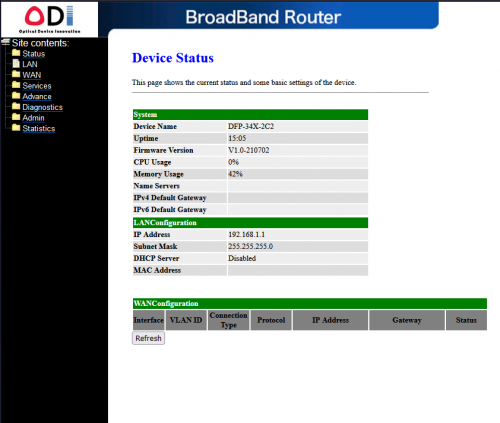
The CPU Usage of the stick as per webinterface is constantly at 100%.
Temperature over the past hours is between 62-64°C

Is that all normal, or anything to tweak to reduce this?
rezzorix
post Jul 7 2022, 11:14 PM

Getting Started
**
Junior Member
98 posts

Joined: Nov 2021
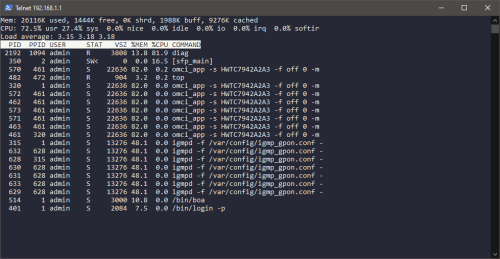
Just logged in via telnet and did run "top" - see screen.

user posted image

Seems like "diag" is putting a lot of stress on the CPU... can this process safely be killed?
rezzorix
post Jul 8 2022, 04:55 PM

Getting Started
**
Junior Member
98 posts

Joined: Nov 2021
QUOTE(Gaara92 @ Jul 8 2022, 08:22 AM)
the experiment is still going on eh haha.. I am now using dark fiber for my resident, no need TM anymore. Pure speed 10Gbps straight to home, but limited in Cybjeraya area only tongue.gif
*
Poser flex.gif biggrin.gif
But congrats! smile.gif

Can you actually utilize all this bandwidth?
And if yes... for what if I may ask?
rezzorix
post Jul 9 2022, 12:50 PM

Getting Started
**
Junior Member
98 posts

Joined: Nov 2021

Thanks for the additional explanation Anime4000 smile.gif

Just reporting back; the stick has now an uptime of 48+ hours.
So far internet is working well - I do have the max TIME package with 1000/500 and speeds/ping/package loss etc. is as good as with the old ONU.

Only thing is that stick CPU still constantly at 100% and the temperature is still high between 62-65°C...
This is not impacting internet performance, but seeing that you guys are in high 40s or in around 50°C makes me wonder.

For OMCC version my stick is currently set to 0x80 and traffic management option 2.
I am not daring to touch it; stick is working at the moment and I dont really wanna mess up more unsure.gif
rezzorix
post Jul 9 2022, 10:20 PM

Getting Started
**
Junior Member
98 posts

Joined: Nov 2021
Oh I have the same UPS smile.gif

And I have the same reason as you, the advantage of the SFP is 1 device less that uses a power adapter.

I have the following devices secured by UPS;

- RB5009 with SFP
- TP-LINK TL-SG108E
- NAS DS920+
- NAS DS214+
- 2x RPi0w
- RPi4
- LattePanda v1

However, I auto-shutdown all after 5 min. of power outage (using nut-client & nut-server / Network UPS Tools).

Mikrotik announced a new RB5009 version with PoE ON ALL PORTS.
That would free up at some more power adapters as I could have the 3 RPi and 1 Lattepanda powered with PoE.
rezzorix
post Jul 9 2022, 10:21 PM

Getting Started
**
Junior Member
98 posts

Joined: Nov 2021
Ah just to complete... the new RB5009 exact version name is: RB5009UPR+S
rezzorix
post Jul 10 2022, 05:14 PM

Getting Started
**
Junior Member
98 posts

Joined: Nov 2021
QUOTE(go626201 @ Jul 10 2022, 04:07 PM)
Can i ask something about the UPS,i currently using right power F800P,and i have a blackout 3 months ago, and at that time I tried to power the TM BTU and RB5009 only,and the UPS suddenly shutdown after few minutes of usage, does it mean my UPS battery is almost died? (I bought it about 2 years ago,just have the only first blackout from 3 month ago,but i had run a battery test in 2022-actual date i forgot the date probably before blackout)
*
Looking at specifications then RB5009 max power consumption is like 20Watts and your TM BTU probably also another max. 20Watts.

Technical Data Sheet of the F800P says:

- Battery 12V 7Ah x 1
- Backup-Time 20-30 min depending on load....

So lets calculate... (and please correct me if anything is wrong):

CODE
Battery Capacity (in Ah) x Input voltage (V) / Total Load (in Watts) = Backup Time (in hours)

7Ah x 12V / 40 Watts = 2,4 hours


So if my calculation is correct, then the UPS battery "should" last you for about 2 hours.
Now if it was far less than lets say 30 minutes - yeah, something is wrong.

2 Pages  1 2 >Top
 

Change to:
| Lo-Fi Version
0.0586sec    0.70    7 queries    GZIP Disabled
Time is now: 8th December 2025 - 01:46 PM